Codex Local Projects Disappeared After Update: Don't Re-Add Yet
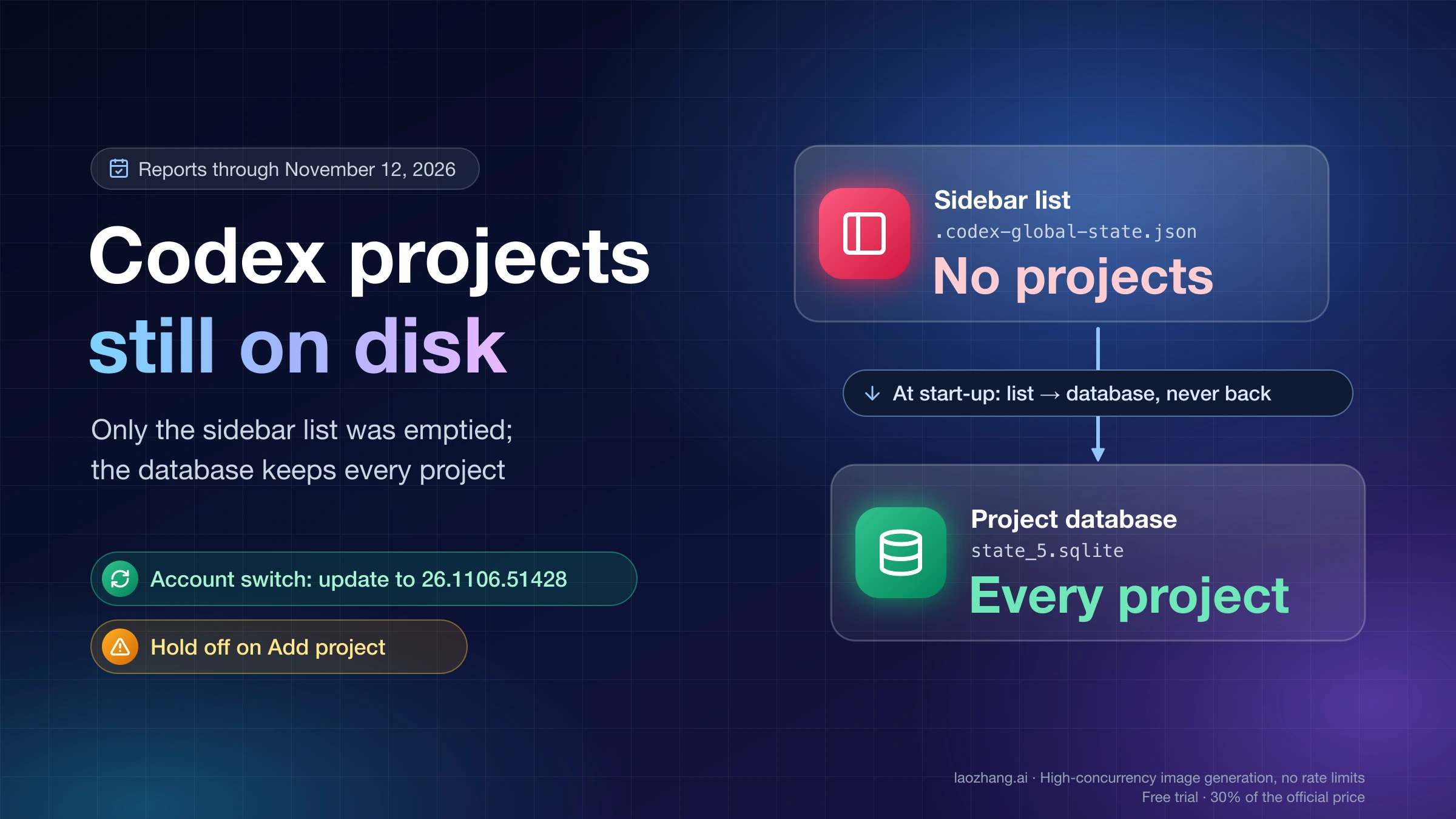
Codex projects missing after an update or account switch are usually still on disk. Update to 26.1106.51428, fully quit, and back up .codex before re-adding.
If your Codex projects disappeared from the sidebar after an update to the ChatGPT desktop app (the former Codex app), the projects and their chats are usually still on your disk. In the GitHub and OpenAI Developer Community reports filed through November 12, 2026, the Projects section shows "No projects" or a short list while the project database, state_5.sqlite in your .codex folder, still holds every project. The app draws the sidebar from a separate file, .codex-global-state.json, and that file is what got emptied. The exception is when the chat files in .codex/sessions are gone too; then nothing on your machine can bring them back.
What to do first depends on what happened just before the list emptied. If it followed a switch between accounts or workspaces, update to version 26.1106.51428, which three users reported fixed that case on November 11, then fully quit the app instead of closing its window, and reopen it. In every other case, fully quit and copy the whole .codex folder before you change anything. Hold off on Add project for the same folders: users report that it registers them as new projects, the old chats stay hidden, and you end up with duplicates.
"Projects" here means the local folders listed under Projects in the Codex sidebar. ChatGPT Projects, the chat folders you also see on chatgpt.com, are a separate feature, and if those are what you lost, this is a different problem.
Why Codex shows "No projects" while your projects are still on disk
The desktop app keeps two lists of your projects, and the sidebar only reads one of them. The database state_5.sqlite stores every project in its projects and project_roots tables. The sidebar list is the local-projects entry inside .codex-global-state.json, with the order in project-order. At every start-up the app copies projects from the sidebar list into the database, but never the other way, so when the sidebar list is emptied, the database keeps every project and the sidebar still shows none.
That mechanism comes from a read-only check on November 12, 2026, on one Mac running ChatGPT desktop 26.1103.60933 (build 25894) with one account, using copies of the files; projects had not disappeared on that Mac, so it shows the normal state, not the broken one. The database held 17 projects with 18 folders, and the sidebar list held the same 17 under different IDs, matched through a mapping entry (app-server-project-id-by-legacy-project-id-by-host). Chats are not tied to projects by an ID in the database: none of the 1,458 chats had one set, and 1,246 belonged to a project only because their working folder sat inside a project folder.
The app's code tells the same story. The start-up migration reads the database projects, walks the sidebar list, and imports into the database anything the database lacks; it updates entries already in the sidebar list but never adds database projects back to it. When projects change, the app tells its windows to refresh the local-projects key, which is why the sidebar follows that list. That last link is inferred from the code, not reproduced in a broken state, and it matches what Windows users found by reading the same app. In GitHub issue #54538, filed on October 16 for Windows build 26.1013.3656.0, local-projects was an empty object while the database held 6 projects and passed PRAGMA quick_check; restoring the sidebar list brought the projects back.
The same code also saves the sidebar state separately for each user and account pair, in electron-account-renderer-state-v1. When you switch accounts, the current account's list is set aside under inactive, and the target account's saved list takes its place. If the target account never had one on this machine, the list is empty.
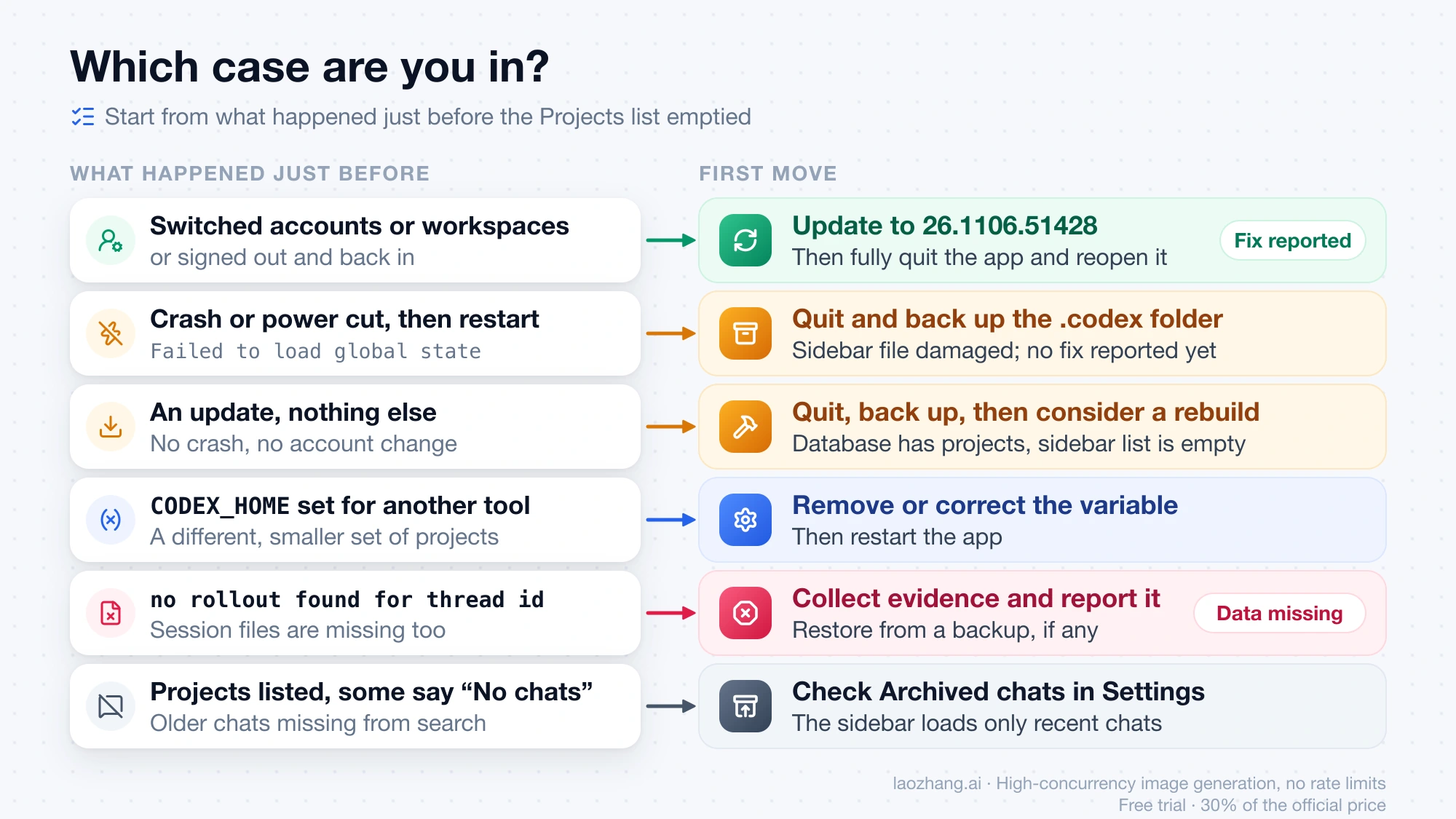
Which case are you in? Match what happened before the list emptied
Five different causes produce the same empty Projects section, and in four of them your data is intact. The fastest way to tell them apart is to remember what you did just before, then look at things you can read without changing anything: the app logs, whether chats still show under Recents or in search, and your app version. The table below is built from user reports on GitHub and the OpenAI Developer Community.
What happened just before
What you can see
Likely cause
First move
You switched accounts or workspaces, or signed out and back in
Empty list after the switch, sometimes the first-run tour again
Sidebar state is saved per account, and this account has no saved list (#59895)
Update to 26.1106.51428, fully quit, reopen
A crash, power cut or forced shutdown, then a restart or update
Log lines Failed to load global state with Unexpected token and is not valid JSON
The sidebar file was damaged, the app started from an empty state and saved it (#52713, #58397)
Quit, back up the folder; no fix reported yet
An update with no crash and no account change
Log still says projectCount= with your usual number; the read-only check finds projects in the database but an empty sidebar list; chats may still be in Recents
The start-up project migration left the sidebar list empty (#42739)
Quit, back up; see the rebuild section
You had set CODEX_HOME for another tool or account
A different, smaller set of projects and chats
The app opened another state folder (one report in #42739)
Remove or correct the variable, restart
Chats fail with no rollout found for thread id
The database has almost no projects; session files are missing
Data really is missing (one report in #58397)
Collect evidence and report it; see the last section
Nothing; projects are there but some say "No chats"
The CODEX_HOME case is cheap to rule out even though only one person reported it: if the variable points somewhere other than your usual .codex folder, the app reads that folder's projects instead. Running several accounts with one CODEX_HOME each is covered in Are Codex Limits Shared Between Accounts on the Same PC? Official Rules, Symptoms, and Checks. If your history vanished right after you pointed Codex at a third-party model provider, that is a separate filter rather than this bug; switching back to the original provider and fully quitting is the reported fix, and GPT-6.1 Terra Not Showing in Codex With CC Switch: Fix by Mode explains what CC Switch changes.
Check that your Codex projects are still on disk without changing anything
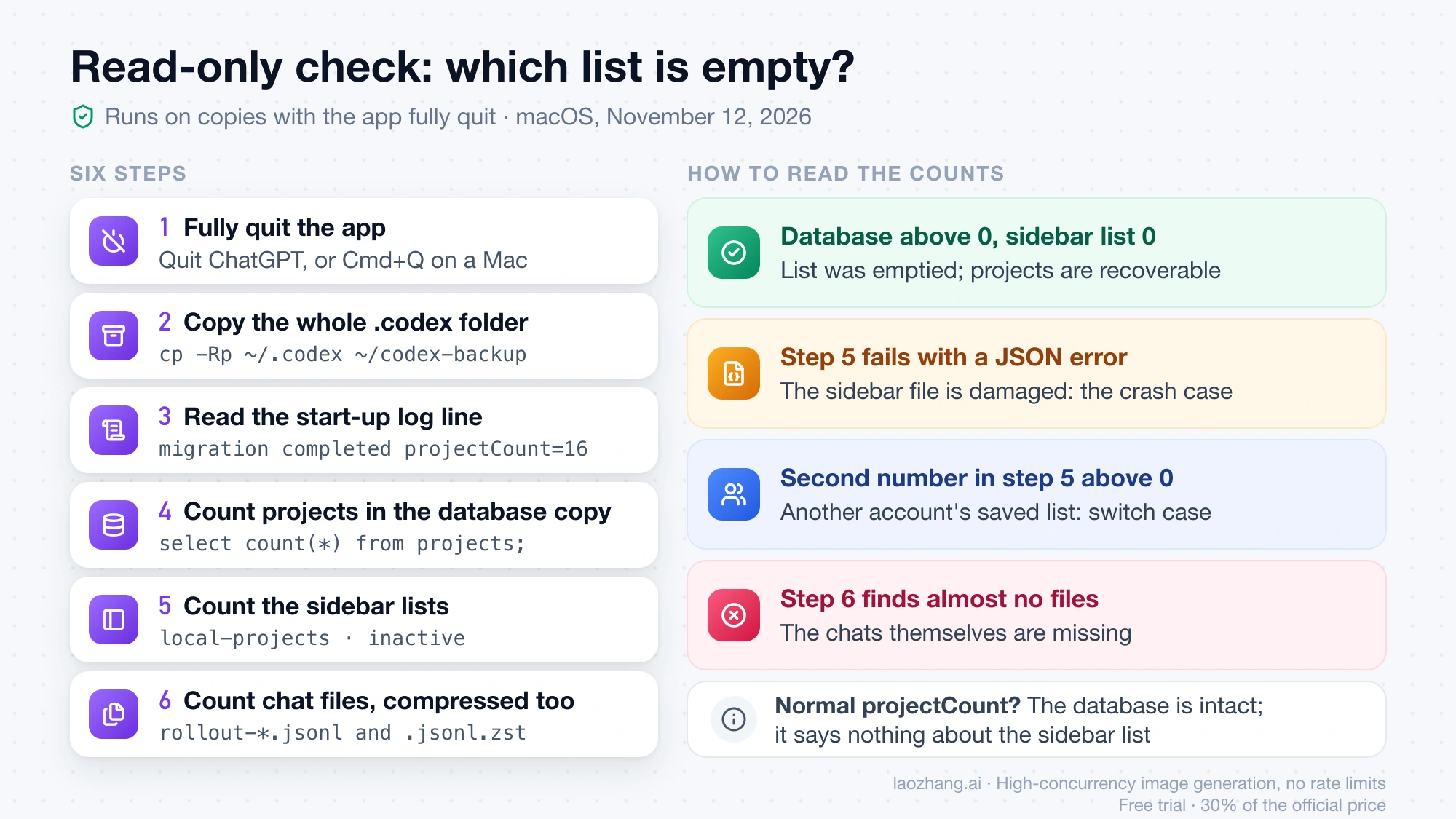
The check below only reads copies, so it cannot make things worse, and it tells you which of the two lists is empty. The commands were run on macOS on November 12, 2026; on Windows the same files sit in %USERPROFILE%\.codex according to user reports, and you can run the same queries if you have sqlite3 or Python installed.
Copy the whole folder before anything else, for example cp -Rp ~/.codex ~/codex-backup on a Mac, or copy %USERPROFILE%\.codex in File Explorer on Windows.
On a Mac, read the start-up line that reports how many projects the database still has:
Each start writes Local app-server project migration completed projectCount=16 or similar. In the same folder, search for Failed to load global state and Dropping invalid global state for key.
Count projects in the copied database:
bash
sqlite3 -readonly ~/codex-backup/state_5.sqlite "select count(*) from projects;"
Count projects in the copied sidebar list, and the other accounts' saved lists:
bash
python3 -c 'import json,sys; s=json.load(open(sys.argv[1])); print(len(s.get("local-projects") or {}), len((s.get("electron-account-renderer-state-v1") or {}).get("inactive") or {}))' ~/codex-backup/.codex-global-state.json
Count chat files: find ~/codex-backup/sessions -name 'rollout-*' | wc -l. Most may be compressed as .jsonl.zst: on the test Mac, 1,271 of the 1,405 session files were, so a search for .jsonl alone badly undercounts.
A database count above zero with a sidebar count of zero means the sidebar list was emptied and your projects are recoverable. That pair of counts is the deciding test. The migration flags some reports quote, projectsMigrated: true with threadAssignmentsMigrated: false, prove nothing on their own: the test Mac had exactly that pair, with 325 chat assignments pending, while all 17 projects showed normally. On the test Mac the log read projectCount=14 on November 2 and projectCount=16 by November 9, and in #58397 the log kept reporting projectCount=23 while the Windows sidebar was empty, so a normal count in the log means the database is intact, not that the sidebar is. If step 5 fails with a JSON error, the sidebar file itself is damaged, which is the crash case. A second number above zero means another account has a saved list on this machine, which points to the account-switch case. If step 6 finds almost no files, the chats themselves are missing.
What
macOS (checked November 12, 2026)
Windows (user reports)
State folder
~/.codex
%USERPROFILE%\.codex
Project database
state_5.sqlite plus -wal and -shm
Same names
Sidebar list
.codex-global-state.json plus .bak
Same names
Chat files
sessions/…/rollout-*.jsonl and .jsonl.zst
Same names
App logs
~/Library/Logs/com.openai.codex/YYYY/MM/DD
No confirmed location
No report places project data in AppData\Local, and one user who reset the app's browser profile under %APPDATA% got nothing back.
Switched accounts or workspaces? Update to 26.1106.51428 and fully quit
If your projects vanished when you moved between a personal account and a Team, Business or Enterprise workspace, or between two accounts, the reported fix is version 26.1106.51428 followed by a full restart. Users on macOS and Windows 11 confirmed it on November 11, 2026, one of them switching between two Team workspaces and a personal account without losing projects.
Let any running task finish.
On a Mac, run Check for Updates… from the app menu. On Windows, if nothing arrives, check for updates in the Microsoft Store, which is how one Windows user got the build.
Confirm the version in About reads 26.1106.51428 or later.
Fully quit (Quit ChatGPT or Cmd+Q on a Mac; the full exit sequence on Windows), then reopen the app while signed in to the account whose projects you want.
If the list is still empty, the fix may not cover your setup: issue #59895 was still open on November 12. Before the fix, a full quit alone brought projects back for four users and did nothing for three whose current-account list was really empty. Five users restored projects by copying the project fields from the inactive copy back to the top level of the file, and one warned that a straight copy can conflict, with 16 chat assignments pointing at different projects. Edit nothing while the app is running, because it overwrites the file. One side effect after updating: a user who had re-created projects by hand saw them twice.
Should you re-add the folder or reinstall the app?
Not yet. OpenAI's ChatGPT desktop troubleshooting page says a project you removed from the sidebar comes back if you re-add it with the Add new project button or Cmd+O, and that advice is right for a project you removed yourself. After this bug, users report the opposite: re-adding the same folder creates a new project ID, the project shows "No chats", and the old conversations stay unassigned. OpenAI support suggested re-adding in at least two cases, #46987 and #47827, and both ended with duplicate projects. One user reported on November 7 that creating a project with the same name and path brought all projects back, but nobody has repeated it. Re-add only once you have decided to start fresh or have finished any rebuild.
Reinstalling does not help either, because the app's data lives in .codex, not in the program folder. A Windows user in #58754 removed and reinstalled the app, had to fall back to the offline MSI installer when the Microsoft Store failed, and the projects were still missing. Reset workspace and configuration in Settings is worse: in #51216 it brought the Projects section back but lost the existing local project and chat history, and the problem returned after the next restart.
Can you restore from .codex-global-state.json.bak?
Usually not. In the 26.1103.60933 code, every save writes the main file and then writes the same content into .codex-global-state.json.bak, and on the test Mac the two files were byte-for-byte identical. So once the app has saved an empty list, the .bak copy is empty too, which is exactly what #52713 describes. Older copies can survive elsewhere: leftover ..codex-global-state.json.tmp-* files (the test Mac had 12, from June to August 2026), Time Machine, or Windows File History. Four users restored their project fields from such copies. Work from your backup folder and with the app fully quit.
How users rebuild the Codex project list from the database
The method that has worked for the most people rebuilds local-projects and project-order in the sidebar file from the rows in the database's projects and project_roots tables, sometimes adding the ID mapping and chat assignments. Ten users confirmed it across #42739, #58397, #54538 and #59895. It is a community method, not an OpenAI procedure; it was not tested on the Mac used for the checks above. The people who succeeded stressed the same conditions:
The app is fully quit, because it overwrites edits made while running, and a repair script launched from inside Codex is killed when the app exits.
A complete copy of .codex exists before any change.
The SQLite database is left alone; changing project_id there did not change the sidebar for several users.
Each rebuilt entry has numeric createdAt and updatedAt values, because the app silently drops entries without them.
Projects are not inferred from chat working folders: one user's helper that did this produced 109 "projects" while the database held only 28 real ones, because many working folders were one-off folders.
Community tools that automate this exist, including adriariu/codex-project-recovery, Swih/codex-sidebar-repair, CaptainVid/codex-local-project-recovery and CGI07/ai-repair-kit, and a top Reddit reply tells people to download a zip and run start-recovery.bat. None of them is from OpenAI, and their code is unreviewed third-party code, so read a script before running it, run it only on a machine where you have the backup, and expect that the list can empty again: three users reported it coming back after a repair.
Which ChatGPT desktop versions lost Codex projects
Users have reported missing projects on Windows, macOS and Linux builds from July 2026 to November 10, so the problem is not tied to one release. On Windows, one release carries two numbers, the Microsoft Store package version such as 26.1103.4239.0 and the version in About such as 26.1103.32239, and reports mix both. Windows users named builds from 26.707.72221 on July 14, through the 26.901 to 26.924 builds in September, 26.1013.3656.0 and 26.1027.30824 in October, and 26.1029.61003, 26.1103.3517.0, 26.1103.4239.0, 26.1103.7773.0, 26.1103.60933 and 26.1104.2876.0 in November, the last on November 10.
On macOS, users named 26.715.21425 on July 17, 26.901.41600, 26.1029.61003, 26.1103.41825, and 26.1103.60933 on November 10; one Linux user reported 26.1103.32239 on November 7. A build on these lists does not mean every install of it is affected, and no earlier build is known to be safe to roll back to, because the different causes overlap in time rather than following particular builds.
Has OpenAI fixed it? What it said from November 7 to 11
OpenAI has acknowledged the problem, and the account-switch case is reported fixed in 26.1106.51428, but there is no release note and no fix reported for the other causes. On November 7, OpenAI's support account wrote in the OpenAI Developer Community thread on local projects disappearing after a Windows update that a similar issue "was identified and has since been mitigated," and asked whether users still saw it on the latest version. On November 9, in a community thread about Windows chats showing in Recents but not under their local project, support repeated that it had been mitigated and asked users to install the latest update once active work had finished, then fully quit and reopen. On November 9, an OpenAI developer wrote in #59895: "We are aware of the issues here and are working on a fix which should be out in the Tuesday release." On November 10, users on 26.1103.60933 still had empty lists, and the account-switch fix described above arrived a day later.
As of November 12, 2026, the Codex changelog had no app entry after October 8, and new reports of the damaged-file and migration cases kept arriving through November 10, none saying the new build helped. An official Repair or Rebuild Projects option is not scheduled either: on September 7, OpenAI support said it had no timeline to share for that feature.
Only some chats are missing, or a project says "No chats"
If your projects are still listed but older chats are missing from them, that is a different limit. GitHub issue #21128 shows the desktop app loading only the 50 most recent chats, so older ones do not appear in their projects, a project can say "No chats", each project shows up to five, and search only covers what was loaded; nothing is deleted. Users reported it on builds from 26.429 to 26.818, the last comment is from September 27, and whether current builds still do this has not been reported. One user brought chats back by opening them with codex resume --all and pinning them. Also look in Settings > Archived chats: OpenAI's troubleshooting page says an unarchived chat returns to its original place in the sidebar.
When local fixes stop working: what to send OpenAI
Rebuilding the sidebar list only helps when the database and chat files are still there. If the database has almost no projects left, the sessions folder is nearly empty, or opening a chat gives no rollout found for thread id, the data is not on this machine and no local repair will bring it back; the error itself is explained in Codex “Error Submitting Message”: Fix It by the Second Line. Restore from Time Machine or File History if you have them, and report the case with:
App version and build from About, and on Windows the Store package number too
Your OS version, and whether an update, account switch or crash came first, with the approximate time
The projectCount lines and any Failed to load global state lines from the log
The counts from the read-only check: database projects, sidebar projects, chat files
A screenshot of the empty sidebar with private titles and paths hidden
Send it by typing / in the message box, which the troubleshooting page says gives you a session ID to share, or add it to #59895 on GitHub. Review logs for private information before you share them.
Sources14
External pages this guide links to, in the order they appear. Last updated Nov 12, 2026.
Use ownership, activity, and lifecycle—not a raw process count—to decide what to leave running, what to verify, and when to end a residual Codex process tree.
A Codex token-exchange 403 is a refused authentication request. The full error tells you whether to repair callback access, check the client’s network, renew stored credentials, or stop for an access restriction.
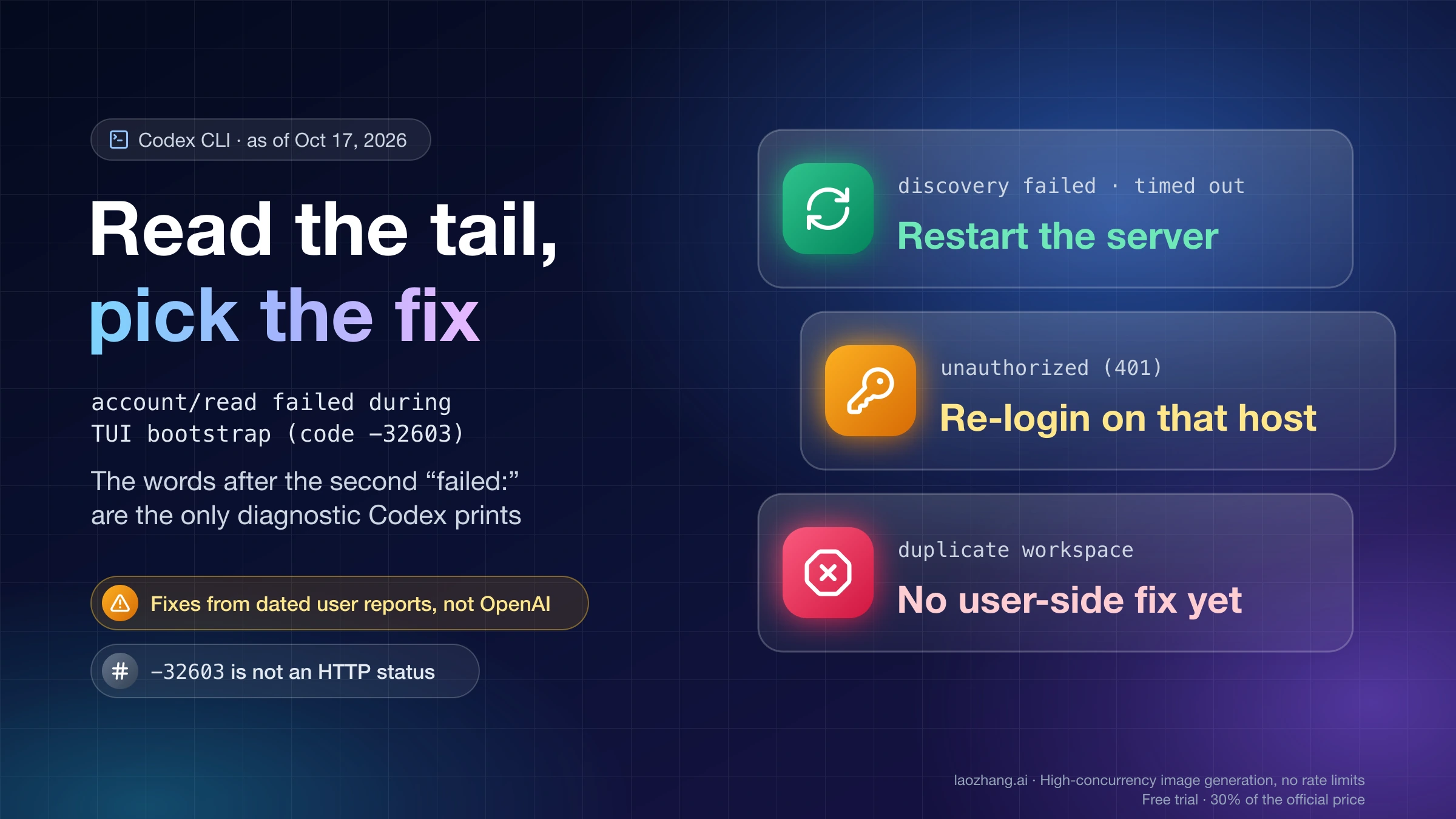
workspace routing discovery failed or timed out clears in most reports with a background-server restart; unauthorized (401) needs a new sign-in on that host.
“The extension could not start its user interface” on Codex 26.1021.22027? Go back to 26.1007.21434. On WSL with VS Code 1.141.1, update VS Code instead.
Codex in the ChatGPT desktop app may require phone verification that email or an authenticator app can't replace. What each error means and the safe next step.