Codex Could Not Start in VS Code: WSL, SSH, and Container Fixes
“The extension could not start its user interface” means the Codex panel timed out. On WSL with VS Code 1.141.1, update VS Code to 1.141.2, not Codex.
On this page
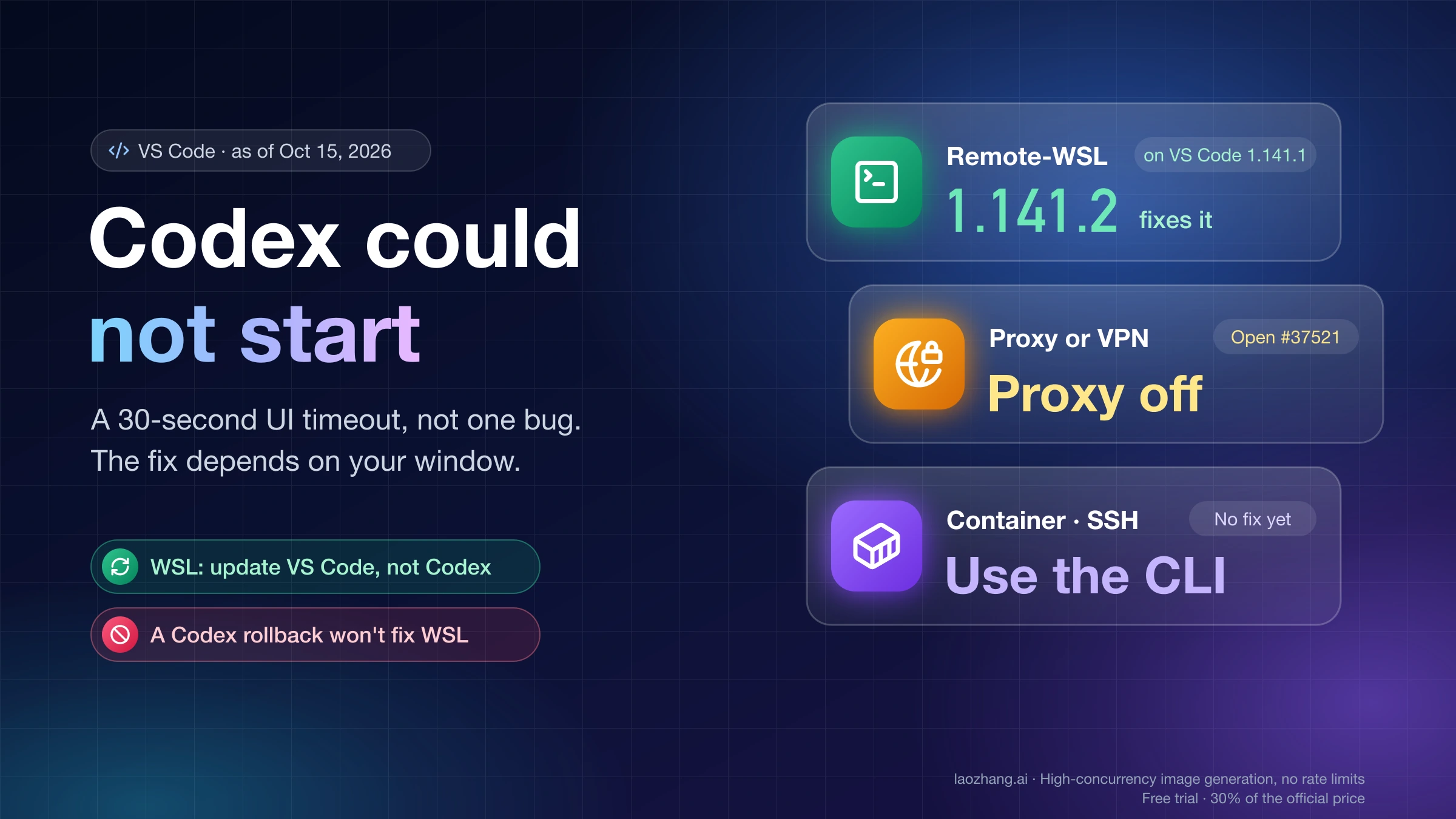
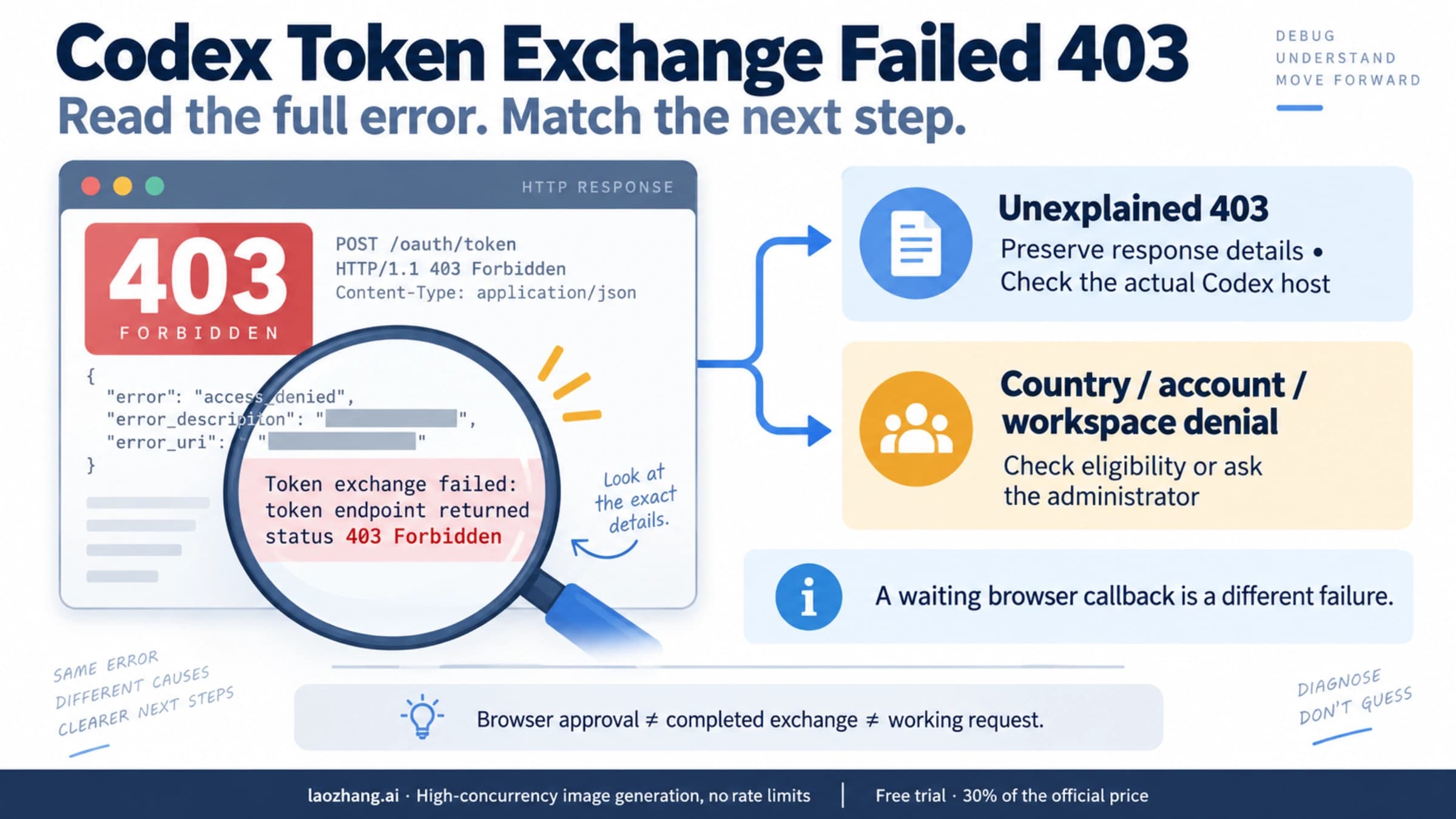
"Codex could not start" with the line "The extension could not start its user interface" means the Codex panel's UI page failed to report that it was ready within 30 seconds. It is a timeout screen, not one specific bug. In most reports the Codex backend started normally and only the chat panel never finished loading, so the fix depends on the kind of window you are in and on what the logs show.
If you work in a Remote-WSL window (the bottom-left corner of VS Code reads something like WSL: Ubuntu-24.04) and the error appeared after VS Code updated to 1.141.1 on October 13, 2026, the cause is a VS Code bug. It blanks every extension panel in WSL windows whose distro name contains capital letters. Microsoft fixed it in VS Code 1.141.2, released October 14, and in 1.142.0. Update VS Code itself. Downgrading or reinstalling the Codex extension did not help in any of the reports.
A proxy or VPN, a Dev Container, several open Codex tabs, and Remote-SSH are separate causes. As of October 15, 2026, each has an open GitHub issue and no fix from OpenAI. For those, the sections below give the log evidence that identifies each one, the workarounds users have reported, and what to collect for the issue.
What was run and what wasn't. None of these failures was reproduced on a Windows/WSL machine, in a Dev Container, or over Remote-SSH. The causes and fixes come from bug reports in the openai/codex GitHub repository, a comment from a member of OpenAI's Codex team, and Microsoft's VS Code fix and issue tracker. Each source is linked where it is used, and user workarounds are labeled as reported, not tested.
What "The extension could not start its user interface" means
The Codex extension has two parts that start separately. The extension host launches a background process, codex app-server, which talks to OpenAI. A webview, the small embedded web page that draws the chat panel, renders the UI. When you open the panel, the extension waits 30 seconds for that page to send a "ready" message. If the message never arrives, the extension swaps the panel for the error page.
Codex.log records exactly that sequence. This excerpt is from a WSL report filed on October 13, 2026 (openai/codex issue #53738, Codex fails to start after VS Code update on WSL):
[CodexMcpConnection] Spawning codex app-server
[CodexMcpConnection] Initialize received id=1
[CodexWebviewProvider] Webview renderer did not become ready elapsedMs=30003 extensionVersion=26.1007.21434 reason=renderer_ready_timeout receivedWebviewMessage=false role=sidebar stage=renderer timeoutMs=30000
The first two lines show the backend starting and answering. reason=renderer_ready_timeout with receivedWebviewMessage=false means the panel page never sent a single message back in 30 seconds. role=sidebar is the Codex sidebar; role=panel is a conversation opened in an editor tab. The 30-second limit is hard-coded in the extension, which users found as setTimeout(..., 3e4) in its bundled code (openai/codex issue #38088 on proxy startup timeouts). OpenAI's Codex troubleshooting page has no entry for this message as of October 15, 2026.
The older wording. In early August 2026, extension 26.803.x showed the same page with "The extension couldn't load its resources." That build had a watchdog bug that killed panels that were only slow to start. On August 13, a Codex team member at OpenAI announced the fix in 26.810.41047 (pre-release 26.5810.41047) and added a warning: "if an underlying networking or authentication problem was preventing initialization from completing, that will likely still be the case." Later builds, including 26.818.61809, 26.901.22334 and 26.1007.21434, show "could not start its user interface" instead. If you still run a 26.803 build, updating the extension is the fix. On anything newer, the timeout means something else kept the UI from loading.
Read Codex.log and Webview DevTools before changing anything
Three checks tell the causes apart, and none of them changes your setup:
- Window type. Look at the remote indicator in the bottom-left corner of VS Code. A WSL, SSH or Dev Container label, or no label for a local window, decides which branch you are in.
- Codex.log. Open the Command Palette, run
Developer: Open Extension Logs Folder, and openopenai.chatgpt/Codex.log. The same lines appear in the Output panel under the Codex channel. Find therenderer_ready_timeoutline, note itsrole=value, and read the lines just before it. - Webview DevTools. With the broken panel open, run
Developer: Open Webview Developer Toolsand look at the Console and Network tabs. Errors that happen before the panel's own logging starts, such as asset files failing with HTTP 401, appear only here and never reach Codex.log.
Write down two versions as well. VS Code shows its version under Help > About (Code > About Visual Studio Code on macOS), or run code --version. For the extension, run code --list-extensions --show-versions and find openai.chatgpt. In a WSL, SSH or container window, the Codex extension runs on the remote side, so the installed build is the Linux one, such as openai.chatgpt-26.1007.21434-linux-x64 under ~/.vscode-server/extensions/.
Match your window and log line to the cause
| Your window and what you see | Cause | Status as of Oct 15, 2026 | What to do | What won't help |
|---|---|---|---|---|
Remote-WSL on VS Code 1.141.1; DevTools shows HTTP 401 for files under webview/assets/; Markdown preview is also blank | VS Code 1.141.1 bug with capital letters in the WSL distro name | Fixed in VS Code 1.141.2 and 1.142.0 | Update VS Code | Downgrading or reinstalling Codex, clearing caches, a fresh profile |
Any window with a VPN or system proxy on; Codex.log never reaches app routes mounted | Account lookup request hangs inside the proxy | Open: issue #37521 | Turn the proxy off or make it pass OpenAI traffic, then reload | Updating the extension alone |
Dev Container on extension 26.818 or later; backend starts, then renderer_ready_timeout | A startup step that never finishes; unconfirmed | Open: issue #40532, no OpenAI reply | Check for PendingMigrationError; use the CLI meanwhile | Reinstalling the extension or VS Code Server |
Several Codex conversation tabs; some fail with role=panel while one works | Unknown | Open: issue #43080 | Close extra Codex tabs and reload the window | Not established |
Remote-SSH; spinner or timeout while codex in the terminal works | Several, unconfirmed | Open since June 8, 2026: issue #26951 | Try the reported workarounds one at a time | Not established |
| Extension 26.803.x; "couldn't load its resources" | August watchdog bug | Fixed in 26.810.41047 | Update the extension | Not established |
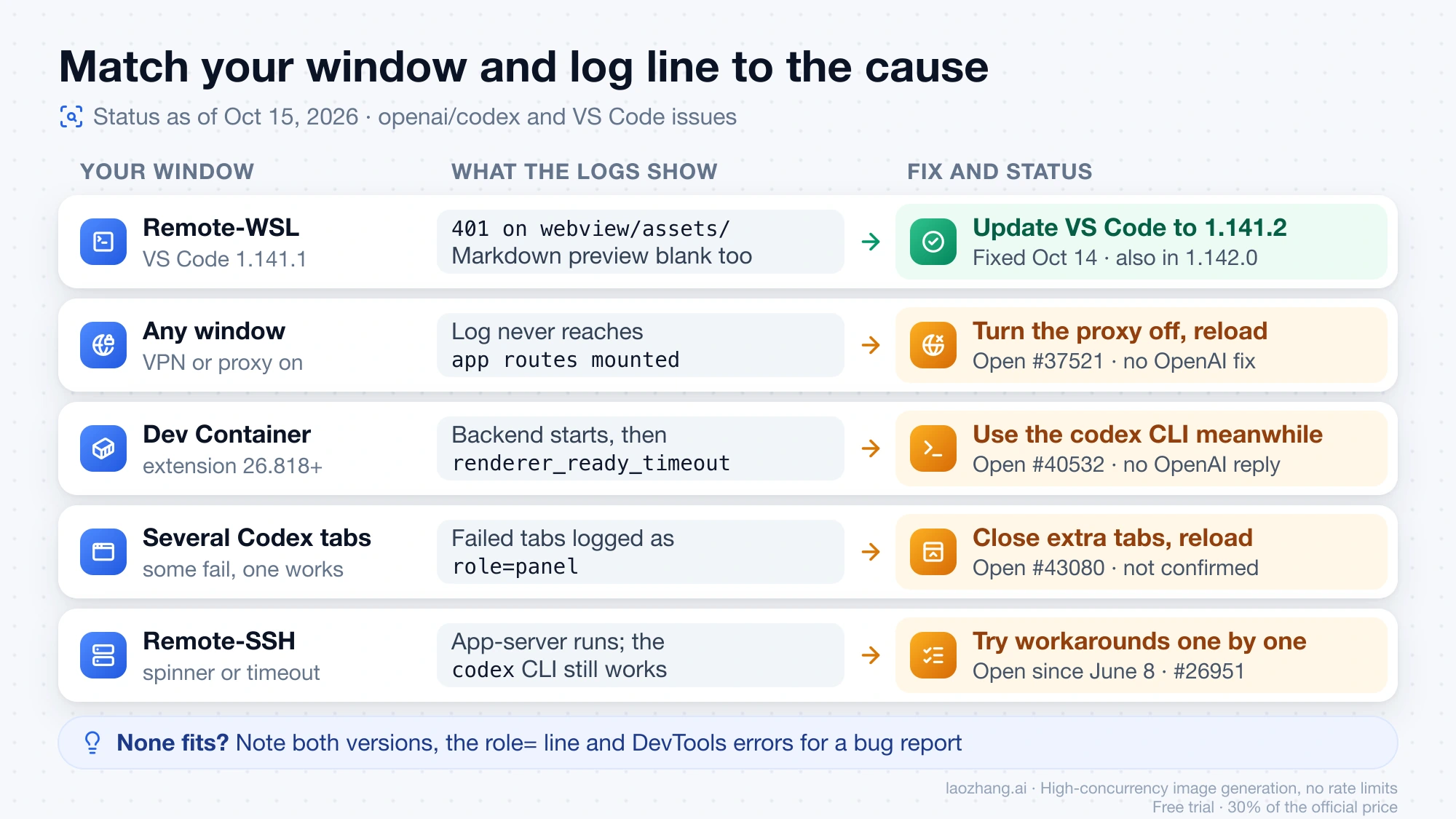
If none of the rows fits, the timeout came from something not covered here. One more user workaround exists for that situation: in a September 16 comment on #37458, a user ran Preferences: Configure Runtime Arguments, added "disable-hardware-acceleration": true to argv.json, and restarted VS Code, and a second user confirmed it worked. Neither described the window type or log signature, so treat it as a last thing to try. The evidence list in the last section is what to attach to a new bug report.
Remote-WSL after the October 13 update: install VS Code 1.141.2
VS Code 1.141.1, released October 13, 2026, included a commit titled "Fix remote webview resource path containment." Webview resource URLs carry the remote window's address, such as wsl+Ubuntu-24.04, inside a web hostname, and the embedded browser lowercases hostnames. VS Code then compared wsl+ubuntu-24.04 with wsl+Ubuntu-24.04 exactly, treated them as different, and answered every request for the panel's JavaScript and CSS with 401 Unauthorized. Without its code, the Codex panel cannot start, and the watchdog fires 30 seconds later. Microsoft describes the cause in VS Code pull request #341508, "webview: fix mixed-case remote resource authorities".
Any remote window whose address contains a capital letter is affected: wsl+Ubuntu, wsl+Ubuntu-24.04, wsl+FedoraLinux-44. The address comes from the distro name, and names such as Ubuntu, Ubuntu-24.04 and FedoraLinux-44 contain capitals. The bug is not specific to Codex. In VS Code issue #341475 on blank webviews in WSL after 1.141.1, the Markdown preview and the Claude Code panel were blank too. That gives you a quick test: open any .md file in the same window and run Markdown: Open Preview. If the preview is blank as well, VS Code is the problem, not Codex.
The Codex-side evidence matches. In openai/codex issue #53840 on webview assets returning 401 in Remote WSL, DevTools showed 401 errors for JavaScript and CSS under ~/.vscode-server/extensions/openai.chatgpt-26.1007.21434-linux-x64/webview/assets/, while codex login status returned "Logged in using ChatGPT" and Codex worked when VS Code ran directly on Windows. Your sign-in is fine in this case, so signing out and back in is not the fix.
The fix. Microsoft merged the fix into the 1.141 release branch on October 14, 2026. VS Code issue #341396, remote webview resources denied when the WSL distro name has uppercase letters, is assigned to the 1.141.2 milestone and labeled verified. Version 1.141.2 was released the same day, and the only other change between 1.141.1 and 1.141.2 is the version bump. Version 1.142.0, also released October 14, includes the same fix. To apply it:
- In VS Code on Windows, choose Help > Check for Updates and install 1.141.2 or later.
- Confirm the new number under Help > About.
- Close the WSL window, reopen your folder in WSL, and open Codex.
As of October 15, 2026, the Codex issues had no post-update confirmation from Codex users yet. Microsoft's verification covers webviews in remote windows in general, and the Codex failure shows the same 401 pattern. If the panel still fails after the update and DevTools no longer shows 401 errors, you are in a different branch of the table above.
If you can't update yet, users reported three ways around it:
- Open the folder with a lowercase address. From Windows PowerShell, run
code --new-window --remote wsl+ubuntu-24.04 /home/YOUR_USER/YOUR_PROJECT. One reporter in #53840 confirmed that DevTools then showedremoteAuthority=wsl+ubuntu-24.04and the 401 errors were gone. Use your own distro name in lowercase;wsl -l -vlists the exact names. From inside the WSL terminal, the reported form ispowershell.exe -NoProfile -Command "code --new-window --remote wsl+ubuntu-24.04 '$PWD'". Running plaincode .from Ubuntu recreates the capitalized address and fails again. - Roll VS Code back to 1.141.0. In one reporter's tests, this was the only change that restored the panel.
- Use a Windows window and let Codex run in WSL. OpenAI's Codex IDE settings page lists
chatgpt.runCodexInWindowsSubsystemForLinux(default false): "Windows only: Run Codex in WSL when WSL is available." Changing it reloads VS Code. The #53840 reporter used this setting in a Windows-native window and Codex ran commands inside WSL2. Your editor then works from the Windows side, which is a different setup from a Remote-WSL window.
What did not help. One reporter in #53738 tested this matrix on Windows with WSL2 Ubuntu 24.04 on October 14:
| VS Code | Codex extension (linux-x64, in WSL) | Result |
|---|---|---|
| 1.141.1 | 26.1007.21434 | Panel fails; repeated 30-second timeout |
| 1.141.1 | 26.1002.51308 | Same failure after the downgrade and a reload |
| 1.141.0 | 26.1002.51308 | Codex chat works again |
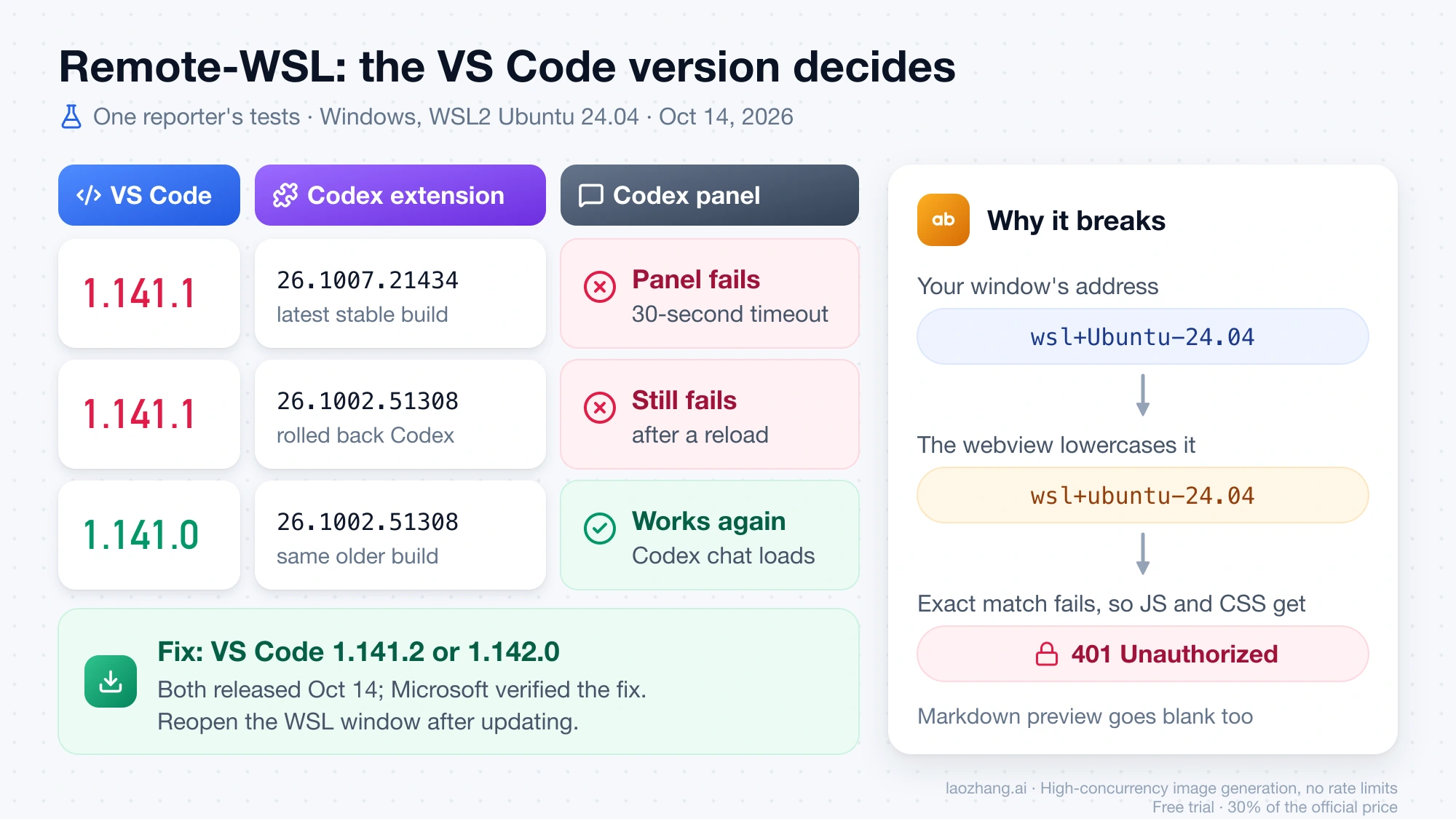
The #53840 reporter also tried reinstalling the extension in WSL, an older extension version, reinstalling VS Code Server, clearing VS Code and webview caches, a fresh VS Code profile, and restarting VS Code and WSL, without success. The #341475 reporter added wsl --shutdown, deleting the Service Worker, Cache and CachedData folders, and a Windows reboot to that list.
Proxy or VPN: Codex waits for account requests that never return
A proxy that hangs does more damage than no network at all. openai/codex issue #37521 on startup deadlocks when account requests stay pending shows that the outcome depends on how requests to OpenAI fail:
| How the network behaves | What the Codex panel does |
|---|---|
| Proxy works | Starts normally |
| Requests fail quickly, for example no route to OpenAI | Account lookup reports an error, then the panel opens in a degraded offline mode |
| Proxy accepts the connection but never completes the request | Account lookup never finishes, the UI never mounts, and the error page appears after 30 seconds |
In the hanging case, Codex.log shows React root render requested, but [chatgpt-account-lookup] completed and [startup][renderer] app routes mounted never appear. The hosts in that report were chatgpt.com, api.openai.com and ab.chatgpt.com on port 443. A slow proxy can also push startup past the limit. In issue #38088, on Windows with the VeePN VPN registering a local privoxy proxy at 127.0.0.1:8080, the panel's routes mounted after about 26.7 and 30.1 seconds, and once after about 3.5 minutes, compared with about 9 seconds without the proxy.
To test this branch, turn off the VPN or system proxy, fully restart VS Code, and open Codex. If the panel loads, the proxy is the cause. Either make the proxy actually complete requests to those hosts or work without it in VS Code. Users in #37521 found that the extension host's requests did not use Codex's own network_proxy setting and that Node's built-in fetch ignores HTTP_PROXY and HTTPS_PROXY by default. OpenAI's IDE settings page lists no proxy setting for the extension.
The August fix does not cover this case. OpenAI's team member wrote on #37521 that the change "does not add deadlines to account requests or make a permanently pending account request fall back to offline mode," and kept the issue open. OpenAI's advice for anyone still stuck after updating is to check proxy and VPN settings first, then file a bug report.
Dev Containers: issue #40532 is open with no OpenAI fix
openai/codex issue #40532, renderer_ready_timeout in VS Code Dev Containers, describes extension 26.818.61809 in a Dev Container (Windows client, Ubuntu 22.04 container, VS Code 1.134.0). The backend started, and then the sidebar timed out with renderer_ready_timeout. Reinstalling the extension and removing older extension and VS Code Server versions did not fix it. The reporter traced it to a startup step in the panel's code that never finished. They patched the shipped bundle by hand, which every extension update overwrites, and that is not something to rely on. As of October 15, 2026, the issue is open with no reply from OpenAI.
A second container report, in a comment on #37458 dated August 26, shows a different signature. On extension 26.820.60940, Dev Containers over Remote-SSH failed before the extension fully activated, and the remote extension host logged PendingMigrationError: navigator is now a global in nodejs. For that reporter, setting "extensions.supportNodeGlobalNavigator": true both in local settings and in each container's remote settings appeared to be the workaround. So look for PendingMigrationError in the remote extension host logs first. If it is there, try that setting. If it isn't, and the log looks like #40532, run codex in the container's terminal while you wait, and add your versions and log lines to #40532.
Several Codex tabs open: some fail with role=panel
openai/codex issue #43080 on multiple Codex editor tabs timing out covers a local Windows install (VS Code 1.136.1, extension 26.901.22334). With three Codex conversations open in editor tabs, one mounted and two failed at almost the same moment, both logged as role=panel. The reporter could not establish a tab limit and also had a helper extension installed that opens Codex conversation editors, so its role is not ruled out. The issue is open with no OpenAI reply.
If your failures are role=panel and only some tabs break, close the extra Codex conversation tabs, run Developer: Reload Window, and reopen conversations one at a time. That follows from the report's pattern; it is not a confirmed fix.
Remote-SSH: the panel stays loading while the Codex CLI works
openai/codex issue #26951, IDE extension stuck loading over Remote-SSH while the CLI works, has been open since June 8, 2026. Its reports show the app-server running on the remote host while the panel spins or times out. Users have posted several workarounds. Each one worked for one or a few people and failed for others, so try them one at a time and keep notes:
- Previous extension version with auto-update off. One user installed the version before the current one and turned off auto-update for Codex. They later upgraded again and it kept working. Rollback steps are in the next section.
"extensions.supportNodeGlobalNavigator": truein both local and remote settings. This removed thePendingMigrationErrorline from new logs for several users. For some, the timeout remained.- Test with a throwaway profile. One user on a local Linux install ran
code --user-data-dir /tmp/vscode-codex-profile --extensions-dir /tmp/vscode-codex-extensionsand Codex worked there. That pointed to stored webview state in their normal profile. With VS Code closed, they moved thePartitions,IndexedDB,Local Storage,WebStorageandService Workerfolders under~/.config/Codeaside as backups, and Codex loaded consistently after about three restarts. Move these folders rather than deleting them. codex features disable remote_plugin. One user reported that this fixed loading at once. Another ran it with the extension's bundled binary, and the hang came back after a window reload.- Leftover processes. On a local Linux install, killing a leftover
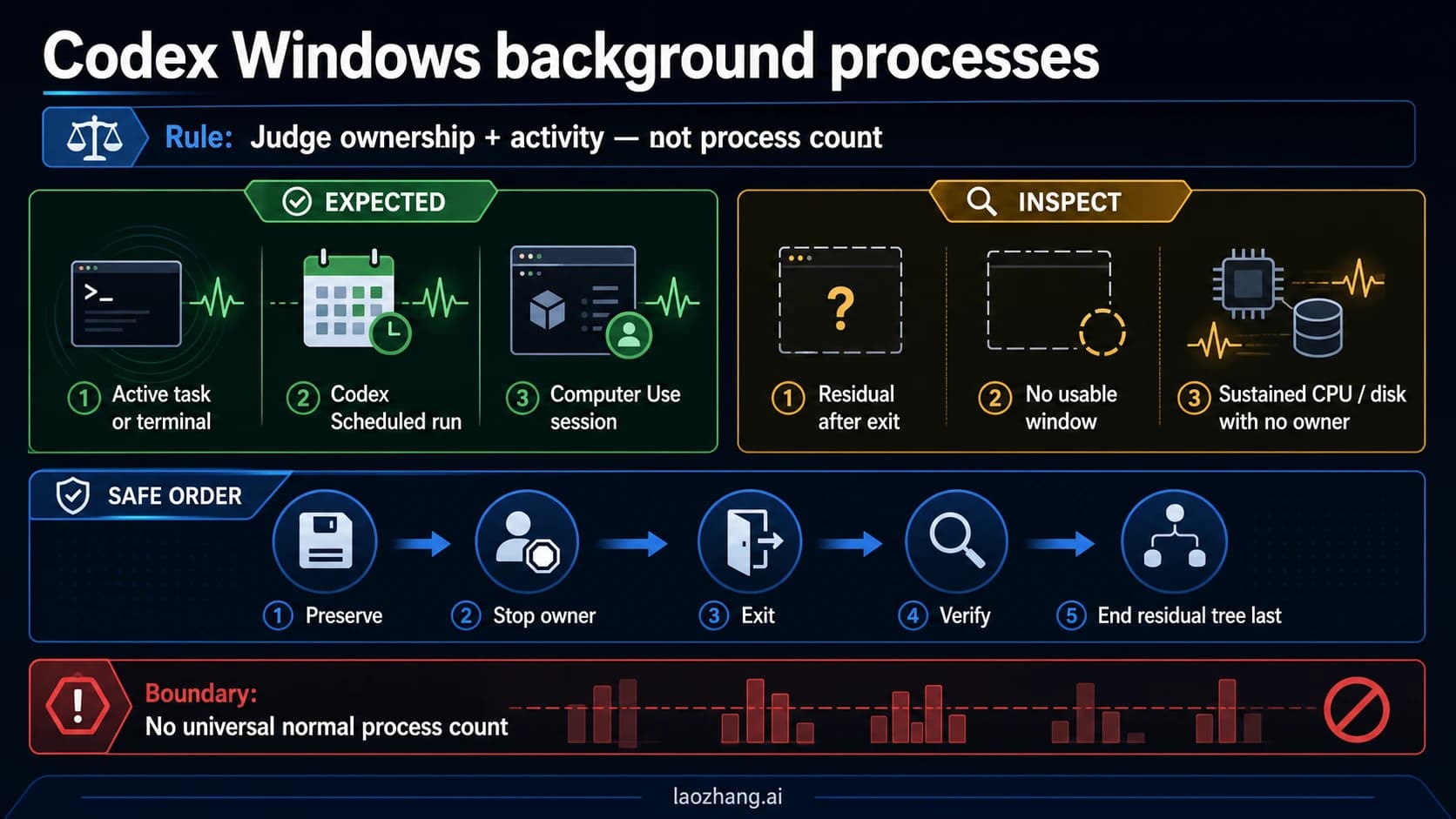
codex app-serverprocess from an earlier session, then reloading the window, helped one user some of the time. On Windows, Codex Windows Background Processes: What to End and What to Leave Running covers which processes are safe to end.
Running Remote-SSH: Kill VS Code Server on Host... and reconnecting restarts the remote server and its extension host from scratch, which rules out a stuck server process. If the panel loads but you cannot sign in because the server has no browser, that is a separate problem, covered in Codex Headless Login: Device Code, SSH Tunnel, or auth.json.
Roll back the Codex extension only when a build is the cause
A rollback fixes the panel only when a specific extension build introduced the failure, as 26.803.x did in August. It did not fix the VS Code 1.141.1 WSL bug, because the broken part was VS Code.
According to the VS Code Marketplace as of October 15, 2026, the latest stable Codex release is 26.1007.21434 (October 9), preceded by 26.1002.51308 and 26.930.61225 (both October 6). Pre-release builds carry a 5 at the start of the second number, such as 26.51007.21434. These numbers change several times a week.
# See which build is installed
code --list-extensions --show-versions

# Install a specific earlier build
code --install-extension openai.chatgpt@26.1002.51308 --force
In a WSL, SSH or container window, the extension is installed on the remote side, so run these from that window's terminal. You can do the same from the UI: open Extensions, select Codex, and use the dropdown next to Uninstall to install another version. Then turn off auto-update for Codex, or VS Code will reinstall the newest build on the next restart. One reporter noted that Developer: Reload Window alone may keep the old extension host running, so quit all VS Code windows and start again after switching versions.
Keep working in the Codex CLI while you wait for a fix
In #53738, #53840 and #26951, the codex command in the terminal kept working while the panel failed. It uses the same account and network, so it is not guaranteed to work, but it is the quickest way to keep going. Setup is covered in Install and Configure Codex CLI on Windows, macOS, or Linux.
If you file a report or add to an existing issue, include:
- VS Code version and commit from Help > About
- Codex extension version and platform build, such as
26.1007.21434-linux-x64 - Window type and the remote label shown in the bottom-left corner
- The
renderer_ready_timeoutline with itsrole=value, plus the 10 or so lines before it - Any errors in Webview DevTools, especially 401 or module-loading errors
- Whether the
codexCLI works on the same machine, and whether a VPN or proxy is on
Errors that appear after Codex has started, such as 401, 429 or "stream disconnected" in a running conversation, have different causes. Codex 401, 429, and Stream Disconnected: Find the Failing Layer covers those.
FAQ: Codex not launching, restarting, and the older wording
Why is Codex not launching in VS Code?
When the panel shows "Codex could not start," the Codex backend has usually launched, but the panel's UI did not report ready within 30 seconds. Check your window type, the renderer_ready_timeout line in Codex.log, and Webview DevTools. On Remote-WSL with VS Code 1.141.1, the cause is a VS Code bug fixed in 1.141.2. If Codex is missing from the sidebar entirely, start with installation in Codex in VS Code: API Keys, Custom Models, and Your First Edit.
How do I restart the Codex extension in VS Code?
Run Developer: Reload Window from the Command Palette, or Developer: Restart Extension Host to restart only the extensions. If you just changed the extension version, quit all VS Code windows and start again. A restart does not fix the WSL 401 bug or a hanging proxy, because the same failure happens on the next start.
Is "Codex couldn't load its resources" the same error?
It is the same error page with older wording, from extension 26.803.x in August 2026. OpenAI fixed that build's watchdog bug in 26.810.41047. If you still see "couldn't load its resources," update the extension. If you see "could not start its user interface," the panel is being held up by something else, such as the WSL bug, a proxy, or one of the open issues above.
Does updating the Codex extension fix "could not start its user interface"?
Only when an extension build is the cause. For the October Remote-WSL failure, a newer or older Codex build made no difference; updating VS Code to 1.141.2 or later is the fix. For proxies, Dev Containers, multiple tabs and Remote-SSH, no Codex release has fixed the problem as of October 15, 2026.
Is it a ChatGPT sign-in problem?
Usually not. In the WSL reports, codex login status said "Logged in using ChatGPT" while the panel failed, so signing in again is not the fix when that command already reports a valid login. The account check does matter when its requests hang behind a proxy, as described in the proxy section.
Does this happen in Cursor or Windsurf?
The same Codex extension and the same 30-second limit apply, so the log and DevTools checks work there too. The 1.141.1 and 1.141.2 version numbers belong to Microsoft's VS Code; forks ship their own versions on their own schedule. Run the Markdown preview test in the same window. If other panels are blank too, the editor is at fault and you need its update. Cursor setup is covered in Set Up Codex in Cursor and Complete a Reviewable First Edit.
Sources13
External pages this guide links to, in the order they appear. Last updated Oct 15, 2026.
Sources13
External pages this guide links to, in the order they appear. Last updated Oct 15, 2026.
- 1.openai/codex issue #53738, Codex fails to start after VS Code update on WSLgithub.com/openai/codex/issues/53738
- 2.openai/codex issue #38088 on proxy startup timeoutsgithub.com/openai/codex/issues/38088
- 3.Codex troubleshooting pagedevelopers.openai.com/codex/reference/troubleshooting
- 4.announced the fix in 26.810.41047github.com/openai/codex/issues/37458
- 5.issue #37521github.com/openai/codex/issues/37521
- 6.issue #40532github.com/openai/codex/issues/40532
- 7.issue #43080github.com/openai/codex/issues/43080
- 8.issue #26951github.com/openai/codex/issues/26951
- 9.VS Code pull request #341508, "webview: fix mixed-case remote resource authorities"github.com/microsoft/vscode/pull/341508
- 10.VS Code issue #341475 on blank webviews in WSL after 1.141.1github.com/microsoft/vscode/issues/341475
- 11.openai/codex issue #53840 on webview assets returning 401 in Remote WSLgithub.com/openai/codex/issues/53840
- 12.VS Code issue #341396, remote webview resources denied when the WSL distro name has uppercase lettersgithub.com/microsoft/vscode/issues/341396
- 13.Codex IDE settings pagedevelopers.openai.com/codex/ide/settings