Which Codex Plugins Should You Install First? A Workflow-First Guide
The best first Codex plugin is the one that removes a repeated external-workflow bottleneck. Start with one, review its access, prove it on a small task, and stop until a second need is real.
On this page
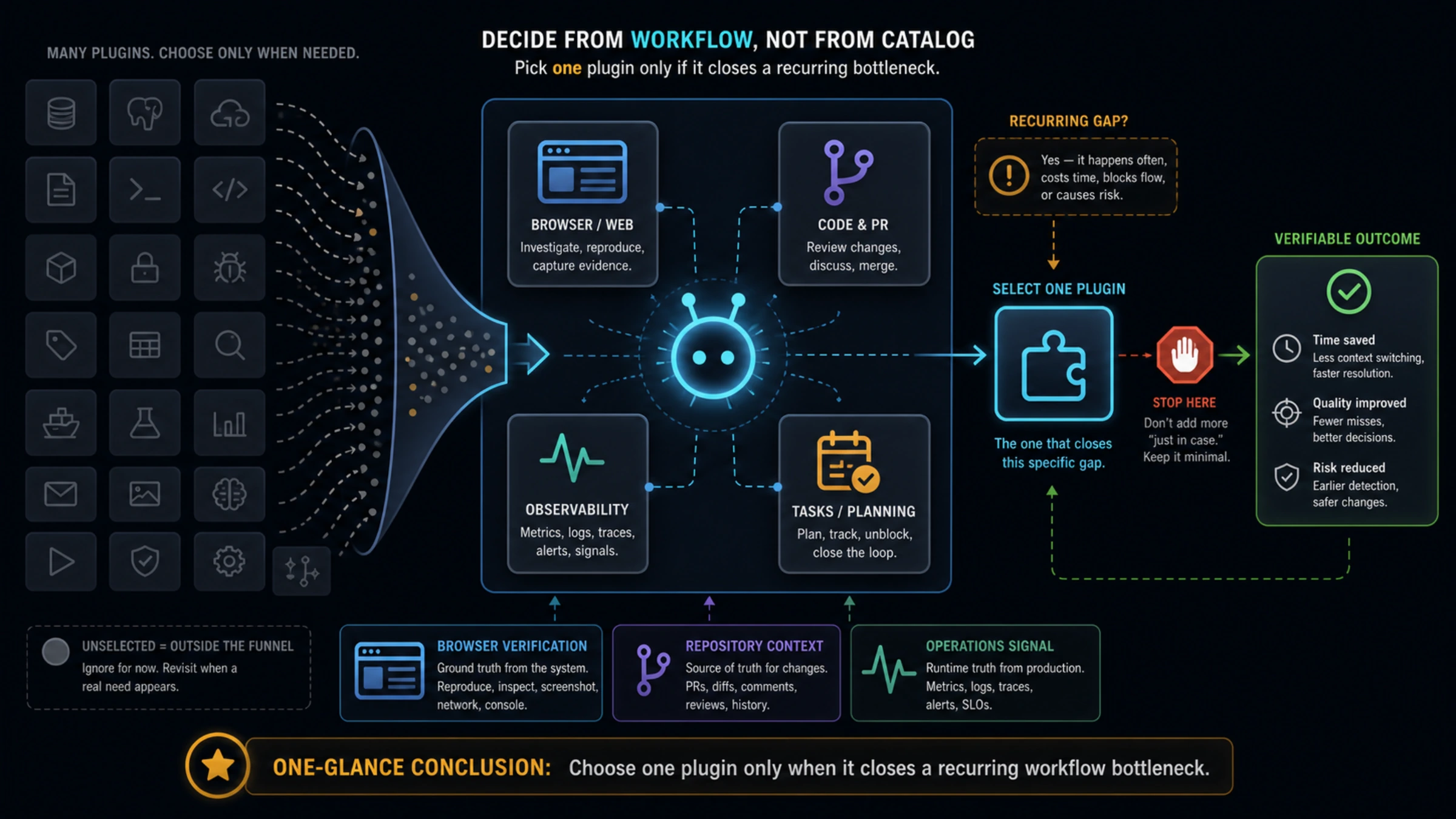
The best Codex plugin is not the most popular one in a directory. It is the one that closes a workflow gap you hit repeatedly and cannot solve cleanly with the tools you already have.
For most people, that means starting with Browser when visual browser verification is the missing proof, a repository and issue integration when live PR or issue context keeps sending you out of Codex, or one operations plugin when deployment, errors, or data are genuinely part of the job. Install one, give it a small task, and stop if it solves the gap. A larger plugin collection is not automatically a better setup.
This guide uses “plugin” carefully. A plugin can package capabilities for Codex, but it is not a synonym for every extension point. A Skill gives Codex reusable instructions. MCP connects it to external tools or data. Local files, tests, scripts, and logs may need no integration at all. Choose the smallest surface that actually completes the job.
OpenAI’s documentation checked on August 3, 2026 shows a Plugins Directory flow for Browser in the desktop app and a separate CLI marketplace flow for the Codex Security plugin. Treat the desktop directory and CLI marketplace as related but distinct: a version or package identifier in one is not a promise about the other.
Pick the missing workflow before you browse the directory
Ask one question before comparing names: what information or action forces you to leave your normal Codex workflow every week? Your answer should name a repeated task, not a tool you have heard of.
| Repeated bottleneck | First thing to consider | Why it earns an early place | Stop rule |
|---|---|---|---|
| You need to inspect a rendered page, reproduce a browser flow, or verify a UI change | Browser | The work depends on visible browser state, not only source code and test output | Do not add another browser tool until the first one has produced useful evidence. |
| Pull requests, issue threads, or repository metadata are missing from the local checkout | A repository/issue plugin | It can bring the live work context into the same task | Stop after it removes the context switch; local Git may already be enough for purely local work. |
| Deployments, runtime errors, traces, or incidents repeatedly interrupt coding | One deployment or observability plugin | Local code cannot answer every question about a live system | Skip it if production investigation is occasional or someone else owns it. |
| A database or hosted platform is the real source of the answer | One data-platform plugin | It can make a specific operational question answerable without manual tab switching | Do not grant broad production access just to explore the catalog. |
| Planning, mail, calendar, or customer systems are part of a defined work loop | One task-system plugin | It can reduce a proven handoff or lookup step | Keep it out if the service is only personal background noise. |
The table is deliberately not a leaderboard. Plugin catalogs change, accounts can expose different choices, and a name alone says little about the tools, data, or permissions behind it. The useful recommendation is the workflow category plus a testable first task.
For example, install Browser when a frontend fix needs evidence such as “the checkout button remains visible after the modal opens.” Do not install it merely because you sometimes read websites. If a page can be fetched as documentation or verified by an existing automated test, browser control may add more surface area than value.
Know when a plugin is not the right answer
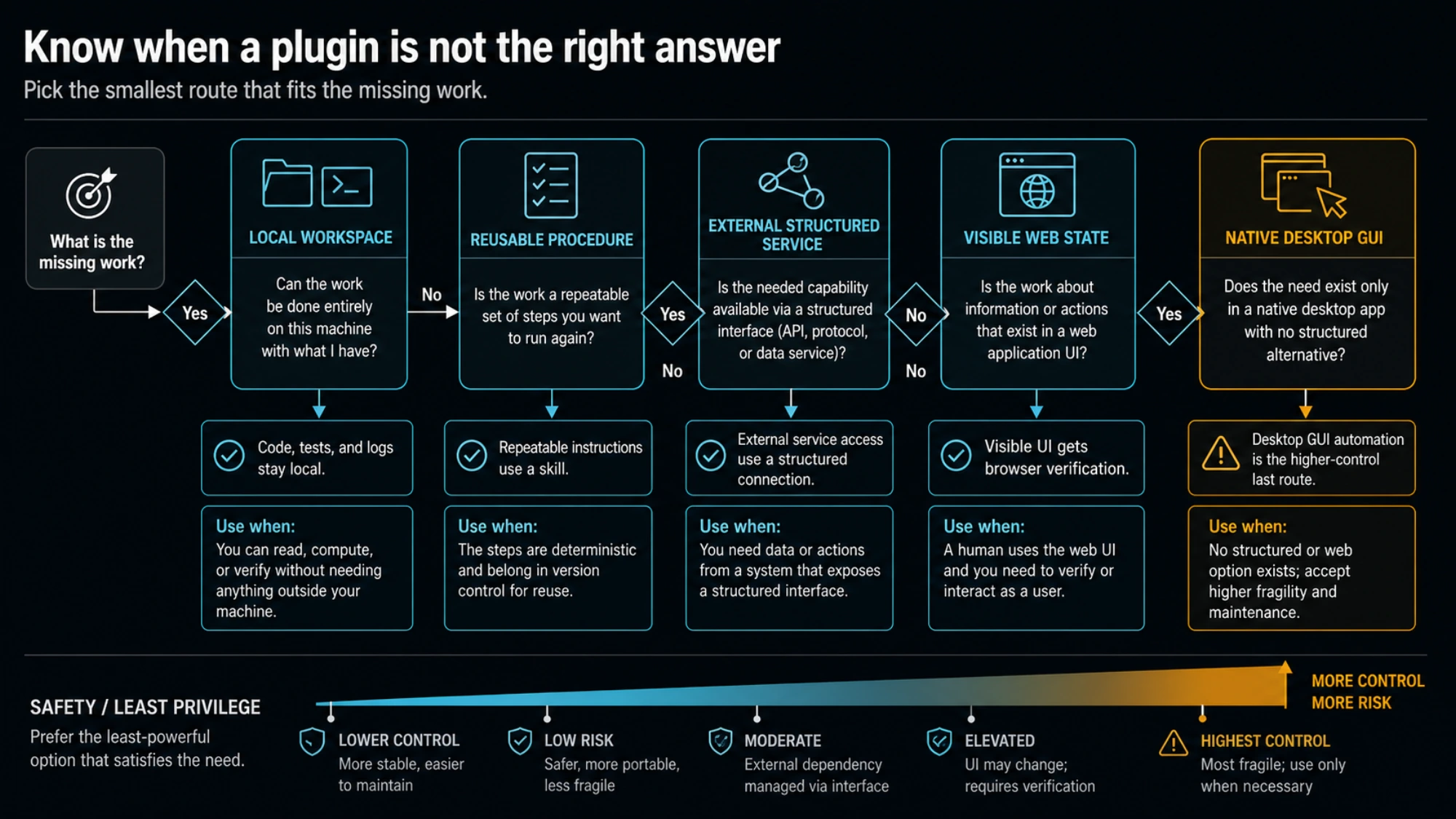
The quickest way to avoid a noisy setup is to rule out the alternatives first.
| The missing piece is… | Prefer this first | Why |
|---|---|---|
| Files, source code, test output, terminal output, or a script you can run locally | Built-in workspace tools | The evidence is already in the project; adding an integration creates no new capability. |
| A repeatable procedure, repository convention, or checklist | A Skill or project instructions | The problem is guidance and consistency, not access to an external system. |
| Structured data or an action from an external service | MCP or a plugin that exposes the necessary integration | The missing capability is external access. Compare scope and trust before choosing the packaging. |
| A visible web flow where rendered state is the evidence | Browser | The interface itself is part of the task. |
| Broad desktop control, native dialogs, or a GUI-only reproduction | Computer Use, only when needed | This is a higher-permission route with a different safety boundary. |
A plugin can bundle a Skill or an MCP server, so these categories can overlap technically. The reader-facing decision is still simple: if you only need a procedure, do not grant an external connection; if you only need local evidence, do not install an external connection; and if a narrow structured route exists, do not start with broad screen control.
For configuration ownership and project-level settings, see Codex config.toml: Where It Lives, What Wins, and Safe Examples. If the work truly needs a real desktop interface rather than a browser page or structured tool, use the separate Codex Computer Use guide before changing macOS permissions.
A safe first-install sequence
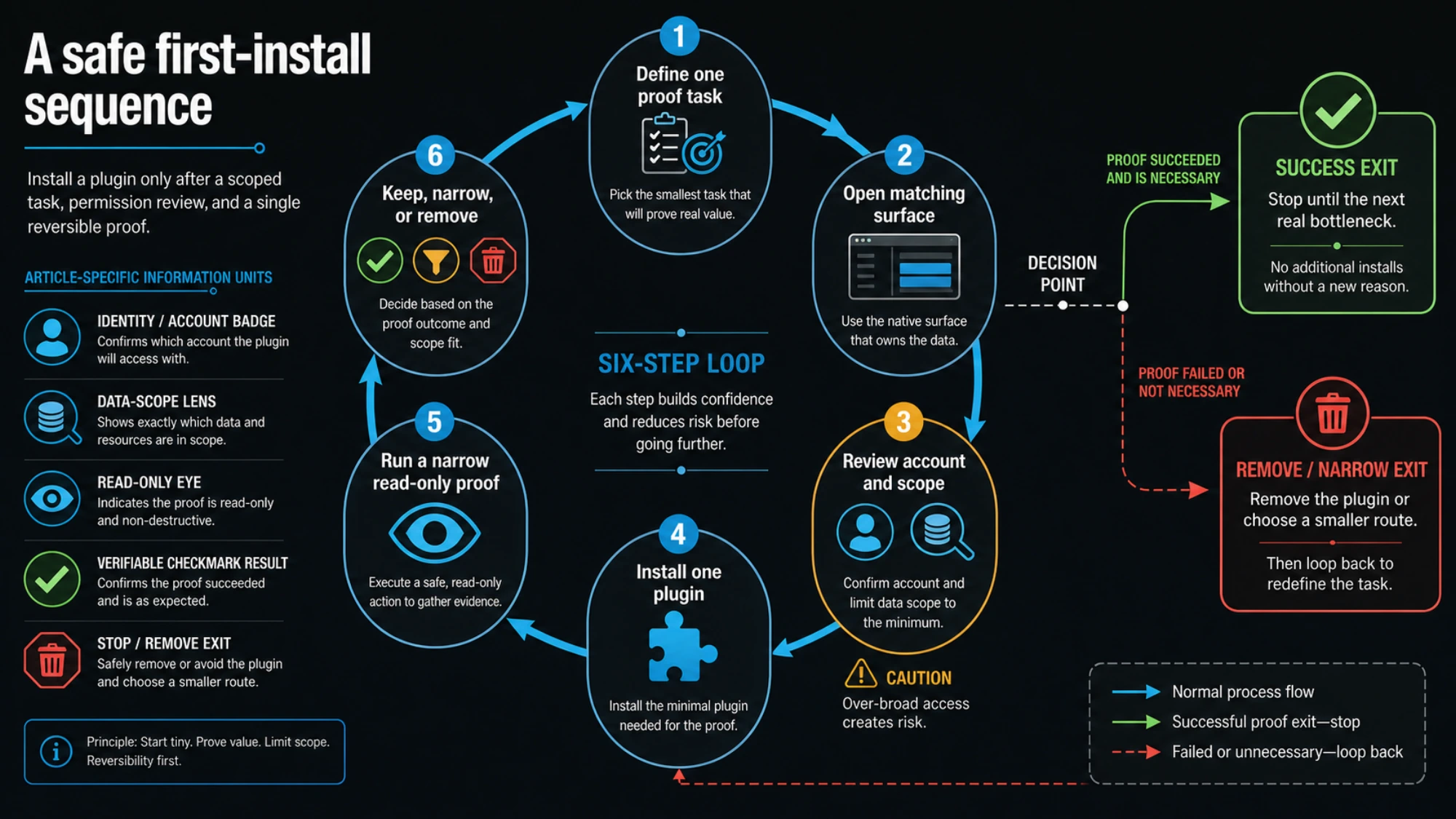
Use this sequence for a personal setup. A managed work account may add policy restrictions, approval steps, or an administrator-owned marketplace source.
- Write down one proof task. Make it observable and reversible. “Read the title and open PR comments for this pull request” is better than “connect my whole GitHub account.” “Check whether the local settings page overflows” is better than “browse the web.”
- Open the matching Codex surface. In the desktop app, use the Plugins Directory for a desktop plugin. For a documented CLI package, use that package’s published CLI installation path. Do not copy a package identifier from a different client or plugin.
- Read the plugin’s declared tools and authorization prompt. Identify the service account, data it can read, actions it can take, and whether its scope is personal, project-wide, or production-facing. If those answers are unclear, cancel the install.
- Install only the plugin that serves the proof task. OpenAI’s current Browser documentation describes opening the Plugins Directory and installing Browser, then asking Codex to use it. That does not make Browser a default install for every task.
- Run the proof task with a narrow prompt. For Browser, a good first prompt is: “Open the local settings page, report whether the Save button is visible at a 1024-pixel-wide viewport, and do not submit or change anything.” Review any website permission request rather than treating the plugin installation as blanket approval.
- Keep, narrow, or remove it. Keep the plugin only if the result was useful, the permission scope matched the task, and you can state when you will use it again. Otherwise remove it and return to the smaller route.
Success is not “the plugin installed.” Success is a concrete answer, a verified UI state, or a completed low-risk lookup that you could not get as cleanly before.
Recommendations by job, with boundaries that matter
Browser is the strongest first plugin for visual web verification
Choose Browser when rendered state is part of the acceptance condition: a modal overlaps a control, a responsive view breaks, a logged-out route redirects unexpectedly, or a product flow needs a real page check. OpenAI documents a Browser install through the desktop Plugins Directory and notes that the product asks before it uses a website unless it has already been allowed. It also retains confirmation for sensitive actions such as submissions, purchases, permission changes, and deletion.
That makes Browser especially good for observation-first work. Start by reading, navigating, or verifying a local or non-sensitive page. Do not make your first test a form submission, a production settings change, or an upload. If ordinary automated tests already establish the condition you care about, those tests remain the cheaper and more repeatable proof.
A repository and issue plugin is worth it when live collaboration context is missing
Consider a repository integration when the work repeatedly stalls on information that does not live in your checkout: the current issue discussion, a pull request’s review comments, labels, merge state, or the relationship between a branch and an active ticket.
Its first proof should be read-only. Ask for a concise summary of one issue, compare review comments with the local diff, or identify the pull request linked to the current branch. Do not begin by creating issues, editing project metadata, or enabling automations. If the only need is commit history and local branches, normal Git commands are usually the better route.
Operations plugins are valuable only for people who own operational decisions
Deployment, observability, database, and hosted-platform plugins can be high leverage when a developer actually investigates releases, errors, traces, or data as part of the weekly job. They are a poor default for a developer who only occasionally sees an alert.
Start with a bounded question: “Show the most recent failed deployment and its error summary,” or “Find the exception group linked to this request ID.” Avoid a first task that writes configuration, changes billing, rotates credentials, alters production data, or bulk-resolves alerts. A plugin that can do all of those things may still be useful, but only after its read path has justified the access.
Planning and communications plugins should shorten a real handoff
Task tracking, calendar, mail, and team-workspace integrations are best when they remove a known handoff: turning an approved bug report into a draft task, checking the decision attached to a meeting, or finding the owner of a documented requirement.
The first proof should retrieve or summarize existing information. If you later want the plugin to create tasks or send messages, make that a separate decision with a clear human review step. A connector that can communicate externally has a different blast radius from one that only reads documentation.
Game Studio fits browser game projects, not engine projects
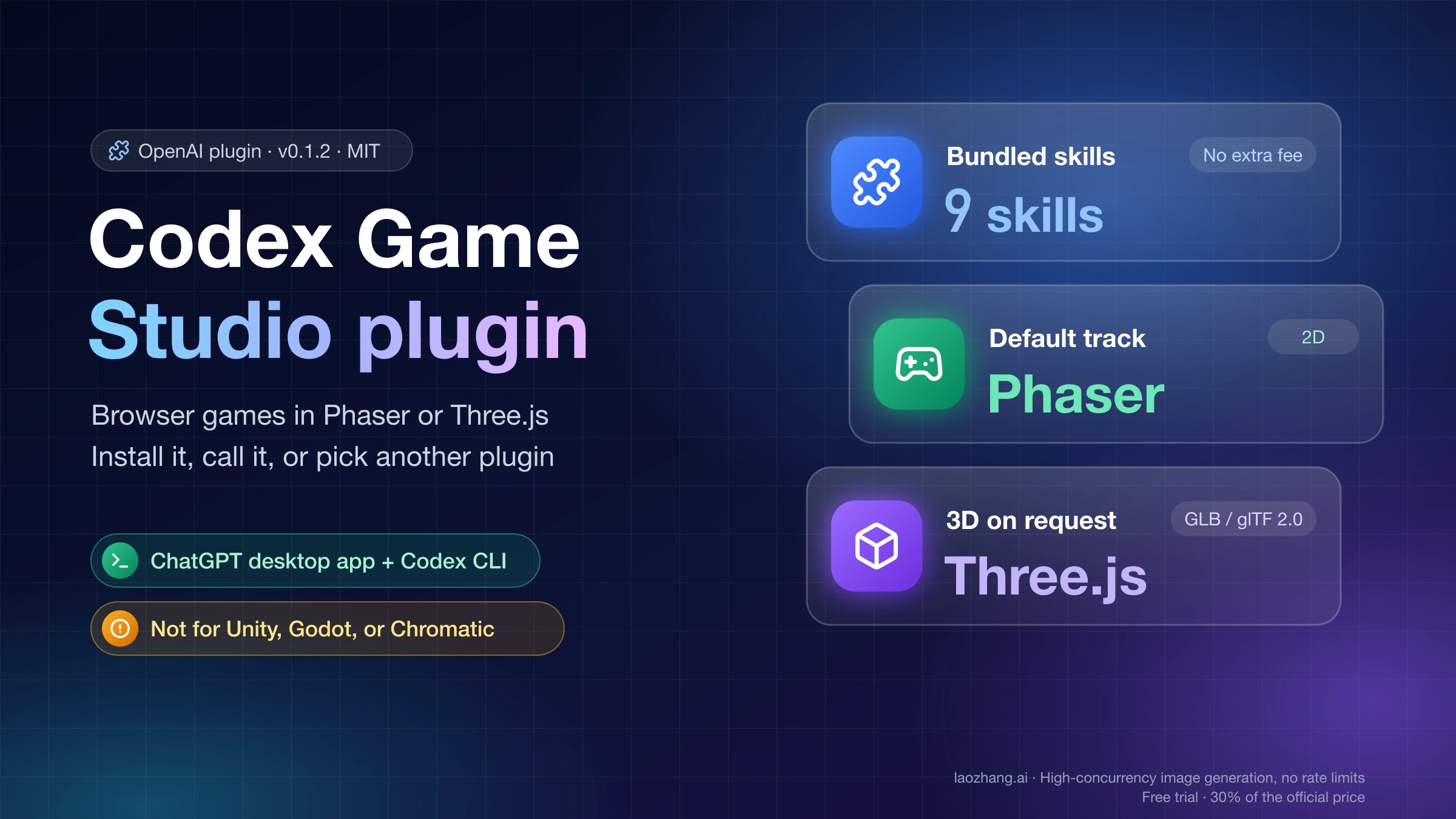
OpenAI's Game Studio plugin is worth installing only if you are building a game that runs in a browser tab: it defaults to 2D Phaser and switches to Three.js or React Three Fiber when you ask for 3D. Unity, Godot, and Game Boy Color projects need different plugins, so check which one you mean first. The Codex Game Studio plugin guide covers installation and the alternatives.
Treat permissions and marketplace source as part of the recommendation
“Official” or “available in a directory” is useful evidence, but it is not a complete security review. Before connecting a service, verify these four things:
- Identity: Which personal, organization, or service account will the plugin use?
- Scope: Can it read one repository or every repository, one project or an entire workspace, development data or production data?
- Actions: Is it read-only, or can it create, modify, send, approve, delete, or spend?
- Data path: Will untrusted tickets, web pages, documents, or customer content become tool output that Codex may need to interpret?
This matters even more in a managed organization. OpenAI documents controls that can restrict marketplace sources and reject unmatched plugin installation or marketplace refresh operations. If a company policy blocks a source, do not work around it by hunting for a mirror. Ask the administrator for the approved route.
The same principle applies to version claims. OpenAI’s documented Codex Security CLI example uses codex plugin add codex-security@openai-curated, and its documentation cautions that the public CLI marketplace can offer a different version from the hosted desktop catalog. Check the plugin’s current page and changelog before relying on a particular feature in CI or a team process.
Your one-plugin-first checklist
Before installing, answer yes to all five statements:
- I can name the repeated task this plugin will make easier.
- I know why local tools, a Skill, or a narrower MCP route are not enough.
- I understand what account and data scope the plugin will receive.
- I have one small, observable first task that avoids irreversible actions.
- I know what result would make me remove it instead of keeping it.
If any answer is no, wait. The directory will still be there after you define the work.
Start with the plugin that proves a real workflow improvement in one short session. Keep its scope tight, confirm the result, and let the next recurring bottleneck—not catalog curiosity—earn the second install.