Claude Code "Error writing file": Ctrl+O Shows the Real Cause
Claude Code's Error writing file is a label. Ctrl+O shows the real message: a changed file, a read-only folder, a cut-off tool call, or a false alarm.
On this page
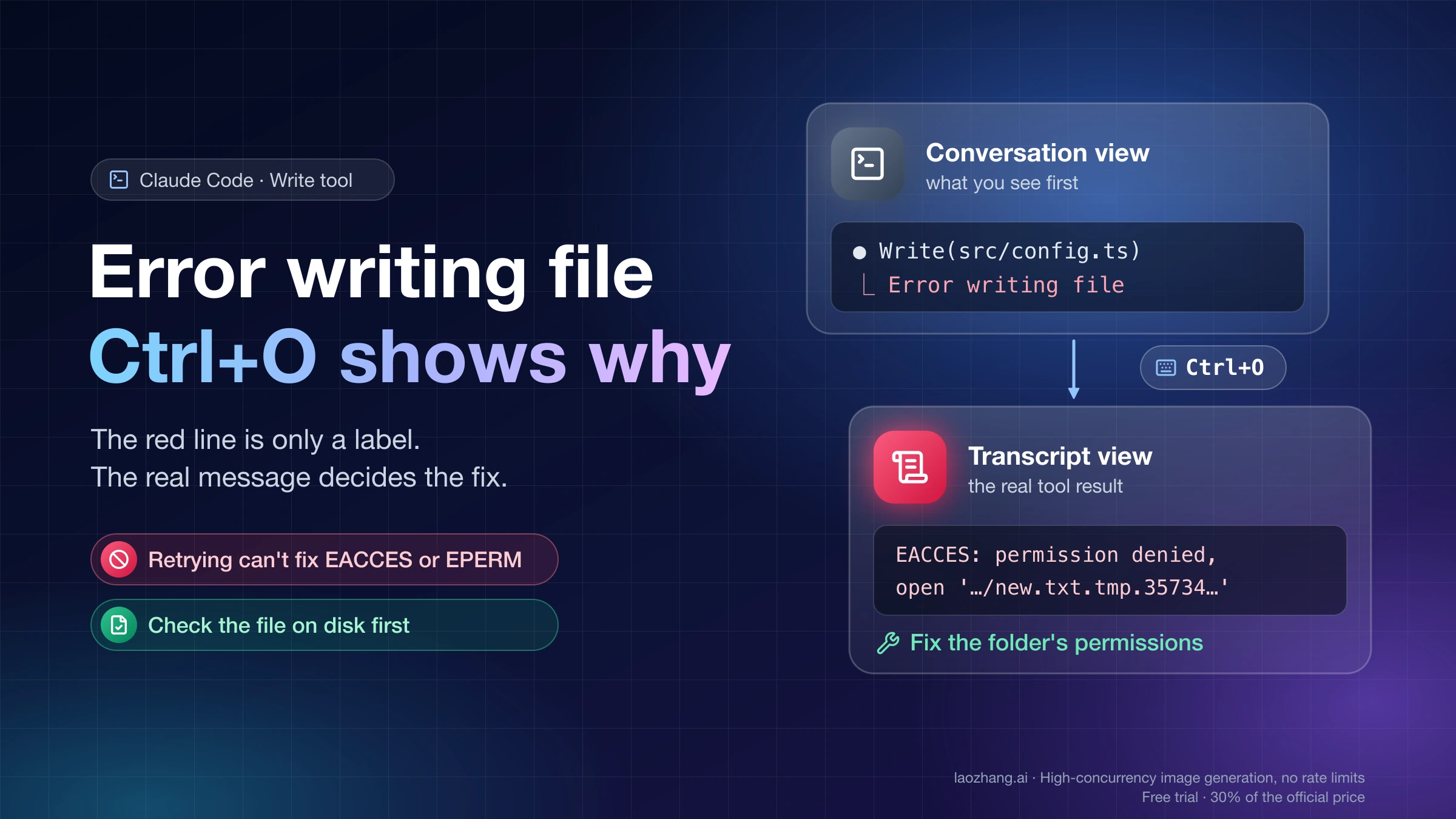
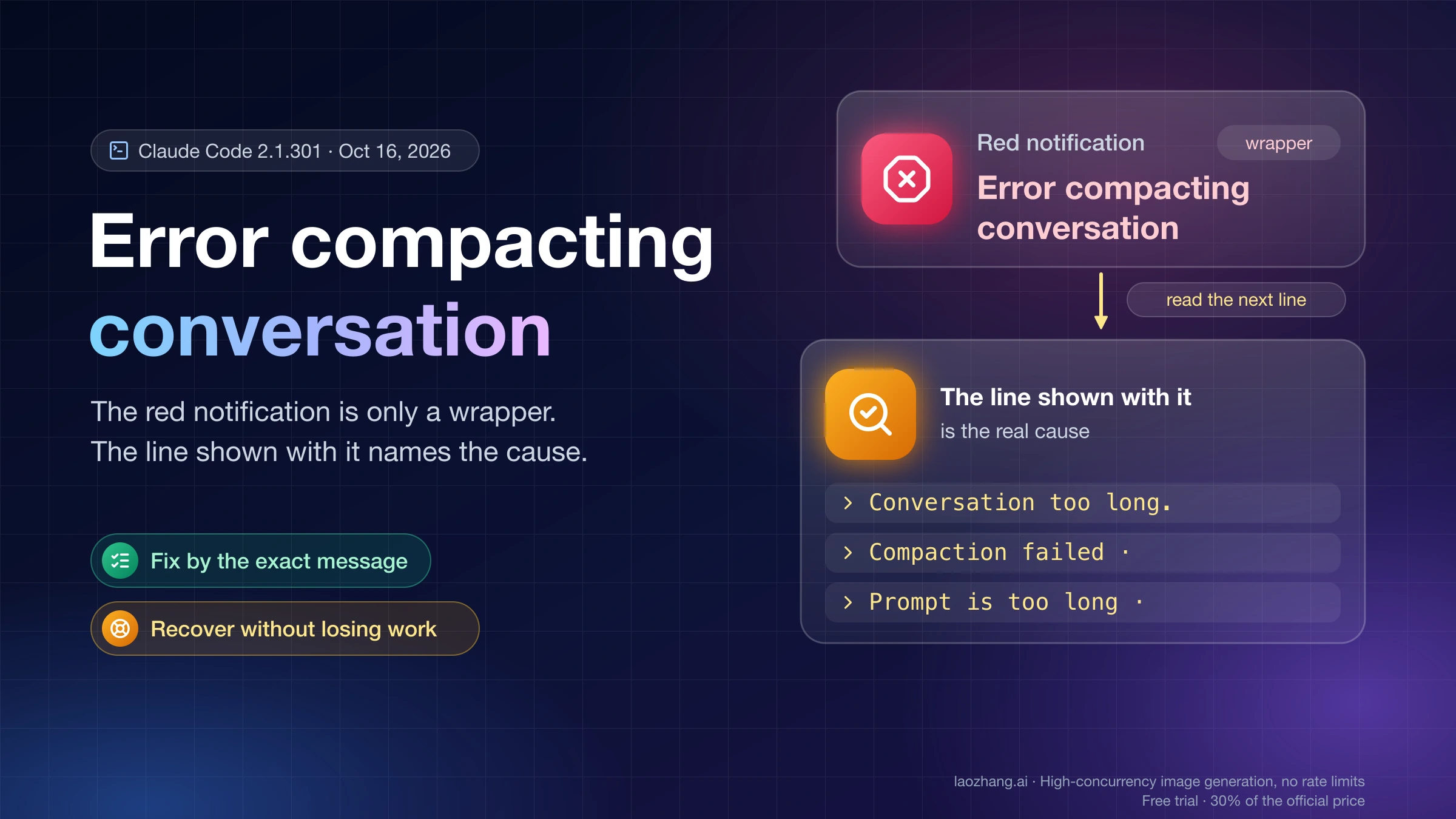
Write(path) ⎿ Error writing file is a summary line, not the error itself. Claude Code collapses a failed Write call into that red label and passes the full message to Claude, which is why Claude often retries, or switches to a Bash or python -c command, without asking you. To see what actually failed, press Ctrl+O to open the transcript view and read the tool result under the failed Write call.
That message decides the fix. In most cases it points to one of four things: the file changed after Claude last read it, the folder can't be written to, the tool call was cut off before it was complete, or a known bug reported the error even though the file was written. Before you let Claude try again, check whether the file is already on disk with the content you expected.
Where to find the real message behind "Error writing file"
In the terminal, a failed write looks like this in the normal conversation view:
● Write(src/config.ts)
  ⎿  Error writing file
The Claude Code docs describe the same pattern for blocked edits: the conversation view shows only a short Error editing file line, and the full message appears in the transcript view, which you open with Ctrl+O. The Claude Code interactive mode reference lists Ctrl+O as "Toggle transcript viewer", the screen that shows detailed tool usage and execution. Inside it:
- Scroll to the failed
Write(...)orUpdate(...)call and read the text under it. - In the classic renderer,
Ctrl+Etoggles showing all content if the result is still collapsed. - Press
q,Esc, orCtrl+Cto go back to the conversation.
Shortcuts can vary by terminal. If you're in the VS Code or JetBrains extension, or the desktop app, and can't find the expanded result, ask Claude directly: "Quote the exact error text the last Write call returned." Claude received the full tool result, so it can paste it for you.
The Claude Code error reference has no entry for the literal phrase Error writing file, because the phrase isn't the error. Search that page for the message you found behind it instead.
Check whether the file was written before Claude retries
Some Error writing file lines appear even though the write succeeded (see the known bugs below). Each retry regenerates the whole file, so a quick check can save a lot of tokens:
ls -l src/config.ts        # exists, size and time look right?
tail -n 5 src/config.ts    # ends where it should, not mid-function?
git status --short         # file shows up as new (??) or modified (M)?
git diff --stat            # line counts roughly match what Claude wrote?
On Windows PowerShell, Get-Item .\src\config.ts and Get-Content .\src\config.ts -Tail 5 do the same job. If the file is complete and correct, tell Claude the file is fine and to continue with the next step. If the file is missing, empty, or ends in the middle of a line, read the message in the transcript view and use the table below.
Error writing file: match the message to the cause
The left column is the text you'll see in the transcript view. "Reproduced" means the message was triggered on Claude Code 2.1.295 (desktop app, macOS, Opus 5.5) on October 16, 2026; the other rows come from the Claude Code docs or GitHub issues.
| Message behind the label | What it means | What to change | Where it comes from |
|---|---|---|---|
File has been modified since read, either by the user or by a linter. Read it again before attempting to write it. | The file changed on disk after Claude's last Read: an editor save, a formatter, a hook, another process | Let Claude re-read; stop whatever keeps touching the file | Reproduced |
EACCES: permission denied, open '…/new.txt.tmp.35734.7a96eba60d51' | The folder isn't writable, so Claude Code can't create its temporary file there | Fix the folder's permissions or ownership | Reproduced |
EPERM: operation not permitted in ~/Desktop, ~/Documents, ~/Downloads, or iCloud Drive | macOS privacy settings block your terminal app from that folder | Allow the folder in System Settings | Claude Code docs |
/…/src/components is a directory, not a file. To create a file inside it, include the file name in file_path. | The path points at a folder | Give the full file name | Reproduced |
InputValidationError: Write failed due to the following issues: The required parameter `file_path` is missing (or content) | The Write call arrived incomplete, usually because the output was cut off | Write the file in smaller pieces; check gateways | GitHub #895, #47189 |
API Error: Claude's response exceeded the ... output token maximum just before the failed write | The reply hit the output limit mid-file | Reply continue, or ask for one file or section per reply | Claude Code docs, GitHub #7927 |
File is not valid UTF-8. It may use a legacy encoding such as Windows-1252, Shift-JIS or GBK, or be binary | Edit refuses files in legacy encodings | Convert to UTF-8 deliberately, or edit with a shell command | Claude Code docs |
Refusing to write docs/current: it is a symbolic link. Write to the link's target path instead | The path is a symlink | Write to the real target path | Claude Code docs |
This write was blocked because the path is spelled in a form that cannot be safely resolved… | Worktree isolation can't verify the path | Usually nothing; Claude retries with the direct path | Claude Code docs |
Command failed: cygpath -u '…' | Windows Git Bash path conversion failed | See the Windows section | GitHub #25971 |
| No useful detail, and the file is fine | A known false alarm | Ignore it and update Claude Code | GitHub #29841, #24151 |
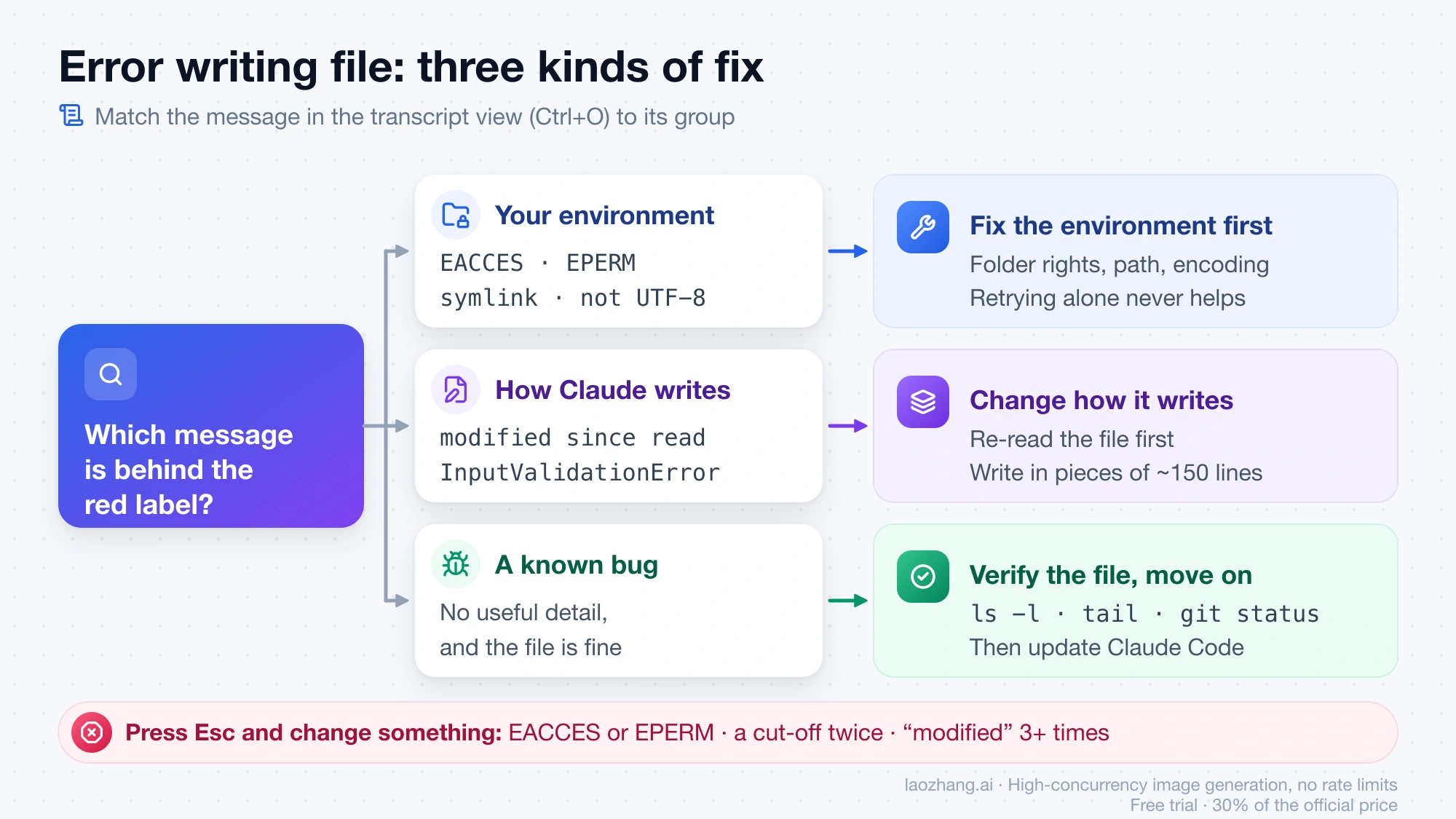
The fixes fall into three groups. Permission, path, encoding, and macOS privacy errors are about your environment, and retrying never helps until you change it. "Modified since read" and cut-off tool calls are about how Claude writes, so you change the order or size of the writes. The false alarms are bugs, where the right move is to verify the file and move on.
"File has been modified since read": something else changed the file
This message means the file on disk no longer matches the copy Claude read. Claude Code refuses to overwrite it so it doesn't wipe out changes it hasn't seen. In the October 16 test, reading a file, changing it from a separate shell command, and then calling Write produced exactly this message.
Usually Claude re-reads the file and the next attempt works. When the error repeats, look for whatever keeps touching the file between Claude's read and its write:
- An editor or IDE with the file open. A macOS report from October 2025 (GitHub issue #10498) found that simply opening or previewing the file in an IDE triggered the error with no content change; the reporter attributes it to a modification-time check. Close the file, or turn off format-on-save and auto-reload for it, while Claude works on it.
- A formatter or linter hook. A
PostToolUsehook that formats files after each edit changes the file right after Claude writes it, so the next Write to that file sees a modified file. The Claude Code hooks vs skills vs slash commands guide shows how that kind of formatter hook is set up. Keep the hook, and let Claude re-read before the next change. - Watchers and build tools. Dev servers, code generators, sync clients, and game editors can rewrite files in the background. A Windows user working in a Unity project hit a loop of the older form of the message,
File has been unexpectedly modified. Read it again before attempting to write it.(GitHub issue #11463). On Windows, a file locked by another process has also been reported to produce this misleading "modified" text (GitHub issue #10245).
For follow-up changes, the Edit tool is more forgiving than Write. Since Claude Code v2.1.208, an edit to a file that changed on disk can still apply when the text being replaced matches the file's current content exactly, according to the Claude Code tools reference. The docs describe no such allowance for Write, which replaces the whole file. If Claude keeps rewriting an existing file from scratch, asking it to use Edit for the change avoids most of these loops.
Permission errors: EACCES, EPERM, and why chmod 444 doesn't block Write
Permission errors are the one case where the transcript view gives you a precise, system-level message. Retrying never fixes them.
EACCES on a ".tmp" file means the folder is read-only
Writing into a folder with mode 555 (read and execute only) produced:
EACCES: permission denied, open '/…/rodir/new.txt.tmp.35734.7a96eba60d51'The file named in the error isn't the one you asked for. Write saves the content to a temporary file next to the target, named after the target plus .tmp., a process ID, and a random hex string (new.txt.tmp.35734.7a96eba60d51 above), and then renames it into place. That means the folder needs write permission, not just the file. To fix it:
ls -ld path/to/folder            # check owner and mode
chmod u+w path/to/folder         # if you own the folder
sudo chown -R "$USER" path/to/folder   # if an earlier sudo command left it owned by root
Permission modes such as acceptEdits or bypass mode decide whether Claude Code asks you before a write. They don't change what the operating system allows. The test above ran in bypass mode and still got EACCES. The Claude Code --dangerously-skip-permissions guide covers what each mode approves and what still blocks a call.
Why chmod 444 didn't stop Claude from overwriting a file
The same mechanism has a surprising side effect. A file set to chmod 444 (read-only for everyone) in a writable folder was overwritten by Write without any error, and its mode stayed -r--r--r-- afterward. Because the new content arrives through a temporary file and a rename, the old file's permission bits don't protect it.
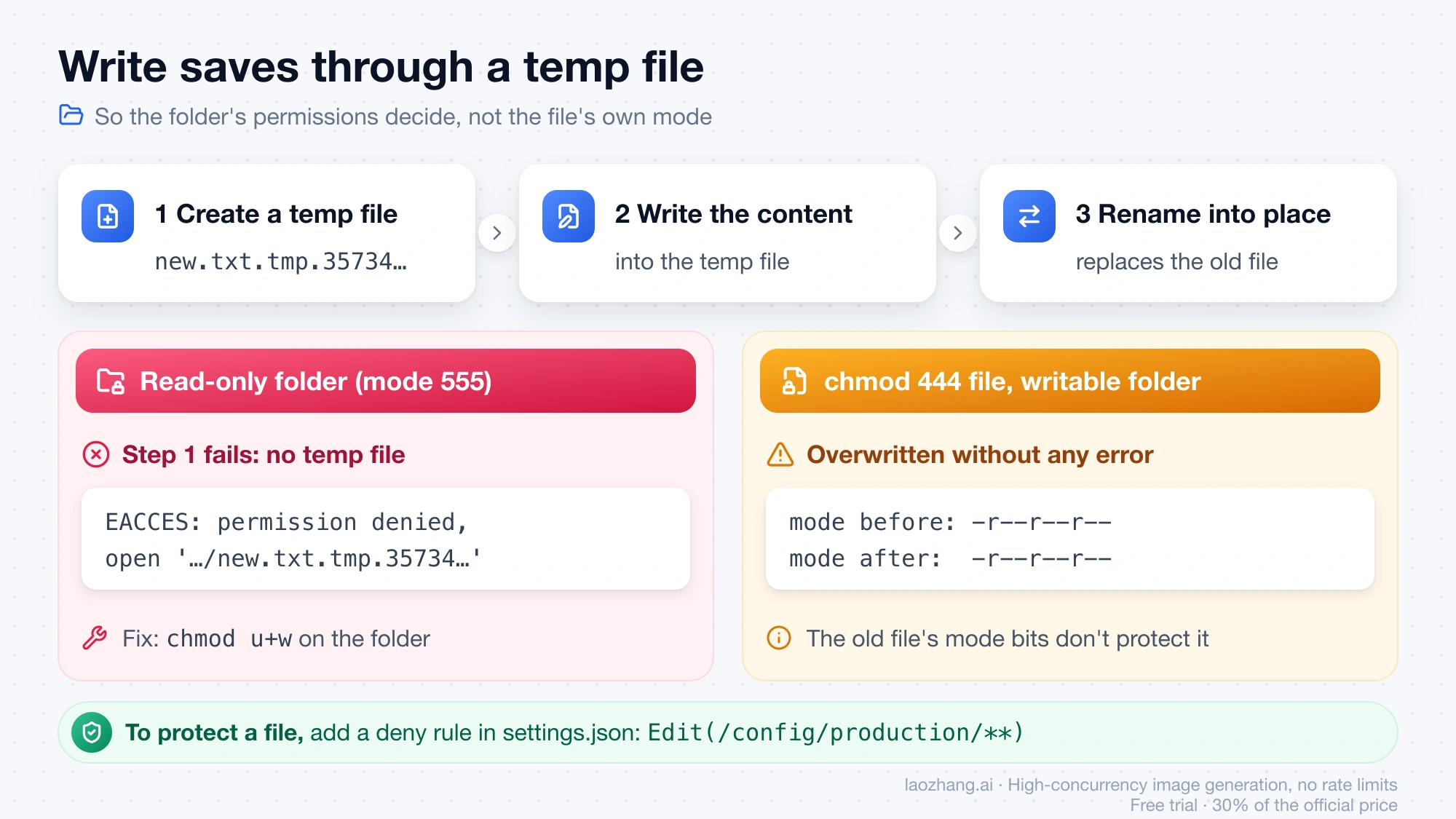
To keep Claude away from a file, use a permission deny rule instead. An Edit(...) rule applies to Edit, Write, and NotebookEdit, and a Read(...) deny rule also blocks Edit and Write on that path, including creating a new file there (Write needs v2.1.228 or later for the Read deny check, per the tools reference). For example, in .claude/settings.json:
{
  "permissions": {
    "deny": ["Edit(/config/production/**)"]
  }
}
Path patterns follow the Claude Code permissions documentation. A read-only folder also works, but then Claude can't create any file in it.
EPERM in Desktop, Documents, or iCloud Drive on macOS
On macOS, EPERM for a path in ~/Desktop, ~/Documents, ~/Downloads, or iCloud Drive usually means macOS privacy settings block your terminal app from that folder. The Claude Code docs describe this for reading the working directory; the same block applies when Claude writes there. The fix:
- Quit the terminal app completely with
Cmd+Q, reopen it, and startclaudein that folder again. - If
lsin that folder still saysOperation not permitted, open System Settings > Privacy & Security > Files and Folders, turn on the folder for your terminal app (or your IDE, if Claude Code runs inside it), and reopen the app.
Keeping the project outside iCloud-synced folders can also prevent a sync client from rewriting files mid-session, which shows up as "modified since read".
"is a directory, not a file", and folders that don't exist yet
If Claude passes a folder path to Write, the message is explicit:
/…/isdir is a directory, not a file. To create a file inside it, include the file name in file_path.Claude normally corrects this on the next attempt. A missing folder, on the other hand, is not a cause: writing to newparent/sub/file.txt when neither folder existed created both folders and the file. If you suspect a path problem, compare the path in the Write(...) line with your project layout, especially when two folders have similar names. One user found that setup steps read from one directory while Write targeted a similarly named one (GitHub issue #51962).
"InputValidationError: file_path is missing": the Write call was cut off
This message means the Write call reached Claude Code without its required parameters:
Error: InputValidationError: Write failed due to the following issues:
  The required parameter `file_path` is missing
  The required parameter `content` is missing
This usually isn't Claude forgetting the path. Reports in GitHub issue #895 (still open, 55 comments as of October 16, 2026) and its duplicates tie it to large files, long sessions, and subagents: the reply that carries the file content gets cut off, and what arrives is an incomplete tool call. A related report (GitHub issue #7927) shows Error writing file right after API Error: Claude's response exceeded the 32000 output token maximum while generating large test scripts on an old version.
The Claude Code docs explain the output limit itself. When a streaming request fails, Claude Code re-sends it without streaming, which caps the reply at 64,000 output tokens, and CLAUDE_CODE_MAX_OUTPUT_TOKENS can't raise that cap. Before v2.1.299, a reply cut off on such a re-sent request ended the turn without any message, as if it were complete.
Gateways and third-party models make this more likely, according to user reports. One commenter on issue #895 traced failures through a LiteLLM proxy: a streaming error made Claude Code fall back to a non-streaming request, that route capped output at 16,000 tokens on their GitHub Copilot Enterprise setup, and the tool call was truncated mid-parameter. That analysis comes from a user, not from Anthropic. Another user reported every tool call arriving with empty parameters after switching from GLM 4.5 to GLM 4.7.
What works, according to the docs and the users in those threads:
-
Stop the retries. Each one regenerates the same large file and fails the same way.
-
Ask for smaller pieces. The docs suggest "one file or one section per reply". In the issue threads, the widely confirmed workaround is a short skeleton first, then Edit calls of about 100–200 lines each.
-
Make it the default for the project with a line in
CLAUDE.md:When creating a file longer than about 150 lines, write a short skeleton with Write first, then add the rest with Edit in sections of about 150 lines. -
Reply
continueif Claude wrote part of its answer before the cut-off. -
Update Claude Code to v2.1.299 or later so a cut-off re-sent reply is reported instead of ending silently. Run
claude update; the latest npm version was 2.1.301 as of October 16, 2026. -
Test the direct route. If you run Claude Code through a gateway, proxy, or non-Anthropic model, try the same task with a direct Anthropic login. The Claude Code API configuration guide shows which settings switch the route, and the Claude Code with OpenRouter and DeepSeek guide covers checking that a third-party model handles tool calls.
If the session stalls with partial response received instead, that's a different failure covered in the Claude Code stream idle timeout guide.
Existing files: read-before-write rules and non-UTF-8 encodings
Two Write rules only apply when the file already exists.
Read before overwrite. According to the tools reference, Claude Opus 4.6, Claude Haiku 4.5, and older models must read an existing file in the current conversation before overwriting it, so a Write to an unread existing file fails. Newer models can overwrite an unread file when reading it wouldn't need a permission prompt and the Read tool is available (v2.1.228 and later; before that, every model needed the read). Jupyter notebooks, and files read only partially with a PARTIAL view notice, need a full read on every model. In the October 16 test, Opus 5.5 overwrote a never-read file without error, and a read limited to the first 3 lines of a 162 KB file did not block the next Write, because that read didn't carry a PARTIAL view notice. If you use an older model and Write fails on an existing file, have Claude Read it first. Viewing it with cat, head, tail, sed -n, grep, or rg on that one file, without pipes, also counts.
Legacy encodings. Edit refuses files that aren't valid UTF-8, such as Windows-1252, Shift-JIS, or GBK text, and leaves them untouched. That refusal is recent: before v2.1.296, Edit and NotebookEdit applied the change anyway and saved every byte they couldn't decode as U+FFFD, which silently corrupts the file. On those versions, update Claude Code before letting it edit legacy-encoded files (Claude Code error reference: File is not valid UTF-8). Write is different: it can still replace such a file, unless the new content contains the replacement character U+FFFD, and it saves the result as UTF-8, so the original encoding is lost. If other tools expect the old encoding, commit the file first, then either convert it to UTF-8 on purpose (for example with iconv) or ask Claude to make the change with a shell command that keeps the encoding.
Known bugs: "Error writing file" when the file was written anyway
These GitHub reports describe the red line appearing although the write worked, or failing once and succeeding on retry:
| Report | Versions reported | What happens | Status |
|---|---|---|---|
| GitHub issue #29841 | 2.1.63, macOS | Write with a relative path (app/Mcp/Tools/…) shows Error writing file for every file, but all files are on disk with the expected content | Closed as stale on March 29, 2026; no fix noted |
| GitHub issue #24151 | 2.1.37 (WSL2), 2.1.42 (Ubuntu), 2.1.50 (Manjaro), also macOS; last working 2.1.29 | In plan mode, the first write of the plan file always shows Error writing file, then the automatic retry succeeds | Closed as stale on April 5, 2026; no fix noted |
A commenter on #24151 saw the same orange line after answering a permission prompt with "Yes" and pressing Tab to add a note. Both issues were closed by an inactivity bot, not marked as fixed, so whether current versions still do this isn't documented. Neither was reproduced on 2.1.295.
The practical rule: if the file passes the check above, the red line is noise. Update with claude update, and if it keeps happening on the latest version, open a new issue that references the old one.
Error writing file on Windows: Git Bash quoting and cygpath failures
Two Windows reports describe failures that don't depend on the file at all:
- Special characters in the content. On Windows 10 with Git Bash, Write and Edit repeatedly failed with
Error writing fileandError editing filewhen the content contained single quotes, backslashes, or XML-style closing tags (GitHub issue #63838, Sonnet 4.5). Claude eventually fell back topython -cto write the file. - cygpath errors. On Windows with MINGW64, every Write failed with
Command failed: cygpath -u '…', and the error referenced a short 8.3-style temp path (C:\Users\HIPOLI~1\AppData\Local\Temp) (GitHub issue #25971, closed as a duplicate of #24738).
Neither was reproduced, and neither issue records a fix. If you see either one, update Claude Code first. A Bash or python -c fallback can get the file written, but check the result for broken escaping, especially quotes and backslashes in the content, before you rely on it.
"Error editing file": the same label for the Edit tool
Update(path) ⎿ Error editing file hides the real message the same way, and Ctrl+O shows it. The Edit tool replaces an exact text snippet (old_string) with new text, so its failures follow from that, per the tools reference:
- No exact match. One character of whitespace or indentation difference is enough to miss. Ask Claude to re-read the file and copy the snippet exactly.
- More than one match. The snippet must appear once, unless Claude sets
replace_all. A longer snippet with surrounding lines fixes it. - Stale or unread file. The same model split as Write applies to reading first. Since v2.1.208, a file changed on disk can still be edited if the snippet matches its current content; otherwise Claude reads it again.
- Non-UTF-8 file. Edit refuses it, as described above.
- A
Readdeny rule on that path blocks Edit, including creating a new file (v2.1.208 and later).
One user traced a loop of repeated Error editing file lines to the file being listed in .gitignore (GitHub issue #8750). That's a single, unconfirmed report, but it's worth a look if nothing else fits.
When to stop Claude from retrying "Error writing file"
Claude Code's docs note that Claude corrects most tool errors on its own, and one retry is often fine. Interrupt with Esc and change something when:
- The file is already correct. You're looking at a false alarm. Tell Claude the file is done.
- The message is
EACCES,EPERM, or a symlink refusal. Retrying can't change the environment. Fix permissions or the path first. InputValidationErroror an output-limit error shows up twice. Ask for a skeleton and smaller pieces, and check your gateway.- "Modified since read" repeats three or more times. Something keeps touching the file. Find it before Claude spends more tokens.
- Claude falls back to heredocs or
python -cfor every file. That suggests a Windows quoting bug or a broken tool route, not a one-off.
If the whole session crashes rather than a single tool call failing, the Claude Code process exited with code 1 guide covers that branch.
What was reproduced on Claude Code 2.1.295, and what wasn't
Seven cases were run on October 16, 2026 with Claude Code 2.1.295 in the Claude desktop app on macOS, using Opus 5.5 in bypass permission mode:
| Case | Result |
|---|---|
| Write into a folder with mode 555 | EACCES on a new.txt.tmp.… temp file |
Write a chmod 444 file in a writable folder (after Read) | Overwritten; mode stayed -r--r--r-- |
| Write to a path that is a folder | … is a directory, not a file … |
| Read, change the file from a shell, then Write | File has been modified since read … |
| Write an existing file never read in the session | Succeeded |
| Read 3 lines of a 162 KB file, then Write it | Succeeded |
| Write into two folders that don't exist yet | Folders and file created |
Not reproduced: the Windows Git Bash and cygpath failures, output-limit cut-offs, the relative-path and plan-mode false alarms, IDE-triggered "modified since read", and the CLI's red short line itself (the desktop app session showed the tool result text). Claude Code 2.1.301 was the latest npm release as of October 16, 2026, so results on newer versions may differ.
FAQ
Why isn't Claude Code creating files at all?
When every Write fails, the cause is almost always environmental, not the content. Check the message in the transcript view: EACCES points to folder permissions, EPERM on macOS to privacy settings, cygpath on Windows to Git Bash path conversion, and InputValidationError with both parameters missing on every call to a gateway or third-party model that's dropping tool parameters. A Read or Edit deny rule covering the folder also blocks new files.
Does --dangerously-skip-permissions fix Error writing file?
No. Bypass mode only removes Claude Code's own approval prompts. It doesn't change operating system permissions, macOS privacy settings, or the size of a reply, and the EACCES test above ran in bypass mode. It also doesn't override deny rules, which is useful if you want to protect certain files.
Sources15
External pages this guide links to, in the order they appear. Last updated Oct 16, 2026.
Sources15
External pages this guide links to, in the order they appear. Last updated Oct 16, 2026.
- 1.Claude Code interactive mode referencecode.claude.com/docs/en/interactive-mode
- 2.Claude Code error referencecode.claude.com/docs/en/errors
- 3.GitHub issue #10498github.com/anthropics/claude-code/issues/10498
- 4.GitHub issue #11463github.com/anthropics/claude-code/issues/11463
- 5.GitHub issue #10245github.com/anthropics/claude-code/issues/10245
- 6.Claude Code tools referencecode.claude.com/docs/en/tools-reference
- 7.Claude Code permissions documentationcode.claude.com/docs/en/permissions
- 8.GitHub issue #51962github.com/anthropics/claude-code/issues/51962
- 9.GitHub issue #895github.com/anthropics/claude-code/issues/895
- 10.GitHub issue #7927github.com/anthropics/claude-code/issues/7927
- 11.GitHub issue #29841github.com/anthropics/claude-code/issues/29841
- 12.GitHub issue #24151github.com/anthropics/claude-code/issues/24151
- 13.GitHub issue #63838github.com/anthropics/claude-code/issues/63838
- 14.GitHub issue #25971github.com/anthropics/claude-code/issues/25971
- 15.GitHub issue #8750github.com/anthropics/claude-code/issues/8750