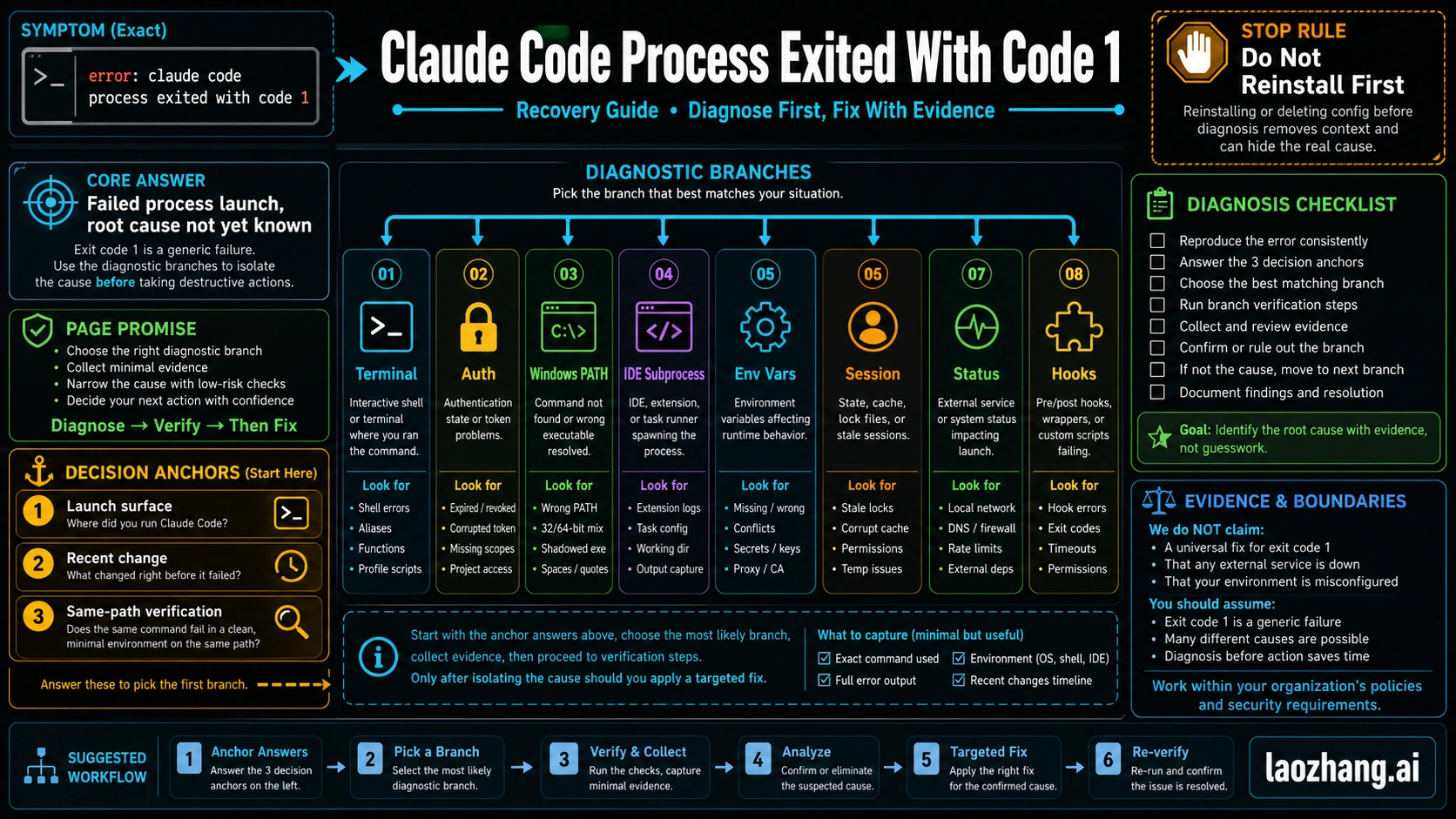
If Claude Code shows error: claude code process exited with code 1, the launched process failed, but the message has not identified the root cause. Start by matching the failing launch surface and the most recent change, then make one branch-specific change and rerun the exact same path before you reinstall, clear config, or delete credentials.
Direct Answer
Treat exit code 1 as a branch-selection problem, not as proof that Claude Code is broken. First identify where the process was launched: raw terminal, IDE subprocess, auth route, Windows/PATH, wrapper or hook, old session, or live service/version issue. Change one variable, rerun the exact same failing path, and stop when the same path still fails so you can preserve evidence instead of destroying the clue with a reinstall.
Start With the Branch Board
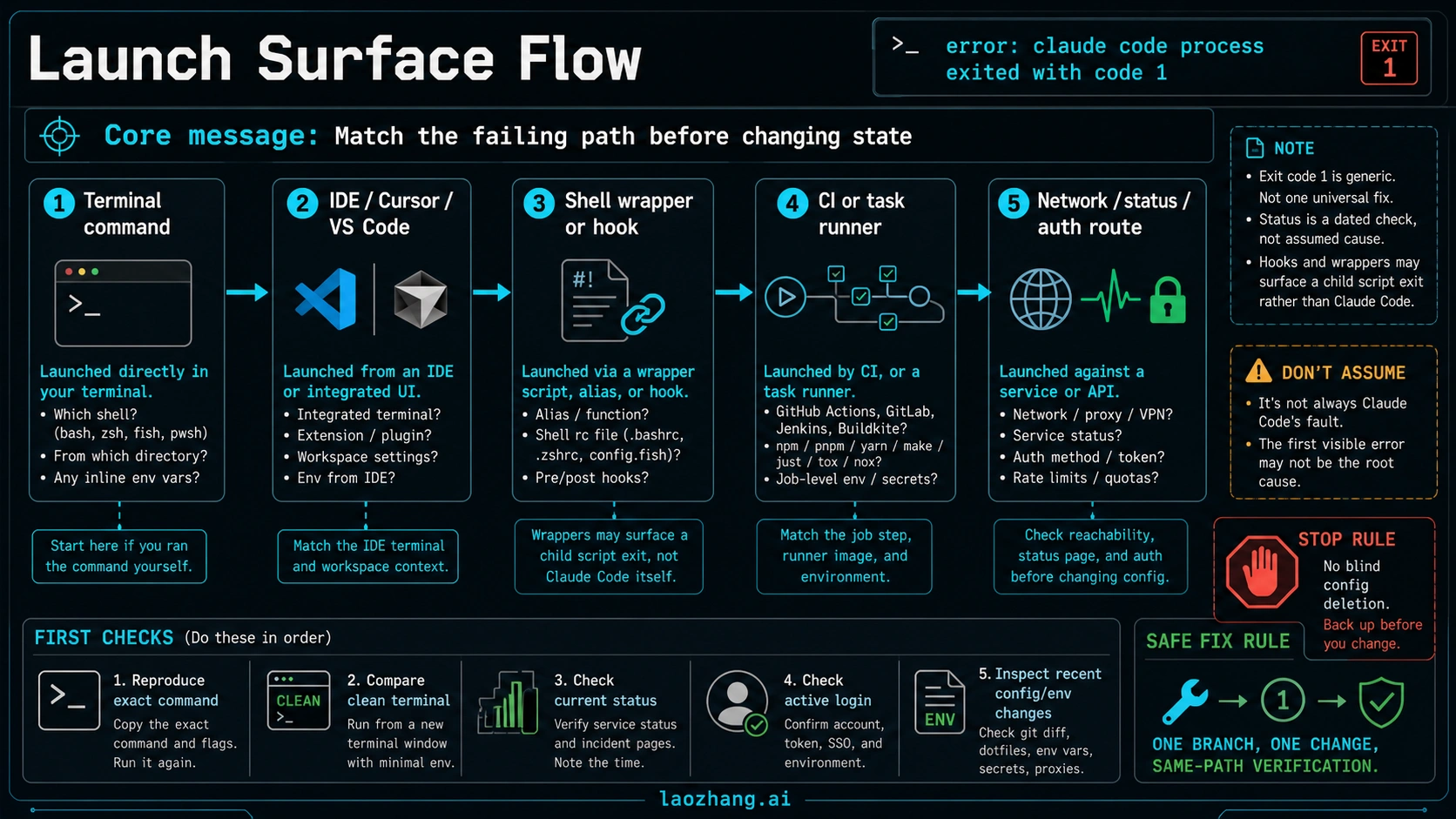
Exit code 1 is useful as a symptom, not as a diagnosis. It tells you a process returned a general failure. It does not tell you whether the failure belongs to the terminal command, the Claude Code binary, an IDE extension, a wrapper script, a hook, an auth route, a network condition, a stale session, or a recent update.
Use this board before changing state:
| Visible condition | First branch to test | Safest first move | Same-path verification | Escalate when |
|---|---|---|---|---|
| The command fails in a normal terminal | Terminal startup or install path | Run the same command from a fresh shell in the project directory, then run claude doctor | Retry the exact command with the same flags | The fresh shell and doctor output still show the same failure |
| The error appears only inside VS Code, Cursor, JetBrains, or an integrated terminal | IDE subprocess | Run the same command in a raw system terminal outside the IDE | Compare IDE launch path against the raw terminal result | Raw terminal works but the IDE-spawned process still exits |
| The failure started after login, account switching, token changes, or route changes | Auth/session route | Check /status, then refresh login only for the active route | Retry the same login or launch path | Status is normal and the same auth path still fails |
| Windows reports PATH, Git, shell, or executable confusion | Windows prerequisites | Confirm Git, shell, PATH, and the claude binary location before reinstalling | Open a new terminal and rerun the same command | The prerequisite check passes but launch still exits |
| The error appears after a hook, alias, npm script, CI step, or task runner | Wrapper or hook route | Bypass the wrapper and run the underlying claude command directly | Re-enable one wrapper layer at a time | Direct Claude Code works but the wrapper path still exits |
| One old conversation or workspace keeps failing | Session state | Start a fresh minimal session or workspace without deleting global config | Run the smallest same task again | A fresh session fails the same way |
| Many users report failures after a new version or the status page shows an active incident | Version or service route | Record current version and status check time, then avoid local churn | Retry after status/version evidence changes | The same path still fails with evidence captured |
The first move is branch selection, not a fix list. A reinstall can be right later, but it is a poor first move because it can erase the condition that would have told you what failed. The same is true for deleting configuration, clearing every token, or changing proxy settings and shell files at the same time.
What the Error Means
The exact wording matters because it helps you recognize the symptom, but the meaning is narrow: the process Claude Code tried to run exited with a general failure code. That can happen before a request ever reaches Anthropic, inside an IDE-spawned subprocess, after a local hook returns failure, during auth/session startup, or while a live service route is degraded.
That is why a single answer such as "log out and back in" or "reinstall Claude Code" is too fragile. Those actions may help one branch and damage another. If the root cause is an IDE subprocess environment, logging out wastes time. If the root cause is a hook script returning code 1, reinstalling Claude Code leaves the hook unchanged. If the root cause is a live incident, local edits create noise while the service route is the owner.
Your working rule should be:
- Change one variable at a time.
- Keep the failing launch path constant.
- Verify the same path after the change.
- Stop and preserve evidence when the same path still exits.
That rule is the difference between recovery and random local churn.
Status, Auth, and Login Branches
Start here when the failure began around login, account switching, token refresh, SSO, subscription/API-key routing, or a visible service degradation. Claude Code's official troubleshooting surfaces include status checks, diagnostic commands, install/login troubleshooting, and support escalation routes. Use those surfaces before guessing.
Run the branch like this:
- Check Anthropic status at the moment you are debugging. Status is volatile, so a screenshot from yesterday is not proof for today's failure.
- In Claude Code, use
/statusto confirm the active route and account context when the tool can start far enough to accept slash commands. - If the problem is clearly a login path, refresh the login path rather than deleting all local config.
- If repeated prompts or token behavior looks broken, use the documented troubleshooting route such as
claude doctor,claude setup-token, or logout/login only for the route you are testing.
The key distinction is status versus auth. A status incident means the safest move is usually to stop changing local state and retry later on the same path. An auth problem means the active route or credential state needs inspection. Those are not the same job.
This branch also protects you from confusing nearby problems. If your evidence turns into an HTTP 500, server-side API error, or request ID problem, switch to the narrower Claude Code API Error 500 guide. If the evidence turns into subscription versus API-key billing confusion, use the Claude Code API key vs subscription guide. Do not make this exit-code page absorb those jobs unless the process-exit symptom is still the visible owner.
Windows, PATH, and Install Branches
Use the Windows/install branch only when the evidence points there: command not found, wrong executable, PATH mismatch, missing Git, unsupported shell, blocked binary, permission failure, or a first-run setup problem. The process-exit message alone is not enough to prove install failure.
Run these checks before reinstalling:
bashclaude --version
which claude
claude doctor
On Windows, use the platform equivalent when needed:
powershellwhere claude
git --version
claude --version
If claude --version cannot run from a fresh terminal, you are probably not in the same branch as a working install that crashes later. Confirm the binary path, shell, Git availability, and PATH order first. If those checks fail, the Claude Code install guide is the better sibling because it owns prerequisites and install methods.
If the binary exists and claude --version works, slow down before reinstalling. A working binary plus a process exit during a specific project launch often points away from install and toward environment, IDE, auth, hooks, or session state.
IDE, Environment, and Session Branches
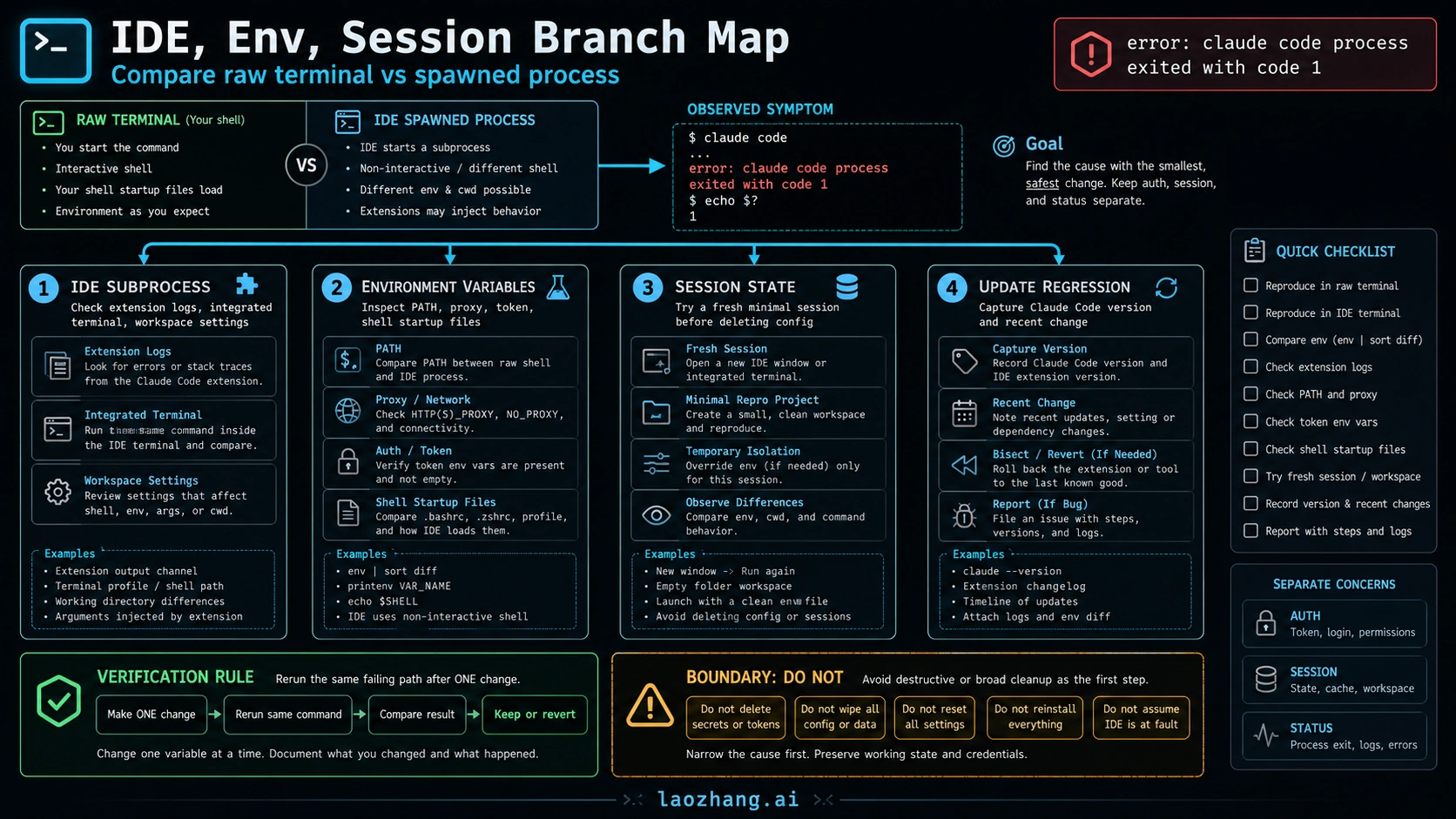
This is the branch many quick-fix pages underplay. The same command can behave differently when launched by an IDE, an integrated terminal, a debugger, a task runner, or a shell startup file. A public Claude Code issue tied this exact process-exit wording to VS Code auto-attach/debugger environment behavior. That does not prove every IDE failure has that cause, but it proves the branch is real enough to test directly.
Use a raw-terminal comparison:
bashpwd
claude --version
claude
Then run the same path from the IDE or integrated terminal. If the raw terminal works and the IDE path fails, inspect the IDE branch:
- extension output logs
- integrated terminal shell type
- workspace settings and launch/task configuration
- injected environment variables
- working directory differences
- debugger or auto-attach behavior
If both paths fail, move down to environment and session state. Compare only the variables that can change launch behavior: PATH, proxy variables, token/auth variables, shell startup files, Node or shell shims, and corporate network settings. Avoid dumping or deleting secrets. The goal is to identify a difference, not to wipe the machine.
Session state is a separate branch. If one project, one old conversation, or one resumed context keeps failing, create a fresh minimal session or a clean temporary workspace and rerun the smallest version of the same task. If the fresh session works, the old state is part of the failure. If the fresh session fails the same way, you have ruled out one branch and can move on with better evidence.
Hooks, Wrappers, and Task Runners
Hooks and wrappers can make the outer error look like Claude Code failed when a child command actually exited. Claude Code's hook documentation distinguishes hook exit behavior, including nonzero exits, from the outer process. That matters because a hook returning code 1 is not the same thing as Claude Code itself crashing at startup.
Test this branch with a bypass:
- Run
claudedirectly from a fresh terminal. - Temporarily bypass the alias, npm script, task runner, CI step, shell function, or hook path.
- Reintroduce one layer at a time.
- Capture the first layer that brings back
process exited with code 1.
If direct Claude Code works but npm run ai, a pre-commit hook, a shell function, or a CI job fails, the wrapper owns the first fix. Inspect that wrapper's exit code, permissions, timeout, working directory, and environment. Do not reinstall Claude Code until the direct command fails too.
This branch is also where timeouts belong. A wrapper can kill a process after a timeout and surface a generic exit. The verification path is not "try more commands"; it is "run without the timeout layer, then add the layer back with logs."
Update Regression or Live Incident Branch
Version and incident evidence is real but volatile. Treat it as a dated check, not a permanent explanation. If the failure started immediately after an update, record:
claude --version- the package or installer route you used
- operating system and shell
- IDE extension version if an IDE is involved
- whether a fresh terminal reproduces the failure
- whether Anthropic status showed a relevant incident at the time
Then run the same-path test. If the problem appears only after a version change and disappears when using a known-good route or after an official fix, you have a version branch. If many paths fail during an active incident and recover after the incident resolves, you have a service branch. If neither of those is true, do not keep blaming "the latest update" without proof.
When you file an issue, include branch evidence rather than only the final error line. "Process exited with code 1" is too generic by itself. "Version X, macOS, zsh, raw terminal works, VS Code spawned process fails after auto-attach is enabled" is actionable. So is "status normal, direct terminal fails, claude doctor output attached, fresh session also fails."
Same-Path Verification and Escalation Packet
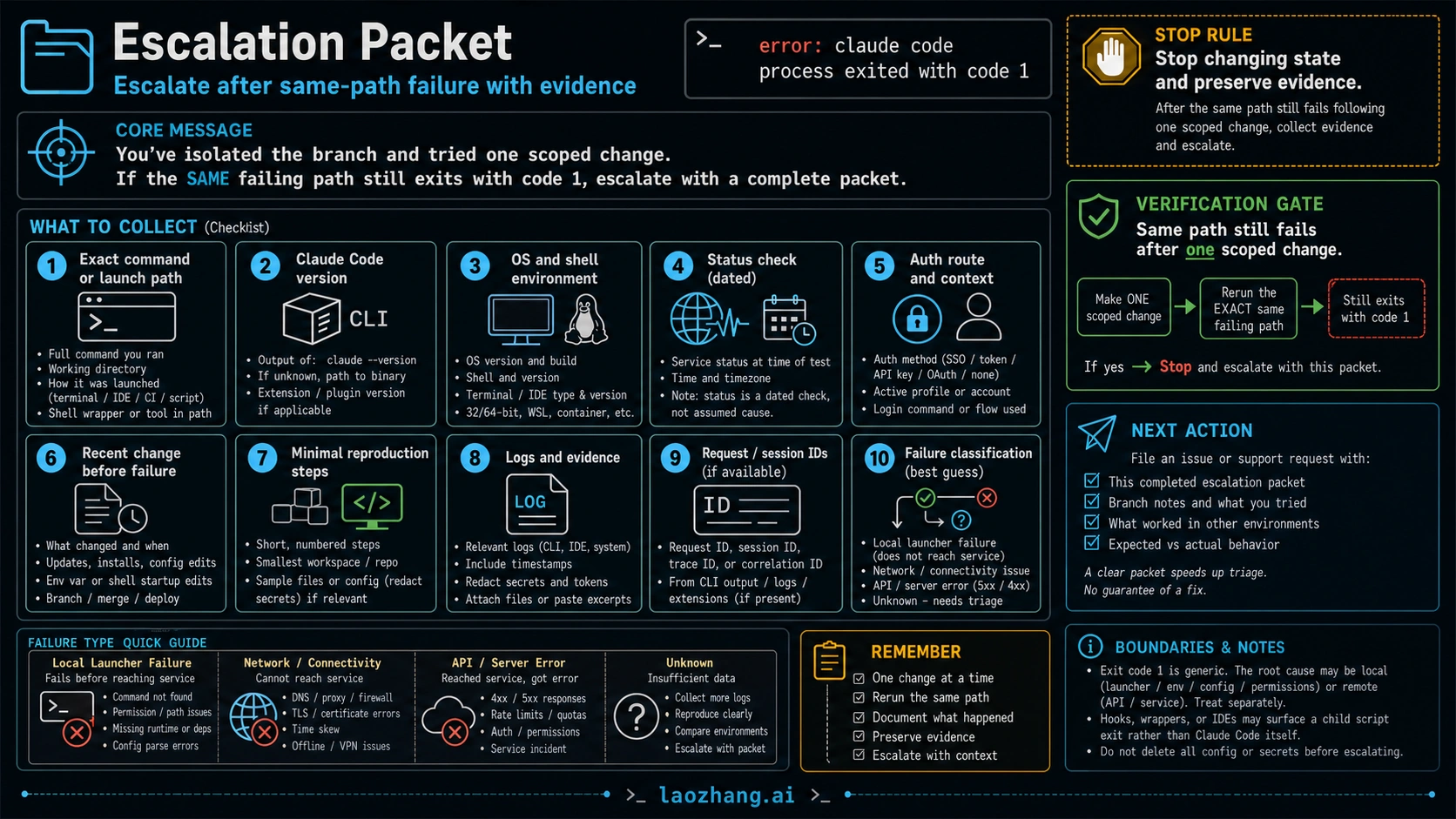
The fix is not complete when a different path works. It is complete when the same failing path works after one scoped change. If the original failure happened inside VS Code, a working raw terminal only proves the raw terminal branch. You still need to fix or bypass the IDE-spawned path. If the original failure happened through a wrapper script, a working direct command only proves the wrapper is suspicious.
Before escalating, collect a compact packet:
- exact command or launch path
- full error text
- Claude Code version
- operating system, shell, and IDE if relevant
- status check time and result
- active auth route or login flow tested
- recent changes before the failure
- raw terminal versus IDE/wrapper comparison
- smallest reproduction steps
- logs, session IDs, request IDs, or correlation IDs when available
Do not invent IDs if you do not have them. For local launcher failures, there may be no API request ID because the process may not have reached a service. That absence is itself useful classification: local launcher failure, network/connectivity failure, API/server error, or unknown.
Escalate when the same path still fails after the correct branch-specific first move and the evidence packet is clean. Until then, continue branch diagnosis. Another random fix makes the report worse.
Quick Fixes by Branch
| Branch | Do this first | Avoid this first | Good evidence that it worked |
|---|---|---|---|
| Terminal startup | Fresh shell, same directory, claude doctor | Deleting all config | Exact same command starts |
| Auth/session | /status, targeted login refresh | Rotating every token | Same login or launch path succeeds |
| Windows/PATH | where claude, git --version, PATH check | Reinstalling without PATH evidence | Fresh terminal finds expected binary |
| IDE subprocess | Raw terminal comparison | Blaming Claude Code globally | IDE path matches raw terminal after one change |
| Env variables | Inspect PATH/proxy/token/shell startup | Printing or deleting secrets | One variable difference explains the failure |
| Hooks/wrappers | Bypass wrapper and reintroduce layers | Changing Claude Code before testing direct launch | Direct path works and wrapper failure is isolated |
| Status/version | Record status time and version | Treating old reports as current proof | Same path recovers after incident or version evidence changes |
| Unknown | Preserve packet and escalate | More random fixes | Support or issue report has branch notes |
FAQ
Does error: claude code process exited with code 1 mean Claude Code is down?
Not by itself. It means the launched process failed. Check current status, but keep status as one branch. Local terminal, IDE, environment, hook, auth, and session branches can produce the same visible message.
Should I reinstall Claude Code first?
Usually no. Reinstall only after the install branch has evidence: missing binary, broken PATH, unsupported shell, corrupted install, or prerequisite failure. If the binary works in one path and fails in another, reinstalling is usually noise.
What is the fastest safe first check?
Match the launch surface. Ask whether the error appeared in a raw terminal, an IDE, a wrapper, a hook, CI, login, or one old session. Then run one branch-specific check and rerun the exact same path.
What if the error happens only in VS Code or Cursor?
Run the same command in a raw terminal outside the IDE. If raw terminal works, inspect extension logs, integrated-terminal shell, workspace settings, debugger/auto-attach behavior, environment variables, and working directory differences before changing global Claude Code config.
Is this the same as Claude Code API Error 500 or rate limits?
No. A process exit can happen before a request reaches the API. If your logs show an actual HTTP 500, use the API Error 500 guide. If the evidence points to usage exhaustion or explicit limits, use the Claude Code rate limit guide.
The Working Rule
Treat Claude Code exit code 1 as a branch-routing problem. Identify the launch surface, test the least destructive owner first, change one variable, rerun the same failing path, and escalate only when that same path still fails with evidence.