Claude Code API Configuration: Keys, Settings, Models, and Gateways
For direct Anthropic API access, set ANTHROPIC_API_KEY and approve it in the interactive CLI. Gateways need their own endpoint and credential; cloud providers and Desktop use separate configuration paths.
On this page
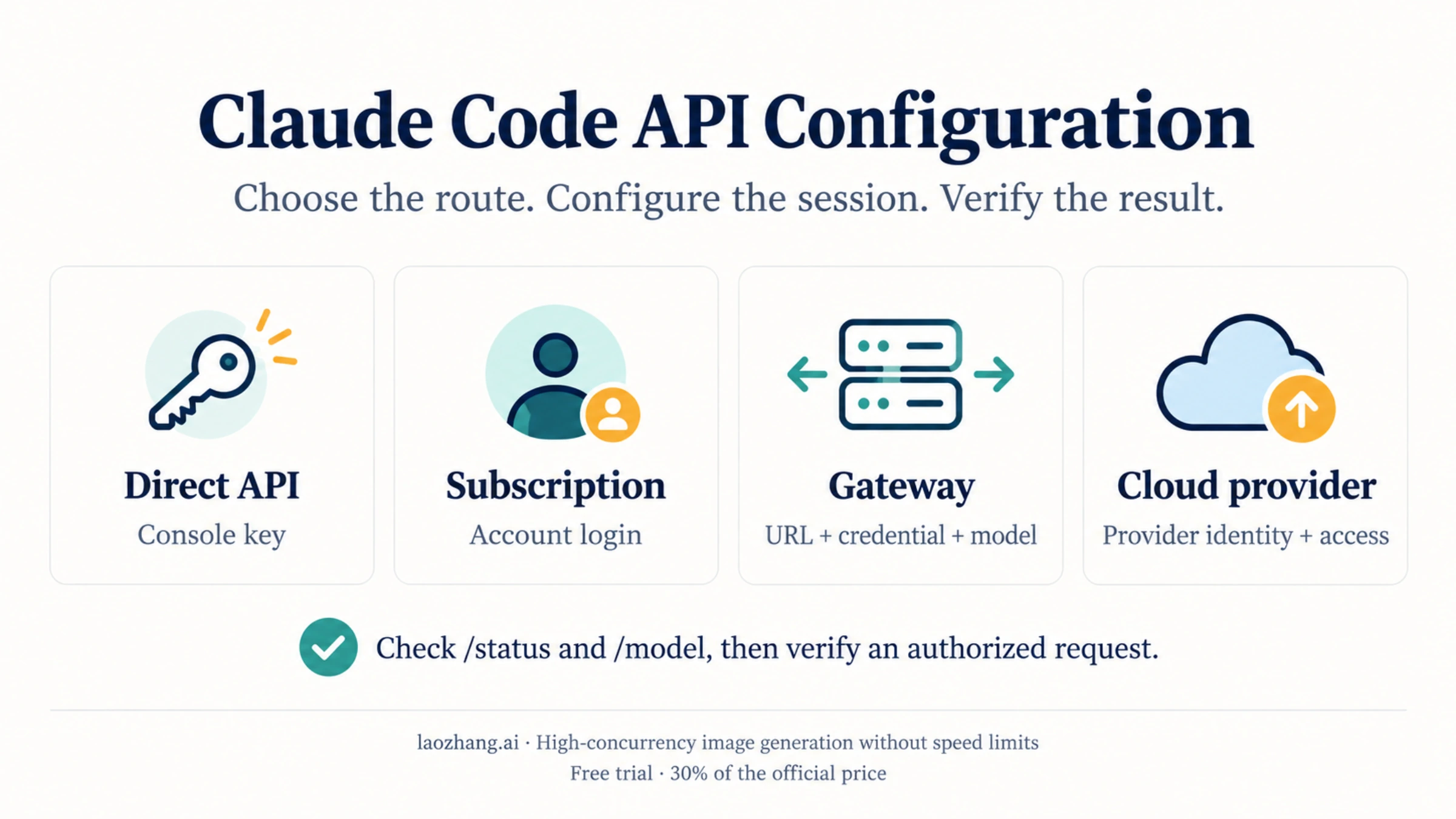
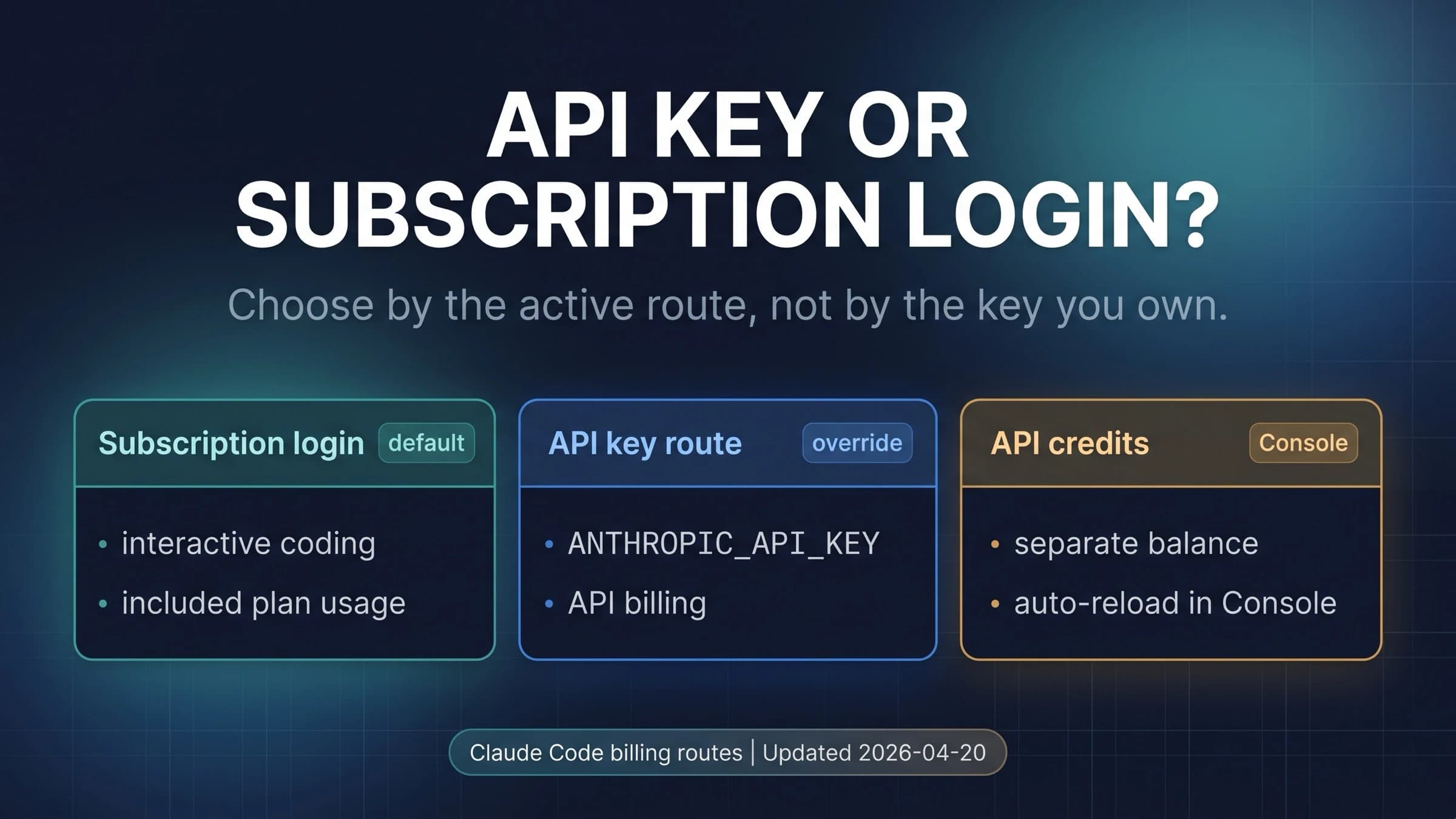
To use an existing Anthropic API key in Claude Code, provide ANTHROPIC_API_KEY to the CLI process, launch claude, and approve the custom key when prompted. Then check /status for the active authentication and /model for the selected model. A saved Claude login does not by itself tell you which credential the session is using.
For a gateway, configure its base URL and the authentication scheme it expects. For Bedrock, Google Cloud, or Foundry, select the provider and supply that provider's credentials. Claude Desktop requires its supported third-party inference configuration rather than the CLI's shell exports. These distinctions follow the current authentication documentation and gateway connection guide.
| What you already have | Configuration to start with | What to confirm |
|---|---|---|
| Anthropic Console API key | ANTHROPIC_API_KEY in the CLI environment or a private settings env block | Key approved and active; intended model selected |
| Claude subscription login | /login, without an unintended competing credential | Expected Claude account active |
| Console account, without a key | Console login with an Anthropic profile on a supported CLI version | Correct Console organization/profile |
| Organization's LLM gateway | Gateway URL, gateway credential, and supported model name | Endpoint and credential both belong to that gateway |
| AWS, Google Cloud, or Azure deployment | Provider selector plus provider-specific configuration | Provider, project/resource, region, and model access |
The examples below are documented configuration templates. They assume Claude Code is installed and you have permission to use the chosen account and endpoint; they are not reports of live authentication or paid API tests.
Direct Anthropic API Key Setup
Use a key from Claude Console when you want direct API usage. For a local Bash terminal, this example accepts the key without putting its literal value in shell history and limits the exported variables to a subshell:
(
  unset ANTHROPIC_AUTH_TOKEN ANTHROPIC_BASE_URL
  unset CLAUDE_CODE_USE_BEDROCK CLAUDE_CODE_USE_VERTEX CLAUDE_CODE_USE_FOUNDRY
  read -r -s -p "Anthropic Console API key: " ANTHROPIC_API_KEY
  printf '\n'
  test -n "$ANTHROPIC_API_KEY" || exit 1
  export ANTHROPIC_API_KEY
  claude --model sonnet
)
This is a Bash example. It clears competing shell variables for the direct API case; it does not change settings files or organization policy. A settings file's env value can still override the same shell variable, and a signed-in Claude apps gateway has its own higher-priority path. Check those branches below if the resulting session is unexpected.
Inside Claude Code, approve the API key if asked, then enter:
/status
/model
Current interactive Claude Code remembers whether you approved the custom key. /config includes a Use custom API key toggle for that choice. In noninteractive claude -p use, the documented behavior is to use ANTHROPIC_API_KEY whenever it is present, subject to the applicable provider and managed-policy constraints. Do not assume an interactive refusal will protect an automated job from API-key usage. See API-key authentication.
For CI, inject ANTHROPIC_API_KEY through the CI secret store. A small check can fail before launching if the variable is missing:
: "${ANTHROPIC_API_KEY:?Inject ANTHROPIC_API_KEY from the CI secret store}"
claude -p "Reply with OK only; do not use tools." --model sonnet
The second command sends a real request and may incur API charges. Use it only in an authorized job with the intended endpoint and account. An OK response confirms that one request completed; it does not test repository tools or establish which billing ledger recorded it.
How to change or unset a Claude Code API key
Replace the key in the source that supplies it: your current shell, secret manager, launcher, or private settings env block. Then launch a new session and check /status. Changing a shell export after Claude Code starts does not change that running process's inherited environment.
To stop supplying the key from the current shell:
unset ANTHROPIC_API_KEYThat neither revokes the key in Console nor removes a key supplied by a settings file, helper, or another launcher. If you intend to use an existing subscription login, also resolve any active gateway token, cloud-provider selection, or profile. Avoid deleting credential stores or history to solve a configuration mismatch.
Console login can work without creating a key
From Claude Code v2.1.242, Console login can authenticate through an Anthropic profile instead of creating a long-lived API key. The current docs recommend that profile path for Console authentication; the legacy key path remains available. Keyless Console login requires ANTHROPIC_API_KEY to be unset and signs out a stored claude.ai login. Server-managed support begins at v2.1.257, with policy-specific conditions. This is an account switch, so choose the intended Console organization before proceeding. Console authentication details.
Credential Precedence: What Wins In Claude Code
When several credentials exist, the CLI does not use whichever you edited most recently. For the ordinary credential chain, the current authentication reference describes this order:
| Priority | Credential | Condition that matters |
|---|---|---|
| 1 | Cloud-provider credentials | Bedrock, Google Cloud, or Foundry must be selected with its CLAUDE_CODE_USE_* variable |
| 2 | ANTHROPIC_AUTH_TOKEN | Sent as a bearer token |
| 3 | ANTHROPIC_API_KEY | Sent as X-Api-Key; interactive approval applies |
| 4 | apiKeyHelper | Configured helper retrieves a credential |
| 5 | CLAUDE_CODE_OAUTH_TOKEN | Explicit OAuth token |
| 6 | Named Anthropic profile or federation | Profile selection and profile type affect placement |
| 7 | /login credentials | Saved Claude subscription login |
There are important exceptions. A signed-in Claude apps gateway operates outside this chain and takes precedence even over cloud providers. An active user_oauth profile without an explicit ANTHROPIC_PROFILE ranks below a working /login session, while federation profile behavior differs. Managed login-method, organization, or provider restrictions can reject a credential that would otherwise be selected. This table is a starting point for local CLI diagnosis, not a universal ordering for every Claude app.
A stored AWS credential alone does not turn the session into Bedrock. Conversely, if a cloud provider is selected, exporting an Anthropic API key does not turn that cloud session into the direct Anthropic route.
To check only whether shell credentials exist, without printing them:
if test -n "$ANTHROPIC_API_KEY"; then
  printf 'ANTHROPIC_API_KEY is set\n'
else
  printf 'ANTHROPIC_API_KEY is unset or empty\n'
fi
if test -n "$ANTHROPIC_AUTH_TOKEN"; then
  printf 'ANTHROPIC_AUTH_TOKEN is set\n'
else
  printf 'ANTHROPIC_AUTH_TOKEN is unset or empty\n'
fi
These checks describe that shell only. /status identifies the session's active authentication and can mark an inactive credential. If organization policy requires a particular login or gateway, use that approved route rather than attempting to override it locally.
Settings Scopes: Which File Should You Edit?
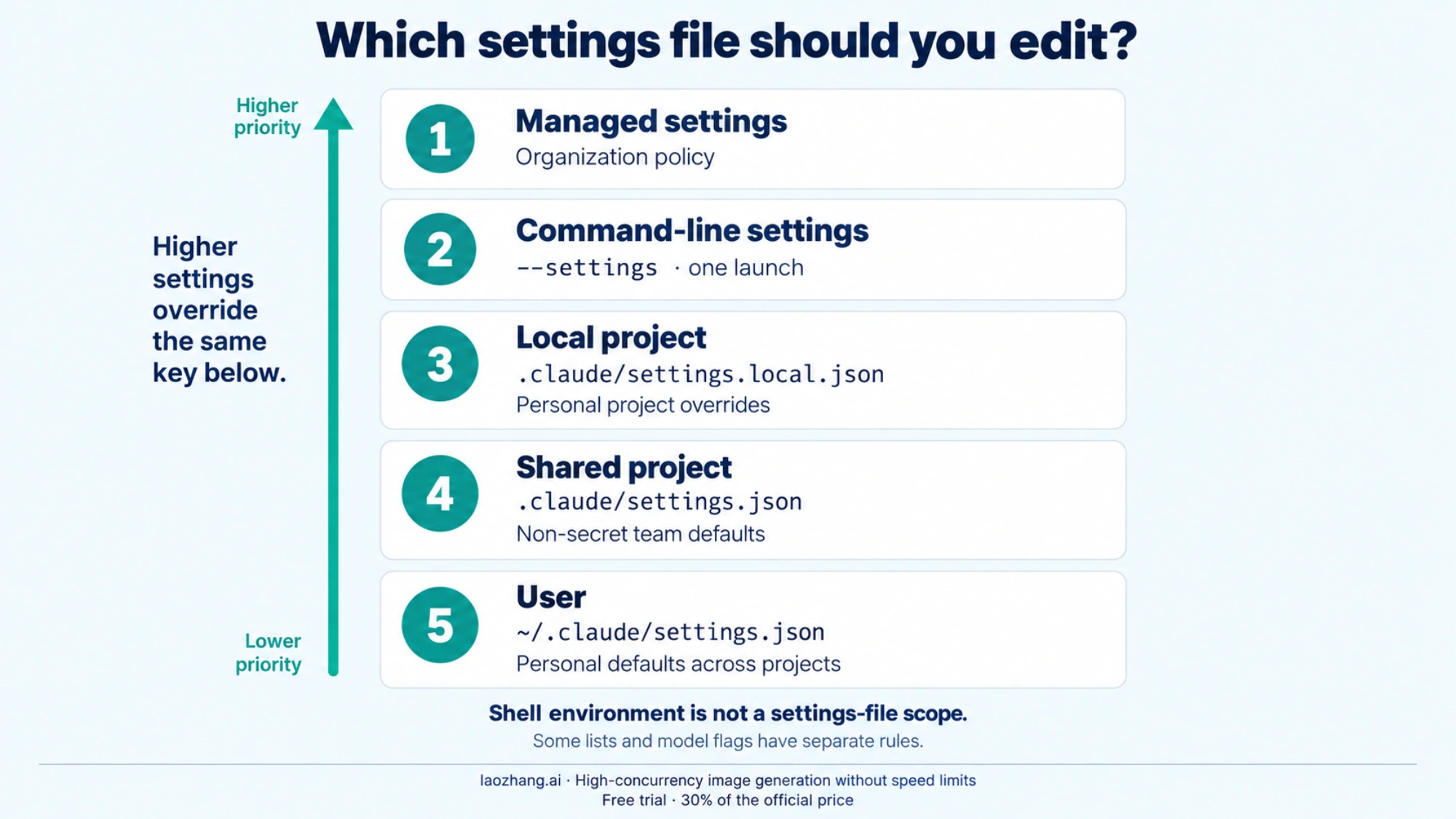
Settings precedence is managed settings → command-line --settings → local project settings → shared project settings → user settings. Other flags, such as --model, follow the rule documented for that setting rather than forming another settings-file tier. Environment variables in an env block are resolved per variable within that hierarchy; shell environment is not another settings-file scope. The settings reference explains both precedence and exceptions.
| Scope | Documented location or input | Appropriate use |
|---|---|---|
| Managed | Organization-managed configuration | Required provider, endpoint, login, or other policy |
| Command line | --settings <file-or-json> | One launch, within policy constraints |
| Local project | .claude/settings.local.json | Personal project overrides, excluded from sharing |
| Shared project | .claude/settings.json | Non-secret defaults teammates should share |
| User | ~/.claude/settings.json | Personal defaults across projects |
The file is strict JSON: no comments or trailing commas. Installation does not automatically create every settings file. Do not use .credentials.json or ~/.claude.json as a substitute for a settings file; those serve credential or application-state purposes.
Set API variables inside settings.json
Claude Code supports an env object. Here is the structure for a private direct-API configuration:
{
  "env": {
    "ANTHROPIC_API_KEY": "<your private Anthropic Console API key>"
  },
  "model": "sonnet"
}
Replace the placeholder before use. This stores the credential as text, so prefer your approved secret store or a helper when available. Never put it in the shared project file. A local file Claude Code creates is normally ignored by Git; if you create .claude/settings.local.json yourself, ensure it is excluded from version control. Being ignored does not encrypt the key or protect it from local access, backups, or accidental sharing. Settings and local gateway storage.
If the shell sets ANTHROPIC_API_KEY to key A and a loaded settings env block sets it to key B, the settings value applies. Exporting key A again will not resolve the conflict. Change the intended settings entry or remove the unintended override. The same rule applies to ANTHROPIC_BASE_URL, so shell-only debugging can miss the endpoint a session actually uses.
Share defaults without sharing credentials
A team can commit a non-secret project default such as:
{
  "model": "sonnet"
}
An alias selects the provider's current mapping; it does not pin a permanent model version. Use an exact provider identifier when reproducibility requires one.
Settings are also not universally isolated to the current subdirectory. In a Git repository, local settings normally resolve from the repository root or main worktree, with documented ownership and platform exceptions. Shared settings are tied to the primary working directory, and /cd changes that lookup in supported versions. Check the actual loaded files rather than assuming every worktree or nested directory has an independent local configuration. Shared executable settings such as env, hooks, or allows also depend on workspace trust. Settings locations and trust.
Most supported settings changes reload during a running session, but model is a startup setting: use /model to change it mid-session. /status can show loaded configuration sources; it does not display the winning value of every key. /config is the terminal's settings menu, not a full JSON inspector, and it is not the same interface as VS Code chat or Desktop. Permission lists and some other settings have special merge rules, so do not assume one file replaces every object wholesale.
Gateway Or Proxy Setup
For an existing gateway, obtain three things from its operator: the API-compatible base URL, the credential/header scheme, and an accepted model identifier. Changing ANTHROPIC_BASE_URL changes the destination; it does not automatically change the model or the authentication being used.
For a gateway using the Anthropic Messages format and bearer authentication, the Bash template is:
(
  : "${GATEWAY_TOKEN:?Provide the gateway credential through your secret store}"
  : "${GATEWAY_BASE_URL:?Provide the operator-supplied Anthropic-compatible base URL}"
  : "${GATEWAY_MODEL:?Provide a model identifier accepted by this gateway}"
  unset ANTHROPIC_API_KEY
  unset CLAUDE_CODE_USE_BEDROCK CLAUDE_CODE_USE_VERTEX CLAUDE_CODE_USE_FOUNDRY
  export ANTHROPIC_AUTH_TOKEN="$GATEWAY_TOKEN"
  export ANTHROPIC_BASE_URL="$GATEWAY_BASE_URL"
  export ANTHROPIC_MODEL="$GATEWAY_MODEL"
  claude
)
GATEWAY_* are example input names, not Claude Code settings. Supply their values before running the template. If a settings env block defines the same ANTHROPIC_* variables, resolve that conflict there first. This template also assumes you are not required to use a signed-in Claude apps gateway.
For a gateway that expects x-api-key, use ANTHROPIC_API_KEY instead of ANTHROPIC_AUTH_TOKEN, and remove a competing bearer token. apiKeyHelper can provide a dynamically retrieved credential and sends it in both documented authentication headers. The correct choice comes from the gateway's contract, not from the word “token” in its dashboard. Gateway authentication and connection examples.
A gateway credential replaces the saved claude.ai credential for these requests; it does not require deleting the saved login. Setting only ANTHROPIC_BASE_URL is different: the login credential can remain active, and the gateway must support forwarding that authentication and its required beta capability. Do not interpret a custom URL alone as a switch to API-key billing. Other LLM gateways.
What “compatible” must mean
A service advertising an OpenAI-compatible chat endpoint is not enough for this template. Claude Code's gateway protocol requirements include the applicable API format, request body, authentication, version headers, and beta headers. For the Messages format, /v1/messages must work; /v1/messages/count_tokens is optional. Required beta headers must be forwarded as sent rather than restricted to a stale list. If the gateway rejects a message role, use the unsupported-role repair guide to check instruction placement and tool-result formats.
Bedrock InvokeModel and Google Cloud rawPredict formats require their own selectors and payload conventions. Do not append /v1/messages to every provider URL. A warmup request such as HEAD /api/hello is also not a model request.
A concrete provider example is OpenRouter's Claude Code integration, which documents https://openrouter.ai/api with bearer authentication. That URL and behavior belong to OpenRouter's integration; they are not defaults for arbitrary gateways. Anthropic does not endorse or audit third-party gateways, and non-Claude model routing is not an official guarantee of Claude Code compatibility. Confirm coding-tool behavior separately from a simple text response.
Use apiKeyHelper when your environment provides one
For an approved helper that already retrieves the appropriate credential, the setting has this form:
{
  "apiKeyHelper": "/absolute/path/to/approved-credential-helper"
}
The path is a placeholder, not a program included with Claude Code. The helper command prints the current credential to standard output so Claude Code can read it. Keep diagnostics out of that output and never copy the returned secret into shared logs. See credential helper configuration. A higher-priority environment token or key can make the helper inactive. Configure and verify the helper in its intended CLI or supported wrapper rather than assuming normal Desktop or cloud sessions will run it.
Model Configuration Ladder
For the current session, an explicit /model selection takes priority over startup --model, then ANTHROPIC_MODEL, then the settings model value, then the lower-priority ANTHROPIC_DEFAULT_MODEL fallback. This is separate from selecting the credential or endpoint. Model selection and priority.
| Intended change | Use | Persistence |
|---|---|---|
| Choose a model and save a personal default | /model, then Enter; or /model <name> | Current model and user default |
| Change only this session through the picker | /model, select a model, then press s | Session only |
| Choose a startup model for one launch | claude --model sonnet | Does not save the user default |
| Set a launcher or shell preference | ANTHROPIC_MODEL | Applies to launches that receive it |
| Give a project or user a default | "model": "sonnet" in the appropriate settings file | Durable default, subject to higher-priority inputs |
The distinction between Enter and s matters: /model is no longer safe to describe as always temporary. Managed availableModels restrictions still constrain the choices, while a managed startup default alone does not necessarily prevent a permitted mid-session change. Resumed sessions also have documented stored-model and override rules. Current model persistence behavior.
For a reproducible setup, pin the identifier that your provider accepts: an Anthropic API model ID, a Bedrock model/inference-profile identifier or ARN, a Google Cloud model version, or a Foundry deployment name. Short aliases such as sonnet can map differently across providers and change over time. A base URL cannot translate an incorrect model name into a correct one, and a model listed in a picker does not prove that your account has access to it.
Bedrock, Vertex, And Foundry Routes
Cloud-provider setup starts with a working provider identity and permission to use the desired model. The Claude Code selector tells the CLI which provider to use; it does not create credentials, grant access, or guarantee regional availability. The following templates assume those prerequisites are already satisfied.
Amazon Bedrock
With an AWS profile configured for Bedrock access:
export CLAUDE_CODE_USE_BEDROCK=1
export AWS_PROFILE="your-bedrock-profile"
export AWS_REGION="your-model-region"
claude
Replace both placeholders. AWS_REGION can be omitted when the profile already supplies the correct region. An SSO login region is not necessarily the region where the model is available. Choose a model or inference profile permitted for that account and region; an Anthropic API key cannot replace AWS access. Bedrock prerequisites and credential configuration.
Google Cloud Agent Platform, formerly Vertex AI
The documentation now uses Google Cloud Agent Platform, while the Claude Code variables retain VERTEX:
export CLAUDE_CODE_USE_VERTEX=1
export CLOUD_ML_REGION="your-supported-model-region"
export ANTHROPIC_VERTEX_PROJECT_ID="your-request-project-id"
claude
Use an authorized Application Default Credentials, service-account, or Workload Identity Federation setup. The request project comes from ANTHROPIC_VERTEX_PROJECT_ID; do not assume the project associated with a credential is the intended billing/request project. Model access, enabled services, quota, and the chosen regional or global endpoint must match. Google Cloud configuration.
Microsoft Foundry
With an existing Azure identity authorized for your resource and deployed Claude models:
export CLAUDE_CODE_USE_FOUNDRY=1
export ANTHROPIC_FOUNDRY_RESOURCE="your-foundry-resource-name"
export ANTHROPIC_MODEL="your-claude-deployment-name"
claude
The documented endpoint inputs are the resource name or ANTHROPIC_FOUNDRY_BASE_URL for a full resource URL. Authentication priority is ANTHROPIC_FOUNDRY_AUTH_TOKEN on supported versions, then ANTHROPIC_FOUNDRY_API_KEY, then the Azure SDK's default credential chain. The bearer-token option requires v2.1.203 or later. Foundry has no interactive setup wizard or startup model-access check, so the first request can fail if the selected deployment is unavailable. Foundry setup and authentication.
Use one provider selector intentionally. Provider account access, resource permissions, and billing are separate from a Claude subscription, and /logout is not a universal cloud-session control.
Does This Configuration Apply to VS Code or Claude Desktop?
The launch surface matters because a process receives only the environment passed to it. A shell export can reach a CLI launched from that shell but fail to reach an editor opened from the Dock or another supervisor. The current gateway connection guide documents different requirements for these surfaces.
| Surface | What to configure | Important difference |
|---|---|---|
| Terminal Claude Code | Shell environment or supported settings env | Inspect the same session you launched |
| Official VS Code extension | Inherited launch environment or claudeCode.environmentVariables | Extension credential precheck differs from the spawned CLI |
| Claude Desktop third-party inference | Desktop's third-party inference configuration | CLI base-URL exports and settings files are not that interface |
| Claude Code cloud sessions | Supported cloud authentication | Local gateway environment variables do not switch these sessions |
For the VS Code extension, its credential precheck reads the extension's claudeCode.environmentVariables. A key supplied only through ~/.claude/settings.json may reach the spawned Claude process but not satisfy that earlier precheck. Open Preferences: Open User Settings (JSON) in VS Code. The following shows the shape for private user settings, not a shared workspace file:
{
  "claudeCode.environmentVariables": [
    {
      "name": "ANTHROPIC_API_KEY",
      "value": "<your private Anthropic Console API key>"
    }
  ]
}
Use the approved credential mechanism for your machine and keep secret-bearing settings out of sharing. Launching VS Code from an appropriately configured terminal is another way to supply inherited variables. If the actual failure is a missing panel, command, or frozen editor, continue with Claude Code's VS Code troubleshooting guide; changing a key will not repair missing UI.
For Desktop on a device without administrator-distributed configuration, open Help → Troubleshooting → Enable Developer Mode. After the app restarts with a Developer menu, choose Developer → Configure Third-Party Inference and enter the gateway base URL supplied by your operator. Administrator-distributed configuration takes precedence and makes that form read-only. With this configuration active, sessions run locally: SSH, Anthropic-hosted cloud environments, and Remote Control are unavailable. Exporting ANTHROPIC_BASE_URL in a terminal does not configure this Desktop interface. Desktop gateway setup.
Verification Checklist
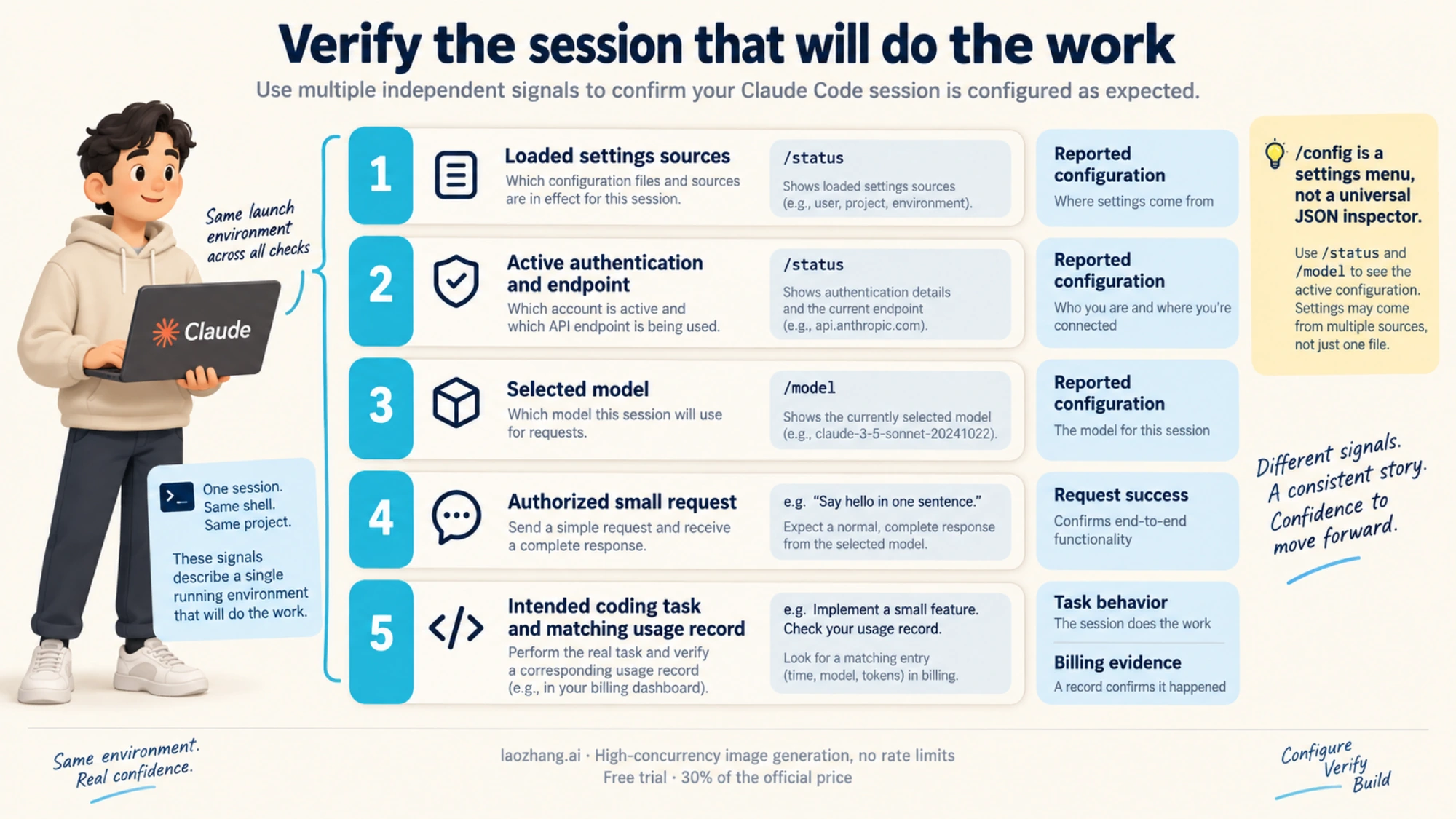
Verify the configuration in the same application and launch context that will do the work. These are different kinds of evidence:
| Check | What it establishes | What it does not establish |
|---|---|---|
| Settings parse and expected files load | Configuration is readable and those sources are present | Winning value of every setting or working API access |
/status and /model | Reported authentication, endpoint/provider, and selected model | A completed model request or the final bill |
| One authorized text request succeeds | That credential, endpoint, and model completed that request | Every coding tool or gateway feature works |
| A small intended coding task succeeds | The tools needed for that task work on that route | Universal provider compatibility |
| Matching provider/account usage record | Usage appears under the expected account or project | A different session used the same route |
Start with /status and compare the reported credential and base URL/provider with your intended setup. Check loaded settings sources if the shell and session disagree. Then inspect /model; if you change it for diagnosis, use s in the picker when you want the choice to remain temporary.
After the route is correct, an authorized small prompt can verify a real request. Avoid private repository content for this initial check. If you need billing confirmation, match the time, model, and account/project in the appropriate usage ledger; the model picker's price label is not proof of a gateway's actual bill.
A 401, 403, or model error means an API layer answered, not that inference succeeded. An unknown-model response is not a universal authentication test: a gateway may validate the model before it validates credentials. Likewise, a successful warmup or an open login screen is not a successful Messages request. See the official gateway verification and troubleshooting steps for the particular endpoint's tests.
FAQ
Do I need an API key to use Claude Code?
No. Supported subscription login, Console profile login, cloud-provider identity, or an organization gateway can supply authentication. Console's keyless profile login requires a supported CLI version and an unset ANTHROPIC_API_KEY; it also switches away from a stored claude.ai login. Authentication options.
Why does Claude Code keep using the old API key?
Check the source supplying it. A settings env value overrides the same variable exported in the shell. The running session also keeps the environment inherited at launch. Update the intended private source, restart the session, and check /status without printing the key. Gateway environment resolution.
Are ANTHROPIC_AUTH_TOKEN and ANTHROPIC_API_KEY interchangeable?
No. The former supplies bearer authentication; the latter supplies an API-key header. Use the scheme your endpoint accepts. A higher-priority bearer token can also make an API key inactive in the ordinary CLI credential chain. Gateway authentication.
Does changing the base URL automatically switch subscription billing to API billing?
No. ANTHROPIC_BASE_URL changes the destination. With no gateway credential, a saved login can remain active; the gateway must support that authentication. With a gateway credential, the upstream account used by the gateway owns its token-based usage. Confirm the active session and the relevant usage record rather than inferring billing from the URL. Gateway credential and billing behavior.
Does /model change only the current session?
Not necessarily. Enter in the picker and /model <name> save the user default as well as changing the current model. Press s in the picker for a session-only selection. Startup --model and ANTHROPIC_MODEL do not save that default. Model persistence.
Can Claude Desktop use my terminal's ANTHROPIC_BASE_URL?
Do not use that as its setup method. Desktop third-party inference has its own supported configuration, with managed settings taking precedence. CLI shell exports and CLI settings are not a substitute, and local gateway support does not extend to every remote or cloud session. Desktop gateway configuration.
Sources11
External pages this guide links to, in the order they appear. Last updated Oct 7, 2026.
Sources11
External pages this guide links to, in the order they appear. Last updated Oct 7, 2026.
- 1.authentication documentationcode.claude.com/docs/en/authentication
- 2.gateway connection guidecode.claude.com/docs/en/llm-gateway-connect
- 3.Claude Consoleplatform.claude.com
- 4.settings referencecode.claude.com/docs/en/settings
- 5.Other LLM gatewayscode.claude.com/docs/en/llm-gateway
- 6.gateway protocol requirementscode.claude.com/docs/en/llm-gateway-protocol
- 7.OpenRouter's Claude Code integrationopenrouter.ai/docs/cookbook/coding-agents/claude-code-integration
- 8.Model selection and prioritycode.claude.com/docs/en/model-config
- 9.Bedrock prerequisites and credential configurationcode.claude.com/docs/en/amazon-bedrock
- 10.Google Cloud configurationcode.claude.com/docs/en/google-vertex-ai
- 11.Foundry setup and authenticationcode.claude.com/docs/en/microsoft-foundry