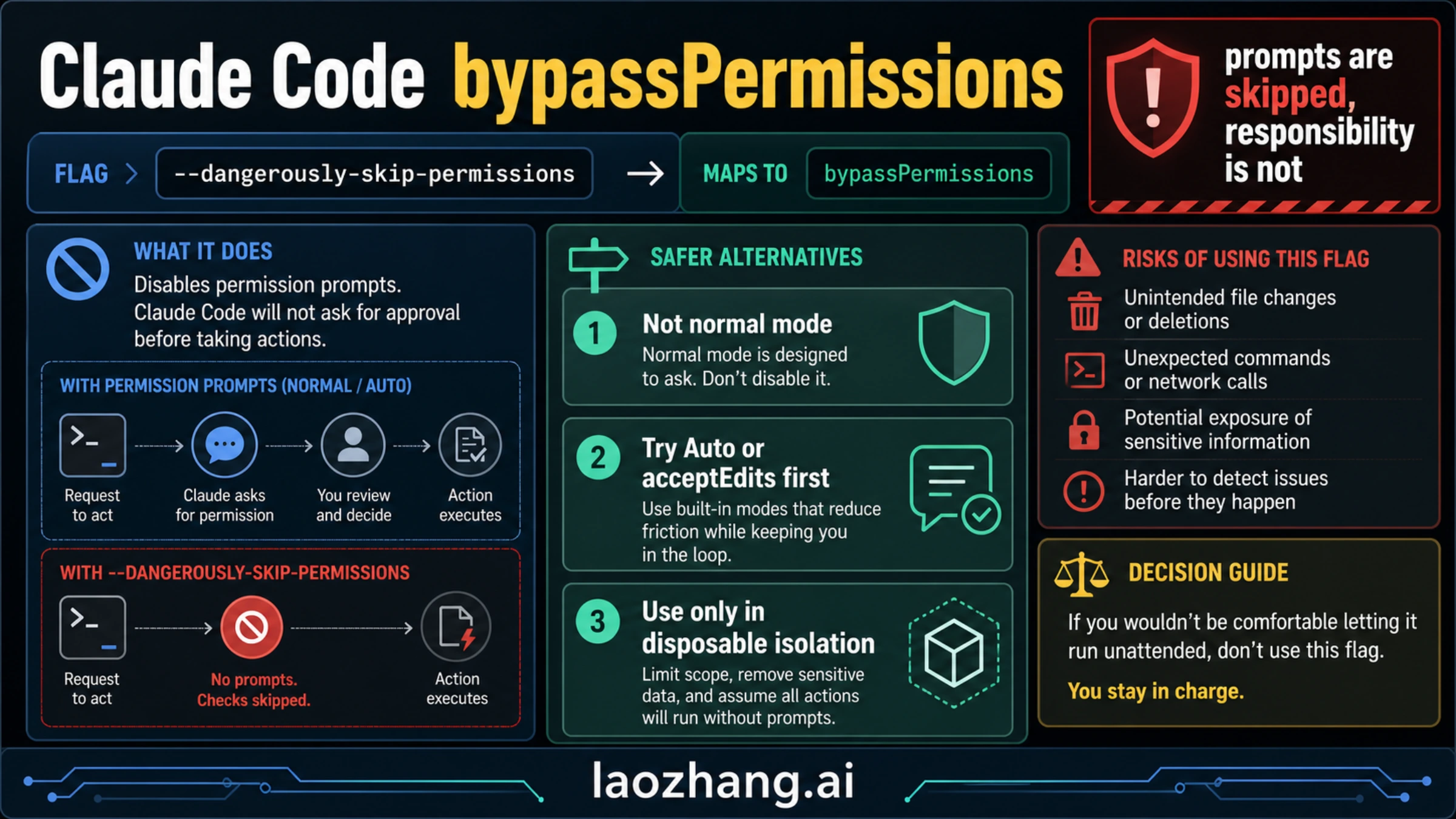
Claude Code --dangerously-skip-permissions is the market-visible flag for --permission-mode bypassPermissions: it tells Claude Code to continue without the normal permission prompts. That can remove friction, but it also removes the review pause that catches file edits, commands, network calls, and prompt-injection surprises. Checked on May 7, 2026, the practical rule is simple: do not use it on a normal workstation; use Auto mode or acceptEdits when you only want fewer prompts, and use full bypass only inside a disposable, isolated workspace with no production credentials or deploy authority.
Quick verdict:
- Exploring unknown code: use default mode or
plan. - Tired of approving routine edits: try
acceptEditsor Auto mode first. - Running repeatable low-risk work unattended: isolate the workspace before you even consider bypass.
- Unable to isolate filesystem, network, secrets, and deploy authority: do not bypass prompts.
Fast Answer: What The Flag Actually Does
Anthropic's current Claude Code permission modes documentation treats --dangerously-skip-permissions as equivalent to --permission-mode bypassPermissions. In plain language, it removes Claude Code's normal prompt layer for actions that would otherwise ask first. That includes the kinds of actions developers care about most: editing files, running shell commands, and making network requests from the session.
The name is loud for a reason. bypassPermissions is not a hidden productivity mode, and it is not the same thing as trusting Claude's answer quality. It changes the control surface. When you bypass prompts, Claude can keep moving without stopping at the places where you normally inspect a command, reject a write, or notice that the task has drifted into a riskier part of the system.
That matters because the prompt layer is not only a nuisance. It is also a cheap human checkpoint. It is where you catch "why is this touching .env?", "why is this command reaching the network?", "why is this editing generated files?", or "why did a repo instruction turn this into a deployment task?" Removing that checkpoint can be reasonable only when the environment itself has already been narrowed enough that a bad action cannot reach anything valuable.
Use this conservative operating rule:
| Situation | Use this mode first | Why |
|---|---|---|
| New repo, unfamiliar bug, unclear impact | default or plan | You still need visibility before action |
| Routine code edits where shell commands should stay reviewed | acceptEdits | It reduces edit prompts without hiding command decisions |
| Long, repeatable, repo-scoped work with eligible account and model support | Auto mode | It reduces prompts while keeping classifier checks |
| Fully isolated disposable environment with no real authority | bypassPermissions | The environment, not the flag, is the safety boundary |
| Production, secrets, cloud admin, billing, data deletion, deploys | Do not bypass | The blast radius is too high |
Make that decision before syntax, because the command is easy and the boundary is the hard part.
Permission Mode Ladder: Choose The Smallest Useful Risk
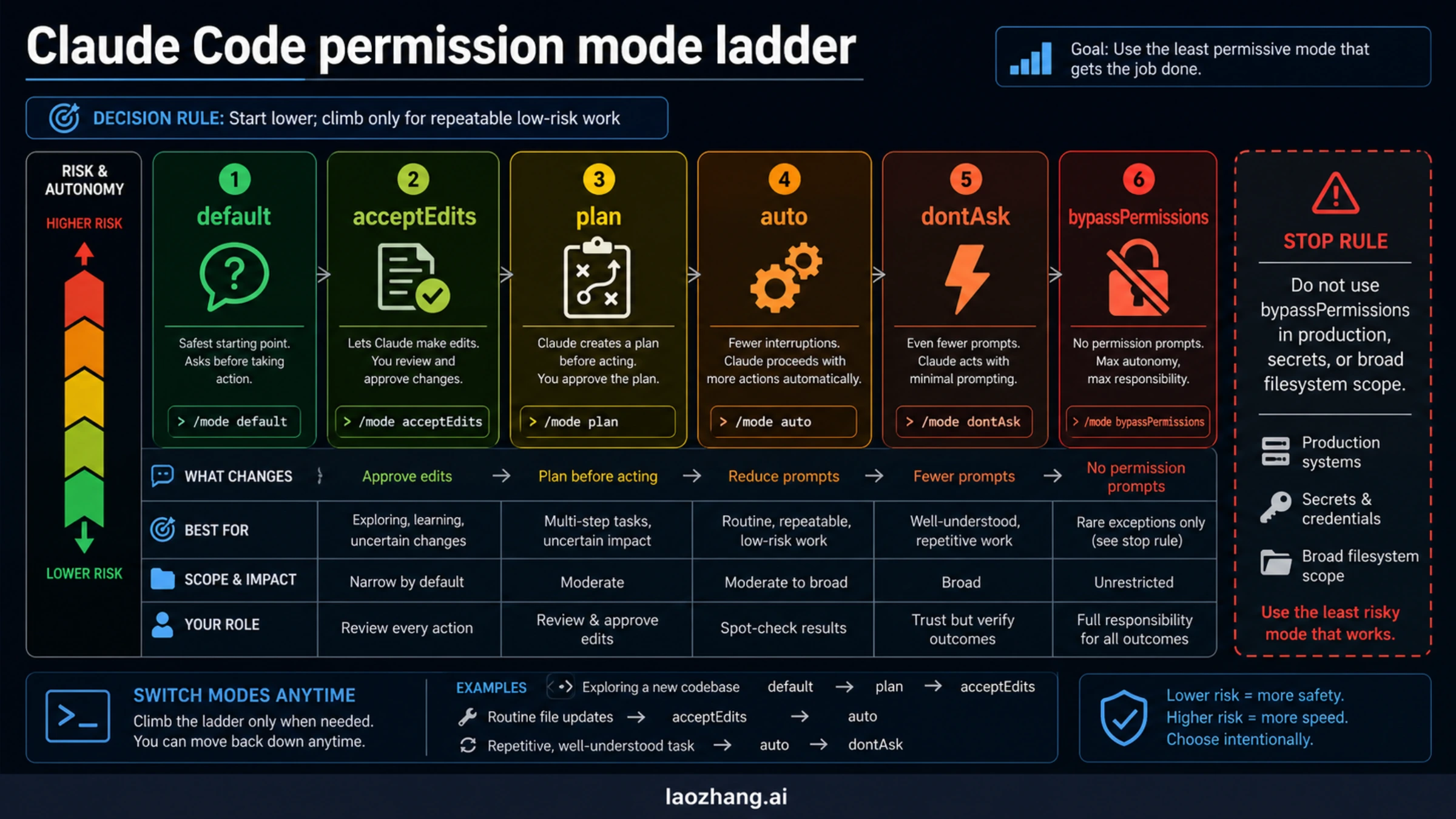
Claude Code now has enough permission modes that "skip prompts or not" is the wrong mental model. Think of it as a ladder. You climb only when the lower step no longer solves the workflow problem, and you climb back down when the task becomes ambiguous.
default is still the right starting point for unknown work. Claude asks before taking actions with side effects, which is exactly what you want when you are learning a codebase, touching sensitive files, or asking for a diagnosis rather than a mechanical edit. It costs clicks, but those clicks are information.
plan belongs before code changes when scope is the actual risk. If the repo is unfamiliar, the migration has many branches, or the cost of a wrong first move is high, ask Claude to plan first. A plan checkpoint is often more valuable than a later permission prompt because it catches the wrong approach before the session has already made changes.
acceptEdits is the safer answer for a lot of approval fatigue. If your main annoyance is approving predictable file edits, let Claude make those edits while you keep command execution under closer review. That is a much narrower trust contract than bypassPermissions, and it is often enough for documentation updates, test edits, type fixes, and small refactors.
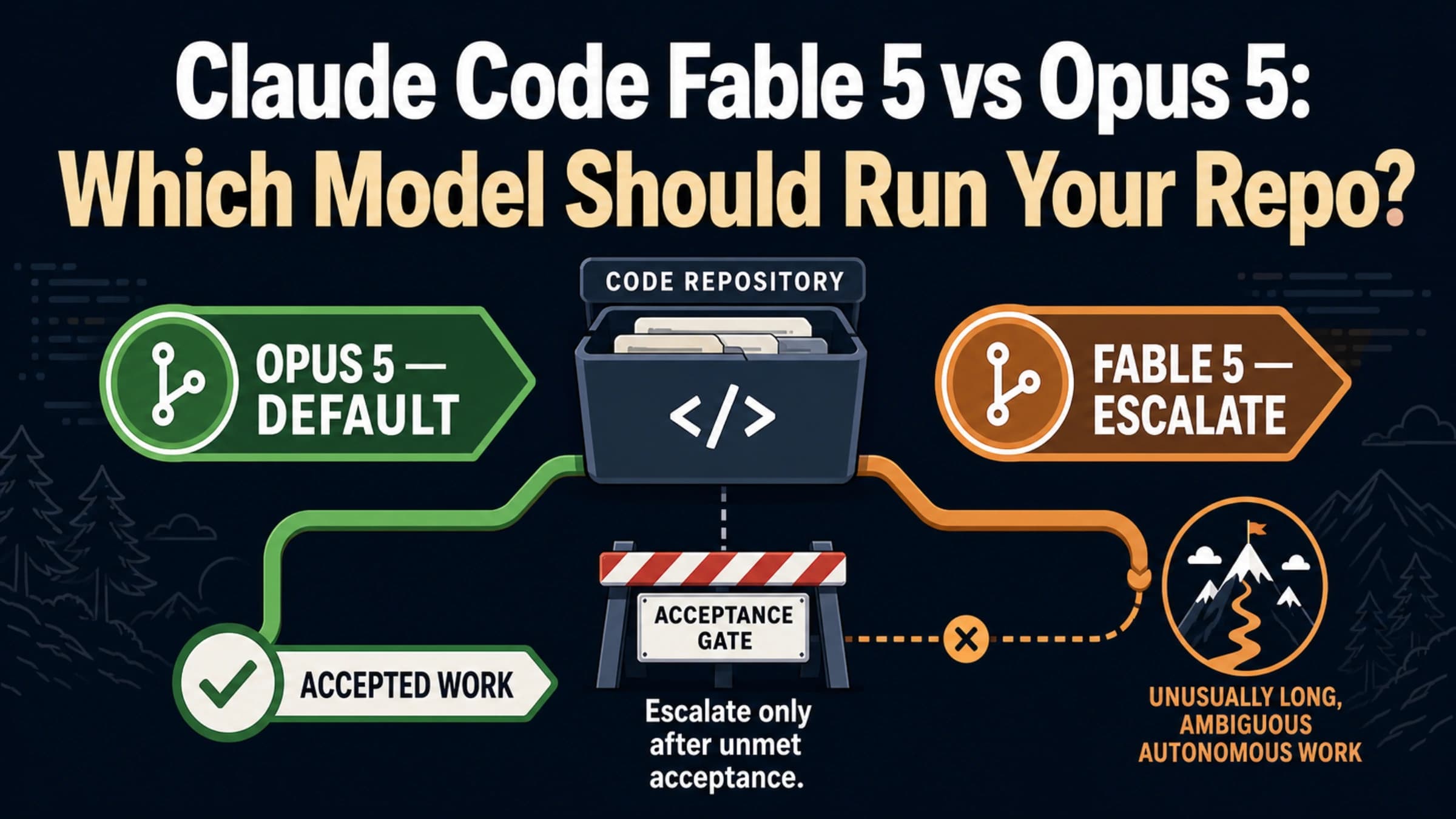
Auto mode is the middle ground Anthropic built because users were approving a high share of prompts but full bypass was too exposed. Anthropic's Auto mode engineering post frames it as a safer alternative between manual permission prompts and total bypass. Current docs checked on May 7, 2026 say Auto mode depends on version, plan, model, provider, and surface. Do not copy an older rollout note's eligibility line without checking the docs in your own environment.
dontAsk and bypassPermissions are where you should slow down. They are not badges of advanced usage. They are more permissive operating contracts. The closer you get to full bypass, the more the environment must do the safety work that prompts used to do.
Red Lines: Do Not Use Bypass For These Tasks
If a task can damage a shared system, leak a secret, or create irreversible state, --dangerously-skip-permissions is the wrong shortcut. This is not because Claude Code is uniquely dangerous. It is because any unattended agent with shell, filesystem, and network access can make a small misunderstanding expensive.
Keep full bypass away from these categories:
- production deploys, rollbacks, release promotion, or service restarts
- database migrations, destructive queries, or bulk data changes
- cloud infrastructure, Terraform, IAM, repository permissions, or billing
- secrets rotation, token discovery,
.envcleanup, or credential debugging - downloaded code execution,
curl | bash, unknown install scripts, or unreviewed binaries - force pushes, direct pushes to protected branches, or mass deletion
- tasks where the repo has live production credentials available in the environment
The official permission-mode docs make the same pattern visible through their Auto mode block categories: downloaded-code execution, production deploys and migrations, sensitive data exfiltration, cloud-storage mass deletion, IAM or repo permission grants, shared infrastructure edits, irreversible destruction, force push, and direct push to main. The exact list can change, but the reasoning is stable: if a bad action leaves the local branch and reaches shared authority, prompts are not the thing to remove.
This is also why "I trust Claude" is not enough. Trusting Claude's coding ability is different from trusting the environment. A good model can still follow a malicious repo instruction, misunderstand a blast radius, select the wrong target, or run a command whose side effect is wider than the natural-language task implied. The permission layer is one place those surprises become visible.
Isolation Checklist Before You Bypass Prompts
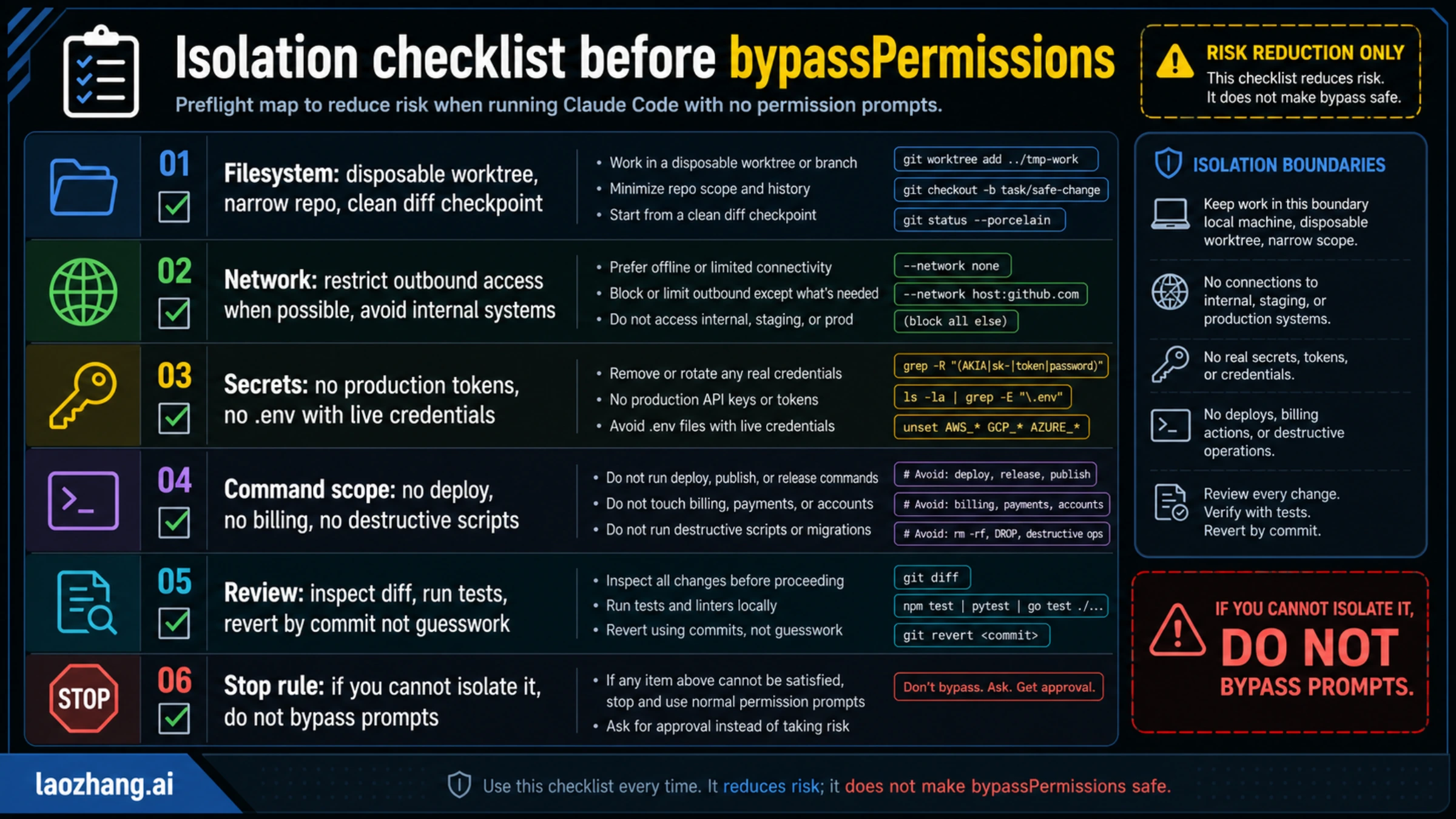
Anthropic's Claude Code sandboxing documentation is clear about the key idea: isolation only matters when it covers both filesystem and network reach. A disposable branch is helpful, but it is not a sandbox if the session can read secrets, call internal systems, or deploy to production.
Before you run full bypass, make these checks boring and explicit:
| Boundary | Minimum requirement | What to verify |
|---|---|---|
| Filesystem | Disposable worktree, narrow repo, clean diff checkpoint | git status, current directory, ignored/generated paths |
| Network | Offline or limited outbound access when possible | no internal services, no staging/prod endpoints, no broad egress |
| Secrets | No real production tokens or live .env files | environment variables, credential files, shell history, local keychains |
| Command scope | No deploy, billing, IAM, migration, or destructive scripts | package scripts, Makefile targets, CI helpers, cloud CLIs |
| Review path | Every change remains diffable and reversible | commits before/after, tests, logs, rollback by commit |
| Stop rule | If you cannot isolate it, do not bypass prompts | switch to default, plan, acceptEdits, or Auto |
The important word is "disposable." A normal laptop with a large home directory, a browser session, local SSH keys, cloud CLIs, and production tokens is not disposable. A separate worktree inside a repo is not enough if the shell still has access to your global credential chain. A container is not enough if it has host networking and mounted secrets.
For serious use, prefer one of these patterns:
bash# Start from a clean branch or worktree first.
git status --short
git worktree add ../tmp-claude-bypass-work -b claude-bypass-test
cd ../tmp-claude-bypass-work
Then remove authority before speed:
bash# Example checks, not a universal scanner.
env | grep -E 'TOKEN|KEY|SECRET|AWS|GCP|AZURE|ANTHROPIC|OPENAI'
ls -la | grep -E '\\.env|credentials|secrets'
git diff --stat
If those commands reveal real credentials or a wide workspace, stop. The right next step is not "run bypass anyway." It is to narrow the environment until the mistakes you can imagine are cheap.
Surface Matrix: CLI, IDE, Remote Control, Cloud, And Non-Interactive Runs
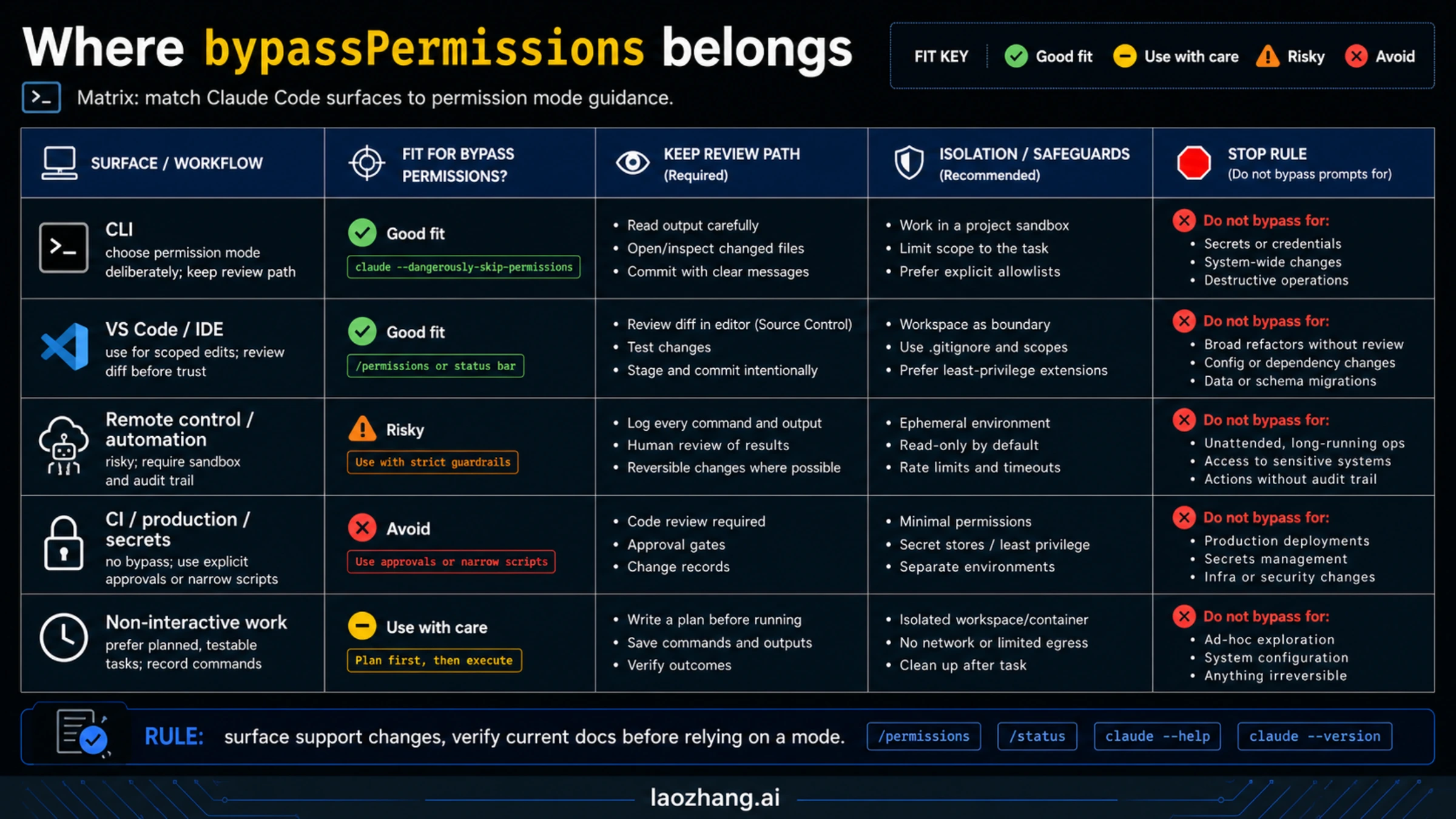
Do not assume every Claude Code surface exposes the same permission controls. The local CLI is the cleanest place to reason about permission modes because it is where the documented flags and mode cycling behavior are easiest to inspect. IDE extensions, Remote Control, cloud sessions, and non-interactive workflows each add their own boundaries.
| Surface | What to expect | Bypass guidance |
|---|---|---|
| Local CLI | The documented permission modes and startup flags are most visible here | Still choose the least risky mode; full bypass only after isolation |
| VS Code / IDE | Advanced modes may be gated by settings and the editor review flow | Use for scoped edits; review diff in the editor before trusting results |
| Remote Control | Existing repo coverage notes that Remote Control keeps supervised approvals | Treat it as a review surface, not an unattended bypass path |
Cloud sessions on claude.ai/code | Current docs say cloud sessions do not expose Ask permissions, Auto, or Bypass | Do not debug missing bypass there as a local CLI problem |
| CI or production automation | Non-interactive execution can be tempting but has high blast radius | Prefer narrow scripts, explicit approvals, or sandboxed dry runs |
| Secrets and admin surfaces | Credential access changes the entire risk profile | No bypass |
For Remote Control specifically, keep the distinction sharp. Our Claude Code Remote Control guide covers that workflow as supervised remote interaction. It is useful when you want to approve, reject, or redirect from another device. That is a different job from full unattended execution.
For Auto mode, use the dedicated Claude Code Auto Mode guide for the broader feature walkthrough, but verify the current docs before relying on any older availability detail. The current permission-mode docs checked on May 7, 2026 listed Max, Team, Enterprise, and API support under specific model/provider constraints; older posts may still describe a narrower Team-first rollout.
Commands After The Safety Gate
Once the boundary decision is made, the command is simple:
bashclaude --permission-mode bypassPermissions
The market-visible alias is:
bashclaude --dangerously-skip-permissions
Use the first form when you want the command to match the current permission-mode language in the docs. Use the second form when you are reproducing an existing script, issue, or teammate instruction that already uses the older flag. In runbooks and team docs, map them together so nobody treats them as two different safety contracts.
Useful inspection commands:
bashclaude --version
claude --help
Inside a session, use permission inspection before you escalate:
text/permissions
If you are switching modes during active work, make the switch visible in your notes or commit message. The worst bypass usage is the invisible kind: a branch where reviewers cannot tell when the session stopped asking for approval.
One current-docs detail matters for people who used older versions: as of Claude Code v2.1.126, the bypass mode includes writes to protected paths that earlier versions still prompted for, while root and home-directory removals still trigger a circuit-breaker prompt. Treat that as a versioned fact, not a permanent guarantee. The right response is not to rely on a last-resort prompt; it is to avoid giving the session dangerous filesystem scope in the first place.
Troubleshooting: Why It Still Prompts Or Does Not Appear
If bypassPermissions does not behave the way you expect, start with the surface and version before changing scripts.
First, confirm you are in a local Claude Code surface that actually exposes the mode. Cloud sessions and Remote Control do not behave like the local CLI. IDE settings may gate advanced controls. A missing option in one surface does not prove the CLI contract changed.
Second, check whether you are confusing Auto mode with bypass. Auto is the safer no-prompt alternative for eligible users, but it has plan, model, provider, version, and surface constraints. Current docs checked on May 7, 2026 say Auto mode requires Claude Code v2.1.83 or later and support varies by plan and model. If Auto does not appear, that may be an eligibility issue rather than a permissions bug.
Third, remember that a circuit breaker is not the same thing as normal prompting. If Claude Code still stops before root or home-directory removal, that does not mean bypass is "safe." It means one hard emergency boundary remained. You should still design the environment so a session cannot get close to that boundary.
Fourth, look for project or organization settings. Anthropic's Claude Code security documentation emphasizes review responsibility, managed settings, allowlists, dev containers, and permission auditing. If your organization configures stricter policy, local behavior may be narrower than a public blog example.
Finally, if the session keeps trying risky actions, do not keep widening permissions. Switch down the ladder. Use plan to force a scope reset, acceptEdits for file-only friction, or Auto mode if the task is eligible and fits the classifier-guarded middle path.
FAQ
Is --dangerously-skip-permissions the same as bypassPermissions?
Yes. Current Claude Code permission-mode docs state that --dangerously-skip-permissions is equivalent to --permission-mode bypassPermissions. Use that mapping early in team docs so people do not treat the flag as a separate hidden mode.
Is it safe if I run it in Docker?
Only if the container is actually isolated. A Docker container with host mounts, broad network access, real credentials, or production CLIs is still dangerous. For bypass to make sense, filesystem scope, network reach, secrets, and deploy authority all need to be narrowed.
Should I use Auto mode instead?
If your problem is approval fatigue during repeatable repo work, yes, check Auto mode first. It exists because many users wanted fewer interruptions without accepting the full risk of bypassPermissions. Just verify current availability for your plan, model, provider, and surface before assuming it is available.
Does bypass protect against prompt injection?
No. The permission-mode docs explicitly warn that bypassPermissions offers no protection against prompt injection or unintended actions. If a repo, dependency, or external file can influence the session, bypass makes the review gap larger, not smaller.
Can I use it for CI?
Not as a blanket default. CI is often connected to secrets, deploy permissions, package publishing, and shared infrastructure. If you want unattended AI work in CI, prefer narrow scripts, dry-run tasks, explicit approval gates, and sandboxed environments that cannot publish or destroy anything.
What is the safest practical rule?
Use the lightest permission mode that solves the actual bottleneck. acceptEdits solves many edit-prompt problems. Auto mode solves some long-running repo-work problems. Full bypass belongs only in disposable isolation where a bad action cannot reach production, secrets, billing, or shared infrastructure.