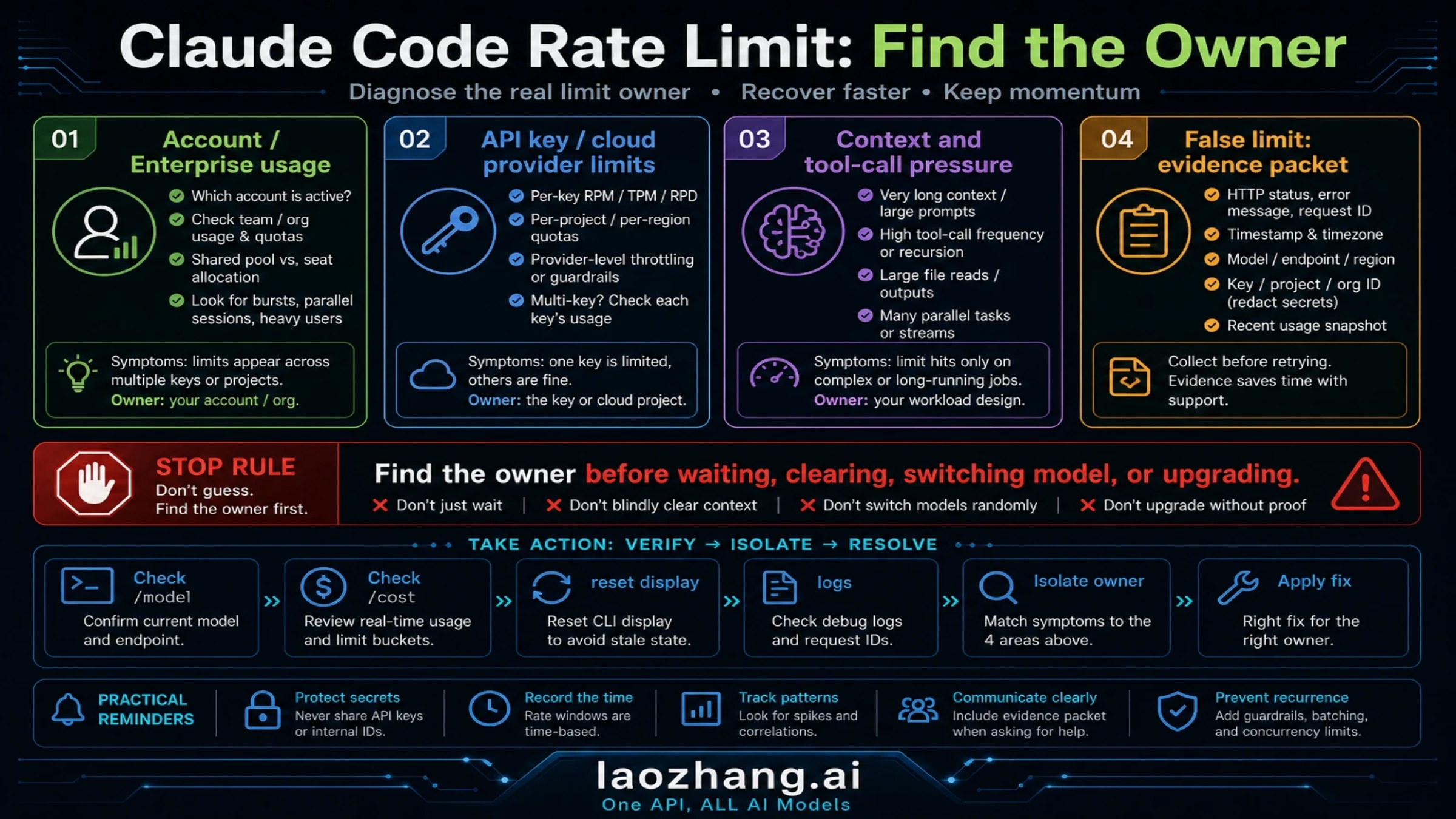
Claude Code's "API Error: Rate limit reached" message stops developers mid-task, but the phrase does not name one single limit. As of May 8, 2026, the first question is how you signed in. A Claude account or Enterprise seat can hit a usage window with a reset time. An API key can hit requests-per-minute, input-tokens-per-minute, output-tokens-per-minute, or spend limits. A long session can also feel like a rate limit because the context window is overloaded and every new turn resends too much history. This guide starts with that split, then gives the fastest recovery path: /model to switch lighter, /clear or /compact to reduce carried context, /cost for API-key sessions, and the Claude Console or account usage screen to confirm the real owner.
TL;DR
- Claude Code limits depend on how you authenticated: Claude account or Enterprise usage window, API key pay-as-you-go limits, or cloud-provider limits through Bedrock, Vertex, or Microsoft Foundry.
- Immediate fixes: run
/modeland switch lighter when available, use/clearbefore a new task, use/compactwhen you need to preserve a long thread, check/costif you are on API billing, and wait only when the limit message gives a reset time. - Why Claude Code burns tokens fast: one visible command can trigger several tool calls, file reads, searches, and model requests. Token use depends on your context, files, model route, and retry pattern, so use current session evidence instead of old example numbers.
- Avoid old hour estimates. The current source of truth is your account's usage/reset display,
/modelavailability,/costfor API sessions, and the Claude Console limits page for API keys. - False-limit states exist: GitHub and community reports still show cases where the visible usage does not match the error. If your usage screen and reset state do not support the limit, clear credentials, restart the session, and capture evidence before escalating.
Quick Fixes When You Hit "Rate Limit Reached"
Every developer who uses Claude Code heavily will eventually see this error message. Most cases can be triaged quickly if you first identify the owner of the limit. The key is choosing the fix that matches your specific route, because waiting, changing models, clearing context, and changing API billing solve different problems.
The fastest workaround when you hit a rate limit is switching to a less resource-intensive model when your account exposes one. Claude Code can show available models through /model; use that live list rather than a stale article table. Lighter routes are better for code formatting, simple edits, and syntax questions, while stronger routes should be saved for complex multi-file refactoring, security review, or architecture decisions.
If model switching does not resolve the issue, check the owner of the limit before waiting. In Claude Code, run /model to confirm what your account can use. If you authenticated with an API key, run /cost and check the Claude Console or your cloud provider dashboard. If you authenticated with a Claude account or Enterprise seat, use the account or organization usage/reset display. The reset time shown by the product is more reliable than old blog estimates because usage windows and plan behavior can change.
For developers who repeatedly hit subscription-window limits, API billing can be a cleaner route, but only after you accept a different contract. API usage is billed per token, has its own rate limits, spend controls, and organization settings, and can still return 429s when RPM, ITPM, OTPM, or spend limits are exhausted. Configure it only if your current Claude Code docs and account surface support that route, then monitor /cost, Console usage, and response headers instead of treating API billing as unlimited relief.
If none of the above works and the error persists even after waiting for a full reset cycle, you may be encountering a known bug rather than a legitimate rate limit. Try signing out and back in with claude logout followed by claude login, which clears cached credentials that sometimes cause phantom rate limiting. Check for background Claude Code processes with ps aux | grep claude on macOS/Linux, because orphaned processes can consume your quota without your knowledge. If the issue persists across machines and after credential reset, it is likely an account-level problem that requires contacting Anthropic support.
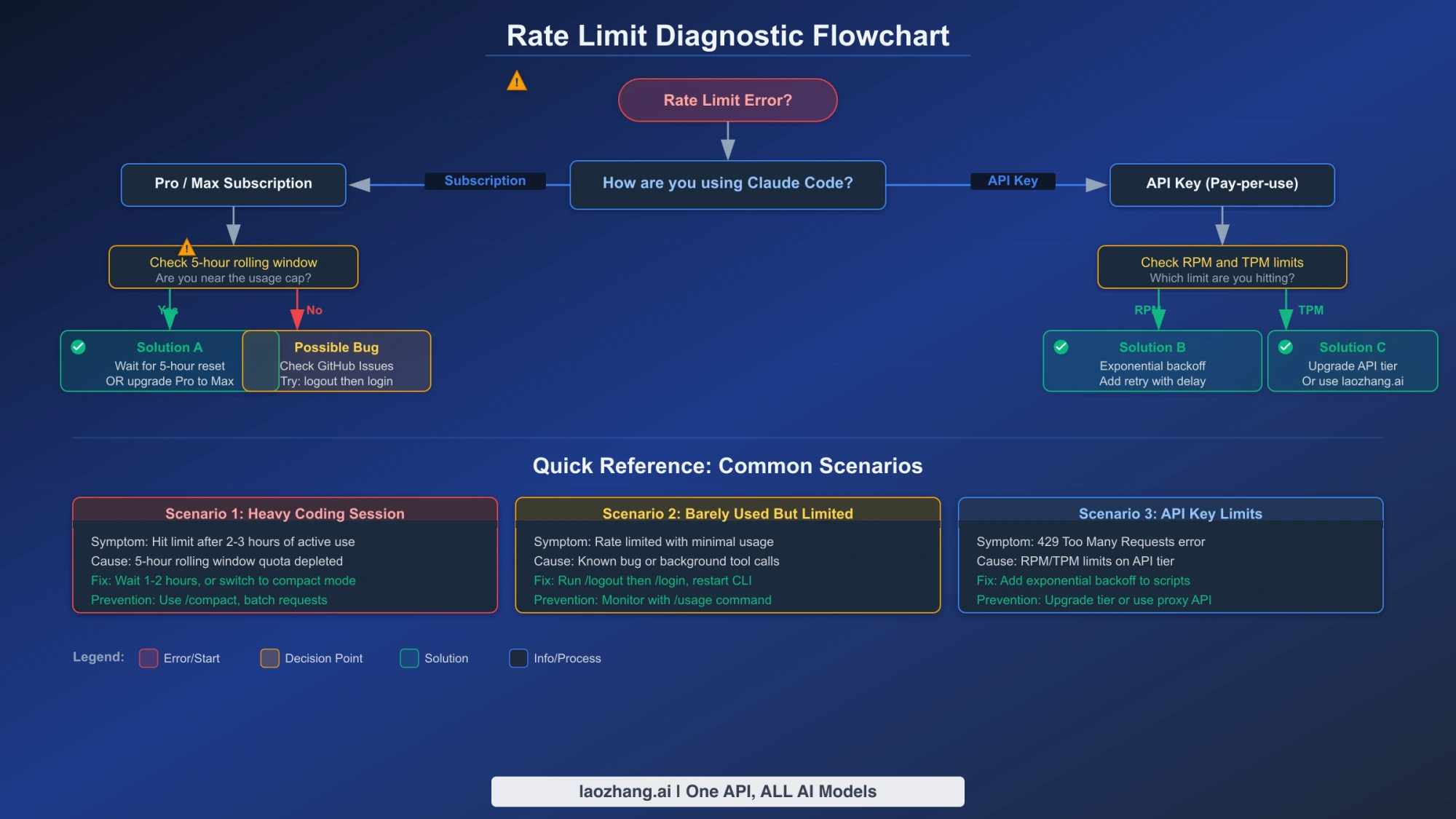
Understanding Claude Code's Two Rate Limit Systems
One of the most common sources of confusion around Claude Code rate limits is that two entirely different systems can produce the same "Rate limit reached" error message. Understanding which system triggered your error is essential because the fix for one system is completely different from the fix for the other. Subscription-based limits and API-based limits operate on different timescales, use different metrics, and respond to different optimization strategies.
Subscription-based limits apply when Claude Code is tied to a Claude account or organization seat. The exact window, reset display, and model availability can change by plan, organization policy, and product rollout. Use the reset or usage surface shown in your own account as the live contract. The practical lesson is stable: broad prompts, large file reads, long tool output, and repeated retries consume the available window faster than short focused tasks.
API-based rate limits apply when Claude Code uses your own API key, Bedrock, Vertex, or Microsoft Foundry. These limits usually combine requests per minute, input tokens per minute, output tokens per minute, spend limits, model-level limits, and organization settings. Do not treat an old tier table as the live contract. The current source of truth is the Claude Console Limits or Usage page, the matching cloud-provider dashboard, anthropic-ratelimit-* response headers, and any retry-after value in the error.
To diagnose which system is limiting you, follow this process: First, identify your authentication route. A Claude or Enterprise login points to a plan or organization usage window. An API key points to Claude Console, Bedrock, Vertex, or Microsoft Foundry billing and rate limits. If you are using an API key, check the current tier and usage in the Claude Console Usage page or the matching cloud provider. If your reported usage is significantly below the visible allocation but you are still being rate-limited, you may be encountering a false-limit or account-state problem — proceed to the Troubleshooting section below.
Why Claude Code Burns Through Tokens So Fast
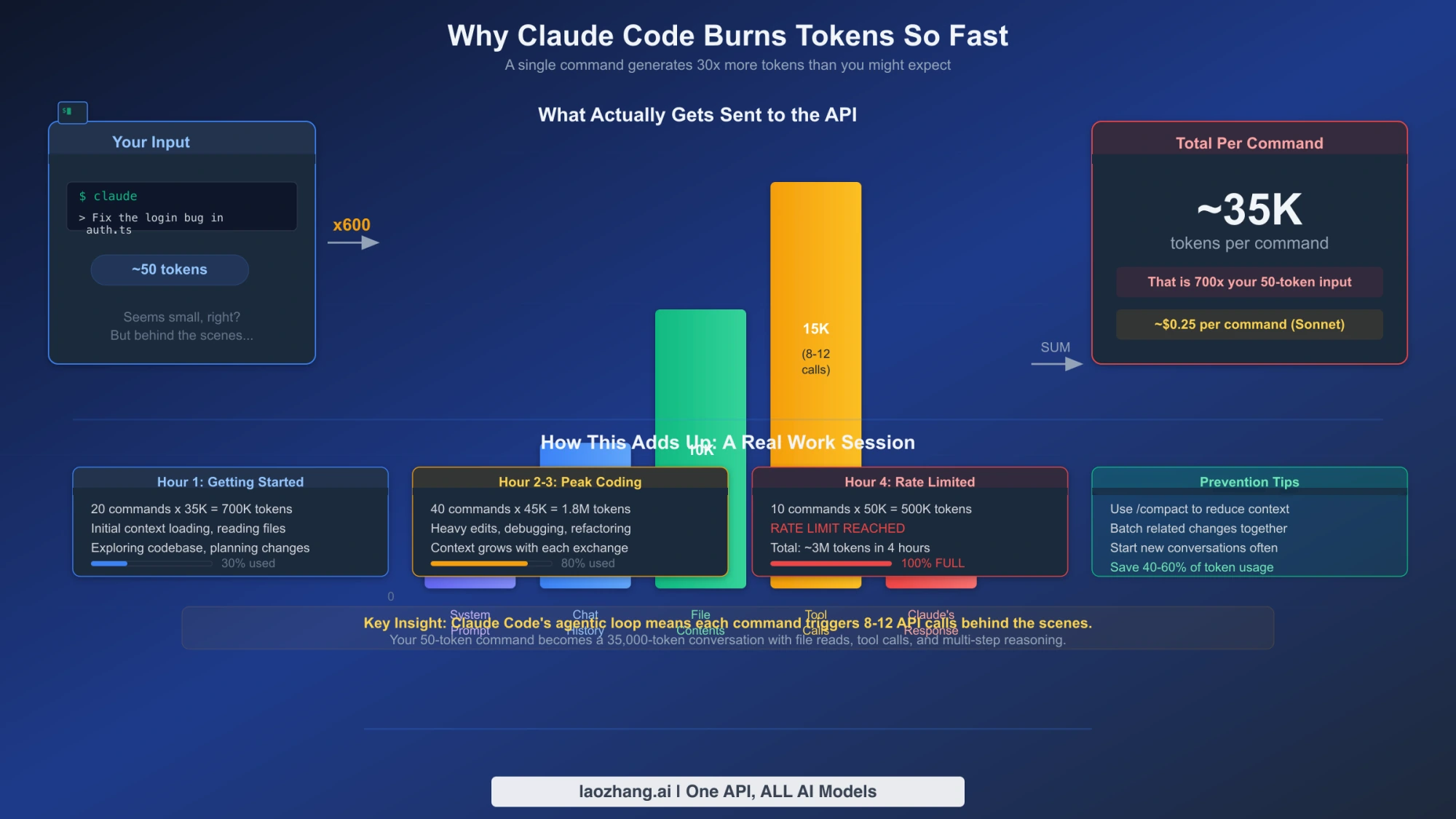
The single most common reaction to hitting a Claude Code rate limit for the first time is disbelief: "I only used it for twenty minutes — how am I already at the limit?" The answer lies in how fundamentally different Claude Code's token consumption pattern is from the Claude chat interface that most developers are familiar with. Understanding this difference is not just academic — it directly informs how to optimize your usage and which plan tier actually fits your workflow.
When you type a message in the Claude web chat, the interaction is usually a single request-response exchange. Claude Code operates differently because it is an agentic system that uses tools: file reads, searches, shell commands, edits, and test runs. A request such as "review and fix the authentication module" may read project instructions, search the repository, inspect several files, draft changes, write files, and run verification. Each step can add context, tool output, and retry work.
That is why the right question is not "how many minutes did I use Claude Code?" but "how much context and tool work did this session create?" Large CLAUDE.md files, broad searches, long terminal output, repeated test failures, subagents, and continuing old conversations all increase the amount of context carried into later model calls. The practical fix is to narrow the task, include only relevant files, compact or clear long sessions, and start a new thread when the job changes.
Subscription, Enterprise, or API: Which Route Owns the Limit?
Choosing the right Claude Code route is fundamentally a question of matching your actual usage pattern to the surface that owns the limit. The main options are Claude account access, Enterprise seat usage, and API-key billing. Do not make the choice from old "hours per week" tables. Use your current account screen, /model availability, /cost for API sessions, and the Claude Console limits page as the live contract.
For individual users, a Claude subscription can be the simplest path when you want predictable interactive usage and do not need per-token accounting. It breaks down when your work routinely involves long sessions, large file context, heavy tool use, or multiple concurrent tasks. In that case, the first fix is not automatically upgrading; it is reducing wasted context with /clear, using /compact mid-task, and switching models intentionally with /model.
Higher-capacity subscription or Enterprise routes make sense when the visible reset window repeatedly blocks real work even after you have cleaned context and matched the model to the job. The practical break-even is not a universal hour count. It is whether limit-induced downtime costs more than the plan or organization route you would move to.
API pay-as-you-go billing changes the problem. It avoids a subscription-style hard stop, but it introduces API rate limits, spend limits, and cost variability. Use /cost inside Claude Code, monitor Console or cloud-provider usage, and treat 429 responses as API-limit events with retry-after and tier ownership rather than subscription-window messages.
How to Reduce Token Usage and Prevent Rate Limits
The most effective way to avoid rate limits is to reduce the amount of irrelevant context your Claude Code sessions carry per interaction. This is not about using Claude Code less; it is about making each request tighter, easier to verify, and less likely to fan out into unnecessary tool work.
Use focused context instead of loading entire codebases. Name the relevant files, folders, and boundaries in the prompt or use the current Claude Code context mechanism for your installed version. Instead of asking for a whole-project review, ask for the authentication path and point the agent at src/auth/**, src/middleware.ts, or the actual files that own the behavior.
Batch related requests into single prompts. Every new prompt carries the full conversation context, so five small questions cost far more tokens than one comprehensive request. Instead of asking "What does function X do?" followed by "What does function Y do?" followed by "How do X and Y interact?", combine them: "Explain functions X and Y and how they interact, including any shared state or dependencies." This reduces the number of API calls from three to one and eliminates the redundant context transmission that occurs with each separate prompt.
Keep reusable instructions stable. If your current Claude route benefits from prompt caching, stable project instructions can reduce repeated input pressure. Keep CLAUDE.md concise, durable, and ordered by what the model needs most often. Verify the current prompt-caching and rate-limit behavior in Anthropic's API docs before planning capacity around a numeric multiplier.
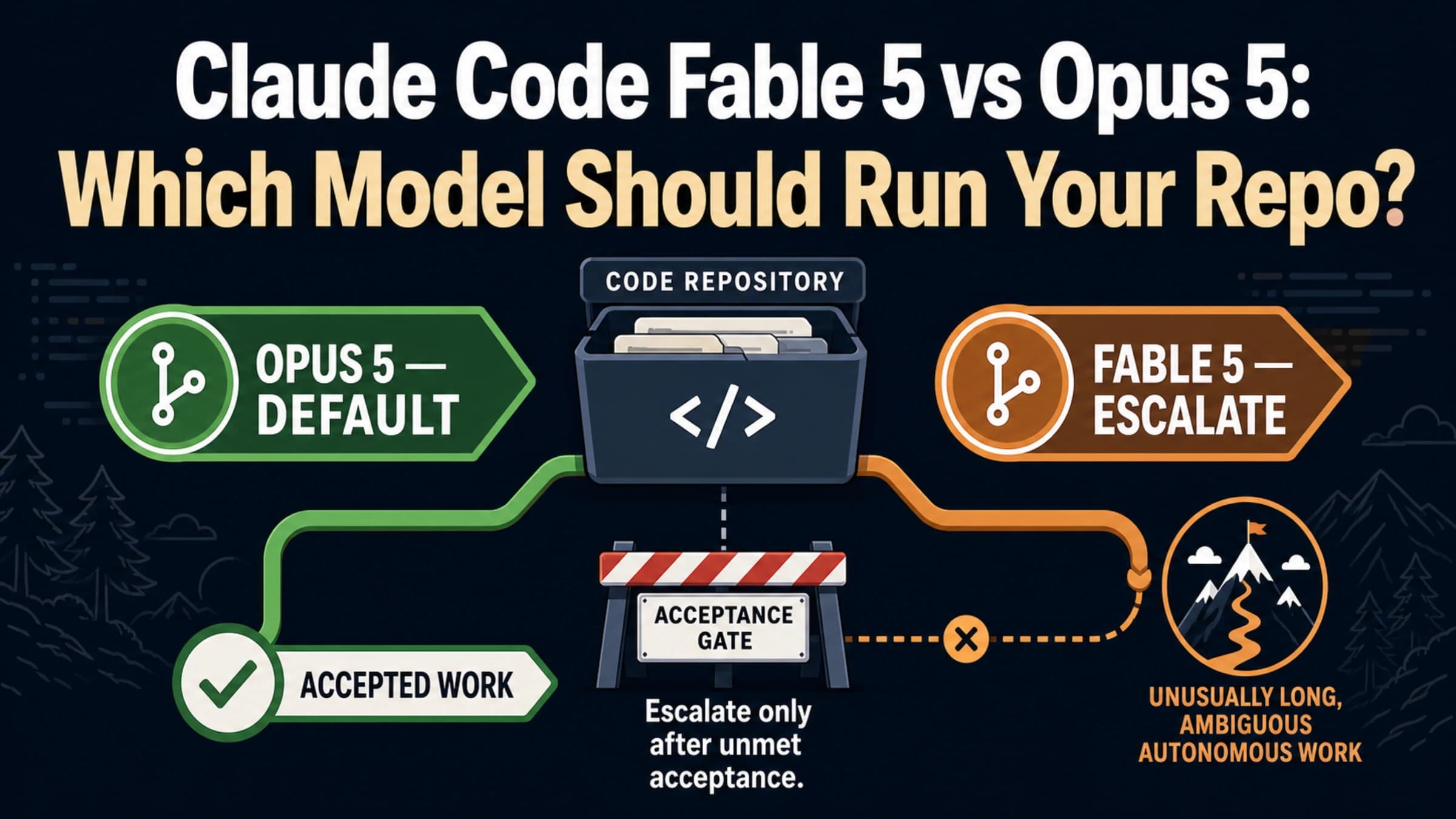
Route tasks to appropriate models. Not every task needs the strongest available model. Use /model to see the routes your account exposes today, then reserve heavier routes for high-risk changes and use lighter routes for simple edits, formatting, summaries, and syntax checks.
Save complex explanations locally. When Claude Code provides a detailed explanation of your codebase architecture, database schema, or API design, save it to a local file: claude "explain the database schema" > docs/schema-explanation.md. Referencing this file later costs far fewer tokens than asking Claude Code to re-analyze and re-explain the same code.
Advanced Strategies: Caching, Batching, and Model Routing
For developers who have implemented the basic optimizations and still find themselves hitting rate limits, advanced strategies involving caching architecture, request batching, and intelligent model routing can push your effective throughput significantly higher. These techniques require more initial setup but pay dividends across every session.
Check the current Batch API contract for non-urgent tasks. If you have tasks that do not require immediate results — such as generating documentation for multiple modules, running code quality analysis across a codebase, or preparing review summaries — Anthropic's Batch API may reduce cost or move work away from real-time interactive usage. Treat the discount, queue behavior, and batch limits as current-pricing facts: verify them on Claude's pricing and API docs before planning capacity around them.
Implement session management to control context growth. Claude Code conversations accumulate context over time. Break long development sessions into shorter, focused conversations. When you finish one logical task, start a new Claude Code session for the next task rather than continuing in the same conversation. This resets the working context and keeps old tool output from being carried forward.
Use complementary tools for non-AI tasks. Not every development task needs AI assistance, and many common operations can be handled more efficiently by specialized tools that do not consume your Claude quota. Use grep or ripgrep for searching code patterns, git log and git blame for understanding code history, your IDE's language server for go-to-definition and find-references, and static analysis tools for linting and type checking. By handling these operations outside of Claude Code, you reserve your AI quota for tasks where Claude's intelligence genuinely adds value: code generation, complex debugging, architecture decisions, and natural-language code review.
Monitor API rate-limit evidence proactively. If you are building tools on top of Claude Code or using the API directly, log the rate-limit headers and any retry-after values your route returns. Header names and availability should be confirmed against the current Anthropic or cloud-provider docs for that route. The goal is to slow down before you hit a hard 429 instead of relying only on reactive retry logic.
Check current help pages instead of relying on expired promotions. Time-limited usage promotions can appear and disappear. The March 2026 off-peak promotion referenced by older guides is expired as of this May 8 refresh. Before scheduling work around a promotion, verify that it is still visible in Claude's help center, your account, or your organization's admin surface.
Troubleshooting: Bugs, Edge Cases, and Known Issues
Not every "Rate limit reached" error is simple quota exhaustion. Treat bug-like cases as evidence problems. Record the exact message, CLI version, auth route, /model output, reset/usage screen, /cost output for API sessions, and the time window. Then search the current Claude Code issue tracker and support docs before assuming an old issue number still describes today's behavior.
False-limit symptoms. If the visible usage screen still shows meaningful headroom but Claude Code rejects every request, clear the local session state first: restart the session, sign out and back in, and check for background Claude Code processes. If the same account fails on multiple machines after credential refresh, prepare an evidence packet for Anthropic support or the current Claude Code issue tracker.
Reset-window confusion. Do not rely on old timezone tables. Use the reset time shown by Claude Code, the Claude account surface, the Enterprise admin surface, or the API response headers. Different auth routes can use different windows.
Shared organization usage. If you are in a team or Enterprise environment, another workspace, user, automation, or API key may own the real limit. Ask the admin to check organization usage, workspace settings, and current limits before you change local Claude Code settings.
When to report a bug versus wait it out. If current usage and reset screens support the limit, use the recovery steps in this article. If they do not, collect evidence first and then escalate. A good report includes CLI version, auth route, exact error, reset display, usage display, and whether the issue survives logout/login and a fresh machine.
What to Do While Rate Limited: Alternative Workflows
When Claude Code's rate limit kicks in and you choose to wait, keep moving on work that does not require the blocked route: write tests manually, review pull requests, update docs, reduce failing test output, split the next task into smaller prompts, or prepare a clean context packet for the reset window.
If you use another coding tool while waiting, verify that tool's current quota, model route, data policy, and billing before you paste production code into it. A backup tool is useful only when it fits your security and workflow constraints. For self-hosted or multi-provider workflows, see our Claude Code vs OpenClaw comparison and the OpenClaw rate limit troubleshooting guide.
Frequently Asked Questions
How long does it take for Claude Code rate limits to reset?
Reset timing depends on the surface that owns your usage. If Claude Code shows a reset time, use that message. If you are on an Enterprise seat, the organization's rolling window and admin settings matter. If you are on API billing, the API uses rate and spend limits rather than the same subscription reset model. Do not rely on old time-zone tables; use the current product display.
Can I use Claude Code for free without hitting rate limits?
The Claude Free plan can be useful for general Claude chat, but do not assume it includes the Claude Code capacity you need. Check current Claude plan access in your account, and check /model inside Claude Code for the models actually available to you. If you want no-cost backup tools while waiting, evaluate alternatives separately instead of treating them as Claude Code equivalents.
What is the difference between a 429 error and "Rate limit reached"?
A 429 HTTP status code is the API-layer signal that a request, token, output, or spend limit rejected the call. Claude Code's visible "Rate limit reached" wording can wrap an API 429, but it can also appear on a Claude account or Enterprise usage window, or after a routing/context problem makes the session look limited. If you are on API billing, respect retry-after and rate-limit headers. If you are on a Claude account login, use the product reset display and account or organization usage surface instead.
Is it worth upgrading from Pro to Max just for Claude Code?
Upgrading is worth evaluating if the current usage window repeatedly blocks real work after you have reduced context, switched models appropriately, and cleaned credentials. Do the calculation with today's plan prices in your account, your actual downtime cost, and whether API billing or Enterprise controls would fit better than a consumer-plan upgrade.
Why does Claude Code use so many more tokens than the Claude chat interface?
Claude Code is an agentic system that executes tool calls such as file reads, searches, command execution, and writes. Those tool calls can carry conversation history, project instructions, file contents, and tool output. Claude chat is usually closer to a direct request-response exchange. That architectural difference is why Claude Code can hit usage pressure faster even when the visible session feels short.