Claude Code Cannot Find Module './yoga.wasm': Find the Old Copy
Only Claude Code npm builds 2.0.25 and older can throw this error, so the claude your shell runs is an old copy. Find it, replace or remove it, then verify.
On this page
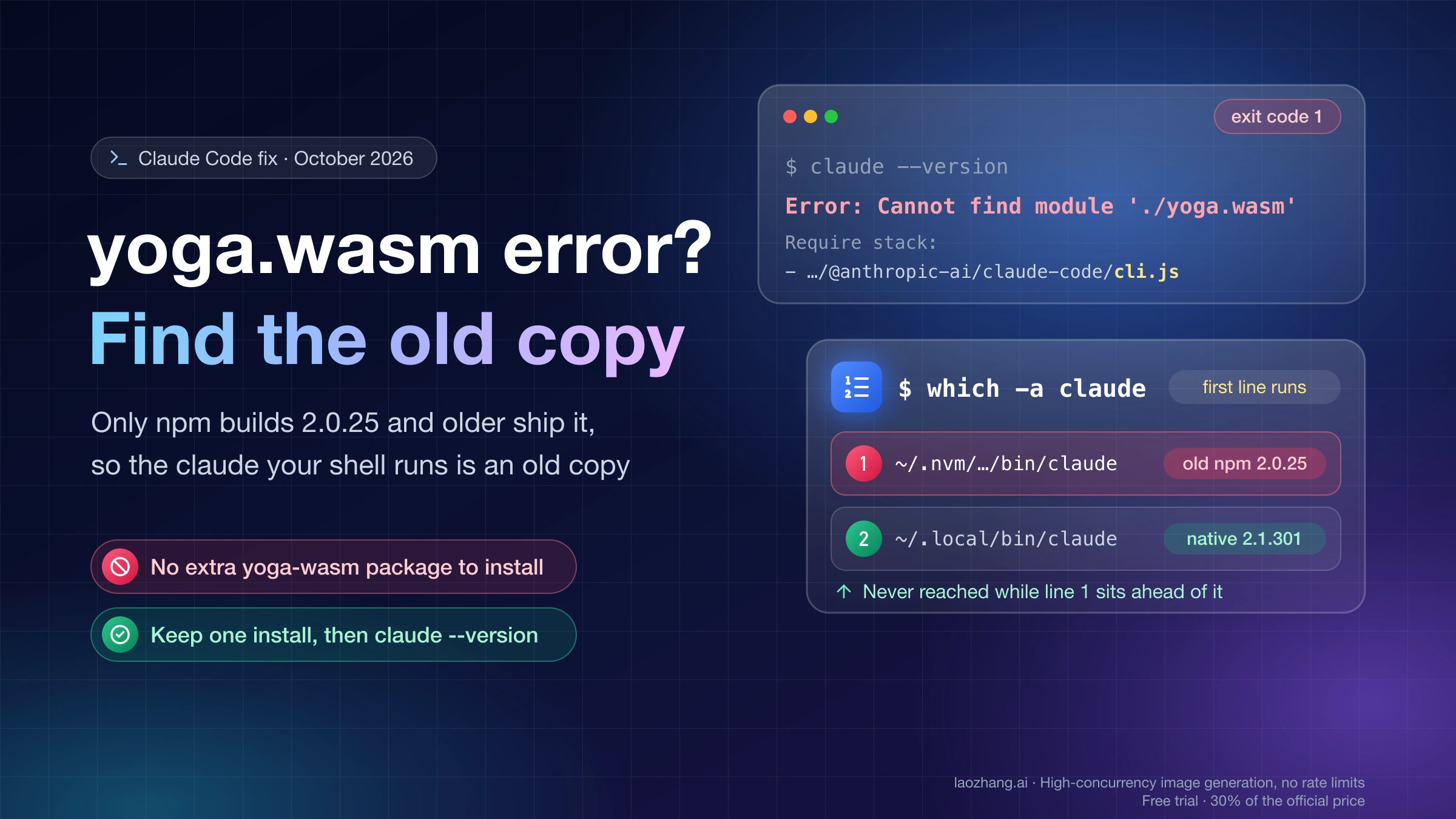
Error: Cannot find module './yoga.wasm' means the claude command your shell started is an old JavaScript build of Claude Code, npm version 2.0.25 or earlier, and that build's folder is missing one of its files. The usual cause is an auto-update that stopped halfway. Current versions can't raise this error: npm packages from 2.0.26 on have no separate yoga.wasm file, and since 2.1.113 the npm package launches a native binary. There's nothing extra to install. Find the copy that runs, replace or remove it, keep a single install, and confirm that claude --version prints a current version.
What was run (October 16, 2026): macOS 26 on Apple silicon, Node 24.11.0, npm 11.6.1, using throwaway npm prefixes and a throwaway
HOME, so no real install was touched. Version 2.0.25 was installed and itsyoga.wasmdeleted to reproduce the error. Then it was upgraded in place with npm, the official native installer was run, and a broken npm copy was put ahead of a working native install onPATH. Outputs quoted below come from those runs.Not run: Windows, Linux, pnpm, mise, Homebrew's Node, a real interrupted auto-update, and the npm
ENOTEMPTYerror. Commands for those cases come from the Claude Code installation troubleshooting docs and are labeled that way where they appear.
Why yoga.wasm goes missing: only npm builds 2.0.25 and older shipped it
Yoga is the flexbox layout engine that Claude Code's terminal interface used to lay out text. Up to npm version 2.0.25, it shipped as a separate WebAssembly file, yoga.wasm, sitting next to cli.js, and cli.js loads it by relative path. When the folder holds cli.js but not yoga.wasm, Node stops before Claude Code prints anything. In the reproduction, claude --version, claude doctor and a plain claude start all exited with code 1 and the same message:
Error: Cannot find module './yoga.wasm'
Require stack:
- .../node_modules/@anthropic-ai/claude-code/cli.js
  code: 'MODULE_NOT_FOUND',
Putting the file back made the same copy print 2.0.25 (Claude Code) again.
Anthropic staff explained in 2025 how the file goes missing. On GitHub issue #1103, an engineer wrote that the auto-updater used npm update, which isn't atomic, so an update could leave a partial install missing some files. The same comment warns that you can't copy cli.js somewhere else on its own, because it needs yoga.wasm in its directory. On GitHub issue #7193, a collaborator described it as an auto-update interrupted partway through, typically by network errors or system interruptions. On issue #3172, another staff member noted that the installer and updater "are not multi-process safe" and advised quitting every running Claude Code instance before touching the install.
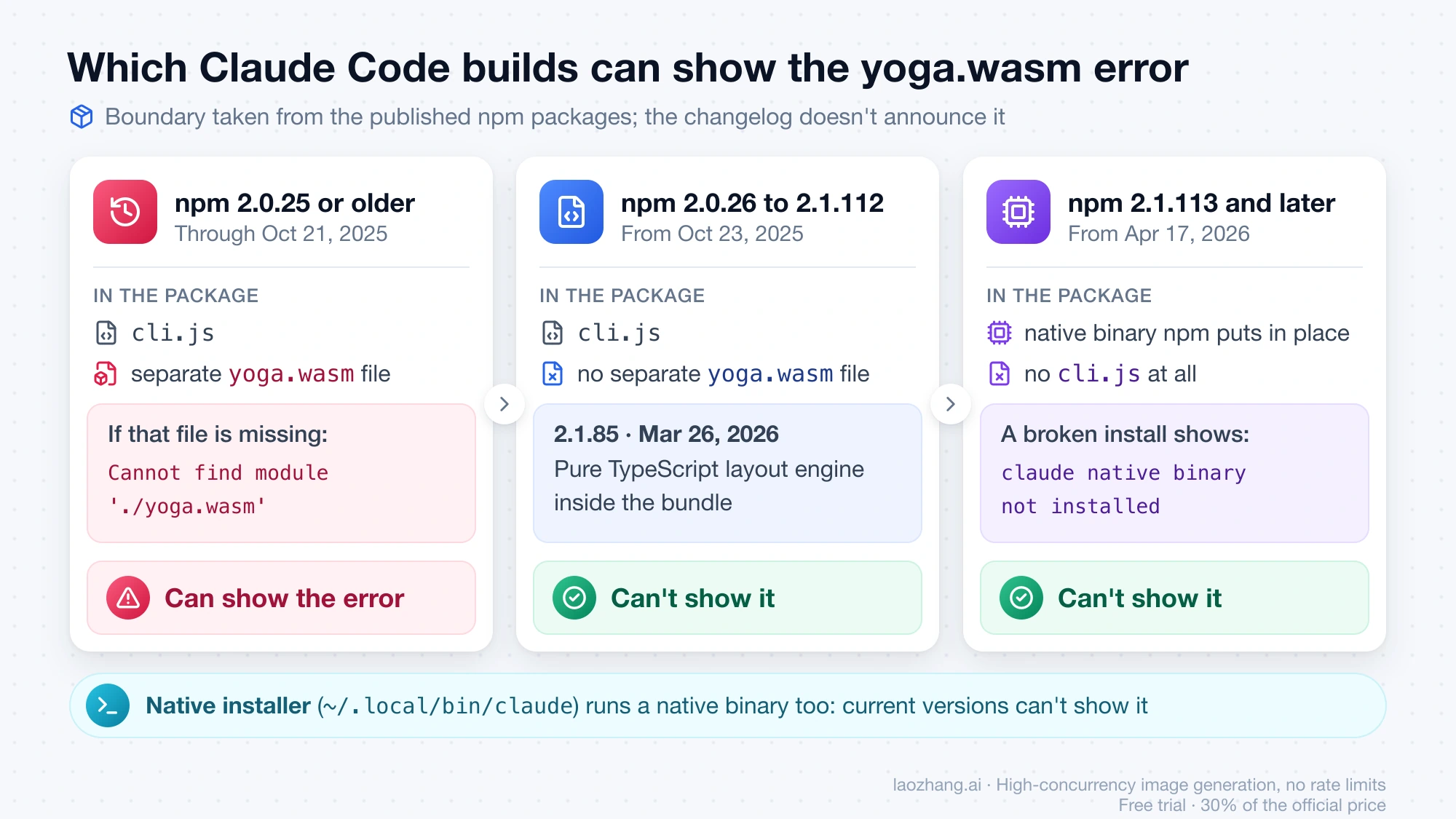
Which builds can throw the error depends only on what the package ships:
What your claude is | What it runs | Can it show the yoga.wasm error? |
|---|---|---|
| npm 2.0.25 or earlier (through October 21, 2025) | cli.js plus a separate yoga.wasm file | Yes, when the file is missing |
| npm 2.0.26 (October 23, 2025) to 2.1.112 | cli.js, no separate yoga.wasm file | No |
| npm 2.1.113 (April 17, 2026) and later | A native binary that the npm package puts in place | No. A broken install shows claude native binary not installed instead |
Native installer (~/.local/bin/claude) | A native binary | No, for current versions |
The 2.0.25/2.0.26 boundary comes from the published npm packages themselves: the 2.0.24 and 2.0.25 tarballs contain yoga.wasm, while 2.0.26 and the later tarballs sampled through 2.1.112 do not, and a 2.0.26 cli.js runs --version with no such file present. The Claude Code changelog doesn't announce that packaging change. Its later Yoga entries, deferred Yoga WASM preloading in 2.1.69 (March 5, 2026) and a pure TypeScript layout engine in 2.1.85 (March 26, 2026), are about code inside the bundle and don't bring the separate file back.
That raises the question of how anyone still runs a 2.0.25-era build in late 2026. The likely answer, inferred rather than documented, is a copy that stopped updating: a machine with DISABLE_UPDATES set, a Docker or CI image that pins an old version, or the global folder of an older Node version that you switched back to with nvm or mise. A Require stack ending in cli.js tells you an older JavaScript copy is running, because the current npm package has no cli.js at all; with this particular error, that copy is a 2.0.25-or-earlier build.
Don't try npm install yoga-wasm or a similar package. yoga.wasm was never a separate dependency; it shipped inside @anthropic-ai/claude-code.
Which claude is running: read the Require stack, then which -a claude
The last line of the Require stack names the broken copy. Everything before /cli.js is that copy's package folder, and the start of the path tells you what installed it:
| Path in the Require stack | What installed that copy |
|---|---|
~/.nvm/versions/node/v20.10.0/lib/node_modules/@anthropic-ai/claude-code/cli.js | npm global install under an nvm-managed Node (v20.10.0 here) |
~/.npm-global/lib/node_modules/@anthropic-ai/claude-code/cli.js | npm global install with a custom prefix |
/opt/homebrew/lib/node_modules/@anthropic-ai/claude-code/cli.js | npm global install under Homebrew's Node, not the Homebrew claude-code cask |
~/.local/share/mise/installs/node/22.19.0/lib/node_modules/@anthropic-ai/claude-code/cli.js | npm global install under a mise-managed Node |
Anything under ~/.claude/local/ | The legacy local install that older Claude Code versions created |
Next, list every claude on your PATH. The shell runs the first line, so a working install further down doesn't help:
which -a claudeIn the reproduction, which -a claude listed the old npm copy's bin/claude first and the native ~/.local/bin/claude second. A working 2.1.301 was installed, yet claude --version still failed with the yoga.wasm error, because the old copy came first. Installing a new version alone doesn't fix anything while an old copy sits ahead of it.
To see what each install channel has on disk, run the checks from the official check for conflicting installations section, plus npm root -g to see which global folder your current Node uses:
npm root -g
npm -g ls @anthropic-ai/claude-code
ls -la ~/.local/bin/claude
ls -la ~/.claude/local/
No such file or directory from an ls just means nothing is installed there. To read the version of the broken copy, look at the package.json in the folder from your Require stack. Use your own path:
grep '"version"' ~/.nvm/versions/node/v20.10.0/lib/node_modules/@anthropic-ai/claude-code/package.jsonclaude doctor can't help here. It starts the same broken copy, and in the reproduction it failed with the same yoga.wasm error before printing any diagnostics.
On Windows the docs give where.exe claude to list copies and Test-Path "$env:USERPROFILE\.local\bin\claude.exe" to check for a native install. Neither was run.
Repair npm in place or switch to the native installer
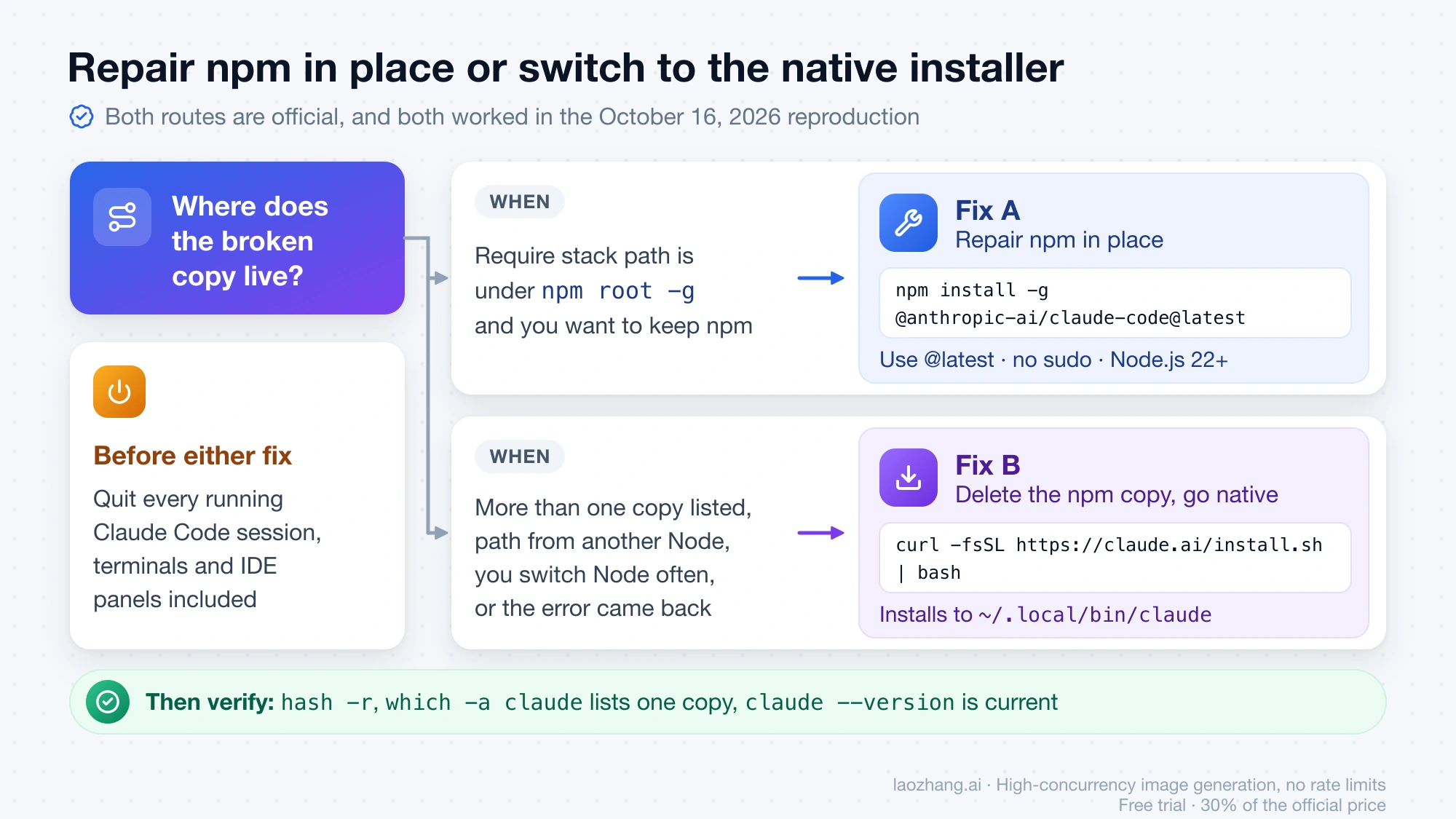
Both routes are official, and both worked in the reproduction. Pick by where the broken copy lives:
| Your situation | Route |
|---|---|
The Require stack path is under the folder that npm root -g prints, and you want to keep managing Claude Code with npm | Fix A: npm install -g @anthropic-ai/claude-code@latest |
which -a claude lists more than one copy, the path belongs to another Node version, you switch Node versions often, or the error came back after an earlier reinstall | Fix B: remove the npm copy and use the native installer |
The Claude Code setup docs still document the npm route. The troubleshooting docs recommend the native install at ~/.local/bin/claude when you're choosing which copy to keep.
Before either fix, quit every running Claude Code session, including terminals and IDE panels, so nothing rewrites the install while you work on it.
Fix A: npm install -g @anthropic-ai/claude-code@latest over the broken copy
First check that npm will write to the broken copy's folder. npm root -g should print the part of your Require stack path that ends in lib/node_modules. If it prints a different folder, the command below installs a second copy and leaves the broken one in front of it. In that case, go to Fix B.
npm install -g @anthropic-ai/claude-code@latestIn the reproduction, running this over the broken 2.0.25 printed added 8 packages, removed 2 packages, and changed 1 package. Afterward, claude linked to bin/claude.exe inside the package (a Mach-O arm64 binary despite the name), and claude --version printed 2.1.301 (Claude Code). No ENOTEMPTY error occurred there. On real machines it sometimes does, and the fix is further down.
The setup docs add three rules for this route:
- Use
@latest, notnpm update -g.npm update -gkeeps to the version range from the original install and may not move you to the newest release. - Don't use
sudo npm install -g. If you hit permission errors, follow the docs' section on permission errors during installation. - The npm package requires Node.js 22 or later. On an older Node, npm prints an
EBADENGINEwarning but completes the install, andclaudestill runs because the native binary doesn't use your Node at runtime. The reproduction used Node 24.11.0, so the older-Node path wasn't tested.
Then verify. hash -r clears the shell's cached location for claude; opening a new terminal does the same.
hash -r
which -a claude
claude --version
Fix B: install the native build and delete the old npm copy
Remove the broken npm copy
If npm root -g prints the folder from your Require stack, uninstall it the official way:
npm uninstall -g @anthropic-ai/claude-codeIf the copy belongs to a different Node version, npm uninstall -g works on the current Node's global folder and leaves the broken copy where it is. In that case, delete the two paths by hand: the package folder from the Require stack (drop the trailing /cli.js) and the bin/claude link next to that Node's lib folder. The reproduction removed its old copy exactly this way. With the nvm example path from above:
rm -rf ~/.nvm/versions/node/v20.10.0/lib/node_modules/@anthropic-ai/claude-code
rm -f ~/.nvm/versions/node/v20.10.0/bin/claude
Replace both paths with the ones from your own error message and which -a claude output. Don't widen them with wildcards across every Node version.
If the broken copy is the legacy local install, the docs remove it with:
rm -rf ~/.claude/localThat deletes only the local subfolder. ~/.claude/ itself holds your settings and history, and ~/.claude.json sits next to it, so leave both alone.
If which -a claude also lists a Homebrew cask install and you're standardizing on the native installer, the docs' removal command is brew uninstall --cask claude-code.
Run the native installer
curl -fsSL https://claude.ai/install.sh | bashIn the reproduction, the installer reported Version: 2.1.301 and Location: ~/.local/bin/claude, which was a symlink into ~/.local/share/claude/versions/2.1.301. It also warned that the install existed but ~/.local/bin wasn't on PATH, and printed this fix for Zsh, the macOS default:
echo 'export PATH="$HOME/.local/bin:$PATH"' >> ~/.zshrc && source ~/.zshrcFor Bash on Linux, the docs use ~/.bashrc instead of ~/.zshrc. That variant wasn't run.
Verify that only one claude is left
hash -r
which -a claude
claude --version
After the old copy was deleted in the reproduction, which -a claude listed only ~/.local/bin/claude and claude --version printed 2.1.301 (Claude Code). Once claude starts, claude doctor gives the full installation check.
Windows commands from the docs (not run)
On Windows, the setup docs install the native build from PowerShell with irm https://claude.ai/install.ps1 | iex. An npm copy is removed with the same npm uninstall -g @anthropic-ai/claude-code, a WinGet install with winget uninstall Anthropic.ClaudeCode, and the legacy local install with Remove-Item -Recurse -Force "$env:USERPROFILE\.claude\local". Afterward, where.exe claude should list only %USERPROFILE%\.local\bin\claude.exe.
npm uninstall or reinstall fails with ENOTEMPTY
This error wasn't reproduced. The fix below comes from the docs section on npm ENOTEMPTY during update or reinstall. It also appears in issue #7193, where a user's npm uninstall -g failed this way even with --force. The error looks like this:
npm error code ENOTEMPTY
npm error syscall rename
npm error path /home/you/.nvm/versions/node/v22.13.1/lib/node_modules/@anthropic-ai/claude-code
npm error dest /home/you/.nvm/versions/node/v22.13.1/lib/node_modules/@anthropic-ai/.claude-code-tVWAnUUt
The npm error path line names the folder npm couldn't move. Delete it along with any leftover .claude-code-* temp folders next to it:
rm -rf "$(npm root -g)/@anthropic-ai/claude-code"
rm -rf "$(npm root -g)/@anthropic-ai/.claude-code-"*
If Zsh prints no matches found for the second line, there were no leftovers. If the npm error path folder isn't under what npm root -g prints, for example because you switched Node versions with nvm, delete the folders the error names instead. The docs' PowerShell version is:
Remove-Item -Recurse -Force "$(npm root -g)/@anthropic-ai/claude-code", "$(npm root -g)/@anthropic-ai/.claude-code-*"Then reinstall with npm install -g @anthropic-ai/claude-code and check claude --version.
After reinstalling: "claude native binary not installed"
This is a different error, and it means the current npm package installed but its last step didn't run. Since 2.1.113, the npm package gets the real binary from a per-platform optional dependency and copies it into place with a postinstall script. If you installed with --ignore-scripts, --omit=optional, a .npmrc that sets optional=false, or a pnpm setup that skips install scripts, claude stays a placeholder and prints:
Error: claude native binary not installed.The docs' fix is to reinstall without those flags. When scripts were skipped but optional dependencies were downloaded, running the package's install.cjs with Node also completes the install. Details are in the docs section on the native binary not found after npm install. If you don't need npm, the native installer from Fix B avoids this step entirely. None of these paths was run.
The yoga.wasm error came back the next day
In the 2025 reports, the error returned after a session was left open, a laptop was closed, or overnight. That was the auto-updater rewriting an old npm install again. On a current version that can't happen, because no current build loads yoga.wasm. If the error is back after a fix, the fix almost always went to a different copy than the one that runs:
which -a claudeprints more than one line: an old copy is still ahead of the new one. Remove it as in Fix B.- The first copy's
package.jsonsays 2.0.25 or lower: something reinstalled or kept an old version, such asDISABLE_UPDATES, a pinned version in a script, Dockerfile or CI image, or a Node version you switched back to. Move the pin to a current version. - You use pnpm as well as npm: in a 2025 report, a Zenn author reinstalled Claude Code with pnpm while an older npm copy under nvm stayed first on
PATH, so the old copy kept running. The fix was deleting the nvm copy and itsbin/claudelink. The pnpm side of this wasn't tested.
Keeping to these rules prevents a repeat:
- Keep one install channel. The troubleshooting docs put it as "If you find multiple installations, keep only one."
- On npm, upgrade with
npm install -g @anthropic-ai/claude-code@latest, neversudo, and nevernpm update -g. - Quit all Claude Code sessions before you update or reinstall.
- Rerun
which -a claudeafter any change of Node version manager or Node version.
When to file a GitHub issue instead
The fix above assumes a Require stack that ends in @anthropic-ai/claude-code/cli.js. Open a new issue on the Claude Code GitHub issue tracker if either of these happens:
which -a claudelists only~/.local/bin/claude(or only one npm copy at 2.0.26 or later), and starting it still printsCannot find module './yoga.wasm'.- The Require stack points at a file outside any Claude Code package.
Include your OS, the full which -a claude output, claude --version from each copy that runs, and the complete Require stack. As of October 16, 2026, the most recent GitHub report of this error is issue #9721 from October 17, 2025, which was closed as a duplicate of #1103.
If your message is Claude Code process exited with code 1 without a yoga.wasm line, start with the guide to diagnosing the Claude Code process exited with code 1 error. If the terminal works and only the VS Code panel fails, see Claude Code not working in VS Code.
Questions about the yoga.wasm error
Can a native install of Claude Code show "Cannot find module './yoga.wasm'"?
Not a current one. A native install runs a compiled binary and has no cli.js, and this error's Require stack always names a cli.js file. In the 2025 thread on issue #7193, a commenter believed it happened on a native install but wasn't sure which install they had. An old npm copy ahead of a native one on PATH produces exactly that picture, as the reproduction showed.
Does uninstalling Claude Code delete my settings and history?
No. npm uninstall -g @anthropic-ai/claude-code and the native uninstall (rm -f ~/.local/bin/claude and rm -rf ~/.local/share/claude) remove program files only. Settings and history live in ~/.claude/ and ~/.claude.json, which the setup docs treat separately. Deleting them is a separate, optional step that this fix never needs.
Do I need npm cache clean --force to fix the yoga.wasm error?
Not usually. One 2025 Zenn fix included it, and its author called it optional. The in-place @latest upgrade in the reproduction worked without clearing the cache.
Sources6
External pages this guide links to, in the order they appear. Last updated Oct 16, 2026.
Sources6
External pages this guide links to, in the order they appear. Last updated Oct 16, 2026.
- 1.Claude Code installation troubleshooting docscode.claude.com/docs/en/troubleshoot-install
- 2.GitHub issue #1103github.com/anthropics/claude-code/issues/1103
- 3.GitHub issue #7193github.com/anthropics/claude-code/issues/7193
- 4.Claude Code changelogcode.claude.com/docs/en/changelog
- 5.Claude Code setup docscode.claude.com/docs/en/setup
- 6.Claude Code GitHub issue trackergithub.com/anthropics/claude-code/issues