AI Video Dialogue With Multiple Characters: One Shot or Cuts?
Use one shot when two characters trade short lines that fit one clip. Cut to separate shots for three or more speakers, long scenes, or lines you will rewrite.
On this page
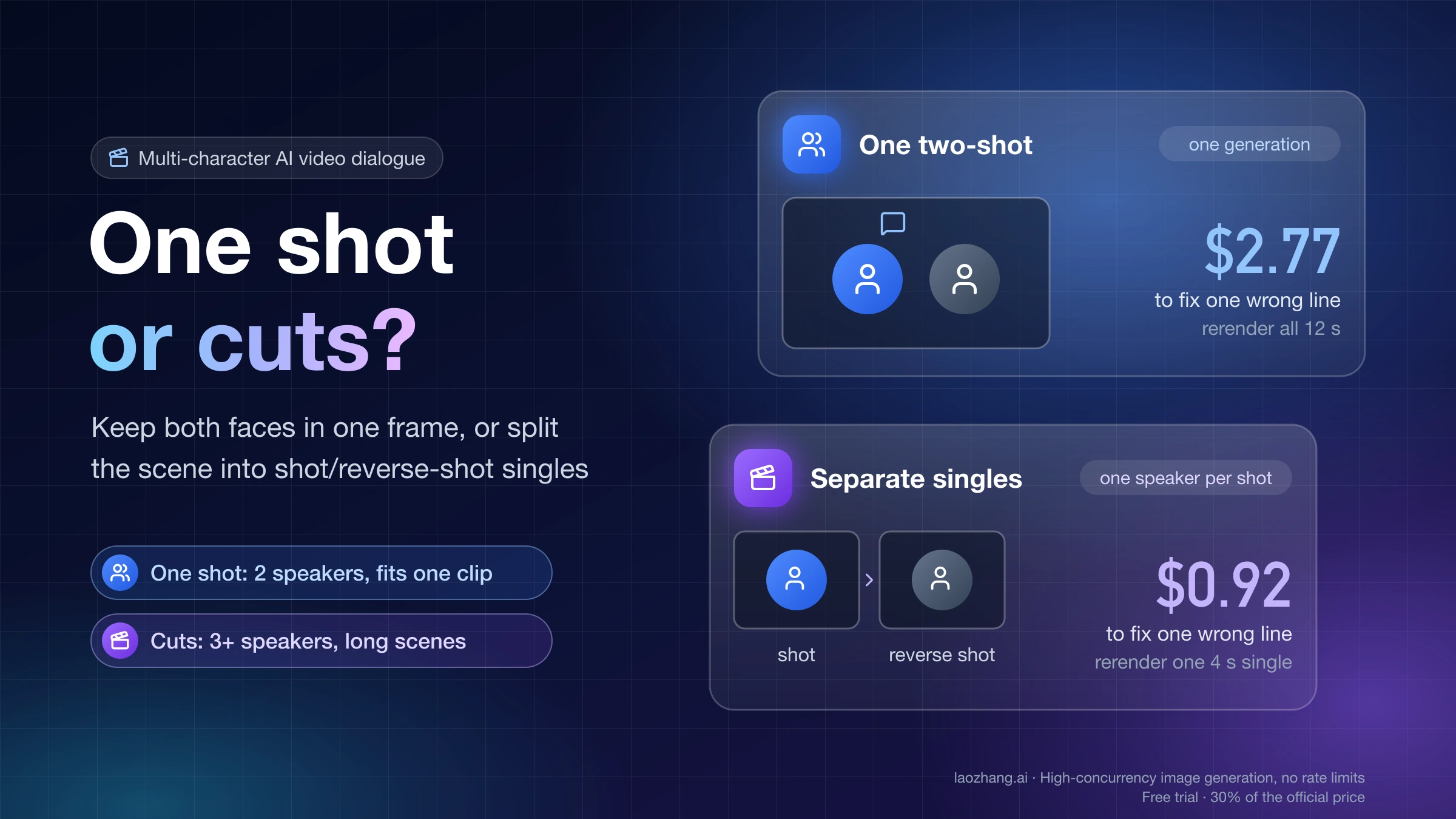
Generate the conversation as one shot when two characters trade a few short lines, the whole exchange fits one clip, and they touch, interrupt, or react to each other in ways a cut would break. Split it into separate shots (singles, shot/reverse shot, over-the-shoulder) when three or more people speak, the dialogue runs longer than the model's clip, you expect to rewrite lines, or the wrong mouth keeps moving. Those two methods are the usual choice. A hybrid sits between them: keep both characters in one frame but drive each face separately, which is what Runway's Act-Two workflow does.
The reason is mechanical. In a one-shot generation, the model has to decide which visible face owns each line and which voice goes with it. When that assignment slips, the whole clip is unusable, and you pay to regenerate all of it. In a single, only one person talks, so the assignment problem mostly disappears. The new problem is keeping that person's face and voice the same from shot to shot.
One shot or separate shots: decide from five facts about your scene
Most scenes can be sorted with the table below. Read down the rows that apply to you. If any row points firmly to cuts, that row usually wins, because a one-shot take has to get every row right in the same generation.
| Scene fact | Lean toward one shot | Lean toward separate shots |
|---|---|---|
| Speakers on screen | Two, visually distinct | Three or more, or two who look alike |
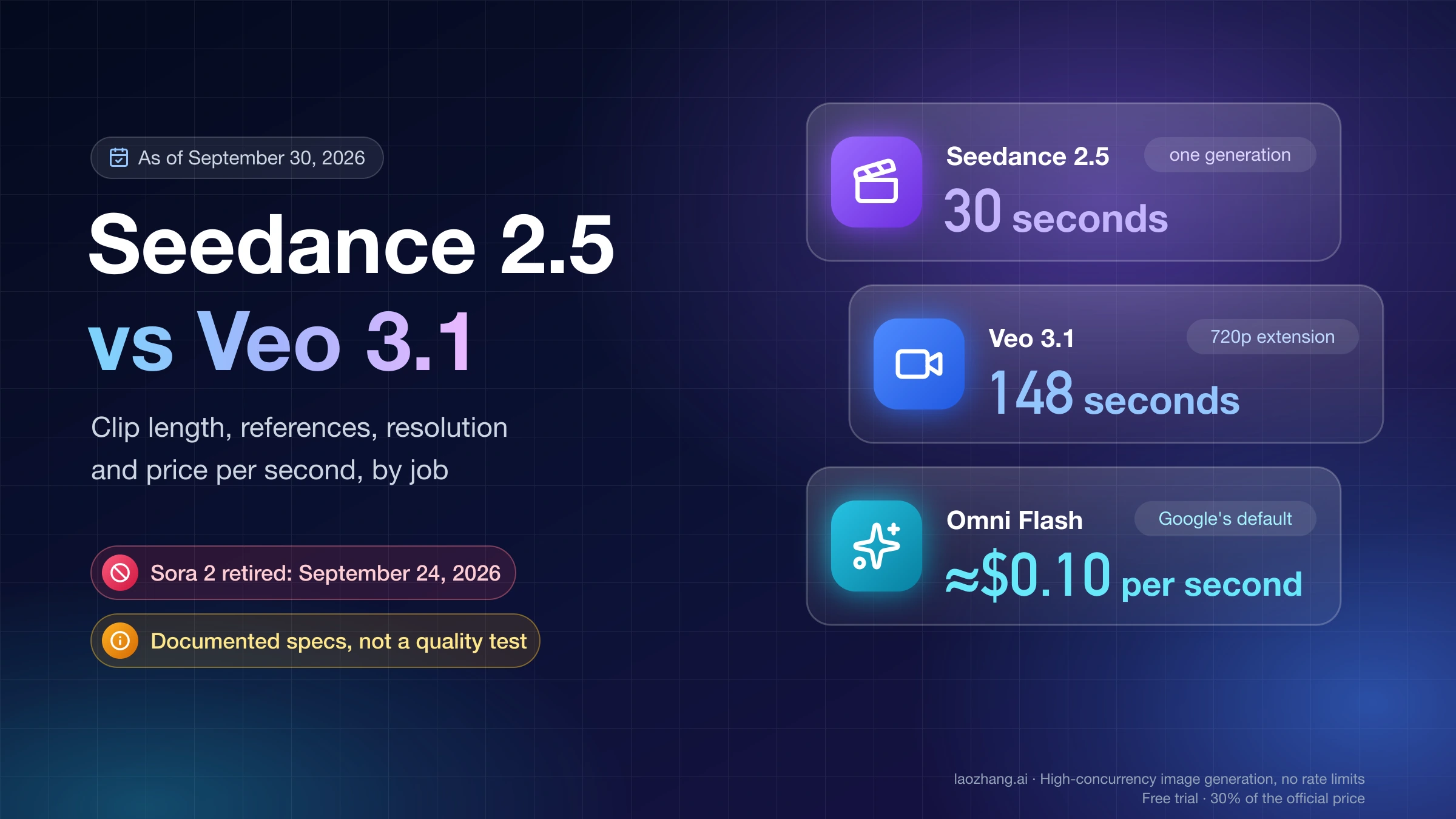
| Length of the exchange | Fits one clip (Veo 3.1: 8 s; Seedance 2.5: up to 30 s; Kling 3.0: up to 15 s) | Longer than one clip, or needs extensions |
| Physical interaction | Hugs, handoffs, interruptions, overlapping reactions | Talking heads, phone calls, seated conversation |
| Line revisions | Script is locked | Client or director will change lines |
| Budget per approved take | You can afford rerendering the whole exchange | You want to retry only the line that failed |
Two follow-on rules help with the edge cases:
- Short exchange, but the wrong person keeps speaking? Keep the two-shot as an establishing shot with no dialogue, then cut to singles for the lines. You keep the shared-space feeling without asking one generation to assign every line.
- Long exchange, but the characters must stay in one frame? That is the case Runway documents a per-character workflow for (covered below), or you accept several one-shot clips joined by cuts at natural pauses.
Some models also offer built-in multi-shot generation, where one request returns several shots with cuts already in place. That gives you shot/reverse-shot pacing without an editor, but every line is still assigned inside one generation. If one shot in the sequence is wrong, you regenerate the sequence.
Why one-shot dialogue fails: every line has to be assigned to a mouth
The failure readers describe most, "the wrong mouth moves, the identities drift," is a binding problem. The model receives several characters, several lines, and sometimes several voice samples, and it has to pair them correctly for the full length of the clip.
Only one vendor states this failure in its own documentation. The BytePlus Seedance 2.5 prompt guide says that in multi-subject videos, "characters may be mismatched with their reference images, voice timbres, or order of appearance," and gives the example that "the first character to appear may be replaced with another referenced character." The paper behind the open-source MultiTalk project names the same issue as "incorrect binding problems between audio and persons." Other vendors don't describe the failure, which isn't the same as saying it doesn't happen.
Third-party guides reach the same practical conclusion. A Seedance TV guide from August 2026 describes "identity leak" (one character borrows the other's hair, jacket, or features) and "role leak" (Character A's face speaks Character B's line), and says two characters are the most controllable setup. Elser AI's multi-character guide is blunter: "Do not generate the whole conversation in one clip." A user in the OpenAI Developer Community thread requesting multi-character dialogue described the workaround of generating each character separately and stitching them in an editor.
Seedance's guide adds a general warning that applies here: results "may be unstable when a single task combines multiple reference and editing requirements," and the suggested fix is to break the task into simpler ones. A two-person, four-line, two-voice clip is exactly that kind of combined task.
Cost per approved take: one shot vs shot by shot
Shot by shot usually costs more per complete pass and less per fix. Which one is cheaper depends on how often you have to retry. The formula is simple:
cost = price per second × seconds generated × number of attempts
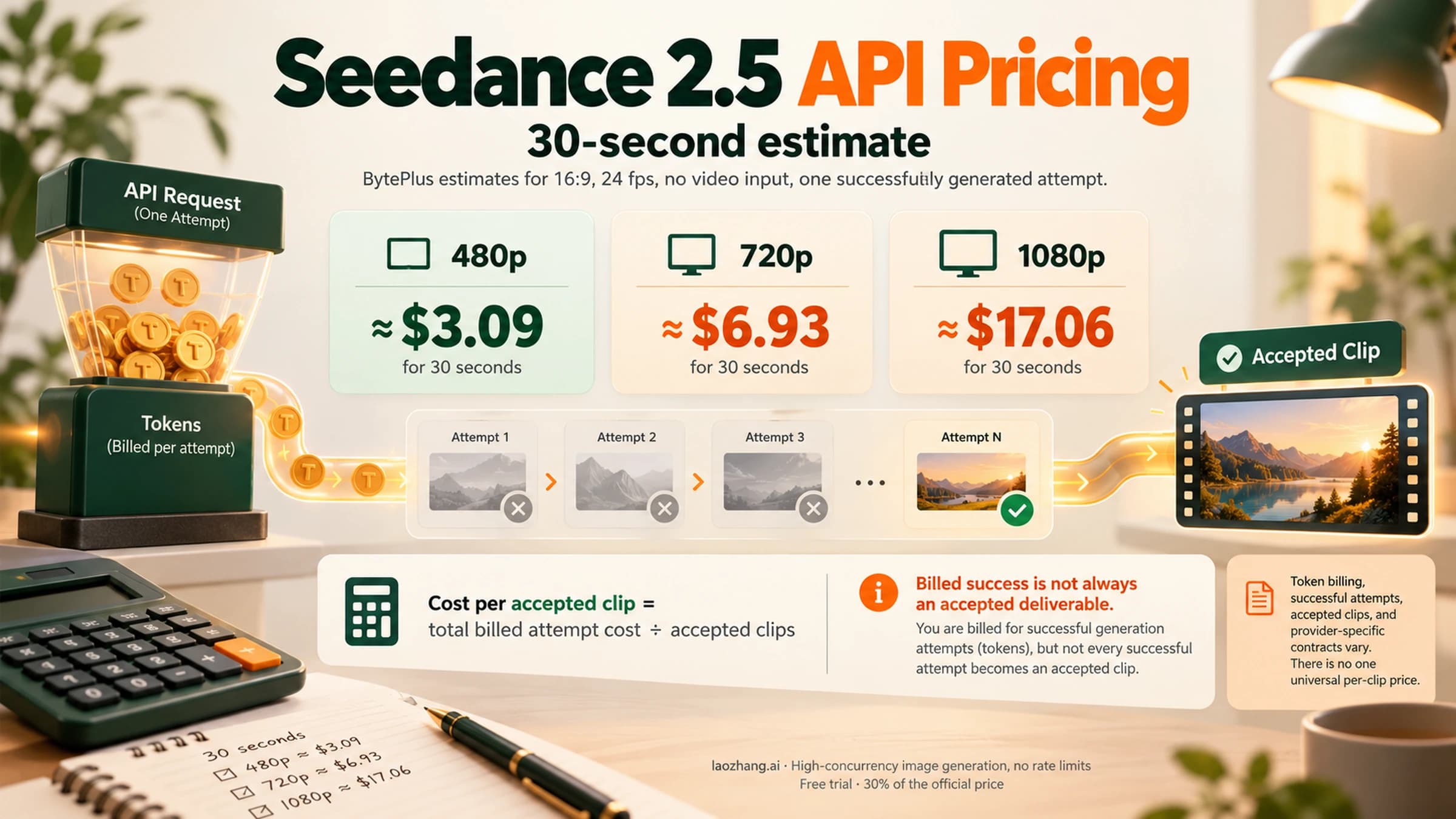
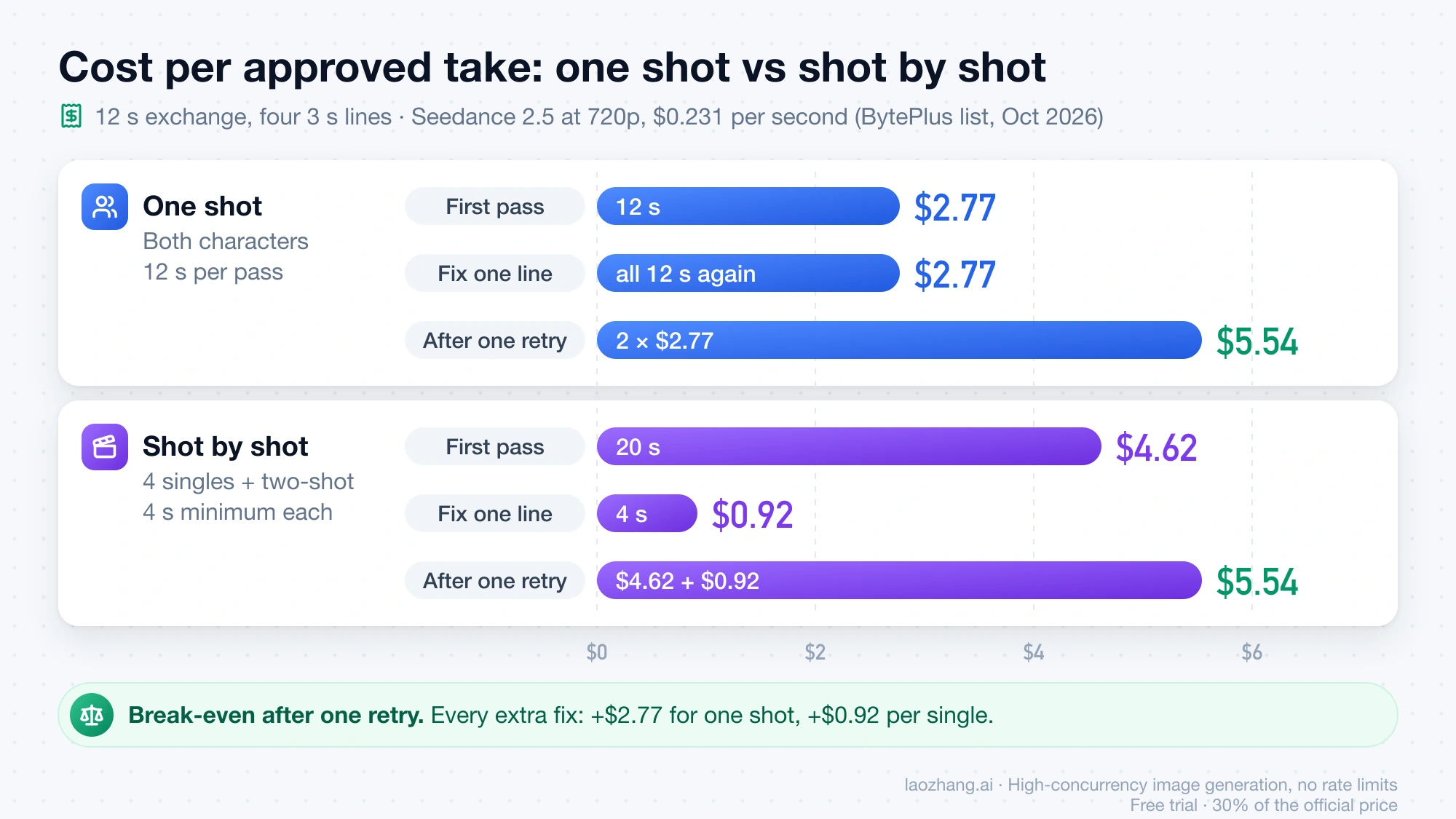
Take a 12-second exchange with four 3-second lines, generated on Seedance 2.5 at 720p. BytePlus listed about $0.231 per second for 720p in October 2026. List prices change often, so plug in the current rate.
| Approach | Seconds per pass | Cost per pass | Cost to fix one wrong line |
|---|---|---|---|
| One shot, both characters | 12 | 12 × $0.231 = $2.77 | Rerender all 12 s: $2.77 |
| Four singles (4 s minimum each) plus a 4 s two-shot | 20 | 20 × $0.231 = $4.62 | Rerender one 4 s single: $0.92 |
Seedance 2.5's minimum output is 4 seconds, which is why each 3-second line costs 4 seconds. After one retry each, the totals meet: two one-shot attempts cost 2 × $2.77 = $5.54, and the shot-by-shot pass plus one fixed single costs $4.62 + $0.92 = $5.54. Every additional one-shot reroll costs another $2.77, while each extra fix on the cut version costs $0.92. A script change works the same way. Changing one line in the one-shot version means a full rerender.
The math tips the other way on Veo 3.1. Google's Veo documentation for the Gemini API requires an 8-second duration whenever you use reference images, extension, or 1080p. If you need reference images to keep faces consistent across singles, four singles at Veo 3.1 Standard's $0.40 per second list price cost 4 × 8 × $0.40 = $12.80, against $3.20 for one 8-second two-shot. You can trim the singles in the edit, but you pay for all 32 seconds. Veo 3.1 Fast at 1080p ($0.12 per second as of October 2026) brings the same four singles to 4 × 8 × $0.12 = $3.84.
What each AI video model documents for multi-character dialogue
The matrix below uses each vendor's own documentation only. "Not documented" means the vendor's page says nothing about it, not that the feature is missing.
| Model | How to write dialogue | Voice or speaker binding | Clip length | Several shots in one request |
|---|---|---|---|---|
| Veo 3.1 (Gemini API) | Speaker label plus quoted line; Google's example has a man and a woman speaking in one clip | Not documented; up to 3 reference images, described as images "of a single person, character, or product" | 4, 6, or 8 s; extension adds 7 s per step, up to 148 s total | Not documented as a feature |
| Gemini Omni 1.1 Flash | Prompted in text | No audio references; uploaded audio is ignored | Extends by 10 s, up to 40 s total | Yes, by default; write "No scene cuts" for one continuous shot |
| Seedance 2.5 | Labeled lines such as Dialogue (elderly woman): "…"; dedicated dialogue brackets; state the language for non-Chinese lines | Yes: bind images and audio to Character 1, Character 2 by upload order | 4–30 s | Yes: Shot 1, Shot 2 with integer-second timestamps |
| Kling 3.0 | Prompted in text | Vendor claim: "pinpoint the exact character speaking" in multi-character scenes | 3–15 s | Yes: API multi_shot, 1–6 shots, at least 1 s each |
| Kling 4.0 | Prompted in text | Reference audio is "Voice reference only"; no multi-speaker statement | 3–30 s (Flash: 3–20 s) | Not stated in the release note |
| MiniMax H3 | Dialogue in 11 languages | Not documented; up to 3 audio references | 4–15 s | "Native multi-shot modeling" |
| Wan 2.7 | Prompted in text, with shot timing in the prompt | Not documented; one audio input of 2–30 s | 2–15 s | Yes, via prompt (Shot 1, Shot 2 with time ranges) |
| Runway Act-Two | Your own recorded performance drives each face | One character per run; you composite | Performance up to 30 s | Separate Multi-Shot app: up to 5 shots, 10 s, no audio by default |
| MultiTalk / InfiniteTalk (open source) | Audio files, one per person | Yes: cond_audio maps person1, person2 to audio | MultiTalk up to 15 s; InfiniteTalk 40 s by default | No |
A few rows need context before you rely on them:
- Veo 3.1 reference images. One sentence in Google's docs says you can provide "up to three asset images of a single person, character, or product." It doesn't say whether three images can show two different characters. Treat a two-character reference setup on Veo as untested territory until you've checked it on your own account.
- Gemini Omni 1.1 Flash. The Omni API documentation says it "will try to create a video with a few different shots" by default. It also can't extend an uploaded video in which someone is talking to add more dialogue, and "voice editing is not supported." For which Omni model ID applies where, see Gemini Omni 1.1 Flash: Which Model ID Should You Use in Each Google Product?.
- Kling 3.0 vs 4.0. The speaker-pinpointing line and the shot/reverse-shot multi-shot feature come from the Kling 3.0 release note, which presents them as eliminating ambiguity. That is the vendor's claim, not an independent result. The Kling 4.0 release note (available to everyone from October 15, 2026) promises "more accurate Lip Sync" but doesn't restate the speaker claim or give a shot count.
- Real faces. Seedance 2.5 doesn't accept direct uploads of real faces. It takes its own trusted outputs, preset digital characters, or verified real-person assets. Omni doesn't support images of "certain recognizable people."
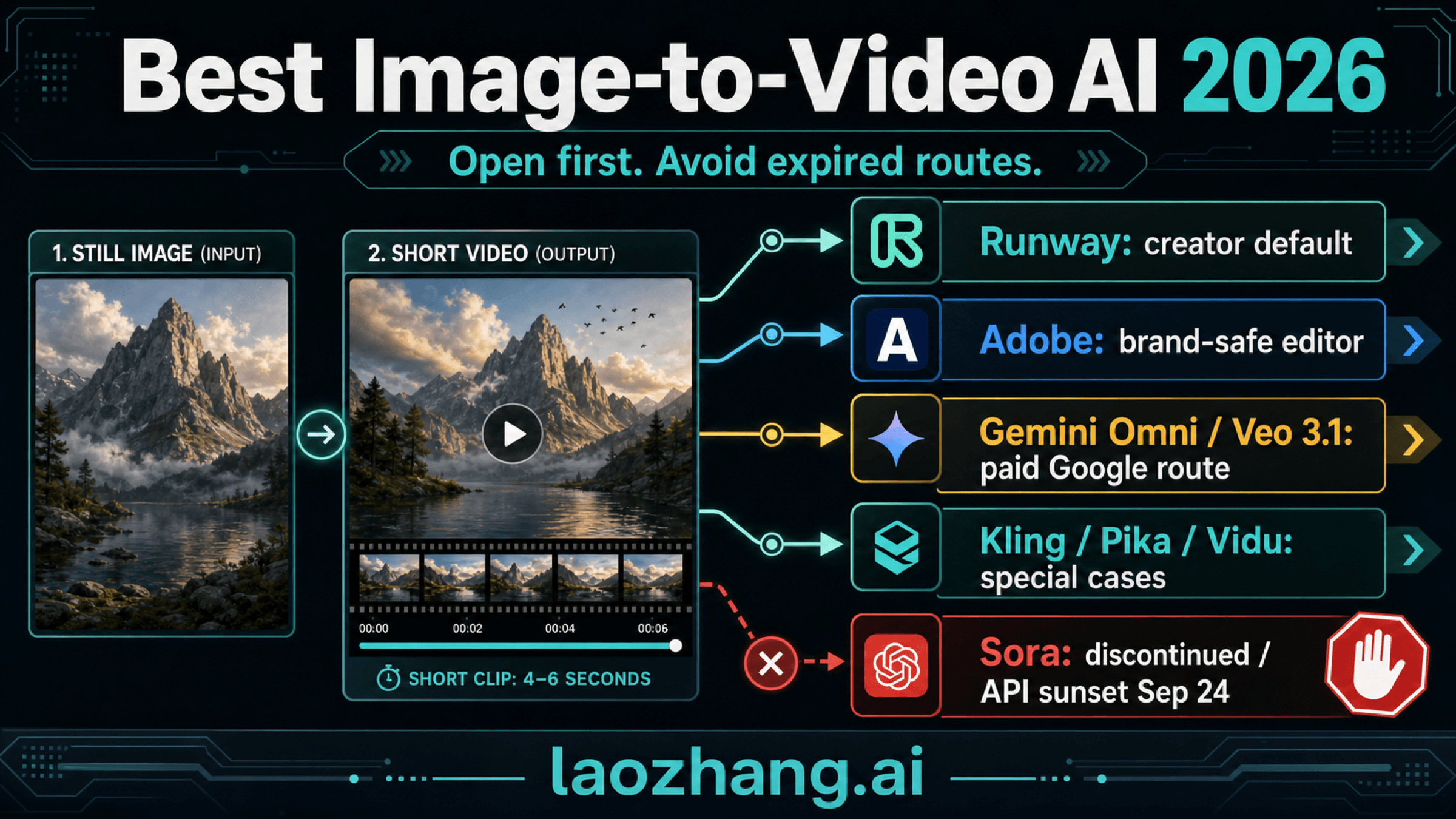
- Sora 2 is not an option. OpenAI discontinued the Sora app on April 26, 2026 and shut down the Sora 2 models and Videos API on September 24, 2026.
If you're still choosing between the three most-used models on duration, references, and price, Seedance 2.5 vs Veo 3.1 vs Gemini Omni: Which Fits Your Job covers that comparison. For the cost of an approved shot on Wan, MiniMax, and Seedance, see Wan 3.0 vs MiniMax H3 vs Seedance 2.5: Pick the First Model to Test.
How to prompt multiple characters talking in one shot
Tie every line to a speaker the model can see, and say what the other person does while it's spoken. Google's Veo guide says to "use quotes for specific speech," and its own two-speaker example labels each line by speaker (Man: and Woman:) with the action in parentheses. The Vertex AI Veo prompt guide uses a colon format instead ("The seasoned detective says: …"). Both are Google examples, so either is reasonable.
The template below follows the documented Veo syntax. It is a starting point, not a prompt with known results:
Medium two-shot, kitchen at night, warm practical light. Two characters at a
counter: MAYA (left, short red hair, green sweater) and THEO (right, gray beard,
denim jacket).
Maya: (sets down a mug, looks at Theo) "You told them already?"
Theo stays silent and avoids her eyes while she speaks.
Theo: (quietly, turning toward her) "I had to."
Maya stays silent and listens, jaw tight.
Fridge hum, a clock ticking. No music.
What each part is doing:
- Visual anchors plus screen position. "Left, red hair, green sweater" lets the model find the speaker. A name alone gives it nothing to look for.
- The listener's behavior. The Seedance TV guide traces "the wrong person speaks" to prompts that name the speaker but not the listener. Writing "Theo stays silent" closes that gap.
- One line per beat. Overlapping lines invite both mouths to move. Seedance's own multi-character example lists "multiple people speaking simultaneously" among the things to exclude.
- Distinct looks. Characters who share hair color, age, and wardrobe are easier to swap.
On Seedance 2.5, add the reference binding. The guide's pattern is to number assets in upload order and bind them in the text, for example "Images 1-2 are Character 1 and correspond to Audio 1; Images 3-4 are Character 2 and correspond to Audio 2." Upload the references in the order the characters first appear on screen, because a mismatch between upload order and appearance order is the failure the FAQ describes. Don't rely on a name written inside a reference image. The guide warns that this "can easily cause character confusion or duplication." Avoid repeating words from a line after it, since that "can trigger subtitle generation." The Seedance 2 Prompt Guide: Shots, Reference Assets, and Targeted Repairs covers the rest of Seedance's syntax and how to repair one segment.
On Gemini Omni, add "No scene cuts" if you want a single continuous two-shot. Otherwise, the default is several shots.
Shot by shot: shot/reverse shot without losing the face or the voice
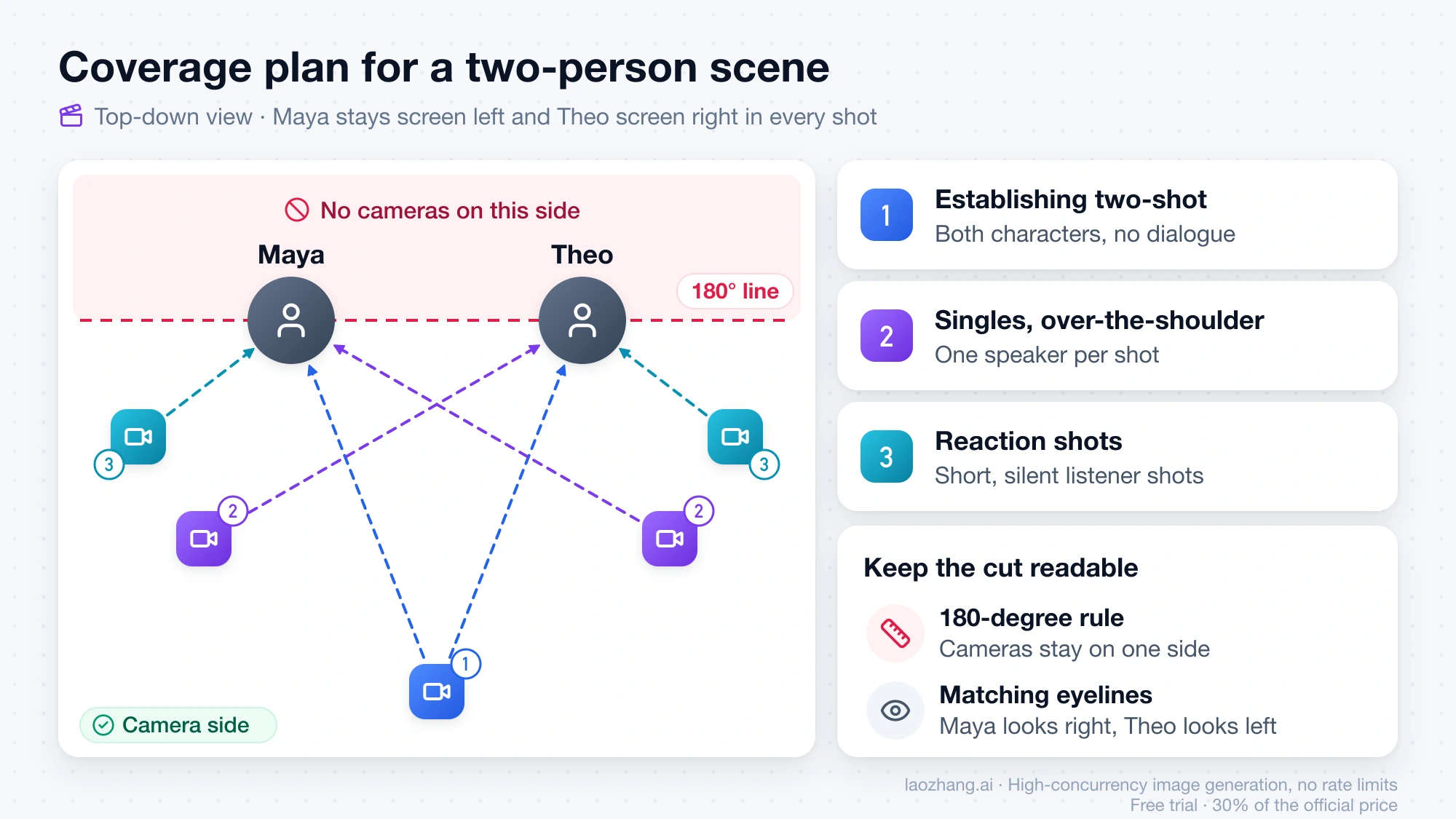
Splitting a conversation trades the binding problem for a continuity problem. Each single is a separate generation, so the character has to look and sound the same in every one. Plan the coverage like a small film shoot:
- Establishing two-shot. Both characters, no dialogue or only a short line. It shows where everyone stands.
- Singles or over-the-shoulder shots. One speaker per shot. An over-the-shoulder shot, framed past the listener's shoulder, keeps the listener present without showing their mouth. Google's Vertex guide calls it "common in conversations."
- Reaction shots. Short, silent listener shots you can cut to when a line needs trimming.
Two film rules keep the cut readable. The 180-degree rule means the camera stays on one side of an imaginary line between the characters, so Maya stays screen left and Theo stays screen right in every shot. Eyelines should match: if Maya looks screen right toward Theo in her single, Theo looks screen left in his.
For continuity, reuse the same reference images and the same character description, word for word, in every shot. Describe lighting and setting identically too. For the voice, use a model that takes audio references. Seedance 2.5 accepts audio clips of 2–30 seconds (combined up to 30 seconds per task) and lets you bind each to a character. Kling 4.0 accepts reference audio for voice. Gemini Omni ignores uploaded audio, so voices from separate Omni generations can drift unless you replace them in post.
If you work through an API, a reusable character asset helps. With a laozhang.ai API key, the Seedance real-person and virtual assets API creates a virtual-human asset from one public HTTPS image, and its asset URI can be passed as the reference_image for every shot of the same character. Real-person assets require official consent and liveness checks first.
Disclosure: laozhang.ai is our own service. Its prices are platform pricing, not an independent comparison.
Built-in multi-shot is the middle ground. Kling 3.0's multi_shot (1–6 shots), Seedance 2.5's timestamped Shot 1, Shot 2, Wan 2.7's prompted shots, MiniMax H3, and Omni's default behavior all return a cut sequence from one request. That saves editing and keeps the look consistent within the request, but you can't swap out just one bad shot. Use it when the sequence is short and the lines are locked. Generate singles separately when you expect to revise.
If a single runs long on Veo 3.1, note one limit on extension: Google says "voice is not able to be effectively extended if it's not present in the last 1 second of video." End the clip mid-line, or start the next line in a new shot.
Runway Act-Two: both characters in one frame, each performed separately
Runway's help article Creating Multi-Character Dialogues with Act-Two documents the hybrid. Act-Two "currently supports single-character inputs," so the workflow drives one face at a time inside a shared shot:
- Record a separate performance video for each character, under 30 seconds total.
- Create a still with both characters, for example with Gen-4 Image references.
- Generate a 10-second base video from that still for ambient motion. Extend it from its last frame if the dialogue runs past 10 seconds.
- Crop the base video so only one character is visible, run Act-Two with that character's performance, then repeat for the other character.
- Layer both Act-Two outputs over the base video in your editor and align them.
This gives you a true same-frame shot in which each character's lip-sync was produced separately, so a swapped voice can't happen. The costs are your own recorded performances, an editor, some compositing, and Act-Two's 5 credits per second. Runway's best-practice page for Act-Two also recommends featuring a single subject, which is why the crop step matters. Runway's standalone Lip Sync tool was deprecated on May 27, 2026, with Act-Two as its replacement.
Fixing wrong-mouth lip-sync, swapped voices, and drifting faces
Start with the cheapest fix in the prompt or references. Switch methods when the same symptom survives two or three focused attempts.
| Symptom | Likely cause | Fix in the prompt or references | When to switch method |
|---|---|---|---|
| The listener's mouth moves, or the wrong character says the line | Speaker not tied to a visual anchor; listener's action not stated | Label each line with name, position, and look; write "stays silent" for the listener | Cut to singles or over-the-shoulder shots for the lines |
| Voices swapped between characters | No voice binding, or references uploaded out of order | Seedance: upload in order of first appearance and renumber Audio 1, Audio 2 in the prompt | On Omni, which has no audio references, replace voices in post or move to a model with audio binding |
| One character replaced by the other partway through | Reference-to-character mismatch (the failure Seedance documents) | Reorder references to match appearance order; one reference set per character | Fewer characters per generation |
| Faces or clothing blend between the two | Characters look too similar ("identity leak") | Differentiate hair, age, and wardrobe; keep descriptions identical across shots | Singles with one character in frame |
| Both characters talk at once | Lines not separated into beats | One line per beat; on Seedance 2.5, give each line its own timestamp | Separate shots |
| Unwanted cuts in a "one-shot" clip | Gemini Omni defaults to several shots | Add "No scene cuts" | Use a model without default cuts |
| Subtitles appear on screen | Dialogue words repeated after the line (Seedance) | Don't repeat dialogue words or attach per-word instructions | Not needed |
| Voice drops after an extension (Veo 3.1) | No speech in the clip's last second | End the clip mid-line | Start the next line as a new shot |
| Upload of a real face rejected | Seedance and Omni restrict real people | Use a preset or verified asset (Seedance) | Use a model that permits it under its terms |
| Results unstable with many references and edits | Too many requirements in one task | Split into simpler tasks, as Seedance's guide suggests | Shot by shot |
Questions about AI video dialogue with multiple characters
How do I make an AI video with dialogue between two characters?
Write the lines into the prompt with a speaker label and a visible anchor for each character, and say what the listener does. Generate it as one shot if the exchange fits one clip, or as an establishing two-shot plus singles if it doesn't. Veo 3.1, Seedance 2.5, and Kling 3.0 all document spoken dialogue generated with the video.
How many characters can talk in one AI video shot?
None of the vendors in the model matrix above publishes a speaker limit per clip. Kling lists "Multi-Character Coreference (3+)" for 3.0, and Google's Veo example has two speakers. The Seedance TV guide calls two characters the most controllable and suggests pair or reaction shots for larger groups. For three or more speakers, separate shots are the safer plan.
Is there a free AI video generator for multiple characters talking?
The free route with documented multi-person binding is open source: MultiTalk and InfiniteTalk bind one audio track to each person and run on your own GPU, so the cost is your hardware. Free tiers of web tools change often. Check whether a site names the underlying model and its limits before you plan a scene around it.
Can I add more dialogue to a Gemini Omni video later?
Not by extending a talking clip. Omni's documentation says it cannot "extend an uploaded video where someone is talking to add additional dialogue." Generate the new line as a separate shot and cut to it.
Sources8
External pages this guide links to, in the order they appear. Last updated Oct 19, 2026.
Sources8
External pages this guide links to, in the order they appear. Last updated Oct 19, 2026.
- 1.BytePlus Seedance 2.5 prompt guidedocs.byteplus.com/en/docs/modelark/seedance-2-5-prompt-guide
- 2.MultiTalk projectgithub.com/MeiGen-AI/MultiTalk
- 3.Veo documentation for the Gemini APIai.google.dev/gemini-api/docs/veo
- 4.Omni API documentationai.google.dev/gemini-api/docs/omni
- 5.Kling 3.0 release notekling.ai/release-note/release-notes/whbvu8hsip
- 6.Kling 4.0 release notekling.ai/release-note/release-notes/Kling_4
- 7.Vertex AI Veo prompt guidecloud.google.com/vertex-ai/generative-ai/docs/video/video-gen-prompt-guide
- 8.Creating Multi-Character Dialogues with Act-Twohelp.runwayml.com/hc/en-us/articles/41748090660499