Gemini Something Went Wrong Error Codes 13, 1076, 1099: 4 Checks
Gemini's Something went wrong (13), (1076), (1099) have no published meaning. Four checks show whether your browser, one chat, your account or Google failed.
On this page
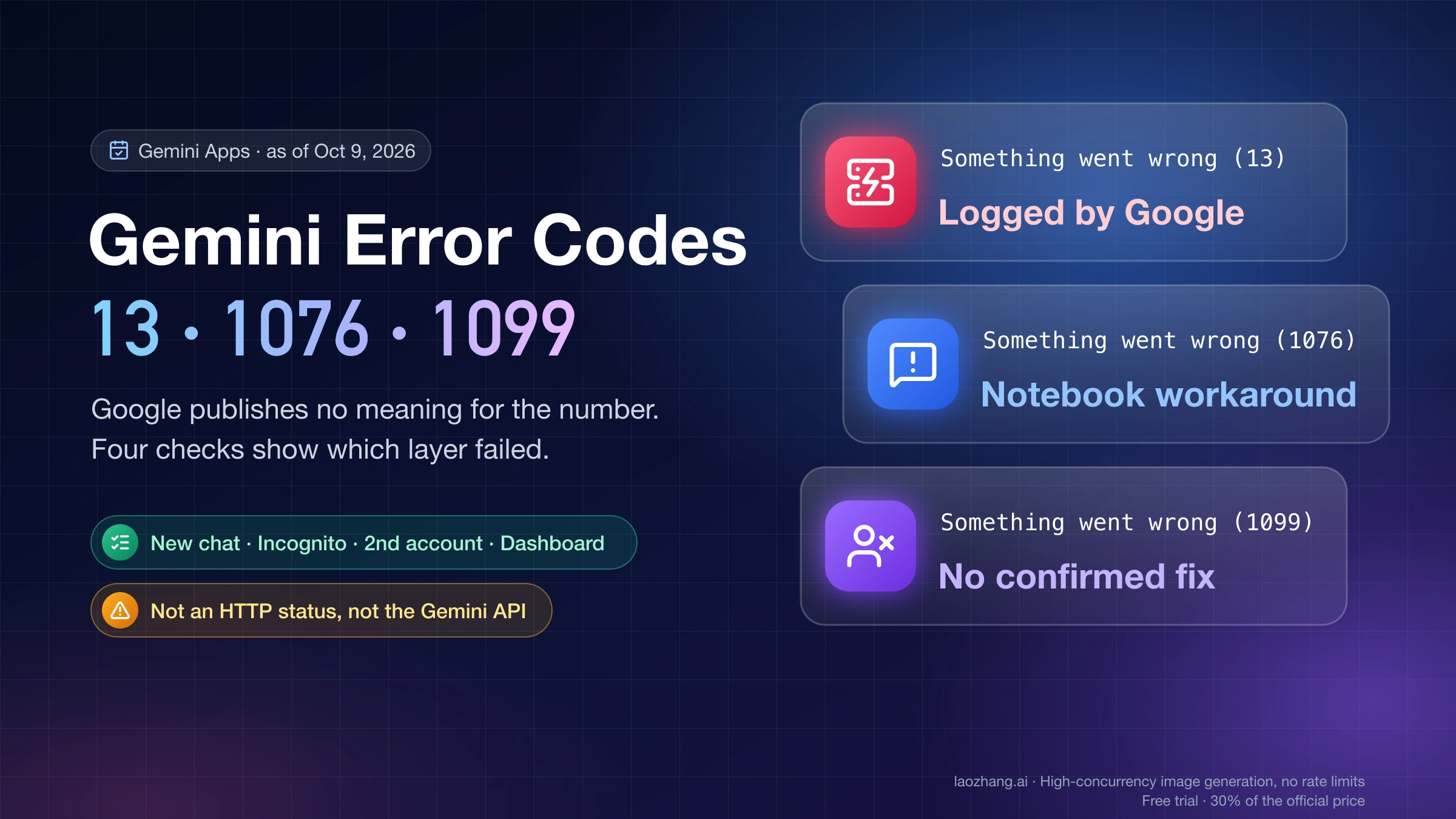
"Something went wrong (13)", "(1076)", "(1099)", "(1155)": the number in brackets is Gemini's own internal code, and as of October 9, 2026 Google has not published what any of them means. No help page lists them, and no Google employee defines one in the community threads where thousands of users have reported them. The number is not an HTTP status either. "(13)" is not a 413, "(5)" is not a 5xx, and none of them come from the Gemini API.
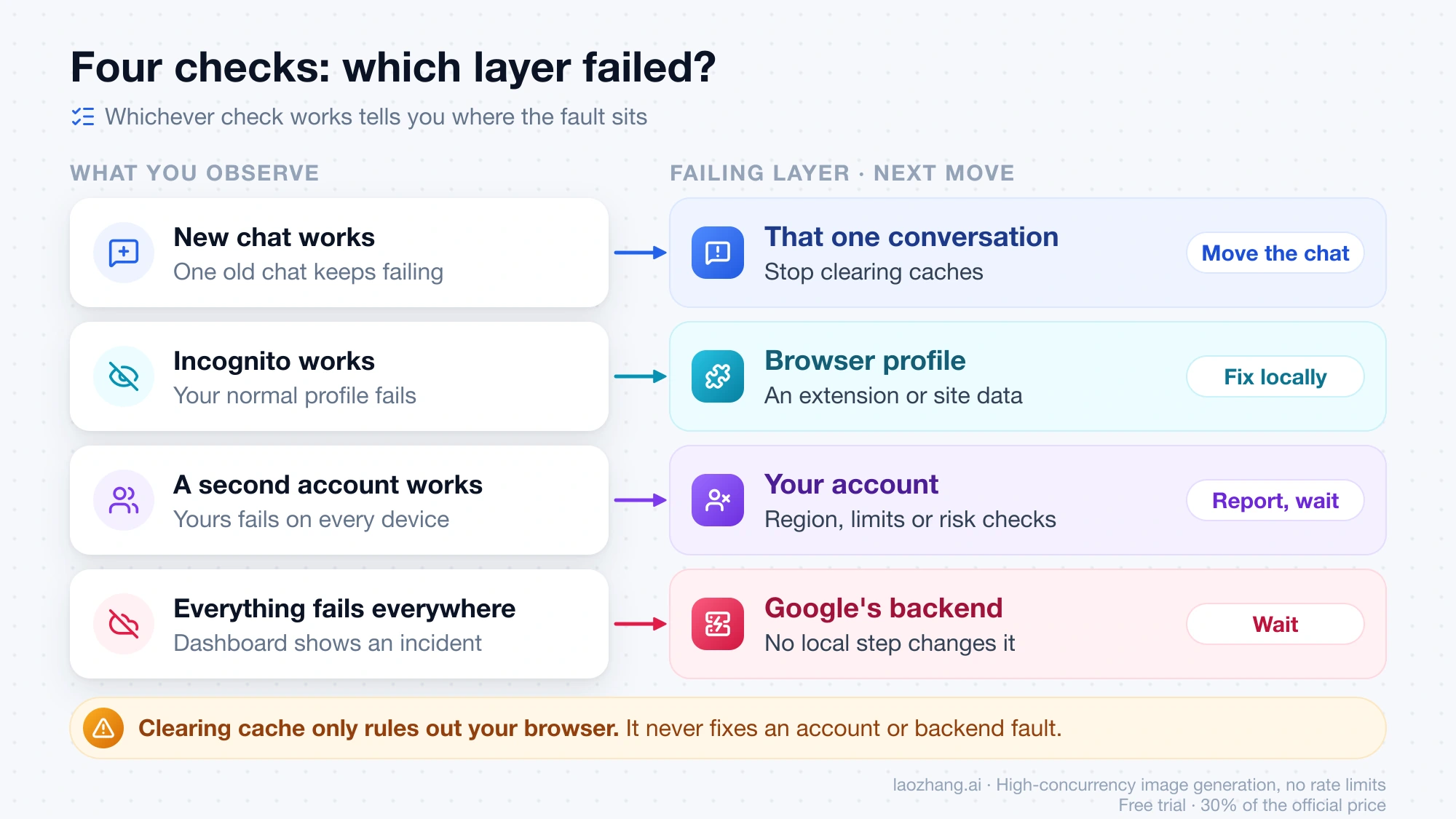
What you can establish in a few minutes is which layer failed, and that decides what to do next. Four checks do it: open a brand-new chat, try an incognito window or another device, sign in with a second Google account, and look at Google's Workspace Status Dashboard. Whichever one works tells you where the fault sits: one conversation, your browser profile, or your account. If everything fails everywhere and the dashboard shows a Gemini incident, it is Google's backend, and nothing on your side will clear it.
Only one number has a first-party record. Google's own incident history logged "Something went wrong(13)" as the symptom of a database-resource problem on May 4–8, 2026, and listed "Something Went Wrong" errors, without a number, across all Gemini surfaces on June 10, 2026. For the rest, the picture comes from Google's Gemini help community threads between November 2025 and August 2026: for 1076 and 9 other users confirmed a workaround, for 1037 Google fixed a wave on its side, and for 1155, 1013 and the other four-digit numbers there are reports but no pattern you can act on. Every step below is what those users reported, with its date, and none comes with a tested success rate.
What "Something went wrong (13)" means: Google has not published a list
The only first-party text about this message is on Google's sign-in requirements page for Gemini Apps. It says that if you see "Something went wrong" while trying to access or sign in to the Gemini web app, "your account can't access the app at the moment," for reasons "including location, age, or type of account, among others," and that you "can try again later." The same page says Google uses "signals and data to help verify that accounts have a consistent history of abuse-free activity." That passage has no number in it and says nothing about a failure in the middle of a chat.
Among Google's Gemini help articles, only that page and two shopping-order pages contain the phrase "something went wrong" at all. A Gold Product Expert, which is a volunteer rank in Google's help community rather than a Google job title, put it plainly in June 2026: "Google doesn't publish a public directory detailing every single internal numeric error code." Pages that give each number a fixed meaning such as "connection timeout" or "age verification incomplete" do not cite Google.
One hypothesis circulates: the small numbers match gRPC canonical status codes, where 5 is NOT_FOUND, 9 is FAILED_PRECONDITION and 13 is INTERNAL (gRPC status codes reference). Every small number seen in the threads is a valid gRPC code, and 13 during a database incident fits INTERNAL. Google has never confirmed the mapping, the four-digit numbers are not in that table, and even a correct mapping would not tell you what to do. Treat it as trivia.
Four checks: new chat, incognito, second account, status dashboard
Run these in order. Each takes one prompt or one page load, and the combination of results matters more than any single number.
- Start a brand-new chat and send a short text prompt with no attachment and no Docs or Drive link, on Flash if Pro was selected.
- Open an incognito window, or a different browser or device, and sign in to the same account. This separates extensions and cached data from everything else.
- Sign in with a second Google account on the same device and send the same prompt.
- Open the Google Workspace Status Dashboard and find the "Gemini" row. Then look for same-hour reports from other people carrying your number.
| What you observe | Layer | What to do |
|---|---|---|
| New chat works, one old chat fails | That conversation's stored state | Stop clearing caches. Move or rebuild the chat (see 1076 below). |
| Incognito or another browser works, your normal profile fails | Browser profile: an extension or site data | Disable extensions one at a time, then clear site data for gemini.google.com. |
| A second account works, yours fails on every device | Your account: eligibility, region, limits or Google's risk checks | Local steps will not help. Check account requirements, wait, and report. |
| Everything fails everywhere, dashboard shows an incident | Google's backend | Wait. No local step changes the outcome. |
| Everything fails everywhere, dashboard is green, others report the same hour | Probably Google's backend, not yet acknowledged | Wait an hour, then report with the number. |
| Only prompts with an upload or a Docs link fail | The attachment path | Resend without the link or file; see the 9 and 13 sections. |
Across the threads for 5, 13, 1037, 1013, 1076, 1099 and 1155, users who ran the standard list (hard refresh, clearing cookies, another browser, signing out and in, toggling Gemini Apps Activity, switching networks, turning off VPN) report again and again that none of it helped when the cause was on Google's side. Those steps rule out your browser; they do not fix an account or backend problem, and repeating them is where the wasted time goes.
Is Gemini down right now? Check the Workspace Status Dashboard
Google's status page for the Gemini app is the Google Workspace Status Dashboard, where "Gemini" is one row among the Workspace products. Despite the name, its June 2026 report covered "all surfaces," including the consumer web app and mobile app. The dashboard has a JSON incident history that goes back to February 2026 for Gemini.
status.gemini.com is the status page of Gemini Exchange, a cryptocurrency exchange (its components are "ActiveTrader" and "Exchange Trading Engine"). Several guides and at least one help-community volunteer recommend it as the Gemini status page; it has nothing to do with Google. Downdetector's Gemini page is a third-party tally of user reports: a same-hour signal, not confirmation.
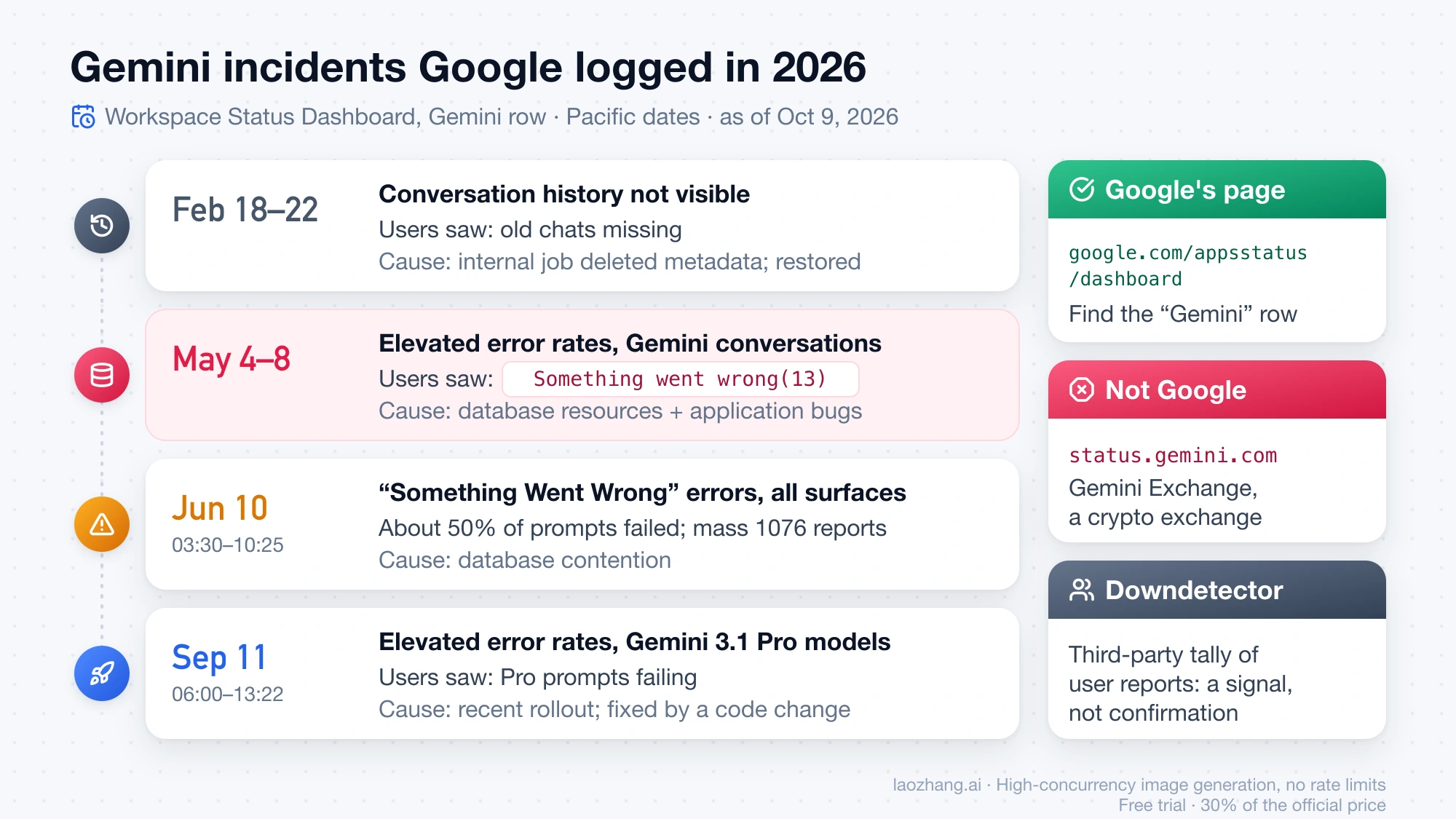
Here is what Google's own history records for 2026 as of October 9, 2026:
| Dates (Pacific) | Google's description | What users saw | Cause Google gave |
|---|---|---|---|
| February 18–22, 2026 | Conversation history not visible | Old chats missing | An internal job deleted valid conversation metadata; restored from backups |
| May 4–8, 2026 | "Investigating elevated error rates with Gemini conversations" | "Something went wrong(13)" | "A combination of insufficient database resources, and application bugs" |
| June 10, 2026, 03:30–10:25 | "Something Went Wrong" errors on the Gemini app in Workspace and the Gemini side panel; final report says all surfaces | About 50% of prompts failed; mass reports of 1076 | Database contention; fixed by optimizing load distribution |
| September 11, 2026, 06:00–13:22 | Intermittent elevated error rates with Gemini 3.1 Pro models on Gemini Web and Gemini App | Pro prompts failing | Linked to a recent rollout; mitigated by a code change |
Two things follow. First, the same number can mean a Google-side outage one week and a stuck chat the next: 1076 was reported en masse on June 10 and in single-chat reports for months before and after. Second, a green dashboard does not prove your account is healthy, and an incident can show on Reddit before it reaches the dashboard: on October 9, 2026, Reddit threads were filling with outage reports ("Gemini Down for hundreds," "I get the error code 1155") while the dashboard listed no Gemini incident for the week. The right reading is "wait an hour and check again," not "it must be my setup."
Error codes by evidence: 13, 1076, 1099, 1037, 1013, 1155, 9 and 5
The table grades each number by the evidence behind it. "Same question" is the "I have the same question" counter on the main Google help thread, a rough measure of how many people hit it.
| Number | Where it tends to appear | Evidence | User-reported workaround |
|---|---|---|---|
| 13 | Uploads; whole-account failures; mobile view of a chat that shows 1076 on the web | Google incident record (May 4–8, 2026); 1,842 same question | None confirmed; wait or report |
| 1076 | One chat fails, new chats work; mass reports on June 10, 2026 | Consistent pattern; three independent confirmations of one workaround; 1,535 same question | Import the chat into a Notebook (July–August 2026) |
| 1099 | Prompt reaches "Analysis," then fails on every device | Thread dated inside the May 4–8, 2026 incident; 987 same question | None confirmed; a second account as a stopgap |
| 1037 | Paid plan, Pro quota used up, "Thinking" selected (January 28 – February 5, 2026) | Consistent pattern; cleared on Google's side around February 6, 2026; 243 same question | Use the faster model until the quota resets |
| 1013 | One account fails on web and mobile; other accounts work | Single-account pattern; resolved by itself; 154 same question | None; the account recovered without a change |
| 1155 | Pro users, some after uploading a video; same-hour waves | June through October 2026, no agreed trigger; 537 same question | None; VPN explanation contradicted |
| 9 | Chat where an earlier prompt had a Docs, Sheets or Drive link | Thread's recommended answer, 26 "helpful"; 943 same question | Edit the last prompt and resend without the link (February 2026) |
| 5 | Pro fails while Flash answers; one account fails everywhere | Covered on the error-5 page | See the linked page |
Something went wrong (13): uploads, whole accounts, a Google incident
"(13)" is the number with the widest spread and the one Google's own records tie to an outage. The main help thread on "something went wrong (13)" from November 24, 2025 started with a photo upload for analysis; one reporter there had image prompts failing for over 16 hours while text prompts still worked, with the standard browser steps already done. Later threads in March 2026 describe the opposite shape: every prompt in every chat failing on one paid account across the app and Chrome, with Google's support chat only able to suggest sending feedback. In May 2026, a user whose chat showed "(1076)" on the web saw "(13)" for the same chat in the mobile app.
Volunteer explanations across those threads do not agree: a browser-side conflict with cached data or extensions, a page that failed to load a response, a "server-side handshake failure," a "hiccup with your account's regional settings." None is Google's. What Google did record is that during the May 4–8, 2026 incident users saw "Something went wrong(13)" and the cause was insufficient database resources plus application bugs. So 13 is at least sometimes a pure backend error, and that incident is the strongest hint about what it signals in general.
If only uploads fail, resend the request as plain text and try a smaller JPEG or PNG; the November 2025 thread's volunteer suggested staying under 10 MB, which is advice, not a documented limit. If one chat fails, treat it as 1076; if your account alone fails everywhere, go to the stop rule. One warning from a Korean-language thread in March 2026: a user recovered after deleting a few recent conversations, and another who followed the same advice lost chats and was not fixed. Do not delete history on the strength of a single report.
Something went wrong (1076): one stuck chat, Notebook workaround
The signature of 1076 is stated in the title of the help thread "Something went wrong (1076) issue for a specific chat", opened May 30, 2026 by a Pro subscriber: one conversation fails on every model and every browser while other chats are fine, and the mobile app shows "(13)" for the same chat. The volunteer answer called it either context exhaustion or a corrupted session state inside that thread and said "the problem isn't your local setup." That is a volunteer's reading, but it matches dozens of later reports from free, Pro and Advanced plans on web, iOS and Android through August 2026, including new chats that start failing after five or six prompts.
The workaround with the most independent confirmations in any of these threads was posted on July 27, 2026: create an empty Notebook (NotebookLM, or a Google Workspace notebook), add the affected Gemini conversation as a source, open the notebook and click the added chat. Three different users replied between July 28 and August 5 that it worked for them. One caveat came from a Gem user: moving the chat this way drops the Gem's instructions, so you get the history but not the persona. It is the best-attested user report in these threads, nothing more.
Other suggestions in the same thread have no confirmation: loading gemini.google.com/gems/create (also sold elsewhere as a paid "reset method"), checking for a Brand Account, pasting a summary into a new chat, and one user's DNS change.
On June 10, 2026, 1076 was also the number most people saw during the backend outage (a Reddit thread on it passed 640 comments), and users on Google's AI developer forum kept reporting "corrupted state" chats after the outage ended. If you see 1076 in every chat, check the dashboard before you touch anything.
Something went wrong (1099): fails after Analysis on every device
The help thread "Repeated mention of a specific Error 1099" is dated May 8, 2026, inside the May 4–8 incident window. A Pro user described prompts going to "Analysis" and coming back with "(1099)" on every device. The volunteer answer said that persistence across devices "points directly to a backend or account-specific issue on Google's side," that "further local troubleshooting won't clear this up," and recommended Send feedback with a screenshot. The same reply offered a different Google account as "a reliable temporary workaround," which locates the layer rather than fixing it.
Threads from late June 2026 also tie 1099 to launching Gemini through "Hey Google" on Samsung phones, with an assistant-toggle reset as the suggested fix, but those are titles and snippets only.
Something went wrong (1037): Pro quota ran out, Jan–Feb 2026 wave
1037 has the most consistent trigger of any number, and it is historical. In the help thread "Pro limit hit now show error 1037", paying Google AI Pro subscribers reported between January 28 and February 5, 2026 that once their Pro quota ran out, selecting the Thinking model produced "(1037)" on every prompt. The standard local steps did nothing ("None of the troubleshooting worked"). A French-speaking user kept working in Fast mode until it passed; a Chinese-speaking user noted the Thinking button was not grayed out even though the quota was gone. On February 6 the original poster tested again after hitting the Pro limit and reported it "seems to be working again," which is the last word in the thread.
The labels "Thinking" and "Fast" belong to that period; the picker as of October 2026 reads Flash-Lite, Flash and Pro. The usable lesson is the pattern: an error that starts the moment a quota runs out is a limit interaction, not a browser fault. Google's usage limits page for Gemini Apps says limits are compute-based and refresh every 5 hours until a weekly limit; it names no message and no number.
Something went wrong (1013): one account fails, then clears by itself
The help thread "Gemini error 1013" from February 27, 2026 has the cleanest account-level signature: one Google account fails in both the mobile app and the browser, incognito works, Gmail and everything else on the account work, and a password change plus the standard browser steps had changed nothing. The volunteer suggestions were to toggle Gemini Apps Activity off and on, check that the birth date in the Google Account shows you are an adult, open gemini.google.com/app directly, and report with "#Error1013." The age link is the volunteer's guess. The original poster then wrote that it was "currently working, I don't know how. I didn't do anything further." Another user tried everything, sent feedback and got no answer.
What 1013 shows is the account layer: when a second account works on the same device, local steps are done. The requirements Google does publish are on the sign-in page linked above: a minimum age for personal accounts, a qualifying Workspace edition for work accounts, admin enablement for school accounts, and no web access for Family Link-managed accounts.
Something went wrong (1155): no agreed trigger, VPN claim contradicted
The help thread "Something went wrong (1155)" from June 13, 2026 opens with the question most people searching the number have: "Is there any information documenting these codes that I could reference?" The volunteer answer said errors "in the 1100s range typically point to a backend communication failure or an API timeout" and blamed the reporter's VPN, which the reporter had used for years without trouble. Ten days later a user with no VPN and a freshly cleared browser reported the same error; another tied it to analyzing an uploaded video; on July 7 another wrote "VPN is clearly not an issue here." Reports continued into July, and on October 9, 2026, same-hour Reddit posts about 1155 sat alongside a clean dashboard.
Nothing in that record gives you a lever beyond the four checks: retry without the video or file if one was attached, and if others report the same number in the same hour, wait.
Something went wrong (9): after Docs links, edit and resend the prompt
The help thread "Keeps saying 'something went wrong (9)'" from November 26, 2025 describes a chat where two prompts with Google Docs links worked, and then every later prompt in that chat failed with "(9)" after reloads and cache clearing. The answer marked as recommended, posted February 9, 2026 and marked helpful by 26 people, is one line: go back to the last prompt, click edit, add a period to the final sentence, change nothing else, resend. A volunteer "cheat sheet" from December 22, 2025 lists the longer version: edit the earlier prompt to remove the Docs, Sheets or Drive links and resubmit; ask Gemini to "re-research this topic from scratch"; turn off the Google Workspace extension under Settings and Extensions.
This is a user-confirmed workaround for text chats from that period, not a Google fix. On November 26, 2025 a volunteer relayed that "Google Gemini support team has reported the 'Something Went Wrong' issue has been fixed," yet reports of (9) continued into February 2026, including a Gem built to process videos. If your (9) started right after a link or a file went into the chat, edit and resend first; if it did not, treat it like 1076.
Something went wrong (5): Pro fails while Flash answers
"(5)" belongs mostly to image requests on the Pro model; the pattern, checks and history are on Nano Banana Pro Error 5: 3 Checks for Something Went Wrong (5). In short: the November 2025 wave had Pro failing with (5) while Flash answered, and some accounts failed everywhere while a second account worked. The claim in a Spanish-language thread that "(5)" counts how many times the request failed appears on no Google help page.
When to stop local fixes: wait, switch surface or account, or report
The stop rule is the part no single-number page gives you. Local steps are finished when any one of these is true:
- A second account works on the same device and yours does not. Browser, network and device are cleared; what is wrong is on your account: eligibility, region, a limit, or Google's abuse checks. You can wait, and you can report. Creating a fresh account is not an answer: two Chinese-language help threads with more than 1,000 "same question" votes each describe one account failing at "Chat with Gemini" while a second account on the same device and network worked; one user's account had been suspended and reinstated, and volunteers attribute the rest to region and risk checks. Those are decisions on Google's side.
- Everything fails on every device and account, and either the dashboard shows an incident or others are reporting the same number in the same hour. Wait. Every 2026 incident in Google's history ended within hours to days, with no user action.
- One chat fails and a new one works. Move the chat (1076 section), rebuild it from a pasted summary, or edit the last prompt (9 section). Do not clear site data again.
- Pro fails and Flash works. You are looking at a model or limit interaction. Use Flash until the 5-hour window resets, then try Pro again.
Where you are matters for the account layer. Google's list of countries where Gemini Apps are available covers 242 countries and territories, lists Mainland China as "Workspace only," and does not include Russia; the mobile apps "may have different availability." An account outside those rules gets the sign-in message from the first section, and no local step changes it.
Reporting works like this, per Google's feedback page for Gemini Apps: on a computer, open gemini.google.com, click Settings & help at the bottom, then Send feedback, add text and an optional screenshot, and send; the current conversation is attached. In the mobile app, tap your profile picture, then Feedback. Users on a work account with Pro access or on a school account cannot add feedback or attach content; their route is their Workspace admin. Include the exact string with the number, your country, browser or app version, and whether a second account works. Volunteers agree that feedback gets no reply but is read; one recommends Google One support chat for Google One subscribers. If the error blocks the Gemini page itself, the web feedback entry may be unreachable, and the mobile app's Feedback entry is the alternative.
Different messages have their own pages. The "high demand" notice is covered in Gemini High Demand Error: What It Means and What to Do First (2026). An image that spins forever or comes back as text only is in Nano Banana Not Working in Gemini? Fix Stuck or Missing Images. If you are a developer and the failure is an HTTP status from the API rather than this app message, start with Gemini API Error Troubleshooting: Complete Guide to Fix 429, 400, 500 Errors (2026).
Numbers with reports but no pattern: 1, 2, 3, 4, 8, 1095–1097, 1185
None of these has a Google explanation, a consistent trigger or a confirmed workaround; the four checks and the stop rule apply as they stand.
- (1): a Russian-language help thread from September 28, 2026, three users, web app fails while the mobile app works.
- (2), (3): appear only as related searches.
- (4): one Reddit title with a snippet calling it a Chrome-on-macOS client bug.
- (8): one help thread.
- 1095, 1096: appear only as questions people ask alongside 1099.
- 1097: appears in guides that assign it a label without a Google source.
- 1152, 1185: titles and snippets only, July and August 2026 (see the 1155 section).
FAQ: Gemini "Something went wrong" questions
Is "Something went wrong (13)" about being 13 years old?
No. The 13 in brackets is an internal code with no published meaning; the personal-account minimum age of 13 on Google's sign-in page is a coincidence. An underage or Family Link-managed account gets the plain sign-in message from the first section, not a numbered mid-chat error.
Why does the app show (13) and the web (1076) for the same chat?
Users reported this pairing in May 2026, and a help-community volunteer read it as one stuck conversation surfacing a different code on each client; Google has not explained it. The number is attached to the chat, not your device, which is why the Notebook import confirmed for 1076 is the thing to try.
Is "Something went wrong (1155)" caused by my VPN?
A volunteer said so in June 2026, and the record in the same thread contradicts it: users with no VPN and a freshly cleared browser hit 1155 in the following weeks. Turning the VPN off for one test is cheap and removes a variable; if the error survives that test and a second account, the VPN was not the cause.
Does clearing cache and cookies ever fix "Something went wrong"?
It is the first thing every volunteer suggests and the step users most often report as useless. Where incognito already works, clearing site data for gemini.google.com or disabling an extension can finish the job. Where incognito, another device and another account all fail the same way, clearing cache changes nothing, and the time is better spent on the dashboard and a report.
Should I make a new Google account to get around the error?
No. A second account is a diagnostic: if it works, the fault is on your main account, and the threads where single accounts were blocked describe eligibility, region and risk decisions on Google's side. Report from the affected account, include the number, and wait; the 1013 reporter's account recovered on its own within the day.
Sources14
External pages this guide links to, in the order they appear. Last updated Oct 9, 2026.
Sources14
External pages this guide links to, in the order they appear. Last updated Oct 9, 2026.
- 1.sign-in requirements page for Gemini Appssupport.google.com/gemini/answer/13278668
- 2.gRPC status codes referencegrpc.io/docs/guides/status-codes
- 3.Google Workspace Status Dashboardgoogle.com/appsstatus/dashboard
- 4.JSON incident historygoogle.com/appsstatus/dashboard/incidents.json
- 5.help thread on "something went wrong (13)" from November 24, 2025support.google.com/gemini/thread/389992990
- 6.help thread "Something went wrong (1076) issue for a specific chat"support.google.com/gemini/thread/437603049
- 7.help thread "Repeated mention of a specific Error 1099"support.google.com/gemini/thread/431784471
- 8.help thread "Pro limit hit now show error 1037"support.google.com/gemini/thread/406019751
- 9.usage limits page for Gemini Appssupport.google.com/gemini/answer/16275805
- 10.help thread "Gemini error 1013"support.google.com/gemini/thread/413205119
- 11.help thread "Something went wrong (1155)"support.google.com/gemini/thread/441238597
- 12.help thread "Keeps saying 'something went wrong (9)'"support.google.com/gemini/thread/390256397
- 13.list of countries where Gemini Apps are availablesupport.google.com/gemini/answer/13575153
- 14.feedback page for Gemini Appssupport.google.com/gemini/answer/13275746