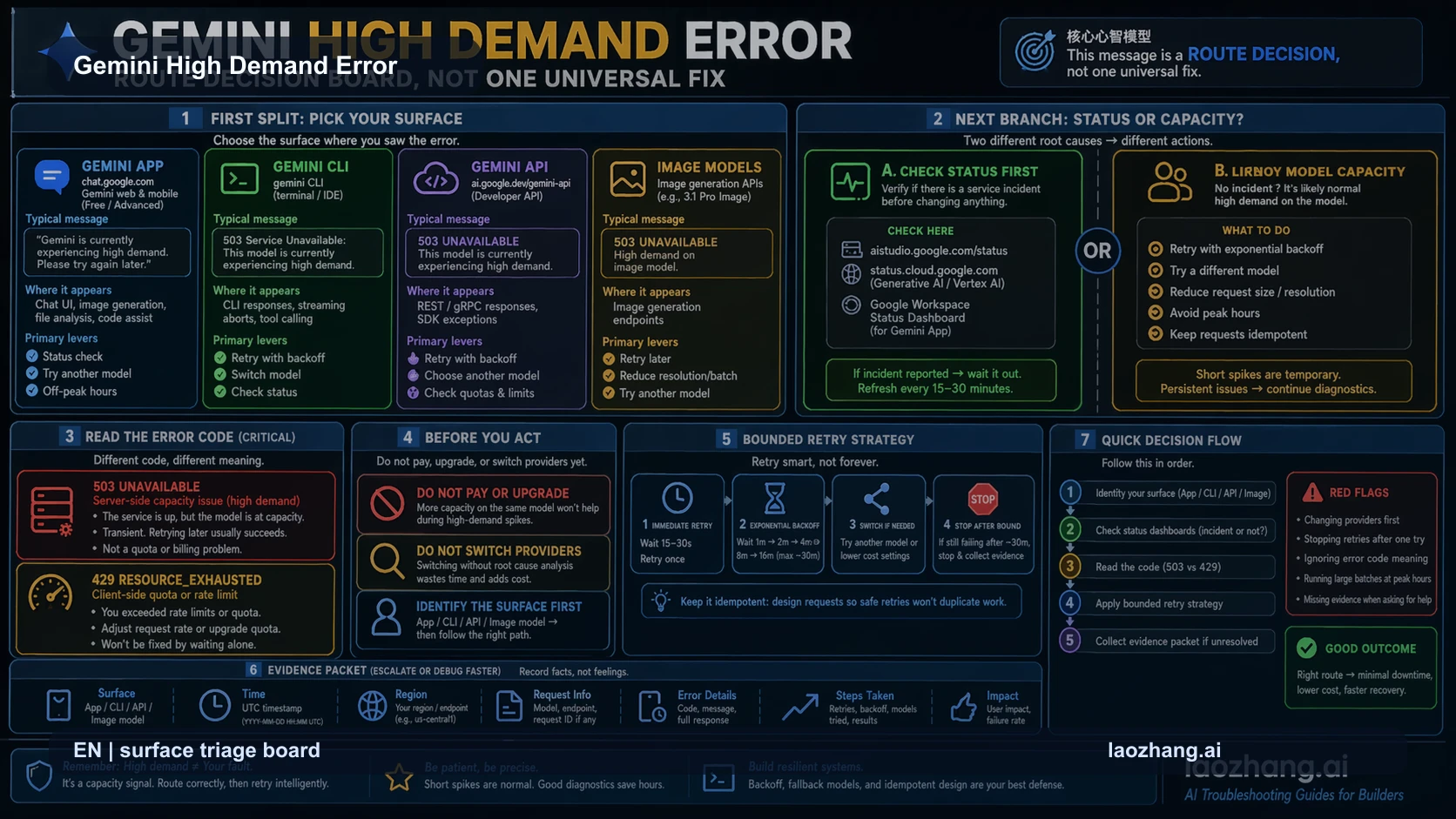
If Gemini says it is in high demand, the fastest safe move is not to rewrite the prompt or upgrade a plan. First identify the surface that produced the message: Gemini App, Gemini CLI, Gemini API, or an image-preview route. The same phrase can appear around very different owners.
After the surface is clear, read the error class. A 503 branch usually means temporary service capacity or model overload. A 429 branch points to quota or rate limits. A 504 branch points to timeout budget. Treating those as one generic Gemini outage is how people waste the first ten minutes.
Checked on April 24, 2026 against Google's Gemini API troubleshooting documentation, a live browser capture of the public Google surface, and live community reports from Gemini CLI and API users. The useful answer is a route board: classify, retry once with bounds, then either wait, switch to an acceptable lower-cost route, or collect evidence for support.
Start With the Route Board
Use the message as an alarm, not as the diagnosis. The first useful split is the product surface.
| Surface | What the message usually means | First move | Stop rule |
|---|---|---|---|
| Gemini App or Gemini Advanced | A busy model path, app surface issue, or plan recognition mismatch. | Check the selected model, visible plan, and official status. Try one lighter model only if quality can drop. | Do not pay again because one busy banner appeared. |
| Gemini CLI | The default model or Code Assist route is overloaded, or the CLI maps a provider error into a short high-demand message. | Retry once, note the model, auth owner, CLI version, and whether a different official model is acceptable. | Do not change project code until the same command path is understood. |
| Gemini API | The HTTP class matters more than the prose. | Separate 503, 429, and 504 before changing code. | Leave the high-demand branch when the code changes to 429 or 504. |
| Image preview or Nano Banana style routes | Image generation capacity can fail differently from text. | Keep the request path stable, retry with bounded backoff, then reduce batch load only if the branch is still image-specific. | Use the exact image 503 route when the response is on that branch. |
This route board prevents the most common wrong fix: treating a capacity event as if it were a local configuration bug. If the same request fails because Google's model path is overloaded, clearing cache or changing prompt wording does not prove anything. If the response is really a quota problem, waiting for capacity is also the wrong fix.
For API work, keep Google's Gemini API troubleshooting guide beside your logs. It separates service availability, quota, and timeout style branches. For image-specific 503 cases, use the narrower Gemini image 503 overloaded guide after you confirm that the image endpoint is the surface.
Identify the Surface Before You Retry
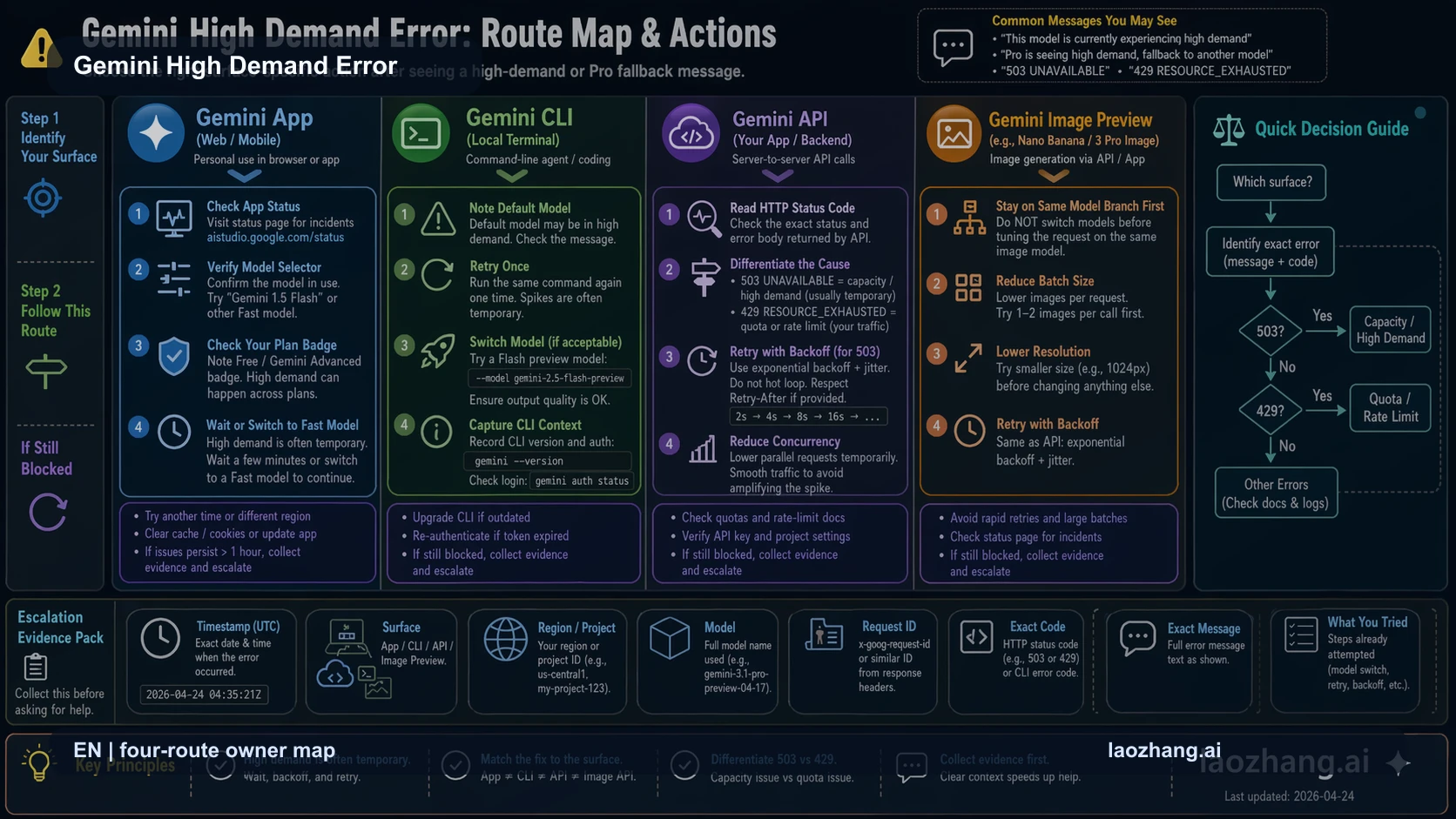
The Gemini high demand error is not one product contract. The app, CLI, API, and image surfaces have different owners, logs, and recovery choices.
In the Gemini App, the reader usually has only a visible model selector, a plan badge, browser or app state, and official status. The best first move is to confirm that the selected model is the one you expected. If the app silently falls back from Pro to a faster model, the problem is not the same as a developer API 503.
In Gemini CLI, capture the command path. Note the CLI version, auth route, default model, and whether the error appears before or after tool execution starts. Public Gemini CLI issues in 2026 show that users can see a short high-demand message while the underlying route may also expose 429 or 503 details. That means the CLI screen alone is not enough evidence for an account diagnosis.
In the Gemini API, logs are stronger than screenshots. Record the HTTP code, status string, model id, request id if available, region or provider route, timestamp, and retry behavior. Changing model, timeout, SDK, prompt, and payload at once destroys the diagnostic signal.
For image-preview routes, keep the image path separate from text. A text prompt succeeding does not prove the image model is healthy. A failed image request does not prove the whole Gemini API is unusable. Use the image branch only when the failed request is actually an image-generation request.
API Branch: 503 Is Not 429 or 504
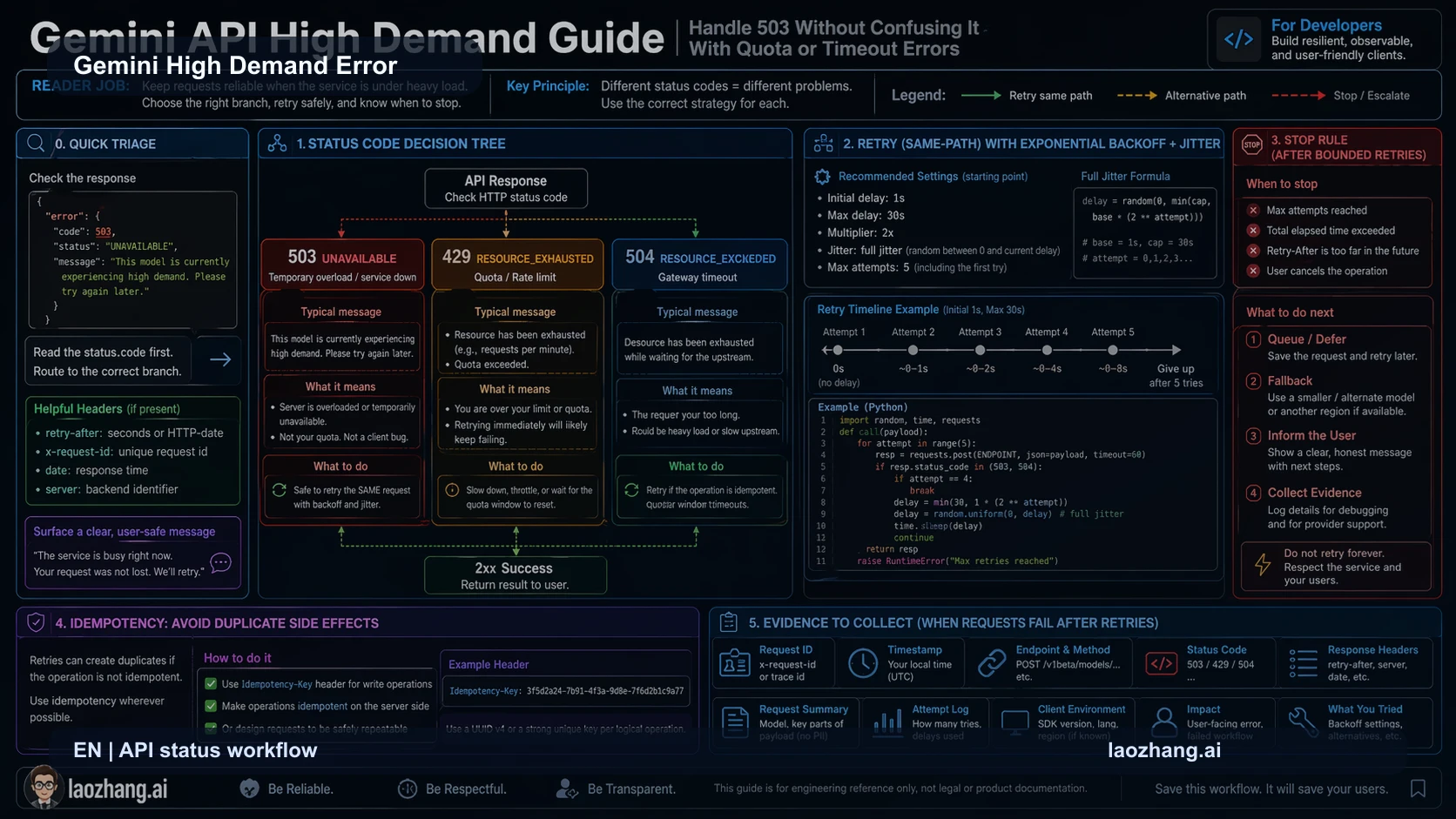
If you are calling the API, read the status before you decide what to change.
| Error class | Practical meaning | Better first action |
|---|---|---|
| 503 UNAVAILABLE or overloaded | Temporary service capacity, model overload, or backend unavailability. | Same-path retry with bounded exponential backoff. |
| 429 RESOURCE_EXHAUSTED or too many requests | Rate limit, quota, billing tier, or per-minute capacity. | Slow down, inspect limits, and move to the rate-limit branch. |
| 504 DEADLINE_EXCEEDED or client timeout | Time budget, request weight, or network timeout. | Raise timeout carefully, reduce request load, and retest. |
The key is same-path verification. Keep the same model, endpoint, auth owner, and essential payload shape for the first retry. If that retry succeeds, the likely explanation is temporary capacity. If it stays 503, wait, queue, or choose a deliberate fallback. If it becomes 429 or 504, leave this branch immediately.
Developers often do the opposite. They see "high demand," swap models, simplify the prompt, raise timeout, change SDKs, and then celebrate when one request works. That may ship a workaround, but it does not identify the owner. A production incident needs a smaller test so the next failure can be routed correctly.
For quota-specific work, use the Gemini API rate limits guide. For broad API failures that are not specifically high demand, use Gemini API error troubleshooting.
CLI Branch: Retry Once, Then Decide Whether Quality Can Drop
Gemini CLI users need a slightly different rule because the tool wraps API, account, local environment, and model selection into one terminal experience.
Start with one same-command retry. Save the exact timestamp, command, model shown by the CLI, and whether tool calls had already begun. If the error appears before any meaningful model response, it is more likely a model route or account capacity problem than a repository problem.
Then decide whether a lower-demand model is acceptable. For a quick non-critical explanation, switching model may be fine. For code generation, refactoring, or an operation where output quality matters, switching model can be more expensive than waiting because it may create a weak patch that needs review later.
The CLI branch should not start with clearing local project files, reinstalling dependencies, or rewriting code. Those moves make sense only after the error proves it is local. A high-demand message usually says the model route could not serve the request at that moment.
If the terminal setup itself is uncertain, use the Gemini CLI install guide to separate installation and auth problems from live capacity problems.
Gemini App and Paid User Branch
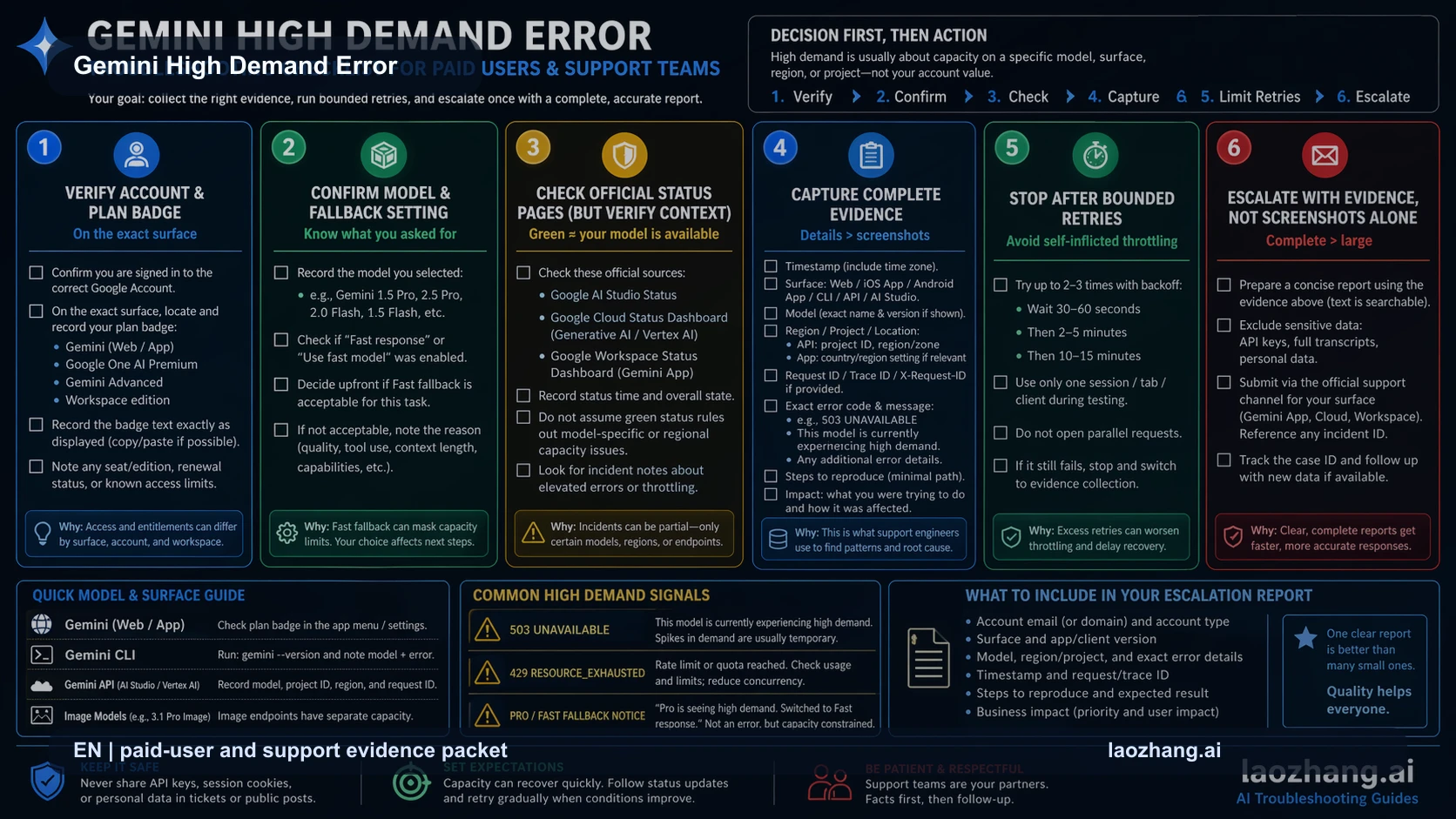
A paid Gemini plan can improve access, but it should not be treated as a guaranteed bypass for every busy model window. The paid-user branch is about recognition and evidence, not panic upgrading.
Check the visible plan, signed-in account, selected model, browser or app surface, and official status page state. If the app says a Pro model is busy but a faster model works, you have a model-path capacity issue. If the app does not recognize the paid state at all, you have an account recognition issue. Those are different support packets.
Use a compact evidence packet before escalating:
- screenshot of the exact high-demand message,
- timestamp and timezone,
- Gemini surface used: app, web, mobile, CLI, API, or image route,
- selected model and plan state,
- official status state at the time,
- one same-path retry result,
- one alternate official surface result if available.
This packet is more useful than a long complaint because it separates service health, account recognition, route capacity, and request shape. It also protects the reader from paying twice for a problem that may be temporary capacity.
Image Preview and Nano Banana Style Failures
Image generation deserves its own branch because it can be capacity-heavy and model-specific. A normal Gemini text response can work while image preview fails. The inverse can also happen.
If the image route returns 503 or says the model is overloaded, keep the request path stable for the first retry. Do not immediately shrink the prompt, change aspect ratio, switch SDKs, and change model. Retest once with the same essential request, then back off. If the branch stays image-specific, reduce batch size or request weight only after you have proved that the route is still the same route.
When the error is specifically a 503 image-model overload, the narrower recovery path is Fix Gemini 3 Pro Image 503 Errors. That branch focuses on the code/status split for image generation and avoids mixing image timeouts with app-level high-demand banners.
When to Wait, Switch, or Escalate
The recovery decision should be boring and explicit.
| Situation | Best next move | Why |
|---|---|---|
| One same-path retry succeeds | Continue and monitor. | Temporary capacity is plausible. |
| Same route stays 503 | Wait, queue, or use a deliberate fallback. | Capacity did not clear during the short retry window. |
| Error changes to 429 | Move to quota and rate-limit diagnosis. | You no longer have the same problem. |
| Error changes to 504 or client timeout | Move to timeout budget diagnosis. | More retries will not fix a time budget mismatch. |
| Paid app user still sees upgrade or fallback messaging | Verify account and plan recognition before paying again. | The owner may be entitlement recognition, not capacity. |
Escalate only after the route is stable enough to explain. Support can act faster when you provide model, surface, status, timestamp, account state, and retry result. A vague "Gemini is broken" report usually gets a vague first reply.
FAQ
What does the Gemini high demand error mean?
It means the current Gemini route could not serve the request at that moment, often because a model path is busy. It does not by itself prove that your account, prompt, browser, or code is broken.
Is 503 high demand the same as a Gemini rate limit?
No. A 503 branch is usually temporary service capacity or backend unavailability. A 429 branch is quota or rate limiting. Treating 503 as 429 can push you toward the wrong fix.
Should I upgrade Gemini when I see the message?
Not as the first move. Check status, selected model, visible plan, and one same-path retry first. A higher plan may improve priority in some contexts, but it is not proof that the active capacity spike will disappear.
Why does Gemini CLI keep saying high demand?
Gemini CLI may be hitting a busy default model or a wrapped provider response. Record the command, CLI version, auth owner, model, timestamp, and one retry result before changing local code.
Can I switch models to fix it?
Sometimes, but only when the task can tolerate a different quality or capability profile. For production API work, switch models as a deliberate fallback, not as the first diagnostic step.
Bottom Line
The Gemini high demand error is a routing problem before it is a fix list. Identify the surface, read the error class, retry once on the same path, then choose wait, queue, model fallback, or support evidence. That sequence keeps a temporary capacity problem from turning into unnecessary account changes, code churn, or plan upgrades.