Antigravity "Unexpected Issue Setting Up Your Account": 3 Fixes
Your browser sign-in worked; the app's own setup call to Google failed. The reason after the colon shows whether to verify the account, fix the network or wait.
On this page
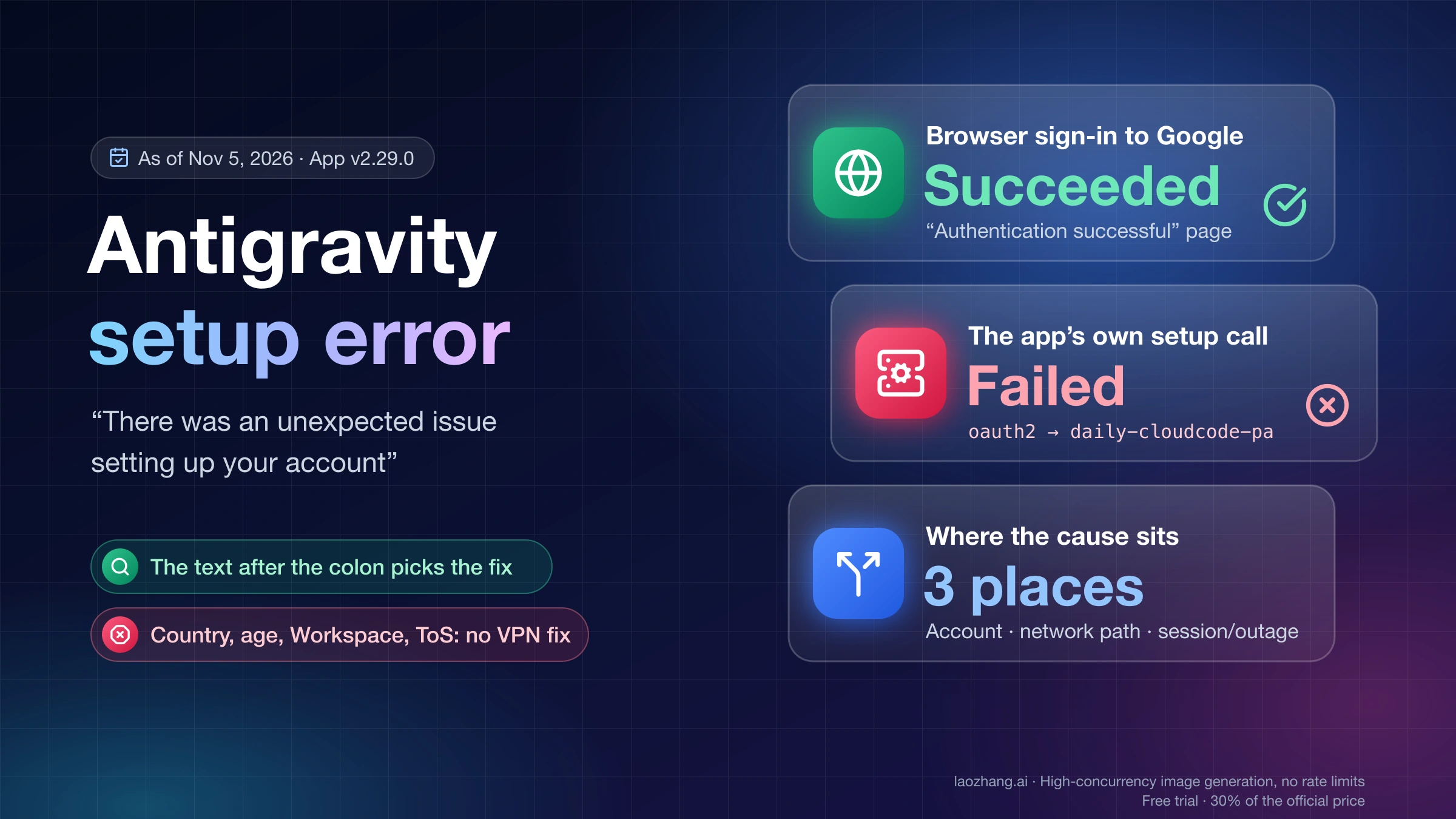
"There was an unexpected issue setting up your account" appears after the Google part of sign-in has already worked. The browser's "Authentication successful" page only confirms that you signed in to Google. Then Antigravity's own background process contacts Google's servers (oauth2.googleapis.com, then cloudcode-pa.googleapis.com or daily-cloudcode-pa.googleapis.com) to set up your account, and that call is what failed. The cause sits in one of three places: the account (a pending verification, or a country, age or account type Antigravity doesn't accept), the network path the app uses (a proxy, VPN, antivirus or firewall your browser gets past but the app doesn't), or a stale local session or an outage on Google's side.
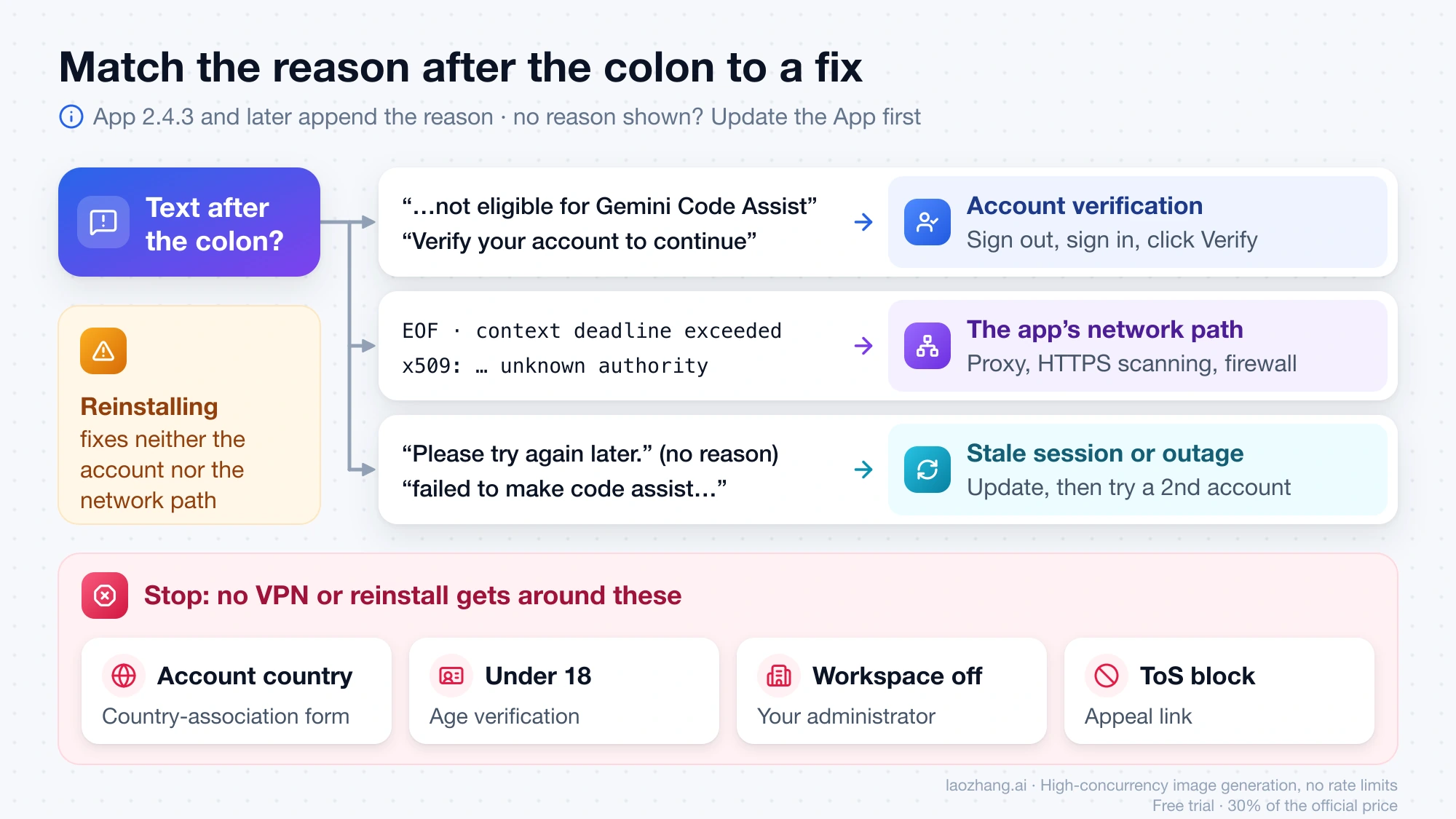
Start with the text after the colon. Antigravity App 2.4.3 and later append the specific reason, so if you see only "Please try again later," update to the current App (v2.29.0 as of November 5, 2026) and sign in again. If the reason mentions eligibility or verification, go to Settings → Account in the Antigravity App, sign out, sign back in and click Verify. If it is a network error such as EOF, x509: certificate signed by unknown authority or context deadline exceeded, fix the proxy, antivirus or firewall between the app and *.googleapis.com. Reinstalling fixes neither.
Stop working on your computer if the account is associated with a country where Antigravity isn't available, you are under 18, your Workspace administrator hasn't turned Antigravity on for you, or the account was blocked under the Terms of Service. Those cases need Google's country-association form, age verification, your administrator or an appeal, and no VPN or fresh install gets around them.
Why Antigravity fails after "Authentication successful" in the browser
Your browser and the Antigravity app reach Google over different connections, so a successful browser page says nothing about the app's connection or about whether the account is cleared for Antigravity. A moderator of the Google AI Developers Forum put it directly on November 5, 2026: "The 'Authentication successful' page only confirms sign-in. It isn't the account verification step" (forum thread on an App 2.29.0 sign-in failure). Earlier, the same moderator explained that the desktop app, the IDE and the agy CLI "all rely on the same background connections, while browser sign-in still works because Chrome uses its own connection path" (forum thread on EOF sign-in errors, October 8, 2026).
That background step exchanges the browser's code for a token at oauth2.googleapis.com, then asks the Code Assist service (loadCodeAssist) which tier, license and models the account gets. The Antigravity enterprise documentation names cloudcode-pa.googleapis.com as a sign-in host, and logs from a personal account show daily-cloudcode-pa.googleapis.com. The process is written in Go, which is why the reasons after the colon read like Go network errors.
The text after the colon: what each reason means and what to do first
Since App 2.4.3, released July 28, 2026, the Antigravity changelog in Markdown, whose dates run one day later than the rendered page shows in US time zones, says sign-in errors show "the specific failure reason," so the words after the colon are the fastest way to tell the three causes apart. The table covers reasons users posted on the Google AI Developers Forum between January and November 2026, with the cause where a forum moderator or several users confirmed one.
| Text after the colon | What it points to | First thing to do |
|---|---|---|
| "Please try again later." (no reason) | Older app build, or any cause; also the text during the January 22 and April 13, 2026 outages | Update the App, then run the reachability check below |
| "Your account is not eligible for Gemini Code Assist for individuals at this time" | A pending account verification (server reply 403 VALIDATION_REQUIRED) or a real eligibility block | Verify the account in the Antigravity App or agy CLI |
| "Failed to exchange authorization code for token" | A proxy or antivirus blocking the app's last connection to Google | Give the app your proxy, or exempt it from antivirus HTTPS scanning |
x509: certificate signed by unknown authority | HTTPS inspection by antivirus or a proxy, or SSL_CERT_FILE / SSL_CERT_DIR set by another tool | Check those variables and HTTPS scanning |
EOF | Connection closed between you and Google by a firewall, DPI or VPN; behind a TUN proxy, also a failed DNS lookup | Run the curl -sv and GODEBUG=tlsmlkem=0 checks |
context deadline exceeded | No reply before the app's timeout; no confirmed cause on the forum | Reachability check, then a different network |
dial tcp 127.0.0.1:…: connect: … refused | A hosts-file entry or proxy setting sends Google's hosts to your own computer | Remove Google entries from the hosts file; fix the proxy port |
read: socket is not connected | Unresolved as of November 2, 2026 (macOS with Defender and GlobalProtect) | Pause security and VPN software, then contact support |
| "failed to make code assist backend request" | The May 19–20, 2026 server problem, or a Terms of Service block behind it | If it persists for one account only, look for a ToS notice and appeal |
Two more reasons, "An error occurred" and "Failed to fetch," have no confirmed cause in the forum; for "Failed to fetch" a moderator suspected the in-app updater and suggested downloading the latest version manually.
The network-layer meanings were reproduced directly. On November 5, 2026, a small Go 1.25.6 program on a Mac running macOS 26.1 triggered each failure on purpose with Go's standard HTTP client: a server that never answered produced context deadline exceeded (Client.Timeout exceeded while awaiting headers), a certificate from an untrusted root produced x509: certificate signed by unknown authority, a server that closed the connection after reading the request produced EOF, and HTTPS_PROXY pointing at a port with no proxy running produced proxyconnect tcp: dial tcp 127.0.0.1:1: connect: connection refused. That reproduces the Go error text, not the Antigravity dialog; Antigravity wasn't installed on that Mac, so the link between each reason and the dialog comes from users' reports.
Account or network? A 401 test against Google's sign-in server
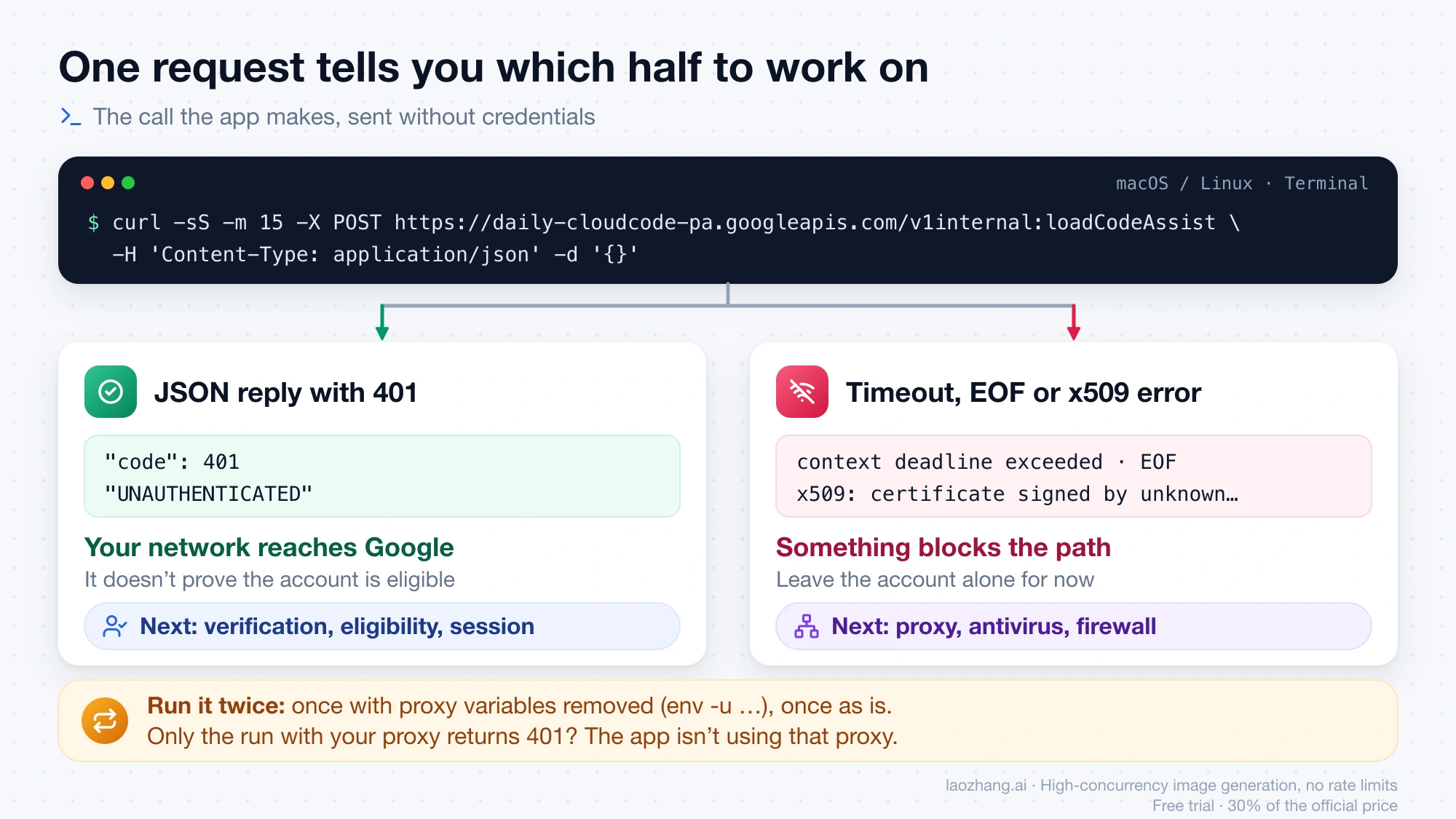
One request tells you which half to work on. Send the call the app makes, without credentials: a JSON reply with "code": 401 and "UNAUTHENTICATED" means your network reaches Google and the problem is the account or session, while a timeout, EOF or certificate error keeps you on the network. On November 5, 2026, this request returned 401 within 0.3–1.0 seconds on a Mac, both through a local proxy and with no proxy set.
-
On macOS or Linux, run it with your terminal's proxy variables removed, because an app opened from the Dock or a launcher doesn't see them:
env -u HTTPS_PROXY -u https_proxy -u HTTP_PROXY -u http_proxy -u ALL_PROXY -u all_proxy \ curl -sS -m 15 -X POST https://daily-cloudcode-pa.googleapis.com/v1internal:loadCodeAssist \ -H 'Content-Type: application/json' -d '{}' -
Run the
curlline again without theenv -u …part. If only this run returns 401, you need a proxy to reach Google and the app isn't using it. -
On Windows, run
curl.exe -sS -m 15 -X POST https://daily-cloudcode-pa.googleapis.com/v1internal:loadCodeAssist -H "Content-Type: application/json" -d "{}"in Command Prompt. This form comes from the same request and has not been run on Windows.
A 401 only proves the network path works, not that the account is eligible. A clean result with the error still showing points to verification, eligibility or a stale session.
"Not eligible for Gemini Code Assist for individuals": verify first
This reason, like "Verify your account to continue" and "Verification Required," is usually an account security check the app never showed you, not a plan problem. In about 20 forum threads between September 24 and 29, 2026, mostly from the Windows IDE 2.5.5, users' logs showed the server answering 403 PERMISSION_DENIED with reason VALIDATION_REQUIRED and a verification link the IDE didn't display. The forum moderator's answer: "This isn't related to your Google AI Pro plan. Antigravity checks your account again each time you sign in and sometimes it asks for verification even if nothing has changed."
Verify in the standalone Antigravity App or the agy CLI, not the IDE:
- Update the Antigravity App to the latest version.
- In your default browser, sign out of every Google account except the one you use for Antigravity, or set a browser profile with only that account as default. Otherwise verification can complete for the wrong account.
- Open Google Account security and finish any pending action, then confirm your age on Google's age verification page.
- Turn off any TUN-mode proxy or VPN while you verify.
- In the Antigravity App, go to Settings → Account → Sign Out, sign back in and click Verify. Complete the browser prompts, usually a QR code or an SMS. If no Verify prompt appears, send a message in the App or CLI to trigger it.
- Wait about 15 minutes, then sign out and back in once more. IDE users then return to the IDE and choose Sign in with original account.
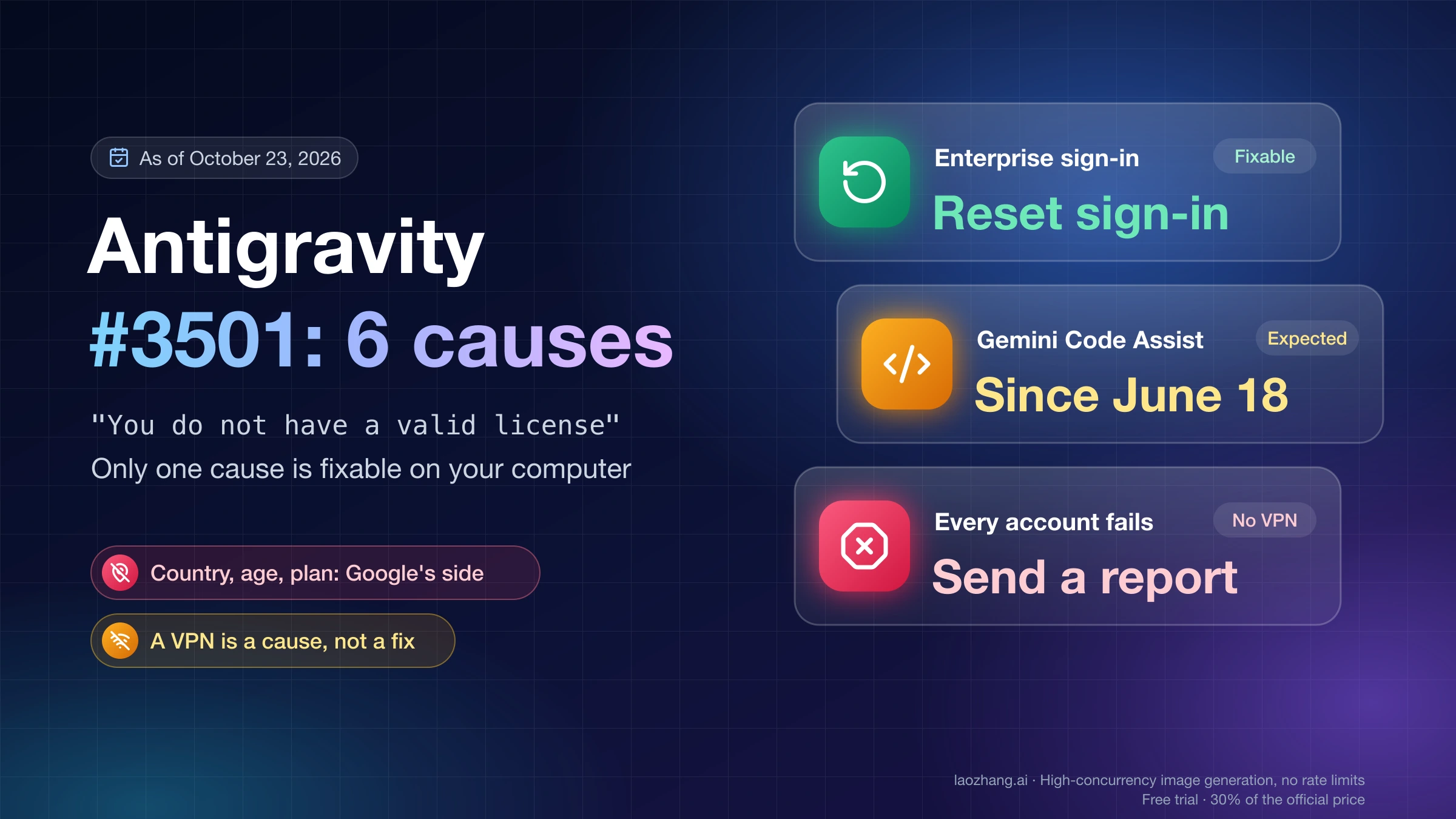
About 28 users confirmed this in the September threads, and it was the accepted answer in three of them. About eight still failed because no QR code appeared or the SMS never arrived, including reports from Kazakhstan and Chinese carriers; that group needs support, not another reinstall. In App 2.x the same kind of rejection can appear as error #3501, covered in Antigravity #3501 "You Do Not Have a Valid License": 6 Causes. A "not eligible" message in Gemini CLI rather than Antigravity is a different problem: personal Google logins there stopped working on June 18, 2026, as explained in How to Install Gemini CLI (2026): Setup and Which Login Works.
Proxy, VPN or antivirus: give the Antigravity app your browser's route
If your browser reaches Google and the app doesn't, something treats the app differently: a proxy only your browser knows about, antivirus that inspects HTTPS, or a firewall rule. The forum moderator's diagnosis for "Failed to exchange authorization code for token" on February 27, 2026 was that "your browser can reach Google, but the Antigravity itself is being blocked from making the final connection," usually by "a Proxy or Antivirus intercepting the network traffic." A proxy is for networks that need one to reach Google, such as a company network; it doesn't change your account's country.
On macOS, proxy variables in your shell don't reach apps opened from the Dock. On the same Mac on November 5, 2026, the terminal had HTTPS_PROXY=http://127.0.0.1:17891, while launchctl getenv HTTPS_PROXY, the environment Dock apps inherit, was empty and scutil --proxy showed the system proxies off. Sign-in traffic worked there only because the proxy ran in TUN mode, which captures all traffic. The moderator's options match: run the proxy system-wide (TUN mode) or set HTTPS_PROXY / HTTP_PROXY so background processes take your browser's path.
Set the proxy for Antigravity on macOS and Windows
On macOS, set the variables for GUI apps, then quit and reopen Antigravity. Replace <port> with your proxy's local port; the setting lasts until you log out:
launchctl setenv HTTPS_PROXY http://127.0.0.1:<port>
launchctl setenv HTTP_PROXY http://127.0.0.1:<port>
For the CLI, prefix the command: HTTPS_PROXY=http://127.0.0.1:<port> agy. If the variables point at a proxy you no longer run, remove them with launchctl unsetenv HTTPS_PROXY, because a dead proxy produces proxyconnect tcp: … connection refused.
On Windows, the moderator suggested starting the app from Command Prompt with the variables cleared (set HTTP_PROXY= and set HTTPS_PROXY=, then start Antigravity.exe from the install folder). About five users who need a proxy reported the opposite fix: set HTTPS_PROXY=http://127.0.0.1:<port> before starting Antigravity, or switching the proxy client to TUN or global mode. If your antivirus scans HTTPS, turn that off or add the Antigravity executable to its exceptions. These Windows steps come from the forum and have not been run on Windows.
Skip forum posts that edit the app's files to set NODE_TLS_REJECT_UNAUTHORIZED=0. That turns off certificate checking, so anything on your network could read your sign-in.
x509: certificate signed by unknown authority in Antigravity
Something on the path presents a certificate your system doesn't trust, or Antigravity is reading the wrong certificate store. In an October 2026 thread about this error on Windows 11, the moderator pointed first at SSL_CERT_FILE and SSL_CERT_DIR: "In Go applications like Antigravity, these variables completely override the native Windows certificate store." Check them with echo %SSL_CERT_FILE% on Windows or launchctl getenv SSL_CERT_FILE on macOS, and remove them if another tool set them. The moderator's other option was to point SSL_CERT_FILE at Google's root bundle from https://pki.goog/roots.pem; one other user said that solved it.
EOF on loadCodeAssist: firewalls and TUN proxies
An EOF means the connection was cut between your computer and Google. In the accepted answer to an October 2026 thread, the moderator suggested curl -sv https://daily-cloudcode-pa.googleapis.com -o /dev/null and launching the CLI as GODEBUG=tlsmlkem=0 agy; if the second works, a firewall or deep packet inspection is dropping the post-quantum TLS handshake recent Go versions send. The poster found a local firewall rule dropping TLS to *.googleapis.com. Treat GODEBUG=tlsmlkem=0 as a diagnostic and fix the rule.
A TUN-mode proxy adds one more cause. With fake-IP DNS, every hostname resolves to an address in 198.18.0.0/15, even one that doesn't exist, so a lookup that should fail with no such host reaches Go as EOF. The November 5, 2026 test showed exactly that: both Google hosts and a deliberately invalid name resolved to 198.18.x.x, and the invalid name returned EOF. If you run such a proxy, make sure its rules send googleapis.com to a working upstream.
Country, age and Workspace account: when Antigravity sign-in is a stop
Some failures are decisions on Google's side, and nothing on your computer changes them. The Antigravity FAQ says personal Google accounts, including @gmail.com, can use Antigravity on any plan including free, and lists three checks when sign-in fails: the account's country, an age of 18 or older, and the account type.
Country belongs to the account, not your connection. As of November 5, 2026, the FAQ's list of available countries doesn't include Russia, China, Hong Kong, Macau, Belarus, Iran or Cuba. Your account's country is shown on Google's Terms of Service page while you're signed in; if it's wrong, request a change with Google's country-association form. A forum moderator wrote on November 5, 2026 that "eligibility is based on the country associated with your Google Account not only your network," and that using proxies "to get around regional availability can put the account at risk under our Terms of Service."
Under-18 accounts can't use Antigravity; if yours is older, confirm it on the age verification page. A Google Workspace account isn't a personal account, so its administrator must explicitly turn on Antigravity for you, or you sign in with a personal account. In the Google Help community thread on this error, a volunteer Product Expert's accepted answer called it, for Workspace accounts, "likely an eligibility block appearing as a 'setup issue'." Gemini Enterprise users choose Business account at sign-in and need a license from their administrator.
The fourth stop is a Terms of Service block. The FAQ says using an Antigravity login in third-party software such as Claude Code, OpenClaw or OpenCode "can result in suspension or termination of your account." Users with blocked accounts often saw only the generic message or "failed to make code assist backend request" in Antigravity, and the Terms of Service notice appeared when they tried another client.
Is Antigravity down? The January 22 and May 19 outages
When the fault is Google's, many people get the error at once, with any account and on any network. On January 22, 2026, sign-in failed with "Please try again later" from about 06:45 to 10:30 UTC, and about 13 users in the main forum thread reported it working between 10:11 and 10:55 UTC. The "[RESOLVED]" label on that thread was added by the person who opened it, not by Google, and the same error was still being posted into July. A similar wave on April 13 eased for about six users who switched to a phone hotspot. On May 19, 2026, App 2.0.0's launch brought "failed to make code assist backend request" until a forum moderator posted "The issue has now been resolved" at 19:31 UTC.
To tell an outage from your own problem, try a second Google account and a second network such as a phone hotspot. If both fail the same way and new forum threads have appeared within the hour, wait instead of reinstalling. If another account works on the same computer, the problem is that account.
Reinstall or delete folders? Update, then rename the session folder
Update before deleting anything, because the App fixed several sign-in failures during 2026: 2.11.0 (August 26) stopped startup DNS timeouts from leaving a permanent account-failure screen, 2.27.0 (October 26) fixed "an invalid saved session at startup" that blocked later sign-ins, and 2.29.0 (November 3) fixed Sign in with Google redirects in the built-in browser. None names this exact message, but a stale session is one of its causes. Update the agy CLI too.
If the latest version still fails while the reachability check returns 401, reset the local session by renaming, not deleting. A check on October 23, 2026, on a Mac that had run the older Antigravity IDE, found the sign-in state in ~/Library/Application Support/Antigravity (cookies and local storage) and the system keychain, while ~/.gemini/antigravity held 689 MB of agent history and ~/.gemini also held Gemini CLI and MCP sign-in tokens; the folder layout of App 2.x wasn't checked. So quit Antigravity completely, rename ~/Library/Application Support/Antigravity (for example to Antigravity.bak), and in the CLI run /logout inside agy, restart it and sign in again, but leave ~/.gemini alone. The full measurement and the case for renaming are in Antigravity #3501 "You Do Not Have a Valid License": 6 Causes.
Where Antigravity writes sign-in logs and which lines to search
The logs show the reason even when the dialog says only "Please try again later." On a Mac that ran the Antigravity IDE from December 2025 to January 2026, the logs were still there as of November 5, 2026, under ~/Library/Application Support/Antigravity/logs/<session time>/, in window1/exthost/google.antigravity/Antigravity.log and main.log. To pull the relevant lines:
grep -rhE "loadCodeAssist|VALIDATION_REQUIRED|x509|no such host|Detected location" \
  ~/Library/Application\ Support/Antigravity/logs | tail -20
That Mac's logs held Post "https://daily-cloudcode-pa.googleapis.com/v1internal:loadCodeAssist": EOF on January 7, 2026, dial tcp: lookup daily-cloudcode-pa.googleapis.com: no such host on January 8, and TypeError: fetch failed … at async GJe.loadCodeAssist in main.log on January 11 and 20. App 2.x users on the forum quote a file named ls-main.log, so names can differ by version, and the Windows log location isn't documented in these reports. A Detected location: CN line, seen in one user's log, means the country check failed, which is a stop.
When to stop and contact Antigravity support or file an appeal
Stop retrying when the reason or log names your country, age or Workspace administration; when the reachability check returns 401, you're on the latest version, the account is verified and the error remains; when another account works on the same computer; or when the reason is still unsolved, such as socket is not connected. More reinstalls add nothing in these cases.
For a Terms of Service block, use the appeal link. Since CLI v1.3.1, agy always shows "the verification or appeal link" with the sign-in error, and App 2.28.0 made links like "the appeal form link in an account error message" clickable. For everything else, post in the Antigravity section of the Google AI Developers Forum or send in-app feedback with the app or CLI version, your OS, the exact text after the colon, the time in UTC, the reachability result and the matching log lines with tokens and email addresses removed.
Antigravity "unexpected issue" sign-in error: other questions
Does switching to Chrome or another browser fix it?
Only when the browser step was the problem: your default browser is signed in to several Google accounts and verification lands on the wrong one, or the sign-in redirect itself fails, which App 2.29.0 fixed for the built-in browser on November 3, 2026. A different browser doesn't help with eligibility or a blocked network path, because the app's own connection never goes through the browser.
Does upgrading to Google AI Pro fix it?
No. The Antigravity FAQ says personal Google accounts can use Antigravity on any plan, including the free tier, so the plan isn't what the setup step rejects. Paying doesn't clear a pending verification, a country block or a network problem.
I got past sign-in, but the model keeps retrying. Is that the same problem?
No. Once you're signed in, "Retrying (1/9)" loops concern model requests, not account setup; see Gemini 4 Argon "Retrying (1/9)": Why Large Edits Fail at 60s.
Sources10
External pages this guide links to, in the order they appear. Last updated Nov 5, 2026.
Sources10
External pages this guide links to, in the order they appear. Last updated Nov 5, 2026.
- 1.forum thread on an App 2.29.0 sign-in failurediscuss.ai.google.dev/t/198170
- 2.forum thread on EOF sign-in errorsdiscuss.ai.google.dev/t/187290
- 3.Antigravity enterprise documentationantigravity.google/docs/enterprise
- 4.Antigravity changelog in Markdownantigravity.google/docs/changelog.md
- 5.Google Account securitymyaccount.google.com/security
- 6.Google's age verification pagemyaccount.google.com/age-verification
- 7.Antigravity FAQantigravity.google/docs/faq
- 8.Google's Terms of Service pagepolicies.google.com/terms
- 9.Google's country-association formpolicies.google.com/country-association-form
- 10.Google AI Developers Forumdiscuss.ai.google.dev