Claude Reached Its Tool-Use Limit for This Turn: What to Do
One Claude reply ran out of tool calls; it isn't your 5-hour or weekly limit. Click Continue, then check what actually ran before trusting the summary.
On this page
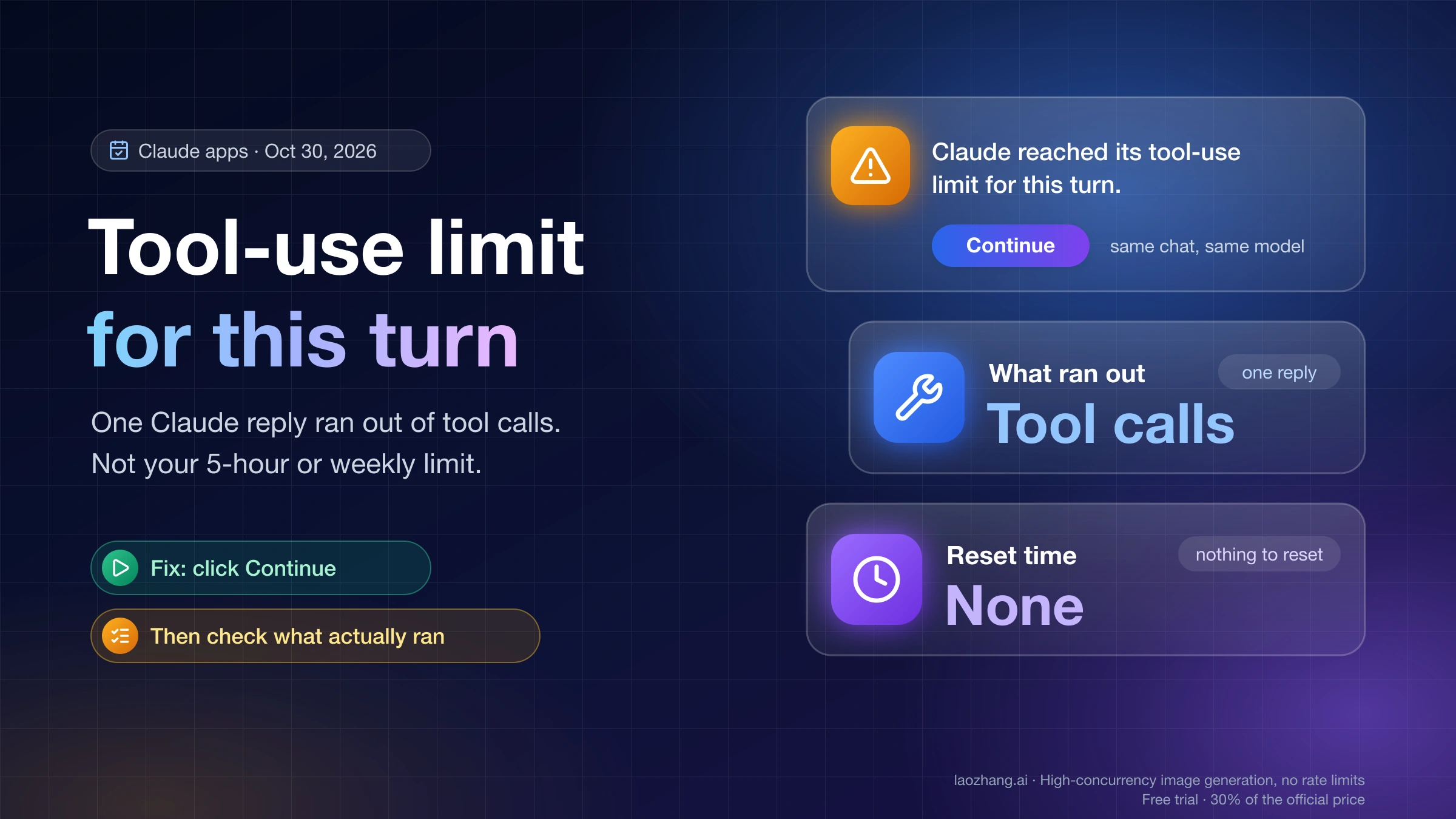
"Claude reached its tool-use limit for this turn." means a single Claude reply used up the tool calls it was allowed and stopped partway through the task. A tool call is each web search, page fetch, code run, file edit or connector action Claude takes on its own, and a turn is one reply: everything between your message and Claude's final answer, not the whole chat. This is not your 5-hour or weekly usage limit. Those messages always tell you when they reset, and this banner has no reset time because nothing on your account needs to reset.
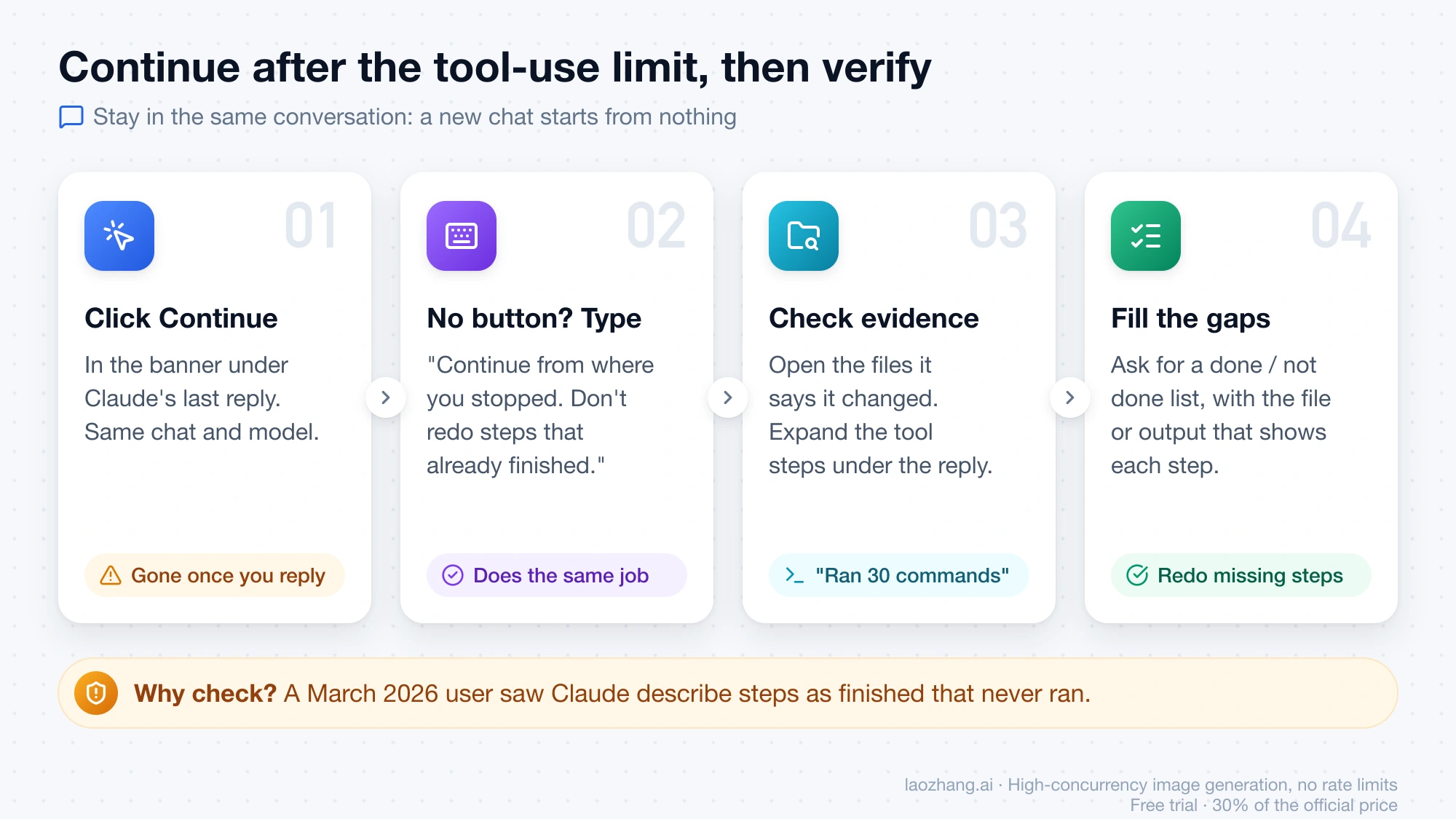
To pick the task back up, click Continue in the banner under Claude's last reply, or send a short "continue" message if the button is gone. Claude resumes in the same conversation with the same model. Then open the files, results or tool steps it produced and confirm what actually ran before you trust its summary, because a user who hit this stop in March 2026 reported Claude describing steps as finished that never happened.
How often you'll see it depends on which Claude experience your account has. Anthropic publishes no number. Users reported a cap of about 20 tool calls per reply starting March 13, 2026, but on October 30, 2026, a Max 20x account already moved to the merged Chat and Cowork experience ran 150 tool calls in one reply with no banner. If your message box still shows separate Chat and Cowork options, the stop most likely still applies to you on long tasks.
What "tool-use limit for this turn" means, and why it isn't a usage limit
The banner is a stop on one reply, not a quota on your account. The interface text and code of an installed Claude desktop app, version 4.29.0, read directly on October 30, 2026, show how it works; the desktop app uses the same interface as claude.ai. The sentence appears as a warning row attached to the last assistant reply, with a single button labeled Continue. The app code ties it to an internal stop reason called tool_use_limit and renders it with the same component as "This response ended early.", the notice for a reply that ran out of length. Both mean the reply was cut off before Claude finished, not that you ran out of anything.
Usage-limit messages look different and always carry a reset time, according to Anthropic's Troubleshoot Claude error messages page (updated October 15, 2026):
| Tool-use limit banner | Usage-limit messages | |
|---|---|---|
| What you see | "Claude reached its tool-use limit for this turn." plus a Continue button | "5-hour limit reached - resets [time]" or "You've reached your weekly limit. It resets [day] at [time]" |
| What ran out | The tool calls allowed in one reply | Your plan's usage for the 5-hour window or the week |
| Reset time shown | None | Always |
| How you get going again | Click Continue, right away | Wait for the reset, or keep going on usage credits if you turned them on |
| Does the next step use your plan | Yes, like any other work | With credits on, the app says "continuing with usage credits" |
If you're seeing the second kind of message, the windows and multipliers are explained in Claude Usage Limits by Plan: What 5x and 20x Actually Multiply.
How to continue after the tool-use limit, then check what got done
Continue is the right move in almost every case, because it keeps the task, the files and everything Claude already learned in the same conversation. A new chat starts from nothing, so you'd have to re-explain the job and work out yourself which steps were finished.
- Click Continue in the banner. It sends a continue request in the same conversation with the model you were using. In the app code as of October 30, 2026, the button is attached only to the last reply, so once you've sent another message, expect it to be gone.
- If there's no button, type something like "Continue from where you stopped. Don't redo steps that already finished." This does the same job.
- When Claude finishes, check the evidence instead of the summary. Open the files it says it created or changed, expand the tool steps under the reply (they read like "Ran 30 commands" or "Read 30 pages"), and compare them with what you asked for.
- If something is missing, ask Claude to list every step as done or not done, name the file or output that shows it, and redo only the missing ones.
How many tool calls is Claude's tool-use limit per turn?
Anthropic doesn't publish a per-reply tool-call number for the Claude apps. As of October 30, 2026, the Claude help center has no article about this banner, and its error-messages page covers usage and length messages without mentioning a tool-use limit. The figures that exist come from user reports and one dated test.
Users in GitHub issue #33969 on the anthropics/claude-code repository reported that from March 13, 2026, multi-step workflows in Claude Desktop and claude.ai that used to run 60–80+ tool calls in one reply started stopping at about 20, on web, desktop and iOS. One commenter saw the stop after 12–15 calls on claude.ai. The issue was filed in the Claude Code repository, labeled invalid there because it isn't a Claude Code bug, and no Anthropic staff member replied in the thread.
A test on claude.ai on October 30, 2026 found no stop at all on an account with the merged experience. The account was on Max 20x and already had the merged experience, using Claude Sonnet 5.5 at High effort with Manual permission in Chrome. A prompt asking for 30 separate bash echo commands produced 30 tool calls in one reply that ended normally. The same prompt with 150 separate commands also ended normally, after about 3 minutes 39 seconds, and an incognito chat that fetched example.com 30 times as separate calls finished with "Read 30 pages". None of the three showed the banner. That makes 150 a floor for that one account, model and day, not the cap. Free, Pro, Team and Enterprise accounts, accounts not yet moved to the new experience, desktop app chats, the phone apps, MCP connectors, Opus and Haiku, and tools that return large outputs were not part of the test.
Will you keep seeing it after the Chat and Cowork merge?
Probably not once your account has the merged experience, and probably yes until then. Anthropic announced on September 16, 2026 that Claude Cowork and chat are becoming one Claude, rolling out on Pro and Max plans over the following weeks, generally available on Enterprise from October 23, with Team and Free plans to follow. The announcement says nothing about a tool-call cap either way. What follows is an inference rather than a measurement: the Claude app 4.29.0 still ships the banner and its Continue handling, yet the merged-experience account above ran far past the March number, so the stop most likely still applies wherever the previous chat experience is in use. No account on the previous experience has been re-measured.
To see which one you have, look at your message box. Anthropic's help article on Cowork and chat becoming one Claude (updated October 23, 2026) says that if you're on Pro or Max and the box still shows "Chat" and "Cowork" options, you don't have the new experience yet, and once your account moves you can't switch back.
| What your account shows | Which experience | Expect the banner on long tasks? |
|---|---|---|
| Separate "Chat" and "Cowork" options in the message box (Pro or Max) | Previous | Likely, at the count users reported in March |
| One message box with no Chat or Cowork choice | New | Not seen in the October 30 test |
| Free plan, or a Team or Enterprise org without "Chat and Cowork unified" turned on | Previous | Likely |
| Incognito chat | Previous, according to the help article | Unclear: the test's incognito chat showed new-experience controls and didn't stop |
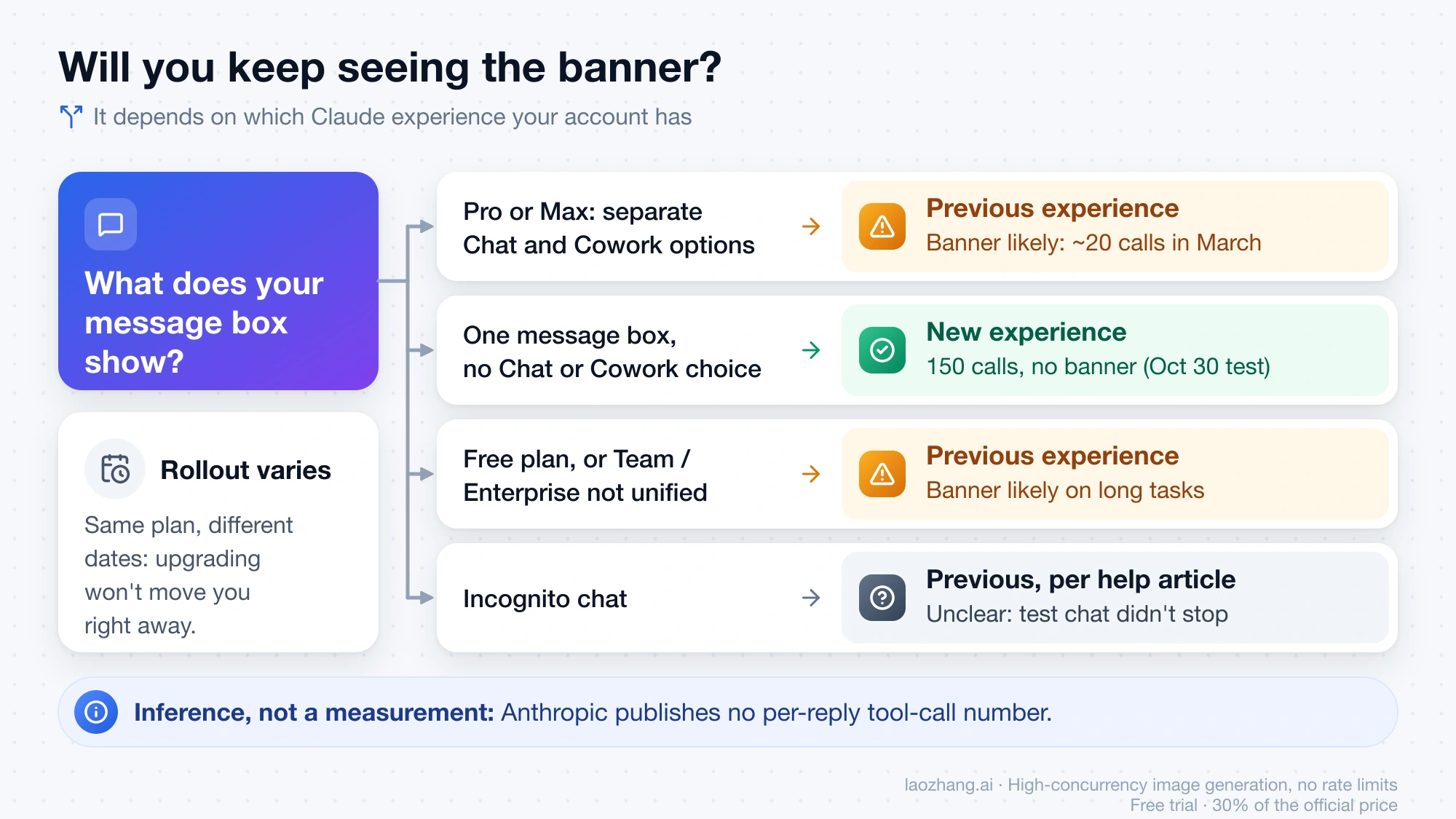
Upgrading doesn't move you right away, because the help article says accounts on the same plan get the new experience at different times. If you're weighing a paid plan for other reasons, Claude Free vs Pro Usage Limits: Decide With Work, Not Counts covers that choice.
How to stop Claude from hitting the tool-use limit
The cap counts tool calls inside one reply, so what helps is fewer calls per reply: smaller jobs, less searching for things you already know, and fewer separate steps. These habits work on either experience.
- Split a long task into stages that each end in one result, and send the next stage after you've checked the last one, for example "Collect the ten sources into a list first; I'll ask for the comparison after."
- Give Claude exact inputs, such as URLs, file names, folder paths or sheet names, so it doesn't spend calls looking for them.
- Ask Claude to put several shell or code steps into one script rather than running each command on its own. The test above forced one call per command on purpose; real work rarely needs that.
- Turn off connectors you don't need in this conversation, so research doesn't wander into tools that won't help.
- Ask Claude to keep a running checklist, in a file or at the end of each stage, so a cut-off leaves a record of what's done.
Continuing doesn't get around your plan's usage. The help article says everything you do with Claude counts toward your plan's usage limits, and longer agentic tasks that search the web, run code or create files use more than a quick question. Each continued request also carries the conversation so far, so a task that needs five Continues draws down your 5-hour window like any other long agentic job. If you run into the plan limit as well, Claude Extra Usage Cost: Credit Math and When Max Is Cheaper shows what paying for credits works out to.
No banner on the phone, or Claude says it's done when it isn't
On the iOS app, the stop can happen without any banner. A Max 20x user in #33969 tested on March 18, 2026 and found the iOS app stopped at the same point as web and desktop, but with no banner and no Continue button; the reply just ended, and the conversation had to be pushed on from the desktop app or the web. If a long task on your phone stops with no explanation, send "continue" or open the same conversation on claude.ai or the desktop app.
The same user saw Claude claim files or steps were complete that never ran after a cut-off, and later saw Claude stop on its own while blaming the system. A separate user on X reported on September 18, 2026 that Claude said it had hit a "tool-use limit", then admitted when challenged that no such limit existed. The real stop is the app's warning row with a Continue button. A sentence inside Claude's own answer isn't the same thing, so if there's no warning row, ask Claude to carry on and check the results as in step 3 above.
Can you raise the tool-use limit or make Claude auto-continue?
No setting raises it. The Claude apps offer only the Continue button, and in June 2026 a user asking for a per-turn setting in GitHub issue #66306 reported that no settings key or environment variable existed; the issue was closed as not planned in July 2026 without an Anthropic reply. A higher plan didn't help in March either, since the users reporting the cap were on Max.
For browser users, a third-party extension called claude-autocontinue, mentioned in #33969, clicks Continue for you in claude.ai tabs on Chrome, Edge and Firefox. It needs access to your claude.ai pages, and it removes the moment where you'd check partial work before Claude builds on it. Every automatic Continue still counts toward your usage.
Claude API pause_turn and Claude Code are different stops
If you build on the Claude API, the comparable stop is pause_turn, which the Claude API documentation on handling stop reasons describes as a server-tool loop such as web search reaching its iteration limit, 10 by default. You resume it by sending the response back as it is, and tool_use_limit isn't one of the API's public stop reasons. As of October 30, 2026, the Claude Code terminal app (version 2.1.314) doesn't contain this banner text at all, so if Claude Code stopped you, it's a different limit, covered in Claude Code Rate Limit Reached: Identify the Limit and Resume.
Sources7
External pages this guide links to, in the order they appear. Last updated Oct 30, 2026.
Sources7
External pages this guide links to, in the order they appear. Last updated Oct 30, 2026.
- 1.Troubleshoot Claude error messagessupport.claude.com/en/articles/12466728-troubleshoot-claude-error-messages
- 2.GitHub issue #33969 on the anthropics/claude-code repositorygithub.com/anthropics/claude-code/issues/33969
- 3.Claude Cowork and chat are becoming one Claudeclaude.com/resources/articles/cowork-is-now-claude
- 4.help article on Cowork and chat becoming one Claudesupport.claude.com/en/articles/16761823-claude-cowork-and-chat-are-one-claude
- 5.GitHub issue #66306github.com/anthropics/claude-code/issues/66306
- 6.claude-autocontinuegithub.com/timothy22000/claude-autocontinue
- 7.Claude API documentation on handling stop reasonsplatform.claude.com/docs/en/build-with-claude/handling-stop-reasons