ChatGPT Chrome Extension Not Working: Match the Message to a Fix
Most failures sit between the extension and the ChatGPT desktop app, not in Chrome. The exact message tells you whether there is a local fix or only a wait.
On this page
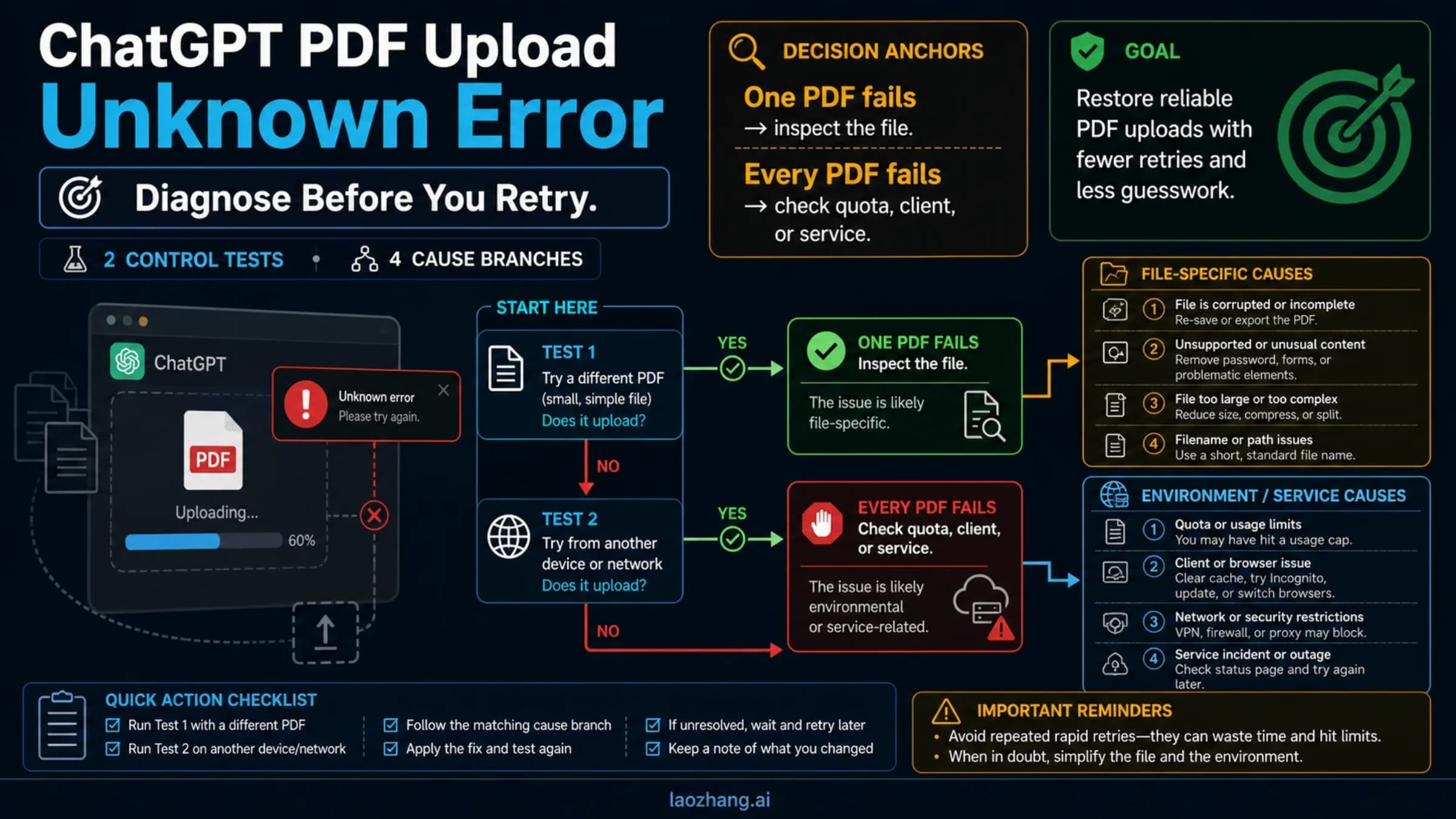
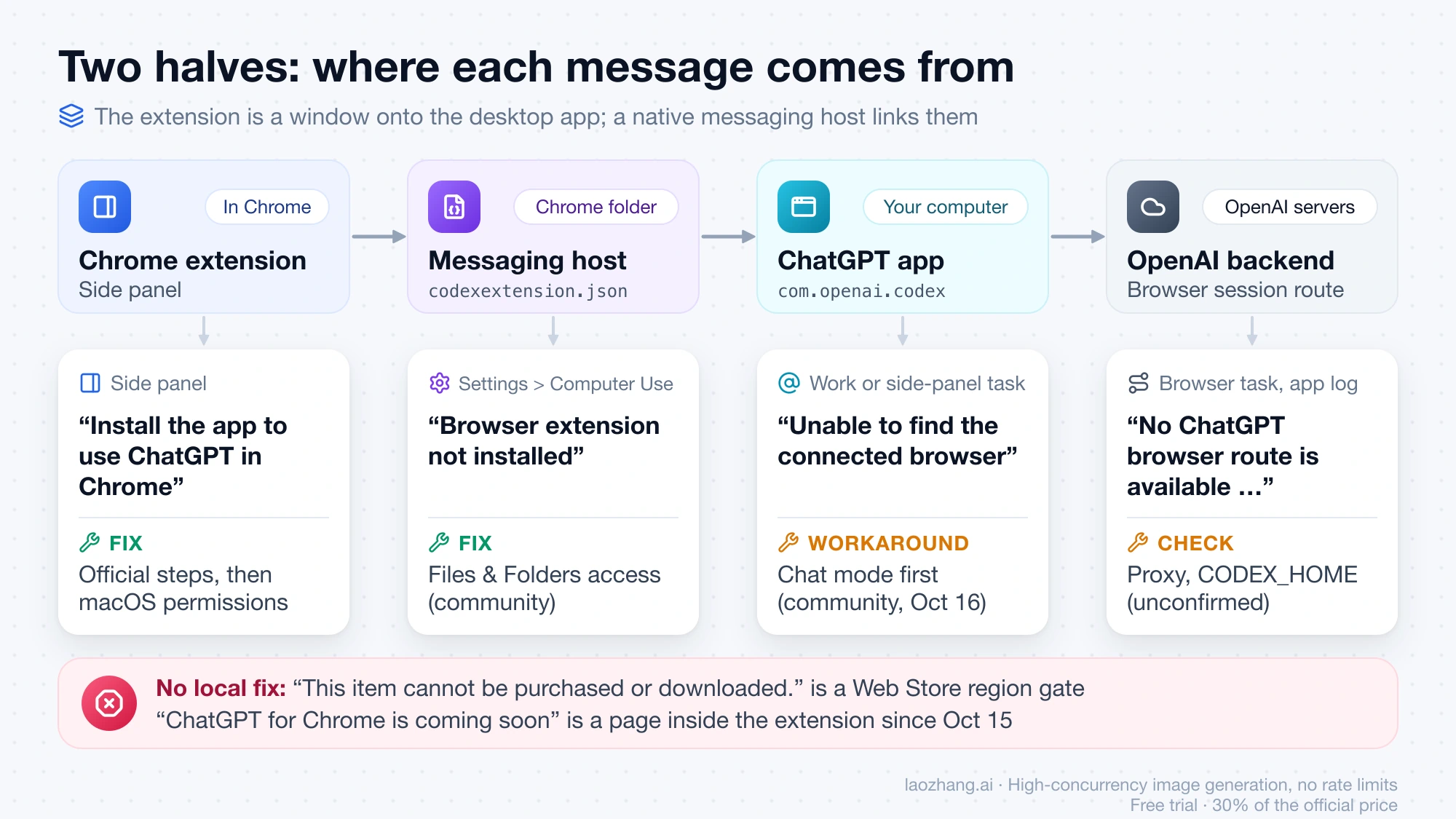
The ChatGPT extension for Chrome (Web Store ID hehggadaopoacecdllhhajmbjkdcmajg, offered by OpenAI) is only half of the system. The other half is the ChatGPT desktop app, which registers a small native messaging host with Chrome (a manifest file in Chrome's profile folder that points at a helper binary) and does the actual work. The extension is a window onto that app plus a bundle of browser permissions. So when the side panel says "Install the app to use ChatGPT in Chrome", when Settings > Computer Use says "Browser extension not installed", or when a task dies with "Unable to find the connected browser", Chrome itself is rarely the broken part. The link between the app and Chrome is.
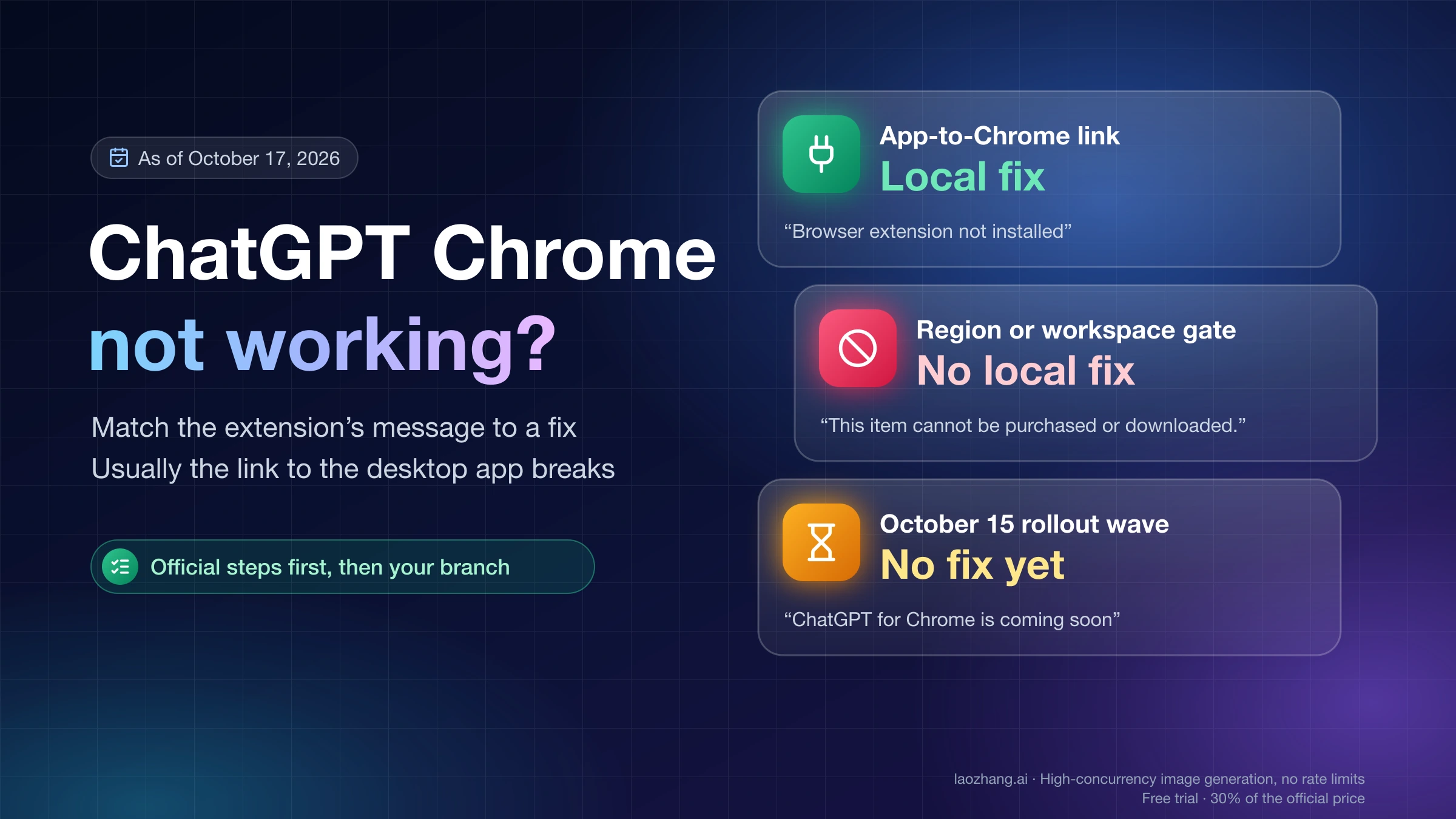
As of October 17, 2026, the messages people report fall into three groups. Some point to that app-to-Chrome link and have local fixes, including two macOS permission fixes that OpenAI has not documented. Some are gates that no local change opens: the Chrome Web Store refusing the listing in an unsupported country, or a workspace policy. And since the October 15, 2026 update (extension version 1.26.1005.11759), a wave of "ChatGPT for Chrome is coming soon" and "Sheep MCP session closed: RPC INTERNAL" reports has no OpenAI explanation yet. Find your message in the table, run the official steps once, then go to the section for your branch.
Two scope notes. The extension meant here is OpenAI's own, which pairs with the desktop app; the third-party "ChatGPT for Google" style extensions of 2023 to 2025 are different products with different failures. And if chatgpt.com itself won't load in Chrome, with no extension involved, that is a different problem, covered in ChatGPT Unblocked at School, Work or Abroad: Find the Block.
Which message is on your screen, and which layer it points to
Read the exact wording, because near-identical messages come from different layers. The table lists the messages reported in the openai/codex issue tracker, the OpenAI developer community and Chrome Web Store reviews between May 7 and October 17, 2026, with where each one originates.
| What you see | Where it comes from | What to do |
|---|---|---|
| Side panel: "Install the app to use ChatGPT in Chrome", with "Download ChatGPT" and "Or open the app if already installed" | The extension cannot reach the desktop app's native messaging host | Official steps, then the macOS permission fixes |
| Settings > Computer Use > Google Chrome: "Browser extension not installed" or "Not installed", "Reinstall extension" grayed out, Chrome missing from the @ menu | The app does not find its manifest in Chrome's folder | Same branch |
| Chrome row reads "Use the browser extension for additional control" with no Install, Manage or toggle | The row never populated; reported October 5, 2026 in issue #51199, no fix yet | Official steps, then report |
| Chrome Web Store: "This item cannot be purchased or downloaded." | Google's standard refusal when a listing is not available to you | Region gate; no local fix |
| "Disabled by your organization or unavailable in your region." or "Could not load this plugin right now." | A server-side gate: workspace policy or region | Same |
| Side panel: "ChatGPT for Chrome is coming soon" plus "The ChatGPT extension is rolling out gradually." | A waiting-room page shipped inside the extension, shown since October 15 to people whose panel used to work | No fix reported; use the desktop app meanwhile |
| "Unable to find the connected browser", "Sheep MCP session closed: RPC INTERNAL", "The browser connection failed. Please reconnect the Browser extension, then tell me to retry." | The Work or side-panel session fails to initialize | Chat-mode workaround (community, October 16) |
| "No ChatGPT browser route is available for browser session …", "Browser is not available: extension" | The app's route to OpenAI's backend was revoked or never published | Proxy and CODEX_HOME checks |
One condition sorts most cases before you read further: did the extension ever work on this machine? If it never did, you are in the first five rows (install, permissions, or a gate). If it worked until October 15 and then stopped, you are almost certainly in the last three rows, and reinstalling will not change anything.
Why every path says codex, and what a healthy Mac install looks like
The desktop app behind the extension is the one OpenAI launched on July 9, 2026, which merged Chat, Work and Codex into a single app; the older Mac app is now called "ChatGPT Classic". Its bundle identifier is still com.openai.codex, its cache lives in ~/.codex, and its bugs are filed in the openai/codex GitHub tracker. The side panel with your full ChatGPT history is the part that got the October 15 upgrade. So "codex" in a path or a diagnostic does not mean you installed the wrong thing.
The file layout below comes from a read-only look (ls, cat, defaults read, pgrep) at one of the LaoZhang AI Team's Apple Silicon Macs on October 17, 2026, where the extension already worked: app 26.1013.31256, Chrome 155.0.8059.84, extension 1.26.1005.11759. It shows what a working install looks like. The failure was not reproduced on that machine and no fix was tested there.
The native messaging manifest sits in Chrome's profile folder at ~/Library/Application Support/Google/Chrome/NativeMessagingHosts/com.openai.codexextension.json, and it is the file the app's bundled diagnostics report as missing in the "not installed" cases:
{
  "allowed_origins": [
    "chrome-extension://hehggadaopoacecdllhhajmbjkdcmajg/",
    "chrome-extension://odlomjlbamekndcpllcnffbgeohgkmjh/"
  ],
  "description": "ChatGPT browser native messaging host",
  "name": "com.openai.codexextension",
  "path": "/Users/yourname/.codex/plugins/cache/openai-bundled/chrome/latest/extension-host/macos/arm64/ChatGPT for Chrome",
  "type": "stdio"
}
The path points at a 1.1 MB executable named "ChatGPT for Chrome". The latest folder in that path is a symlink to a folder named after the app version (26.1013.31256), so every app update swaps the host binary. The second allowed origin is, according to a remark in issue #36319, the Edge build of the extension, which keeps its own ID. The extension's own manifest requires Chrome 116 or newer and asks for host access to all URLs plus the debugger, history, bookmarks, downloads, tab groups, native messaging and side panel permissions, which is the long permission prompt you see at install. The "coming soon" screen is a file called waiting-room.html bundled inside the extension. While the app runs, three helper processes under /Applications/ChatGPT.app/Contents/Resources/cua_node/ stay alive (cua-repl.mjs, node_repl, server.mjs).
You can check the first two facts on your own Mac without changing anything:
ls -la ~/Library/Application\ Support/Google/Chrome/NativeMessagingHosts/
ls -la ~/.codex/plugins/cache/openai-bundled/chrome/
If the com.openai.codexextension.json file is absent while Chrome shows the extension enabled, you are in the macOS permissions branch below. Windows equivalents come only from issue reports, not from a first-hand check: the registry key HKCU\Software\Google\Chrome\NativeMessagingHosts\com.openai.codexextension (issue #53476), a chrome-native-hosts-v2.json file and a chrome\latest junction under the CODEX_HOME folder, and an extension-host.exe (issue #54036).
Official steps from OpenAI's browser extension guide come first
OpenAI's browser extension documentation on learn.chatgpt.com has a seven-step troubleshooting list under "If ChatGPT can't connect to your browser". Do it once before any community fix, because Support asks for the same checks before it looks further. Condensed:
- Confirm the site you are working on is not on the blocklist in Settings.
- Update the desktop app, and update or remove any extra ChatGPT or Codex desktop copies.
- Restart the browser and reopen side chat from the toolbar or Extensions menu.
- In Settings > Computer Use, the browser row must show Manage (or "Connected to browser extension for additional control"). If it shows Install, repeat the setup: select the browser, let Install open the store, add the extension, review the permission prompt, then confirm Manage. Turn on the row's toggle if the browser is missing from the @ menu.
- Use the Chrome profile where the extension is installed and enabled. A second profile sees nothing.
- Start a new Work or Codex chat and @-mention Chrome again.
- Restart the desktop app. If it still won't connect, reinstall the extension from Settings > Computer Use, then run
/feedbackin the app and keep the chat ID for Support.
OpenAI Support (Ziad) repeated the core of this on October 14, 2026 in the community thread ChatGPT Chrome Extension - native messages host never establishes browser control connection (macOS): check that Chrome shows Manage, use the right profile, start a new Work or Codex chat, try a simple task, and report whether the connection stays active plus the exact error wording. The "quit the app, type chrome://restart, relaunch ChatGPT first" recipe in the same thread is from a community member on October 16, not from Support.
Two details the guide does not state: it carries no dates or version numbers, and the only macOS permissions OpenAI documents for Computer Use are Screen Recording and Accessibility. Neither Full Disk Access nor Files & Folders appears on any official page, which is why the next section is labeled community.
"Browser extension not installed" on a Mac: two permission fixes
If Chrome shows the extension enabled but Settings > Computer Use shows "Browser extension not installed" or "Not installed" with the Reinstall and Remove controls grayed out, the fix that macOS reporters confirmed most often is a privacy permission, not a reinstall. This family runs from September 14 to October 15, 2026, on macOS 26 and 27, apps 26.915 through 26.1007 and extensions 1.26.901 and 1.26.1005. In these reports the built-in browser and native Chrome computer control kept working; only the extension link was dead, and the bundled diagnostic said the manifest above was missing.
Both fixes below are community reports from the openai/codex tracker. No OpenAI staff member has replied in any of these threads, and "confirmed" means other users said it worked for them.
Files & Folders access to Chrome (Roni-TheMAN, October 10, 2026, in openai/codex issue #51395 on the Chrome extension not connecting on macOS; confirmed by tripasect and the issue author on October 12; garyamorris reported the same on October 12 in issue #53231: "ChatGPT didn't have permission to access Google Chrome's files and folders in macOS. Granting that access fixed the issue for me.")
- Open System Settings → Privacy & Security → Files & Folders.
- Expand ChatGPT and turn on Google Chrome.
- Quit both ChatGPT and Chrome fully with Cmd+Q, then reopen them.
Full Disk Access for ChatGPT (damirradanovic on September 19 and StephenRi on September 20, 2026, in issue #46463; allandelmare on October 1 and bananakiu on October 11 in issue #49724): turn Full Disk Access off and back on for ChatGPT under Privacy & Security, then restart ChatGPT and Chrome. One author (#51395, October 9) found the Full Disk Access entry "not available for ChatGPT", which is when the Files & Folders route matters.
The mechanism nobody has documented, but which fits every report, is that the app has to write the manifest into Chrome's own folder and macOS blocks that write until you grant the permission. After either fix, run the ls command above: the .json file should now exist, and the Chrome row should switch to Manage after the app restarts.
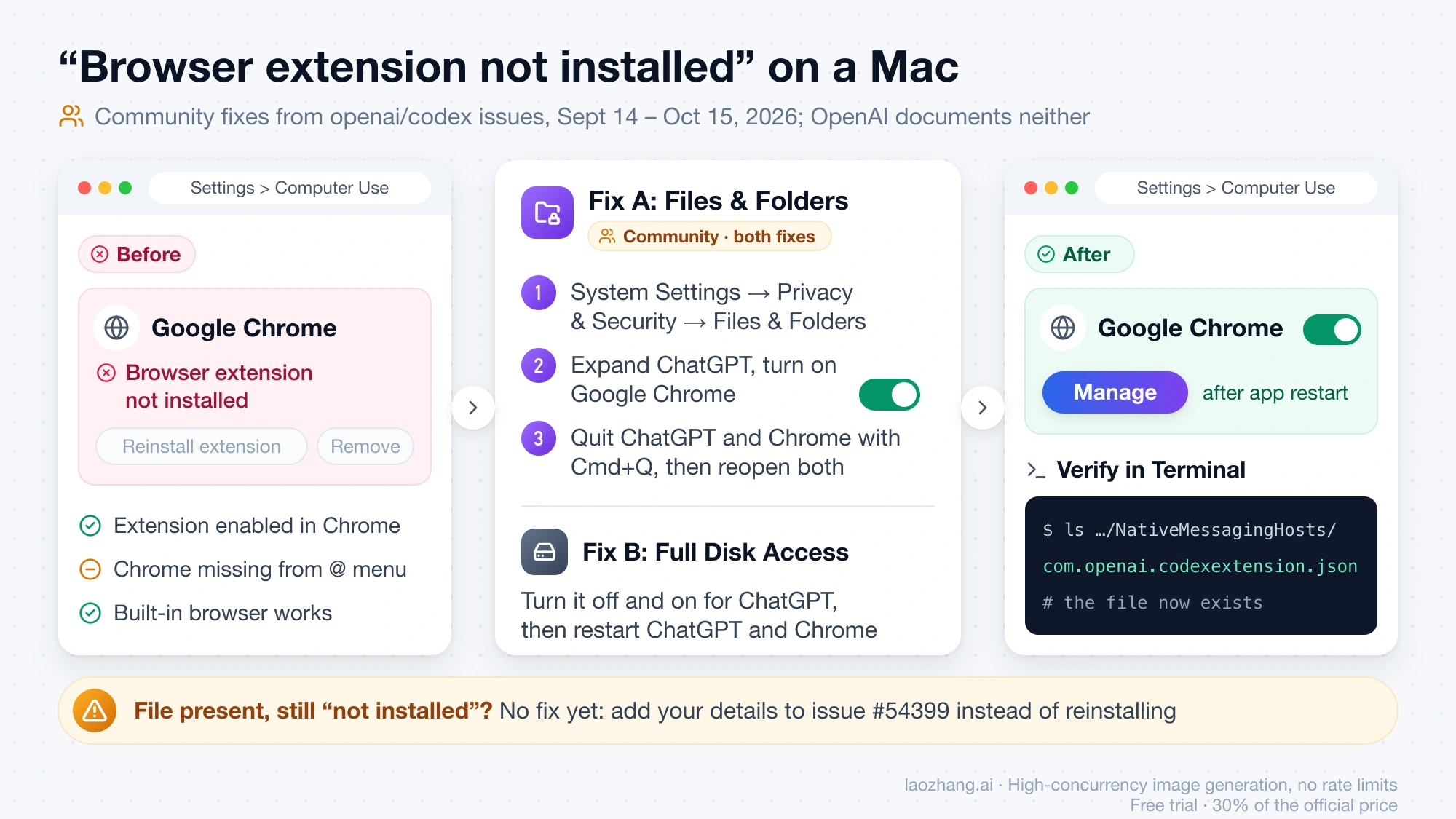
Two cases in the same family have no fix as of October 17. In issue #54399 (October 15, app 26.1007.71326) the manifest and the host binary exist and the side chat even opens, yet Settings still says "Browser extension not installed". In issue #51199 (October 5) the Chrome row shows only "Use the browser extension for additional control" with no Install or Manage button at all. If that is your screen, add your details to the existing issue rather than reinstalling again.
"This item cannot be purchased or downloaded": a region gate
When Install in Settings > Computer Use (or Plugins → "Use ChatGPT while browsing") opens the Chrome Web Store and the store answers "This item cannot be purchased or downloaded." (after a Google sign-in sometimes "Item not available"), nothing on your Mac or PC is broken. That text is Google's standard refusal for a listing that is not available to you, and the reports that state a location come from unsupported regions: mainland China in issue #36319 (July 31, 2026, still open). Windows reports with the region unstated are in issues #45589 (September 15) and #44958 (September 12, filed in Chinese, where Settings → Browser also read "In-app browser plugin unavailable.").
OpenAI has not published a store-region list for the extension. What it has published: Computer Use and the Chrome extension rolled out to the EEA, the UK and Switzerland on June 16, 2026 (OpenAI contributor chess-oai, August 15, 2026, closing issue #21598 about the plugin being unavailable in Norway and the EU); the Computer Use page says "In supported regions"; and OpenAI's ChatGPT supported countries list includes Japan, Korea, Spain and Taiwan and leaves out mainland China, Hong Kong and Russia, with the warning that access from outside the list may lead to account blocks. That the store refusal tracks region is an inference from those facts and from where the reports come from, not an OpenAI statement.
Plan is not the gate: the October 15 announcement says "Available for all ChatGPT plans". Workspace can be: the official guide says browser availability "can depend on rollout and your workspace settings", so on a Team or Enterprise account the same screen can mean your admin has not enabled it. Ask the admin before filing anything.
If your country is not on the supported list there is no local fix. Issue #36319 contains reports of a VPN and of an unofficial external-extensions file working for some people; OpenAI's own supported-countries page is the reason not to go that way, since it ties out-of-region access to account blocks.
"ChatGPT for Chrome is coming soon" after it used to work: no fix yet
If your side panel worked and since October 15 or 16, 2026 shows "ChatGPT for Chrome is coming soon" with "The ChatGPT extension is rolling out gradually. In the meantime, you can use ChatGPT on the web.", no reinstall, restart or sign-out has restored it for anyone who reported it. The text is served by waiting-room.html inside extension 1.26.1005.11759, so the extension is deciding to show it; the most plausible reading is a server-side rollout flag tied to the October 15 update, which is an inference, since OpenAI has said nothing about it.
Reports: a ChatGPT Pro subscriber on Windows 10 in issue #54355 (October 15), also in Incognito, with @chrome browser control from the desktop app still working; a Windows user on a ChatGPT Team workspace in issue #54484 (October 16) who lost Chrome and Edge at once and also saw "This is open in another app. Close it there to continue here." and "Unable to find the connected browser."; and a Brave user who sees "ChatGPT for Brave is coming soon". The Brave reporter got the panel back after disabling and re-enabling the extension, but it loaded the new Chat/Work interface instead of the old side-chat view, and the panel now embeds chatgpt.com/?surface=browser_side_chat. That matches an October 16 store review complaining that the direct Codex option in the side panel is gone.
What still works in these reports is browser control started from the desktop app: open a Work chat there and @-mention Chrome. The waiting-room text itself points you to ChatGPT on the web in a normal tab. There is no point reinstalling more than once; add your app version, browser and workspace type to issue #54355 and run /feedback.
"Unable to find the connected browser": the Chat-mode workaround
If a browser task pends for about a minute and then fails with "Unable to find the connected browser" or McpServerError: Sheep MCP session closed: RPC INTERNAL (error code UNAVAILABLE, JSON-RPC -32000), one community workaround has worked for several people since October 16, 2026. CecyMadero posted it in issue #54376; RainelHub and axeexcess confirmed it, and another user thanked them on October 17. It is not from OpenAI:
- Open the extension's side panel in Chat mode, not Work.
- Ask it to read a page that is already open in Chrome.
- Accept the browser permission prompt that appears.
- Switch back to Work mode, select the model, and retry the task.
The symptom started October 15 with extension 1.26.1005.11759, on Intel and Apple Silicon Macs and on Windows 10 22H2. One reporter's Chrome log shows the extension receiving the MCP initialize call and nothing after it, with the extension's JS kernel offscreen document never loading. Codex's separate Chrome integration and browser control from the desktop app keep working; only the side-panel and Work path fails. The theory behind the workaround (nhorlock, unverified) is that the onboarding "test functionality" step triggers a browser permission prompt that manual requests never do, so skipping the example tasks leaves a connected extension that cannot initialize. Reading a page in Chat mode forces that prompt.
Chrome Web Store reviews dated October 16, 2026 repeat the same strings and add two more: "The browser connection failed. Please reconnect the Browser extension, then tell me to retry." and "Codex chat history no longer loads". As of October 17 the listing stands at 2.2 out of 5 from 922 ratings, with 7,000,000 users and a last update of October 15. One reviewer wrote that the connection was fixed later the same day while Work chats were still missing, so part of this may be recovering server-side; that is not confirmed. If your existing chats do not show tab tools in the panel, that predates the wave: before October 15 only a chat started inside the side panel could read the tab (issue #37309, open since August 6, 2026), and the October 15 thread's promise of full history in the panel is exactly what the "history no longer loads" reviews say is broken.
"No ChatGPT browser route is available": proxy and CODEX_HOME cases
This message means the desktop app reached the extension but could not keep a route to OpenAI's backend for the browser session. In issue #52472 (October 9, 2026, macOS 27 and later Windows) the app log shows the session route captured, a browser-use host created, then REVOKED within about 374 ms and "No ChatGPT browser route is available for browser session …"; @Chrome fails or times out after 30 seconds while every extension, manifest and Chrome check passes. Two environment-specific causes have been found by reporters, both unconfirmed by OpenAI.
If you run a proxy or VPN client: the #52472 reporter restored control on October 10 by enabling TUN mode in the proxy client, after finding that the durable WebSocket to the backend kept timing out. They added that this "does not prove the root cause". If your proxy runs in system-proxy mode only, this is the first thing to try.
If you moved CODEX_HOME on Windows: in issue #54036 (October 14, Windows 11, Edge and Chrome, "Browser is not available: iab" and the route message) the folder C:\Users\yourname\.codex was a junction to D:\Codex\.codex. The configured path and the real path differed, so the app never published its Chrome and Edge backends: chrome-native-hosts-v2.json stayed stale and the chrome\latest junction was never created. The reporter's fix on October 15: compare the configured path with fs.realpathSync.native in Node, set CODEX_HOME to the canonical path for the user ([Environment]::SetEnvironmentVariable('CODEX_HOME','D:\Codex\.codex','User') in PowerShell), restart the app, then restart Chrome and Edge so extension-host.exe relaunches. The in-app browser needed a full Windows reboot on one machine.
Two Windows reports with the same strings have no fix: issue #54586 (Brave, October 16) shows "Installed / Manage" yet "Browser is not available: extension", with diagnostics reporting the native-host manifest and registration missing on an already canonical path; issue #53476 (October 12) stops with "Computer Use has been stopped for this turn because it could not determine the current browser URL" and a missing registry key while the manifest file exists. On Windows, Support's only written diagnosis is from August 6, 2026 on "Error creating chat: The system cannot find the file specified (os error 2)": it "generally points to a missing local file or resource", possibly in the extension-to-app connection, is not documented, and that case closed unresolved on August 10.
Which plans, browsers and regions the extension supports
All ChatGPT plans can use it, which includes Free: the October 15, 2026 announcement thread from @ChatGPT on X ends with "Available for all ChatGPT plans". What limits availability is region and workspace policy, not the subscription tier.
Browsers: the official guide lists Chrome, Edge, Brave, Opera and Vivaldi, with side chat in Chrome, Edge, Brave and Vivaldi. Opera has no side chat, so Opera tasks start from the desktop app, and Opera users check the connection from the app rather than from the toolbar. The store listing names the same Chromium browsers.
Operating systems: the desktop app is required, and the extension documentation lists macOS and Windows for Computer Use. On a Mac, OpenAI's help article "Downloading the ChatGPT macOS app" states the requirement as macOS 14 and either Apple Silicon (M1 or better) or an Intel processor, with the download page detecting which installer you need. The quickstart button on learn.chatgpt.com still reads "Download for macOS (Apple Silicon)", and an Intel Mac user in issue #54376 had the extension working before October 15, so Intel is supported in OpenAI's own wording despite that button. On Windows the app comes from the Microsoft Store (winget install --id 9PLM9XGG6VKS -s msstore). A Linux app exists, but the extension pages do not list it.
Mobile: Chrome on iOS and Android does not run extensions, so there is nothing to fix on a phone; the ChatGPT mobile app is the route there.
Regions: EEA, UK and Switzerland since June 16, 2026; the broader supported-countries list above for everything else. If you want the Computer Use setup itself (plugin install, Screen Recording and Accessibility, the Windows foreground rule), that lives in Codex Computer Use: Setup on Mac and Windows, and When to Use It. That setup is separate from the Chrome link described here.
When to stop, and where to report the extension bug
Stop fixing locally when the message is a gate. "This item cannot be purchased or downloaded." outside a supported country, or "Disabled by your organization or unavailable in your region." on a work account, will not change with reinstalls. Stop too when you are in the October 15 wave with "coming soon" or "RPC INTERNAL" and the Chat-mode workaround did not help; use browser control from the desktop app or chatgpt.com directly until OpenAI says something. Reinstalling did not help the reporters in issues #54355 and #54484, and in June 2026 the in-app "reinstall Chrome extension" action was reported to break other bundled plugins for some Codex users.
Report in two places. Run /feedback inside the desktop app and note the chat ID, which is the official step. Then add to the matching openai/codex issue above instead of opening a new one; a community moderator confirmed on August 27, 2026 that the GitHub tracker is where these bugs are tracked. Include what Support asked for on October 14: app version, Chrome version, whether Settings > Computer Use shows Manage, whether the connection stays active, and the exact error wording.
Questions about the ChatGPT Chrome extension not working
Why is ChatGPT not working in Chrome at all, without the extension? That is the older problem of chatgpt.com not loading: a Cloudflare check, cookies, a school or work filter, an outage or an unsupported country. None of the fixes above apply; the causes and tests are in ChatGPT Unblocked at School, Work or Abroad: Find the Block.
Why isn't the ChatGPT Chrome extension available for me? Three gates exist: your country is not on OpenAI's supported list (the store then says "This item cannot be purchased or downloaded."), your Team or Enterprise admin has not enabled browser access (the official guide ties availability to workspace settings), or you are in the October 15 rollout wave and see "coming soon" even though the extension is installed. Plan tier is not a gate.
Is Google blocking ChatGPT? Nothing in the reports points to Google. "This item cannot be purchased or downloaded." is the Web Store's standard wording when a listing is not available to you, the same listing shows 7,000,000 users and an October 15, 2026 update, and the refusal reports that name a location come from countries OpenAI itself does not serve.
Is ChatGPT down, or is it just the extension? If chatgpt.com answers normally in a tab and only the side panel or the @Chrome task fails, it is the extension link, not an outage. OpenAI's ChatGPT release notes on help.openai.com had no entry about the extension as of October 17, so a quiet status page does not rule out the October 15 wave.
Does the ChatGPT Chrome extension work on iOS or Android? No. Mobile Chrome does not support extensions on either platform. The ChatGPT app for iOS and Android is the mobile route.
Why don't my existing chats have tab tools in the side panel? Before October 15, 2026 only a new chat started inside the side panel could read or control the tab (issue #37309, still open). The October 15 update was announced as bringing full history into the panel, and the "Codex chat history no longer loads" reviews from October 16 suggest that part is not working for everyone yet.
Sources16
External pages this guide links to, in the order they appear. Last updated Oct 17, 2026.
Sources16
External pages this guide links to, in the order they appear. Last updated Oct 17, 2026.
- 1.browser extension documentation on learn.chatgpt.comlearn.chatgpt.com/docs/chrome-extension
- 2.ChatGPT Chrome Extension - native messages host never establishes browser control connection (macOS)community.openai.com/t/chatgpt-chrome-extension-native-messages-host-never-establishes-brower-control-connection-macos/1392348
- 3.openai/codex issue #51395 on the Chrome extension not connecting on macOSgithub.com/openai/codex/issues/51395
- 4.issue #53231github.com/openai/codex/issues/53231
- 5.issue #46463github.com/openai/codex/issues/46463
- 6.issue #49724github.com/openai/codex/issues/49724
- 7.issue #54399github.com/openai/codex/issues/54399
- 8.issue #36319github.com/openai/codex/issues/36319
- 9.issue #21598 about the plugin being unavailable in Norway and the EUgithub.com/openai/codex/issues/21598
- 10.ChatGPT supported countries listhelp.openai.com/en/articles/7947663-chatgpt-supported-countries
- 11.issue #54355github.com/openai/codex/issues/54355
- 12.issue #54484github.com/openai/codex/issues/54484
- 13.issue #54376github.com/openai/codex/issues/54376
- 14.issue #52472github.com/openai/codex/issues/52472
- 15.issue #54036github.com/openai/codex/issues/54036
- 16.issue #54586github.com/openai/codex/issues/54586