Claude "Temporarily Unable to Authenticate": Outage or Local Fix?
Anthropic's service sends it, not your login. Check status.claude.com: during an incident stay signed in and retry slowly; fix locally only if none is posted.
On this page
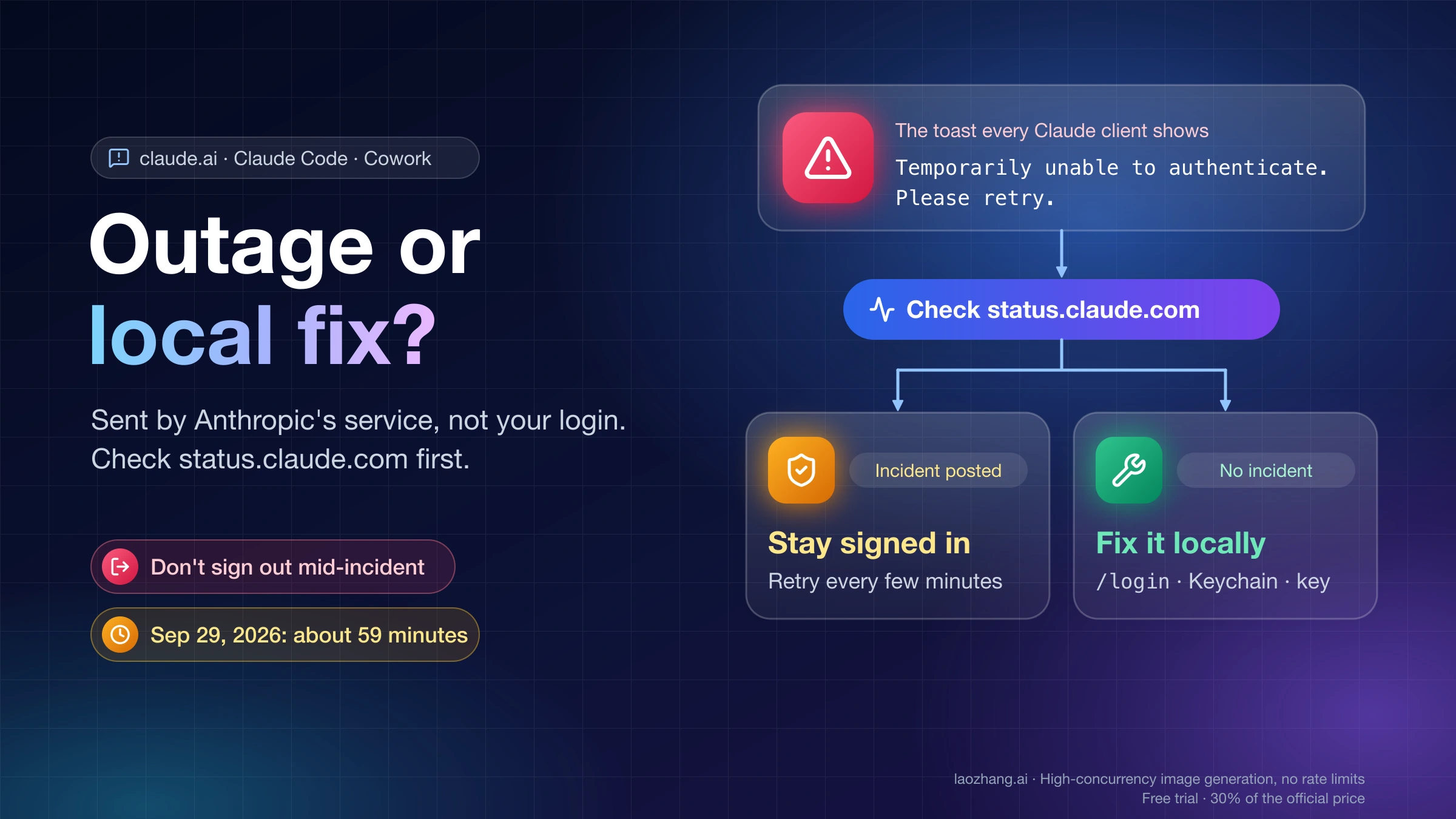
"Temporarily unable to authenticate. Please retry." is a sentence Anthropic's service returns when it cannot confirm your session, and every Claude client shows it as-is: the claude.ai web app, the desktop and mobile apps, Claude Code in a terminal or VS Code, and Cowork. It is not one of Claude Code's own credential messages, it is not the account-suspension notice, and it is not a network error. That is why nothing on your machine makes it go away while the service behind it is failing.
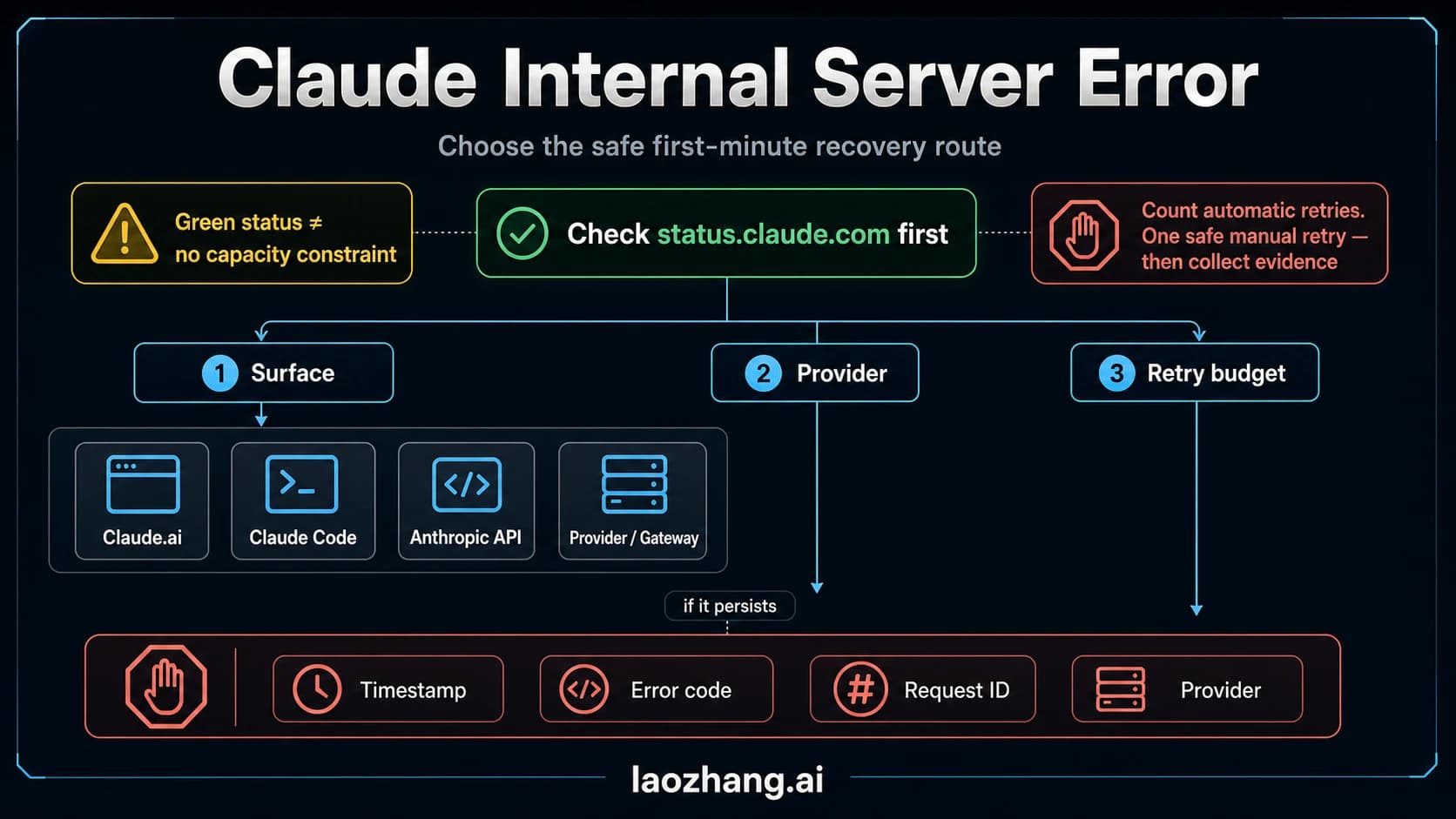
The decision comes down to one signal. Open status.claude.com and look for an active incident on claude.ai, Claude Code, or Claude Cowork.
- Incident posted: stay signed in, do not sign out or clear credentials, retry at a slow pace, and check what was saved once the page says services are back. On September 29, 2026, Anthropic's own instruction was "If you're signed in, please don't sign out," because signing in was the part that was broken.
- No incident, and Claude Code shows a different message such as
Login expired · Please run /login: that is a documented local problem with a documented fix, covered below. - No incident, the exact sentence persists for more than an hour across surfaces: report it with
/feedbackin Claude Code or Get help in claude.ai. Do not reinstall.
Telling the branches apart takes four checks, and the incident branch has its own short list of things to avoid and a recovery check at the end.
What the sentence is, and what it is not
Three facts settle most of the confusion.
It is not produced by the Claude Code client. As of September 30, 2026, the string does not occur in the Claude Code binary (version 2.1.281, the build bundled with Claude Desktop) and does not appear in the Claude Code error reference, the authentication page, the troubleshooting page, or the commands page. Claude Code's own authentication messages are different sentences, each with a named cause and a named fix (see the table below). When you see "Temporarily unable to authenticate," the client is relaying what Anthropic's service answered, on the web the same way as in the terminal.
It is not a verdict on your account. A suspended account shows a different message with a link: Your account is on hold and can't use Claude Code. View details or appeal: https://claude.ai/restricted. Signing in again does not clear that one, because the hold is on the account. "Temporarily unable to authenticate" carries no such link, and on September 29, 2026 it reached users across the US, Europe, and the Middle East within the same hour, with outage trackers counting more than 10,000 reports. Fear of a ban was the most common reaction in community threads that day; the reports that followed up described the sentence clearing on its own when the incident ended.
It is not a connectivity error. Network failures in Claude Code read Unable to connect to API. Check your internet connection, Can't reach the API server — check your internet or DNS (ENOTFOUND), or Couldn't connect through your proxy (ERR_PROXY_TUNNEL). Those mean your request never reached Anthropic. "Temporarily unable to authenticate" means it did reach Anthropic and the service could not validate the session at that moment. The guide on Claude Code Unable to Connect to API: Fix ECONNREFUSED, ECONNRESET, and Proxy Errors covers the network class in depth.
The word "authenticate" is doing something narrower than most readers assume. It refers to the service checking the session you already have, not to you typing a password. "Please retry" is a server suggestion, and it is a different thing from Claude Code's own Retrying in Ns · attempt x/y countdown, which the spinner shows while the client re-sends a request on its own.
Messages that look similar but have different owners
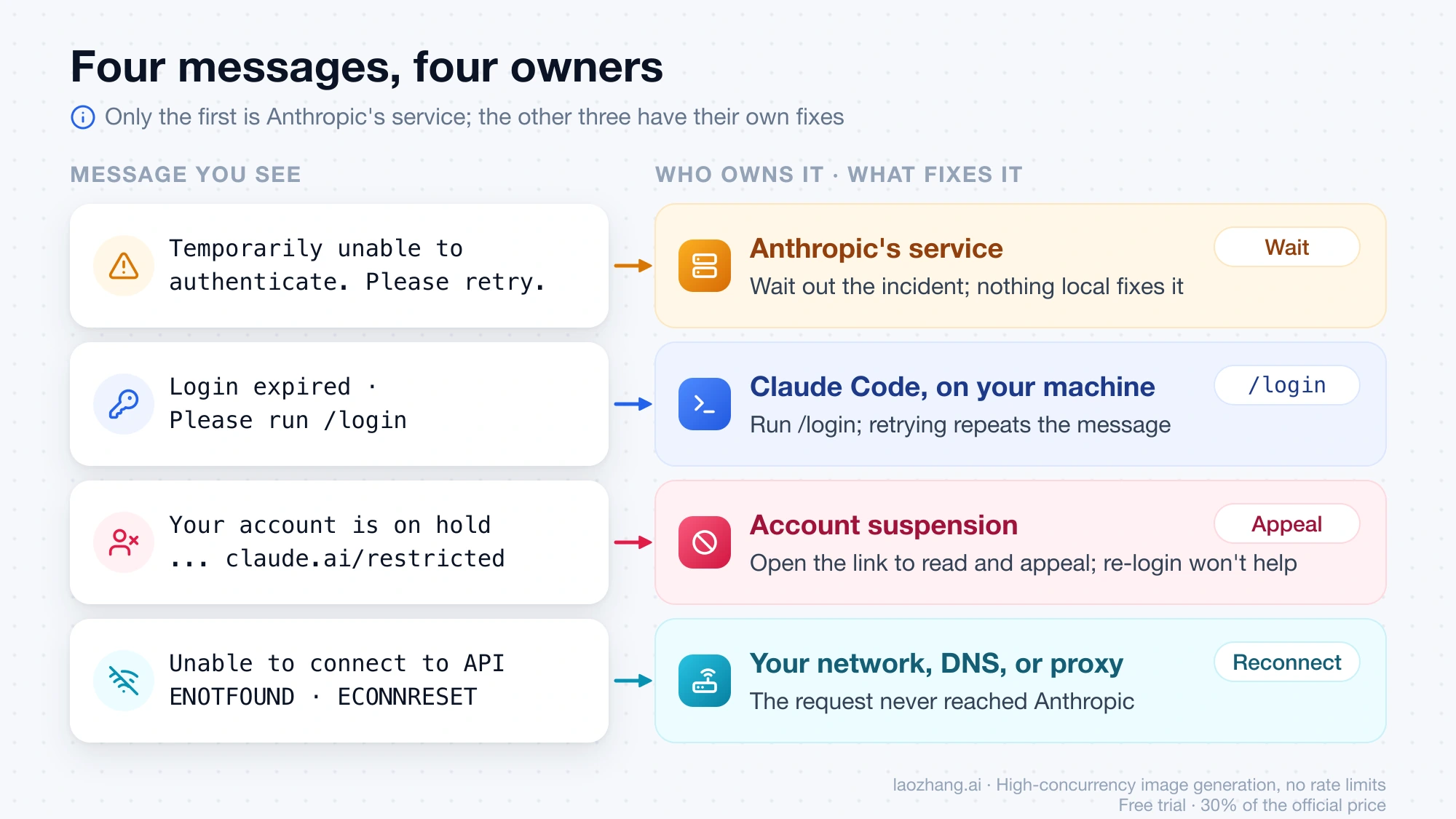
| Message you see | Where it comes from | What fixes it |
|---|---|---|
Temporarily unable to authenticate. Please retry. | Anthropic's service, shown verbatim by claude.ai, mobile apps, Claude Code, Cowork | Waiting out the incident; nothing local while it is live |
Not logged in · Please run /login (Desktop sessions: Authentication required · Sign in again to continue) | Claude Code, no credential available | /login, or sign in again from the Desktop app |
Login expired · Please run /login | Claude Code, after the OAuth service rejected the stored refresh token and the client cleared credentials | /login only; retrying repeats the message |
OAuth token revoked · Please run /login / Please run /login · API Error: 401 OAuth token has expired ... | API rejection of the token (revoked = signed out everywhere or admin removed access) | /login |
Could not refresh your login because another Claude Code process is refreshing it (or exited mid-refresh) · Try again in a minute; ... | Claude Code, shared refresh lock on one machine | Wait a minute, close other windows, or /login |
Couldn't save your login. If your Mac's keychain is locked, unlock it and log in again. | Claude Code, credential store rejected the write | Unlock the Keychain, /login again |
Your account is on hold and can't use Claude Code. View details or appeal: https://claude.ai/restricted | Account suspension | Open the link; re-login does not help |
Unable to connect to API. Check your internet connection and the ENOTFOUND / ECONNRESET / proxy variants | Your network, DNS, or proxy | Fix connectivity; curl -I https://api.anthropic.com |
Every row except the first names a local cause. If your screen shows the first row, the table's job is to stop you from applying the fixes in the other rows.
Decide which branch you are in
Work through these signals in order; each one either settles the branch or hands you to the next.
Signal 1: an incident on status.claude.com
status.claude.com lists claude.ai, Claude Console (platform.claude.com), the Claude API, Claude Code, Claude Cowork, and Claude for Government as separate components. The old address status.anthropic.com redirects there. If claude.ai, Claude Code, or Claude Cowork carries an active incident mentioning sign-in, authentication, sessions, or elevated errors, you are in the incident branch and can skip the local checks entirely.
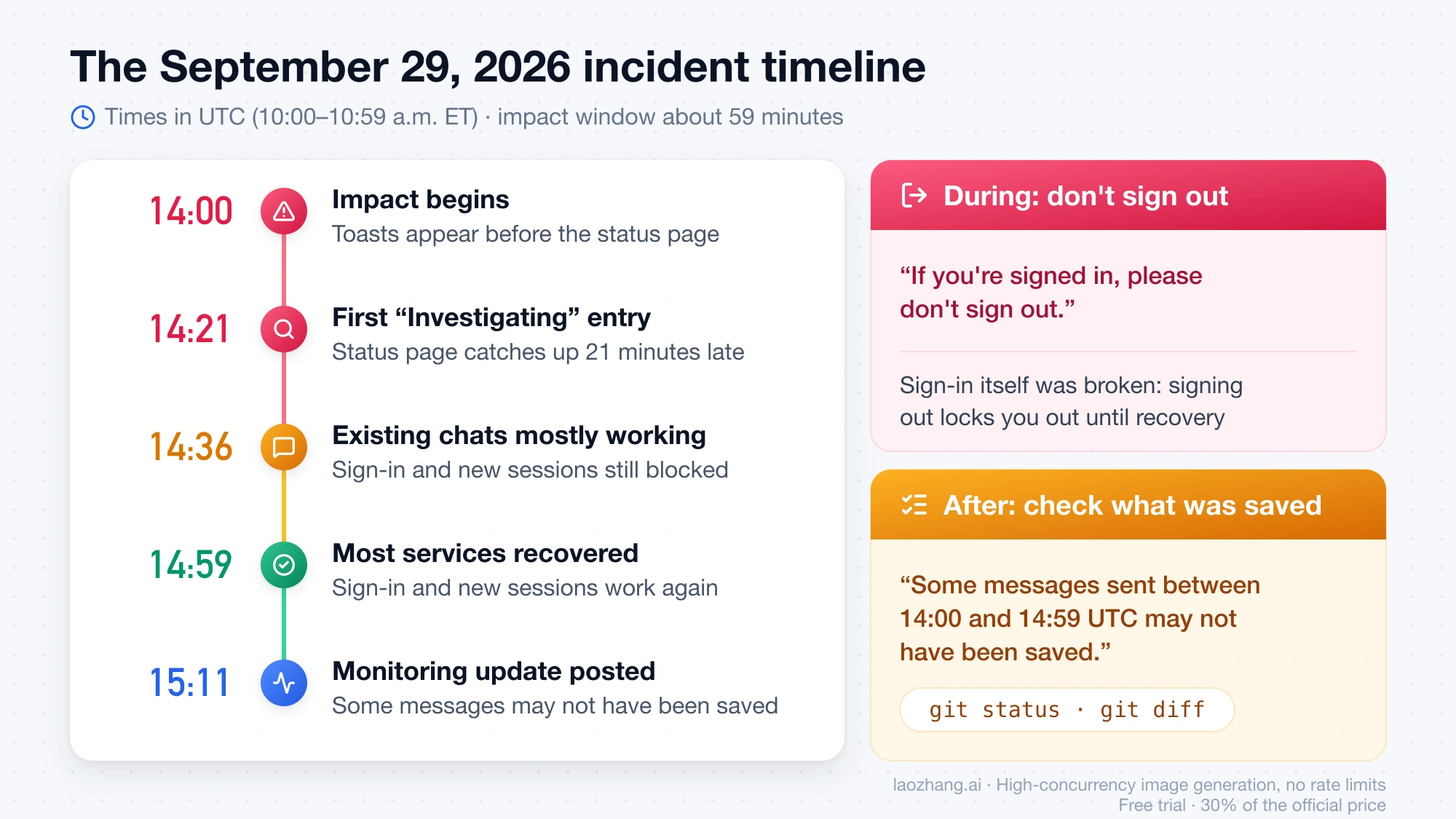
One caveat from September 29, 2026: the first user reports appeared before the status page was updated. Anthropic's first "Investigating" entry is stamped 14:21 UTC, while the impact window later reported by Anthropic began at 14:00 UTC. So a green status page in the first quarter hour of a real incident is possible. If the page is green but the sentence started for you within the last 20 minutes and you have not changed anything locally, treat it as a probable incident for now: wait ten minutes and reload the status page before touching credentials. Third-party trackers and the r/ClaudeCode subreddit fill that gap, since a thread with hundreds of replies in the first hour is a reliable enough sign that the cause is not on your machine.
If you want the signal without searching for it, the status page offers an Atom feed at https://status.claude.com/history.atom and email, SMS, Slack, Teams, and webhook subscriptions.
Signal 2: what Claude Code says in /status and the spinner
Run /status in Claude Code. It opens the Status tab and shows which credential is active: a Login method row for a claude.ai login, or an Auth token / API key row that names an environment variable. Two readings move you out of the incident branch:
- A
Loginrow readingExpired — log in again(Claude Code 2.1.210 or later). Your stored login can no longer be refreshed; that is theLogin expiredstate, and only/loginclears it. - An
API keyrow that is not marked as not in use. An approvedANTHROPIC_API_KEYoutranks your subscription login, so your authentication is going through the Console key, not through claude.ai. A key from an old or disabled organization produces failures that/logincannot fix.
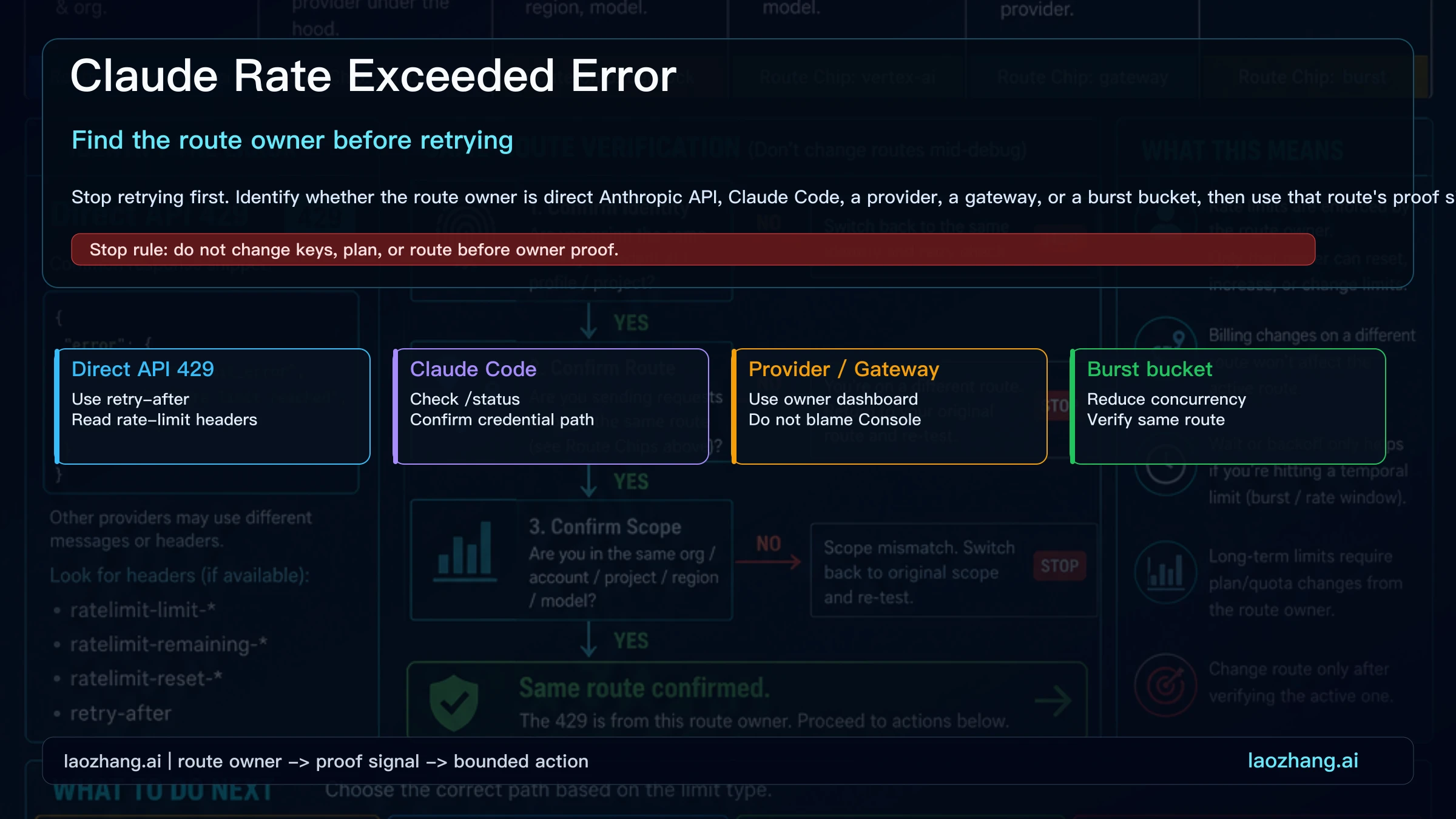
Also read the error label itself. If the spinner shows Retrying in Ns · attempt x/y with a label such as API error and then a specific reason from the third attempt on, Claude Code is handling a request-level failure on its own, up to the default of 10 retries. Which retry class the authentication sentence falls into is not documented, so do not assume Claude Code will keep retrying it for you; if the message sits there without a countdown, the retry is yours to make.
If you work in the VS Code extension, Check Your Claude Code Account in VS Code: Status, Login, and API Route shows where the same rows appear there.
Signal 3: were you signed in, or trying to sign in?
On September 29, 2026, the two halves of the incident behaved differently. Existing conversations were "mostly working again" from 14:36 UTC, while a second issue kept blocking sign-in, single sign-on, Sign in with Apple, new chats, voice, file uploads, purchases, and new Claude Code or Cowork sessions until 14:59 UTC. That explains the mixed reports from the same hour: some people saw the toast repeat and still got responses, some found Claude Code working while the app failed, and some saw the reverse. Your surface's state depends on whether it needed to establish a new session or could keep using an existing one.
The practical consequence: if you are signed in anywhere, that session is your most valuable asset during the incident. Keep it.
Signal 4: which credential path you use
Claude Code chooses a credential in a fixed order: cloud-provider credentials (Bedrock, Vertex, Foundry) first, then ANTHROPIC_AUTH_TOKEN, then ANTHROPIC_API_KEY, then an apiKeyHelper script, then CLAUDE_CODE_OAUTH_TOKEN, then Anthropic profiles, and finally the subscription login from /login. Only the last path authenticates through claude.ai. A single community remark on September 29 noted that a Bedrock-based Claude integration kept working; that is one report, but it is consistent with the precedence list, since Bedrock sessions never touch the claude.ai sign-in service. If you authenticate with an API key or through a cloud provider and still see the sentence, the failure is on a different path than the subscription incident, and the local checks under "No incident posted" apply.
During an incident: what to do and what to avoid
The rule Anthropic published mid-incident on September 29, 2026 was specific: "If you're signed in, please don't sign out." Sign-in was the broken component, so a sign-out converted a working session into a locked-out one for the remainder of the incident. The same reasoning applies to any future incident whose status text mentions sign-in or sessions.
Do not:
- Run
/logoutin Claude Code. It removes every stored credential, including MCP server logins and plugin secrets, and you cannot get them back until sign-in works again. - Use "Log out of all active sessions" in claude.ai (Settings → Account → Log Out). It forces re-authentication on every device you own, at the moment when re-authentication is what is failing. Web sessions normally last 28 days and refresh hourly with activity; there is no reason to reset them during an outage.
- Delete
~/.claude/.credentials.json, clear the macOS Keychain entry, or reinstall Claude Code or the desktop app. None of these touches the cause, and each one leaves you needing a fresh sign-in. - Refresh the page or re-send the same prompt in a tight loop. Anthropic's guidance during the incident was that retrying "may succeed," which is a reason to retry occasionally, not continuously.
Do:
- Keep the session open. In Claude Code, your original message stays in the conversation, so when the service recovers you can type
try againinstead of pasting a long prompt back in. - Retry every few minutes rather than every few seconds. If a retry returns a normal response, keep working; the toast may still repeat in the corner, and some users reported it doing so while responses arrived.
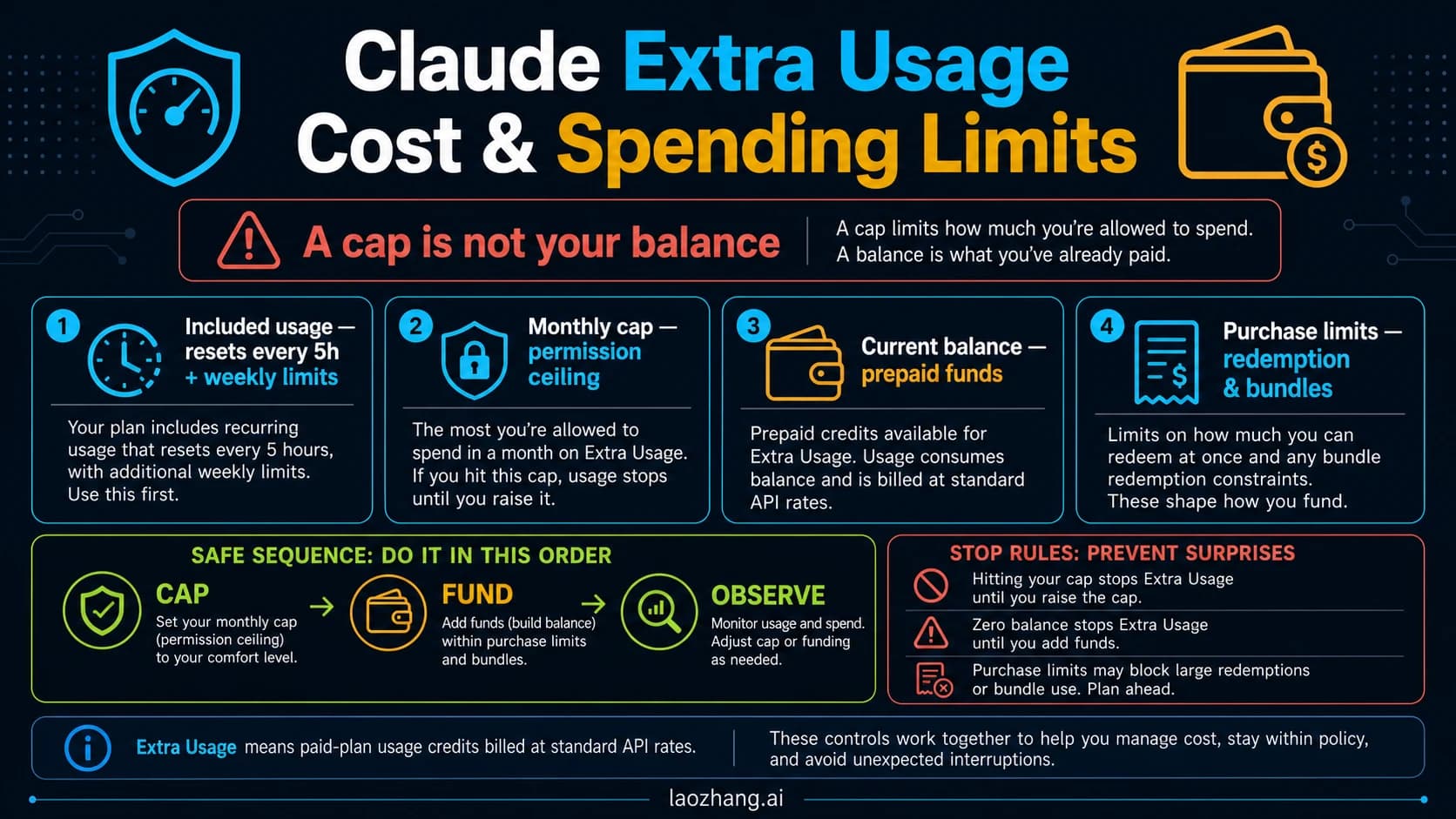
- If you are on a paid plan and a long tool-heavy task was mid-flight, pause it until the status page turns green. One user claimed that tool-calling retries during the incident consumed their usage window quickly. That claim is unverified and undocumented, and the only quota statement in Anthropic's Claude Code error reference concerns 529 overload errors, which do not count against usage. Pausing costs nothing while the service is down anyway, so it is the conservative choice.
- Note the time the sentence first appeared. You will use it for the recovery check.
How long these incidents have lasted
Three authentication incidents appear in Anthropic's status history over six weeks, with the impact windows Anthropic itself reported:
| Date | Status-page title | Impact window (UTC) | Duration |
|---|---|---|---|
| August 16, 2026 | Service disruption on Claude services ("an issue with users authenticating to claude.ai, Claude Code, and Claude Cowork") | 21:58–22:34 | about 36 minutes |
| August 24, 2026 | Errors logging into Claude.ai, then Issues logging into Claude.ai (two separate entries, both including "logging in via subscriptions for Claude Code") | 16:02–16:08 and 20:00–20:08 | 6 and 8 minutes |
| September 29, 2026 | Elevated errors on claude.ai, Claude Code, Claude Cowork and the Claude API | 14:00–14:59 (10:00–10:59 a.m. ET) | about 59 minutes |
Those windows give you a reasonable expectation: minutes to an hour, not a day. They also mean the sentence will come back at some point, so the branch checks above are worth remembering rather than treating September 29 as a one-off.
After recovery: check what was saved
Recovery is announced on the status page, not by the toast disappearing. On September 29, 2026 the Monitoring update at 15:11 UTC said that most services had recovered as of 14:59 UTC and that "signing in, starting new chats, voice conversations, Claude Code and Cowork sessions, purchases and file uploads are working again." It also said something you should act on: "Some messages sent between 14:00 and 14:59 UTC may not have been saved."
Run through this once the page reports normal operation:
- In claude.ai, open the conversations you used during the window and confirm the last messages you sent are there. If the last exchange is missing, send it again; the model has no memory of a message that was never stored.
- In Claude Code, check the working tree, not the chat. Run
git statusandgit diffto see which files the session actually changed before the failure. A turn that was cut off mid-way may have finished some tool calls and not others, and the conversation transcript is a less reliable record of that than the files themselves. - If a session refused to start during the window, start it now; the sign-in path is what came back at recovery time.
- If you did sign out despite everything, sign in again now. If Claude Code then shows a different message such as
Login expiredorCouldn't save your login, you have moved to the local branch and the next section applies.
No incident posted: the local branch for Claude Code
With the status page green for more than half an hour and the sentence still appearing, or with Claude Code showing one of its own messages, the cause is on your machine or your account configuration. The documented fixes below apply to the documented messages; none of them is a fix for the incident sentence itself, which is why they come after the incident check rather than before it.
Login expired · Please run /login. Claude Code tried to renew your saved claude.ai login, the OAuth service rejected the refresh token, and the client cleared the credentials. Run /login. If this happens often, check that your system clock is accurate, because token validation depends on correct timestamps. Within three days of expiry Claude Code warns at startup with Your login expires in 3 days · run /login to renew; renewing then avoids the expiry entirely, which matters most for background or Remote Control sessions that stop making progress when the login lapses.
Could not refresh your login because another Claude Code process is refreshing it. Another Claude Code process on the same machine holds the shared refresh lock, or exited and left it behind. Wait a minute; if it recurs, close other Claude Code windows; if it recurs with nothing else running, run /login, which does not wait on the lock.
Couldn't save your login on macOS, or repeated prompts to log in. The login Keychain rejected the write, which happens when it is locked in an SSH session or its password is out of sync with your account password; Claude Code then falls back to the plaintext ~/.claude/.credentials.json. Run claude doctor from the shell: a warning starting with macOS Keychain is not writable confirms it. Unlock with security unlock-keychain ~/Library/Keychains/login.keychain-db, run claude doctor again, and if the warning is gone run /logout then /login to move the credentials back into the Keychain. Expect to re-authorize MCP servers afterwards.
An API key row in /status you did not expect. A leftover ANTHROPIC_API_KEY in ~/.zshrc, ~/.bashrc, ~/.profile, or the Windows $PROFILE overrides your subscription once approved, and always in -p mode. Run unset ANTHROPIC_API_KEY (PowerShell: Remove-Item Env:ANTHROPIC_API_KEY), start claude again, and remove the export line so it stays gone. /status should then show only your login.
Nothing specific, but sign-in keeps failing. The documented reset is /logout, close Claude Code, start claude, and complete sign-in again; press c if the browser does not open, to copy the OAuth URL. This reset is the right move here and the wrong move during an incident, which is the whole reason for checking the status page first.
For failures that arrive as an HTTP status rather than a sentence, the branches are already worked out elsewhere: Claude Code API Error 500? Fix the Internal Server Error Without Blind Retries separates a live incident from a login failure and a broken session for 500s, and Claude Code 403, 503, and 529 Errors: Find the Source, Then Fix identifies which layer refused the request.
The local branch in claude.ai
The web and mobile apps have far fewer knobs. If the sentence persists for you alone with no incident posted, sign out on one device only, sign back in with the same method (Google login or the emailed login link), and check whether the sentence follows you to a private browser window. If it does, the problem is most likely on the account side, and the Get help entry in claude.ai (click your initials in the lower left) is the route Anthropic documents for account problems. Do not use "Log out of all active sessions" as a first step; it is the last one.
Account holds and region blocks are different messages
Two other situations get mixed up with this sentence because they also stop Claude from working.
An account hold shows the on-hold text with a claude.ai/restricted link, in Claude Code and on the web alike. If you see that, the hold page is where to read the details and appeal; retrying and re-logging in change nothing.
A region block appears when you connect from a country or region that Anthropic's supported-countries list does not include, and its wording is about unsupported location, not about authentication. Some users on September 29 saw a region message and the authentication sentence within minutes of each other, because a change in network route produced the first and the incident produced the second. They are unrelated: one is a policy answer about where you are, the other is a temporary service failure. Anthropic's supported-countries page is the authoritative list for the first, and the only honest answer to a region block is that list.
When to escalate
Escalate only when both of these hold: the status page shows no incident on claude.ai, Claude Code, or Cowork, and the exact sentence has persisted for more than an hour on more than one surface (for example, both the web app and Claude Code) after the local checks above came back clean.
- In Claude Code, run
/feedback. It sends a report with your session context, after a consent screen, so Anthropic can look at the failing requests. Claude Code's error reference gives the same instruction for server errors that persist with no posted incident. - In claude.ai, sign in, click your initials in the lower left, and choose Get help. That is the documented route for account, billing, and subscription problems.
Skip both while an incident is live. The status page is already telling you what Anthropic knows, and the fix will not arrive faster because of one more report.
Frequently asked questions
Does "Temporarily unable to authenticate" mean my account was banned?
No. A suspended account produces a different message that includes a claude.ai/restricted link and does not clear on re-login. The authentication sentence appeared for users across the US, Europe, and the Middle East within the same hour on September 29, 2026, and Anthropic's status page reported sign-in and sessions working again from 14:59 UTC.
Should I log out and log back in? Not while status.claude.com shows an incident touching claude.ai, Claude Code, or Cowork. Anthropic's instruction during the September 29 incident was "If you're signed in, please don't sign out," because sign-in was the broken part. Once the page is green and the sentence persists only for you, a single sign-out and sign-in on one device is a reasonable test.
Why does Claude Code still work while the app shows the error, or the other way around? Because the two halves of an authentication incident affect different things. On September 29, existing conversations were mostly working from 14:36 UTC while new sign-ins and new Claude Code or Cowork sessions kept failing until 14:59 UTC. A surface that could reuse an existing session kept going; one that needed a new session did not.
Did the retries during the incident use up my usage window? Anthropic has not documented it either way for authentication errors. The only quota statement in the Claude Code error reference is for 529 overload errors, which do not count against usage. One community claim that tool-calling retries burned a usage window is unverified. Pausing long tasks until recovery is the safe choice.
How do I re-authenticate Claude Code once the incident is over?
If Claude Code still shows the incident sentence after recovery, retry once; a working session needs nothing else. If it shows Login expired · Please run /login or Not logged in · Please run /login, run /login. If it shows Couldn't save your login, unlock the macOS Keychain first, then /login.
Where do I see whether Claude is down right now? status.claude.com, which lists claude.ai, the Claude API, Claude Code, Cowork, and the Console as separate components and offers email, SMS, Slack, Teams, webhook, and Atom subscriptions. Community threads confirm scope faster during the first minutes, but the status page is the source that also tells you when it is over and whether messages may have been lost.