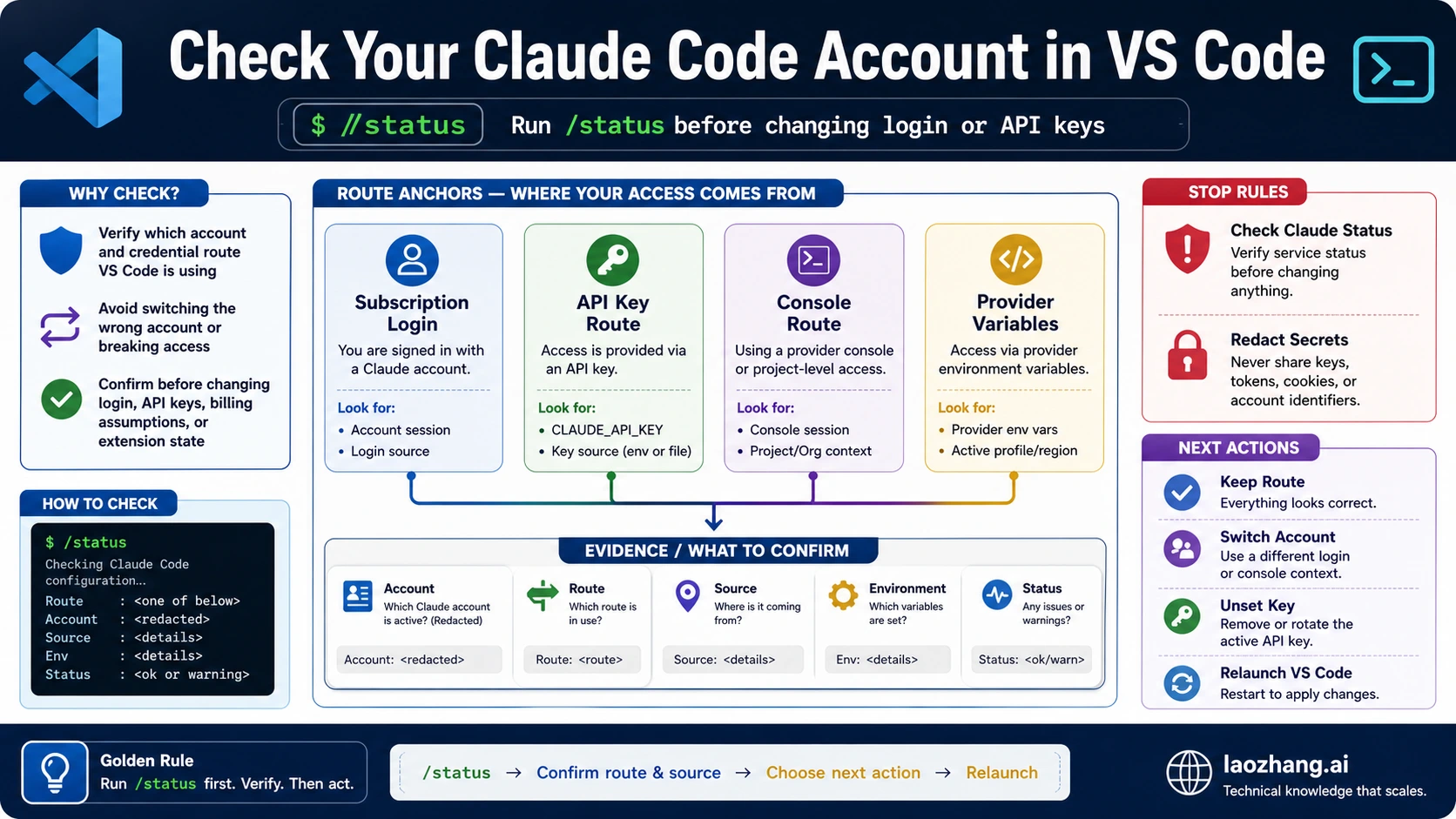
To check your Claude Code account in VS Code, open Claude Code in the same VS Code window, run claude from the integrated terminal if needed, then run /status before you change login, API keys, providers, or billing assumptions. A visible VS Code extension, a signed-in Claude plan, or an API key in your shell is not enough; the route that matters is the one the current VS Code session is actually using.
Use this route board before you touch credentials.
What /status or the same VS Code session shows | What it means | First safe check | Next action |
|---|---|---|---|
| Expected account and normal connectivity | VS Code is using the intended Claude Code session | Confirm the account label, model/version, and connectivity in /status | Continue; use /usage, /cost, or /stats only for usage context |
| Not logged in, wrong account, or stale session | The local Claude Code session is not the account you expected | Run /logout, then /login, then rerun /status in the same VS Code window | Do not debug billing until the route is proven |
| API key, auth token, provider, or custom base URL is present | VS Code may be using a credential route instead of subscription login | Check inherited ANTHROPIC_API_KEY, ANTHROPIC_AUTH_TOKEN, helper, or provider variables | Remove or scope the route intentionally, reload VS Code, rerun /status |
| Local route looks correct but requests fail broadly | This may be a service incident or organization/account restriction | Check Claude Status with the current date, then collect a redacted evidence packet | Stop local credential churn until status or admin evidence clears |
Keep secrets out of screenshots and support notes. Share the /status result, VS Code launch path, relevant environment-variable names, Claude Code version, error text, and request or timestamp evidence, but never paste real API keys, auth tokens, or full provider secrets.
Run The Check In The Same VS Code Surface
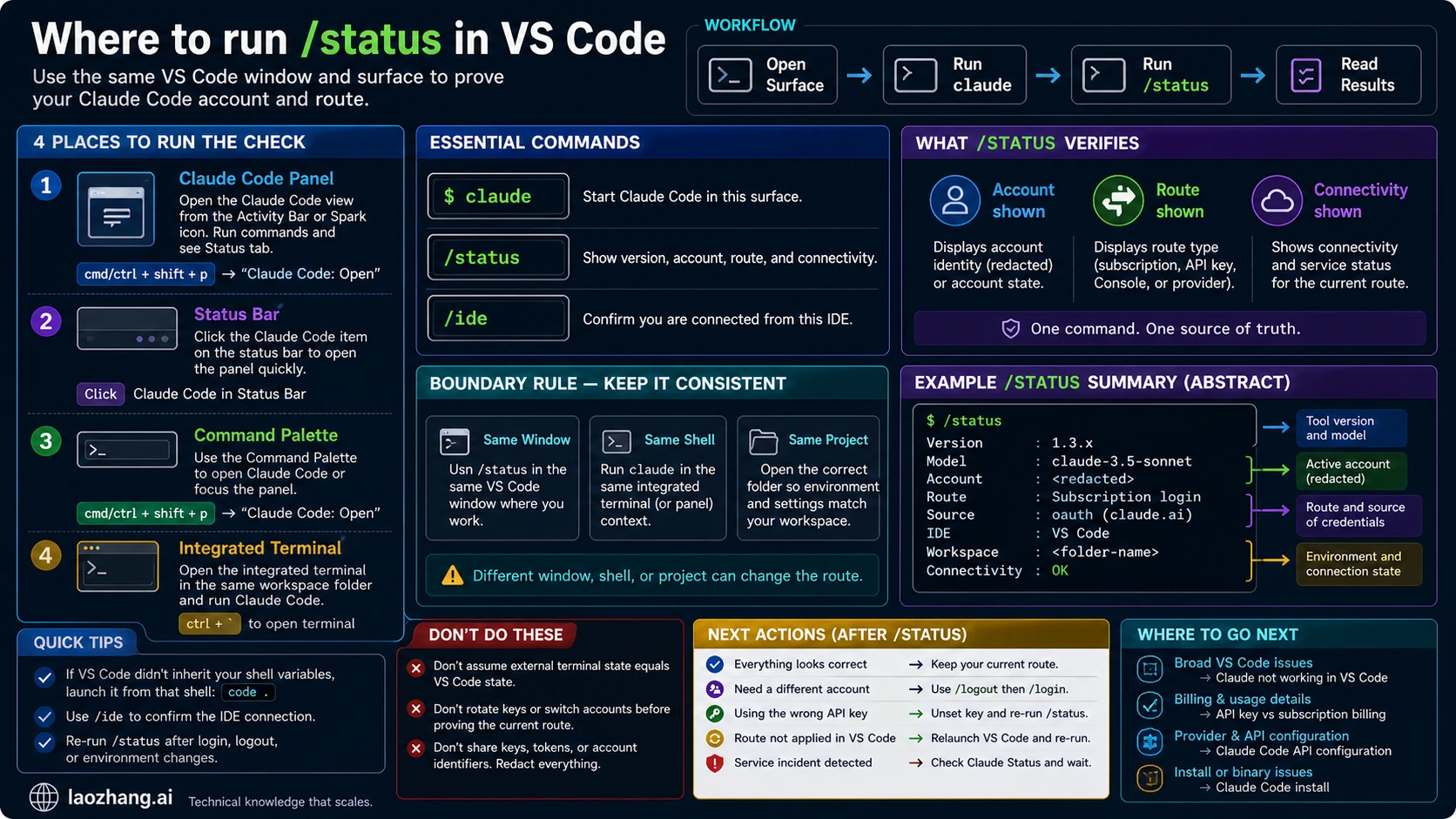
The account check only answers the real question when it happens in the same VS Code surface that will run your work. Anthropic's VS Code integration docs describe several entry points: the Spark icon, Activity Bar, Command Palette, Status Bar, and the VS Code integrated terminal. Use whichever surface opens in your editor, but do not mix evidence from one terminal with a different VS Code window.
Start with the integrated terminal when you are unsure whether the extension and CLI agree:
bashclaude
Then run this inside Claude Code:
text/status
The Status tab is the first account-route proof because the Claude Code command reference says it shows version, model, account, and connectivity. That one surface gives you a better signal than guessing from a browser tab, plan page, shell profile, or API Console.
If the extension says you are not logged in, stay in the VS Code branch. Anthropic's VS Code docs say first use prompts browser authorization, and if the sign-in flow does not reopen, reloading the VS Code window is a valid low-cost repair. After reload, return to the same window and run /status again.
If the terminal cannot start Claude Code at all, you are not ready for account diagnosis. Run:
bashclaude --version
If that fails, use the Claude Code install guide or the broader Claude Code not working in VS Code guide. Account-route diagnosis starts after the command path exists.
Interpret The Account And Credential Route
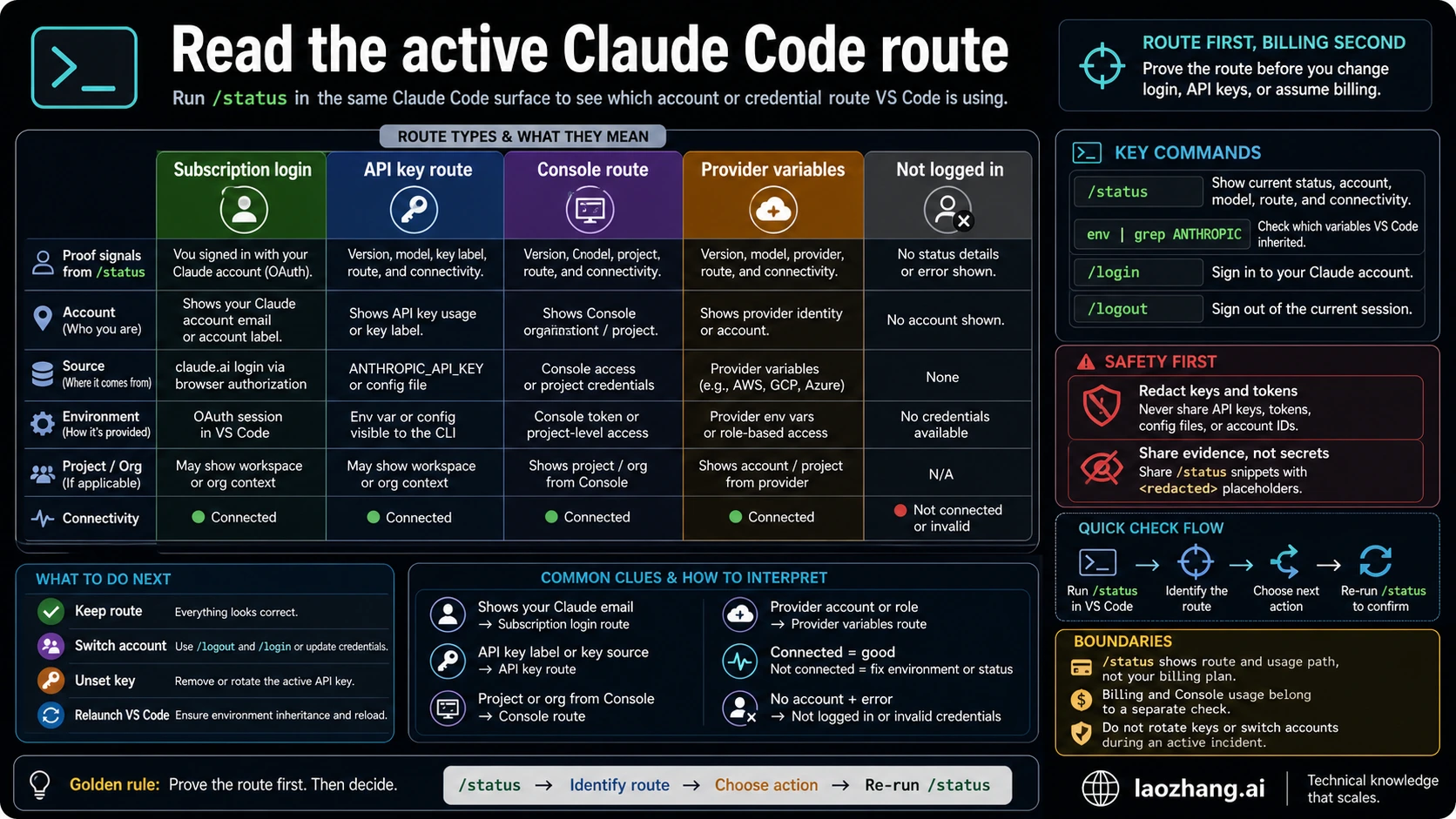
Claude Code can authenticate through more than one route. The official authentication docs include Claude.ai account login, Team or Enterprise routes, Console access, cloud providers, API keys, auth tokens, and helper-based credentials. The route matters because it decides which account, organization, provider, and usage ledger owns the session.
Use this interpretation table after /status:
| Route signal | Likely owner | What to verify | Do not assume |
|---|---|---|---|
| Claude.ai account login | Personal or plan-backed Claude account | The account label is the account you intended to use in this VS Code window | That API billing, Console credits, or CI routes are also covered |
| Team or Enterprise account | Organization-managed Claude account | The org or workspace is the one allowed for this repository | That a personal login has the same permissions |
| Console or API key route | Anthropic API project or key owner | API key presence, Console access, usage ledger, and project boundary | That Pro or Max subscription usage owns the session |
ANTHROPIC_AUTH_TOKEN and base URL | Compatible gateway or provider-style route | Base URL, token owner, model names, and trust boundary | That first-party Anthropic docs own every provider behavior |
| Bedrock, Vertex, or Foundry | Cloud provider account and region | Provider credentials, region, model availability, and provider billing | That /login and /logout are the normal control knobs |
| Not logged in or invalid key | Broken local auth or stale credential | Same-shell variables, stale key, disabled org, or missing sign-in | That reinstalling VS Code is the first fix |
This is why the account question should not immediately become a billing question. First prove the route. If the route is subscription login and you still have usage-limit friction, the Claude Code API key vs subscription billing reference explains which meter to read. If the route is an API key, gateway, or provider setup, use the Claude Code API configuration guide to audit variables and settings.
The key official behavior to remember is credential precedence. Anthropic's authentication docs say API-key-style environment credentials can override the route you expected after approval. That means a stale shell variable can make a freshly logged-in subscription user appear to be on the wrong account or billing path.
Check Environment Inheritance Without Leaking Secrets
VS Code can inherit a different environment than your external shell. That is the common reason a developer says, "The key is set in my terminal, but Claude Code in VS Code still asks me to sign in," or the opposite: "I logged in with my plan, but VS Code seems to use an API route."
Use checks that prove presence without printing secret values:
bashtest -n "$ANTHROPIC_API_KEY" && echo "ANTHROPIC_API_KEY is set"
test -n "$ANTHROPIC_AUTH_TOKEN" && echo "ANTHROPIC_AUTH_TOKEN is set"
test -n "$ANTHROPIC_BASE_URL" && echo "ANTHROPIC_BASE_URL is set"
If you need a compact audit of Anthropic route variables, mask the values:
bashenv | grep -E '^ANTHROPIC_(API_KEY|AUTH_TOKEN|BASE_URL)=' | sed 's/=.*/=set/'
Run the same checks in the VS Code integrated terminal, not only in iTerm, Terminal, Windows Terminal, Git Bash, WSL, or a CI shell. Anthropic's VS Code docs call out this exact inheritance boundary: if VS Code did not inherit the shell where the key is set, launch VS Code from that intended shell.
bashcode .
Then open the integrated terminal in that new VS Code window and rerun:
bashclaude
/status
If the route changes after launching with code ., the account mismatch was environment inheritance. Make the launch path intentional instead of rotating keys or changing plans.
Fix A Wrong Account, Stale Login, Or API-Key Override
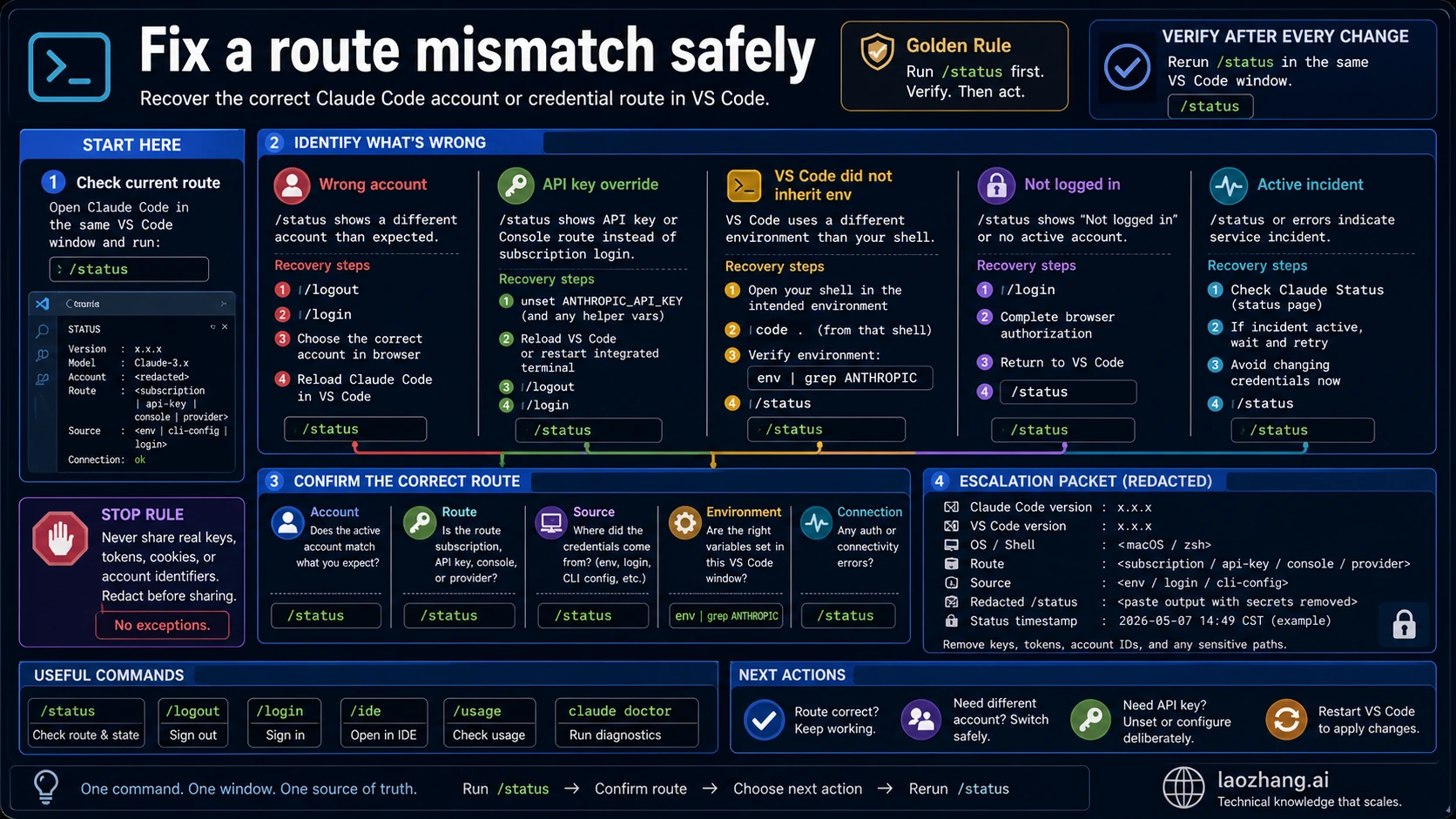
Do one repair at a time. If you change login, remove variables, reload VS Code, and switch providers in one pass, the final /status result will not tell you which change mattered.
For a wrong or stale account:
text/logout
/login
/status
Use the browser authorization flow for the account you want, then return to the same VS Code window and confirm the result. If the sign-in flow does not reopen, reload the VS Code window and try again before reinstalling the extension.
For an accidental API-key override in the current shell:
bashunset ANTHROPIC_API_KEY
claude
Then run:
text/status
If the API route returns in a new terminal, the key is probably coming from a shell startup file, project .env, devcontainer, launch script, CI secret, or profile. Remove it from the owner that launches VS Code, not only from the terminal you happen to be looking at.
For a gateway or provider route, do not treat /logout as the whole fix. Audit the provider variables, credentials, region, base URL, and model names. A Bedrock, Vertex, Foundry, or compatible gateway session may be working correctly while still being the wrong route for this task.
For a disabled organization or invalid key message, keep the route proof close to the error. Anthropic's troubleshooting docs describe these as authentication or key-route problems. If a stale API key is overriding subscription login, remove that key from the active environment and rerun /status before filing a ticket.
Decide Which Usage Command Answers Your Question
After the active account route is proven, usage commands become useful. Before that, they are easy to misread.
Use /status for identity and route. Use /usage, /stats, or /cost for usage context after you know which route is active. For API-route spend, Console Usage remains the safer billing owner. For subscription usage patterns, Claude Code's local stats can help you understand behavior, but they are not a replacement for plan-limit documentation.
The practical split is:
| Question | First surface | Why |
|---|---|---|
| Which account is VS Code using right now? | /status | It shows account, model/version, and connectivity in the active session |
| Is a shell key changing the route? | Masked environment checks | It proves key presence without exposing the key |
| Why did API billing appear? | /status, environment checks, Console Usage | Billing follows the active route, not memory of a plan |
| Am I near a plan or usage limit? | /status, /usage, /stats, plan docs | Limit diagnosis depends on the authenticated route |
| What should I send to support? | Redacted status, version, route, error, timestamp | It gives support evidence without leaking secrets |
Do not paste /cost into a billing dispute without route context. A token-cost estimate and an account owner are different facts. The useful sequence is route first, meter second, invoice or plan interpretation third.
Stop Local Changes During Incidents Or Admin Blocks
Claude Status is important, but it is not a substitute for same-surface route proof. Check it after /status when requests fail broadly, login loops affect more than one machine, or the error looks like an account or service-side incident. Record the date and time of the check because status can change quickly.
Use this stop rule:
- If Claude Status shows a relevant active incident, stop local credential churn.
- If your organization or Console admin has disabled access, stop editing local settings until the admin path is clear.
- If status is clear and the same route still fails, return to local evidence: VS Code launch path, environment variables,
/status, logs, and exact error text.
This rule prevents destructive fixes. Reinstalling VS Code during an authentication incident does not repair the service. Rotating an API key during an organization block does not grant access. Logging into another account during an environment override can add more confusion without removing the stale variable.
Escalate With A Redacted Evidence Packet
A good support packet is short because the route work already did the sorting. Build it from facts, not screenshots full of secrets.
Include:
- Claude Code version and VS Code version
- the VS Code launch path, such as Dock, terminal
code ., WSL, Git Bash, PowerShell, devcontainer, or remote workspace /statusaccount and connectivity result, with sensitive account or org details minimized when needed- whether
ANTHROPIC_API_KEY,ANTHROPIC_AUTH_TOKEN, orANTHROPIC_BASE_URLis set, without values - login path tried:
/login,/logout, browser authorization, reload window - provider route if relevant: Console, Bedrock, Vertex, Foundry, gateway, or custom base URL
- exact error text, request ID or timestamp if available, and Claude Status timestamp
- whether the same route works in an external terminal, another VS Code window, or a clean shell
Do not include:
- real API keys
- bearer tokens
- provider credentials
- complete
.envfiles - screenshots that expose full secrets, private repository paths, customer data, or organization internals
An actionable escalation line looks like this: "/status in VS Code shows the wrong API route after launching from Dock; ANTHROPIC_API_KEY is set in the integrated terminal; after unset, reload, and /login, /status shows the expected account." That tells a teammate or support engineer which contract changed.
Sources And Verification Path
These behavior claims are based on the official Claude Code documentation checked on May 7, 2026:
- Claude Code IDE integrations for VS Code entry points, version requirement, sign-in flow, extension behavior, and environment inheritance via
code .. - Claude Code authentication for account routes, storage, terminal-only credential variables, and credential precedence.
- Claude Code quickstart for starting
claudeand authenticating with supported routes. - Claude Code commands for
/status,/login,/logout,/ide,/usage,/cost, and/stats. - Claude Code errors and troubleshooting for invalid key, disabled org, not logged in,
/doctor, and same-shell diagnosis. - Claude Code for VS Code Marketplace listing for product naming, publisher, install route, and VS Code version requirement.
Community discussions and GitHub issues are useful for seeing why developers mix account, extension, subscription, and API-key questions. They are not policy sources. Use official docs for behavior, then use your own /status and masked environment checks for the local account answer.
FAQ
How do I check which Claude Code account VS Code is using?
Open Claude Code in the same VS Code window and run /status. If needed, start Claude Code from the integrated terminal with claude first. Read the account, model/version, and connectivity from that same session before changing login or API keys.
What if Claude Code in VS Code says I am not logged in?
Run /login, complete browser authorization, and rerun /status. If the sign-in flow does not reopen, reload the VS Code window and try again. If the extension or command is missing entirely, switch to the broader VS Code troubleshooting path.
Can an API key override my subscription login?
Yes. Anthropic's authentication docs describe credential precedence where environment credentials can take priority over an expected login route. Check whether ANTHROPIC_API_KEY or related variables are set in the VS Code integrated terminal, then remove or scope them intentionally and rerun /status.
Why does my external terminal show a key but VS Code does not?
VS Code may have been launched from a different environment. Launch it from the intended shell with code ., open the integrated terminal, and rerun the masked environment check plus /status.
Is /cost the right command to check my Claude account?
No. Use /status first for account and route. Use /cost, /usage, or /stats only after the active route is known, because usage and billing interpretation depends on whether the session is subscription, API key, Console, provider, or gateway.
Should I delete my API key if Claude Code uses the wrong account?
Usually no. First unset or remove the key from the environment that launches VS Code, then rerun /status. Delete or rotate the key only if it is compromised, no longer needed, or controlled by the wrong owner.
Can Claude Status prove my local VS Code account is correct?
No. Claude Status can explain a service-side incident branch, but it does not prove local VS Code auth, environment inheritance, provider variables, or subscription/API ownership. Use it after same-surface route proof, not instead of it.
What should I send to support?
Send Claude Code version, VS Code version, launch path, redacted /status result, masked credential-variable presence, exact error text, timestamp or request ID, and Claude Status timestamp. Do not send real API keys, bearer tokens, full .env files, or screenshots with visible secrets.