Claude Computer Use in 2026: API Tool vs Cowork vs Claude Code
Claude Computer Use now points at two different contracts: Anthropic's API tool for builders who run actions inside their own sandbox, and desktop workflows in Cowork or Claude Code for people who want Claude to act on their own machine. This guide shows which route fits your job, what setup each one needs, and where the safety and retention boundaries differ.
On this page
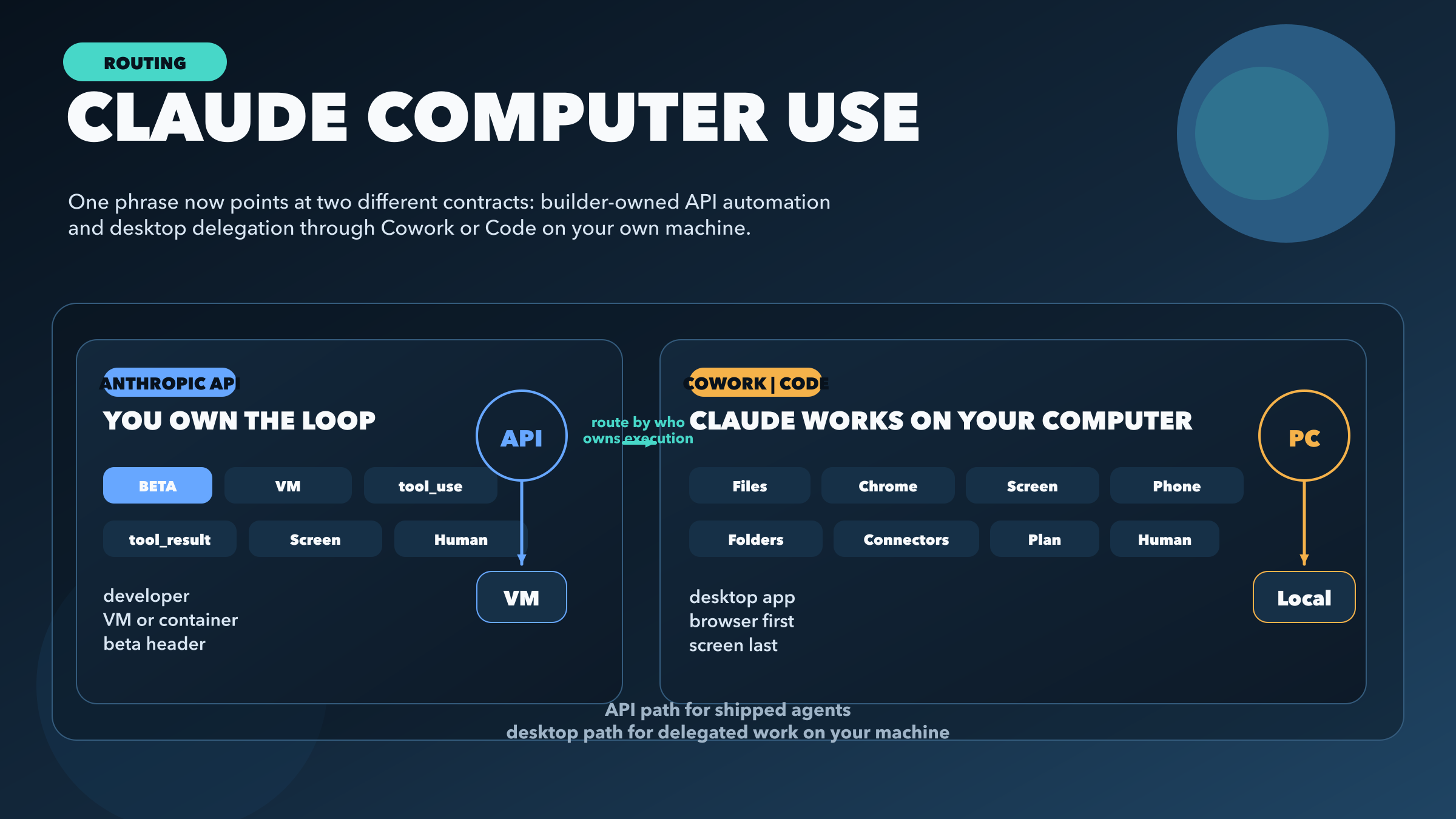
Claude Computer Use now refers to two different execution contracts. On the API side, Anthropic gives builders a beta tool for screenshots, mouse actions, keyboard input, and desktop automation inside a sandbox they control. On the product side, Cowork and Claude Code let Claude work on your own machine, where Anthropic's desktop product manages the session and you decide what access, approvals, and escalation it gets.
The right choice is simple. Use the API route if you are shipping automation into a product, and use Cowork or Claude Code if you want Claude to do work on your own machine. The real decision is not whether Claude can click. It is who owns the execution environment, who owns the tool loop, and which permission and retention contract you are willing to accept.
Evidence note: this guide reflects Anthropic's current computer use API docs, Cowork help page, Cowork product page, and privacy guidance for computer use, checked on March 28, 2026.
TL;DR
- Anthropic API computer use is for builders. You enable the beta tool, run Claude inside your own VM or container, execute the actions yourself, and send the results back through the tool loop.
- Cowork and Claude Code are for delegation on your own machine. Anthropic's desktop product handles the workflow, while you control folders, connectors, approvals, and whether Claude escalates from files or browser tasks to direct screen interaction.
- If you want the fastest first attempt, start from Anthropic's reference implementation on the API side, or start in Claude Desktop -> Cowork on the desktop side.
- These paths do not share one clean universal contract for setup, permissions, or retention. Treat each surface separately.
- The safest default is: connectors or local files first, browser tasks second, screen-level control last.
- If your task involves sensitive accounts, financial transactions, consent flows, or anything that demands perfect precision, keep a human in the loop no matter which route you choose.
What Claude Computer Use actually means now
The phrase made more sense when it referred mostly to a single developer feature. Anthropic's original computer-use story was: give Claude screenshots plus mouse and keyboard tools, run those tools in a controlled environment, and let the model work through desktop tasks agentically. That is still real, and if you are building an agent product, it is still the important path.
What changed is that Anthropic's product language now uses the same family of ideas across Cowork and Code. The current Cowork page says Claude can move between phone and desktop, use connectors, browse in Chrome, and use your computer when there is no direct integration. The help-center page adds an even more practical framing: Cowork runs in the Claude Desktop app, works on the user's computer, keeps the app open during execution, and lets you step in while the task is underway. Together, those pages make it clear that the same phrase now points at two different operating models.
That overlap creates a real decision problem. A builder can easily overestimate how much Anthropic manages for them on the API side, while a desktop user can underestimate how much setup, scoping, and approval still matter on their own machine. The reliable way to think about the topic is by execution ownership. If your code owns the environment and Claude asks your code to act, that is the API path. If Anthropic's desktop product is orchestrating work on your own machine, that is the Cowork or Claude Code path.
There is one more distinction worth making early: browser use and full computer use are not the same thing. Anthropic's own Cowork page suggests a preference order. Claude should use a connector when one exists, use Chrome when the task can be handled in the browser, and only use the screen itself when there is no direct integration. That hierarchy is more useful than the generic "Claude can use your computer" slogan, because it tells you which level of control you actually want for a given job.
Route 1: Anthropic API computer use
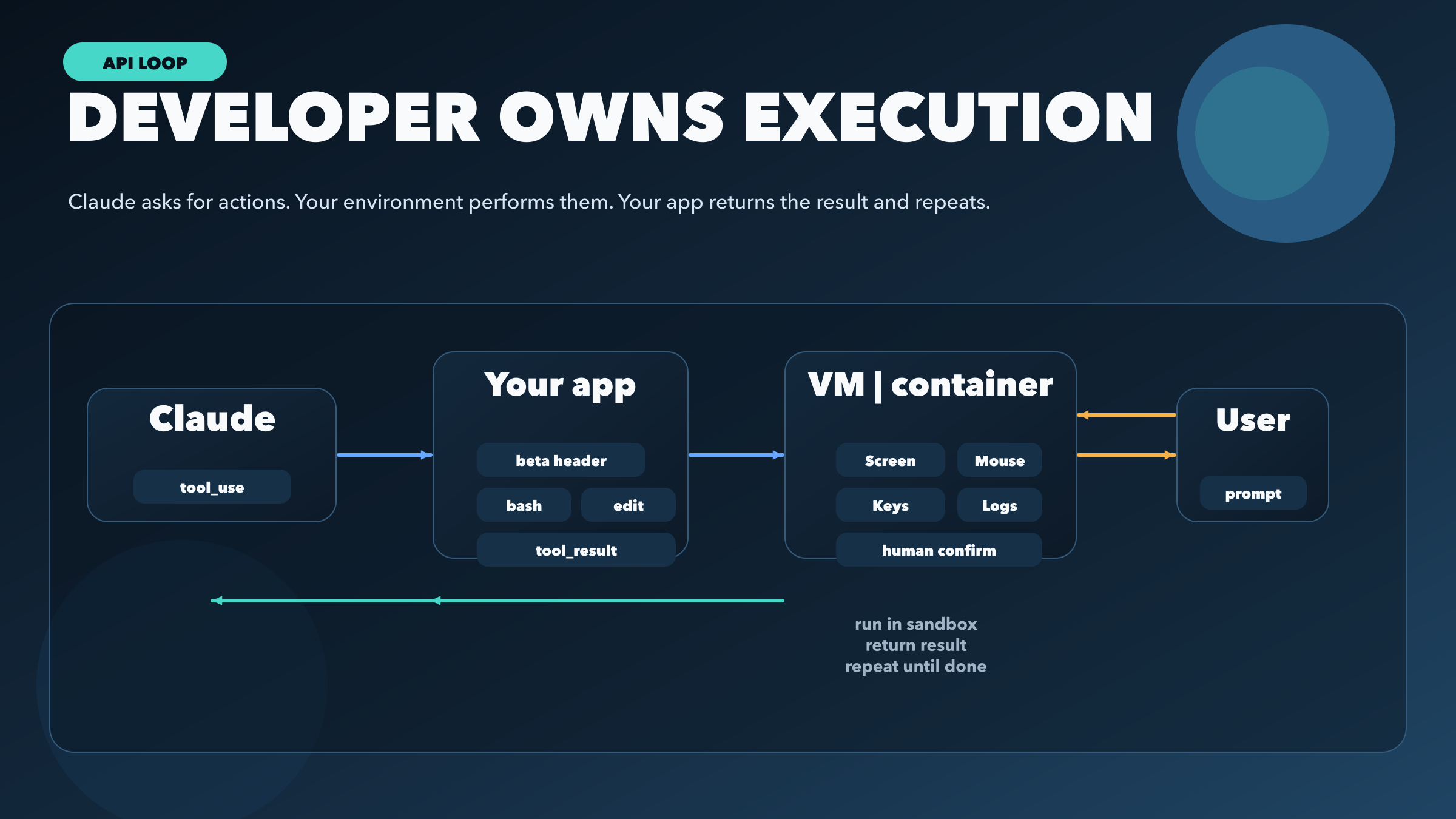
If you are building an automation product, internal tool, or agentic workflow that needs to operate software like a human, the API path is the one to care about. Anthropic's current docs describe the computer use tool as a beta feature that gives Claude screenshot capture, mouse control, keyboard input, and general desktop automation. The API examples are explicit about the contract: Claude responds with a tool call, your application executes the action inside a VM or container, your application returns a tool_result, and the loop continues until the task is done.
That "you own the loop" part matters more than anything else. It means Anthropic is not remotely driving a machine for you. You are the system integrator. You choose the display environment, capture the screenshot, transform coordinates if your environment is higher resolution than the model's analysis image, execute the click or keypress, and decide what safety rails exist around the model. If your implementation is sloppy, the problem is not that computer use is conceptually wrong. The problem is that you failed to wrap it in the right environment.
Anthropic's current beta headers also make it clear that this remains a tool contract, not a general always-on capability. The docs currently list:
computer-use-2025-11-24for Claude Opus 4.6, Claude Sonnet 4.6, and Claude Opus 4.5computer-use-2025-01-24for Sonnet 4.5, Haiku 4.5, Opus 4.1, Sonnet 4, Opus 4, and the deprecated Sonnet 3.7
The quickest possible skeleton looks like this:
curl https://api.anthropic.com/v1/messages \
  -H "content-type: application/json" \
  -H "x-api-key: $ANTHROPIC_API_KEY" \
  -H "anthropic-version: 2023-06-01" \
  -H "anthropic-beta: computer-use-2025-11-24" \
  -d '{
    "model": "claude-opus-4-6",
    "max_tokens": 1024,
    "tools": [
      {
        "type": "computer_20251124",
        "name": "computer",
        "display_width_px": 1024,
        "display_height_px": 768,
        "display_number": 1
      }
    ],
    "messages": [
      {
        "role": "user",
        "content": "Open the browser and summarize the dashboard."
      }
    ]
  }'
That request is enough to show the real shape of the feature. You are not "turning on" generic computer autonomy. You are telling Claude which model to use, which beta tool contract to follow, and what display surface exists. From there, your infrastructure carries the hard part.
This route is strongest when the task genuinely needs a visible interface that has no clean API underneath it. Legacy enterprise software, browser-based internal tools, RPA-style workflows, QA automation, and end-to-end acceptance tests are all reasonable candidates. It is much weaker when you are using UI automation as a substitute for a perfectly good direct integration. If the system already has an API, database hook, webhook, or CLI, screen-level automation is usually the worse engineering choice.
The cost model also reinforces that point. Anthropic's current docs say the computer-use beta adds 466-499 system-prompt tokens and 735 tool-definition input tokens on Claude 4.x models, before you even count screenshot images or tool results. In other words, you are paying extra overhead to keep the model grounded in a visual environment. That can be completely worth it when the interface is the real system of record. It is a waste when you are automating the UI of something that already exposes a proper machine interface.
The most important implementation advice in the docs is safety advice. Anthropic recommends a dedicated VM or container with minimal privileges, limited internet access, and human confirmation for meaningful actions. It also warns about prompt injection from web pages and images. This is not boilerplate legalese. It is the core engineering truth of computer use. The moment a model is allowed to interpret on-screen instructions and act on them, you must assume the environment can try to steer the agent. Treat the tool like an automation runtime with adversarial inputs, not like a magical browser macro.
One subtle but practical detail from the docs is coordinate scaling. Anthropic notes that the API constrains the analysis image to a maximum size, which means the screenshot Claude sees may be smaller than the real screen you are controlling. If you do not resize and remap coordinates correctly, the model can click the wrong target even when the reasoning is fine. That is a good example of why the API route belongs to builders: using the tool well requires real integration work, not just enthusiasm about a new capability.
Route 2: Cowork and Claude Code on your computer
The desktop-product path is what many people actually mean when they say they want "Claude to use my computer." Here the key difference is that you are not wiring a tool loop into your own product. You are using Anthropic's desktop environment to delegate work on your own machine. The current Cowork help page says Cowork requires the Claude Desktop app on macOS or Windows, is available only on paid plans, and is not available on web or mobile as a standalone execution surface. The app has to stay open while Claude works.
That already makes the route feel different. The API tool is an integration contract. Cowork is a product workflow. Anthropic describes it as something closer to "hand Claude a task and come back to the result." The desktop app has access to folders you share, can use connectors, can work through files, and can coordinate longer-running tasks. The same help page also says you can message Claude from your phone while the task continues on your desktop, which is a different kind of convenience than the API path offers. You are not building a runtime. You are steering one.
The current Cowork product page also adds an important hierarchy that many secondary explainers miss. Anthropic says Claude picks the fastest path: a connector when one exists, Chrome for web research, or the screen to open apps when there is no direct integration. That is a much healthier model than jumping straight to the cinematic phrase "Claude can use your computer." In practice, screen-level interaction is supposed to be the fallback, not the first move.
Anthropic's own wording is also careful about availability. The help-center page says Cowork itself is available through the desktop app on macOS or Windows for paid plans. But the product page's more aggressive line about doing "anything you can do on your computer" currently says that path is available on macOS. The safest interpretation is not to collapse those statements into one universal availability claim. Say what the pages actually say: Cowork runs in the desktop app across macOS and Windows, while the explicit full computer-use pitch on the product page is marked as available on macOS.
The product page also says the persistent phone-to-desktop conversation and computer-use update spans both Cowork and Code. But the clearest public operational steps today are still Cowork-centric rather than Code-centric. So if you want a concrete first setup path, anchor yourself on the Cowork docs first and treat Code as a related surface in the same product family rather than as a separately documented mirror of Cowork.
Permission boundaries are also much more product-shaped here. The help page says Cowork requires explicit permission before permanently deleting files. The product page says Claude shows you the plan, waits for approval, and lets you decide what folders and connectors it can access. That is a different posture from the API route, where you build the sandbox and the approval mechanics yourself. On the desktop path, Anthropic is giving you a controlled delegation UI rather than a low-level automation toolkit.
For many non-developer tasks, that is exactly the better model. Organizing folders, drafting reports from notes, extracting spreadsheets from screenshots, and pulling together recurring summaries are all better fits for Cowork than for the API tool. Even on coding-adjacent tasks, the right question is whether you need a programmable agent runtime or whether you just want Claude to work through a task on your own machine while you supervise. If it is the second one, Cowork or Claude Code is the natural fit.
This is also where plan context matters. If you are still figuring out what access path makes sense at the subscription level, our Claude Code pricing guide is the right companion piece. And if your real need is not broad "computer use" but safer long-running repository autonomy, Claude Code Auto mode is often the more relevant feature to study.
Fastest working path on each surface
If you want to try the capability without reading the whole ecosystem into your head first, start here.
For the API route, begin with Anthropic's reference implementation rather than building a raw click executor from scratch. Set the current beta header, run the tool inside a dedicated VM or container, send Claude the computer tool plus your prompt, execute the returned action, and feed the tool_result back into the loop. The important part is not the first request. It is the environment boundary around the request.
For the desktop route, open Claude Desktop, switch to Cowork, choose the working folder or files you want Claude to use, describe the deliverable, review the plan Claude proposes, and then keep the desktop app open while the task runs. If you want to follow up from your phone, use the mobile messaging path Anthropic documents for ongoing Cowork work, but remember the actual execution stays tied to the desktop app.
Which route should you choose?
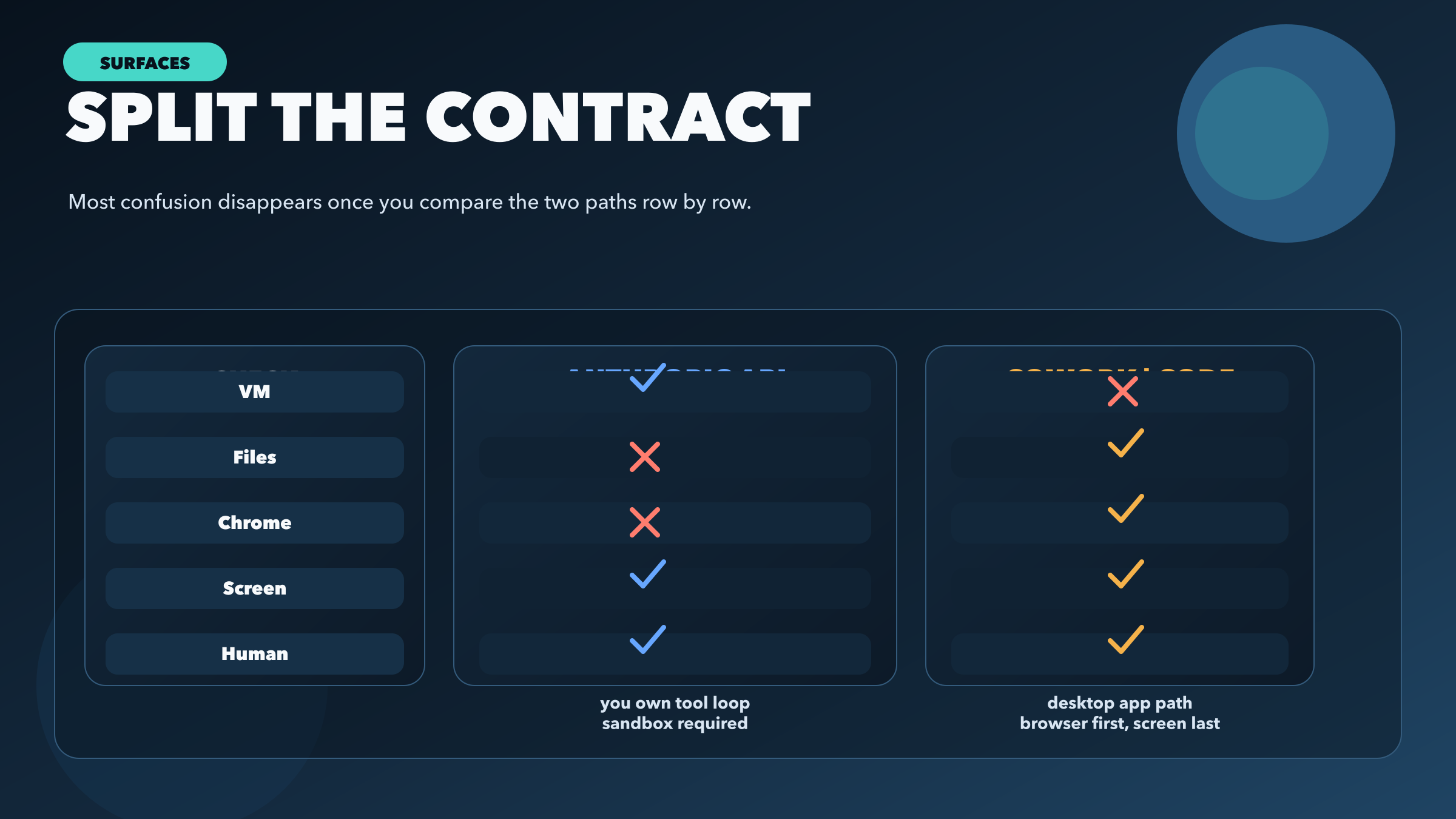
If your job is to ship a reliable product feature, choose the API route. If your job is to delegate work on your own computer, choose Cowork or Claude Code. The more detailed version looks like this:
| If you need... | Choose... | Why |
|---|---|---|
| An agent inside your own app or workflow | Anthropic API computer use | You control the VM, the tool loop, the network boundary, and the approvals |
| Claude to work through local files and tasks on your desktop | Cowork or Claude Code | Anthropic's desktop product handles the session and lets you supervise it |
| Web research, dashboards, or browser tasks | Browser path before screen control | Lower control and lower risk than broad desktop interaction |
| Slack, GitHub, Drive, or another supported system | Connector path before browser or screen | Cleaner and safer than pretending the UI is the only interface |
| Highly sensitive actions, financial transactions, or consent flows | Human-led workflow, not full computer automation | Anthropic explicitly recommends human confirmation for meaningful actions |
The cleanest mental model is this: the API route is for builders who want a tool, and the desktop route is for users who want delegation. Clarity matters because execution ownership determines risk, setup effort, approval flow, and where data actually moves. If you do not separate the owner of the environment, you will make the wrong call about the right use case.
The privacy and retention story is surface-specific
This is one of the easiest places to overstate the product. Anthropic's current materials do not present one single universal retention sentence that cleanly covers every computer-use surface.
For the API tool, the computer-use docs describe the feature as client-side and say it is eligible for Zero Data Retention when the organization has a ZDR arrangement, with data not stored after the response is returned under that arrangement. But Anthropic's privacy-center article for computer use in commercial products says screenshots are deleted from the backend within 30 days by default unless different terms apply. Meanwhile, the Cowork product page emphasizes that task history is stored locally unless you choose to send feedback or diagnostics.
The correct conclusion is not that Anthropic is hiding something mysterious. It is that computer use now spans more than one surface, and each surface has its own data-handling context. For a developer, the safe move is to treat retention as part of the implementation contract and read the exact docs for your plan and arrangement. For a desktop user, the safe move is to assume local history and product-level permissions are the relevant frame, not the API tool contract. What you should not do is paste one sentence about retention from one page into a different product context and call it universally true.
When not to use computer control
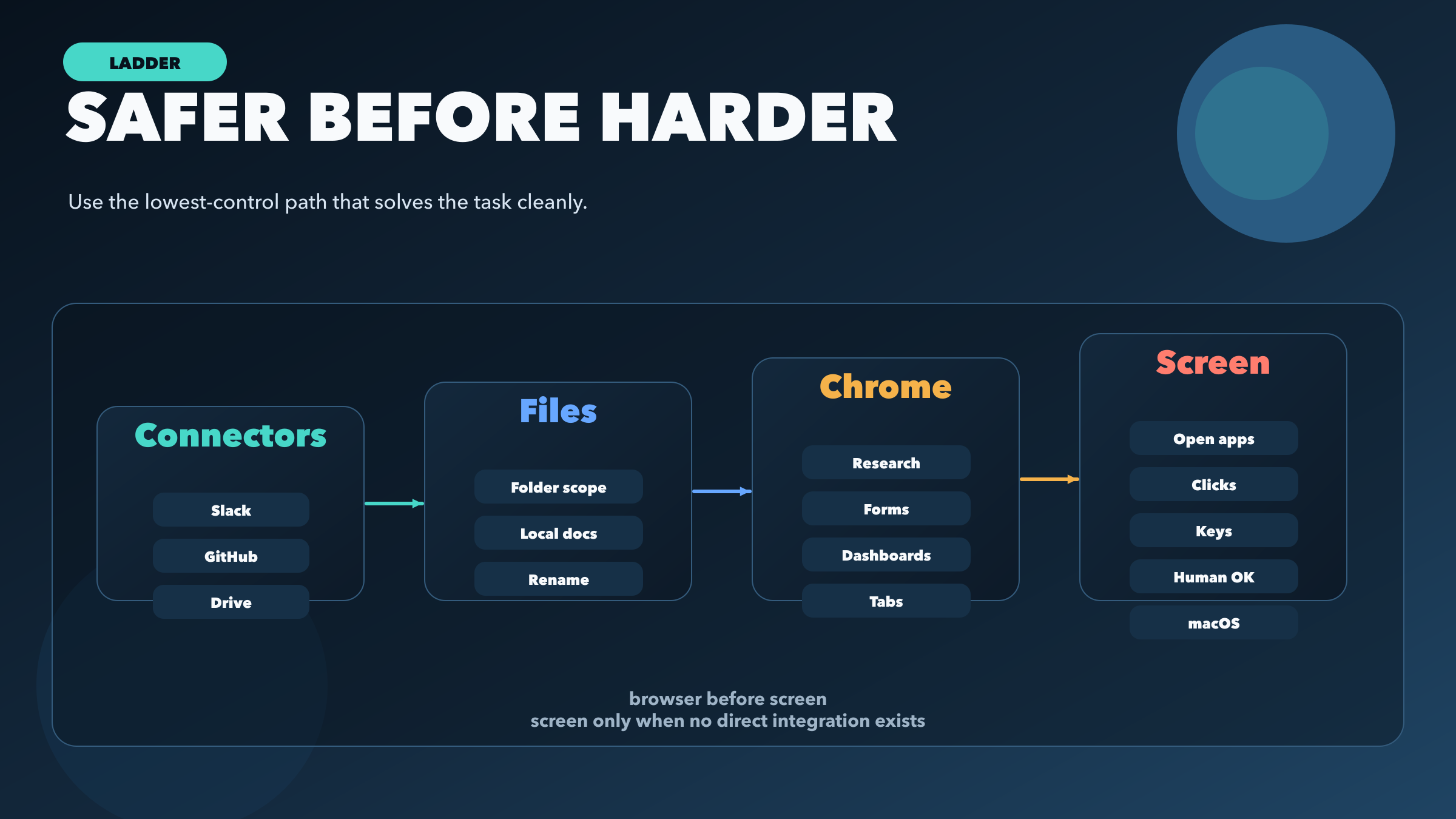
Anthropic's current product framing points toward the right rule: use the lowest-control path that still solves the task. If Claude can pull the answer through a connector, let it do that. If it can work through a folder of local files, that is usually better than asking it to click around an app window. If the job is web research or filling a browser workflow, Chrome is a narrower and easier-to-understand surface than "the whole screen." Only when there is no direct integration and no cleaner browser path should full computer control become the answer.
That matters for both safety and reliability. Connectors and file access are easier to scope, easier to audit, and less likely to fail because a button moved or a page injected unexpected instructions. Browser tasks are still fragile compared with direct APIs, but they are usually less open-ended than full desktop interaction. Screen-level automation is the most powerful and the hardest to reason about, which is why it should be the last rung on the ladder, not the default.
There are also clear classes of tasks where "Claude can do it" is not the same as "Claude should do it." Anthropic explicitly calls for human confirmation on meaningful actions, and that is the right standard. Cookie consent flows, payments, contractual acceptances, destructive operations, access to sensitive accounts, and anything that requires perfect precision should stay under direct human control. Even if the model performs well most of the time, the blast radius is too high to treat successful demos as sufficient evidence.
The same is true for productivity tasks that already have a better interface. If you are tempted to automate a dashboard via screen capture when the system already exposes a CSV export or API, do not romanticize computer use. Screen-level interaction is valuable because some software is stubbornly human-shaped. It is not valuable because clicking is somehow more advanced than calling the right integration.
FAQ
Is Claude Computer Use just the Anthropic API tool?
No. The API tool is one important meaning, especially for builders. But Anthropic's current Cowork and Code material also uses the same family of ideas for local desktop delegation. The phrase now covers more than one surface.
Do I need to build the loop myself?
Only on the API route. Anthropic's API docs are explicit that your application extracts the tool call, executes the action in a VM or container, and returns the tool_result. On the desktop route, Anthropic's product orchestrates that workflow for you.
Does Cowork run on the web or on my phone?
The current help-center page says Cowork requires the Claude Desktop app on macOS or Windows and is not available on web or mobile as a standalone execution surface. You can still message Claude from your phone while the task runs on your desktop.
Is full computer use available everywhere Cowork runs?
Do not assume that. The help page documents Cowork broadly on macOS and Windows, but the Cowork product page currently marks the explicit "Anything you can do on your computer" screen-control path as available on macOS. Treat the more specific wording as the safer claim.
How expensive is the API route?
More expensive than ordinary text prompts, because you pay for tool overhead plus screenshots. Anthropic currently documents 466-499 system-prompt tokens from the beta, 735 tool-definition tokens on Claude 4.x, and additional costs from screenshot images and tool results. That is exactly why it should be reserved for cases where UI automation is genuinely necessary.
Does Anthropic store screenshots?
Answer this by surface, not by slogan. Anthropic's API docs describe ZDR eligibility for qualifying organizations. Anthropic's privacy article for commercial computer use says screenshots are deleted within 30 days by default unless other terms apply. Cowork product material emphasizes local history storage. If retention matters to your use case, read the exact policy for your surface and plan instead of assuming a single universal answer.
The useful question is not whether Claude can click
Claude can click. That part is no longer the interesting part.
The useful question is what kind of system you are trying to build or trust. If you are shipping an agent, use the API tool and treat it like an automation runtime that belongs inside a real sandbox with real oversight. If you want Claude to work on your own machine, use Cowork or Claude Code and let Anthropic's product manage the session while you stay in control of the folders, connectors, and approvals that matter.
Once you frame the topic that way, the phrase "Claude Computer Use" becomes much less magical and much more useful. It stops being a vague promise and turns into a concrete routing decision. That is the level where good implementation and good judgment start.