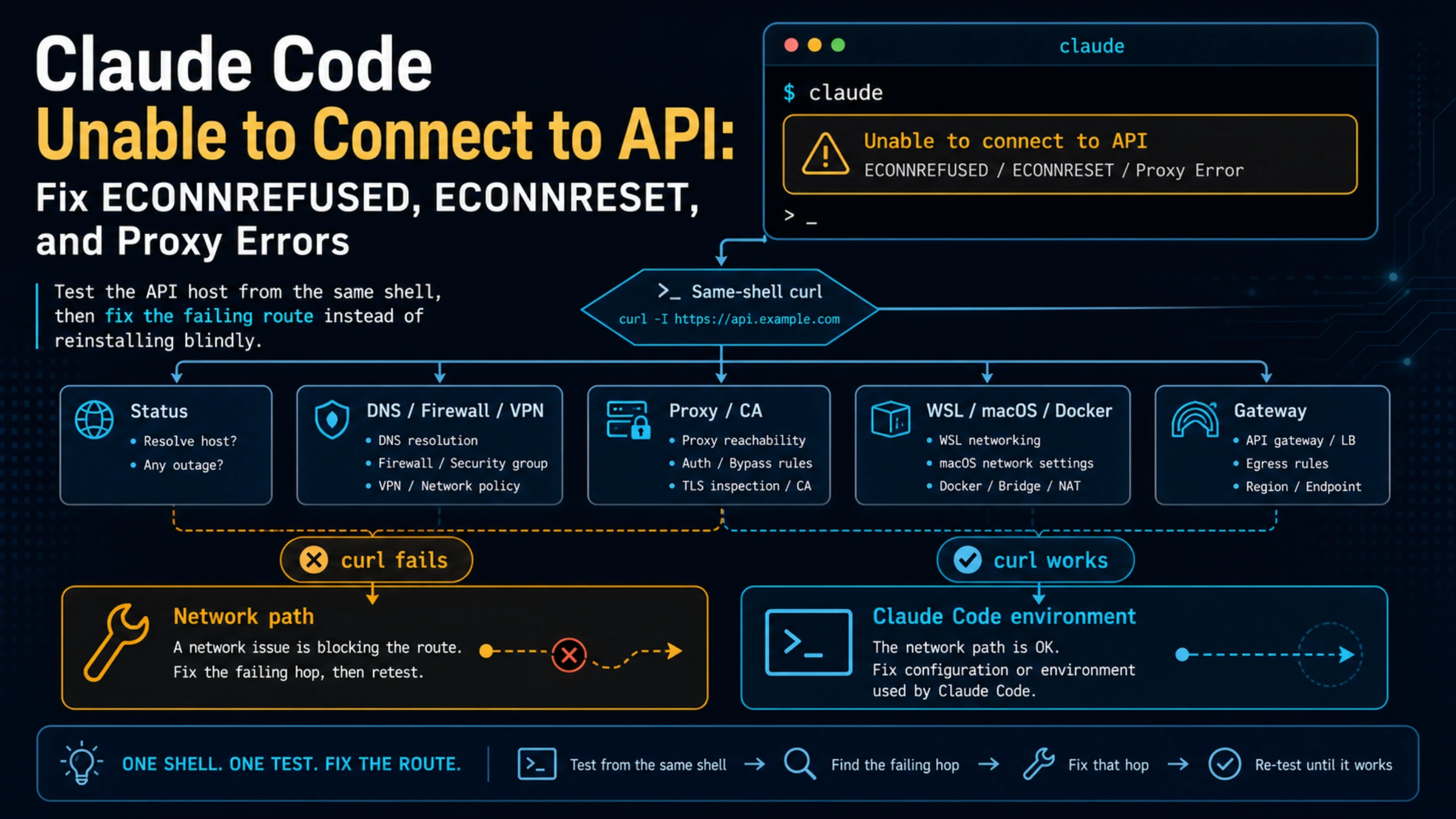
Unable to connect to API means Claude Code did not complete the TCP connection to the API route. It is not the same as a returned 401, 429, 500, or 529 response. Check the live Claude Status, then run this from the same shell that starts Claude Code:
bashcurl -I https://api.anthropic.com
If that command cannot connect, investigate DNS, firewall, VPN, proxy, or TLS on that network. If it connects but Claude Code still fails, inspect the route Claude Code actually loaded: authentication, proxy and CA variables, WSL or macOS networking, Docker interception, and ANTHROPIC_BASE_URL.
| What you see | What it usually narrows | First useful action |
|---|---|---|
ECONNREFUSED | The target or local proxy rejected the connection | Confirm the effective host and proxy address |
ECONNRESET | A network device, proxy, VPN, or remote side reset an established connection | Compare one retry on a second trusted network |
ETIMEDOUT | The connection path did not complete before its deadline | Test DNS, firewall, proxy, and route latency |
fetch failed | A wrapper-level network failure without a returned API response | Read the next error line and run the same-shell test |
| Certificate or self-signed-certificate error | TLS inspection or a missing corporate CA | Install the approved CA and point Claude Code at it |
| HTTP status and JSON error body | The request reached an API layer | Leave this guide and classify the returned status |
Do not begin by reinstalling Claude Code, rotating an API key, changing the model, and switching networks at the same time. Those changes can hide the route that failed.
Confirm That This Is a Connection Failure
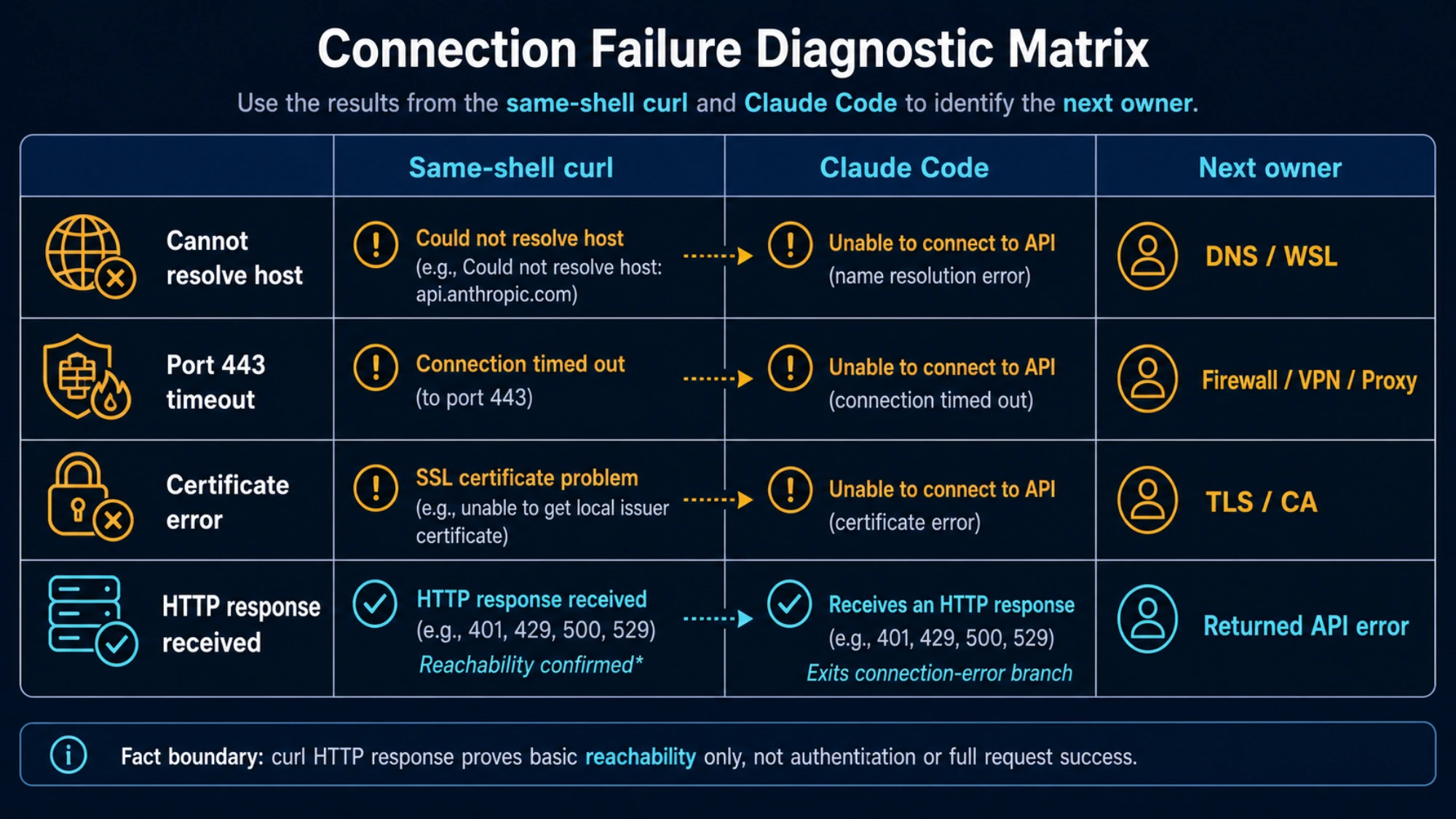
Anthropic's Claude Code error reference groups Unable to connect to API, ECONNREFUSED, ECONNRESET, ETIMEDOUT, fetch failed, and network/proxy timeout wording under network errors. The key boundary is whether Claude Code received an HTTP response.
- No HTTP status, response body, or request ID: stay in the connection branch.
- A returned
401or invalid-key message: use the authentication branch. - A returned
429,500, or529: the API or configured provider responded; use that status-specific recovery path. Connection closed mid-response: Claude had started streaming. Preserve the completed output and continue from the last complete block instead of assuming the whole request never connected.
Claude Code retries many transient connection and server failures with exponential backoff before it surfaces an error. A visible Unable to connect to API therefore usually means the quick automatic recovery attempts did not clear the problem. Repeatedly pressing Enter without changing the route adds little evidence.
Run the Same-Shell Baseline
Use the terminal, WSL distribution, SSH session, IDE remote shell, or container that launched claude. A browser opening claude.ai does not prove that this process can reach api.anthropic.com.
Run the host check and inspect only routing-related variables:
bashcurl -I https://api.anthropic.com
env | grep -Ei '^(ANTHROPIC_BASE_URL|ANTHROPIC_API_KEY|HTTP_PROXY|HTTPS_PROXY|NO_PROXY|NODE_EXTRA_CA_CERTS)='
Do not paste the output if it contains a key or proxy password. You only need to know whether each variable exists and which host or file path it selects.
Interpret the result before changing anything:
curl result | Claude Code result | Likely owner |
|---|---|---|
| Cannot resolve the host | Fails | DNS or WSL resolver |
| Times out or cannot open port 443 | Fails | Firewall, VPN, proxy, or network route |
| Shows a certificate validation error | Fails | Corporate TLS inspection or CA trust |
| Receives any HTTP response | Fails | Claude Code environment, proxy scope, CA scope, gateway, or runtime path |
| Receives a response | Returns 401/429/500/529 | Not a pure connection error; classify the response |
An HTTP response from curl -I proves basic host reachability, not that your account, full request, model, or gateway configuration is valid. It is a branch test, not an end-to-end success test.
Fix the Route Indicated by the Result
When curl also fails
Check the current service status first, but do not treat a green page as proof that every regional network path is healthy. Then change one network variable:
- Retry on another trusted network, such as a mobile hotspot or a home connection.
- If a VPN is active, disconnect it for one controlled retry. If the organization requires a VPN, ask the network team to verify access instead of bypassing policy.
- Confirm the firewall permits
api.anthropic.comand the other hosts in Anthropic's network access requirements. - On Linux or WSL, inspect
/etc/resolv.conffor an unreachable nameserver. A WSL shell can inherit a broken resolver even when Windows browsing works. - If DNS resolves but port 443 times out, investigate the firewall, router, proxy, and outbound route rather than changing credentials.
ECONNREFUSED often points to the effective target or a local proxy endpoint refusing the connection. Confirm whether Claude Code is going directly to Anthropic or to a base URL or proxy you configured. ECONNRESET is different: a connection existed and was reset, so a VPN, TLS-inspecting appliance, unstable network, or long-lived connection policy deserves attention.
When a corporate proxy or certificate is involved
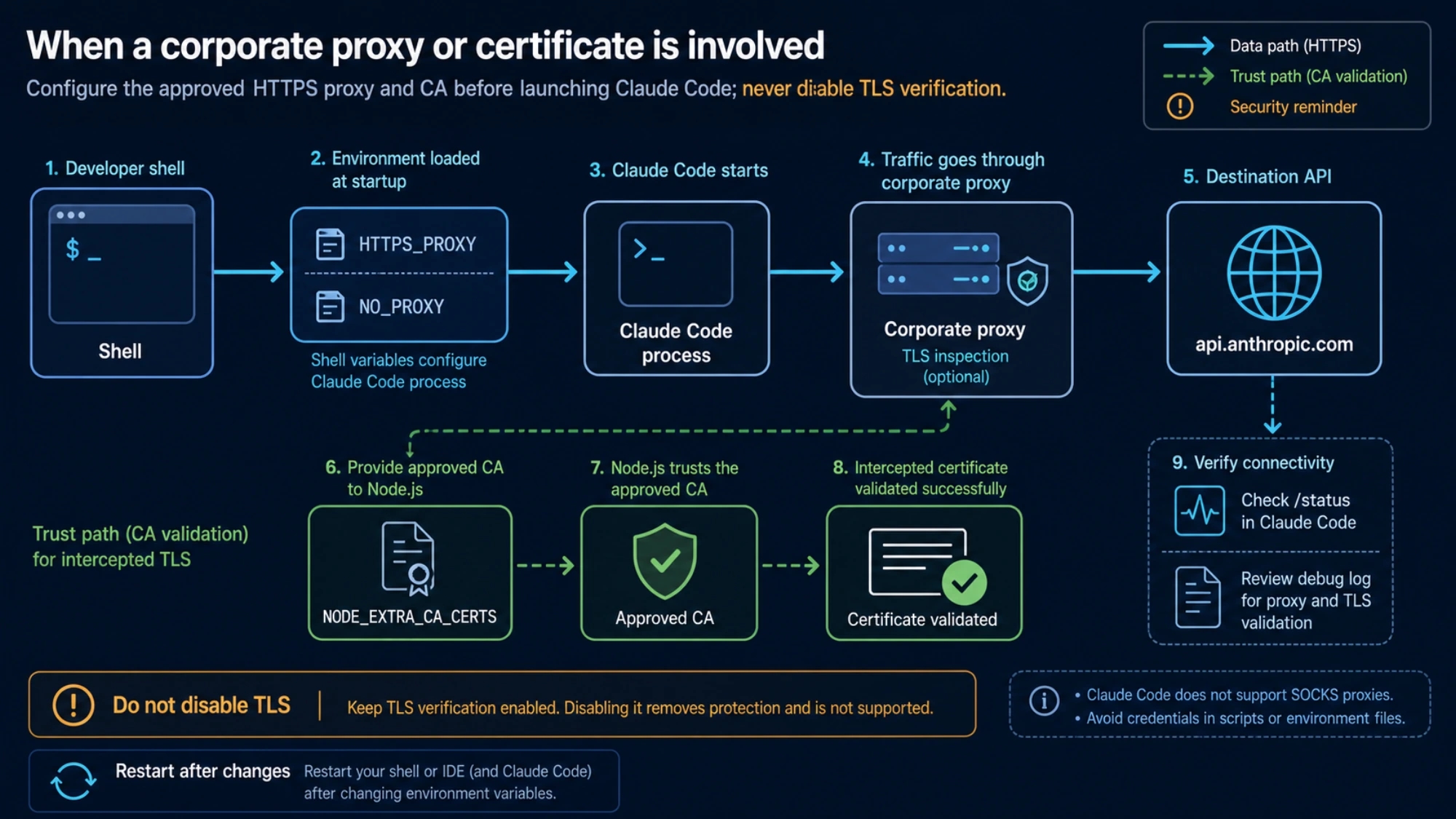
Claude Code reads standard proxy variables when it starts:
bashexport HTTPS_PROXY=https://proxy.example.com:8080
export NO_PROXY=".example.internal"
claude
Use the proxy scheme and address supplied by your organization. Claude Code does not support SOCKS proxies. If the proxy performs TLS inspection, use the approved CA bundle:
bashexport NODE_EXTRA_CA_CERTS=/path/to/corporate-ca.pem
claude
Never “fix” this by setting NODE_TLS_REJECT_UNAUTHORIZED=0; that disables certificate verification. Also avoid putting proxy passwords in committed scripts. Anthropic's enterprise network configuration explains settings scopes, CA stores, and managed environments.
Variables exported after Claude Code starts do not update that running process. Restart Claude Code after changing proxy or CA settings. In Desktop-managed or background sessions, shell variables may not be the effective scope; /status and debug output help confirm what loaded.
When curl works but Claude Code fails
Run /status inside Claude Code. Confirm the active credential, provider, proxy, and endpoint match your intention. Then inspect these environment-specific causes:
- Unexpected key route:
ANTHROPIC_API_KEYcan select API-key authentication when you expected subscription login. Do not print the key; confirm only whether it is set. - Unexpected gateway:
ANTHROPIC_BASE_URLchanges the destination. Test the official route and the gateway as separate systems, subject to your organization's policy. - WSL or remote IDE: compare the same
curlcommand in WSL, the host terminal, and the actual VS Code remote shell. Their DNS, proxy, and certificate stores can differ. - macOS after a VPN change: a disconnected or removed VPN client can leave a stale
utuninterface or network extension. Review the VPN extension in System Settings; do not delete routes you do not understand. - Docker Desktop or another runtime: outbound interception can affect the CLI. Quit the runtime for one controlled retry if doing so is safe for your work.
- Background process: a long-lived supervisor may have inherited the environment from a different shell. Put required network variables in the supported user or managed settings scope.
If route ownership is unclear, use the Claude Code API configuration guide to map authentication and provider precedence before changing values.
Verify the Repair Without Losing the Signal
After one change, restart Claude Code and run a small, low-risk prompt. A repair is verified when all three statements are true:
- The same shell still receives an HTTP response from
api.anthropic.comor the approved gateway. /statusshows the intended authentication and route.- Claude Code completes a new request without the same connection error.
If the error changes to an HTTP status, that is useful progress: the transport route now reaches an API layer. Use Claude Code API Error 500, Claude API 529 overloaded, or Claude API rate-limit reached as appropriate. Do not keep toggling network settings after the server has returned a classified response.
Escalate With a Small, Redacted Packet
If the same route still fails, collect the timestamp and timezone, operating system, Claude Code version, exact error suffix, route type, whether curl -I returned an HTTP response, current status-page observation, and the result of one controlled network or proxy change. Include the host selected by ANTHROPIC_BASE_URL only if it is not private.
Do not send API keys, OAuth tokens, proxy passwords, private prompts, customer data, or a complete environment dump. For Anthropic support, use the official Help Center or /feedback when available. For a corporate route, send the same redacted packet to the network or platform owner.
The practical rule is simple: if the same-shell curl fails, fix the path to the host; if it succeeds and Claude Code fails, fix Claude Code's effective environment; if an HTTP error returns, leave the connection branch and handle that response.