Claude Code Fast Mode: 2x Price, How to Use It, Fix Its Errors
Claude Code fast mode runs the same Opus 5.5 or Fable 5.2 up to 2.5x faster at 2x the token price, paid from usage credits on plans. Enable it at session start.
On this page
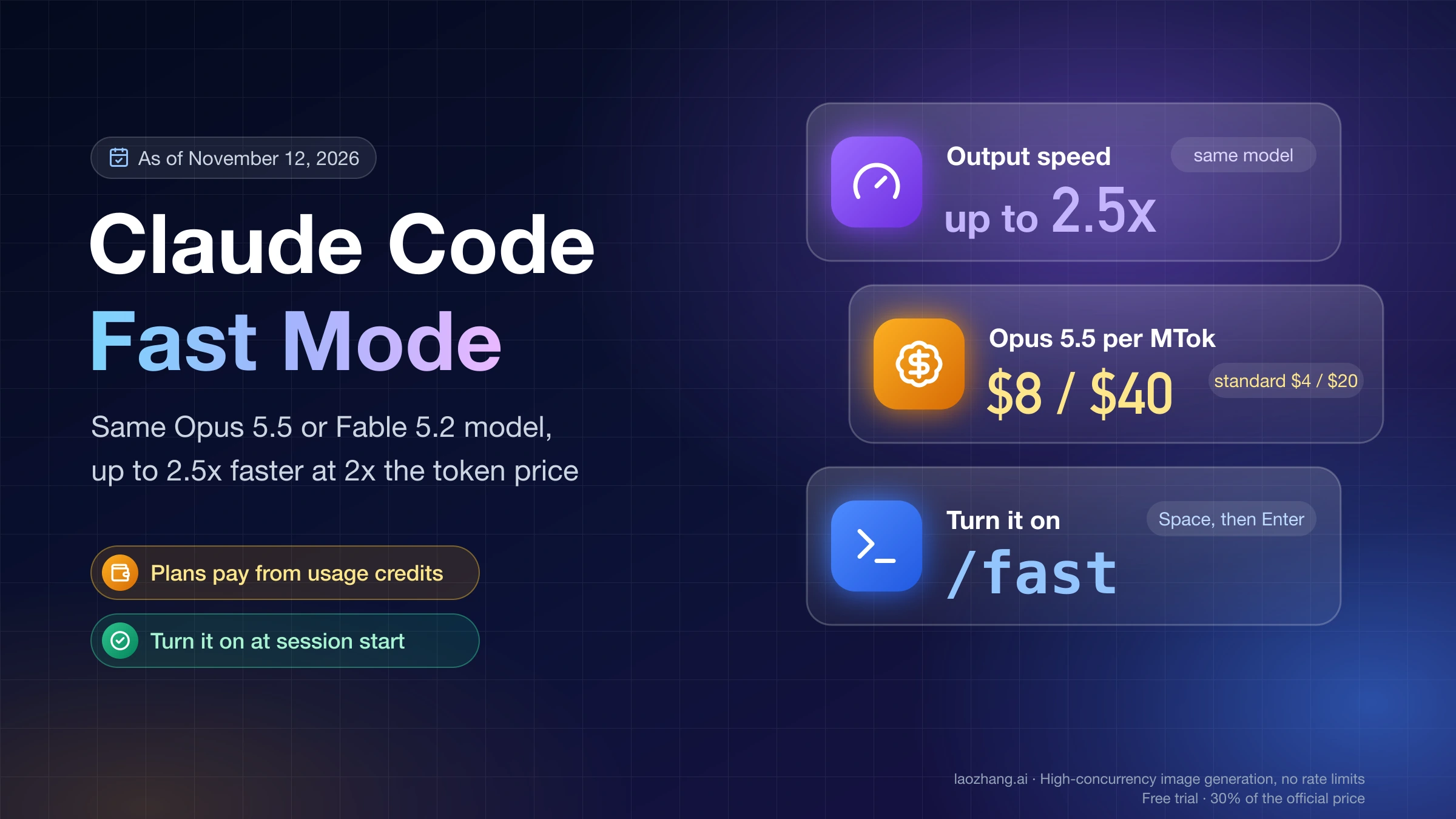
Claude Code fast mode runs the same Opus 5.5 or Fable 5.2 model on a faster serving configuration. Anthropic says output arrives up to 2.5x faster with the same quality, and you pay twice the standard token price for it: $8 per million input tokens and $40 per million output tokens on Opus 5.5 instead of $4 and $20, or $16 and $80 on Fable 5.2. On Pro, Max, Ultra, Team and Enterprise plans it is paid only from usage credits, even when your plan still has usage left; Console API keys pay per token. As of November 12, 2026, Sonnet and Haiku have no fast mode, and Claude Code can't use it on Amazon Bedrock, Microsoft Foundry or Claude Platform on AWS.
To use it on a subscription, turn on usage credits first in Settings > Usage on claude.ai (or run /usage-credits), then type /fast at the start of a session, press Space and then Enter. Claude Code confirms with "Fast mode ON" and a small ↯ next to the prompt. The start of the session matters: switching on 100,000 tokens into an Opus 5.5 conversation re-reads that context at the fast input price, $0.80 to $1.00, where a normal cached turn reads it for $0.02. In claude -p, launch with --settings '{"fastMode": true}', or you get "Fast mode is not available in the Agent SDK".
A lit toggle isn't proof that requests ran fast. Search the session transcript for "speed":"fast", because one open bug report counted 10,307 Desktop requests that all ran at standard speed while the app said "Fast". Through an LLM gateway or third-party relay, fast mode works only if the gateway passes the speed field on to Anthropic, and the relay tested on November 12 accepted it and dropped it. If you still use fast mode on Opus 4.8, it stops working on November 30, 2026; switch to Opus 5.5 with /model.
What fast mode changes: faster output, same model, double the price
Fast mode changes how fast tokens come out and what each token costs, nothing else. Anthropic's Claude Code fast mode documentation describes it as the same model with a different API configuration, so answers keep the same quality and capabilities. It is not a separate "Opus Fast" model. The Claude API fast mode documentation adds where the speed comes from: up to 2.5x more output tokens per second, not a shorter wait for the first token. A turn that writes a long file feels much quicker; a turn that mostly waits on npm test or a slow tool barely changes, because that time isn't spent generating tokens. The 2.5x is Anthropic's "up to" figure, not a typical result.
| Model | Fast mode, per million input/output tokens | Standard price | Fast mode status in Claude Code |
|---|---|---|---|
| Fable 5.2 | $16 / $80 | $8 / $40 | Available from Claude Code v2.1.321; turn it on while you're on Fable 5.2 |
| Opus 5.5 | $8 / $40 | $4 / $20 | Available; the default fast mode model from v2.1.280 |
| Opus 5 | $10 / $50 | $5 / $25 | Research preview |
| Opus 4.8 | $10 / $50 | $5 / $25 | Deprecated October 30, 2026; removed November 30, 2026 |
| Opus 4.7 | None | $5 / $25 | Removed July 24, 2026; switching to it turns fast mode off |
| Sonnet and Haiku models | None | Unchanged | Not supported; /fast moves you to Opus |
Prices are from Anthropic's Claude API pricing page as of November 12, 2026. Fast mode pricing is flat across the whole 1M-token context window, and prompt-caching and data-residency multipliers apply on top of it, so a cache read in fast mode also costs twice as much. On the API, fast mode doesn't work with the Batch API or with a Priority Tier commitment.
If you still have fast mode on with Opus 4.8, the API starts rejecting those requests once it's removed. Claude Code 2.1.322 already warns with "Opus 4.8 fast mode is deprecated and will be removed on …". To keep fast mode, run /model and pick Opus 5.5, which needs Claude Code v2.1.280 or later; fast mode stays on through the switch. To stay on Opus 4.8, run /fast off.
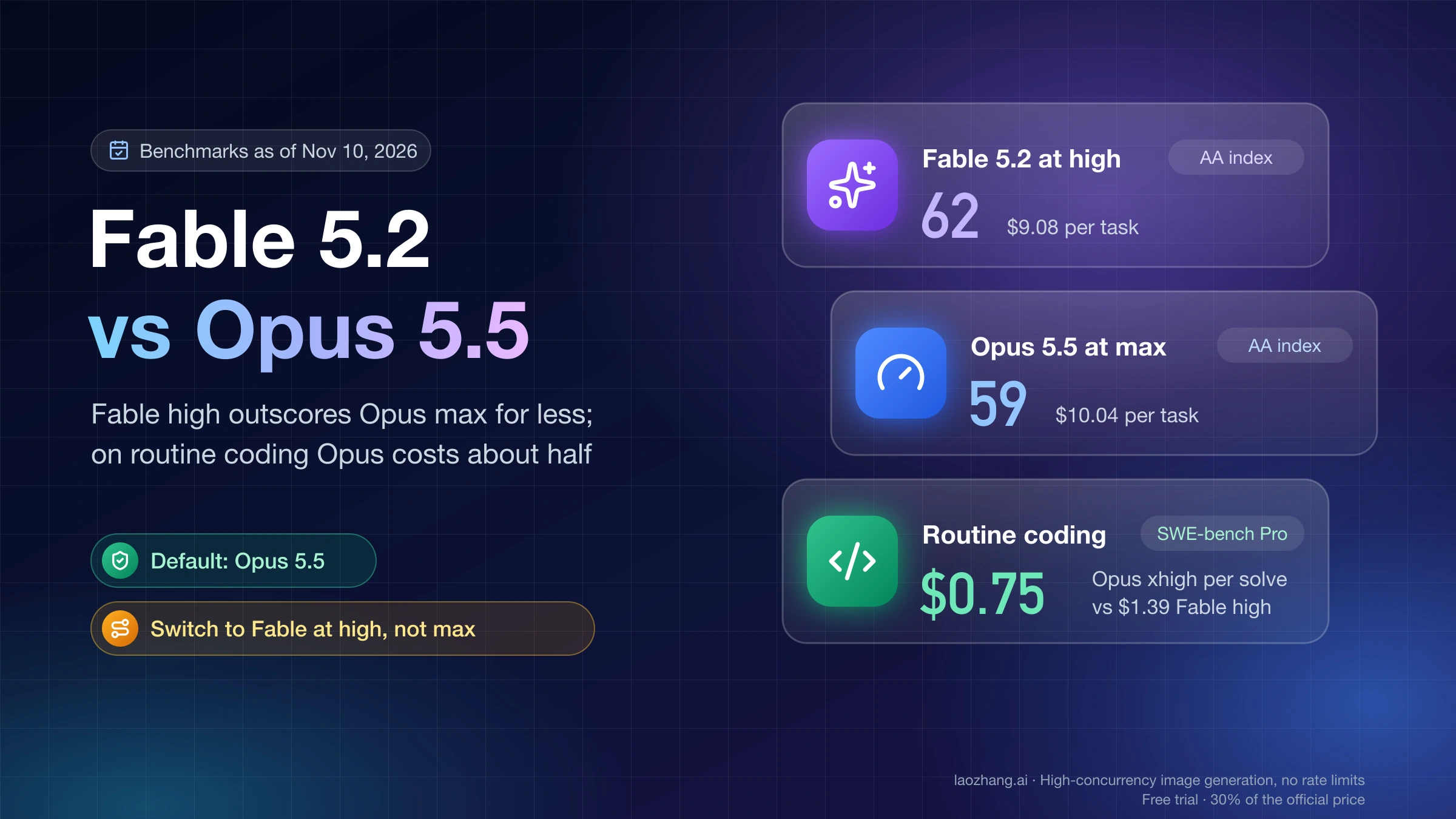
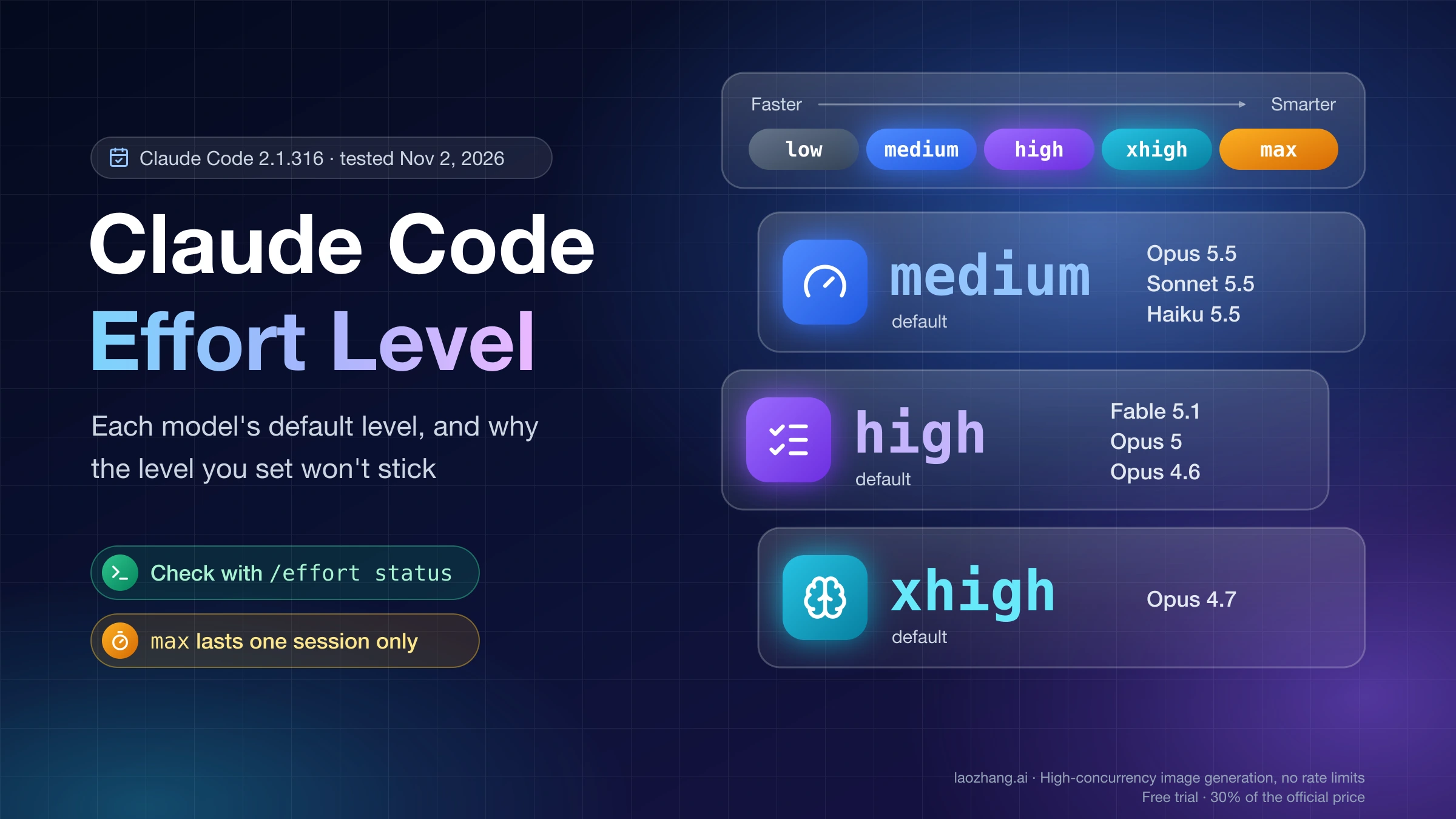
Fast mode is also different from lowering effort. Lower effort makes Claude think and check less, which is faster and cheaper but can hurt hard tasks; fast mode keeps the thinking and charges more to serve it quickly, and the two can be combined. What effort does per model is in Claude Code Effort Level: Model Defaults and Why It Won't Stick, and whether Fable or Opus suits a task is in Claude Fable 5.2 vs Opus 5.5: When Fable High Beats Opus Max.
Which plans and providers can use Claude Code fast mode
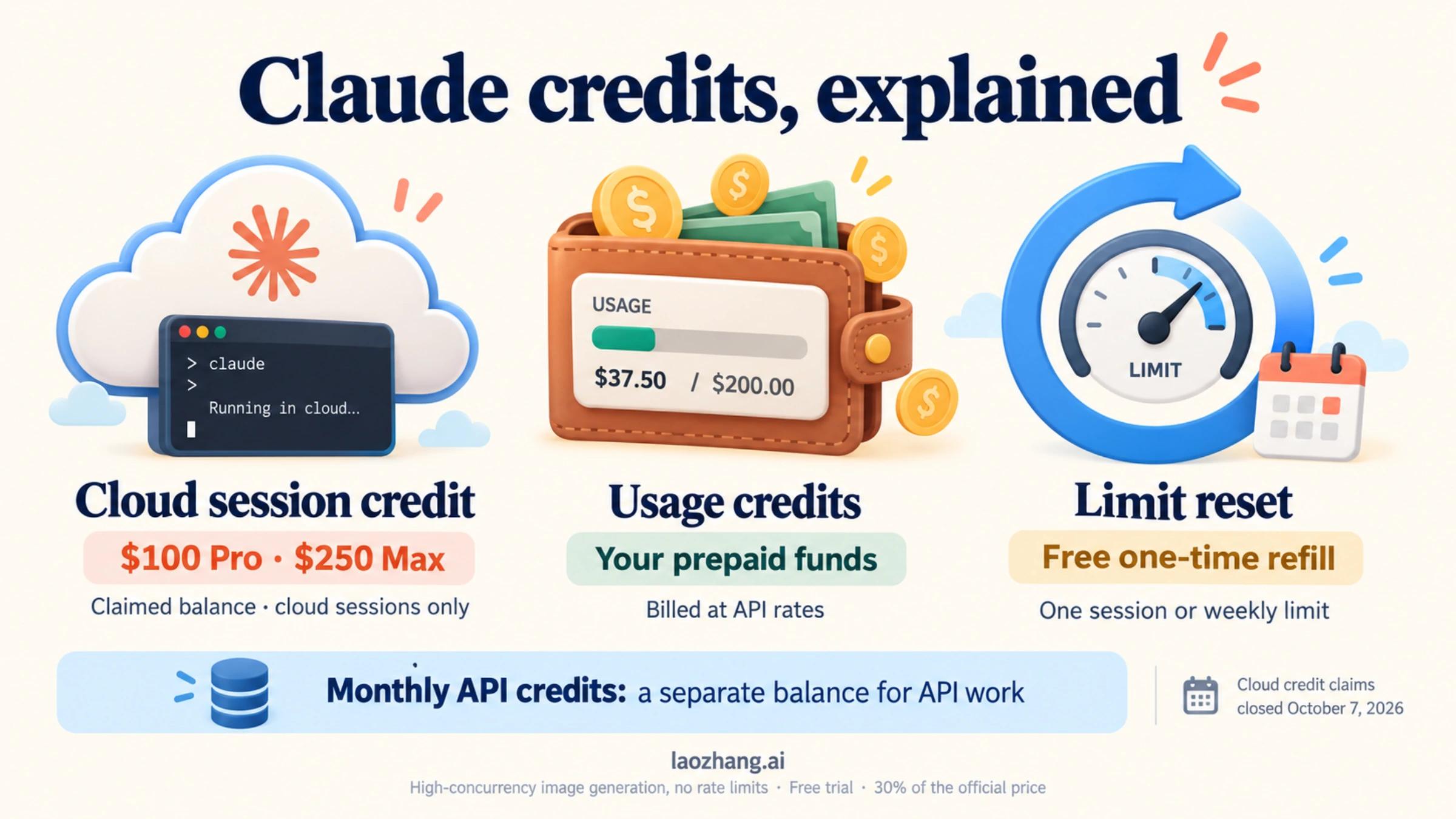
Any paid Claude plan and any paid Console organization can use fast mode on the Anthropic API, but each needs one thing switched on first. On a subscription that thing is usage credits (the newer name for what older pages call "extra usage"): fast mode never comes out of your plan's included usage, and it draws on usage credits even when the plan's limits still have room. On a Console API key it is billed per token with the rest of your API usage.
| How you sign in | Fast mode? | What has to be in place |
|---|---|---|
| Pro, Max, Ultra | Yes, paid from usage credits only | Usage credits turned on in Settings > Usage on claude.ai, or run /usage-credits to open that page |
| Team, Enterprise | Yes, after an Owner enables it | An Owner enables fast mode at Organization settings > Claude Code; a member with billing access turns on usage credits at Organization settings > Usage; others run /usage-credits to ask an admin |
| Claude Console API key | Yes, per token | A paid organization (not the free Evaluation plan), fast mode enabled by an admin in the Console's Claude Code preferences; Opus 5 and Opus 4.8 also need provisioned access, and Fable 5.2 and Opus 5.5 depend on your usage tier |
| Google Cloud Agent Platform | Fable 5.2 only | Claude Code v2.1.322 or later and a Fable 5.2 region of global, us or eu |
| Amazon Bedrock, Microsoft Foundry, Claude Platform on AWS | No | /fast answers "Fast mode is not available on this provider" |
| LLM gateway or third-party relay | Only if it forwards speed | Covered in the gateway section below |
Team and Enterprise organizations start with fast mode off, so on those plans the Owner step comes before anything you can do yourself. Run /status if you aren't sure which row you're in: a Login method row such as Claude Max account means a subscription, an API key row means a Console organization. How usage credits are billed, and when a bigger plan costs less than paying for credits, is worked through in Claude Extra Usage Cost: Credit Math and When Max Is Cheaper; choosing between Pro, Max, Team and the API is in the Claude Code Pricing Guide 2026: Pro, Max, Team, API, and Extra Usage.
Is fast mode worth it? Only from the start of a session you're watching
Fast mode pays off when you are sitting at the terminal waiting for long answers to stream, and you turn it on before the conversation gets long. Anthropic recommends it for rapid iteration, live debugging and deadline work, and recommends standard speed for long autonomous runs, CI pipelines and anything cost-sensitive. In steady use the premium is simply 2x: with 100,000 tokens of cached context, 3,000 new input tokens and 2,000 output tokens, a turn on Opus 5.5 costs about $0.072 at standard speed and $0.144 in fast mode, and on Fable 5.2 about $0.12 against $0.25. If you would happily pay double to stop waiting, that part is easy.
The expensive part is the switch. The first time you enable fast mode in a conversation, Claude Code sends the whole context again at the fast input price without cache, and fast and standard speed keep separate caches, so every later switch in either direction re-reads the context too, including the automatic drop to standard speed after a rate limit and the return to fast. The cost of a switch is context tokens × fast input price ÷ 1,000,000. Because fast mode on a plan is paid from usage credits, and usage credits or an API key put the main conversation on the 5-minute cache, that request is usually also written to cache at 1.25x the input price, so the switch costs between the base figure and 1.25 times it. A standard turn that hits the cache pays only 0.05x the input price on Opus 5.5 and 0.025x on Fable 5.2.
| Context when you switch | Standard turn, cached read | Turn on fast mode, Opus 5.5 | Turn on fast mode, Fable 5.2 |
|---|---|---|---|
| 20,000 tokens | $0.004 | $0.16–$0.20 | $0.32–$0.40 |
| 100,000 tokens | $0.020 | $0.80–$1.00 | $1.60–$2.00 |
| 300,000 tokens | $0.060 | $2.40–$3.00 | $4.80–$6.00 |
| 800,000 tokens | $0.16 | $6.40–$8.00 | $12.80–$16.00 |
The table was recomputed on November 12, 2026 from Anthropic's list prices; it isn't a bill, and it leaves out thinking tokens and data-residency multipliers. The lower number is the uncached input price the docs name, and the upper one adds the 5-minute cache write. If you have forced a 1-hour cache with promptCacheTtl or CLAUDE_CODE_PROMPT_CACHE_TTL, writes cost 2x the input price instead, so a switch at 100,000 tokens on Opus 5.5 can reach $1.60. To see which cache your requests write, run claude -p "hello" --output-format json and compare ephemeral_5m_input_tokens with ephemeral_1h_input_tokens under usage.cache_creation. Flipping back and forth is where it adds up: on, off and on again at 150,000 tokens of Opus 5.5 context costs $1.20 + $0.60 + $1.20 = $3.00 at base input price, or $1.50 + $0.75 + $1.50 = $3.75 with the 5-minute cache write, so $3.00–$3.75 before any output, against $0.09 for three standard cached turns.
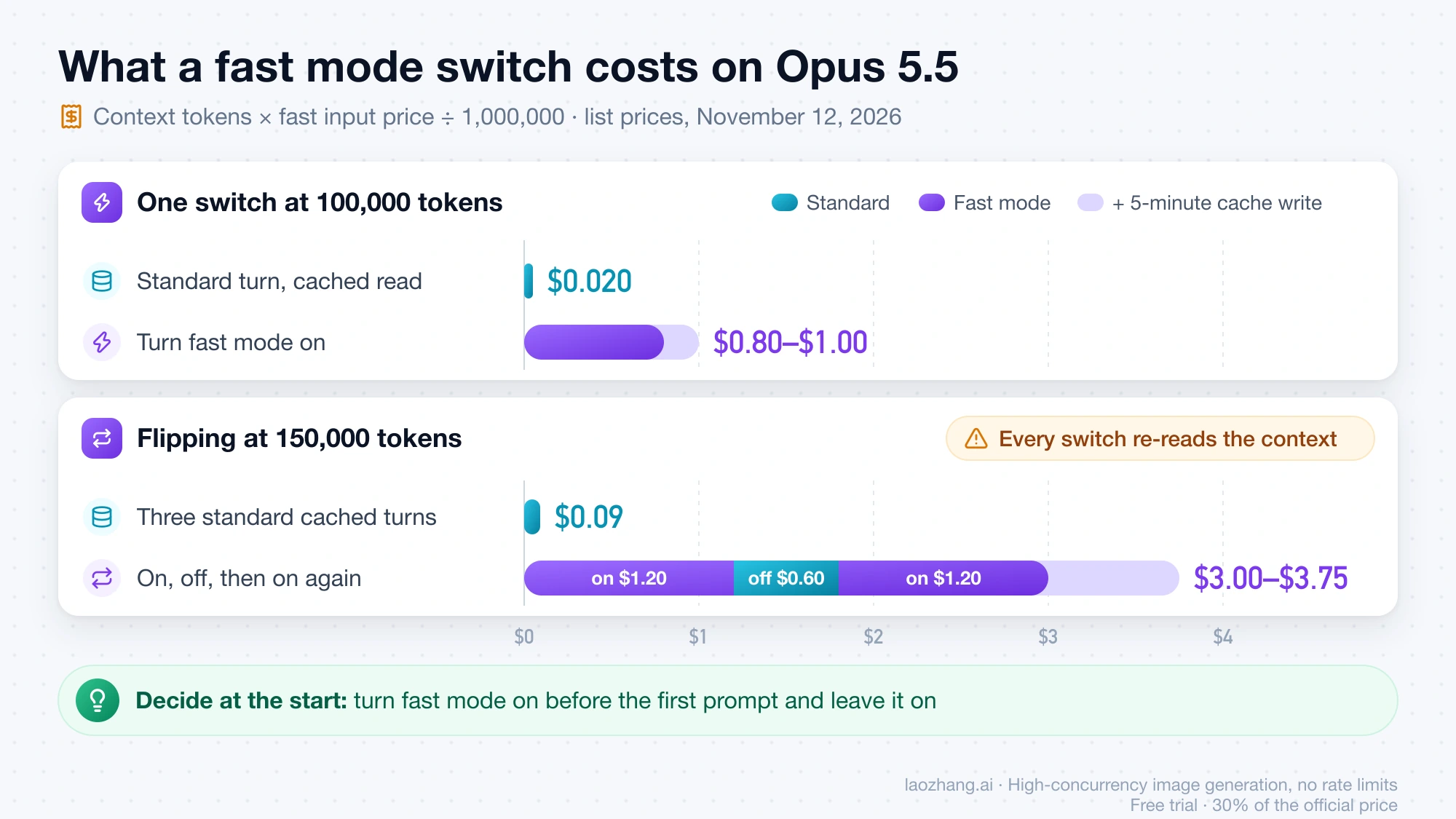
So the rule is: decide at the start. If the next hour is interactive debugging and you'll read every answer as it arrives, start a new session, turn fast mode on before the first prompt and leave it on. If the session is a long autonomous task, a batch of subagents or a CI job, leave it at standard speed, since nobody is waiting on each token. If you're already deep in a long conversation, turning fast mode on for one answer costs more than the answer. The cache multipliers per model are in Claude Prompt Caching: How It Works, Costs, 512-Token Minimum, and finding which turns were expensive afterwards is covered in Claude Code Cache TTL and Token Usage: Why Cache Misses Get Expensive and How to Prove It.
How to turn on fast mode in the CLI, VS Code, Desktop, web and claude -p
Every surface uses the same switch, but where you flip it and how long it stays on differ. In an interactive CLI session on the Anthropic API, the choice you make with /fast is saved and new sessions start with fast mode on until you turn it off.
| Where you work | How to turn fast mode on | How long it lasts |
|---|---|---|
| CLI, interactive | Run /fast, press Space to toggle, Enter to confirm; or /fast on and /fast off | Saved as your default on the Anthropic API |
| Settings file | "fastMode": true in ~/.claude/settings.json, on a model that supports it | Every session; on Fable 5.2 it has no effect until you've run /fast on Fable 5.2 |
| VS Code extension | Toggle fast mode in the Command Palette, shown when the selected model supports it | Saved like the CLI setting |
| Claude Desktop, Code tab | The Use fast mode switch in the composer's model menu | Applies across the app's sessions; check the transcript, see below |
| claude.ai/code and cloud sessions | The switch in the model menu on the message box, or type /fast on (Claude Code v2.1.271 or later in the session) | That session only |
claude -p (headless) | Launch with claude -p --settings '{"fastMode": true}' (v2.1.205 or later) | That run only |
The Desktop row comes from users' reports in Claude Code GitHub issue #100998 about the Desktop fast mode toggle, not from Anthropic's docs page, and the same issue shows the switch reading "Fast" while requests ran at standard speed.
Model switches carry fast mode with them. Running /fast on a model without fast mode, such as Sonnet, moves you to Opus (Opus 5.5 from Claude Code v2.1.280). Switching with /model to a model without fast mode turns it off, and switching back to a supported Opus turns it on again if your saved preference is on. Fable 5.2 is the exception: it stays at standard speed until you run /fast while on Fable 5.2, and from then on that choice is remembered. You can also run /fast while Claude is working; the running turn finishes at its old speed and the change applies from the next one.
In headless mode the settings file isn't enough. On November 12, 2026, with Claude Code 2.1.322 on a Mac, signed out, in a clean shell, plain claude -p "/fast" returned Fast mode unavailable: Fast mode is not available in the Agent SDK, and "fastMode": true in the settings file gave the same message, because -p only reads fast mode from the --settings flag. With claude -p --settings '{"fastMode": true}' "/fast" the command was accepted and answered Fast mode has been disabled by your organization, since a signed-out client has no organization that allows it, and /fast off in that run returned Fast mode OFF (this session only). Those runs were signed out; on a paid account with fast mode allowed, Anthropic's docs say the --settings form is what lets /fast work in -p, for that run only.
If several people or several sessions share a budget, the saved default can cost more than intended, since every new session starts fast. Setting "fastModePerSessionOptIn": true in any settings file makes each session start at standard speed, and Team and Enterprise Owners can push it to everyone through server-managed settings. When managed settings set it, /fast on works only in an interactive terminal; VS Code, cloud sessions and -p refuse it with the "disabled by your organization" message.
How to check that fast mode actually ran
The reliable check is the speed value Claude Code writes into the session transcript for every response. The ↯ icon and the "Fast mode ON" message show what Claude Code intends to send; the transcript records the speed reported in each response's usage data, matching the usage.speed field the Claude API returns as "fast" or "standard". That gap is real: in GitHub issue #100998, still open on November 12, 2026, one Max user who had turned fast mode on in the Desktop app many times found that all 10,307 requests from 75 sessions since October 19 had run at standard speed, on an account with usage credits turned off.
- Run
/fastin the session to see whether it's on. A gray↯means a rate-limit cooldown, during which requests run at standard speed and price. - Find the session's transcript. Claude Code stores one
.jsonlfile per session under~/.claude/projects/, in a folder named after the project path; the newest file is usually the current session. - Count the speed values:
cd ~/.claude/projects/<project-folder>
ls -t *.jsonl | head -1
grep -o '"speed":"[a-z]*"' <session-id>.jsonl | sort | uniq -c
Any "speed":"fast" lines mean those responses were served in fast mode; only "speed":"standard" means none were, whatever the toggle said. On November 12, 2026, the five most recent transcripts on one Mac that never used fast mode returned 283, 475, 259, 170 and 275 "speed":"standard" entries and no others, which is what a session without fast mode looks like.
The bill is the other check. On Pro, Max and Ultra, the Usage credits total in Settings > Usage on claude.ai rises with fast mode use but doesn't list it separately; on Team and Enterprise, /usage shows your own usage-credits spend; on the Console, the Usage and Cost pages can group by Speed (research preview) when the date range includes fast mode traffic.
Fast mode through an LLM gateway or relay: what Claude Code sends
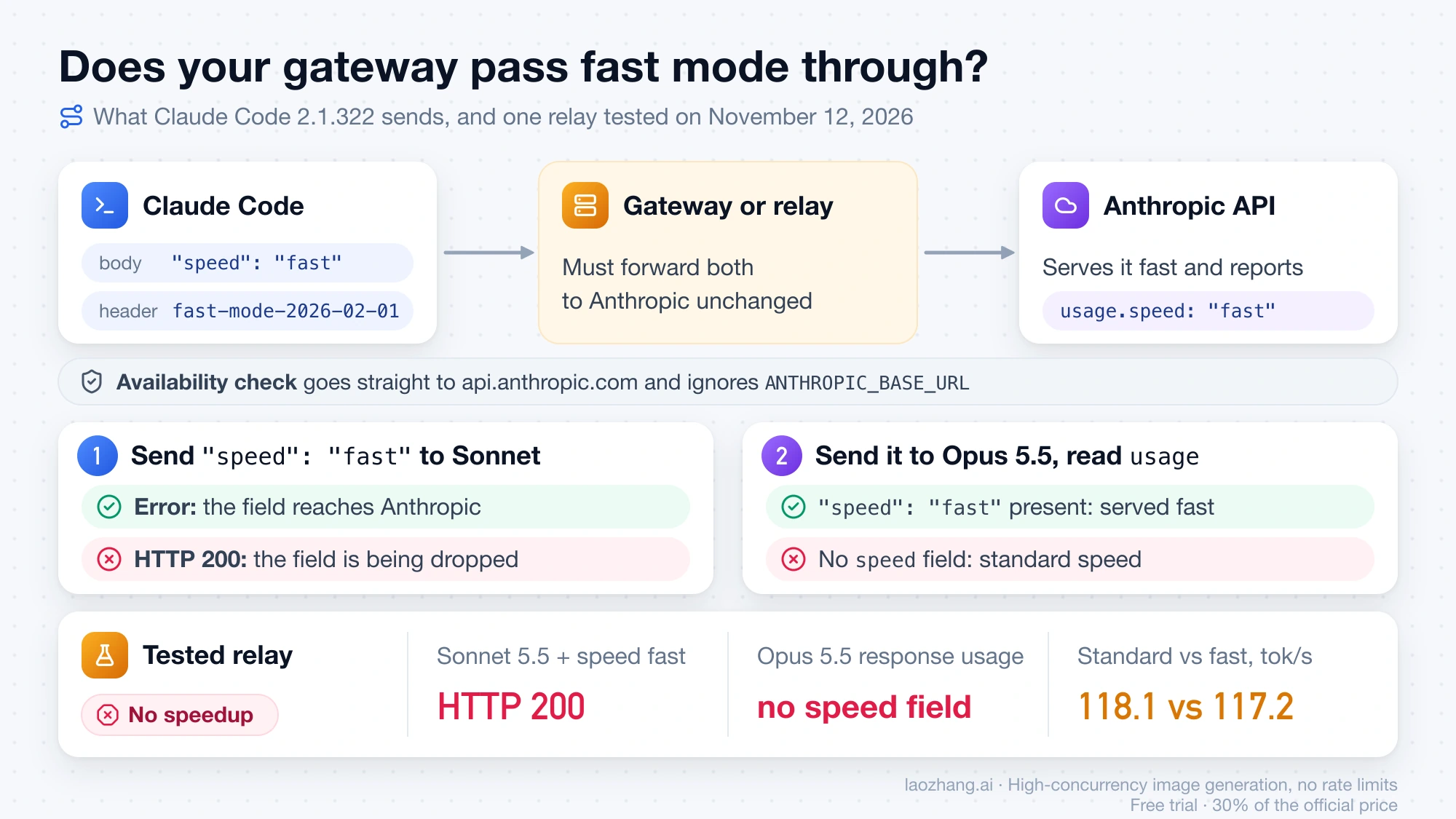
Claude Code asks for fast mode by adding "speed": "fast" and a beta header to each request, so a gateway can only deliver fast mode if it forwards both to Anthropic and Anthropic serves them. Before offering fast mode, Claude Code also checks your organization's availability with a request straight to api.anthropic.com. That check ignores ANTHROPIC_BASE_URL (it does use an HTTP proxy if you set one), which is why gateway users see fast mode messages even when normal requests work. Gateway setup itself is in Claude Code API Configuration: Keys, Settings, Models, and Gateways.
What Claude Code sends was captured on November 12, 2026 by pointing Claude Code 2.1.322 (-p with --settings '{"fastMode": true}') at a local mock of the Anthropic API. With fast mode on, every request body carried "speed": "fast" with model claude-opus-5-5, and fast-mode-2026-02-01 was appended to the anthropic-beta header. With ANTHROPIC_AUTH_TOKEN as the only credential, /fast answered "Fast mode has been disabled by your organization", and prompts then went out with no speed field at all, so the session ran at standard speed without any further message. Adding CLAUDE_CODE_SKIP_FAST_MODE_ORG_CHECK=1 brought "speed": "fast" back.
One result differs from the docs. Anthropic says a gateway-issued ANTHROPIC_API_KEY that isn't in Anthropic's key format leads to "Fast mode is currently unavailable" unless you set CLAUDE_CODE_SKIP_FAST_MODE_NETWORK_ERRORS=1. In the -p test, such a key needed no variable: /fast on printed ↯ Fast mode ON · $8/$40 per Mtok (this session only) and the requests carried "speed": "fast". Interactive sessions, or a client with an earlier cached check, may behave as the docs say.
Sending the field is only half of it. The same day, a request was sent through one third-party relay, LaoZhang's /v1/messages endpoint, with "speed": "fast" and the beta header on claude-opus-5-5. Every call returned HTTP 200, but the response usage had no speed field and service_tier read standard. Sonnet 5.5 and Haiku 5.5 with "speed": "fast", and Opus 5.5 with the made-up value "speed": "turbo", also returned 200, where Anthropic's API returns an error for a model without fast mode, so the relay removes the field before the request goes upstream. In four alternating non-streaming rounds of the same code-writing prompt, capped at 2,000 output tokens with thinking off, standard calls ran at a median of 118.1 output tokens per second (108.9–119.4) and "fast" calls at 117.2 (114.5–119.8): no speedup.
That result covers one relay on November 12, 2026, and other relays can behave differently. The same check works on any of them: send "speed": "fast" to a Sonnet model, and if it comes back 200, the field is being dropped; then send it to Opus 5.5 and look for "speed": "fast" in the response usage. A gateway that fails either check can't give you fast mode, whatever Claude Code shows.
Every "Fast mode …" message, what causes it and the fix
Most fast mode messages come from one of four causes: usage credits, an organization setting, the provider, or a gateway blocking Claude Code's availability check. The strings below were extracted from the Claude Code 2.1.322 binary on November 12, 2026, and matched with Anthropic's docs. Four of them aren't explained in the docs, and for those the cause is read from the wording and marked as inferred.
| Message | Cause | Fix |
|---|---|---|
| Fast mode requires usage credits | Subscription without usage credits turned on | Pro, Max, Ultra: turn them on in Settings > Usage or run /usage-credits; Team, Enterprise: a member with billing access turns them on at Organization settings > Usage |
| Fast mode requires a paid subscription | Not in the docs; the wording points to a free claude.ai account (inferred) | Use a paid plan with usage credits, or a paid Console API key |
| Fast mode has been disabled by your organization | Team or Enterprise Owner hasn't enabled it; managed settings set fastMode: false; fastModePerSessionOptIn outside an interactive terminal; or, behind a gateway, ANTHROPIC_AUTH_TOKEN alone or a TLS proxy answering the check | Ask the Owner (Organization settings > Claude Code) or Console admin (Claude Code preferences); in the gateway cases set CLAUDE_CODE_SKIP_FAST_MODE_ORG_CHECK=1 |
| … is not in your organization's allowed models | The availableModels allowlist excludes the model /fast would switch to | Start on an allowed model that supports fast mode, then run /fast; or ask an admin to allow it |
| Fast mode is not available on this provider | Amazon Bedrock, Microsoft Foundry or Claude Platform on AWS | None on that provider; use a Claude subscription or a Console API key |
| Fast mode is not available in the Agent SDK | claude -p or an Agent SDK session started without fast mode in --settings | Launch with claude -p --settings '{"fastMode": true}'; the settings file isn't enough |
| Fast mode unavailable during evaluation. Please purchase credits. | Console organization on the free Evaluation plan | Buy credits in the Console's billing settings |
| Fast mode unavailable due to network connectivity issues | The check to api.anthropic.com failed, usually a blocked network on a new install; requests run at standard speed | Allow direct access to api.anthropic.com, or set CLAUDE_CODE_SKIP_FAST_MODE_NETWORK_ERRORS=1 |
| Fast mode is currently unavailable | Gateway-issued key not in Anthropic's format, or CLAUDE_CODE_DISABLE_NONESSENTIAL_TRAFFIC set, so no check was sent | Set CLAUDE_CODE_SKIP_FAST_MODE_NETWORK_ERRORS=1 |
| Fast mode overloaded and is temporarily unavailable · resets in … | Not in the docs; the wording points to fast mode capacity being full, with standard speed meanwhile (inferred) | Wait for the stated time, since requests run at standard speed meanwhile, or run /fast off |
Gray ↯, then "Fast limit reset · now using fast mode" | Fast mode's separate rate limit was hit; standard speed and price during the cooldown | Nothing; it comes back by itself, or run /fast to turn it off |
| Fast mode disabled · Out of usage credits | Usage credits ran out mid-session; requests are retried at standard speed and fast mode is turned off for the session, while your saved preference stays on | Add credits or raise your limit, then run /fast |
| Fast mode disabled · usage credit limit reached | Not in the docs; the wording points to the monthly spending limit you set on usage credits (inferred) | Raise the limit in Settings > Usage, then run /fast |
| Fast mode disabled · Usage credits turned off by your organization / for your account | Usage credits were switched off for the organization or the account | Ask the organization's admin, or turn them back on in Settings > Usage |
| Fast mode needs Vertex region global, us or eu | Agent Platform with Fable 5.2 in another region | export VERTEX_REGION_CLAUDE_FABLE_5_2=global before starting Claude Code |
| Using standard speed on Fable 5.2 · fast mode wasn't available | Agent Platform refused fast mode for that request | Run /fast on to try again |
| Fast mode was refused for this project · trying again in … | Agent Platform answered a fast request with 403 or 404 | Wait, or run /fast on to retry sooner |
| … auto mode is off while fast mode is on. Run /fast off to change this. | Not in the docs; the wording says auto mode doesn't run while fast mode is on (inferred) | Run /fast off if you need auto mode |
| Opus 4.8 fast mode is deprecated and will be removed on … | Fast mode on Opus 4.8 is being removed | /model to Opus 5.5, or /fast off to stay on Opus 4.8 |
Running out of usage credits can look like fast mode turning itself off. In Claude Code GitHub issue #107249 about fast mode switching itself off, a user running several sessions with background subagents saw fast mode go off repeatedly while settings.json still said "fastMode": true, and closed the issue on November 4, 2026 once it turned out the usage credits were exhausted. In -p with --output-format stream-json, the same notice arrives as a system message with subtype notification once per turn, and fast mode stays on. A mistyped argument, such as /fast maybe, returns Unknown argument "maybe". Use: /fast [on|off]. To turn fast mode off everywhere, whatever any setting says, set CLAUDE_CODE_DISABLE_FAST_MODE=1.
Sources5
External pages this guide links to, in the order they appear. Last updated Nov 12, 2026.
Sources5
External pages this guide links to, in the order they appear. Last updated Nov 12, 2026.
- 1.Claude Code fast mode documentationcode.claude.com/docs/en/fast-mode
- 2.Claude API fast mode documentationplatform.claude.com/docs/en/build-with-claude/fast-mode
- 3.Claude API pricing pageplatform.claude.com/docs/en/about-claude/pricing
- 4.Claude Code GitHub issue #100998 about the Desktop fast mode togglegithub.com/anthropics/claude-code/issues/100998
- 5.Claude Code GitHub issue #107249 about fast mode switching itself offgithub.com/anthropics/claude-code/issues/107249