Claude Code Effort Level: Model Defaults and Why It Won't Stick
Claude Code runs Opus 5.5, Sonnet 5.5 and Haiku 5.5 at medium effort by default. Check with /effort status; /effort high saves per model, max lasts one session.
On this page
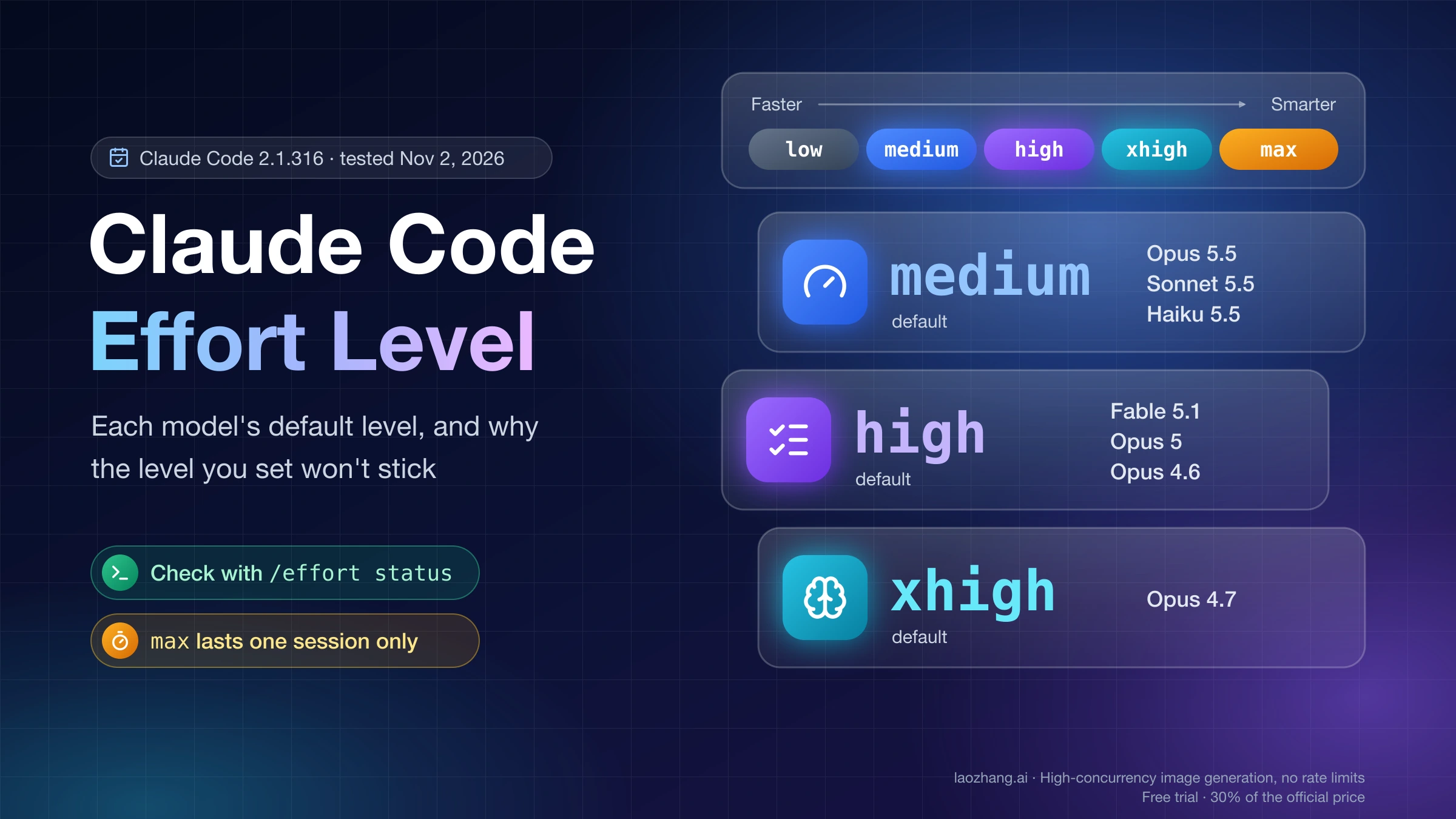
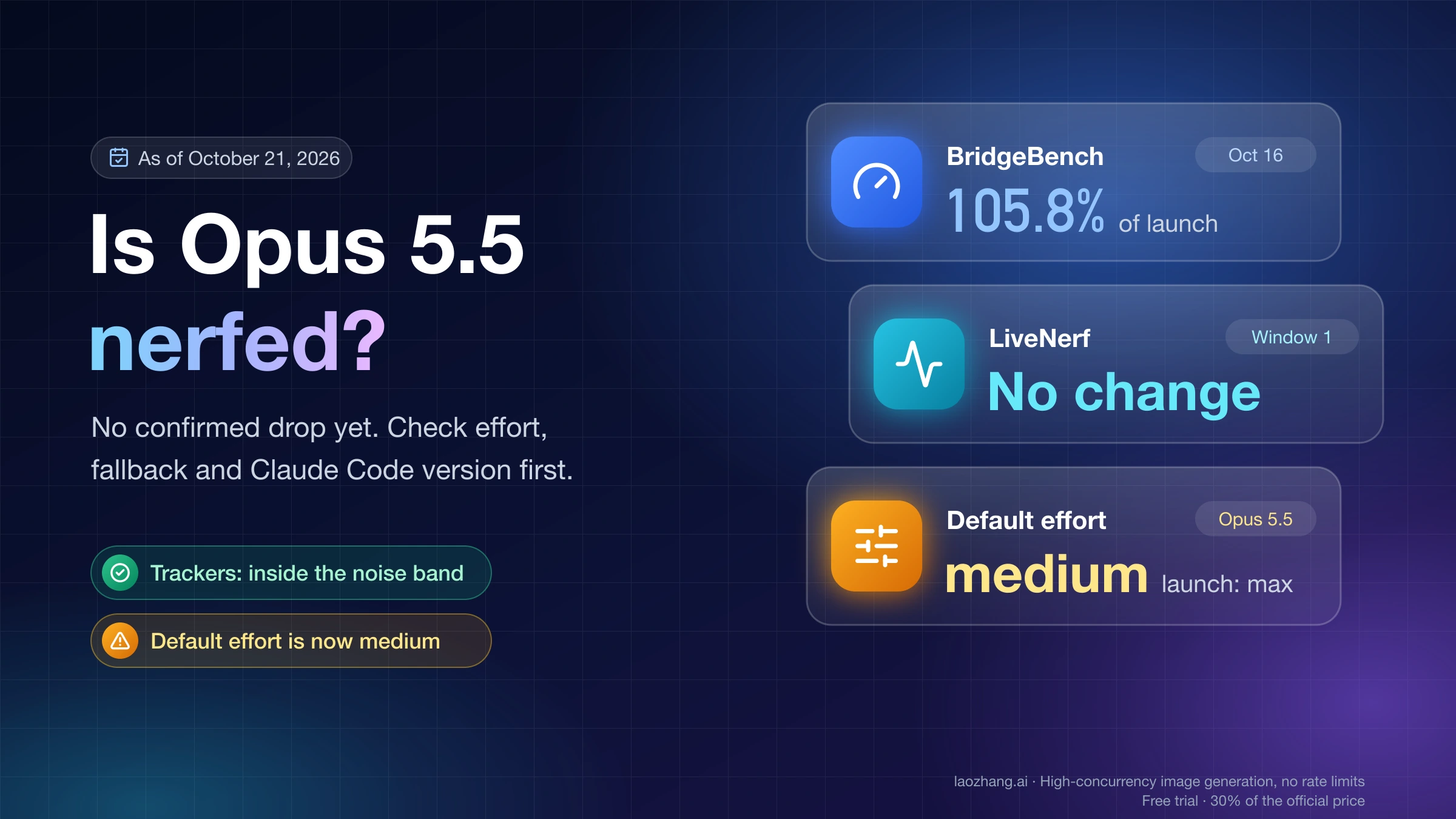
Effort in Claude Code is how much work Claude puts into each request: how much it thinks, how many files it reads and commands it runs, and how far it goes before checking back with you. It doesn't change which model answers. As of November 2, 2026, Claude Code starts Opus 5.5, Sonnet 5.5 and Haiku 5.5 at medium, Opus 4.7 at xhigh, and every other model that supports effort at high. So a footer that says medium on Opus 5.5 is the intended default, not a downgrade, and Anthropic reports that Opus 5.5 at medium matches or beats Opus 5 at high on its coding evaluations.
To see what your session is running at, type /effort status. To change it, type /effort high (or another level): in an interactive session this saves the level for the current model under modelSettings in ~/.claude/settings.json, so the next session starts there too. Press s in the /effort slider instead if you only want it for this session. max never saves this way; it lasts one session unless you set it with the CLAUDE_CODE_EFFORT_LEVEL environment variable.
If a level you set keeps coming back different, something earlier in Claude Code's order of precedence is deciding instead. The usual culprits are CLAUDE_CODE_EFFORT_LEVEL in your shell profile, an old top-level effortLevel key that Opus 5.5 ignores, a project settings file, or a maxEffortLevel cap.
What effort changes in Claude Code, and when you need a bigger model
Effort controls how much Claude does on a request overall, not just how long it thinks. Anthropic's article Choosing a Claude model and effort level in Claude Code describes it this way: at higher effort Claude reads more files, runs more tests and double-checks more before it comes back to you, while at lower effort it would rather ask you for context than spend tokens working it out alone. It is also not a token limit. The Claude API effort documentation calls it "a behavioral signal, not a strict token budget": at a low level Claude still thinks on a hard problem, just less than it would at a higher one.
It does make a difference you can see. In Anthropic's tests on Opus 5.5 and Fable 5.1, described in the Claude Code model configuration docs, Claude at a higher level tested more edge cases, verified more of its work and made more decisions on its own, while a lower level returned a starting point sooner. The scale is calibrated per model, so medium on Opus 5.5 is not the same amount of work as medium on Opus 5. Opus 5.5 tends to think more per turn at a given level, which is why the docs advise starting it at medium instead of carrying over the high you used on Opus 5.
When a result disappoints, the kind of mistake tells you which knob to turn. If Claude had all the context, clearly tried and still got it wrong, Anthropic's guidance is to pick a more capable model. If it skipped a file, didn't run the tests or gave up on a refactor halfway, raise the effort level. Whether Sonnet at a high level beats Opus one level lower is a cost question of its own, covered in Claude Sonnet 5.5 vs Opus 5.5: When Half the Price Really Saves.
Default effort level for each model in Claude Code
Claude Code's default depends on the model, and so does the list of levels you can pick. Below, each model's documented default sits next to the value Claude Code actually sent for it in a November 2, 2026 test, and the two match for all seven. Opus 4.6 and Sonnet 4.6 have no xhigh at all, and models missing from the official list don't support effort.
| Model | Levels you can use | Default in Claude Code docs | Sent in the November 2, 2026 test |
|---|---|---|---|
| Opus 5.5 | low, medium, high, xhigh, max | medium | medium |
| Sonnet 5.5 | low, medium, high, xhigh, max | medium | medium |
| Haiku 5.5 | low, medium, high, xhigh, max | medium | medium |
| Fable 5.1 | low, medium, high, xhigh, max | high | high |
| Opus 5 | low, medium, high, xhigh, max | high | high |
| Opus 4.7 | low, medium, high, xhigh, max | xhigh | xhigh |
| Opus 4.6 | low, medium, high, max | high | high |
The last column comes from a run on November 2, 2026: Claude Code 2.1.316 on macOS, an empty config directory, and ANTHROPIC_BASE_URL pointed at a local mock server that only records the requests it receives, with no real model behind it. Each model was started with claude -p "Reply with OK" --model claude-opus-5-5 (changing the model ID) and nothing else set, and every request carried thinking: {"type": "adaptive"} plus the output_config.effort value shown. The other runs quoted below used the same setup. They show what Claude Code sends; they say nothing about how a real model answers or how many tokens it uses. Fable 5, Sonnet 5 and Opus 4.8 default to high and Sonnet 4.6 matches Opus 4.6 according to the docs, but those four weren't part of the run.
Sonnet 5.5 is the model where Claude Code and the raw API disagree. Claude Code sends medium for it, while the Claude API defaults Sonnet 5.5 to high when a request sends no effort, so a script that calls the API directly runs Sonnet 5.5 one level higher than your Claude Code session unless you set the level. What each Sonnet 5.5 level costs compared with Sonnet 5 is in Claude Sonnet 5.5 vs Sonnet 5: Cost by Effort and What Breaks.
Which effort level to use for your kind of work
Start with the model's default and change it as a standing preference for the type of work you do, not task by task; that is the advice in Anthropic's own Claude Code article. Drop to low when you review every result anyway, move up to high when a bug fix has to be verified, and keep xhigh and max for long or hard work you want Claude to finish without you.
| Level | Fits this kind of work | What you trade |
|---|---|---|
low | Quick exchanges where you check each result: brainstorming, a first sketch, a rename | Fastest and cheapest; Claude asks you for context instead of digging for it |
medium | Day-to-day engineering with a clear scope, such as implementing a feature; the default on Opus 5.5, Sonnet 5.5 and Haiku 5.5 | On models that default to high, saves tokens on cost-sensitive work at some loss of capability |
high | Work where verification matters or edge cases are likely, such as fixing a bug in an existing codebase | More reading, testing and double-checking before Claude replies |
xhigh | Deeper reasoning on long-running agentic or coding work | Higher token spend; not available on Opus 4.6 or Sonnet 4.6 |
max | Hard problems you want Claude to work through alone, such as hunting for security vulnerabilities | Diminishing returns and a tendency to overthink; lasts one session |
Higher levels spend more tokens on work that benefits from them, although Anthropic says Claude generally won't inflate usage on simple tasks just because the level is high. On a Pro, Max or Ultra plan that still means a sustained xhigh or max habit reaches your limits sooner; to see where your tokens actually go, use the /usage checks in Claude Code Usage Limits: Check, Audit, and Reduce Token Usage.
max vs xhigh vs high: is the highest level the best one?
max is the deepest level on every model that supports effort in Claude Code, but it is not the better default. The model configuration docs warn that max "may show diminishing returns and is prone to overthinking, so test before adopting it broadly." When you set it interactively, Claude Code 2.1.316 says the same thing in its confirmation, which in the November 2, 2026 session read Set effort level to max (this session only): Maximum capability with deepest reasoning. May use excessive tokens resulting in long response times or overthinking. Use sparingly for the hardest tasks.
The practical difference is persistence. max can't be saved: /effort max applies to the current session, and settings files don't accept it, so a user settings file with "effortLevel": "max" made Claude Code send Opus 5's default, high, in the November 2 run, with no message in -p output. The only way to keep max across sessions is CLAUDE_CODE_EFFORT_LEVEL=max. xhigh, by contrast, can be saved as your default per model, so it is the level to use if you want Claude to go deeper on everything. On Opus 4.6 and Sonnet 4.6, which lack xhigh, asking for it runs at high. For a bug fix where verification matters, the docs point to high.
How to check the effort level your session actually uses
/effort status is the reliable check, because the header and footer show the level you set even while Claude may still be finishing a turn at the old one. If the answer isn't the level you expect, work down from the settings that outrank everything else.
- Type
/effort status.Effort level: auto (currently medium)means you haven't picked a level and Claude Code is sending the model's default,mediumin this case.Effort level: autowith nothing after it means no effort is sent at all. After you pick a level, it reports that level instead. - Look at the footer. In the November 2, 2026 session on Opus 5.5 it read
◐ medium · /effortat startup,● highafter/effort highand◈ maxafter/effort max. The footer shows the level only briefly at startup and whenever it changes, while a session header such as "with low effort" keeps showing the level set. - In the shell you launch from, run
echo $CLAUDE_CODE_EFFORT_LEVEL. Any value there wins over/effort,--effortand every settings file. - Open
~/.claude/settings.jsonand look for amodelSettingsentry for your model, a top-leveleffortLeveland anymaxEffortLevel. Then check the project's.claude/settings.jsonand.claude/settings.local.json, and ask your admin whether managed settings set effort. - After
/modelswitches or an automatic model fallback, run/effort statusagain. After a fallback, Claude Code keeps the level the flagged request ran at, so a session on Opus 5.5 atmediumthat falls back to Opus 4.8 stays atmediumeven though Opus 4.8 defaults tohigh.
How to change the effort level, and how long each method lasts
Pick the method by how long you want the level to last: one turn, one session, every session on one model, or every session started from one shell. In an interactive session on your own machine, /effort followed by low, medium, high or xhigh saves that level as your default for the active model, and s in the slider keeps it to this session.
| Method | Example | Lasts for | Notes |
|---|---|---|---|
/effort plus a level | /effort high | Saved for this model in later sessions | max applies to this session only; in -p runs, remote-worker sessions and the Agent SDK every level is session-only |
/effort slider, then Enter | /effort, then Left/Right | Saved for this model | Same rules as typing the level |
/effort slider, then s | /effort, then Left/Right, s | This session only | Needs v2.1.257 or later |
/model picker | Left/Right on the effort slider | Enter saves, s is session-only | The new level starts with your next message at the latest |
--effort at launch | claude --effort xhigh | This launch | Beats settings files; loses to the environment variable and to a level you pick in the session |
| Environment variable | export CLAUDE_CODE_EFFORT_LEVEL=max | Every session started from that shell | Beats every other setting and is the only way to keep max |
modelSettings in a settings file | See the JSON below | Every session on that model | What /effort writes for you |
Top-level effortLevel | "effortLevel": "xhigh" | Every session on models without a saved level | Ignored by Opus 5.5 and later models when it sits in ~/.claude/settings.json; applies to every model in project, local or managed settings |
| Remote Control on a phone or browser | The effort control in the remote view | This session only | Needs v2.1.234 or later |
In the November 2, 2026 interactive session (Claude Code 2.1.316, Opus 5.5, fresh config, the same recording endpoint), /effort high printed Set effort level to high (saved as your default for new sessions): Comprehensive implementation with extensive testing and documentation and added this entry to settings.json:
{
  "modelSettings": {
    "claude-opus-5-5": {
      "effortLevel": "high"
    }
  }
}
/effort max in the same session left that file untouched and sent the next message at max. The entry is keyed by the model's canonical name, and Claude Code matches aliases, date-suffixed IDs and [1m] variants to it, so you can edit or remove it by hand. Settings files accept low, medium, high and xhigh, not max, and ultracode has its own key.
The slider itself prints low medium high xhigh max between "Faster" and "Smarter", with ←/→ to adjust · Enter to confirm · s for this session only · Esc to cancel underneath, and Tab flips the Ultracode toggle. Left and Right also move the effort slider inside /model, and you can rebind them as effortSlider:decreaseEffort, effortSlider:increaseEffort, modelPicker:decreaseEffort and modelPicker:increaseEffort. A new level applies from your next message; to switch in the middle of a long turn, queue a short message such as keep going while Claude is still working.
Which effort setting wins when two disagree
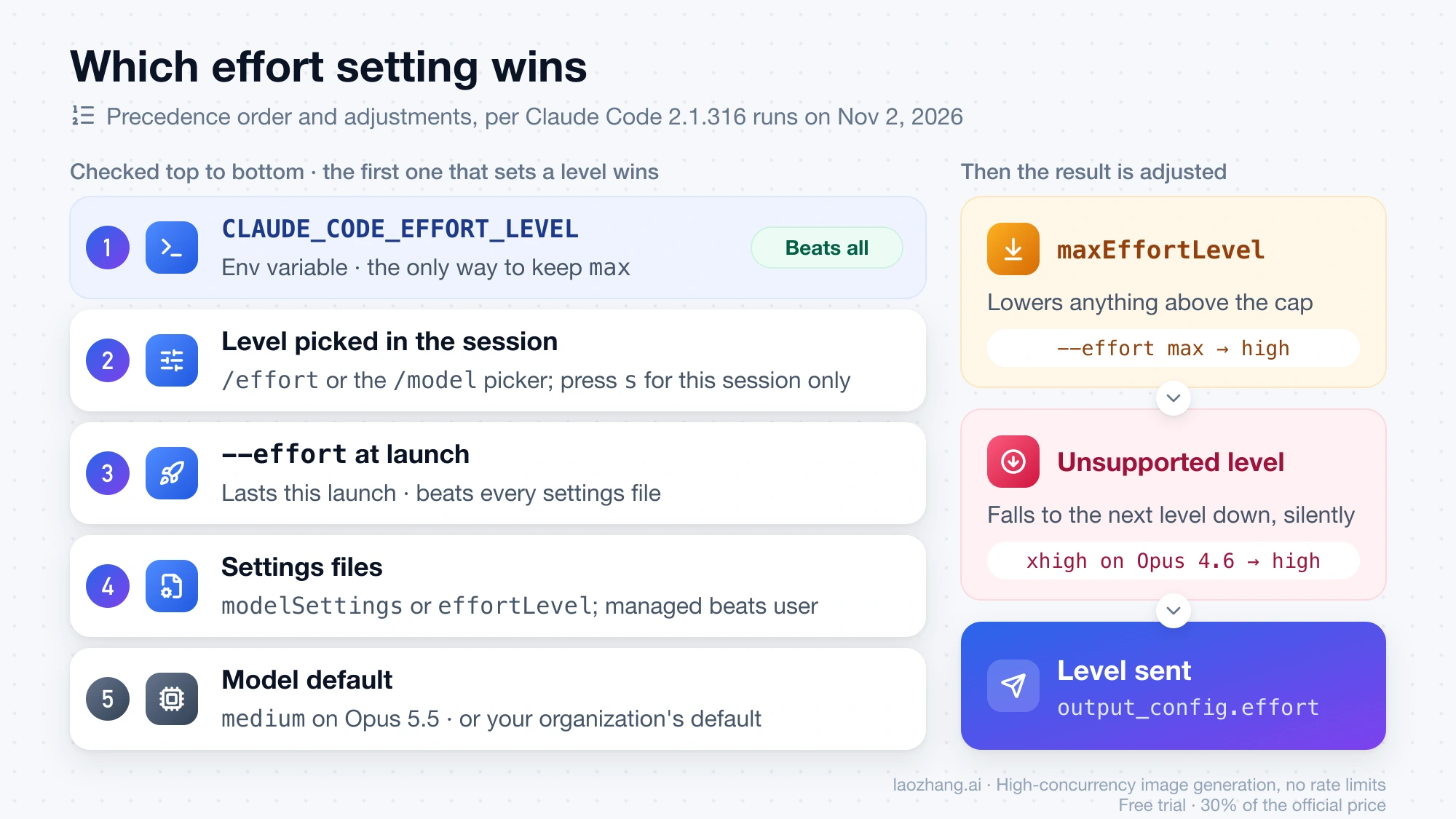
Claude Code takes the first place in this order that sets a level, and ignores the rest:
- The
CLAUDE_CODE_EFFORT_LEVELenvironment variable. - A level you pick in the session with
/effort, the/modelpicker, orapplyFlagSettings()in the Agent SDK. --effortat launch.- Settings: the model's entry under
modelSettingsor a top-leveleffortLevel, where the highest-precedence settings file that sets either one decides, so managed settings outrank a level you saved in your user file. - The model's default from the table above, or your organization's default effort if you are running its default model.
Two things then adjust the result. A maxEffortLevel cap lowers anything above it, and a level the model doesn't support falls to the highest supported level below it. The November 2, 2026 runs with Claude Code 2.1.316 confirm the order for launch flags, the environment variable and the user settings file; project and managed settings follow the documented rules but weren't part of the test.
| Setup | Model | Effort sent |
|---|---|---|
--effort max | Opus 5.5 | max |
--effort low | Opus 5.5 | low |
--effort xhigh | Opus 4.6 | high, with no warning |
--effort banana | Opus 5.5 | medium, with an "Unknown --effort value" warning |
CLAUDE_CODE_EFFORT_LEVEL=low plus --effort high | Opus 5.5 | low |
CLAUDE_CODE_EFFORT_LEVEL=max | Opus 5.5 | max |
CLAUDE_CODE_EFFORT_LEVEL=auto | Opus 5.5 | No effort field at all |
User settings "effortLevel": "high" | Opus 5.5 | medium |
User settings "effortLevel": "high" | Fable 5.1 | high |
User settings "effortLevel": "max" | Opus 5 | high, with no message |
modelSettings entry for Opus 5.5 at high | Opus 5.5 | high |
modelSettings entry for Opus 5.5 at high | Sonnet 5.5 | medium |
modelSettings entry for Opus 5.5 at high plus --effort low | Opus 5.5 | low |
Effort level won't stick: symptoms, causes and fixes
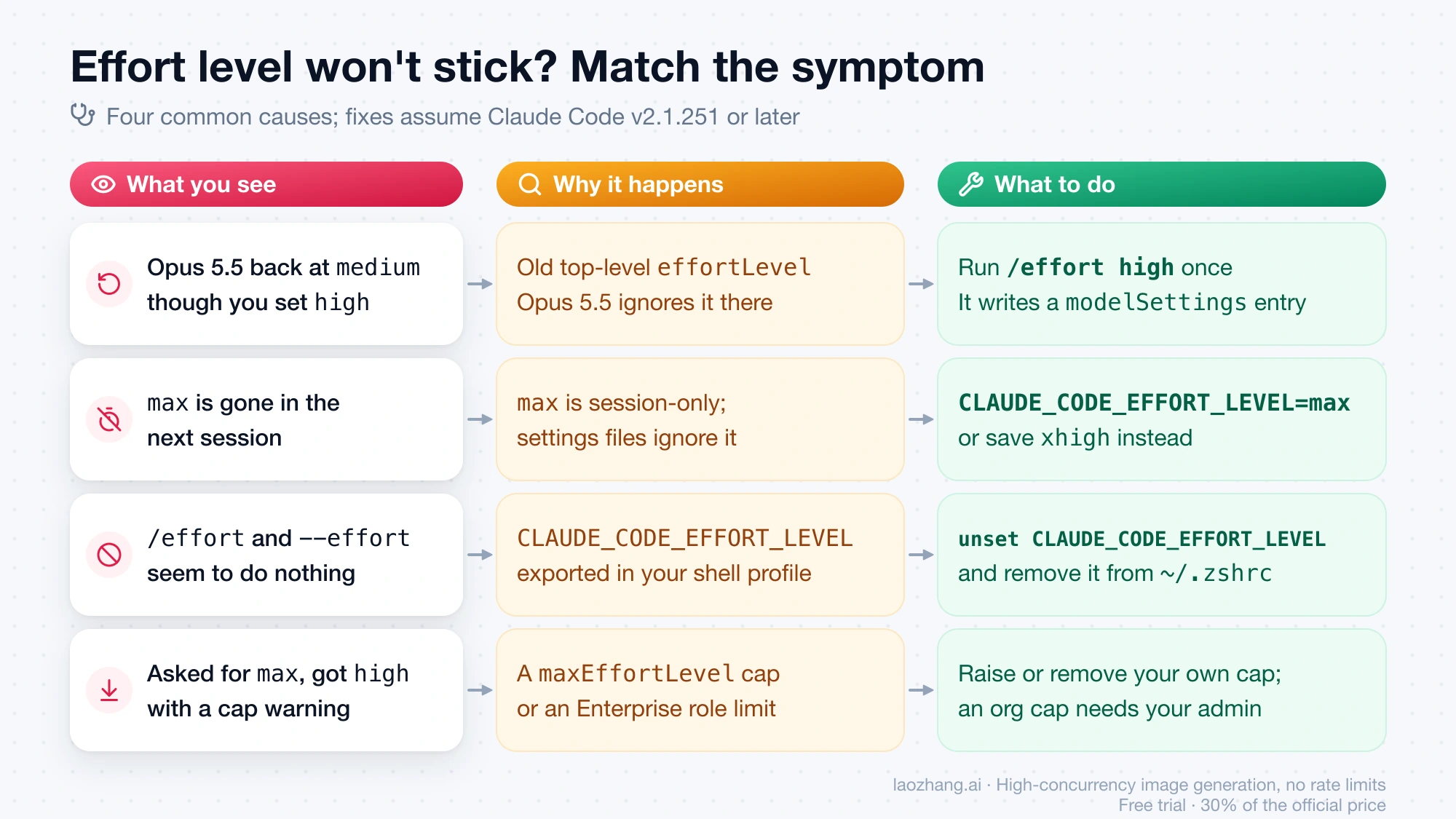
When a level you set doesn't hold, the cause is usually one of three things: Opus 5.5 ignoring an old key, max being session-only by design, or a higher-ranked setting overriding your choice. Match what you see to a row below; each fix assumes Claude Code v2.1.251 or later, the version that started saving levels per model.
| What you see | Why it happens | What to do |
|---|---|---|
Opus 5.5 starts at medium though you set high long ago | Your high is a top-level effortLevel in ~/.claude/settings.json, the form /effort wrote before v2.1.251. Opus 5.5 and later models ignore it there. | Switch to Opus 5.5 and run /effort high once. It writes a modelSettings entry that Opus 5.5 reads. |
max is gone in the next session | max is session-only, and settings files ignore it without a message | Launch with --effort max, export CLAUDE_CODE_EFFORT_LEVEL=max, or save xhigh instead |
You saved high on Opus 5.5, but Sonnet 5.5 is still at medium | Levels are saved per model | Switch to Sonnet 5.5 and set its level there |
/effort and --effort seem to do nothing, or the level keeps switching back | CLAUDE_CODE_EFFORT_LEVEL is exported from your shell profile and outranks both | Run unset CLAUDE_CODE_EFFORT_LEVEL, remove the line from ~/.zshrc or ~/.bashrc, and start a new session |
| Your saved level holds everywhere except in one repository | That project's .claude/settings.json or .claude/settings.local.json sets effortLevel, which outranks your user file | Edit the project setting, or pick a level for the session with /effort |
You ask for max and get high, with Effort 'max' exceeds the cap for claude-opus-5-5 set by your settings or organization; using 'high'. | A maxEffortLevel in one of your settings files, or a Claude Enterprise role limit, caps the model | Raise or remove your own cap; an organization cap needs your admin |
--effort xhigh runs at high on Opus 4.6 or Sonnet 4.6 | The model has no xhigh, so Claude Code falls back silently | Use max, or switch to a model with xhigh |
Warning: Unknown --effort value 'banana' — ignoring it and using the default effort. Valid values: low, medium, high, xhigh, max. | The value isn't a level Claude Code knows | Use one of the five listed values |
| After a model fallback, the new model runs at the old model's level | The session keeps the level the flagged request ran at | Run /effort or pick a model in /model |
| The level changed but the current turn still runs at the old one | A new level starts with your next message | Queue keep going while Claude works |
| A skill or subagent runs at a different level | Its markdown frontmatter sets effort | Edit the frontmatter, or note that CLAUDE_CODE_EFFORT_LEVEL overrides it |
The cap message in that table is what Claude Code 2.1.316 printed on November 2, 2026 for --effort max with "maxEffortLevel": "high" in a plain-text -p run. With the same cap and CLAUDE_CODE_EFFORT_LEVEL=xhigh, it sent high and printed nothing, so a capped environment variable fails silently.
/effort auto vs CLAUDE_CODE_EFFORT_LEVEL=auto
The two "auto" settings do different things. /effort auto clears the level you saved for the active model, so Claude Code goes back to sending that model's default. CLAUDE_CODE_EFFORT_LEVEL=auto (or unset), exported before you start claude, makes Claude Code send no effort at all, and the API's own default applies instead.
In the November 2, 2026 interactive session on Opus 5.5, /effort auto printed Effort level set to auto, turned the saved claude-opus-5-5 entry into {}, and the next message went out at medium, with /effort status reporting Effort level: auto (currently medium). With the environment variable set to auto, the -p request carried no effort field, and the docs say the header and footer then show no level and /effort status prints Effort level: auto. The difference matters most on Sonnet 5.5: according to the Claude API effort docs its API default is high, so sending nothing runs Sonnet 5.5 one level above Claude Code's own medium. If /effort status still shows auto (currently ...) with the variable set, a maxEffortLevel below max is making Claude Code send its default lowered to the cap; remove the cap or set it to max. Versions before v2.1.304 printed auto (currently high) even when nothing was sent.
Ultracode is a toggle, not a sixth effort level
Ultracode is a Claude Code setting, not an effort level. With it on, Claude plans dynamic workflows for substantial tasks at whatever effort level the session already runs at, and since v2.1.284 turning it on or off leaves the level unchanged. So "max vs ultracode" isn't a choice between two levels: max decides how hard Claude works, and Ultracode decides whether it organizes the task as a workflow.
You turn it on with /effort ultracode, off with /effort ultracode off, or with Tab in the /effort slider followed by Enter; "ultracode": true in a settings file keeps it on. The exception is the launch flag. claude --effort ultracode turns Ultracode on and also sets the level to xhigh, and in the November 2, 2026 run it sent xhigh on Opus 5.5 and high on Opus 4.6, where Ultracode isn't available because the model lacks xhigh, so Claude Code starts with Ultracode off at the highest level allowed up to xhigh. The workflow orchestration itself wasn't exercised, since the mock server only returns plain text. Neither effortLevel nor CLAUDE_CODE_EFFORT_LEVEL accepts ultracode, and Ultracode is also unavailable when workflows are turned off. Descriptions written before v2.1.284 say that turning it on forces xhigh and that picking another level turns it off; that was the old behavior.
ultrathink and "think hard": one deeper turn, or plain text
Typing ultrathink anywhere in a prompt asks for deeper reasoning on that one turn without touching your session level. Other phrases such as "think", "think hard" or "think more" are passed through as ordinary text. In the terminal on Claude Code v2.1.311 or later, the word can also raise that turn to xhigh, and it shows in rainbow colors when it can.
The November 2, 2026 runs showed the two behaviors side by side. In an interactive terminal session at medium, the turn typed as ultrathink about this and reply with OK went out at xhigh, the next plain turn went back to medium, and the footer stayed at medium throughout. In claude -p "ultrathink: reply with OK", the request stayed at medium, and Claude Code added this line to the context: The user included the keyword "ultrathink", requesting deeper reasoning on this turn. Reason as thoroughly as the task warrants. A -p prompt starting with "think hard" added nothing at all. If the word isn't rainbow, the docs list the usual blockers: a CLAUDE_CODE_EFFORT_LEVEL below xhigh, a cap below xhigh, or a model other than Opus 5.5, Sonnet 5.5, Haiku 5.5 or Fable 5.1. On providers where the word can't raise a turn, such as Amazon Bedrock, set the effort level instead.
Capping effort for a team or one model with maxEffortLevel
To keep people at or below a level, use maxEffortLevel, not effortLevel. A managed effortLevel only sets a starting default that users can still change with /effort or --effort, while maxEffortLevel lowers any higher request to the cap, including the environment variable, skill and subagent frontmatter and the model's own default. Claude Code applies the cap on the client before each request, so it holds on Amazon Bedrock, Google Cloud's Agent Platform and Microsoft Foundry as well; it needs v2.1.267 or later.
The key works in any settings file. Deployed in managed settings it applies to the whole organization, and when several scopes set a cap the lowest one wins, so a user can't raise a managed cap from their own file. A "max" value means no cap, and a per-model entry under modelSettings replaces the top-level cap for that model within the same file. This example from the settings reference caps every model at medium and exempts Sonnet 4.6:
{
  "maxEffortLevel": "medium",
  "modelSettings": {
    "claude-sonnet-4-6": {
      "maxEffortLevel": "max"
    }
  }
}
On Claude Enterprise, admins can also set a maximum effort per model for each custom role (v2.1.195 or later), and when both apply the lower cap wins. Levels above a cap disappear from the /effort picker. A plain-text --print run with --effort above the cap prints a warning on stderr, as in the symptom table above; in interactive sessions and with json or stream-json output, that warning goes to the debug log instead.
Claude Code effort level: other questions
Can a skill or subagent use its own effort level?
Yes. Set effort in the skill's or subagent's markdown frontmatter, and Claude Code runs at that level while the skill's turn or the subagent runs, whatever level you launched with or saved, unless the subagent's invocation overrides it. A skill forked with context: fork keeps its level for the forked subagent's whole run. Two limits apply, according to the Claude Code model configuration docs as of November 2, 2026: CLAUDE_CODE_EFFORT_LEVEL still wins over frontmatter, and a maxEffortLevel or organization cap still lowers it.
What does "Effort 'xhigh' isn't available with thinking turned off" mean?
It means you turned extended thinking off and asked for a level above high on a model that rejects that combination, such as Opus 5. The full message is API Error: Effort 'xhigh' isn't available with thinking turned off on this model · run /effort high to continue, or turn thinking back on (unset MAX_THINKING_TOKENS=0). Either run /effort high or turn thinking back on by unsetting MAX_THINKING_TOKENS or removing "alwaysThinkingEnabled": false from your settings. Versions before v2.1.242 showed the API's wording, API Error: 400 output_config.effort 'xhigh' is not supported when thinking is disabled on this model., and since v2.1.251 Claude Code sends high instead to models it knows reject the pair. Opus 5.5, Sonnet 5.5, Haiku 5.5 and the Fable models can't turn thinking off at all, so effort is the only control there. If a gateway returns a 400 about the thinking type rather than effort, see Fix Claude Code 400: thinking type should be enabled or disabled.
Does the effort level work on Bedrock or through a custom gateway?
It works when Claude Code recognizes the model ID. Claude Code turns on effort levels, including xhigh and max, by matching the model ID against patterns it knows, and provider-specific IDs such as Amazon Bedrock application inference profile ARNs or Microsoft Foundry deployment names often don't match, which leaves /effort disabled. On Bedrock, Google Cloud's Agent Platform and Foundry, the Claude Code model configuration docs (as of November 2, 2026) fix this by declaring what the pinned model supports with ANTHROPIC_DEFAULT_OPUS_MODEL_SUPPORTED_CAPABILITIES, or the SONNET, HAIKU and FABLE versions of that variable, for example effort,xhigh_effort,max_effort,thinking,adaptive_thinking. Listed capabilities are turned on and unlisted ones off for that model. These variables have no effect through an ANTHROPIC_BASE_URL gateway, where only the _NAME and _DESCRIPTION variables apply, or on api.anthropic.com.
Once effort is on, Claude Code sends the level in the request body as output_config.effort. In the November 2, 2026 run through a custom ANTHROPIC_BASE_URL with standard model IDs such as claude-opus-5-5, every request carried it. The maxEffortLevel cap holds on every provider because Claude Code applies it before sending. Two other things differ: on Amazon Bedrock, ultrathink can't raise a turn, and on third-party providers before v2.1.242, /effort waited until the current turn ended before taking effect. If a gateway rejects a request over effort, first check that the model supports the level in the defaults table; CLAUDE_CODE_EFFORT_LEVEL=auto makes Claude Code send no effort field, which isolates whether the field is the problem.
Sources3
External pages this guide links to, in the order they appear. Last updated Nov 2, 2026.
Sources3
External pages this guide links to, in the order they appear. Last updated Nov 2, 2026.