ChatGPT Unblocked at School, Work or Abroad: Find the Block
A blocked ChatGPT is usually an outage, a Cloudflare check, a school or work filter, an unsupported country, or an account issue. Each has its own fix.
On this page
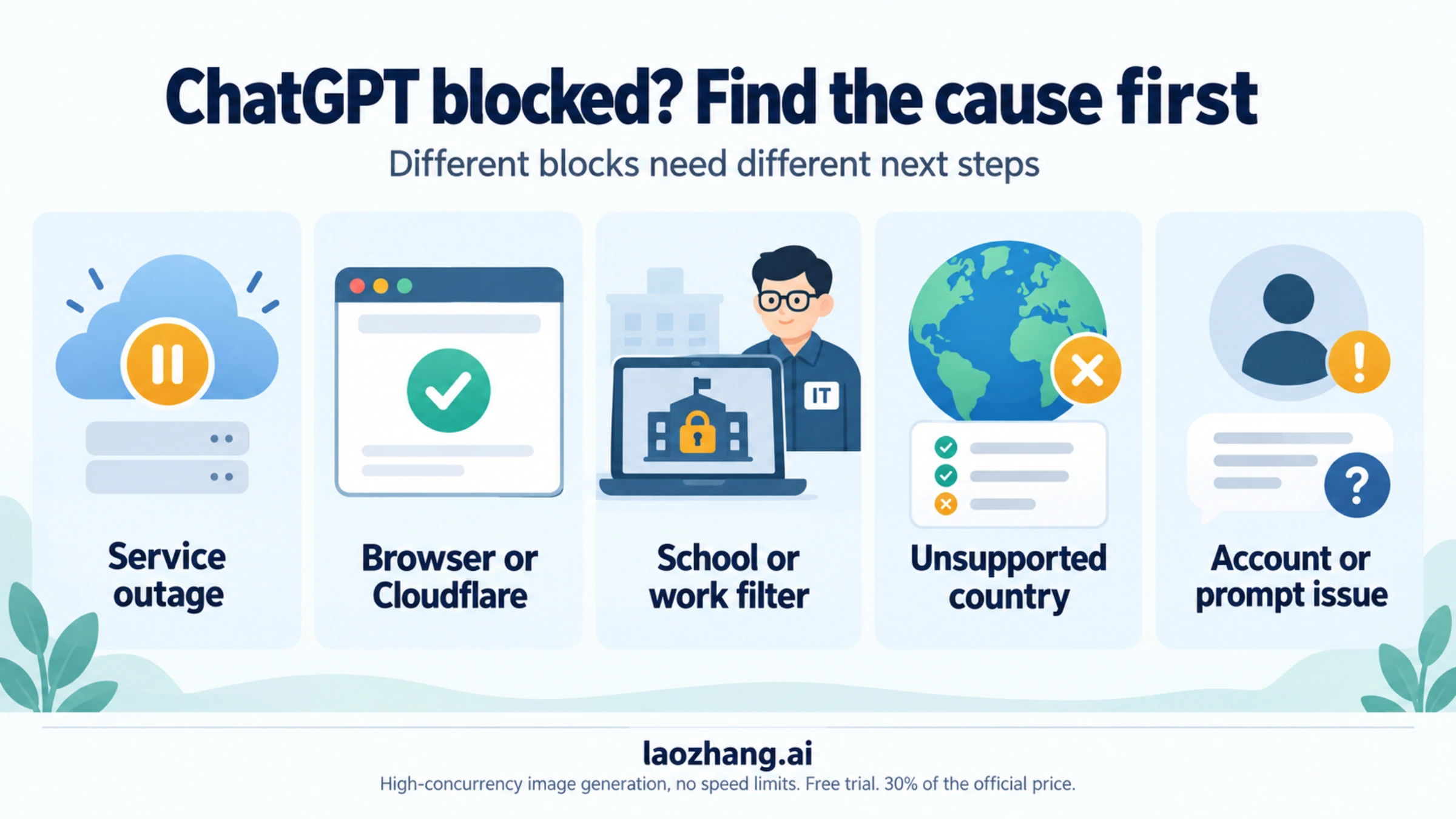
"ChatGPT unblocked" covers five different problems, and each one has a different fix: ChatGPT itself is down, Cloudflare is stopping your browser or IP address, a school or work network filters the site, you are in a country OpenAI does not serve, or your account or a single prompt has been blocked. The steps below follow OpenAI's help articles as of October 8, 2026. VPN, proxy, DNS and hotspot tricks don't fix most of these blocks, and some make them worse: OpenAI names VPNs as a cause of the "Sorry, you have been blocked" error, and using ChatGPT from an unsupported country can get the account suspended. At school, the way to get ChatGPT unblocked is through the school itself, and the school section below shows what to ask for.
First — Is ChatGPT Actually Blocked?
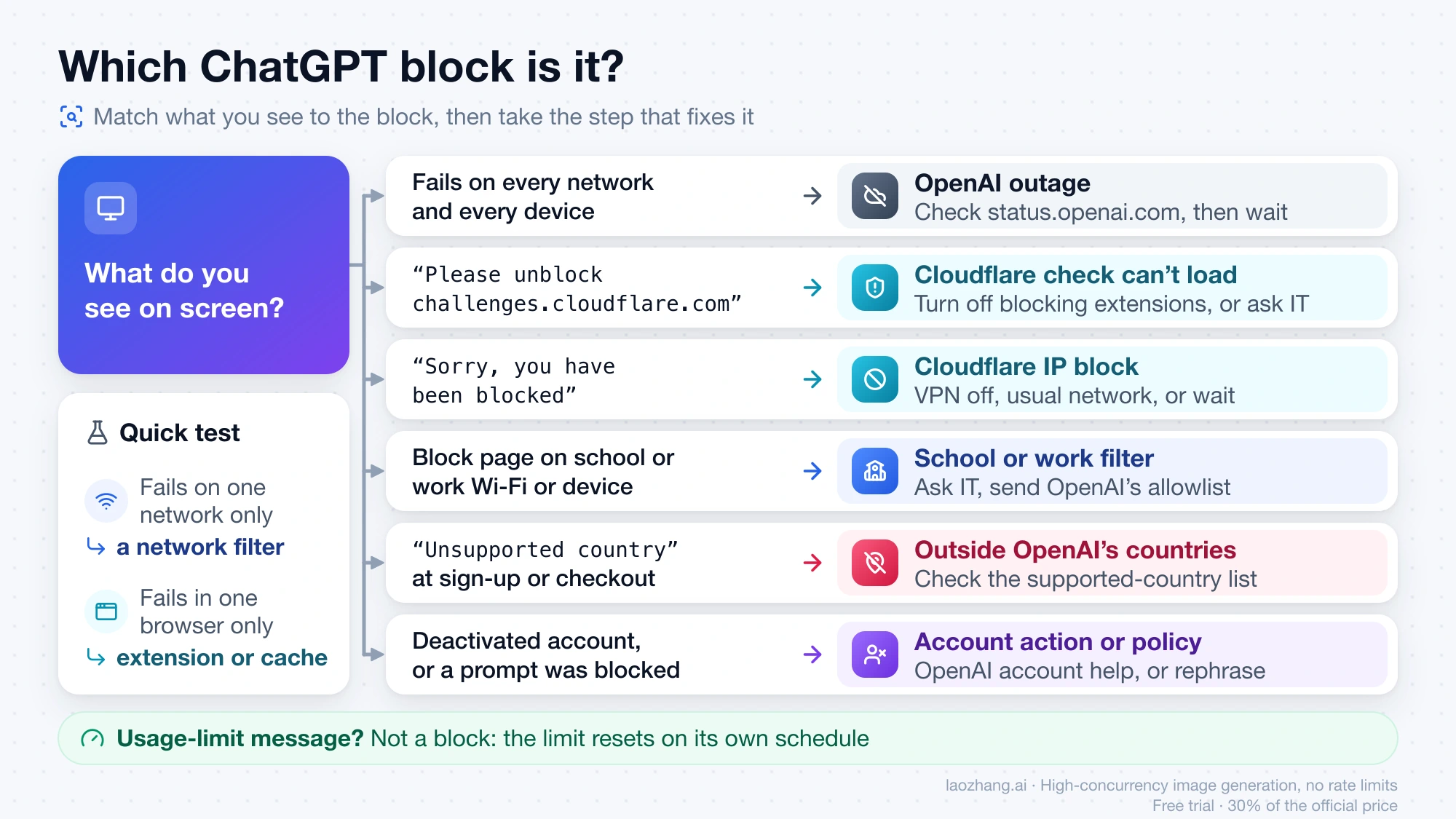
Start with what you actually see on screen. The table maps each symptom to the likely cause and the step that resolves it.
| What you see | Most likely block | What you can do |
|---|---|---|
| ChatGPT fails everywhere, on every network and device | OpenAI outage | Check status.openai.com and wait for the incident to close |
| "Please unblock challenges.cloudflare.com to proceed" | Cloudflare's check can't load: a browser extension or a network filter blocks it | Turn off blocking extensions for chatgpt.com; on a managed network, ask IT to allow challenges.cloudflare.com |
| "Sorry, you have been blocked" | Cloudflare IP block | Turn off any VPN, connect from your usual network, or wait for a temporary block to lift |
| A school block page, or ChatGPT blocked only on a school Chromebook or school Wi-Fi | School filter or device management | Ask your teacher or school IT; send them OpenAI's allowlist; use the tool they approve |
| A company block page, or ChatGPT only fails on the office network | Employer's network filter | Ask IT or your manager; use the AI tool the company approves |
| "Unsupported country" at sign-up, login or checkout | Your location or payment method is outside OpenAI's supported list | Check OpenAI's supported-country list; travelers follow OpenAI's return-home steps |
| "Deactivated" or "deleted" account errors, or a message that a prompt was blocked | Account action or content policy | Use OpenAI's account help and appeal route; rephrase prompts that conflict with the usage policies |
A usage-limit message belongs to none of these. OpenAI says reaching a usage limit does not mean your account is restricted; the limit resets on its own schedule. The ChatGPT usage limits by plan guide explains what each plan caps and when it resets.
Is ChatGPT down? Check status.openai.com first
If ChatGPT fails on your home Wi-Fi, on mobile data and in the app, the problem is almost certainly not a block. Open OpenAI's status page and look for an active incident affecting ChatGPT. OpenAI's own network guidance for IT teams also starts here: check the status page before changing any network settings. During an outage nothing on your side will help, and changing settings only adds a second problem once the service returns.
If the status page is green and ChatGPT fails on one network but works on another network you normally use, such as your home connection, you are probably looking at a network filter. If it fails in one browser but works in another, a browser extension or cached data is the more likely cause.
"Please unblock challenges.cloudflare.com to proceed": what the message means
This message appears when your browser cannot load Cloudflare's security check, which ChatGPT runs before it lets you in. OpenAI lists challenges.cloudflare.com among the domains a network has to allow for ChatGPT to work. When that domain is blocked, the check never completes and ChatGPT asks you to unblock it.
Two things usually block it:
- A browser extension. Ad blockers, script blockers and privacy extensions can stop the challenge from loading. Open chatgpt.com in a private window with extensions disabled, or in a different browser. If it works there, allow chatgpt.com and challenges.cloudflare.com in the extension, or turn the extension off for those sites.
- A network filter. School, company, hotel and some home routers or parental-control tools block unfamiliar domains. If the message only appears on one network, the filter's owner has to add
challenges.cloudflare.comto the allowlist. The school section below explains what to send them.
Clearing the browser's cache and cookies for chatgpt.com is also worth trying once, because a stale challenge cookie can keep failing after the cause is gone.
"Sorry, you have been blocked" on ChatGPT: Cloudflare's IP block
This one is different. OpenAI's help article Why am I getting "Sorry, you have been blocked" error? explains that Cloudflare blocks the IP address you are connecting from when it detects suspicious activity. OpenAI names two causes:
- VPN use. A VPN hides your original IP address, and Cloudflare can treat the shared VPN address as suspicious.
- Location. If your IP address comes from an area Cloudflare treats as high-risk, it may block access.
OpenAI's steps are short: turn off any VPN, connect from a different, lower-risk location if you can (in practice, your usual home or mobile connection rather than a shared or public one), or wait, because temporary blocks lift after a while. A VPN therefore tends to cause this error rather than fix it.
How to Unblock ChatGPT at School (2026 Guide)
On a school network or a school-managed device, only the school can unblock ChatGPT. Ask your teacher or the school's IT staff, point them to OpenAI's allowlist, and use the AI tool the school approves. On your own phone or laptop, on your home connection, the school's filter doesn't apply, but the school's rules on AI use for assignments still do.
Schools usually block ChatGPT over academic integrity, distraction during class, or a blanket rule on new web services. Many have since moved from outright bans to an AI policy: ChatGPT allowed in certain classes, for teachers only, or through an approved tool or an education plan the school manages, such as ChatGPT Edu. So the first question to ask is what your school's AI policy actually says.
Getting around the filter with a DNS change, guest mode, a VPN extension or a phone hotspot breaks most schools' acceptable-use policies. On a school device it is usually logged, and it can cost you device or network privileges.
Ask your teacher or school IT to allowlist ChatGPT
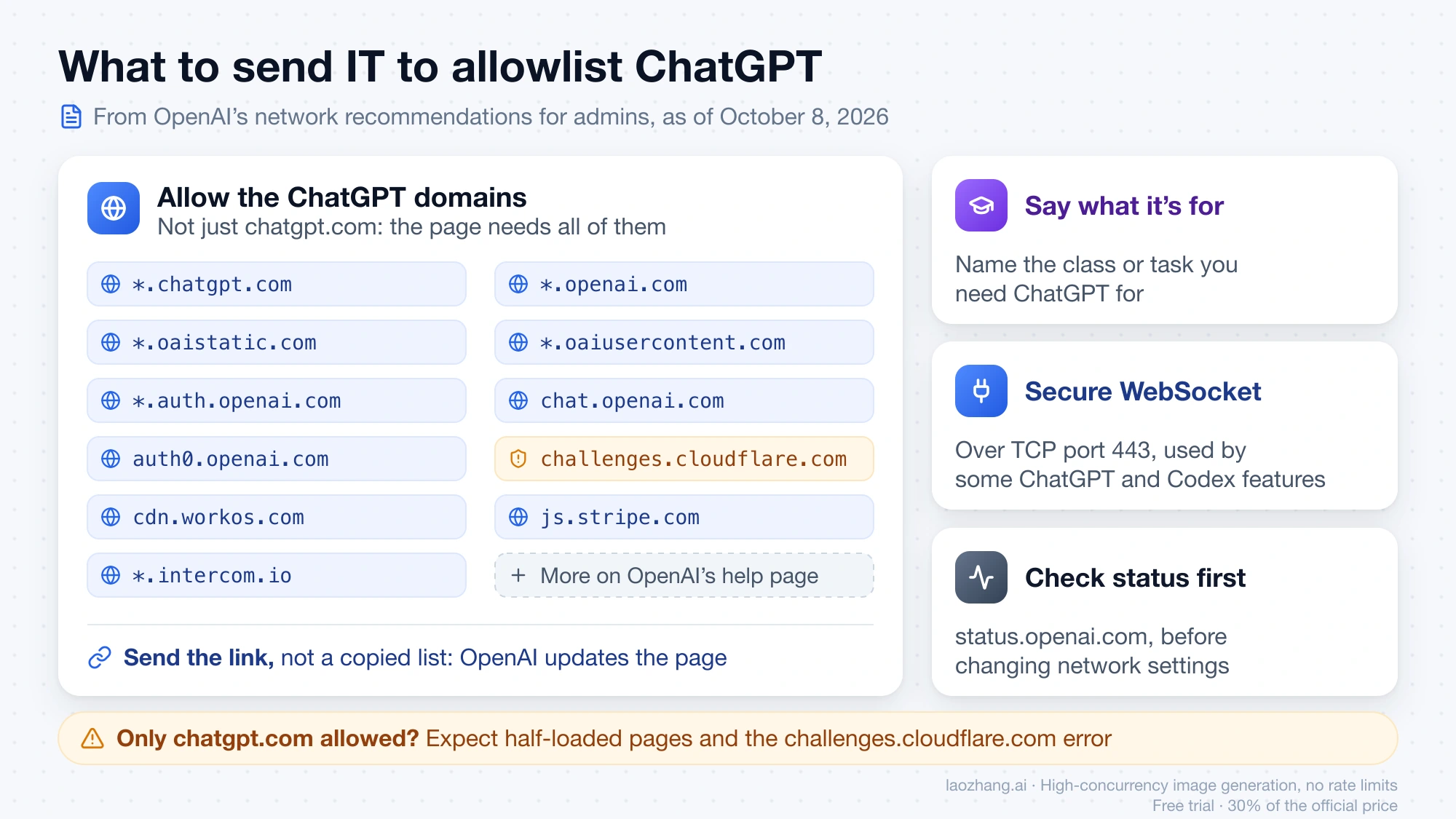
A request with specifics gets further than "please unblock ChatGPT." Say which class or task you need it for, and give IT OpenAI's network recommendations for ChatGPT errors on web and apps, which OpenAI writes for administrators. The key points as of October 8, 2026:
- Allow the ChatGPT domains, including
*.chatgpt.com,*.openai.com,*.oaistatic.com,*.oaiusercontent.com,*.auth.openai.com,chat.openai.com,auth0.openai.com,challenges.cloudflare.com,cdn.workos.com,js.stripe.comand*.intercom.io. The full list is on the help page. - Allow secure WebSocket traffic over TCP port 443, which some ChatGPT and Codex features use.
- Check OpenAI's status page before troubleshooting the network.
Sending the link is better than sending a copied list, because OpenAI updates the page. A school that allows chatgpt.com but not the rest of the list will see half-loaded pages and the "Please unblock challenges.cloudflare.com" error.
How to unblock ChatGPT on a school Chromebook
A school Chromebook is managed by the school. Its administrator decides which websites, extensions and browsing modes the device allows, and those settings usually stay in force on any network, so ChatGPT can stay blocked on a school Chromebook even on your home Wi-Fi. That is also why guest mode, extensions or a different network rarely help, and why trying them on a managed device shows up in the school's logs.
The working path is the same as above: ask your teacher to request access from the school's IT team, and include OpenAI's network page so they can allow every domain ChatGPT needs, not just chatgpt.com. If the school says no, use the AI tool it provides on the Chromebook, and use ChatGPT on a device of your own.
Is there a ChatGPT not blocked by school?
Not one that is allowed on a school network or device without the school's approval. Sites advertising an "unblocked ChatGPT" for school are third parties, not OpenAI, and the school's policy usually covers them too; the fake-site warning below explains the risks. What does work:
- ChatGPT through the school, when your teacher or IT allows it, or an AI tool the school provides.
- The official ChatGPT on your own device and connection, at home or wherever the school's rules don't apply. The Free plan costs $0, so you don't need a third-party site to use it.
How to Access ChatGPT at Work
At work, ask your manager or IT team rather than routing around the filter. Companies usually block ChatGPT because staff might paste confidential data into an outside AI tool, and many monitor managed devices and network traffic. Installing a VPN on a work laptop to reach a blocked site can be a firing offense in many companies, so the direct request is both safer and more likely to work.
Ask first whether the company already has an approved option, such as a ChatGPT Business or Enterprise workspace or an AI assistant inside tools it already licenses. If you want ChatGPT itself allowed, make the case with specific tasks (drafting, summarizing, code prototypes) and ask how the company wants confidential data handled. IT will need the same OpenAI domain list and WebSocket rule described in the school allowlist section.
If ChatGPT is blocked on your home network, the filter is usually a parental-control app or a router setting. The person who manages it can allow the same domains.
How to Use ChatGPT in Restricted Countries
ChatGPT is only offered in the countries and territories on OpenAI's supported-countries list. As of September 26, 2026, the list includes the United States, Japan, South Korea, Spain and Taiwan. Mainland China, Hong Kong, Russia and Belarus are not on it. Check the current list yourself, because OpenAI changes it.
OpenAI is explicit about what happens outside that list. Its help article on ChatGPT and API services in unsupported countries and territories says that accessing or offering access to ChatGPT or the OpenAI API from an unsupported country "may result in your account being blocked or suspended," and that using payment methods from outside the supported countries "will result in you being blocked from using our services." The supported-countries page carries the same warning. So a VPN, a proxy or a borrowed phone number doesn't make ChatGPT available in an unsupported country. It puts the account at risk instead, and OpenAI's Cloudflare layer may block the connection anyway.
If you live in a country that is not on the list, the honest answer is that ChatGPT is not offered to you there. The AI alternatives section below explains how to check what is officially available where you live.
Traveling and ChatGPT stopped working
OpenAI's article I'm traveling to a different country and I can't access ChatGPT or the API says that logging in can fail while you are in an unsupported region. Once you are back in a supported country and still see an "unsupported country" error, clear your browser's cache and cookies, then try a different browser or a private window. If that doesn't work, contact OpenAI support.
Paying for ChatGPT Plus from a supported country
If you are in a supported country and the block is really a declined card or a checkout error, that's a billing problem, not a network block. How to Pay for ChatGPT Plus: Checkout Checks and Recharge Risks covers what to confirm before you pay, and ChatGPT Payment Declined: Payment Was Not Approved, Card Declined covers failed payments. To decide which plan is worth paying for, see ChatGPT Go vs Plus vs Pro: which plan is worth it.
Developer Access — Using ChatGPT API in Restricted Regions
The OpenAI API follows the same country rule as ChatGPT: the warning above names both. Routing API calls through a relay or proxy in another country is still access from an unsupported country, so it doesn't change the answer for developers. If you build in a supported country and API calls fail on a company network, the same allowlist approach applies: ask IT to allow OpenAI's domains.
Account deactivated or prompt blocked: two different ChatGPT blocks
Some "blocked" messages have nothing to do with the network.
The account is deactivated, deleted or suspended. You can reach the login page, but signing in fails with an account error, or you received an email about a policy violation. OpenAI's help articles Troubleshooting "deleted or deactivated" account errors and Why was my OpenAI account deactivated? describe the official route. For the appeal itself, what evidence to keep and how to export your data, see ChatGPT Account Banned or Deactivated? Appeal, Evidence, Export, and Backup Steps. Creating a new account from a different location doesn't resolve a deactivation.
A single prompt is blocked. OpenAI's article Why was my ChatGPT prompt blocked? explains that ChatGPT can block prompts that conflict with its Terms of Use and Usage Policies. That isn't an access problem. Rephrase the request so it clearly states a legitimate purpose. Prompts written to slip past the policies (jailbreaks) can lead to account action.
Stay Safe — Avoiding Fake "ChatGPT Unblocked" Sites
"Unblocked ChatGPT" websites, along with sites calling themselves "ChatGPT no login" or "unlimited ChatGPT", are not run by OpenAI. Some are wrappers that send your text to an AI model they pay for, some run a different model under the ChatGPT name, and some exist to collect logins, payments or personal data. Even a harmless one gets a copy of everything you type, under its own privacy policy, if it has one. The same goes for "modded" ChatGPT APKs and "unblocker" browser extensions.
Before you use any site that offers ChatGPT, check four things:
- The domain. Official ChatGPT runs on chatgpt.com, and OpenAI's sign-in happens on chatgpt.com and openai.com addresses. The official mobile apps come from OpenAI in the App Store and Google Play. Any other domain is a third party.
- The login prompt. Never enter your OpenAI email and password, or a one-time code, on any other domain. A site that asks for them is phishing for your account.
- The payment. OpenAI sells ChatGPT plans at chatgpt.com and inside the official apps. As of October 8, 2026, Plus costs $20/month in US list prices. A third party selling "unblocked" or "unlimited" ChatGPT access is not selling an OpenAI product.
- Downloads and extensions. If a site insists you install something to "unblock ChatGPT", don't. A padlock in the address bar only means the connection is encrypted. It says nothing about who runs the site.
If what you want is ChatGPT unblocked and free, the official Free plan already is: it costs $0, and OpenAI says Free users get unlimited everyday text chats, subject to abuse-prevention safeguards, with separate limits on uploads, images, voice and other tools.
AI Alternatives That Work When ChatGPT Is Blocked
If ChatGPT isn't offered where you live, or your school or employer has approved a different tool, use an assistant that is officially available in your country. None of these is a way around a ChatGPT block. A school or company filter that blocks ChatGPT often blocks them too, and the same ask-IT route applies.
Google Gemini (gemini.google.com). Google publishes its own availability lists for Gemini and Google AI plans, and they are separate from OpenAI's. As of October 8, 2026, the Gemini API's list of available regions includes the United States, Japan, South Korea, Spain and Taiwan, and leaves out Russia, mainland China and Hong Kong. Students in the US have a specific offer: eligible US college students aged 18 and over can get Google AI Pro free for one year, redeemable until December 31, 2026. A valid payment method is required, and it renews at $19.99/month unless canceled.
Claude (claude.ai) from Anthropic has a Free plan; check where Anthropic offers it before you sign up. Before counting on a Pro trial, read Claude Pro Free Trial: What's Real and Who Qualifies.
Microsoft Copilot and Perplexity are also widely used. Check each product's own availability page and terms for your country before you sign up, and don't assume a tool is available just because its site happens to load.
Frequently Asked Questions
Is it allowed to unblock ChatGPT at school?
Only through the school. A school network and school-managed devices are covered by its acceptable-use policy, and getting around the filter with a VPN, DNS change or hotspot usually breaks that policy. The allowed path is to ask your teacher or IT staff whether ChatGPT, or an approved alternative, can be enabled for your class.
Are there unblocked ChatGPT websites that work at school?
No site turns a school filter off. Sites using that name are third parties, not OpenAI, and the school's filter or policy usually covers them as well. Use the official chatgpt.com when your school allows it, or the AI tool your school provides.
Will a VPN fix ChatGPT in a country where it isn't available?
OpenAI's help center says that accessing ChatGPT from an unsupported country may get your account blocked or suspended, and it names VPN use as a cause of the "Sorry, you have been blocked" error. A VPN doesn't change which countries OpenAI serves. Check the supported-countries list instead, and use a service that is officially available where you are.
Why does ChatGPT work on my phone but not on my laptop?
Usually because the two devices are on different networks, use different browsers, or the laptop is managed by a school or employer. If the laptop is a school Chromebook or a work computer, its management settings or the network filter are the likely cause. If both are your own devices on the same network, try the laptop in a private window with extensions disabled. A blocking extension often produces the "Please unblock challenges.cloudflare.com" message.
What is the difference between unblocking and jailbreaking ChatGPT?
Unblocking is about reaching chatgpt.com at all, when a network, a country rule or an account action stops you. Jailbreaking means writing prompts meant to get around OpenAI's content policies. Jailbreaking violates OpenAI's terms and can lead to account action, and it has nothing to do with network access.
Sources9
External pages this guide links to, in the order they appear. Last updated Oct 8, 2026.
Sources9
External pages this guide links to, in the order they appear. Last updated Oct 8, 2026.
- 1.status.openai.comstatus.openai.com
- 2.Why am I getting "Sorry, you have been blocked" error?help.openai.com/en/articles/7967834-why-am-i-getting-sorry-you-have-been-blocked-error
- 3.network recommendations for ChatGPT errors on web and appshelp.openai.com/en/articles/9247338-network-recommendations-for-chatgpt-errors-on-web-and-apps
- 4.OpenAI's supported-countries listhelp.openai.com/en/articles/7947663-chatgpt-supported-countries
- 5.ChatGPT and API services in unsupported countries and territorieshelp.openai.com/en/articles/9131992-chatgpt-and-api-services-in-unsupported-countries-and-territories
- 6.I'm traveling to a different country and I can't access ChatGPT or the APIhelp.openai.com/en/articles/9022015-im-traveling-to-a-different-country-and-i-cant-access-chatgpt-or-the-api
- 7.Troubleshooting "deleted or deactivated" account errorshelp.openai.com/en/articles/8958977-troubleshooting-deleted-or-deactivated-account-errors
- 8.Why was my OpenAI account deactivated?help.openai.com/en/articles/10562188-why-was-my-openai-account-deactivated
- 9.Why was my ChatGPT prompt blocked?help.openai.com/en/articles/9824988-why-was-my-chatgpt-prompt-blocked