Why ChatGPT Slows Down in Long Conversations—and How to Fix It Safely
Keep the old thread, run one small prompt in a fresh chat, and let that control decide whether to hand off the work or troubleshoot the broader path.
On this page
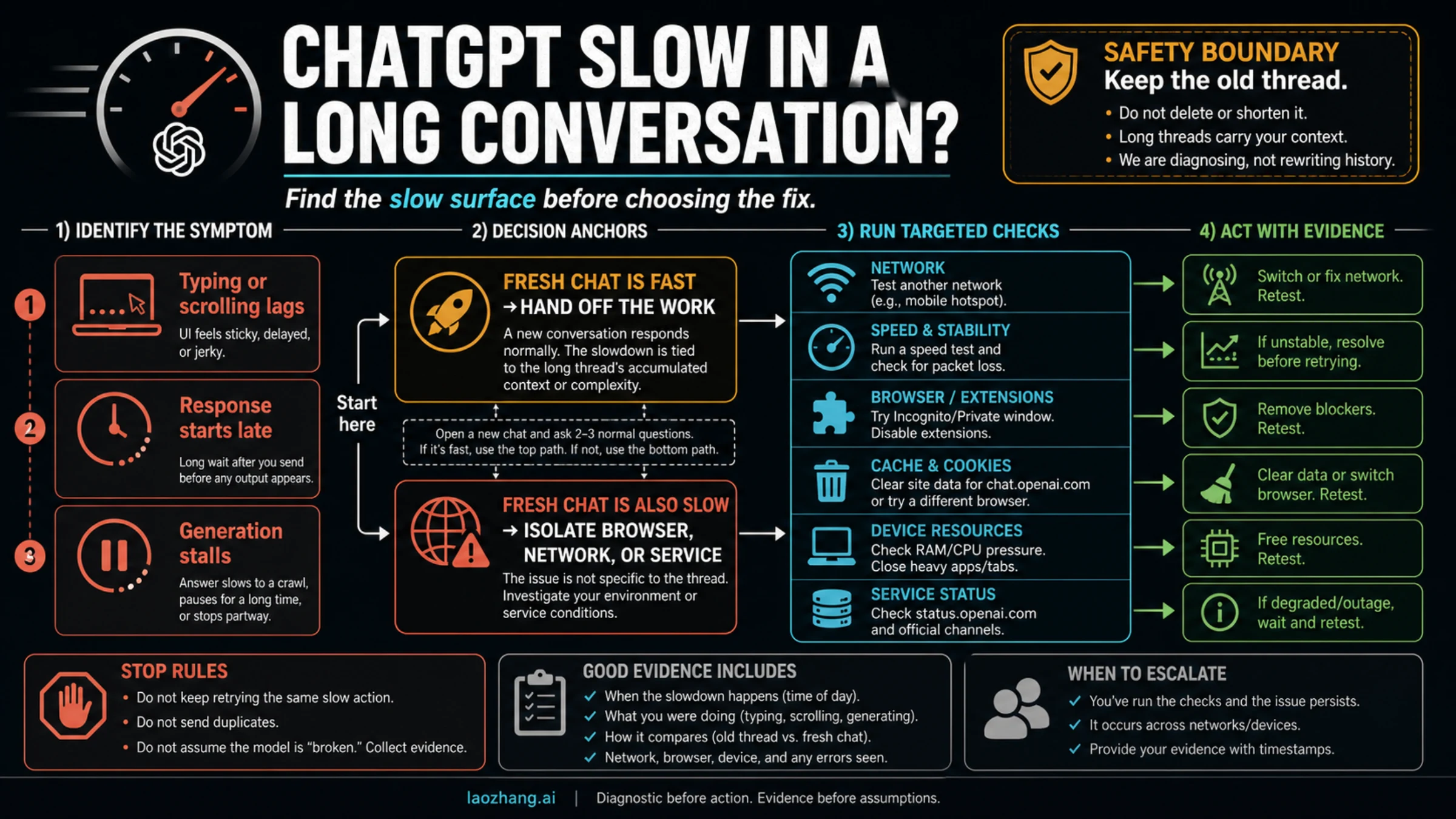
A long ChatGPT conversation can feel slow in three different places: typing or scrolling may lag, the reply may take longer to start, or generation may stall. Do not delete or clear the old thread. Open a fresh chat and send one small prompt you can easily repeat.
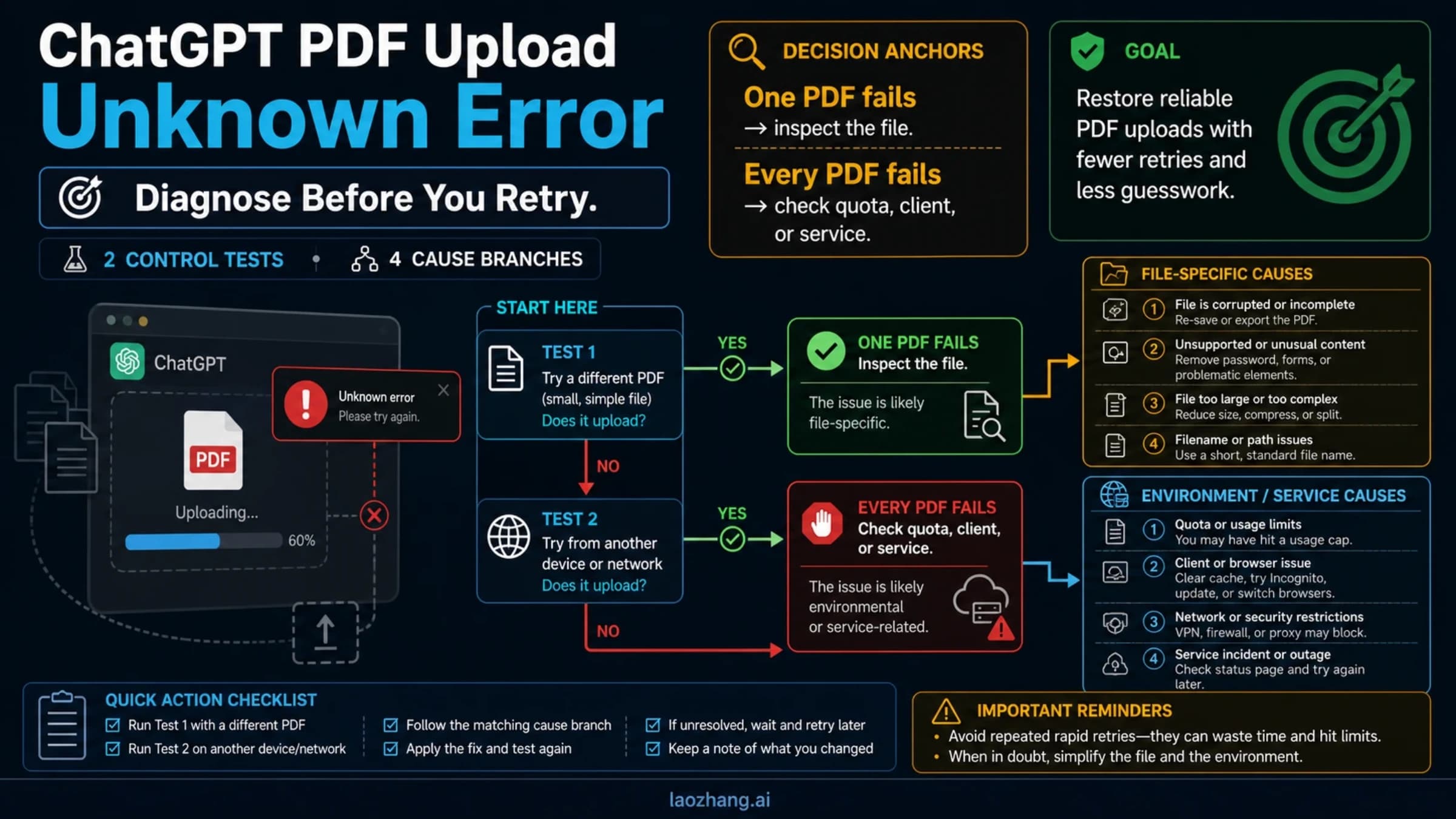
If the fresh chat responds normally, the long thread is the leading place to investigate: move only the goal, locked decisions, constraints, essential inputs, open questions, next step, and stop rule in a reviewed handoff. If the fresh chat is slow too, widen the test to the browser, network, account, model, and live service status.
| What feels slow | Run this control | Read the result |
|---|---|---|
| Typing or scrolling | Open a new chat in the same client | Fresh chat smooth: hand off. Still laggy: isolate the browser or client. |
| Send to first word | Repeat one short prompt in a new chat | Fresh chat fast: thread-specific pressure leads. Both slow: check status and the broader path. |
| Generation stalls or errors | Stop, reload, and retry once | Repeats: preserve the error evidence and move to official isolation steps. |
Stop rule: change one variable at a time. A fresh-chat comparison narrows the likely layer; it does not prove a private ChatGPT implementation cause.
The short answer: why does ChatGPT slow down after a long conversation?
There is no single verified cause for every slow long conversation. The useful diagnosis depends on where the delay appears:
- Typing or scrolling lag points first to the page, app, browser, device, or rendering path.
- A slow response start points first to the request path, carried conversation state, selected model or mode, account scope, network, or service load.
- A response that stalls or errors belongs on the official stuck-response and connectivity route.
Conversation context is finite, but that does not create a universal “too many messages” threshold. OpenAI's developer documentation explains that multi-turn state can be carried through prior messages or conversation state, and its long-running-agent guidance warns that old messages, logs, retries, and stale details can crowd out useful state. Those are general model mechanics—not a public specification of the consumer ChatGPT interface.
The practical fix is therefore a controlled comparison, not an architecture guess. OpenAI's current ChatGPT error troubleshooting guide explicitly recommends starting a new chat when a conversation is long or has many turns. The missing piece is continuity: preserve the old thread, then move only reviewed working state into the responsive one.
First, identify what “slow” means
“ChatGPT is slow” can describe three experiences that happen at different stages. Time each stage separately before changing anything.
| Slow surface | Observable test | Useful signal | What it does not prove |
|---|---|---|---|
| Interface lag | Type, select text, collapse code blocks, and scroll before sending | The old thread feels heavy while a fresh one is smooth | That one DOM or rendering behavior is the universal cause |
| Response-start delay | Measure from Send to the first visible output | A short prompt starts quickly in a fresh chat but slowly in the old one | The exact amount of context the product sent or processed |
| Stuck generation | Watch for an endless spinner, partial answer, disconnect, or error | The same failure repeats after one clean reload and retry | Whether the fault belongs to the model, account, network, or service |
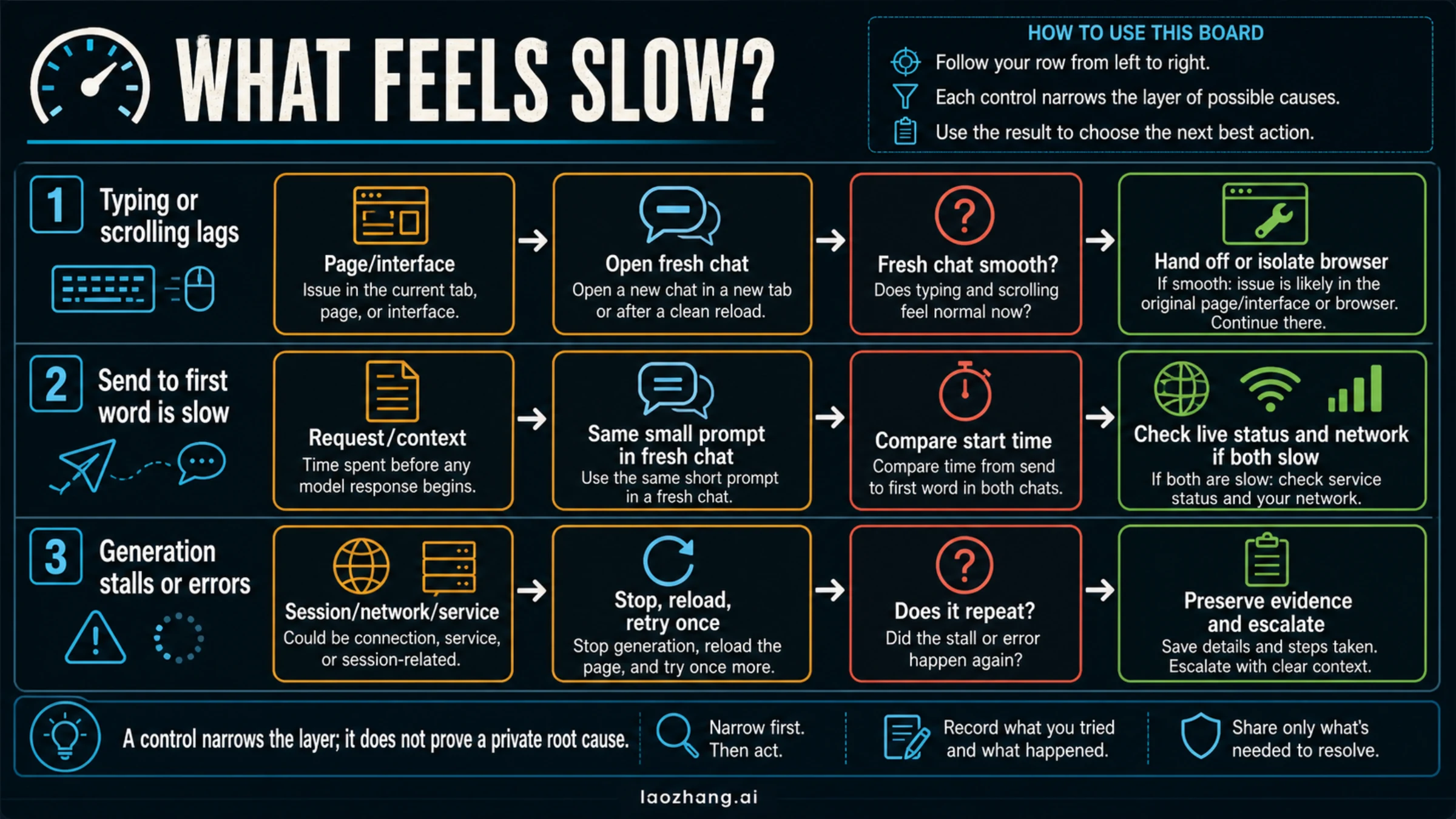
This distinction matters because browser cleanup cannot repair every response-start delay, and switching models cannot repair a page that freezes before you press Send. Treat the visible symptom as the owner of the first test.
Lane 1: typing and scrolling are slow
If the text box, selection, code blocks, or scroll position feel sticky only in one large thread, local interface pressure is the leading diagnosis. Long pages, rich formatting, images, code, browser extensions, memory pressure, and client state are plausible contributors.
That is an inference from the symptom, not an official OpenAI root-cause statement. OpenAI does not publish a rule saying every old message remains rendered in the same way on every client, nor does it attribute all long-chat lag to one DOM mechanism.
Verify it: open a fresh chat in the same browser or app, type a paragraph, scroll, and send one small prompt. If the fresh page is smooth while the old one remains sticky, preserve the old thread and prepare a handoff. If both pages lag, move to browser and device isolation.
Lane 2: the page is responsive, but the answer starts late
When typing is smooth but the first output takes longer to appear, the interface is no longer the only suspect. The request may be carrying more conversation state, the selected model may take longer for this task, or the same account, network, or service path may be slow.
OpenAI's conversation-state guide documents the general principle that prior messages can be supplied to maintain multi-turn state. ChatGPT's exact consumer implementation is not public, so do not turn that principle into “ChatGPT always rereads every token.” Exact context capacity also varies by model and mode and changes over time.
Verify it: send the same short, non-sensitive prompt in the old and fresh chats with the same account, model, client, device, and network. Record time to first visible output. If only the old thread is consistently slower, handoff is the smallest safe move. If both are slow, check the live service state and isolate the broader path.
Lane 3: generation stalls, disconnects, or errors
Stop the response, reload once, and retry once. If the failure repeats, do not keep submitting duplicates. Record the literal error, timestamp, timezone, model, and what happened before the stall.
An endless spinner can share causes with a slow response, but the next action is stricter because the request did not complete. Use OpenAI's current slow-response troubleshooting guide and the recovery ladder below instead of assuming the long thread is the only cause.
Run a 60-second fresh-chat control
The control should be small enough to repeat and representative enough to compare. Do not use a large upload, web research, image generation, a tool-heavy task, or a prompt that requires the old conversation to make sense.
- Keep the old conversation open and copy its URL or bookmark it.
- Open an ordinary new chat in the same client.
- Use the same account and model or mode if the interface allows it.
- Send one short prompt such as:
Give me three concise checks for a slow web app. - Observe typing and scrolling before Send, time to first output, and whether generation completes.
- Repeat only if the first result was ambiguous; do not turn the control into a benchmark campaign.
Use the outcome matrix:
| Old thread | Fresh chat | Leading branch | Next move |
|---|---|---|---|
| Slow | Fast | Thread-specific state or interface pressure | Build and review the handoff packet |
| Slow | Slow | Browser, device, network, account, model, or service scope | Run the official isolation ladder |
| Stalled | Completes | Session or thread path is the leading suspect | Continue in fresh chat after review |
| Stalled | Stalled | Broader path or incident remains possible | Preserve evidence; check status; isolate one variable |
The result is a routing signal. A fast new chat does not reveal whether rendering, message shape, carried state, a tool trace, or another thread-specific factor was decisive. It tells you that continuing in the same state is not the best next test.
Write the result as three observations—old thread, fresh chat, and what changed—before taking the next step. That one-line record prevents a later transient success from being remembered as a proven cause.
Move the work, not the entire transcript
Do not paste the whole old conversation into the fresh chat. That recreates noise, can carry obsolete assumptions forward, and makes it harder to see whether the handoff is correct.
Use this seven-field packet instead:
GOAL
What outcome are we trying to produce?

LOCKED DECISIONS
What has already been chosen and should not be reopened?

CONSTRAINTS
What must remain true? Include format, tools, budget, privacy, and deadlines.

INPUTS AND LINKS
Which files, excerpts, URLs, identifiers, or data are still required?

OPEN QUESTIONS
What remains genuinely undecided or unverified?

EXACT NEXT STEP
What should the new chat do first, and what output format should it use?

VERIFICATION / STOP RULE
How will we know the next step worked, and when must it stop or ask?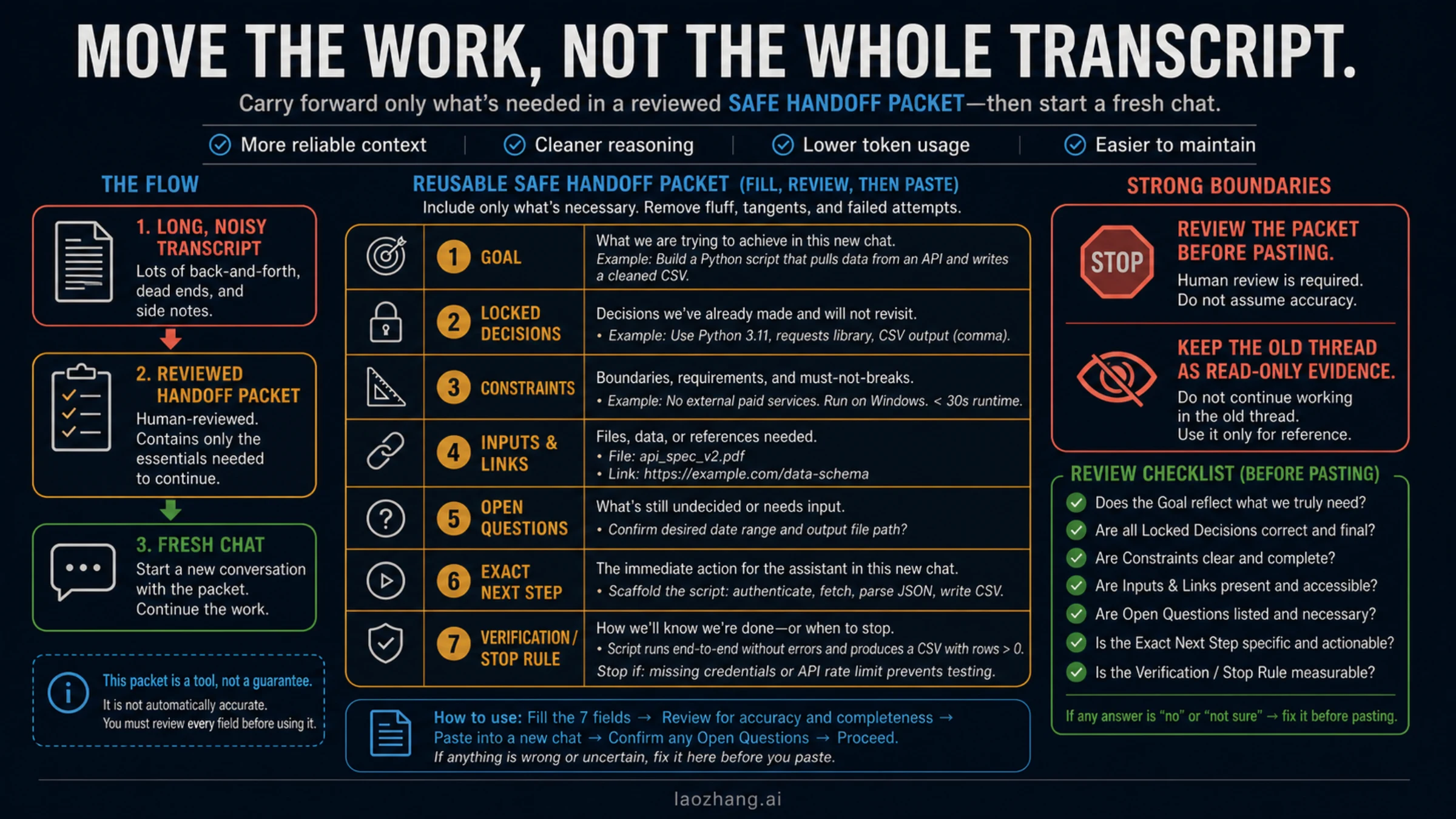
Ask the old chat to draft the packet if it is still responsive, but review every field yourself. Check filenames, numbers, decisions, exclusions, and the next action against the record copy. A generated summary can omit a failed attempt that matters, reopen a decision you already made, or turn a tentative idea into a “fact.”
The old thread remains read-only evidence. Do not delete it, and do not continue editing both versions in parallel. Once the new chat correctly restates the packet, choose one active work thread.
Saved Memory is not a substitute for this transfer. Memory, project instructions, task prompts, tools, and the active conversation serve different jobs. If that boundary is unclear, use the ChatGPT context, Memory, and tools guide before assuming a new chat will inherit every detail.
Branch in a new chat or start an ordinary new chat?
OpenAI documented Branch in new chat for logged-in ChatGPT web users in its September 4, 2025 release note. When the option is present, open the message menu and branch from the last point where the conversation state was still clean and useful.
Branching is convenient, but it is client- and workspace-dependent. It also does not remove the need to review what the new branch should treat as current. An ordinary new chat plus the seven-field packet is the universal fallback and creates a clearer boundary between record copy and active work.
Choose this way:
- Branch when the web option is available and one earlier message is a trustworthy checkpoint.
- Ordinary new chat when the thread contains many reversals, failed approaches, private material you no longer need, or no clean checkpoint.
- Stay in the old chat only when the fresh control shows no meaningful difference and the old conversation remains usable.
If a fresh chat is also slow, use the official recovery ladder
If both conversations are slow, stop treating length as the only suspect. OpenAI's current help pages recommend status checks, reloads, cache or site-data checks, extension isolation, VPN/proxy/secure-DNS isolation, another browser or device, another network, and a brand-new chat to distinguish model-specific from account-wide behavior.
Run those actions in an order that preserves evidence:
- Preserve the conversation URL and timestamp. Do not clear anything yet.
- Check OpenAI Status. Treat it as a live aggregate snapshot, not proof that every tier, model, region, or feature is healthy.
- Reload once, then try a private window or first-party app. A private window is a useful browser-state control, but it may still share the same device, network, VPN, DNS, and security software.
- Disable extensions temporarily. Start with privacy, script-blocking, security, writing, automation, or ChatGPT-specific extensions. Retest before removing anything permanently.
- Disable VPN, proxy, Web Protect, or secure-DNS filtering temporarily. Record which layer changed.
- Try another supported browser or device. Keep the account, prompt, and network constant if possible.
- Try another network. A mobile hotspot can separate the local network path from the account and device.
- Compare another model or a brand-new chat if available. This helps distinguish model-specific behavior from account-wide behavior; it is not a speed guarantee.
- Clear ChatGPT site data or cache only after the reversible controls. This can sign you out and remove local state, so it should not be the first move.
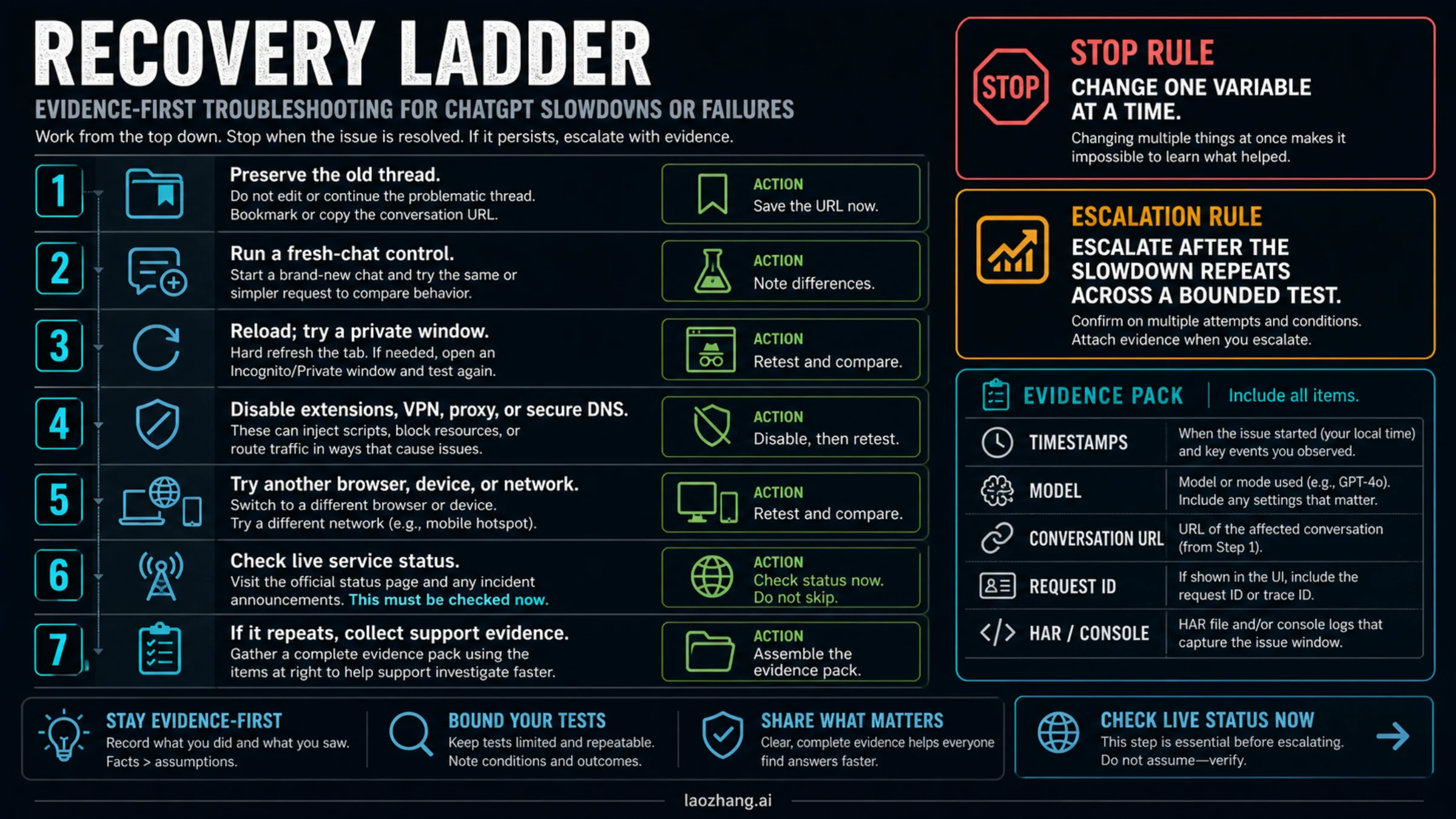
Verification rule: when one change appears to fix the slowdown, reintroduce that layer once if doing so is safe. If the issue returns, you have stronger evidence than a one-off success. If it does not return, label the result transient rather than declaring a root cause.
Why an extension is not the first-line fix
Browser extensions may hide old messages, alter rendering, or add workflow controls, but an extension with access to ChatGPT pages may also be able to read conversation content. Its privacy policy, permissions, update behavior, code ownership, and actual effect need a separate audit.
Use a clean official client and fresh-chat control first. If you later test an extension, do it with a non-sensitive conversation, inspect its permissions, and verify the effect by enabling and disabling only that extension. Do not treat a store listing or community recommendation as proof of privacy or performance.
When to contact OpenAI support
Escalate after the slowdown repeats in a bounded test and no live incident explains it. A strong reproduction is more useful than a long complaint.
Collect:
- exact timestamps and timezone;
- account email, without the password;
- model or mode used;
- conversation URL;
- browser or app version, operating system, device, and network type;
- request ID if the interface or response exposes one;
- screenshots or screen recording of the symptom;
- console errors and a HAR file covering the failure window, if support requests them;
- the old-thread versus fresh-chat result;
- the result from a second official client or network.
OpenAI's slow-response article specifically asks for timestamps, conversation URL, request IDs, HAR, console errors, and model or account scope when the problem persists. Remove passwords, API keys, payment-card data, and unrelated confidential conversation content before sharing evidence.
Prevent the next long chat from becoming a single point of failure
The goal is not to keep every conversation short. It is to make working state portable.
- Start a new milestone chat after a major decision, release, or change of task owner.
- Keep source files, datasets, specs, and outputs outside the conversation when they are the durable record.
- End important sessions with a reviewed state packet: decisions, constraints, artifacts, open risks, next action, and verification.
- Separate exploration from execution. A noisy brainstorming thread should not be the only home of the final plan.
- Name exact files and versions instead of relying on “the document above.”
- Preserve the old thread as evidence, but designate only one active continuation thread.
OpenAI's deployment checklist for long-running agents recommends compacting old messages, tool logs, retries, and stale details while preserving important state. Consumer ChatGPT does not expose that exact compaction API, but the workflow lesson is useful: portable state should be deliberate, small, reviewable, and tied to the next action.
Frequently asked questions
Is there a fixed number of messages after which ChatGPT becomes slow?
No reliable universal threshold is public. The result can vary with model or mode, device, browser, message length, code blocks, images, files, tools, and product updates. Use the observable symptom and fresh-chat control instead of counting turns.
Do long conversations use more context?
Multi-turn systems need a way to carry relevant prior state, and context capacity is finite. OpenAI documents that general mechanism for its APIs, but it does not publish a complete consumer ChatGPT implementation map for every client. Avoid claims that every historical token is always processed in exactly the same way.
Will starting a new chat make ChatGPT forget everything?
The new conversation will not automatically have the full active thread. That is why you should transfer the reviewed seven-field packet. Saved Memory and project instructions may provide separate state, but they are not an exact transcript handoff and should be verified.
Is Branch in new chat better than copying a summary?
Branching is useful when the option exists and you have a clean checkpoint. A reviewed packet is better when the old thread contains reversals, outdated facts, or unnecessary private material. Ordinary new chat remains the dependable fallback across clients.
Should I clear cache or site data immediately?
No. First preserve the thread and compare a fresh chat. Clear site data after reversible browser, extension, device, and network controls point toward local client state. Expect to sign in again, and do not delete chat history as a troubleshooting shortcut.
Can a browser extension fix a slow long conversation?
It may change page behavior, but that does not establish safety, privacy, or a guaranteed fix. Use an official client and fresh-chat control first. Audit permissions and test only with non-sensitive content if you later evaluate an extension.
When is the slowdown probably not caused by the long thread?
When a small prompt is also slow in a brand-new chat, especially across a second official client or network, the long thread is no longer the only leading suspect. Check live status, browser and device state, network path, account scope, and the selected model before escalating.
What is the safest immediate action?
Keep the old conversation, open a fresh chat, and send one small repeatable prompt. If the fresh chat is fast, build and review the handoff packet. If it is slow too, follow the official isolation ladder and record each result.
Sources6
External pages this guide links to, in the order they appear. Last updated Jul 14, 2026.
Sources6
External pages this guide links to, in the order they appear. Last updated Jul 14, 2026.
- 1.ChatGPT error troubleshooting guidehelp.openai.com/en/articles/7996703-troubleshooting-chatgpt-error-messages
- 2.conversation-state guidedevelopers.openai.com/api/docs/guides/conversation-state
- 3.slow-response troubleshooting guidehelp.openai.com/en/articles/9047779-why-is-my-chatgpt-taking-so-long-to-respond
- 4.September 4, 2025 release notehelp.openai.com/en/articles/6825453-chatgpt-release-notes
- 5.OpenAI Statusstatus.openai.com
- 6.deployment checklist for long-running agentsdevelopers.openai.com/api/docs/guides/deployment-checklist