Does Grok AI Generate Videos? Grok Imagine Routes, Limits, and API Facts
A current answer to whether Grok AI makes videos, with the official workflow map and a safe app, API, or wrapper route for a first clip.
On this page
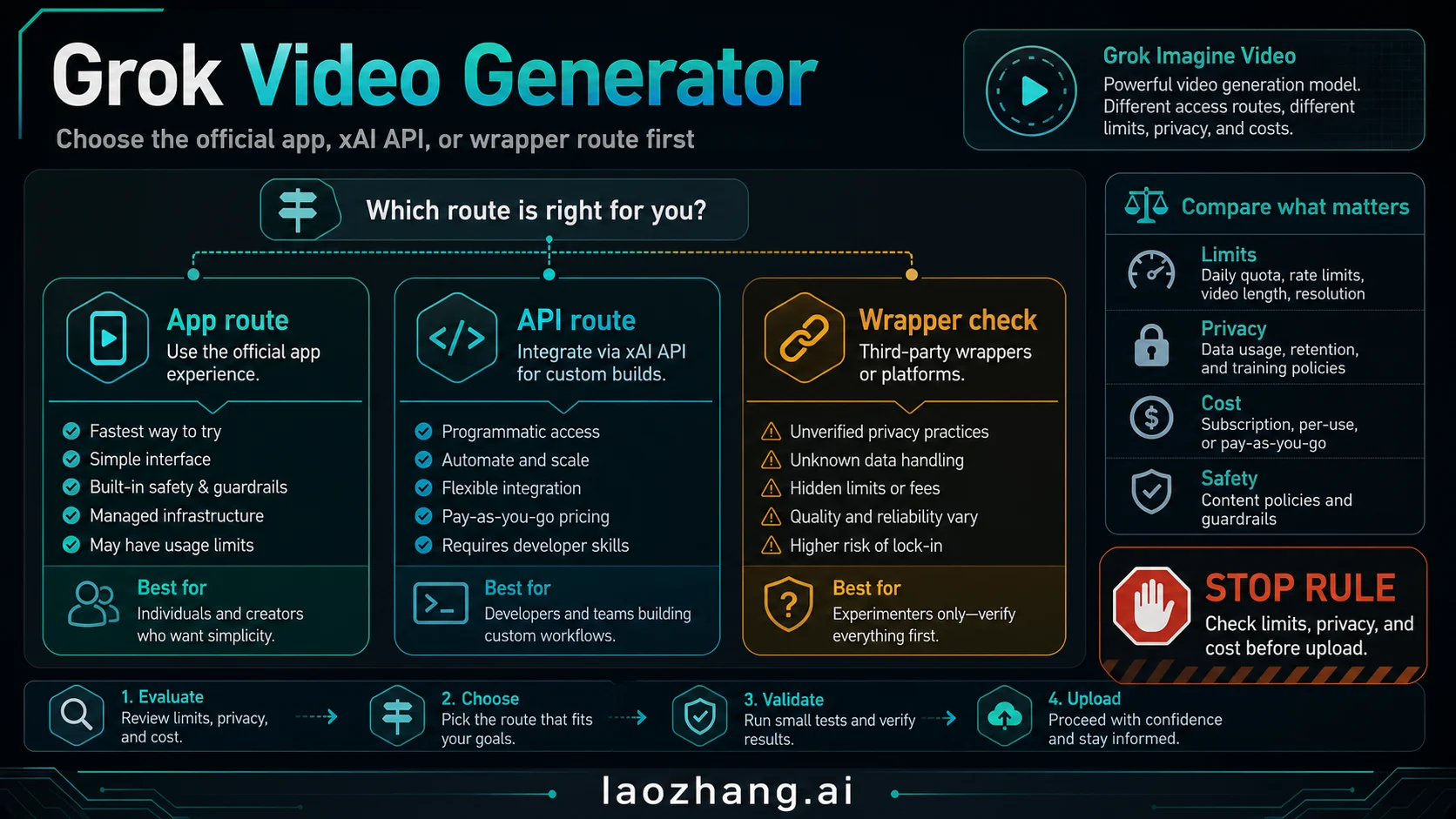
Yes. Grok AI generates videos through Grok Imagine. Use the Grok app or Grok.com for the official consumer workflow, use the xAI Imagine API for repeatable programmatic generation, and treat third-party "Grok video generator" pages as separate services with their own credits, privacy terms, watermarks, and rights.
| Your job | Start here | Verify before the first run |
|---|---|---|
| Make one short video in the official UI | Grok app or Grok.com Imagine | Current account access, quota, export, and library behavior |
| Automate text, image, reference, edit, or extension jobs | xAI Imagine API | Model/input support, duration, resolution, price, and temporary output URL |
| Use templates or a packaged creator UI | Third-party wrapper | Exact model, credits, privacy, rights, watermark, and refund rules |
| Get longer clips or different controls | Another video model | Length, audio, editing, commercial terms, and total cost |
As of July 14, 2026, xAI's official video guide covers text-to-video, image-to-video, reference-to-video, video editing, and video extension across the API family. Those workflows do not all belong to every model: the current grok-imagine-video-1.5 model page describes image-to-video and explicitly says it does not support text-to-video.
There is no honest universal number for free Grok videos. Consumer access and quotas are account-specific, while API usage is billed by the current model contract and wrappers set their own credits. Stop before uploading personal or client media if the route cannot explain current limits, privacy and retention, rights, pricing, and download behavior.
What Videos Can Grok Generate?
The short answer is broader than basic prompt-to-video. xAI's current video generation guide documents five workflow families:
| Workflow | What you provide | What to verify |
|---|---|---|
| Text-to-video | A text prompt | Use a model whose current page supports text input; Video 1.5 is not the text route today. |
| Image-to-video | A starting image plus prompt | Confirm image rights, target resolution, and whether the image becomes the first frame. |
| Reference-to-video | Reference images plus instructions | Check reference limits and avoid assuming identity or style consistency is guaranteed. |
| Video editing | A source video plus edit instructions | Verify source-video input support, output duration, and what changes the route can preserve. |
| Video extension | A source clip plus continuation prompt | Treat extension pricing as promotional where xAI labels it that way, and recheck before budgeting. |
These are API workflow categories, not a promise that every Grok app account exposes five separate buttons. In the consumer UI, use the controls actually shown to your account; in code, match the workflow to the current model and request schema.
API generation is asynchronous: submit to /v1/videos/generations, keep the returned request_id, and poll /v1/videos/{request_id} until the status is done, failed, or expired. The documented duration range is 1–15 seconds, and result URLs are temporary. Download an approved output promptly rather than treating the URL as storage.
What "Grok Video Generator" Means
"Grok video generator" is the phrase many users type, but the official product reality is more specific. xAI's Grok product page describes Imagine as the creative surface for generating images and videos from prompts or reference photos. xAI's Imagine API documentation exposes video generation under the Imagine API with model IDs such as grok-imagine-video and grok-imagine-video-1.5.
That naming distinction prevents three expensive mistakes:
| Mistake | Why it happens | Safer interpretation |
|---|---|---|
| Assuming every "Grok generator" page is official | Wrapper pages often use Grok language in titles and ads. | Official consumer routes live on Grok surfaces; API facts come from xAI docs. |
| Assuming app limits equal API pricing | App access, SuperGrok, and developer API billing are different contracts. | Check the route first, then read the limits or pricing for that route. |
| Assuming every model supports every input mode | xAI model pages split text, image, and video inputs by model. | Match model ID, input type, duration, and resolution before generating. |
xAI announced Grok Imagine Video 1.5 on June 16, 2026, saying Video 1.5 was generally available on the Imagine API and that a faster Video 1.5 route was rolling out in Grok's web and mobile experiences. That does not mean every account sees the same app quota, every wrapper uses the official model directly, or every API model supports every input mode.
The practical reader answer is: Grok can make videos, but first choose the contract you are using.
Pick the Right Route Before You Generate
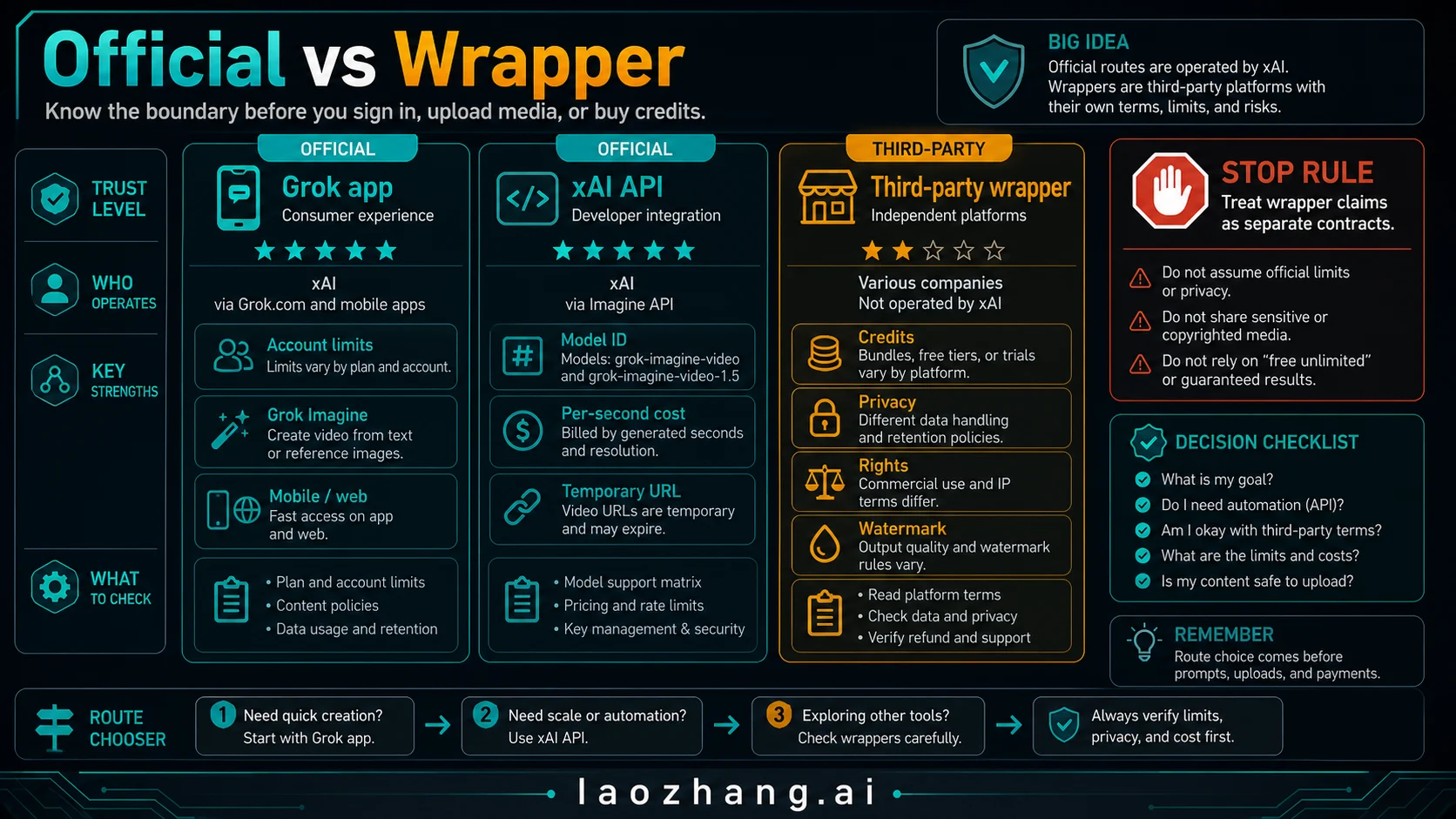
Use this route split before you write prompts.
| Route | Best for | What you can trust from it | Stop rule |
|---|---|---|---|
| Grok app or Grok.com Imagine | Fast personal creation, casual prompt tests, creator experiments | The official consumer workflow, current account UI, and current app limits | Do not assume another user's free quota or SuperGrok limit applies to your account. |
| xAI Imagine API | Product workflows, automation, repeatable tests, logging, cost control | Official model IDs, developer endpoints, per-second pricing, status polling | Do not start with 15-second or high-resolution jobs until a small request succeeds. |
| Third-party wrapper | Template UI, local payment flow, packaged creator workflows | Only the wrapper's own credits, queue, privacy, watermark, rights, and refund terms | Do not treat wrapper copy as official xAI pricing or official free limits. |
| Alternative AI video model | Longer clips, different edit controls, local route, or model-specific style | The alternative provider's own terms and capabilities | Switch only because the job needs different controls, not because a wrapper headline says "unlimited." |
For most readers, the fastest safe path is: open the official Grok route, make one small test clip, download it, then decide whether the API or a wrapper is worth the extra setup. For teams, the safest path is: create one API test, log the model, duration, resolution, status, URL lifetime, and actual cost, then scale.
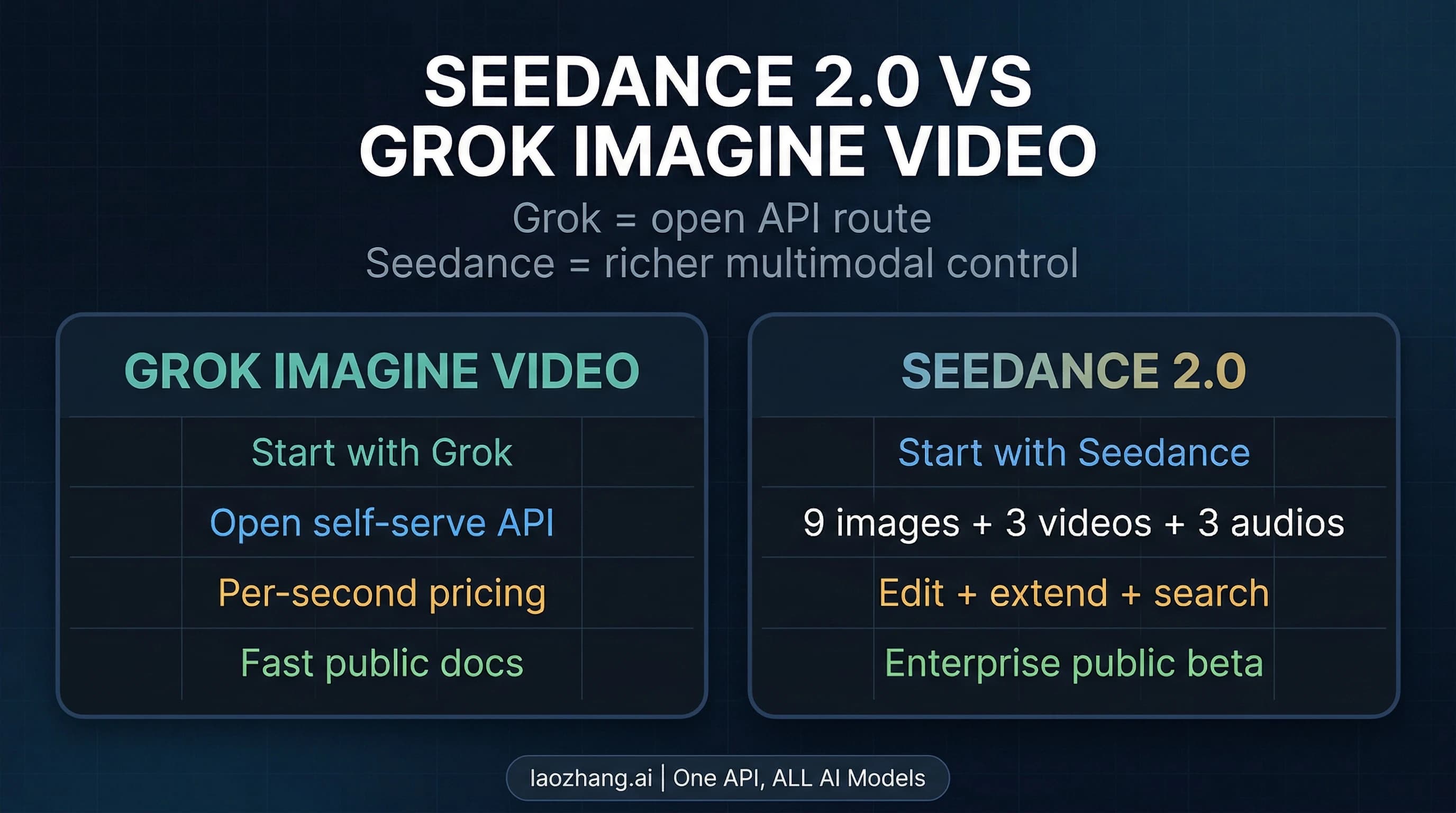
If you are deciding between Grok and another public video model, use a comparison only after this route split. For example, our Seedance 2.0 vs Grok Imagine Video guide is useful when the question becomes access versus richer multimodal control, not when the immediate task is simply "can I make a Grok clip safely?"
Current Official Grok App and API Facts
Here is the official-fact layer checked on July 14, 2026:
| Fact surface | Current xAI-facing answer | Reader consequence |
|---|---|---|
| Consumer product | Grok's Imagine surface can generate videos; xAI says Video 1.5 Fast is available in Grok's web and mobile experiences. | The app/web route is the easiest first test, but feature access and quota are account/platform-specific. |
| Video length | xAI product and API pages describe short videos, with API duration controls in the 1-15 second range. | Do not plan long-form video output from this route. |
| API workflow | xAI documents asynchronous video generation through /v1/videos/generations and status polling through /v1/videos/{request_id}. | Build polling and timeout handling into any product workflow. |
| Temporary URLs | xAI docs say video result URLs are temporary. | Download or store approved outputs promptly after success. |
| Model availability | xAI docs list grok-imagine-video and grok-imagine-video-1.5, but support differs by model. | Do not copy one model's input claims into another model's prompt form. |
| Status | xAI status showed no active incident during the July 14 check. | This is a point-in-time check, not an uptime promise; check again before a production batch. |
The key boundary is consumer versus developer access. The app is the fastest place to learn what Grok does visually. The API is where you can pin model IDs, log parameters, estimate cost, and automate retries. A wrapper can still be useful, but it is not the source of truth for official model support or official pricing.
Model and API Cost Chooser
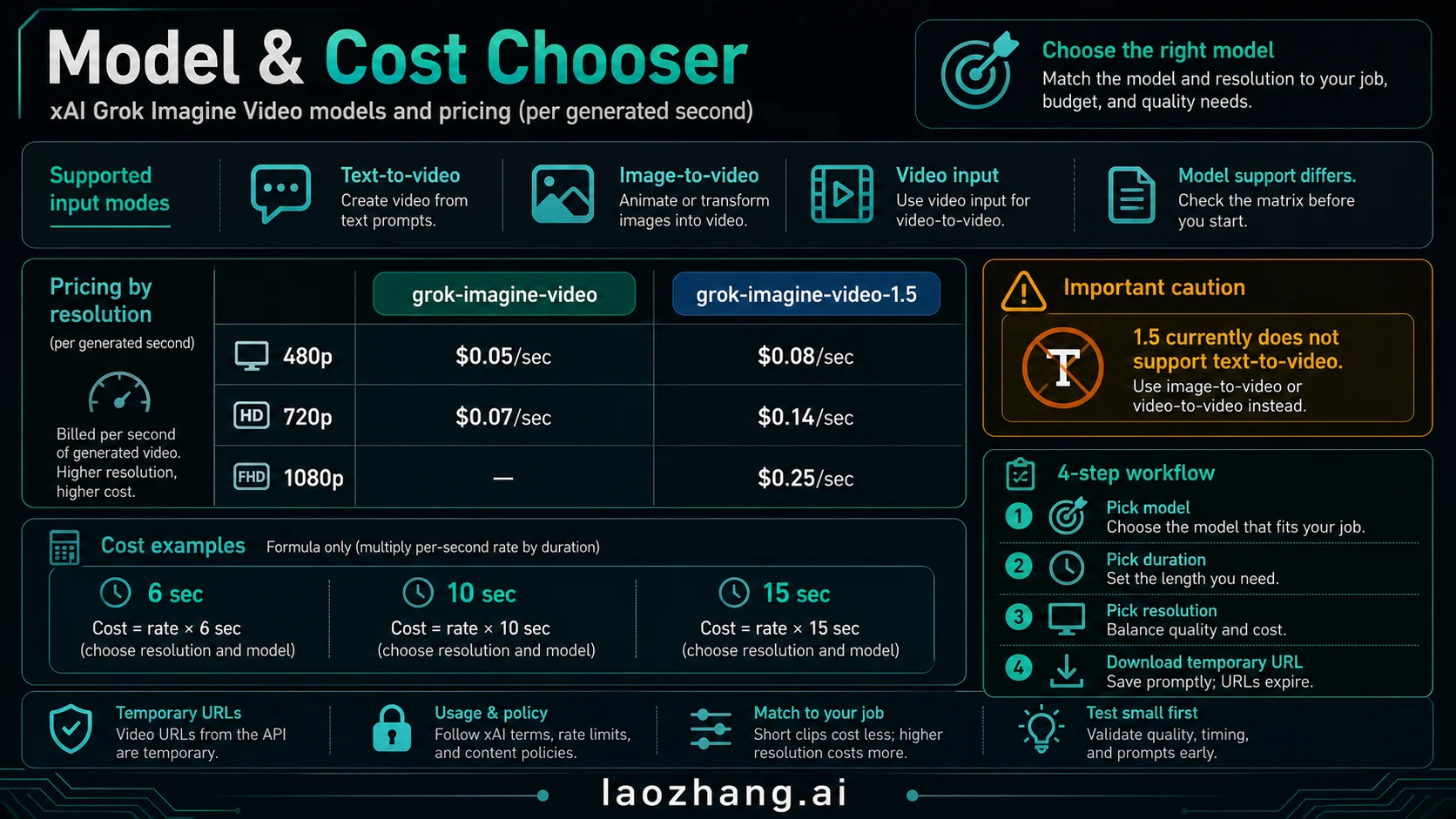
xAI's pricing docs make video billing a per-generated-second problem. The safe cost formula is:
estimated video output cost =
  generated_seconds * per_second_rate_for_model_and_resolution
+ input_image_or_input_video_charges
+ retry_cost
The current official rows checked on July 14, 2026 from the grok-imagine-video and grok-imagine-video-1.5 model pages:
| Model | Input modes to verify | 480p output | 720p output | 1080p output | Important boundary |
|---|---|---|---|---|---|
grok-imagine-video | Text, image, and video input to video output | $0.05/sec | $0.07/sec | Not listed for this row | Better first API test when you need text-to-video. |
grok-imagine-video-1.5 | Image-to-video | $0.08/sec | $0.14/sec | $0.25/sec | xAI's model page says it currently does not support text-to-video; 1080p is limited to this image-to-video route in the current guide. |
Input charges matter too. The current model pages list image input pricing and video input pricing separately from generated output seconds. For grok-imagine-video, the model page lists image input at $0.002 and video input at $0.01/sec. For grok-imagine-video-1.5, the model page lists image input at $0.01. Recheck xAI docs before you publish a budget, because model availability, pricing, and rate limits can move.
Example API Output Costs
These examples price generated output only. Add input charges, retries, and any wrapper/provider markup separately.
| Job | grok-imagine-video 480p | grok-imagine-video 720p | grok-imagine-video-1.5 480p | grok-imagine-video-1.5 720p | grok-imagine-video-1.5 1080p |
|---|---|---|---|---|---|
| 6 seconds | $0.30 | $0.42 | $0.48 | $0.84 | $1.50 |
| 10 seconds | $0.50 | $0.70 | $0.80 | $1.40 | $2.50 |
| 15 seconds | $0.75 | $1.05 | $1.20 | $2.10 | $3.75 |
The first production test should usually be short and low-risk: one prompt, one reference image if needed, the lowest acceptable resolution, and explicit logging of model, duration, resolution, status, and final file URL. If the output is not good enough at low resolution, increasing resolution will not fix a bad prompt, a wrong reference image, or a model-mode mismatch.
For broader xAI token pricing and spend-control context, use the current Grok API pricing guide. Keep the Grok video decision separate from text-token budgeting, because generated seconds, input media, and retries are the variables that change this workflow.
Create Your First Grok Video Safely
A good first Grok clip is a diagnostic test, not a finished campaign asset. Keep the first run short, low-resolution, and easy to judge.
Official Grok App or Web Route
- Open Grok or the Grok Imagine surface in the official app or web experience.
- Use a prompt that states subject, action, style, camera movement, and what must not appear.
- If using a reference photo, use media you have the right to upload and reuse.
- Generate one short clip first.
- Download promptly if the output matters.
- Record what the account UI says about remaining quota, SuperGrok access, queue, or export behavior.
Example prompt:
A six-second cinematic product shot of a matte black desk lamp turning on in a quiet studio,
slow dolly-in, soft reflections on the metal, no text, no logos, no people.
Use "no text" or "no logos" when the output is visual-only. Use stronger subject and action language when motion is the problem. If the clip looks static, rewrite the action before you spend more on duration or resolution.
xAI Imagine API Route
For API work, design the request lifecycle before you design a prompt library:
| Step | What to log | Why it matters |
|---|---|---|
| Choose model | Model ID, input mode, duration, resolution | Prevents text-to-video and image-to-video mode confusion. |
| Submit generation | Request ID, timestamp, prompt/media metadata | Makes failed jobs auditable. |
| Poll status | pending, done, expired, failed | Determines whether to wait, download, or repair. |
| Download result | Temporary URL, file hash, storage destination | Prevents losing the output after URL expiry. |
| Retry | Changed prompt, media, duration, or resolution | Avoids resubmitting the same blocked or bad request. |
Do not build your first integration around the most expensive option. Start with a small duration, a clear model choice, and a narrow success criterion such as "moving camera, no broken subject, usable first frame, downloadable file." After that succeeds, test longer duration or higher resolution.
How to Judge a Third-Party Grok Wrapper
Wrapper pages can be convenient. They may add templates, payment options, queues, or a simpler UI. They can also hide the exact route, model, data handling, and export terms. Treat them like separate software products.
Use this wrapper checklist:
| Check | Question to answer before upload | Why it matters |
|---|---|---|
| Official status | Is this Grok/xAI, or a third-party service using Grok wording? | Prevents confusing wrapper copy with official xAI terms. |
| Credits and refunds | How many seconds can you generate, what counts as a failed job, and when are credits refunded? | "Free" can mean a tiny trial, queue-limited output, or paid export. |
| Privacy and retention | What happens to uploaded photos, prompts, and generated videos? | Personal media and client assets need a deletion and training-use answer. |
| Rights and commercial use | Who owns the output and what use is allowed? | App terms, wrapper terms, and API terms can differ. |
| Watermark and resolution | Are trial exports watermarked or downscaled? | A free preview may not be a usable deliverable. |
| Model naming | Does the wrapper name the model or only say "Grok powered"? | Vague naming makes cost, quality, and troubleshooting harder. |
If a wrapper cannot answer those questions before upload, use it only for non-sensitive tests. Do not upload faces, private rooms, client assets, unreleased products, or anything where rights and retention matter.
Troubleshooting: Pending, Failed, Expired, or Moderated
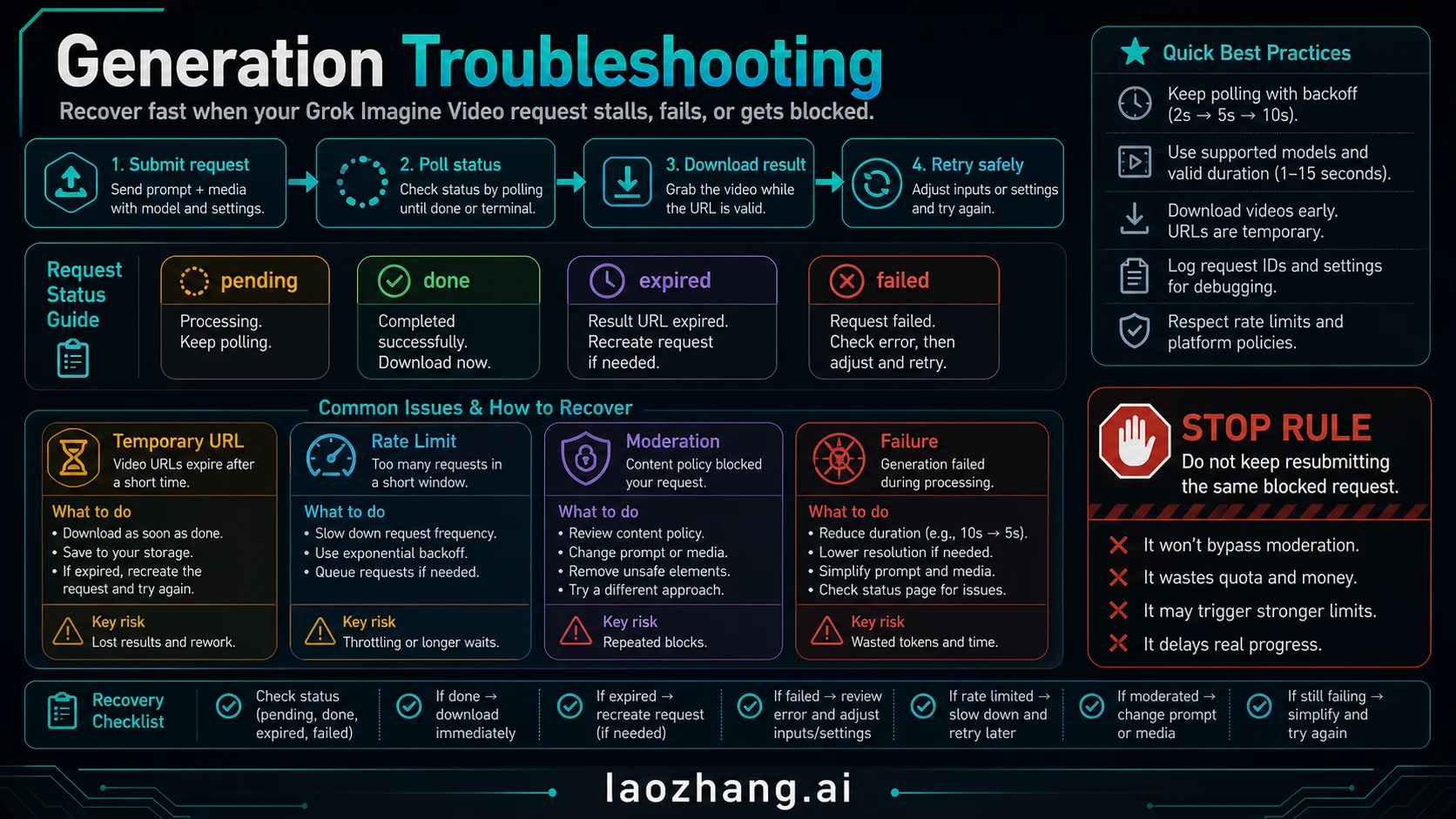
Most Grok video failures are route or lifecycle problems before they are prompt problems.
| Symptom | Likely cause | Recovery move |
|---|---|---|
Request stays pending | Queue, service load, or too-frequent polling | Wait, poll at a sane interval, check xAI status, and avoid duplicate submissions. |
Status is done but file is gone | Temporary result URL expired or was not saved | Download promptly after success and store the result in your own system. |
Status is failed | Prompt/media issue, model mismatch, duration/resolution pressure, or service failure | Reduce duration/resolution, simplify the prompt, check model support, and retry once with a changed request. |
| Prompt is rejected or output is blocked | Safety or moderation boundary | Remove unsafe content, avoid non-consensual or deceptive face/video use, and do not loop the same blocked request. |
| API requests fail quickly | Authentication, request schema, model ID, or rate limit issue | Verify key, endpoint, model ID, duration, resolution, and rate limit before changing prompts. |
| Wrapper charges credits but output is unusable | Wrapper-specific credit policy or export rule | Check refund terms and support policy; do not assume xAI will resolve wrapper billing. |
The most important operational rule is simple: change one variable per retry. If a 15-second 1080p job fails with a complex prompt and a weak reference image, do not resend it unchanged. Try a shorter duration, lower resolution, simpler action, clearer reference, or a model that supports the input mode you need.
Safe Upload and Rights Checklist
Grok video generation often starts with prompts or reference images. That makes the upload decision part of the creative decision.
Before you upload, answer these:
- Do I have the right to use this image, video, character, logo, product shot, or person's likeness?
- Would the output be deceptive, non-consensual, intimate, harassing, or targeted at a private person?
- Does the route explain whether uploaded media can be stored, reviewed, retained, or used for improvement?
- Does the route explain commercial-use rights for generated output?
- Can I delete uploaded assets or generated results if the project changes?
- Do I know whether the export will include a watermark or downscale?
If the answer is unclear, use synthetic or low-risk test media first. A route that is fine for a desk-lamp demo may be wrong for faces, client assets, unreleased products, or legal/commercial deliverables.
Practical Recommendation
Use the official Grok app or Grok.com Imagine when you want to learn the creative behavior quickly. Use the xAI Imagine API when you need model IDs, repeatability, logging, cost control, and programmatic access. Use wrappers only after they answer the contract questions that official xAI pages cannot answer for them.
The best first move is not a perfect prompt. It is a small route-confirming test:
| Test item | Pass condition |
|---|---|
| Route | You know whether this is official app, official API, or wrapper. |
| Model | You know the model ID or the route's product surface. |
| Cost or quota | You know whether the current account uses quota, credits, subscription access, or per-second API pricing. |
| Input mode | You know whether this route supports text-to-video, image-to-video, or video input. |
| Output handling | You know how to download and keep the file. |
| Rights | You know whether the uploaded media and generated video are safe to use. |
Once that test passes, improve the prompt, reference images, duration, and resolution. If it does not pass, changing tools is usually smarter than pushing more media or money through an unclear route.
FAQ
Can Grok make videos?
Yes. Grok can create short videos through Grok Imagine Video. The exact route matters: the consumer app/web experience, xAI Imagine API, and third-party wrappers have different limits, costs, and terms.
Is the Grok video generator free?
There is no safe universal "free unlimited" answer. App quotas, SuperGrok limits, trial behavior, and wrapper credits are account- and platform-specific. Check the current route before upload or payment.
How many Grok videos can I generate?
There is no universal public quota that applies to every account. Read the counter, plan, or limit shown in your current Grok app, Grok.com session, API console, or wrapper account. For API use, budget by generated seconds and account rate limits rather than inventing a daily video number.
Does Grok keep generated videos?
That depends on the route. The xAI API returns a temporary result URL, so download approved files promptly and store them where your own retention policy applies. For Grok app/web libraries or wrappers, check the current product's storage, sharing, deletion, and training-use terms before uploading sensitive media.
What is the official name for Grok video generation?
Use Grok Imagine Video for the factual product surface. "Grok video generator" is useful search shorthand, but official product and developer references should map back to Grok Imagine and xAI Imagine API model IDs.
Which API model should I start with?
Start with the model that supports your input mode. If you need text-to-video through the API, verify grok-imagine-video first. If you need Video 1.5 quality or higher resolutions, check grok-imagine-video-1.5, but remember that xAI's model page says it currently does not support text-to-video.
How much does a Grok API video cost?
Use generated seconds times the official per-second rate for the selected model and resolution, then add input charges and retries. On July 14, 2026, the checked output rows ranged from $0.05/sec for grok-imagine-video 480p to $0.25/sec for grok-imagine-video-1.5 1080p.
How long can Grok videos be?
xAI's official product and API material describes short videos and API duration controls in the 1-15 second range. Treat that as the planning range unless the current route explicitly shows a different limit for your account.
Are third-party Grok generator pages official?
Not by default. A third-party page may provide a useful wrapper, but its credits, privacy terms, watermark, refund policy, and rights terms are its own contract. Do not treat wrapper claims as official xAI pricing or official Grok limits.
What should I do when generation fails?
Check the lifecycle first: request ID, status, model ID, duration, resolution, input mode, rate limit, and temporary URL behavior. Then change one variable per retry. Do not keep resubmitting the same blocked or failed request unchanged.