Grok Bot vs Claude Cowork vs ChatGPT Work: Choose by the Job
Grok Bot favors a persistent team of cloud-computer agents, Claude Cowork blends cloud tasks with Claude Desktop access, and ChatGPT Work spans local and cloud work with files and plugins. The right choice depends on where your job must finish.
On this page
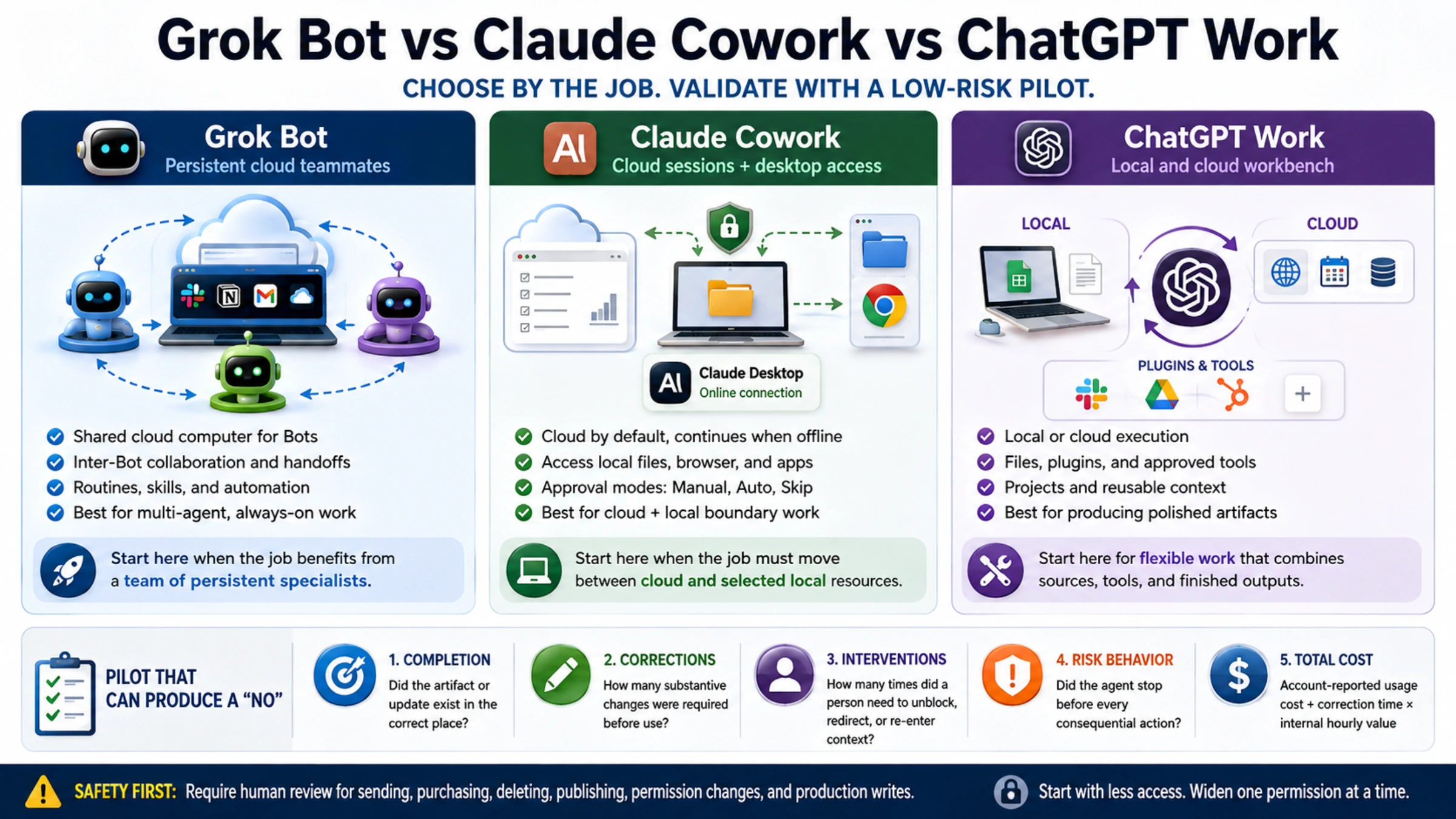
Choose between Grok Bot, Claude Cowork, and ChatGPT Work by where the task must run and where the result needs to be saved. All three handle tasks with multiple steps, but they differ in account access, collaboration, and billing.
The practical choice is this:
- Start with Grok Bot when the job benefits from several persistent specialists working together on an always-on cloud computer.
- Start with Claude Cowork when knowledge work must move between a cloud session and selected files, browser tabs, or apps reached through Claude Desktop.
- Start with ChatGPT Work when the deliverable depends on a mix of local or cloud execution, reusable project context, files, and approved plugins.
Those are starting hypotheses, not verdicts. All three products are changing quickly, and a launch page cannot tell you whether an agent will finish your Monday report without three rounds of correction. Use those differences to choose what to test, then run the same bounded job before committing important accounts or a team rollout.
Put the job where it can actually finish
A work agent is useful only if it can reach the source material, do the transformation, and leave the result in the right place. “Can use tools” is too vague. Write down the last step of your job.
If the result must land inside several web applications while your laptop is closed, a dedicated cloud computer matters. If the result must be written into a folder on your Mac or depend on a logged-in local browser, the desktop bridge matters. If the result is a reviewable brief, deck, spreadsheet, or recurring update assembled from connected services, the quality of the file and plugin workflow may matter more than screen control.
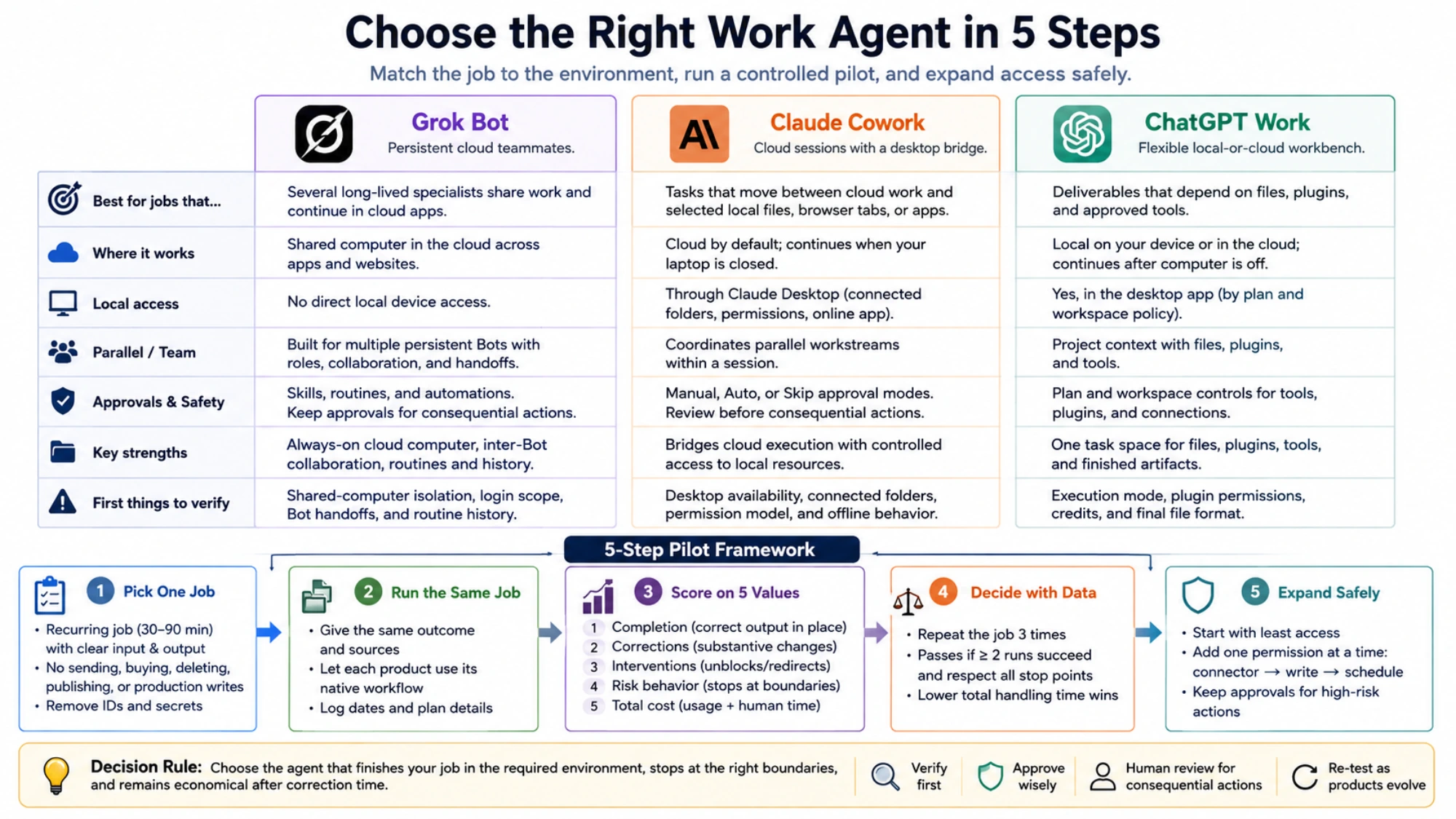
| Your decisive requirement | Best first candidate | What to verify |
|---|---|---|
| Several long-lived specialists share work and continue in cloud apps | Grok Bot | Shared-computer isolation, login scope, handoffs, and routine history |
| The task combines cloud execution with selected local files or desktop apps | Claude Cowork | Desktop availability, connected folders, approval mode, and offline behavior |
| You want one task space for local or cloud work, files, plugins, and finished artifacts | ChatGPT Work | Available execution mode, plugin permissions, credits, and the final file format |
Do not treat this table as a procurement decision. It tells you which product to test first, not which one deserves a year-long subscription.
Grok Bot is organized around persistent cloud teammates
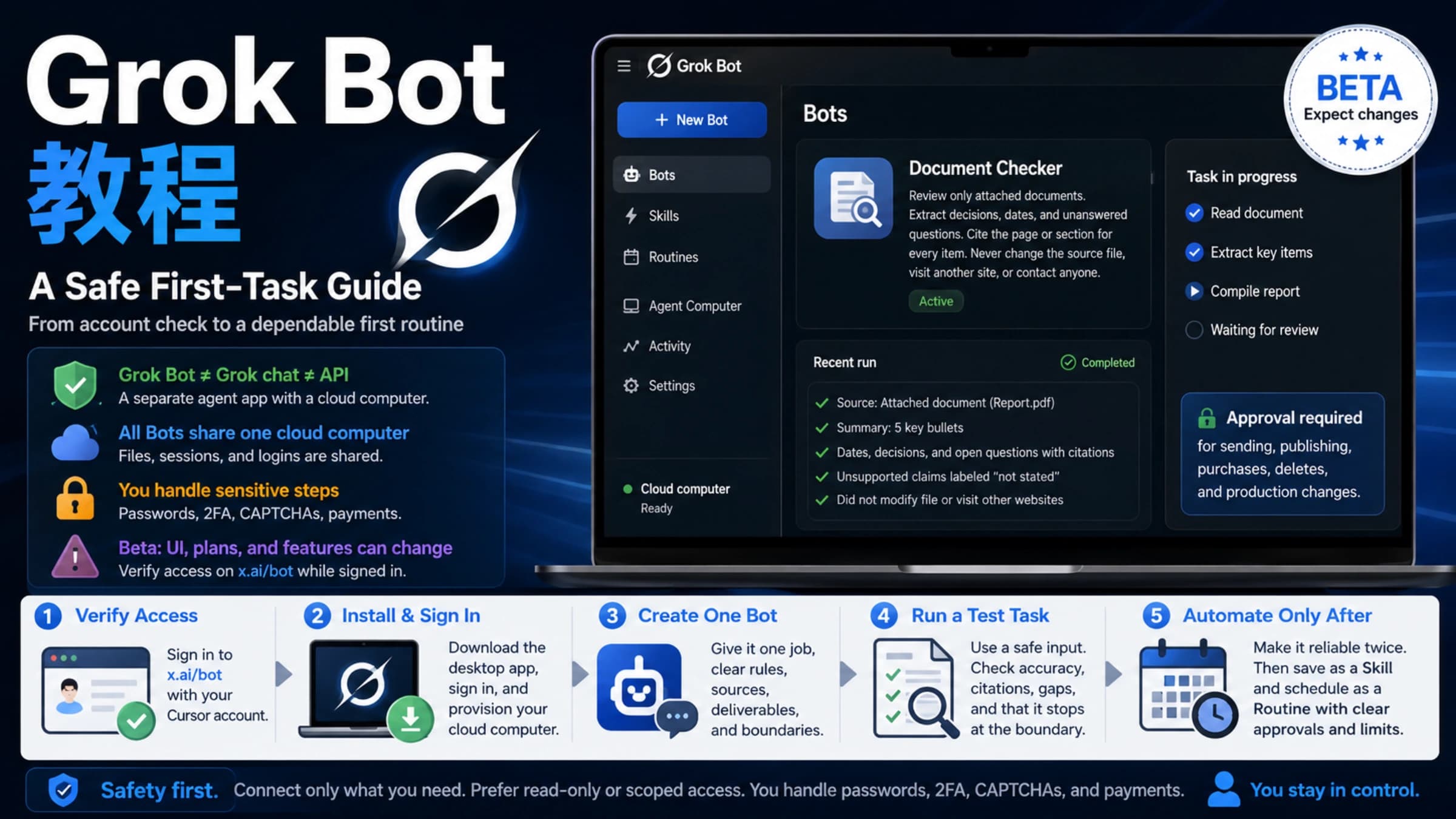
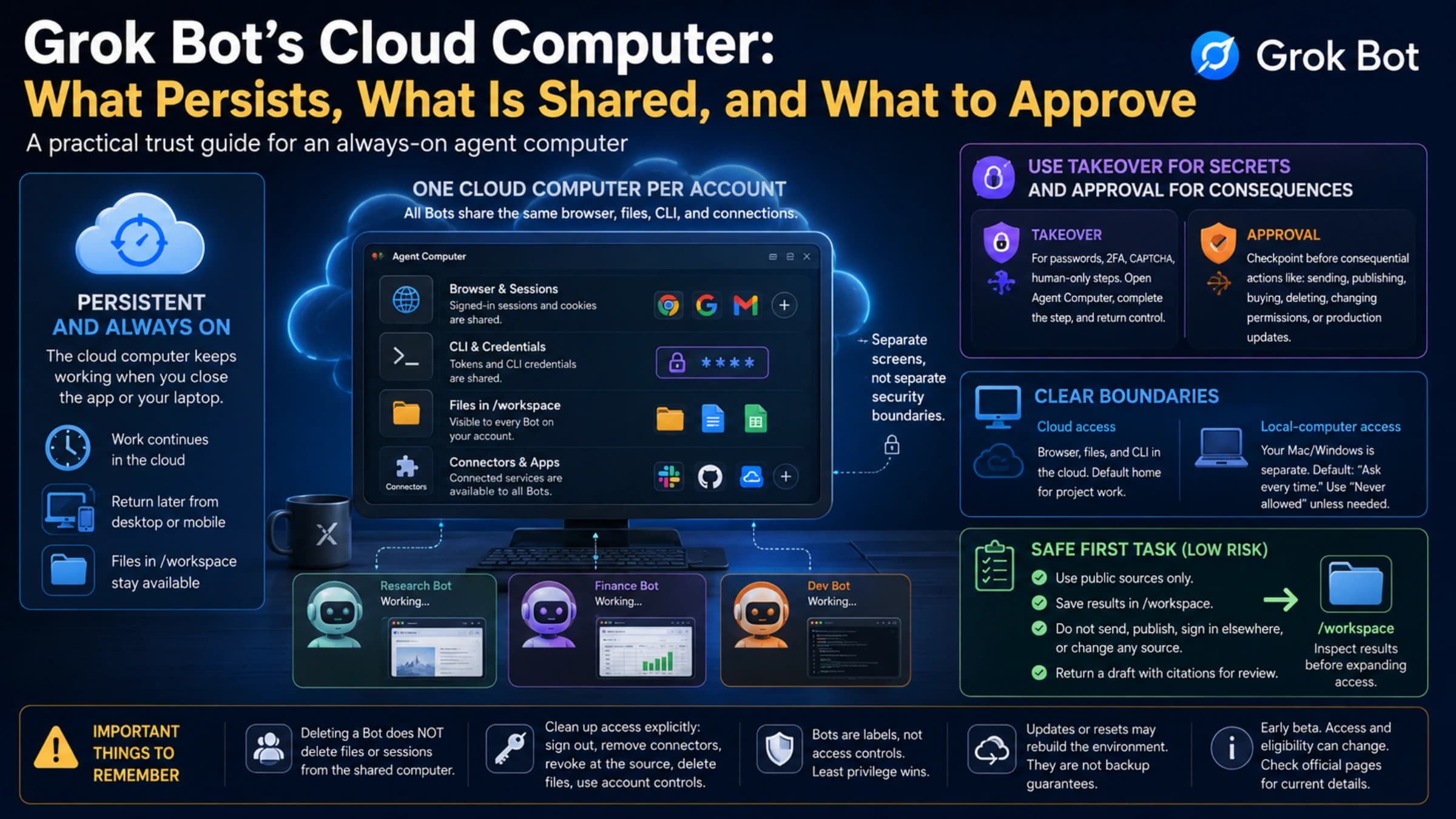
SpaceXAI introduced Grok Bot on August 11, 2026 as an early beta. Its launch description says Bots share a computer in the cloud, work across apps and websites, remember ongoing context, and can coordinate with other Bots. The product is therefore most distinctive when the unit of work is not one conversation but a small roster: for example, a researcher, an operator, and a coordinator passing a job between them.
That shared computer is both the benefit and the first question to investigate. SpaceXAI's Bot management documentation says Bots have separate roles and conversations but share the computer. Separate names do not automatically mean separate files, sessions, or sign-ins. If two Bots will touch different clients or security domains, confirm how you will prevent cross-account mistakes before giving them access.
Grok Bot also supports reusable skills and routines. The official automation guide recommends making a one-time task reliable before scheduling it and keeping approval boundaries for sending, purchasing, deleting, publishing, or changing production systems. That is a better adoption sequence than automating a workflow on the strength of one successful demo.
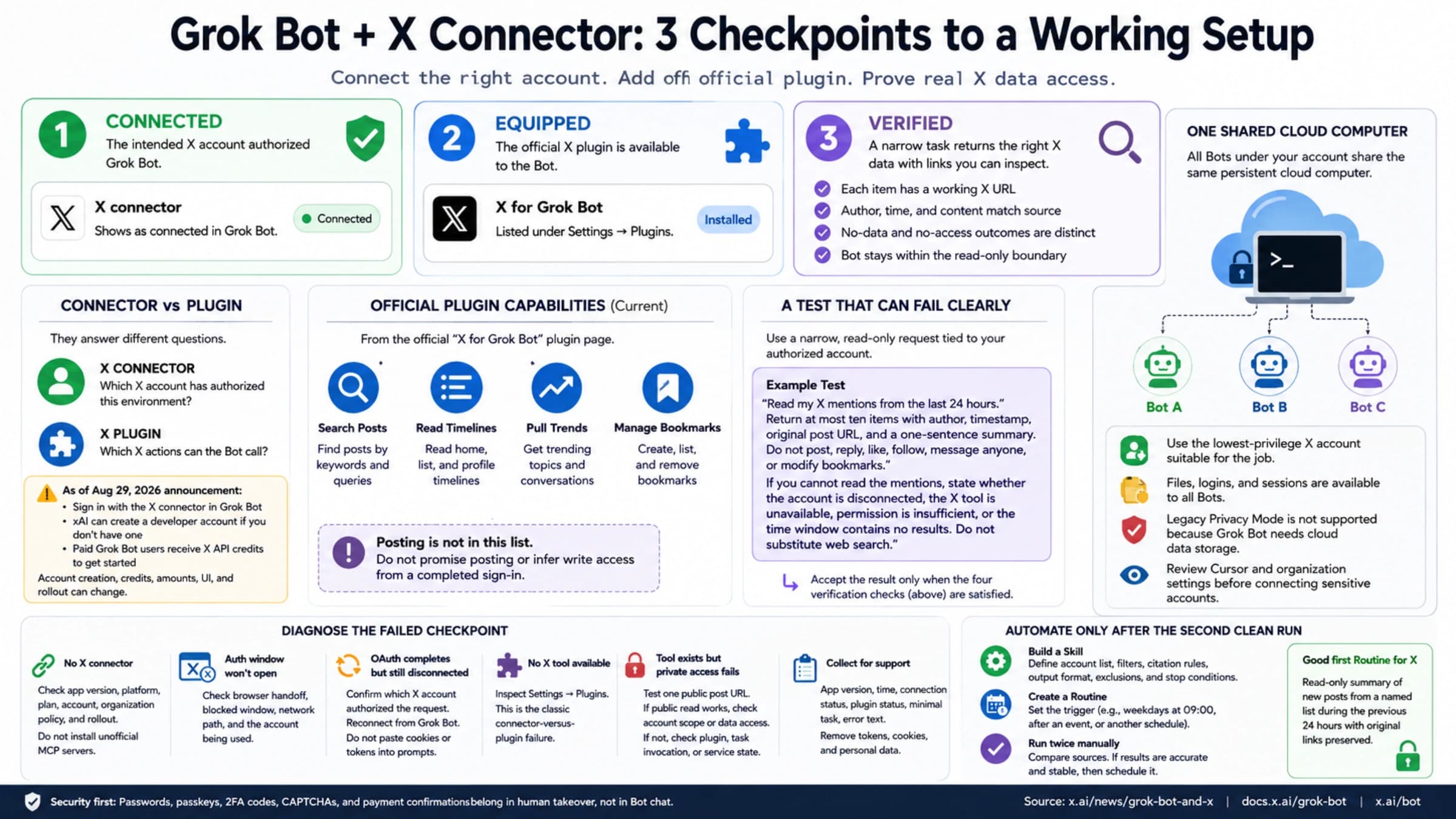
Access changed within weeks of launch. SpaceXAI's August 26 plan update lists SuperGrok, SuperGrok Plus, SuperGrok Heavy, Cursor Pro, Pro+, Ultra, and Cursor Teams plans, and says Bot usage is separate from existing Grok or Cursor usage. “Included” does not tell you the effective allowance, regional checkout, or renewal total. Check the current screen in your own account.
Claude Cowork connects cloud work to selected desktop files and apps
Claude Cowork uses the agentic approach behind Claude Code for non-coding work. Anthropic's current getting-started guide says it is available on paid plans, runs sessions in the cloud by default, continues when the laptop is closed, and can coordinate parallel workstreams. When a cloud task needs a local file, browser, or app, it reaches the device through Claude Desktop.
This makes Cowork a strong first test when a job crosses the cloud/local boundary: analyze account files in the cloud, then update a selected desktop workbook; collect web research, then write to a connected project folder; or steer the same task from web, mobile, and desktop.
The boundary is precise. Anthropic's architecture overview says local access depends on connected folders, permissions, and an online desktop app. Cloud isolation protects where code executes, but files opened through the desktop bridge are still processed on Anthropic's servers. If a policy requires data to remain on the endpoint or requires endpoint security tools to inspect every operation, that detail can disqualify the cloud route before any quality test.
Cowork offers Manual, Auto, and Skip approval approaches, with plan and organization differences. Anthropic's safety guidance warns that browser content, email, files, plugins, and computer use can expose the agent to prompt injection. Skip is not simply a faster version of Manual; it removes an important review barrier. Use manual review for unfamiliar systems and consequential actions.
ChatGPT Work is a flexible local-or-cloud workbench
OpenAI describes ChatGPT Work as a way to delegate a concrete outcome such as a brief, deck, analysis, workflow, recurring update, or finished file. It can use files, plugins, and approved tools. In the desktop app, local work can use resources on the computer. Cloud work can continue after the computer is off and can support scheduled research or monitoring.
That flexibility is the reason to test it first when the work does not need a permanent team of named agents but does require several sources and a polished artifact. A task can stay close to local files when needed or move to cloud execution when continuity and cross-device access matter.
The word “ChatGPT” can hide important boundaries. OpenAI's enterprise overview separates local device access from cloud execution and notes that browser, network, app, and approval controls vary by plan and workspace policy. A plugin being visible does not grant access to an account; the connection still carries the permissions of the authorized user or shared account.
Cost is similarly account-specific. For eligible managed workspaces, OpenAI's usage and cost guide explains that Work may draw from shared credits, while seat fees, committed credits, overage, estimates, and invoices remain different things. Measure the completed job and actual usage together. A cheaper run that requires an hour of cleanup is not cheaper work.
Run a pilot that can produce a “no”
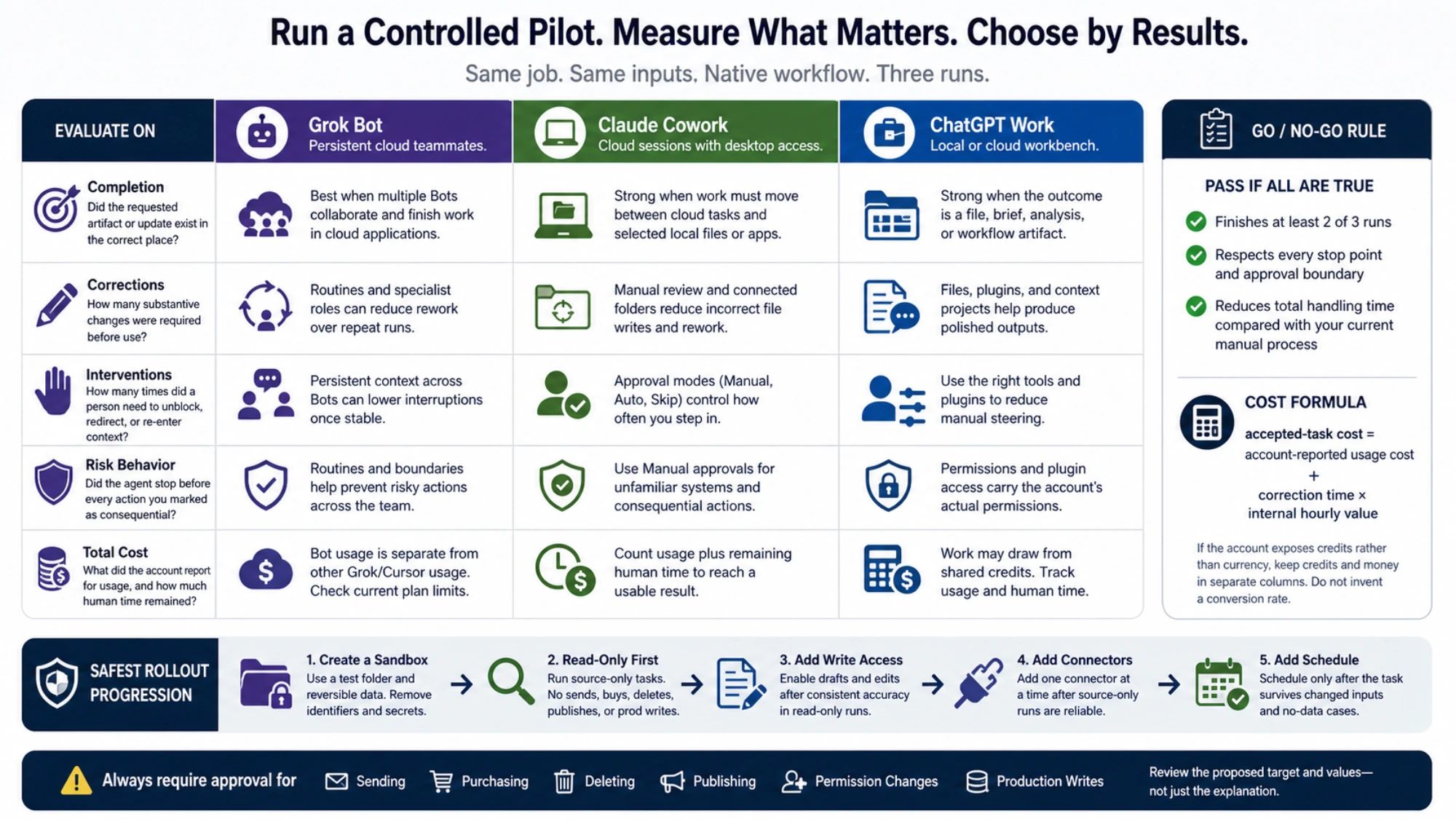
Choose one recurring job that normally takes 30 to 90 minutes. Good candidates have a clear input, a checkable output, and no need to send, buy, delete, publish, or change production systems. Remove customer identifiers and secrets. Give each available product the same outcome and source set, but let it use its native workflow rather than forcing identical clicks.
Record five values:
- Completion: Did the requested artifact or system update exist in the correct place?
- Corrections: How many substantive changes were required before use?
- Interventions: How many times did a person need to unblock, redirect, or re-enter context?
- Risk behavior: Did the agent stop before every action you marked as consequential?
- Total cost: What did the account report for usage, and how much human time remained?
A simple comparison is enough:
accepted-task cost = account-reported usage cost + correction time × internal hourly valueIf the account exposes credits rather than currency, keep credits and money in separate columns. Do not invent a conversion rate. If a plan only shows a remaining allowance, record the before-and-after change along with the timestamp.
For a small initial pilot, repeat the job three times. One possible acceptance rule is that it finishes at least two runs, respects every stop point, and reduces total handling time. A polished first run followed by two failures is not a dependable workflow.
The safest rollout starts with less access than the final job
Create a dedicated test folder and, where practical, test accounts with reversible data. Keep external messages as drafts. Require approval before payments, deletions, publication, permission changes, and production writes. Review the agent's proposed target and values, not only the friendly explanation around them.
Then widen one permission at a time. Add a connector only after the source-only run is reliable. Add write access only after drafts are consistently correct. Add a schedule only after the one-time task survives changed inputs and a no-data case. This progression applies regardless of which brand you choose.
If your real question is how Claude's API computer-use tool differs from its desktop product, use the Claude Computer Use guide. If you want to compare model answers, coding, image generation, or API economics rather than delegated work, that is a different decision from choosing a work agent.
The right product is the one that finishes your job in the required environment, stops at the right boundaries, and remains economical after correction time. Start with the product whose operating model matches the job, then let three controlled runs overrule the marketing.
Sources10
External pages this guide links to, in the order they appear. Last updated Sep 3, 2026.
Sources10
External pages this guide links to, in the order they appear. Last updated Sep 3, 2026.
- 1.launch descriptionx.ai/news/introducing-grok-bot
- 2.Bot management documentationdocs.x.ai/grok-bot/bots
- 3.automation guidedocs.x.ai/grok-bot/skills-routines-and-automations
- 4.plan updatex.ai/news/grok-bot-more-plans
- 5.getting-started guidesupport.claude.com/en/articles/13345190-get-started-with-claude-cowork
- 6.architecture overviewsupport.claude.com/en/articles/14479288-claude-cowork-architecture-overview
- 7.safety guidancesupport.claude.com/en/articles/13364135-use-claude-cowork-safely
- 8.ChatGPT Worklearn.chatgpt.com/docs/get-started-with-work
- 9.enterprise overviewlearn.chatgpt.com/docs/enterprise/chatgpt-work-overview
- 10.usage and cost guidelearn.chatgpt.com/docs/enterprise/chatgpt-work-usage-and-cost