Grok Bot's Cloud Computer: What Persists, What Is Shared, and What to Approve
The feature that keeps Grok Bot working after you close your laptop also keeps sessions and files available. Understand what your Bots share before giving them email, admin access, or production work.
On this page
Before you let Grok Bot sign into email, a CRM, or an admin console, answer one question: would you be comfortable making that login available to every Bot on your account?
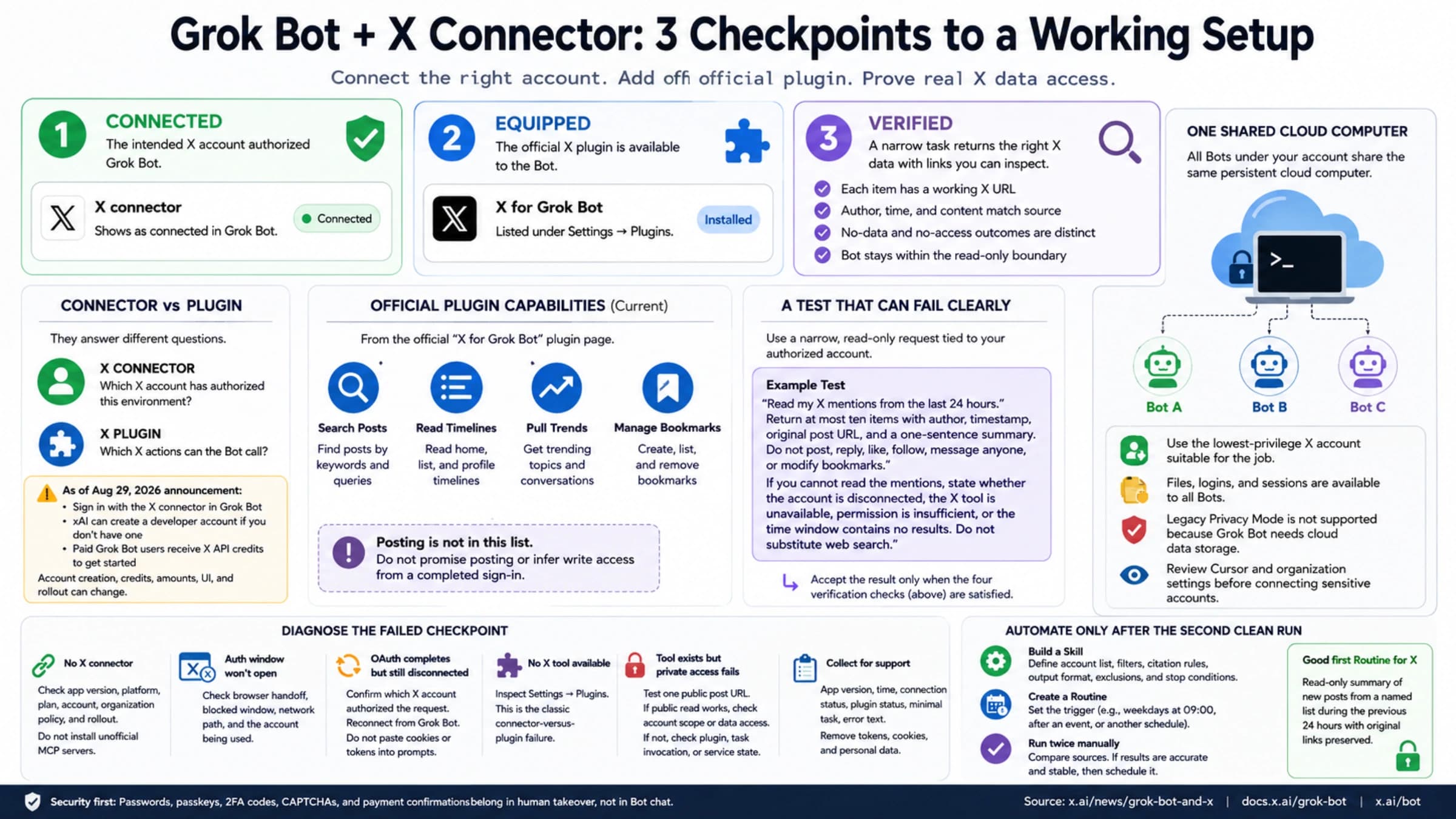
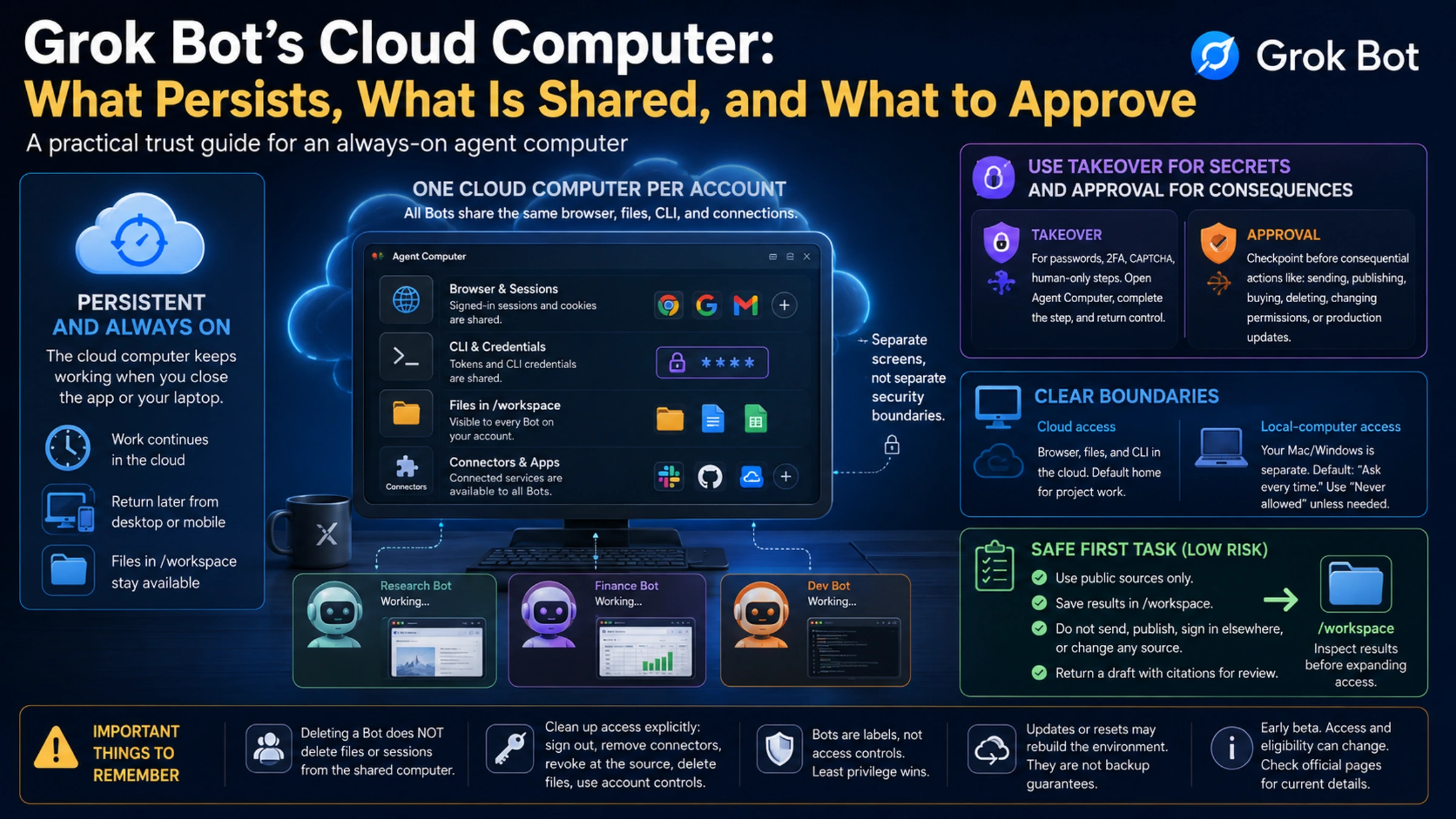
Every Bot on your account uses the same cloud computer. It is not your laptop streamed to a remote screen, and it is not a fresh security sandbox for every named Bot. It is a persistent computer assigned to your user account. Bots can operate its browser, command line, files, and connected services while your local device is asleep or switched off.
Review which sessions and files should remain available before connecting your accounts.
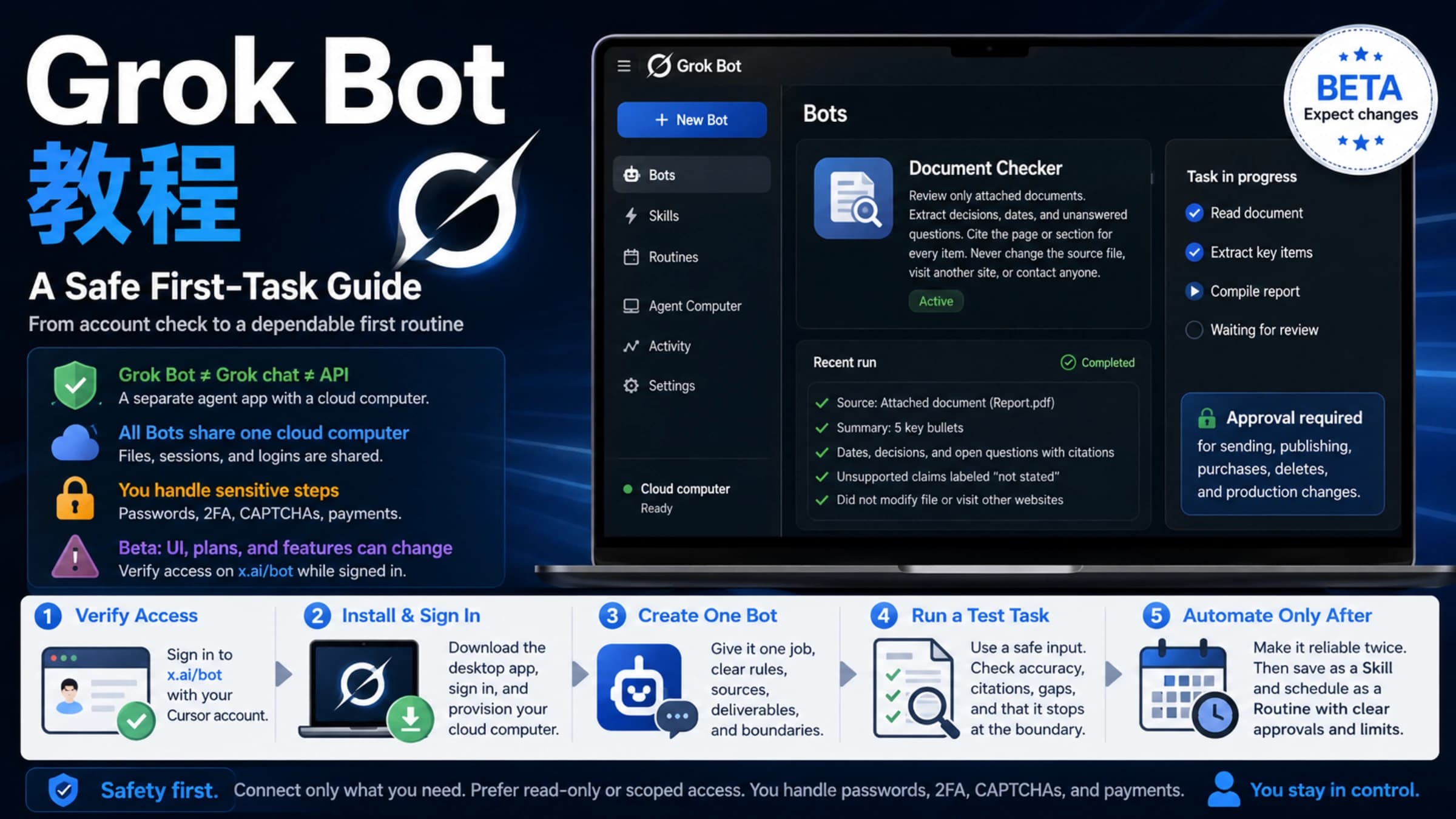
For app installation, account access, and your first document task, start with the Grok Bot getting-started guide. Then use this guide to decide which access should persist on its cloud computer.
The computer belongs to the account, not one Bot
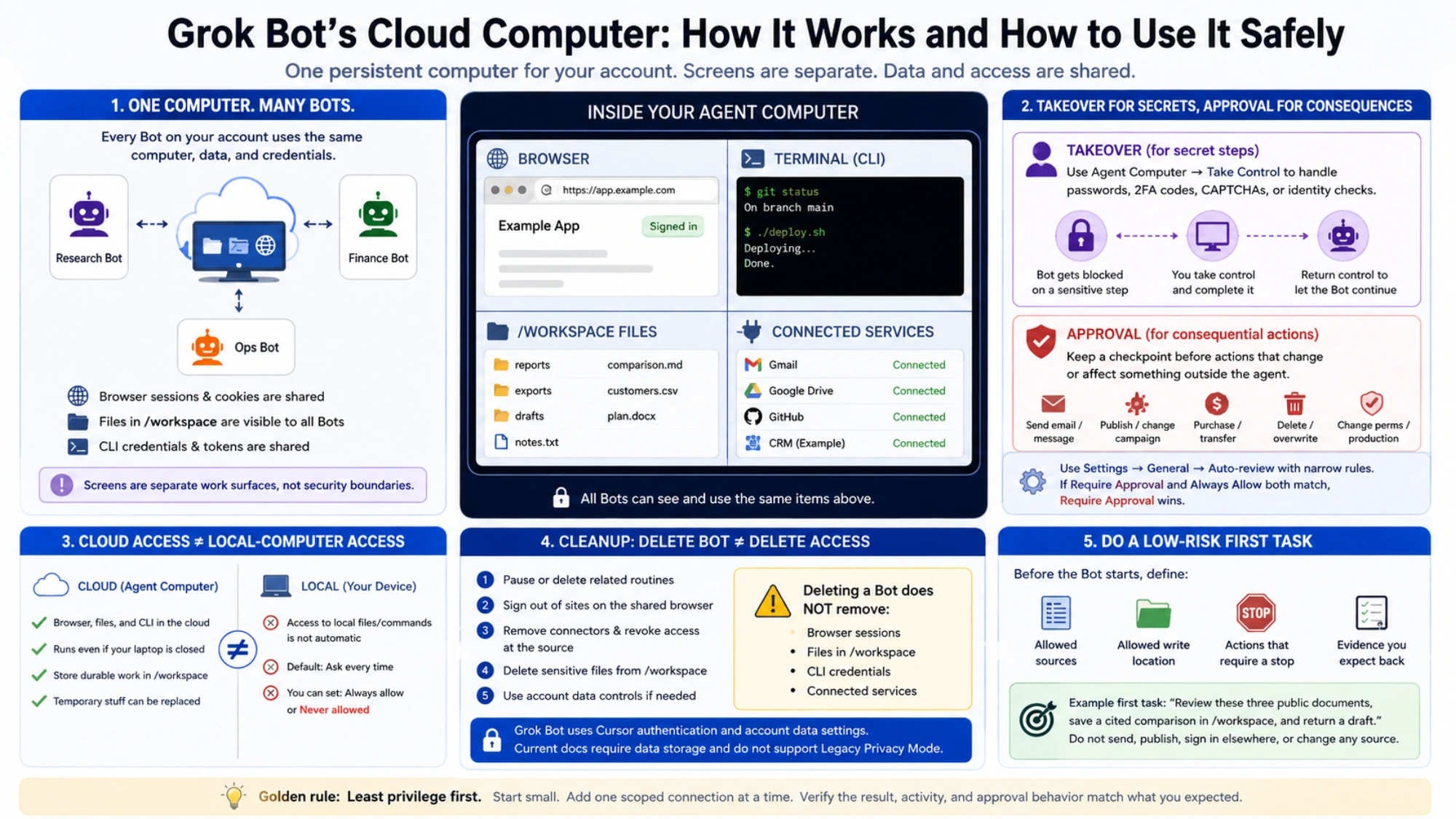
SpaceXAI's computer and apps documentation says every Bot on an account uses the same computer. Browser cookies and signed-in sessions are shared. Files are visible to every Bot. Command-line credentials are shared too.
Each Bot does get its own screen, which allows several Bots to work with browser or desktop tools at the same time. But the documentation is explicit that those screens are separate work surfaces, not separate security boundaries.
This changes how you should interpret common product language:
- A “research Bot” and a “finance Bot” are organizational labels, not access controls.
- Signing into a site for one Bot usually makes that session usable by the others.
- Saving a customer export for one project can expose it to another Bot on the account.
- Adding a CLI token for a development task can make that token available beyond the original conversation.
If two projects must not see each other's data, giving them different Bot names does not create isolation. Keep the sensitive material off the shared computer, or use boundaries enforced by the source system: a read-only account, a project-scoped service identity, narrow permissions, and credentials that can be revoked.
Closing your laptop does not end the cloud job
The work runs in the cloud, so closing the Grok Bot app or your laptop does not stop it. You can return later from desktop or mobile, inspect what happened, and respond when the Bot reaches a decision that needs you.
“Always on” should not be read as “guaranteed never to pause.” A website can expire a session, require verification again, rate-limit requests, or become unavailable. The agent can also encounter an approval, a product usage limit, or a cloud-computer recovery event. The practical promise is independence from your laptop remaining open, not immunity from every external dependency.
That makes some jobs naturally suitable. A Bot can collect public source material overnight, organize files in /workspace, or prepare a draft for morning review. A job that is allowed to publish, pay, delete, or change production without a checkpoint is risky for exactly the same reason: it can keep going while you are away.
Use takeover for secrets and approvals for consequences
When a password, passkey, two-factor code, CAPTCHA, payment confirmation, identity check, or human-only site blocks progress, the intended pattern is to open Agent Computer, take control, complete only that sensitive step, and return control to the Bot.
Do not paste passwords or one-time codes into ordinary chat. A supported connection may present a masked secret request, but the official security guidance describes that as a limited mechanism, not a general password manager.
Takeover protects the secret at an input step. Approval answers a different question: should the proposed action happen at all? Keep an explicit checkpoint before actions such as:
- sending an external email, message, or invitation;
- publishing content or changing an ad campaign;
- making a purchase, transfer, or budget change;
- deleting or overwriting data;
- changing permissions, production settings, or legal terms.
Where Settings → General → Auto-review is available, narrow rules are more useful than broad permission grants. A rule such as “require approval before sending any external email” has a target and a consequence. “Allow everything in the browser” does not. If Require Approval and Always Allow both match, the documentation says Require Approval wins.
Auto Review is model-based. Treat it as another checkpoint, not a replacement for least privilege.
Cloud access and local-computer access are separate
The Grok Bot computer is separate from the Mac or Windows machine in front of you. Browser and terminal access in the cloud does not automatically grant access to local files or local commands.
Local execution has its own policy. The documented default is Ask every time, with options that include always allowing it or choosing Never allowed. If a task only needs cloud services, there is little reason to expose local files. Keeping local execution disabled creates a clearer boundary and reduces the damage from a mistaken instruction.
The separation also affects how you preserve results. The shared cloud workspace at /workspace is meant for durable project files. Temporary directories, manually installed packages, and uncommitted application state should be considered replaceable. Important deliverables should also be attached to the conversation, downloaded, or stored in a system you control rather than trusted to one current desktop state.
Resetting the computer is not the same as deleting a Bot
The maintenance actions solve different problems. An update or recovery can rebuild the environment while preserving durable state when the option is available. Reset Agent Computer can return to a recent durable snapshot and discard newer unsaved work. None of those labels should be treated as a backup guarantee.
Deleting a Bot has a different effect: it does not remove files or browser sessions from the shared computer. If access should truly end, cleanup may require all of the following:
- Pause or delete related routines.
- Sign out of the affected websites on the shared browser.
- Remove connectors and revoke authorization at the source service.
- Delete sensitive project files from
/workspace. - Use account-level data controls if the entire account must be removed.
The last point matters because Grok Bot uses Cursor authentication and account data settings. Current documentation says the product requires data storage and does not support Legacy Privacy Mode. Training opt-out follows the applicable Cursor account and privacy settings. That is not the same as a universal no-retention or no-training promise.
Start with a small, reversible task
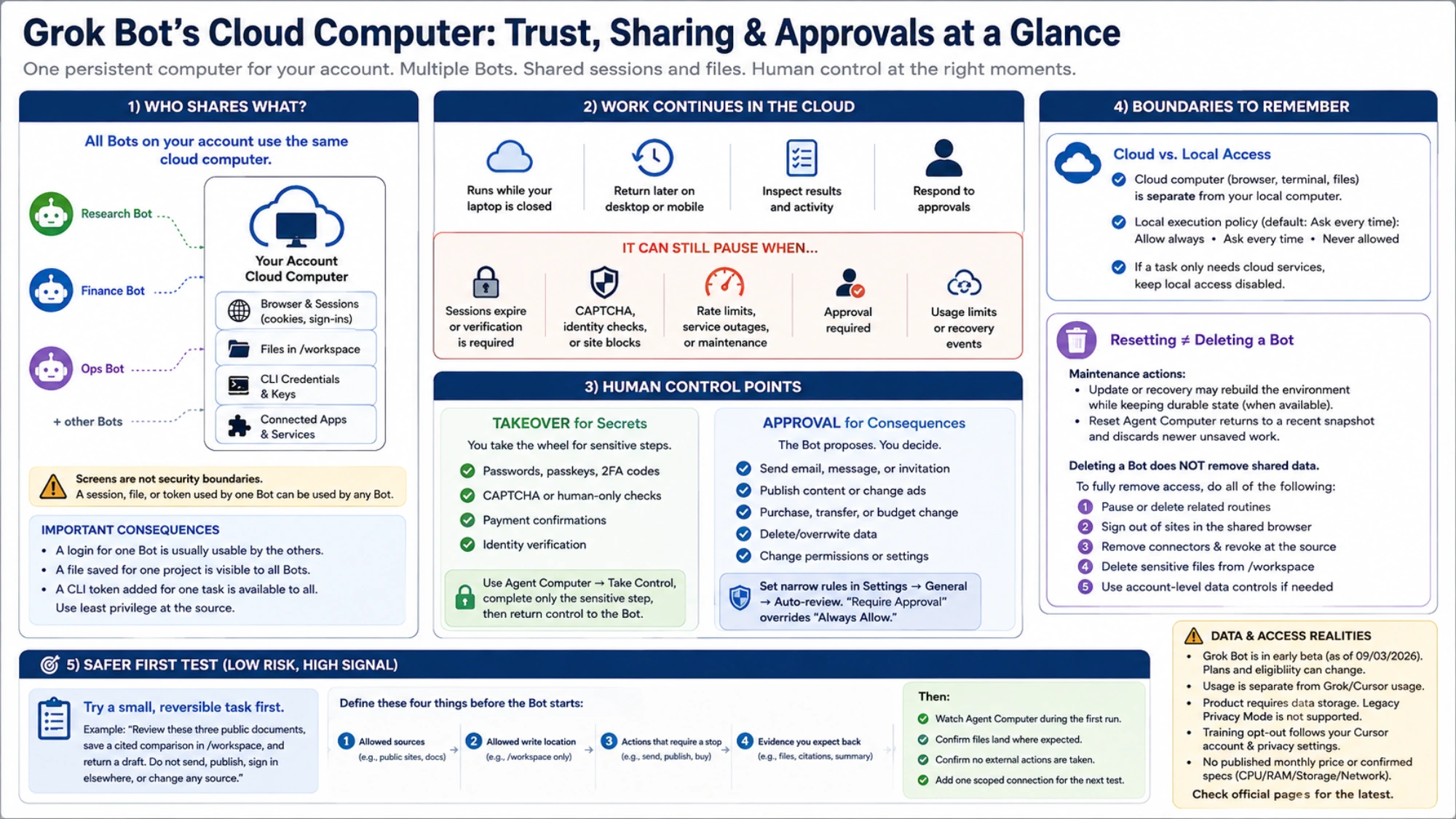
Start with a task whose input is public, output is inspectable, and failure is reversible. For example: “Review these three public documents, save a cited comparison in /workspace, and return a draft. Do not send, publish, sign in elsewhere, or change any source.”
Define four things before the Bot starts: allowed sources, allowed write location, actions that require a stop, and the evidence you expect back. Watch Agent Computer during the first run. Confirm that files land where expected and that the Bot does not turn a draft into an external action.
For the second test, add one scoped connection rather than an administrator account. Expand access only after the result, activity, and approval behavior match what you expected.
This test tells you more than a complicated one-shot challenge. It evaluates whether the system keeps consequences within bounds, not merely whether it can produce an impressive result.
Check beta access before subscribing
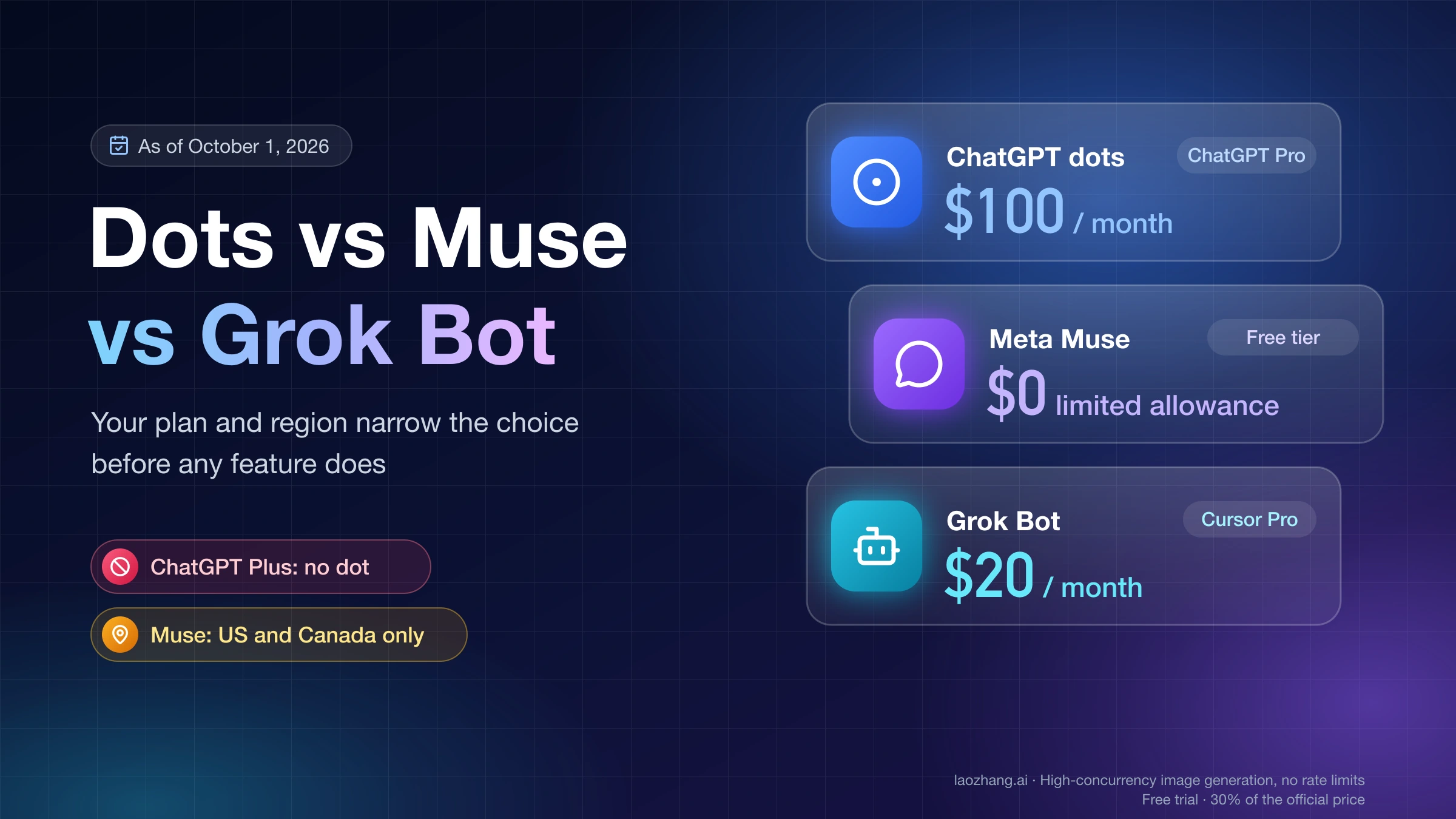
As of September 3, 2026, the official launch announcement labels Grok Bot an early beta. It lists access for SuperGrok, SuperGrok Plus, and SuperGrok Heavy; Cursor Pro, Pro+, and Ultra; and Cursor Teams Standard and Premium subscribers on desktop and iOS. It also says Bot usage is separate from existing Grok and Cursor usage, while enterprise users can join a waitlist.
Those plan names and eligibility rules can change. Check the current first-party page before buying anything. The official pages reviewed for this guide do not publish a standalone monthly price or confirmed CPU, RAM, storage, or network specification, so social posts quoting such numbers should not be treated as a purchasing contract.
Grok Bot's cloud computer is a strong fit when work spans websites and files, benefits from continuing while you are away, and can be broken into inspectable steps with approvals. It is a poor fit when you require isolation between Bots, local-only data, no storage, or unsupervised high-impact actions. Choose tasks whose permissions you can safely grant to the shared computer.
Sources3
External pages this guide links to, in the order they appear. Last updated Sep 3, 2026.
Sources3
External pages this guide links to, in the order they appear. Last updated Sep 3, 2026.