Grok Bot X Connector Guide: Connect X, Add the Plugin, and Test Access
A connected X account is only the first checkpoint. Grok Bot still needs the right plugin and a real data-access test before you can trust the workflow.
On this page
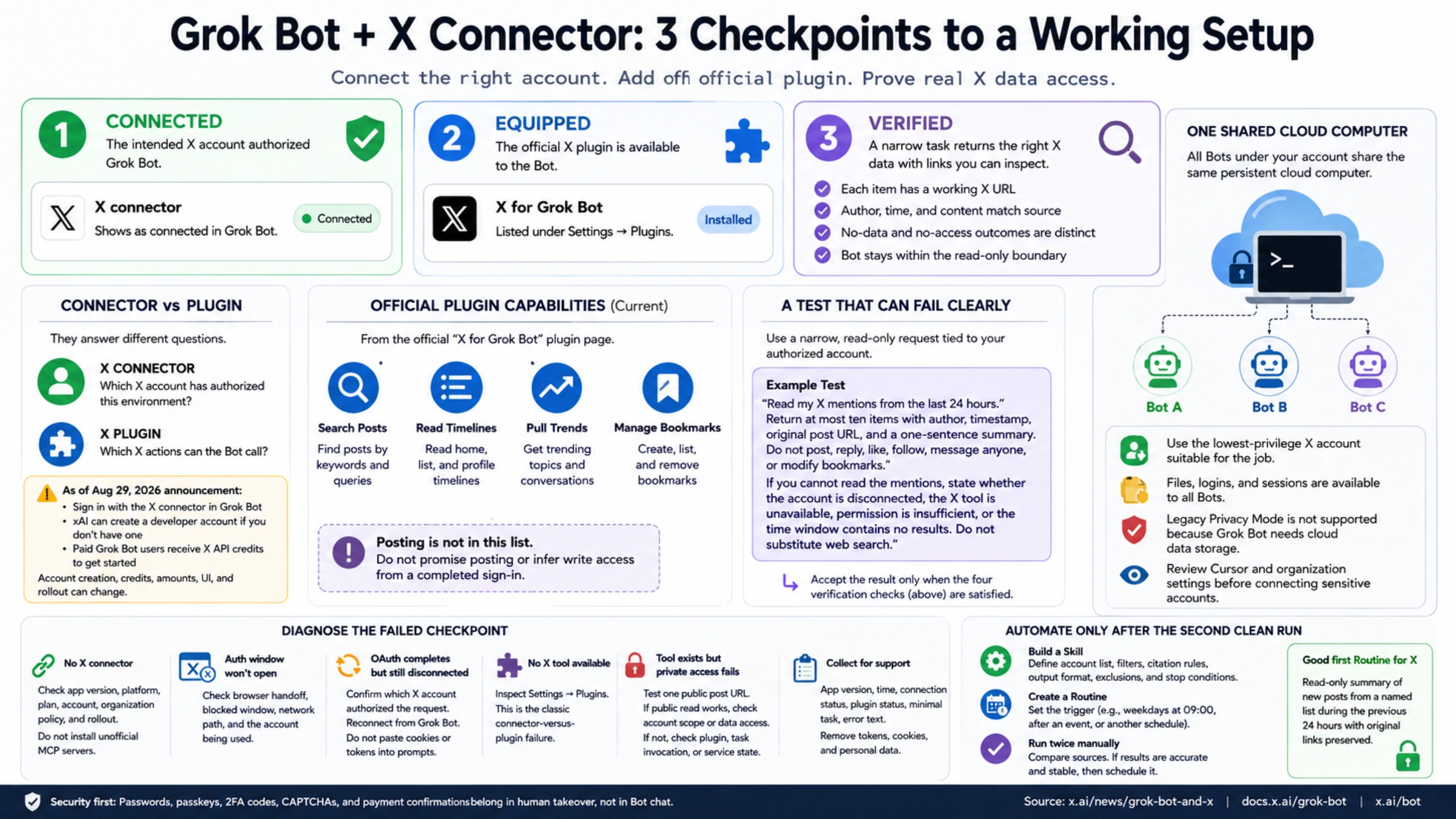
To use X from Grok Bot, connect your X account, add the official X plugin, and test whether it returns the data you need. An OAuth page can finish while the X tools are missing. A plugin can be present while the Bot cannot read the account data you expected. A broad prompt can fail even though the connection is healthy.
Check each step separately:
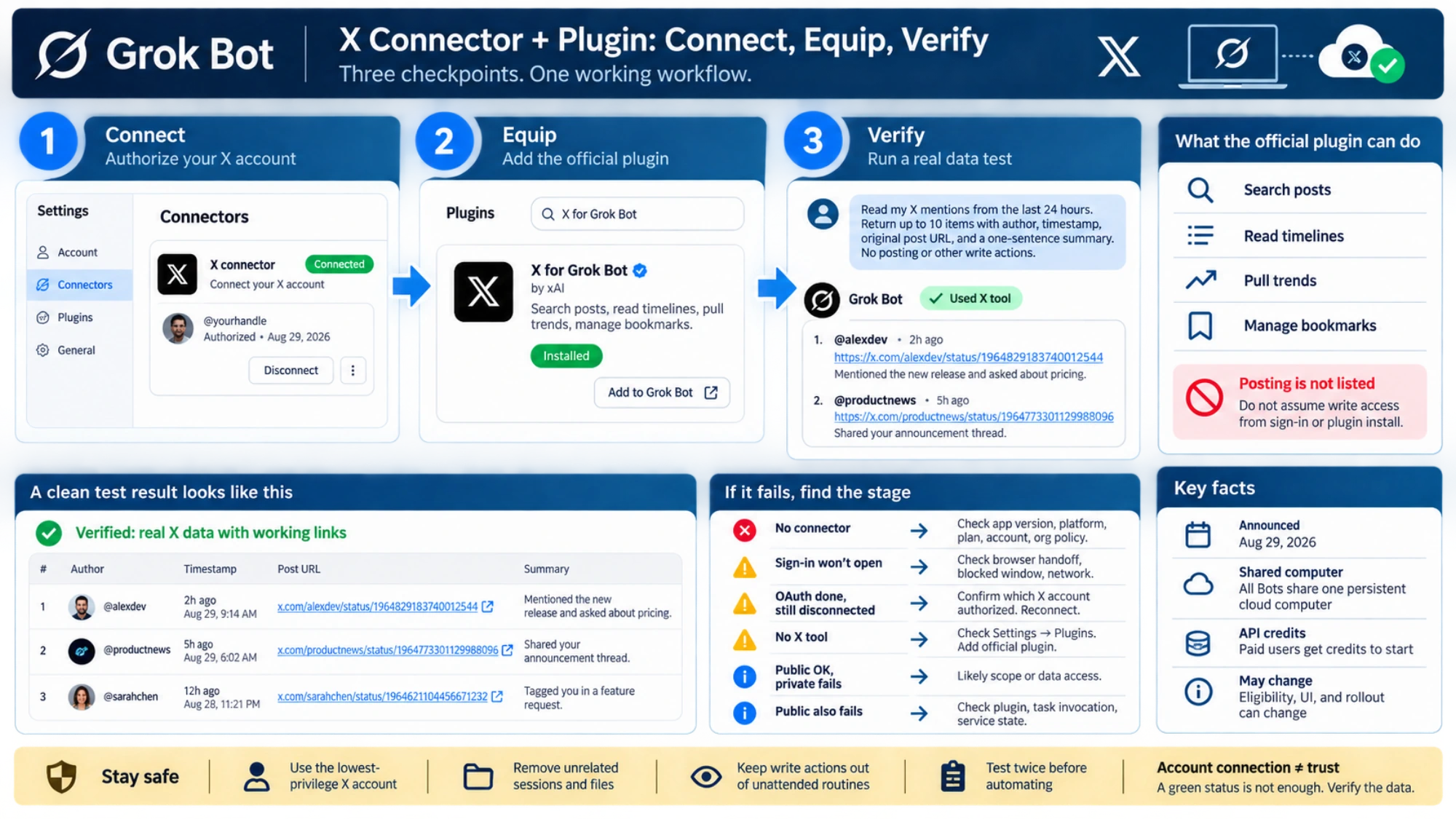
- Connected: the intended X account authorized Grok Bot.
- Equipped: the official X plugin is available to the Bot.
- Verified: a narrow task returns the right X data with links you can inspect.
This guide takes you to the third checkpoint. It also places the X integration inside a safer first-Bot setup, because an account connection is useful only when the Bot has a bounded job.
Identify the product before installing anything
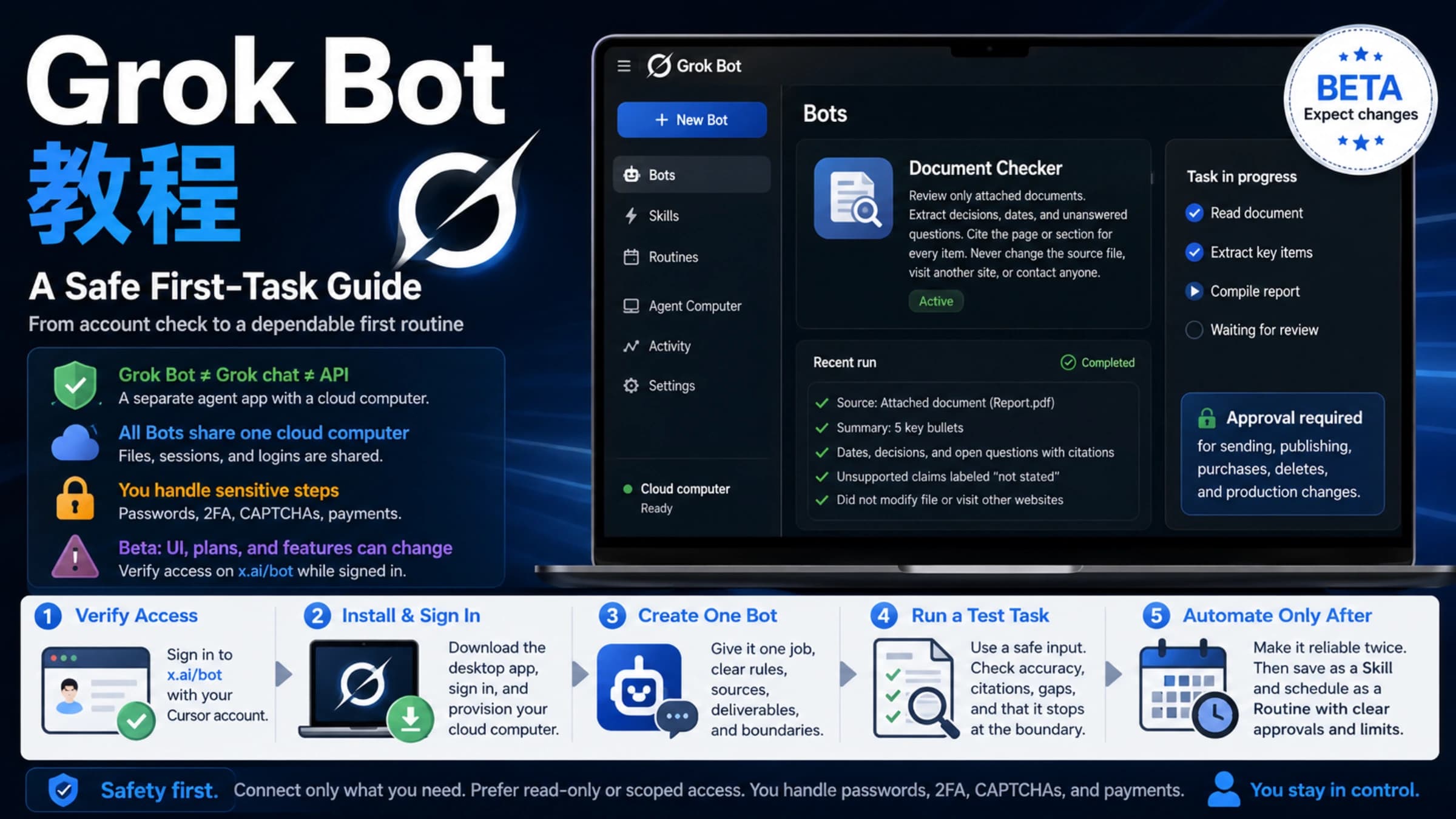
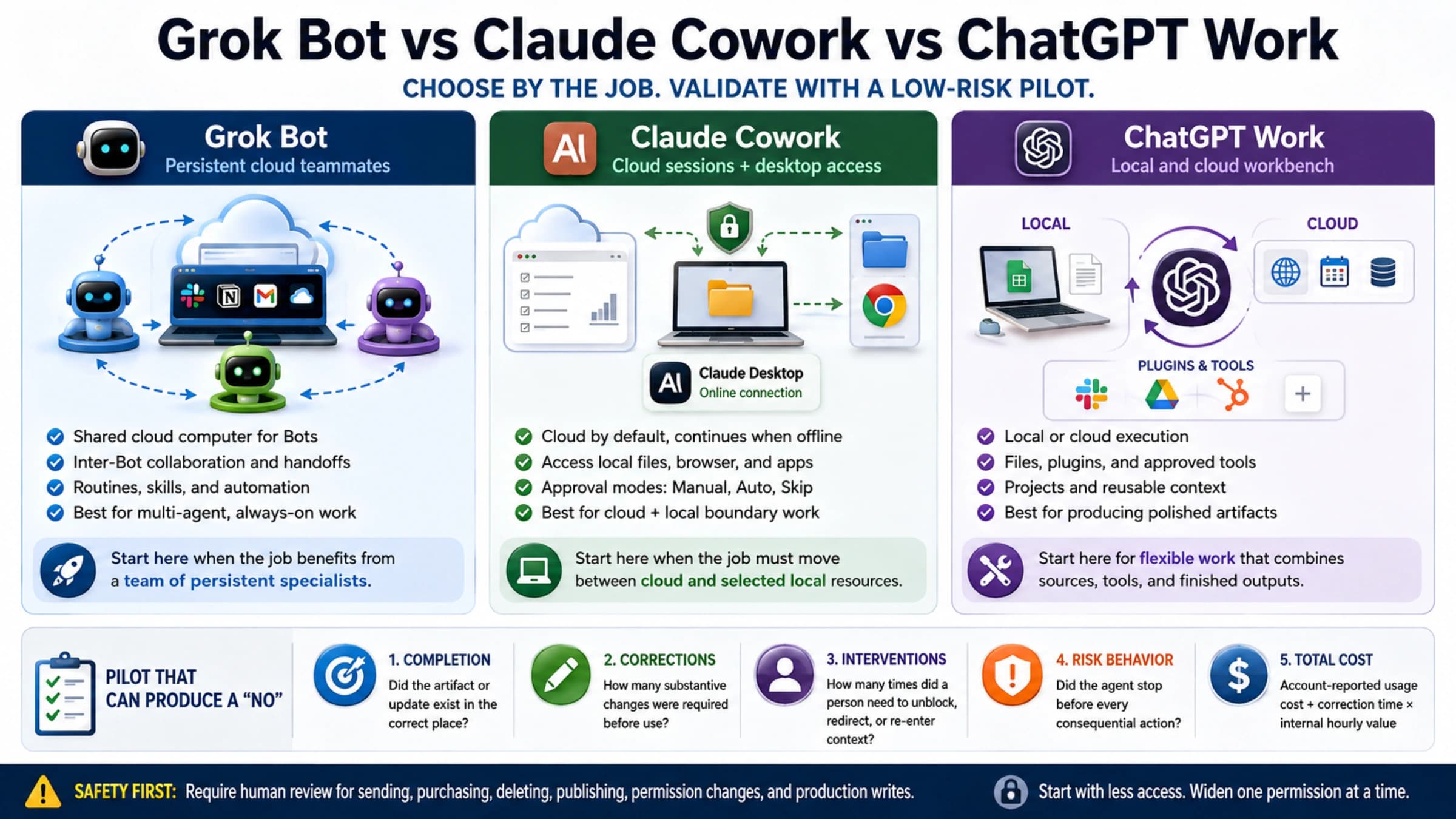
Grok Bot is not the Grok chat experience inside X. The official Grok Bot overview describes a persistent AI teammate that works across apps and websites on a cloud computer. Grok chat is the conversational assistant documented separately in the Grok overview.
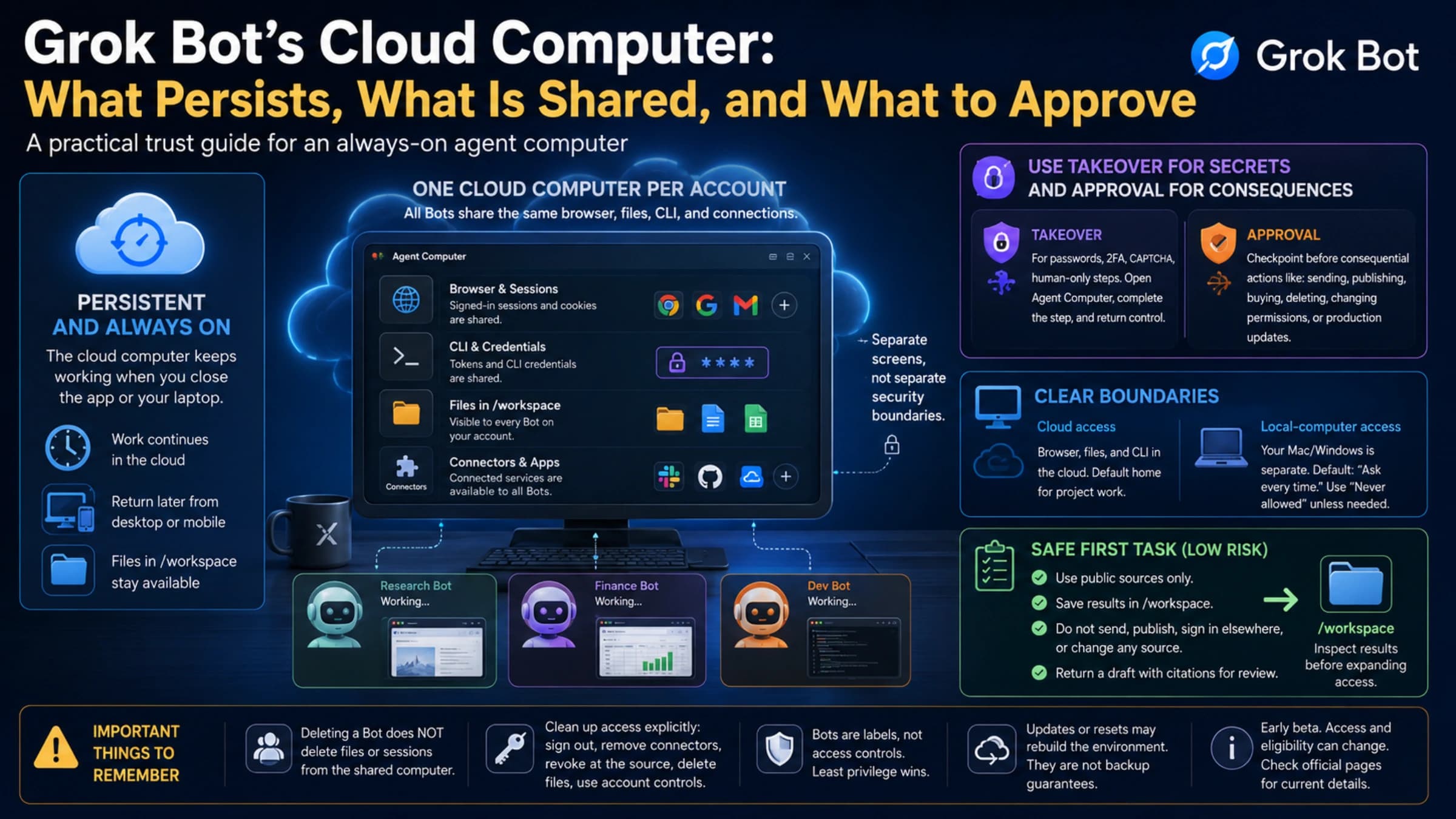
That distinction changes the security model. A Grok Bot can retain files, browser sessions, and app logins on its cloud computer. All Bots under one account share that computer, so creating another Bot does not create a fresh credential boundary.
As of September 3, 2026, the official setup path supports the desktop app on macOS and Windows and also lists iOS. Eligible plans, downloads, and rollout can change. Check xAI's current Grok Bot page and the Get started documentation for the account in front of you instead of relying on an old plan comparison.
If the app does not show the relevant creation or connection controls, verify the signed-in Cursor account, app version, plan eligibility, team policy, and rollout first. A prompt cannot enable a feature that the account has not received.
Give the first Bot one job and one stopping point
Avoid a role such as “manage my social media.” It combines research, account access, writing, publishing, moderation, and analytics before you know which tools work.
A better starting instruction is deliberately smaller:
Monitor product updates from the X accounts I specify. Read only. For each item, return the original post URL, author, timestamp, and a factual two-sentence summary. Do not post, reply, like, follow, send messages, or change bookmarks unless I approve that exact action in the current task.
The instruction establishes a result, source requirement, permission boundary, and review point. Before adding a private account connection, test the Bot on two public post URLs. If it cannot return accurate links and timestamps there, adding OAuth will not fix the underlying task design.
Connector and plugin answer different questions
xAI announced the Grok Bot integration with X on August 29, 2026. Its official announcement says to open Grok Bot and sign in with the X connector. It also says xAI can create a developer account when the user does not have one, and that paid Grok Bot users receive X API credits to get started. Treat account creation, credit availability, and amounts as current-account facts, not permanent entitlements.
The connector answers: which X account has authorized this environment?
The plugin answers: which X actions can the Bot call?
The official X for Grok Bot plugin page currently lists four capabilities: searching posts, reading timelines, pulling trends, and managing bookmarks. Posting is not in that published list. That does not prove no other X integration will ever write, but it does mean you should not promise posting from this plugin or infer write access from a completed sign-in.
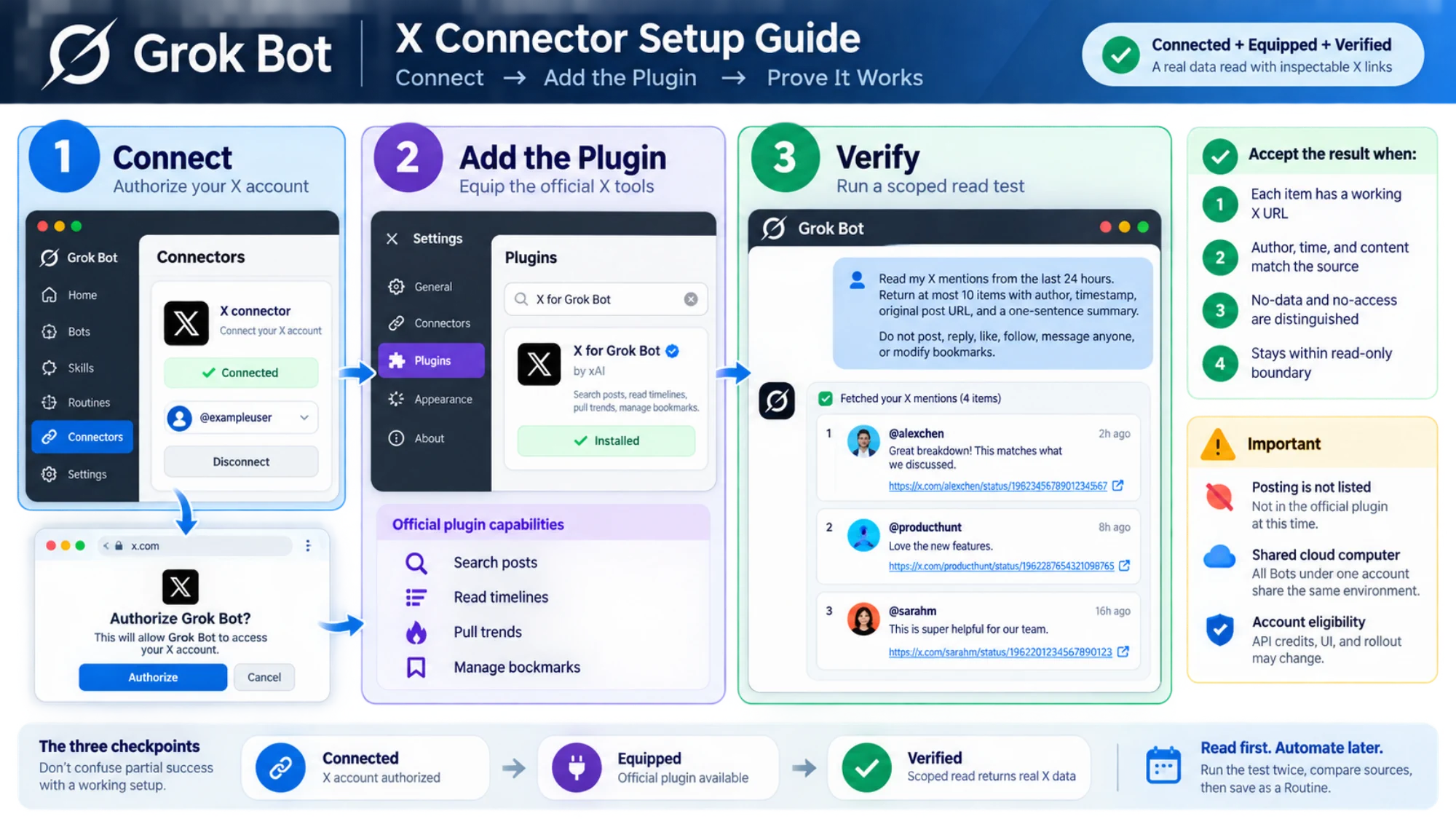
Use Add to Grok Bot on the official page, or confirm that X for Grok Bot appears under Settings → Plugins. Then return to the app and verify both the account connection and plugin presence. The browser's OAuth completion page is not enough on its own.
Run a test that can fail clearly
“Tell me what is happening on X” is a poor connection test. It can be answered from public web material, and an empty result reveals little.
Use a request tied to your authorized account and a short time window:
Read my X mentions from the last 24 hours. Return at most ten items with author, timestamp, original post URL, and a one-sentence summary. Do not post, reply, like, follow, message anyone, or modify bookmarks. If you cannot read the mentions, state whether the account is disconnected, the X tool is unavailable, permission is insufficient, or the time window contains no results. Do not substitute web search.
Accept the result only when:
- each item has a working X URL;
- the author, time, and post content match the source;
- no-data and no-access outcomes are distinguished;
- the Bot stays within the read-only boundary.
This is the difference between a green status indicator and a functioning workflow.
Diagnose the failed checkpoint
If X connector is absent, check the current Grok Bot release, platform, plan, account, and organization policy. Do not install an unofficial MCP server merely to make the label appear.
If the connector is present but the authorization window does not open, keep the investigation at the sign-in stage: app version, browser handoff, blocked window, network path, and the account being used. Passwords, passkeys, 2FA codes, CAPTCHAs, and payment confirmations belong in a human takeover, not in the Bot chat. The official approvals and security guidance explains this boundary.
If OAuth completes but the app remains disconnected, confirm which X account authorized the request and reconnect from Grok Bot. Do not paste cookies or tokens into a prompt.
If the account is connected but the Bot reports no X tool, inspect Settings → Plugins. The account connection and available tools need to be checked separately.
If the tool exists but private timeline or mention access fails, shrink the test to one public post URL. A successful public read with a failed private read points toward account scope or data access. Failure on the public URL points toward the plugin, task invocation, or service state. Capture the app version, time, visible connection status, plugin status, minimal task, and error text for support; remove tokens, cookies, and personal data.
Protect the shared cloud computer
Every Bot in the account uses the same persistent cloud computer. A login created for one Bot may therefore be available to another. Use the lowest-privilege X account suitable for the job, remove unrelated sessions, and assume files placed on that computer are shared across your Bots.
The official security page says Legacy Privacy Mode is not supported because Grok Bot needs cloud data storage. Review the current Cursor and organization settings before connecting sensitive accounts. Separate Bots are useful for job clarity, not credential isolation.
Consequential X actions deserve an explicit review even if a future tool exposes them. Publishing, replying, messaging, following, or changing account state represents you to other people. Keep those actions out of unattended routines until the exact tool, preview, target, and approval behavior have been verified.
Test the task before automating it
A successful first task confirms that the setup worked for that request. Repeat it on other representative inputs before saving the method or scheduling it.
Use a Skill for the method: account list, filters, citation rules, output format, exclusions, and stop conditions. Use a Routine for the trigger: weekdays at 09:00, after a specified event, or another schedule. The official Skills and Routines guide recommends testing a task before automating it.
For X, a sensible first Routine is read-only: summarize new posts from a named list during the previous 24 hours and preserve original links. Run it twice manually, compare the sources, and only then schedule it. If either run invents links, merges dates, or hides an access failure as “nothing found,” the workflow is not ready.
The finished setup is observable: the intended account is connected, the official plugin is present, a scoped read returns inspectable X sources, failures identify their stage, and the Bot has no permission to write. Once those conditions hold, you can expand the job one capability at a time without confusing access with trust.
Sources8
External pages this guide links to, in the order they appear. Last updated Sep 3, 2026.
Sources8
External pages this guide links to, in the order they appear. Last updated Sep 3, 2026.
- 1.official Grok Bot overviewdocs.x.ai/grok-bot/overview
- 2.Grok overviewdocs.x.ai/grok/overview
- 3.xAI's current Grok Bot pagex.ai/bot
- 4.Get started documentationdocs.x.ai/grok-bot/get-started
- 5.official announcementx.ai/news/grok-bot-and-x
- 6.X for Grok Bot plugin pagex.ai/bot/plugin/49086599
- 7.official approvals and security guidancedocs.x.ai/grok-bot/approvals-security-and-privacy
- 8.official Skills and Routines guidedocs.x.ai/grok-bot/skills-routines-and-automations