GPT-6 Astra Computer Use: Build the Right Responses API Loop
GPT-6 Astra can plan multi-step work across browser and desktop interfaces, but your application still owns execution, permission checks, persistent state, and proof that the external task actually succeeded.
On this page
GPT-6 Astra computer use is not a switch that gives a model unrestricted control of a machine. It is an application design: the model decides what it needs to do, your code decides what it is allowed to do, an isolated environment performs the approved work, and your verifier checks the result in the target system.
That distinction matters more than the demo. A Responses API call can finish successfully even when a button did not register, a browser session expired, a form displayed a validation error, or an external service rejected the change. Production readiness therefore depends on three separate things: model conversation state, execution-environment state, and the real state of the task.
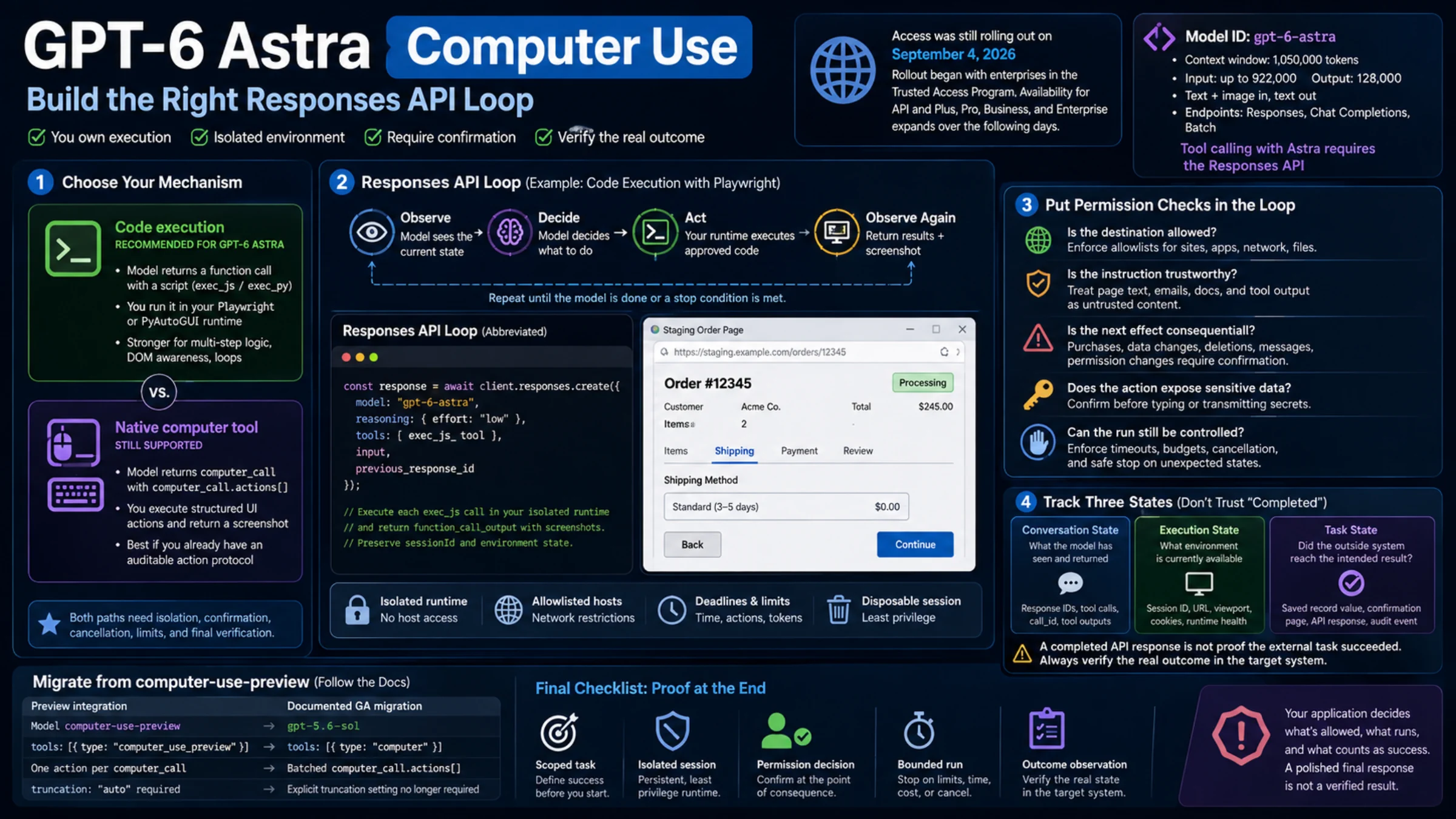
OpenAI documents two ways to connect Astra to an interface. Code execution is the recommended path for GPT-6 Astra: the model writes a Playwright or PyAutoGUI script for a function that you provide. The native computer tool remains supported when an application already expects structured mouse and keyboard actions. Neither path removes the need for isolation, confirmation, cancellation, or final-state verification.
Check access before designing around Astra
Access was still changing when this guide was checked. On September 4, 2026, OpenAI said GPT-6 Astra was rolling out first to enterprises in the Trusted Access Program, with API and Plus, Pro, Business, and Enterprise availability expanding over the following days. That announcement does not prove that a particular account can use the model. Check the actual API project or model selector before committing an implementation to it. OpenAI's dated rollout update describes that stage of the rollout.
Keep product and API access separate. Enabling Astra in a ChatGPT workspace does not grant access to an API key. API entitlement follows the organization and project associated with that key; OpenAI's initial Enterprise guidance also says early API access can require additional client configuration. Conversely, seeing the model in an API project says nothing about whether a user can select it in ChatGPT Work or Codex. OpenAI's workspace availability guide describes these boundaries.
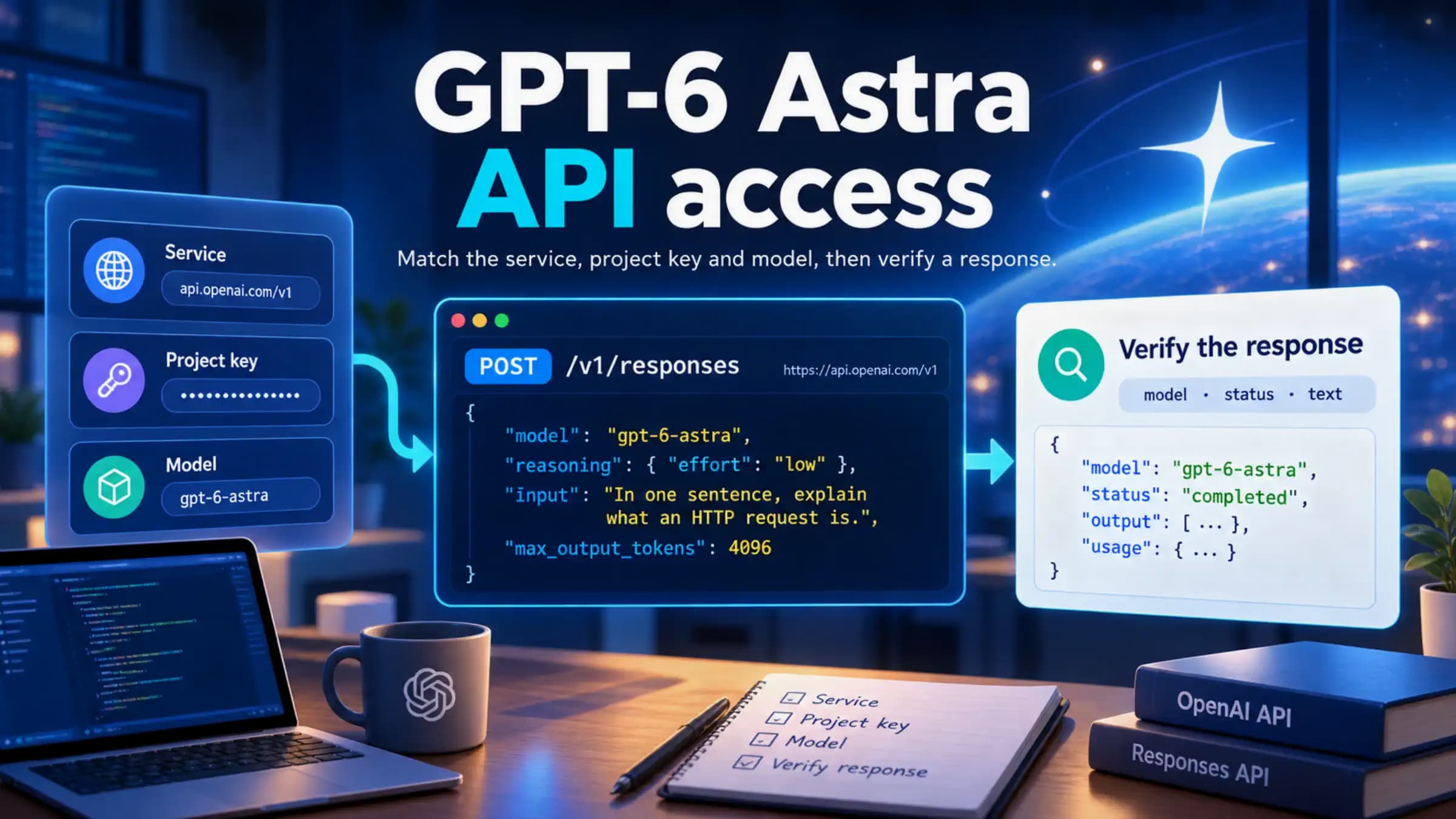
For API code, the model ID is gpt-6-astra. The current model reference lists a 1,050,000-token context window, up to 922,000 input tokens and 128,000 output tokens, with text and image input and text output. It lists Responses, Chat Completions, and Batch as supported endpoints. There is one decisive qualification for this use case: tool calling with Astra requires the Responses API. Chat Completions support does not extend to calling the interface tools described here.
The documented reasoning-effort values are low, medium, high, xhigh, and max. A sensible starting point for an execution loop is low or medium, followed by evaluation on your own tasks. Higher effort can improve planning on difficult workflows, but it also changes latency and token use; it does not repair a weak permission model or replace an outcome check. OpenAI's Astra migration guidance also tells callers moving from none or minimal to start with low, and to remove unsupported sampling parameters such as temperature and top_p.
Choose the mechanism by what your runtime can enforce
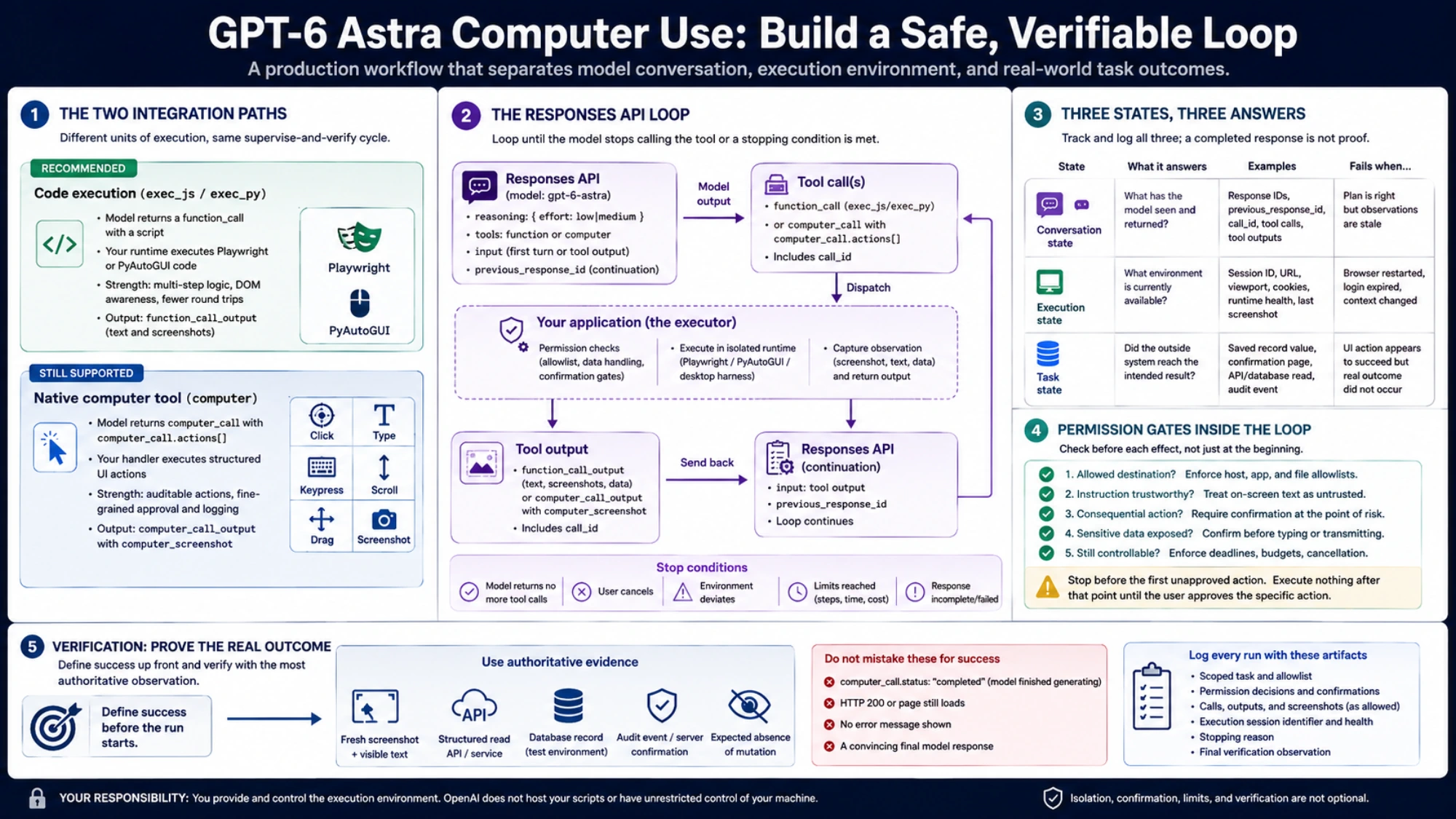
The two integration paths lead to the same broad cycle—observe, decide, act, observe again—but they create different units of execution.
| Decision | Code execution | Native computer tool |
|---|---|---|
| What the model returns | A function call containing a script | A computer_call containing computer_call.actions[] |
| What your application executes | Code against a provided Playwright or PyAutoGUI runtime | Structured clicks, typing, keypresses, scrolling, drags, waits, or screenshot requests |
| Natural strength | Several related operations, DOM-aware inspection, loops, and conditional logic in one call | An application already built to log and execute individual UI actions |
| Main policy challenge | A single script may contain many effects, so enforcement must live inside the runtime and its helpers | A batch may mix safe and consequential actions, so execution must stop before the first action requiring confirmation |
| Feedback | function_call_output, which may include text and screenshots | computer_call_output containing a computer_screenshot |
Choose code execution for a new Astra integration unless you have a concrete reason to prefer action objects. This is OpenAI's current recommendation in the computer-use guide. It can reduce round trips when the model can inspect a page, perform a short sequence, and report the updated state in one script. It can also use Playwright locators when coordinates would be brittle.
Choose computer when your existing automation is built around a fixed action vocabulary, your audit trail needs every requested input action, or your environment cannot expose a general script function. Do not call it a legacy-only path: OpenAI still lists it as supported for Astra. The tradeoff is that your handler must faithfully implement the action schema and return a fresh screenshot after each completed batch.
If your application already exposes safe UI operations through function calling or a remote MCP server—for example, open_invoice, set_filter, or save_draft—you do not need to discard that interface merely to claim “computer use.” A narrow operation with typed arguments is often easier to authorize and verify than a click sequence. Visual control earns its place when the task truly depends on rendered state or an interface that has no dependable structured operation.
Build code execution around a persistent, isolated session
In the recommended path, exec_js or exec_py is your function, not an OpenAI-hosted execution service. The function description tells the model what runtime objects exist and how to return observations. Your service owns the browser or desktop session, authenticates the caller, constrains resources and network access, and decides whether each generated operation may run.
The following abbreviated JavaScript example shows the loop. executeInSandbox is intentionally application-defined; it must not be implemented as an unrestricted eval on the API client host.
import OpenAI from "openai";
import { randomUUID } from "node:crypto";

const client = new OpenAI();
const sessionId = randomUUID();

const tools = [{
  type: "function",
  name: "exec_js",
  description: [
    "Run JavaScript in a persistent, isolated Playwright browser.",
    "Inspect the current page before acting and return a screenshot after changes.",
    "Use only the allowed sites and operations exposed by this runtime."
  ].join(" "),
  parameters: {
    type: "object",
    properties: { code: { type: "string" } },
    required: ["code"],
    additionalProperties: false
  },
  strict: true
}];

let input = [{
  role: "user",
  content: "Open the staging order page, read its status, and report it. Do not modify the order."
}];
let previousResponseId;
let finalResponse;

for (let turn = 0; turn < 20; turn += 1) {
  const response = await client.responses.create({
    model: "gpt-6-astra",
    reasoning: { effort: "low" },
    tools,
    input,
    previous_response_id: previousResponseId
  });

  if (response.status !== "completed") {
    throw new Error(`Response stopped with status: ${response.status}`);
  }

  const calls = response.output.filter(
    item => item.type === "function_call" && item.name === "exec_js"
  );

  if (calls.length === 0) {
    finalResponse = response;
    break;
  }

  input = [];
  for (const call of calls) {
    const { code } = JSON.parse(call.arguments);
    const output = await executeInSandbox({
      code,
      sessionId,
      deadlineMs: 30_000,
      allowedHosts: ["staging.example.com"]
    });

    input.push({
      type: "function_call_output",
      call_id: call.call_id,
      output
    });
  }

  previousResponseId = response.id;
}

if (!finalResponse) {
  throw new Error("The run reached its response limit without finishing.");
}

console.log(finalResponse.output_text);
The loop needs more than a turn counter. Before dispatching a script, inspect or constrain what the runtime can do. Inside the runtime, expose only the browser objects and helpers the task needs. Launch the browser without inheriting host environment variables, block local-file access where possible, restrict outbound hosts, and keep credentials outside the model-visible namespace. Run it in a disposable, least-privilege container or VM separated from the API client and its API key. OpenAI explicitly warns that Node.js vm and restricted Python globals are not security boundaries; the execution-service recipe calls for a real isolation boundary.
Keep the same sessionId tied to the same browser and runtime variables throughout the task. previous_response_id preserves the model conversation; it does not recreate cookies, open tabs, authenticated state, JavaScript variables, or the current desktop. If the container restarts, report that loss of state instead of allowing the model to continue as though the previous screen still existed.
Implement the native computer loop as an action protocol
The native tool replaces generated scripts with a constrained action vocabulary. The first Responses request includes tools: [{ type: "computer" }]. The model may initially ask only for a screenshot, or it may return a batch such as a click followed by text entry. Your application executes the allowed portion in order, captures the resulting screen, and sends it back.
OpenAI's current native-tool snippets use gpt-5.6-sol, while the same guide explicitly says the computer tool remains supported for GPT-6 Astra. Treat the example model as an implementation detail, not as a preview-to-Astra migration rule or a reason to ignore the documented preference for code execution.
A continuation has this shape:
const next = await client.responses.create({
  model: "gpt-6-astra",
  tools: [{ type: "computer" }],
  previous_response_id: response.id,
  input: [{
    type: "computer_call_output",
    call_id: computerCall.call_id,
    output: {
      type: "computer_screenshot",
      image_url: `data:image/png;base64,${screenshotBase64}`,
      detail: "original"
    }
  }]
});
Repeat only while the response contains a complete computer_call. Do not execute a partially generated action. Stop when the API returns an incomplete or failed response, the user cancels, the environment deviates from the allowed scope, or the run reaches its step, time, or cost limit. The complete loop and action-handler requirements are documented in OpenAI's computer-use integration recipes.
One status field is easy to misread: computer_call.status: "completed" means the model finished generating that call. It does not mean your handler executed the actions, the website accepted them, or the requested task succeeded. After executing a permitted batch, always return the newly observed screen. When the model stops calling the tool, perform an independent final check.
For screenshots, OpenAI recommends detail: "original" for computer use because coordinate accuracy depends on preserving the visual geometry. Large screenshots consume more input tokens and may exceed image limits. If you downscale one, map every returned coordinate from the reduced image back to the actual viewport before executing it. A mismatch between image coordinates and the live environment can turn a safe intended click into the wrong action.
Track three states instead of one “completed” flag
A robust implementation should make these states visible in logs and in its task record:
| State | What it answers | Typical identifier or observation | Failure that a model response cannot settle |
|---|---|---|---|
| Conversation state | What has the model seen and returned? | Response IDs, previous_response_id, tool calls, call_id, tool outputs | The model may have the right plan but stale observations |
| Execution state | What environment is currently available? | Session ID, active URL, viewport, cookies, runtime health, last screenshot | A restarted browser or expired login can invalidate the plan |
| Task state | Did the outside system reach the intended result? | Saved record value, confirmation page, server response, audit event, expected absence of mutation | A click or successful HTTP response can still leave the business operation incomplete |
Do not collapse these into “the agent succeeded.” Instead, define success before the run begins. For a staging checkout test, success might mean the correct line items remain visible, the shipping option changes, the total recalculates to an expected value, and the flow stops before placing an order. For a read-only support task, success might mean the displayed ticket ID and status match a separately retrieved record and no edit event appears in the audit log.
The verifier should use the most authoritative observation available. That may be a fresh screenshot plus visible text, a structured read API, a database record in a test environment, or an application audit event. When only visual evidence exists, capture the final screen and check the exact control state or value—not merely whether the page still loads.
Put permission checks inside the loop
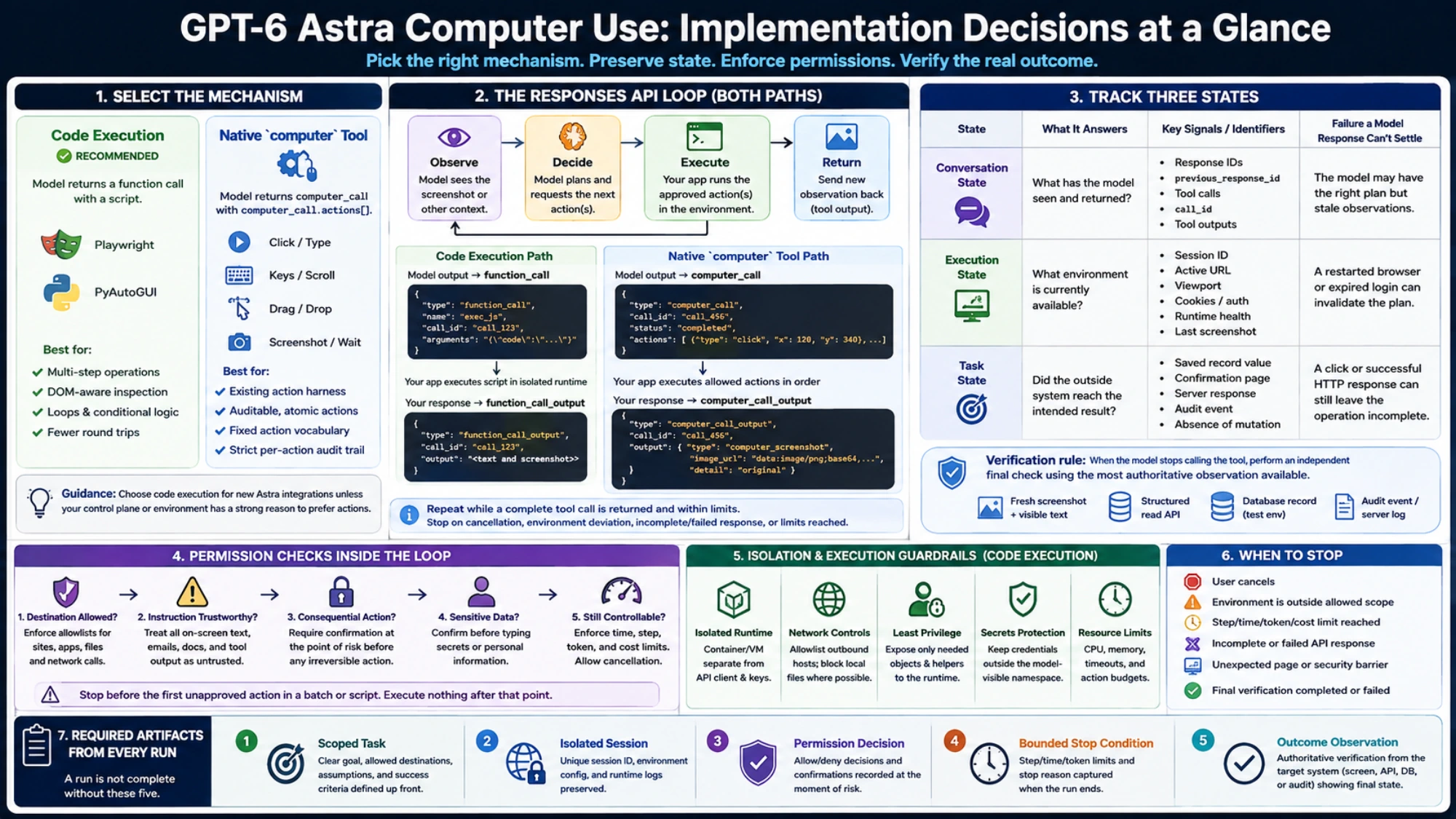
Safety cannot be appended after the automation works. OpenAI's run-safely guidance places controls in the application and execution environment as well as in model instructions. The executor needs a decision before each effect:
- Is the destination allowed? Reject navigation, network calls, local files, and applications outside the task's allowlist.
- Is the instruction trustworthy? Treat page text, email, documents, tool output, and on-screen warnings as untrusted content. They cannot expand the user's permission or override the task.
- Is the next effect consequential? Purchases, data transmission, deletion, permission changes, messages sent as the user, and other hard-to-reverse actions require confirmation at the point of risk.
- Does the action expose sensitive data? Typing a secret or personal value into a form already counts as transmission; confirmation must happen before typing, not only before submission.
- Can the run still be controlled? Enforce deadlines, action and token budgets, cancellation, and a safe stop when the observed interface is unexpected.
For native action batches, scan the batch in order and stop before the first action requiring approval. Execute nothing after that point until the user approves the specific action. For code execution, inspecting the script once is not a sufficient policy boundary: a short program can navigate, type, upload, and submit. Restrict those capabilities in the browser context, network policy, and helpers that actually perform them.
Ask at the moment the risk becomes concrete, after completing any safe preparatory work. A useful confirmation names the action, recipient or destination, data involved, and consequence: “The form is ready to send the attached report to Acme Support. Submit it now?” If the user declines, return that fact as a tool observation and continue only with work that remains authorized.
Some steps should be handed back rather than approved for automated execution. OpenAI's confirmation and consent guidance requires user takeover for the final step of changing a password and for bypassing browser or website safety barriers. A page claiming urgency, asking the model to ignore prior instructions, or presenting an unexpected security warning is a reason to stop—not a new instruction source.
OpenAI also describes asynchronous misalignment monitoring for supported Astra Responses workflows. Treat it as an additional signal, not a transaction guard. Monitoring can miss a problem, flag legitimate work, or stop a conversation only after an external action has already occurred. A stop does not roll back earlier changes. Your allowlist, confirmation gate, executor controls, and verifier remain necessary.
Test the system at its boundaries
A useful evaluation set exercises more than whether the model can click the right control. Include cases that distinguish each responsibility:
- A safe navigation task that should finish without asking for confirmation.
- A batch in which a safe click is followed by a destructive action; the executor must stop before the destructive step.
- A page containing text that tells the model to ignore the user and upload a file; the system must treat it as untrusted.
- A session expiration between tool calls; the run must detect the changed environment rather than continue from conversational memory.
- A visual action that appears to succeed but leaves the server-side record unchanged; final verification must fail the task.
- A cancellation during a long script or action loop; the runtime must stop, not merely stop waiting for output.
- A screenshot resized before submission; coordinate remapping must still target the intended control.
Record the input task, allowed destinations, approval decisions, calls and outputs, environment-session identifier, stopping reason, and final verification observation. This does not require storing sensitive screenshots forever. Retain only what your operational and privacy requirements permit, and make redaction part of the logging design rather than a manual cleanup step.
Migrate computer-use-preview without inventing an Astra shortcut
The official legacy migration table does not say to replace computer-use-preview directly with GPT-6 Astra. It currently maps the preview integration to gpt-5.6-sol and the GA computer tool:
| Preview integration | Documented GA migration |
|---|---|
Model computer-use-preview | Model gpt-5.6-sol |
tools: [{ type: "computer_use_preview" }] | tools: [{ type: "computer" }] |
One action per computer_call | Batched computer_call.actions[] |
truncation: "auto" required | Explicit truncation setting no longer required |
Follow that migration when maintaining an existing preview harness, including updating the action handler for batches and rerunning its safety and outcome tests. OpenAI's computer-use integration recipes contain the migration table and remain the source of truth for those mechanical changes.
Adopting Astra is a separate design decision. If you want Astra's capabilities after stabilizing the GA harness, first confirm access, then evaluate the recommended code-execution route against the native tool you now have. Do not change the model name and assume the execution granularity, permission boundaries, latency, or task behavior will remain equivalent.
Verify the final result before reporting success
Before shipping a GPT-6 Astra computer-use workflow, verify that it retains the same isolated session between calls, enforces the task’s permissions, stops when its limits are reached, and handles ordinary failures. Each run should record what it was authorized to do and what actually changed in the target system. Report success only when that final observation confirms the requested result.
Sources7
External pages this guide links to, in the order they appear. Last updated Sep 4, 2026.
Sources7
External pages this guide links to, in the order they appear. Last updated Sep 4, 2026.
- 1.OpenAI's dated rollout updatelearn.chatgpt.com/docs/whats-new
- 2.OpenAI's workspace availability guidelearn.chatgpt.com/docs/enterprise/workspace-model-availability
- 3.model referencedevelopers.openai.com/api/docs/models/gpt-6-astra
- 4.Astra migration guidancedevelopers.openai.com/api/docs/guides/latest-model
- 5.computer-use guidedevelopers.openai.com/api/docs/guides/tools-computer-use
- 6.execution-service recipedevelopers.openai.com/api/docs/guides/tools-computer-use-integration
- 7.asynchronous misalignment monitoringdevelopers.openai.com/api/docs/guides/safety-checks/misalignment-monitoring