GLM-5.3-Flash in Claude Code: Setup That Actually Runs Flash
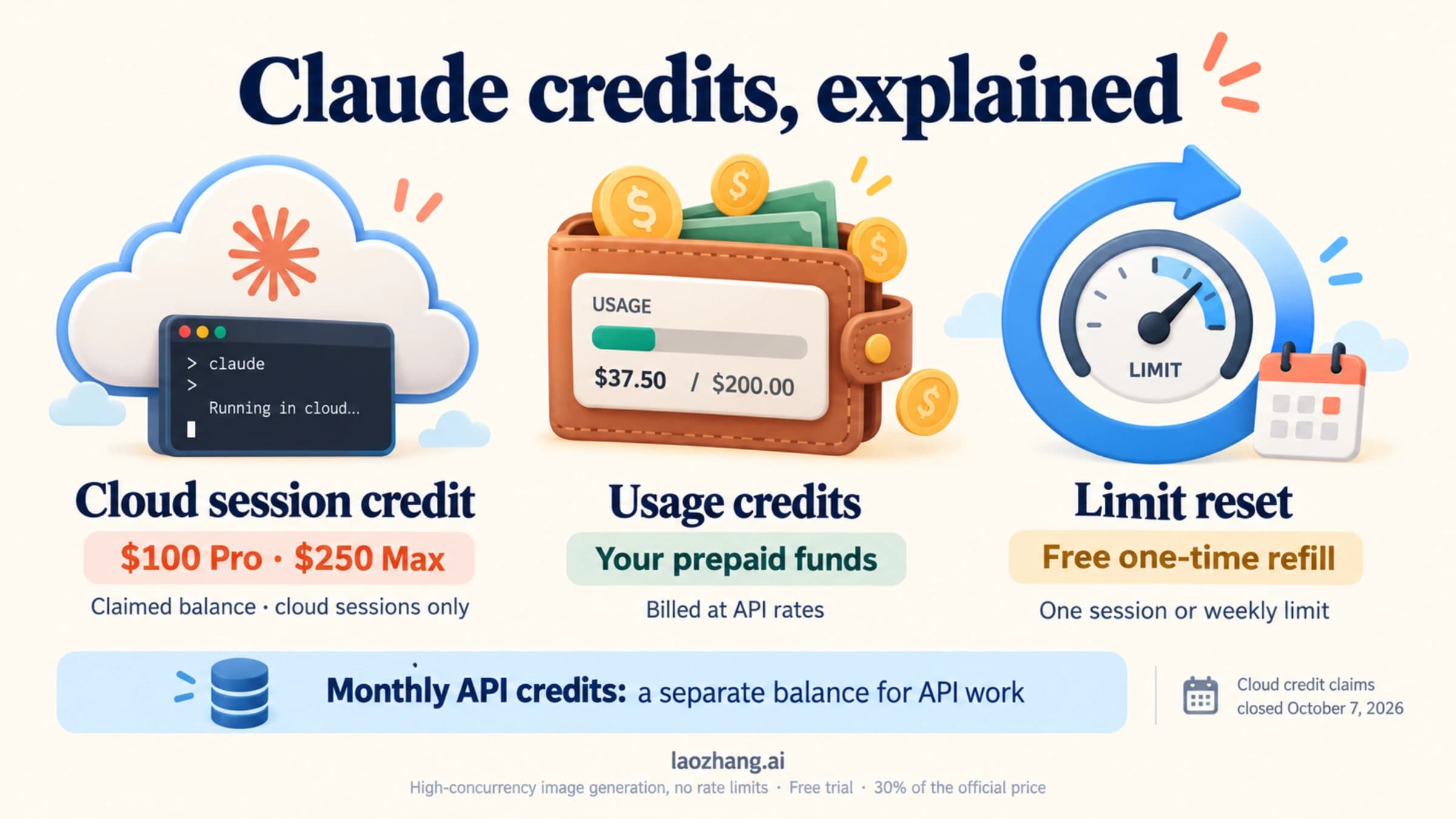
Point Claude Code at Z.ai's Coding Plan endpoint and put glm-5.3-flash[1m] in the Opus slot, which runs the main session. Effort defaults to high, not max.
On this page
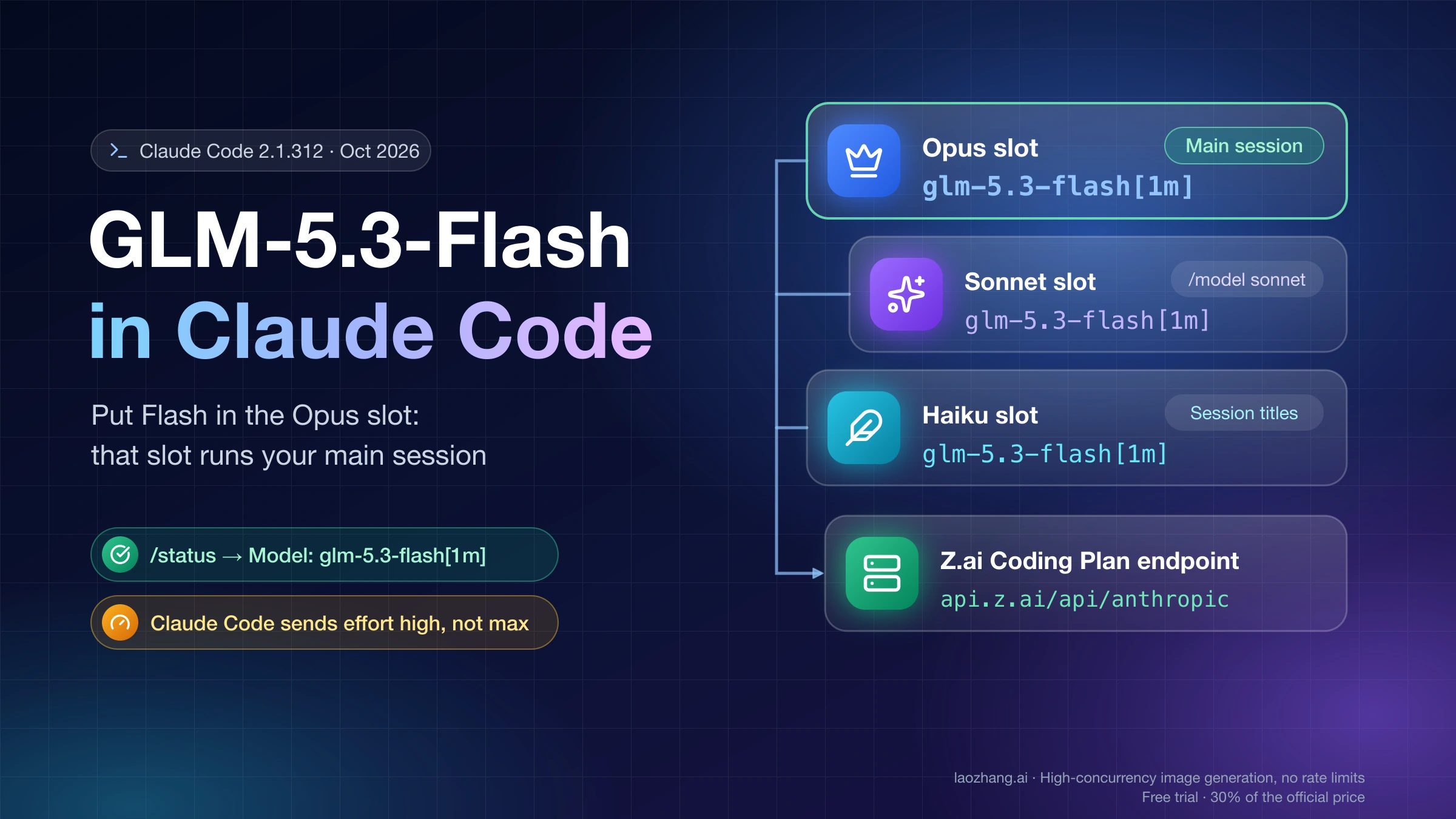
To run GLM-5.3-Flash in Claude Code, you need a GLM Coding Plan from Z.ai and at least three keys in the env block of ~/.claude/settings.json: your plan key in ANTHROPIC_AUTH_TOKEN, ANTHROPIC_BASE_URL set to https://api.z.ai/api/anthropic (or https://open.bigmodel.cn/api/anthropic for a bigmodel.cn plan in China), and glm-5.3-flash[1m] in ANTHROPIC_DEFAULT_OPUS_MODEL. The Opus slot is the one that matters, because Claude Code sends your main session there by default. Z.ai's "Manual configuration" block on its Claude Code page puts Flash only in the Haiku slot, so a session set up from it runs on GLM-5.3, which costs about three times as many plan credits per turn.
After that, check two things. Type /status and make sure the Model line reads glm-5.3-flash[1m]. Then decide on effort: Claude Code 2.1.312 sends high on every request, while Z.ai recommends max for coding, so add CLAUDE_CODE_EFFORT_LEVEL set to max if you want that level in every session. Both findings come from requests captured on October 30, 2026, with Claude Code pointed at a local mock endpoint that recorded exactly what it sends.
The plan isn't free: it starts at $18 a month for Lite. If you want Flash without a subscription, OpenRouter and Z.ai's pay-as-you-go API also serve it, and the weights are free to download if you have the hardware.
How Claude Code picks a GLM model: three slots and one endpoint
Claude Code doesn't know what GLM is. It keeps three model aliases, opus, sonnet and haiku, and the ANTHROPIC_DEFAULT_OPUS_MODEL, _SONNET_MODEL and _HAIKU_MODEL keys decide which model name each alias sends. These three keys are the slots. Every request goes to whatever ANTHROPIC_BASE_URL says, and the endpoint, not Claude Code, decides which quota pays for it: Z.ai only draws on your Coding Plan when the request arrives at its plan endpoint from a supported tool, and Claude Code is on that list.
Which slot gets used depends on what Claude Code is doing, and the vendor docs don't spell that out for GLM. So on October 30, 2026, Claude Code 2.1.312 (macOS, npm build, the latest npm release that day) was run with Z.ai's documented settings, except that ANTHROPIC_BASE_URL pointed at a local mock server. The mock spoke the Anthropic Messages format, logged every request and returned a stub reply, with no Z.ai account or real model involved. That shows precisely what Claude Code would send to Z.ai, but not how Z.ai's servers answer. Three results shape the setup:
| What Claude Code is doing | Slot it used | What that means for GLM |
|---|---|---|
Main session started with plain claude | Opus | Your main model is whatever ANTHROPIC_DEFAULT_OPUS_MODEL holds |
| Session-title request sent before each message in an interactive session | Haiku | A small background call, no tools, about 1K tokens |
| Explore and general-purpose subagents | The session model (Opus slot) | Subagents don't drop to the Haiku slot |
Claude Code's own docs describe the Haiku slot as the model "for haiku, or background functionality", which matches the title request. The Sonnet slot only comes into play when you pick sonnet, or opusplan outside Plan Mode. Custom subagents with their own model field weren't part of the capture.
Set up GLM-5.3-Flash in settings.json, step by step
The whole setup is one edit to your user settings file plus a restart. This is the block to merge in:
{
  "env": {
    "ANTHROPIC_AUTH_TOKEN": "your_zai_api_key",
    "ANTHROPIC_BASE_URL": "https://api.z.ai/api/anthropic",
    "API_TIMEOUT_MS": "3000000",
    "CLAUDE_CODE_AUTO_COMPACT_WINDOW": "1000000",
    "ANTHROPIC_DEFAULT_OPUS_MODEL": "glm-5.3-flash[1m]",
    "ANTHROPIC_DEFAULT_SONNET_MODEL": "glm-5.3-flash[1m]",
    "ANTHROPIC_DEFAULT_HAIKU_MODEL": "glm-5.3-flash[1m]",
    "CLAUDE_CODE_EFFORT_LEVEL": "max"
  }
}- Create an API key in the Z.ai console under Personal Coding Plan > Plan Overview. Team Plan members create it under Team Coding Plan > My Plan.
- Open the user settings file:
~/.claude/settings.jsonon macOS, Linux and WSL, or%USERPROFILE%\.claude\settings.jsonon Windows. If you run Claude Code both in WSL and in native Windows, edit the file belonging to the copy you actually launch. - Add the keys above to the
envobject. If the file already has other fields, such as permissions or hooks, keep them; Z.ai's docs warn not to replace the entire file. If it has a top-level"model"line from an earlier/modelchoice, delete it so it doesn't override the Opus slot. - Close every Claude Code window, open a new terminal and run
claude. Z.ai notes that changes only apply in a new window. - If Claude Code says a model with the
[1m]suffix doesn't exist, runclaude updateand start again.
The [1m] suffix and CLAUDE_CODE_AUTO_COMPACT_WINDOW work together. Z.ai says both are needed for the 1M-token context. In the capture, Claude Code stripped the suffix before sending, so Z.ai receives model: "glm-5.3-flash", and added the context-1m-2025-08-07 beta header instead. The plain claude session got that 1M treatment even from a slot without the suffix, but choosing a slot with --model or /model when its value lacked [1m] dropped the header, and Claude Code then assumed a 200K window and would compact the conversation there. Keeping the suffix on every slot avoids that. API_TIMEOUT_MS comes from Z.ai's own config and keeps long responses from timing out. The effort line is optional and explained further down.
For a bigmodel.cn plan, the keys are identical apart from the base URL https://open.bigmodel.cn/api/anthropic and a key from the bigmodel.cn console. Z.ai also offers two shortcuts that write the file for you: the Coding Tool Helper (npx @z_ai/coding-helper) and, on macOS and Linux only, the claude_code_zai_env.sh script. Z.ai's docs show that script writing just the key, the base URL and the timeout. With only those three keys in the mock capture, Claude Code 2.1.312 sent its own default model name, claude-opus-5-5, at effort medium. Z.ai's FAQ says only GLM-5.3 and GLM-5.3-Flash can be called on the plan and doesn't say how it treats that name, so add the three slot lines yourself after running the script. For how these settings interact with shell variables and project settings, see Claude Code API Configuration: Keys, Settings, Models, and Gateways.
Z.ai's two configs: which one actually runs Flash
Z.ai publishes two different slot mappings, and they don't run the same model in your main session. Its "How to Switch Models" page sets all three slots to glm-5.3-flash[1m]. Its Claude Code setup page lists Flash as the default for all three slots in a bullet list, then shows a "Manual configuration" JSON that sets Haiku to glm-5.3-flash[1m] and both Sonnet and Opus to glm-5.3[1m]. Since plain claude uses the Opus slot, the second block gives you GLM-5.3 for all real work and Flash only for session titles. bigmodel.cn's Chinese docs carry the same two versions.
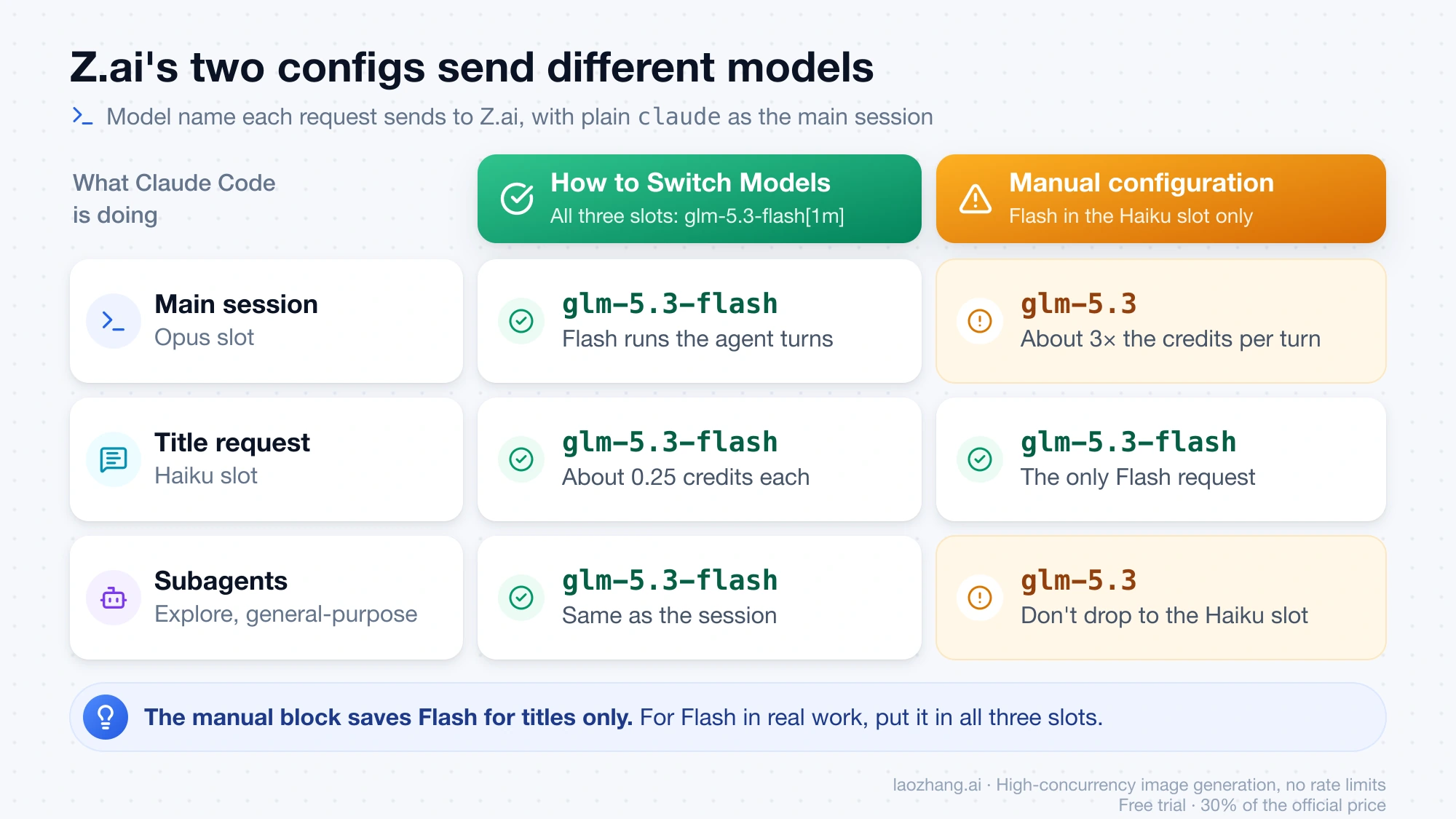
| Config you copied | Main session sends | Title request sends | Explore and general-purpose subagents |
|---|---|---|---|
| "How to Switch Models" page, all three slots Flash | glm-5.3-flash | glm-5.3-flash | glm-5.3-flash |
| Claude Code page "Manual configuration": Haiku Flash, Sonnet and Opus GLM-5.3 | glm-5.3 | glm-5.3-flash | glm-5.3 |
| Setup script keys only, no slots | claude-opus-5-5 | Not captured | Same as main session |
The main-session column was captured directly with each config. The title and subagent columns apply the slot behavior from the earlier capture, which used distinct placeholder names in each slot to tell them apart.
Pick the mapping by what you want running the long agent turns. If the point is cost or Claude Code limits, put Flash in all three slots; it's also the multimodal one, while Z.ai describes GLM-5.3 as text-only. If you want GLM-5.3 doing the main work, Z.ai's manual block does that, but its Flash Haiku slot only saves on title requests, roughly 0.25 credits each on Flash against 0.76 on GLM-5.3, and subagents still run on GLM-5.3. Claude Code's docs list CLAUDE_CODE_SUBAGENT_MODEL as the setting for subagents that aren't assigned a model another way, which is the key to try if you want Flash subagents under a GLM-5.3 session; it wasn't part of the capture.
To keep both models within reach, put glm-5.3-flash[1m] in the Opus slot and glm-5.3[1m] in the Sonnet slot, then type /model sonnet when a task needs the bigger model. Two catches came out of the capture. /model writes your choice into settings.json as the default for new sessions, so switch back when you're done. And picking a slot whose value has no [1m] loses the 1M context flag and triggers the 200K warning, so keep the suffix on every slot. If you're unsure whether Flash is good enough as your main model, GLM-5.3 vs GLM-5.3-Flash: Which One Should You Test First? compares the two.
Confirm it in /status before your first real task
/status shows which settings file Claude Code loaded and which model name it will send, so it catches most setup mistakes before you spend credits. Do this once after every settings change:
- Open a new terminal in your project and run
claude. - Type
/status. - Check four lines: Model should read
Default (glm-5.3-flash[1m]), Auth token should readANTHROPIC_AUTH_TOKEN, Anthropic base URL should show your Z.ai or bigmodel.cn endpoint, and Setting sources should includeUser settings.
That is how the screen looked in the October 30 capture. The startup banner also read glm-5.3-flash[1m] · API Usage Billing. That label comes from Claude Code, not Z.ai, and doesn't mean you're paying per token; per Z.ai's FAQ, the plan quota pays as long as the base URL is the plan endpoint. To see it from Z.ai's side, send a few messages and open the Charge Type page in the Z.ai console, which lists tokens consumed under each pricing type.
Don't use the model's own answer as a check. A thread on r/LocalLLaMA is titled "GLM 5.3 Flash decided it's Claude", and asking "which model are you?" inside Claude Code tells you nothing reliable. /status and the Charge Type page do.
Effort: Claude Code sends high, Z.ai recommends max
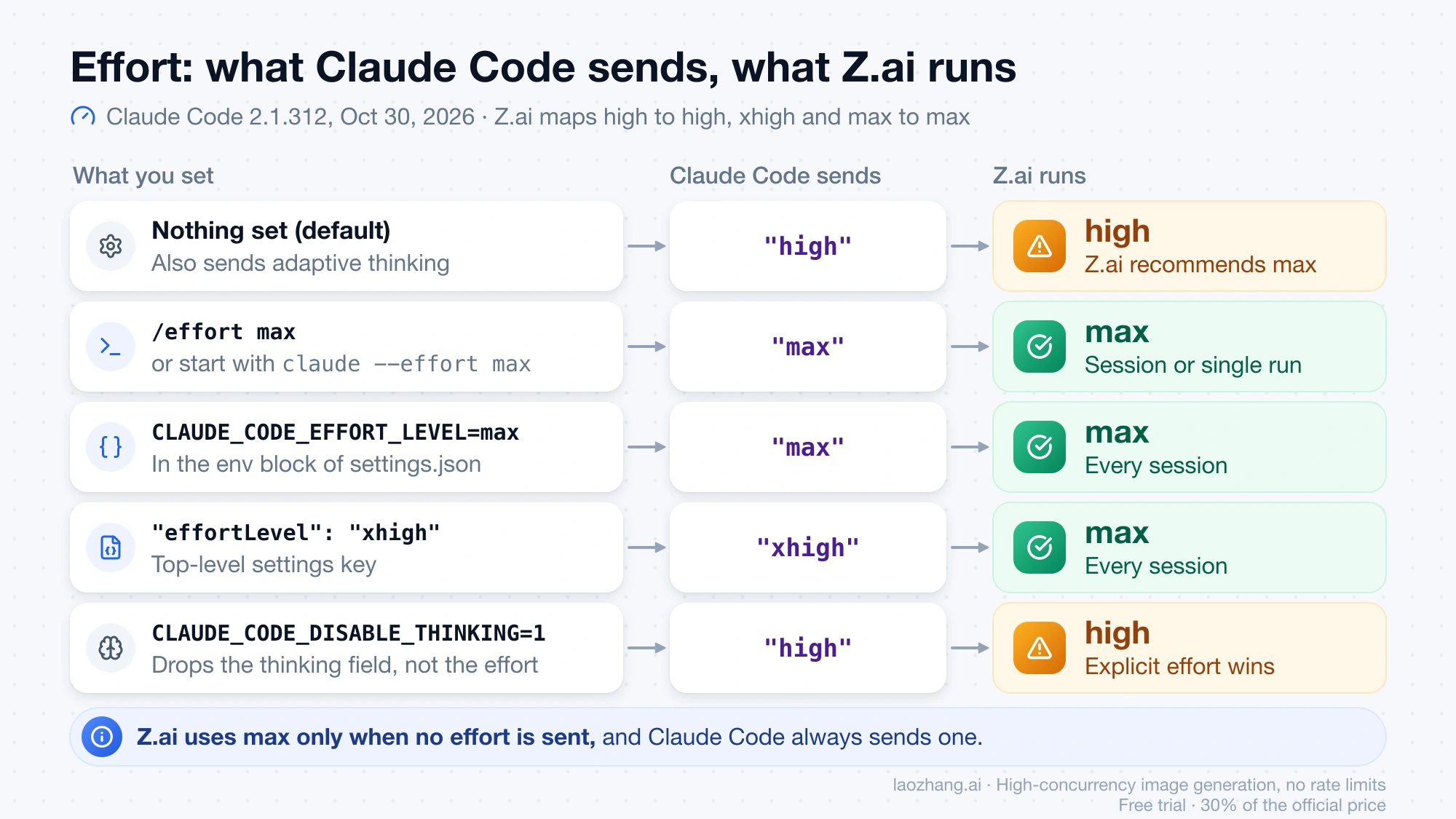
Out of the box, Claude Code runs GLM-5.3-Flash at Z.ai's high level, not max. In the October 30 capture, every default request carried output_config: {"effort": "high"} and thinking: {"type": "adaptive"}. Z.ai's docs say its plan endpoint uses max only when no level is given, that an explicit effort beats the thinking toggle, and that high maps to high while xhigh and max both map to max. Because Claude Code always sends an explicit level, you get high until you change it, even though Z.ai calls max the default and recommends it for coding.
Effort makes a measurable difference by Z.ai's own numbers. On its in-house Z.ai Code Bench v1.0, run on Claude Code 2.1.207, Z.ai reports that Flash beats GLM-5.2 at every effort level and at max scores 29.0 against Claude Opus 4.8's 29.5. Higher effort also means more thinking tokens, and output tokens are the most expensive part of a turn in plan credits, so max drains a window faster than high.
Pick the fix by how long you want the level to last. Each of these was checked in the capture:
| How long it lasts | What to do | What Claude Code sent |
|---|---|---|
| This session only | Type /effort max; Claude Code replies "Set effort level to max (this session only)" | max from the next request |
| One run | Start with claude --effort max | max |
| Every session | Add "CLAUDE_CODE_EFFORT_LEVEL": "max" to the env block, as in the setup JSON | max |
| Every session, via the settings key | Add a top-level "effortLevel": "xhigh" | xhigh, which Z.ai maps to max |
Turning thinking off doesn't lower the level the way Z.ai's table suggests. With CLAUDE_CODE_DISABLE_THINKING=1, Claude Code dropped the thinking field but still sent effort: "high", and under Z.ai's priority rule the explicit effort wins over the thinking toggle. If you want Z.ai's cheaper low level, use /effort low.
One related limit: by default Claude Code set max_tokens to 32,000 per request. Setting CLAUDE_CODE_MAX_OUTPUT_TOKENS to 128000 raised that to 128,000, which is Flash's documented maximum output. Z.ai's docs don't say whether the plan endpoint accepts that value, so add it only if long answers get cut off.
How far Lite, Pro and Max go with Flash
With Flash in every slot, a Lite plan's 5-hour window covers roughly 300 ordinary agent turns at peak and about 600 off-peak, three times what GLM-5.3 gets. Those figures come from Z.ai's published credit formula, credits = (input tokens × input multiplier + cached input tokens × cached multiplier + output tokens × output multiplier) / 10,000, and its multipliers as of October 30, 2026: 2.3 / 0.56 / 8 for GLM-5.3-Flash and 6.9 / 1.7 / 24 for GLM-5.3. Off-peak use costs half.
The turn counts below assume an ordinary agent turn of 60K cached tokens, 4K new input tokens and 3K output tokens including thinking. For Flash that's (4,000 × 2.3 + 60,000 × 0.56 + 3,000 × 8) / 10,000 = 6.68 credits at peak and 3.34 off-peak; the same turn on GLM-5.3 costs 20.16 and 10.08. These token counts are an illustration, not measured Z.ai usage, and a session at max effort will usually produce more output tokens per turn.
| Plan, monthly price | Credits per 5 hours / per week | Flash turns per 5 hours, peak / off-peak | GLM-5.3 turns per 5 hours, peak / off-peak | Flash turns per week, peak / off-peak |
|---|---|---|---|---|
| Lite, $18 | 2,000 / 10,000 | 299 / 598 | 99 / 198 | 1,497 / 2,994 |
| Pro, $80 | 12,000 / 60,000 | 1,796 / 3,592 | 595 / 1,190 | 8,982 / 17,964 |
| Max, $168 | 28,000 / 140,000 | 4,191 / 8,383 | 1,388 / 2,777 | 20,958 / 41,916 |
Heavier turns shrink this fast. A turn with 150K cached tokens, 10K new input and 8K output costs 17.10 credits on Flash at peak and 8.55 off-peak, which is about 116 or 233 such turns in a Lite 5-hour window. The background title request is small by comparison, roughly 0.25 credits on Flash. Z.ai's own estimate for Lite with Flash is 146–292 million tokens a week at a 95% cache hit rate. The weekly allowance equals five full 5-hour windows on every plan, so if you empty the 5-hour window each time, the weekly cap stops you before the week ends.
Peak hours are Monday to Friday, 14:00–18:00 Singapore time (UTC+8), which is 06:00–10:00 UTC and overnight in US time zones, 1–5 a.m. Eastern once daylight saving time ends on November 1, 2026. Weekends are off-peak all day, so most US daytime work is billed at half rate. The 5-hour allowance refreshes five hours after you use it, and the weekly one resets every seven days from your subscription date.
When the credits run out, Claude Code calls simply fail until the window refreshes. Z.ai's FAQ says plan calls in supported tools never fall back to your account balance, so there's no surprise bill, but there's no overflow either. Concurrency is also tied to the tier: Z.ai recommends Lite for one project at a time, Pro for one or two and Max for two or more, and subagents running in parallel count against it.
Prices on z.ai as of October 30, 2026 are $18, $80 and $168 a month, with 20% off for quarterly billing ($14.40, $64 and $134.40 a month) and 30% off for yearly ($12.60, $56 and $117.60 a month). bigmodel.cn charges ¥118, ¥538 and ¥1,078 a month. Z.ai doesn't refund subscriptions, so starting with Lite monthly is the low-risk way to test. The only free part of GLM-5.3-Flash is its open weights, and running them locally is a separate project, covered below. GLM-5.3-FlashX isn't available on the plan yet.
Fix 1113, ignored settings, [1m] and the 200k warning
Most first-day failures come from a wrong base URL, a settings file Claude Code isn't reading, or a model name it doesn't recognize. Match the symptom first:
| Symptom | Likely cause | Fix |
|---|---|---|
1113 Insufficient Balance right after buying the plan | The base URL isn't the plan endpoint, the tool isn't on Z.ai's supported list, or the model name isn't GLM-5.3 or GLM-5.3-Flash | Set ANTHROPIC_BASE_URL to https://api.z.ai/api/anthropic and put glm-5.3-flash[1m] in all three slots |
| Your Z.ai account balance goes down even though you have the plan | Same causes as 1113: the call landed outside the plan | Same fix, then confirm on the Charge Type page |
| Requests start failing after a long session | 5-hour or weekly credits are used up, and plan calls never fall back to balance | Wait for the 5-hour refresh, shift heavy work off-peak, or lower effort |
| Edits to settings.json change nothing | An old Claude Code window is still open, the JSON is invalid, or you edited another copy of the file | Close every Claude Code window, check the JSON for missing or extra commas, and look at Setting sources in /status |
/status shows a model you didn't set | An earlier /model choice saved a "model" line in settings.json | Delete that line, or run /model and choose the slot you want |
Claude Code says the [1m] model doesn't exist | Your Claude Code is too old for the suffix | Run claude update |
| "Claude Code doesn't recognize the model …, so it assumes a context window of 200k tokens" | You picked a slot with --model or /model and its value has no [1m] suffix | Add [1m] to the slot value, or set CLAUDE_CODE_MAX_CONTEXT_TOKENS to the real window |
The 1113 causes come straight from Z.ai's FAQ. The 200K warning appeared in the capture whenever --model sonnet, --model haiku or --model opus picked a slot whose value had no [1m]; Claude Code's docs give the [1m] suffix and CLAUDE_CODE_MAX_CONTEXT_TOKENS as the two fixes for an unrecognized gateway model. If you see a 400 error about thinking.type instead, you're probably on a different gateway, because Z.ai's plan endpoint lists adaptive among the values it accepts; Fix Claude Code 400: thinking type should be enabled or disabled covers that case.
Running Flash in Claude Code without the GLM Coding Plan
OpenRouter and Z.ai's pay-as-you-go API both serve GLM-5.3-Flash per token, so you can skip the subscription and pay only for what you use. As of October 25, 2026, OpenRouter listed z-ai/glm-5.3-flash, and Z.ai's own endpoint there charged $0.15 per million input tokens, $0.50 per million output tokens and $0.03 per million cached tokens, the same as Z.ai's direct API price. Pointing Claude Code at OpenRouter works the way it does for other models, which Claude Code with OpenRouter and DeepSeek: Setup, Routes, and First-Error Fixes walks through. Z.ai's general API documents only enabled as the thinking type for this model, so a gateway that forwards Claude Code's adaptive unchanged may return the thinking.type 400 mentioned above.
If you're weighing Flash against other cheap models per job, DeepSeek V4.1 Flash vs GLM-5.3-Flash: Which Is Cheaper, and When runs the numbers. For local use, the weights are free, but the FP8 weights alone are about 305.8 GiB; GLM-5.3-Flash Guide: Ox Alpha, API Pricing, and Local Deployment has the fit check and the API model IDs.
GLM-5.3-Flash in Claude Code: other questions
Does GLM-5.3-FlashX work in Claude Code on the Coding Plan?
No. As of October 30, 2026, Z.ai's model page says GLM-5.3-FlashX "is not yet available on the plan", and its Coding Plan FAQ lists only GLM-5.3 and GLM-5.3-Flash as callable models. Older names are redirected: Z.ai sends GLM-4.7 requests to GLM-5.3-Flash and GLM-5.2 or GLM-5.1 requests to GLM-5.3, which is why an old config can quietly land on Flash.
Can I use one GLM Coding Plan in Claude Code and another tool at the same time?
Yes, within limits. Z.ai's FAQ says all supported tools share the same usage quota under one subscription, so Claude Code and, for example, Cline draw from the same 5-hour and weekly credits. Sharing the account with other people is prohibited by Z.ai's usage policy, and repeated violations can lead to rate limits, a frozen account or a ban.
How do I cancel the GLM Coding Plan before it renews?
Cancel on the Subscription page in the Z.ai console. Z.ai's usage policy asks for at least three days before the next billing date, while its FAQ says 24 hours, so three days is the safe margin. The current period stays active until it ends, and Z.ai doesn't refund unused time.