How to Use Claude in Chrome with Claude Code: Setup, Browser Testing, and Safe Use
If you want Claude Code to work inside your real browser, the official route is Claude in Chrome. This guide shows how to connect it, where it helps most, and why the browser path should stay narrower than broad computer use.
On this page
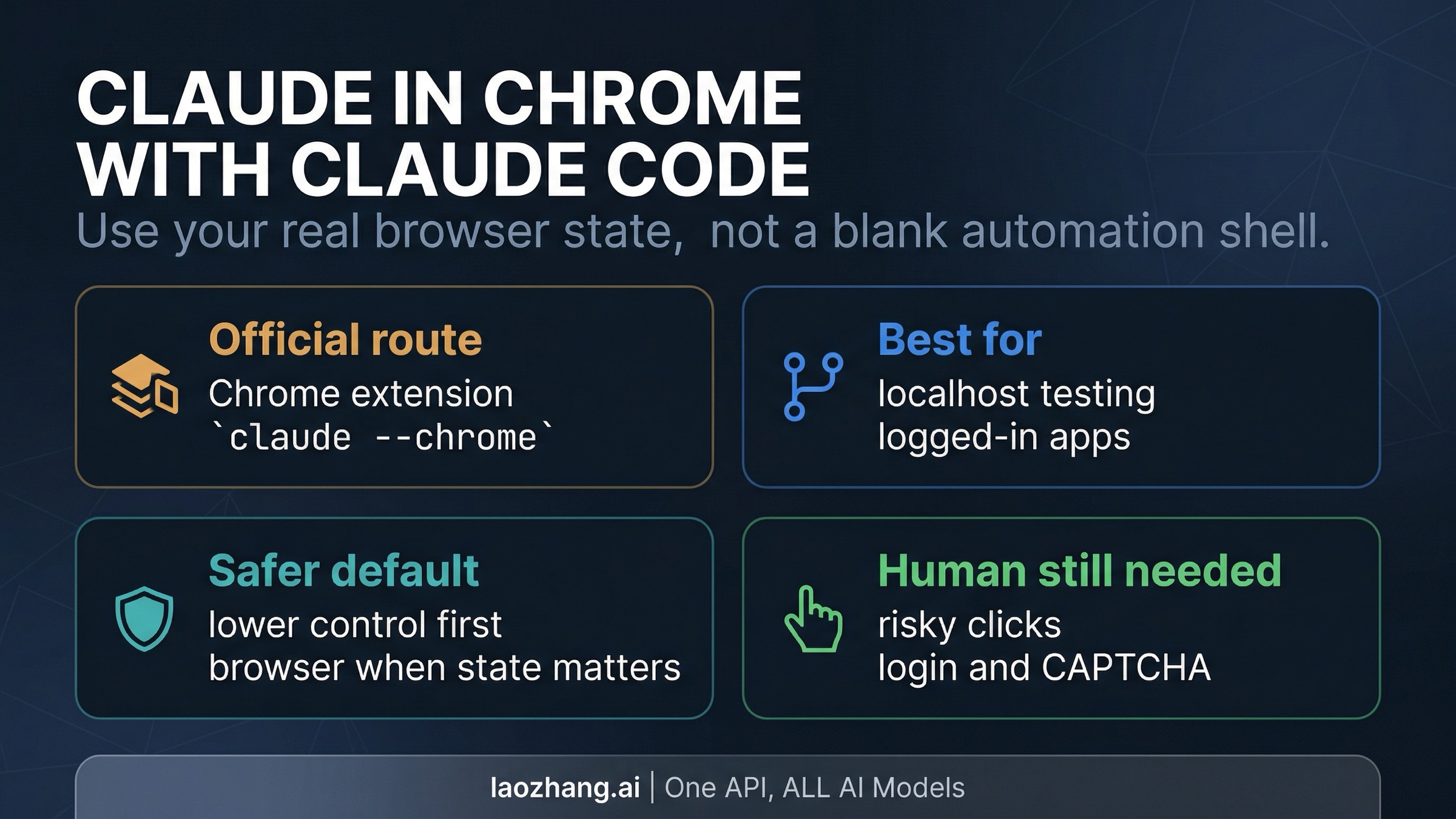
If you want Claude Code to work inside your real browser, the feature you want is Claude in Chrome. Install the official extension, keep Chrome open, then start Claude Code with claude --chrome or connect from inside a live session with /chrome. That gives Claude Code access to your logged-in browser instead of a blank automation shell, which is exactly why the route matters on localhost and authenticated pages.
This route is worth using when browser state is the reason the task is hard: localhost testing, authenticated dashboards, repetitive browser QA, and page inspection all fit naturally. It is the wrong default when a connector, file, or API already solves the job more cleanly, and it is safest when risky actions stay under confirmation.
Evidence note: this guide reflects Anthropic's current Claude Code Chrome docs, Claude in Chrome getting-started guide, permissions guide, and safety guide, checked on April 7, 2026.
Before you debug the wrong thing, keep these blockers in view:
- Anthropic's Claude Code docs currently require Claude Code
2.0.73+, Claude in Chrome extension1.0.36+, and a direct Anthropic subscription or Anthropic API key. - Anthropic's Claude Code docs currently list Google Chrome and Microsoft Edge for the integration, but Anthropic's extension help center still documents the setup in more Chrome-specific language. Chrome is the safest default path.
- The browser window needs to stay visible, and Claude will pause for login, 2FA, or CAPTCHA rather than silently pushing through.
- The extension needs browser permissions, and Anthropic's permissions guide says some high-risk actions still require confirmation even if you choose a less interruptive mode.
What this route is actually for
If browser state is the reason the task is hard, this is the route to try first. The main value is not "Claude can click now." The value is that Claude Code can borrow the browser session you already trust: the site where you are signed in, the localhost app already running on your machine, the page whose layout or error state matters, or the workflow that is easier to verify in the browser than in abstract code.
That is why this page needs a narrower frame than Anthropic's broader "computer use" story. A full computer-use discussion asks who owns the execution environment, how much screen control is available, and when desktop-level delegation makes sense. This article is about something more specific: the browser-connected workflow inside Claude Code. The extension is the bridge, but the task loop still starts from Claude Code, and the right question is not whether Claude can operate a browser in theory. It is whether using your real browser is the shortest safe path for the job in front of you.
There is also one naming detail worth fixing once and then leaving behind. People often search for some variation of "Claude Chrome" because they are trying to make Claude Code work in a browser context. Anthropic's official product name is Claude in Chrome, and the Claude Code docs describe the workflow as using Claude Code with Chrome. Once that bridge is clear, the practical work is straightforward: install the extension, connect it from Claude Code, then test one real browser task before you trust it with anything larger.
If what you really need is a full CLI installation walk-through, use the broader Claude Code install guide. If your real question is how browser work compares with other execution surfaces such as Cowork or the API computer-use tool, the better companion piece is Claude Computer Use in 2026. This page should stay focused on the browser route itself.
Turn it on in 5 minutes
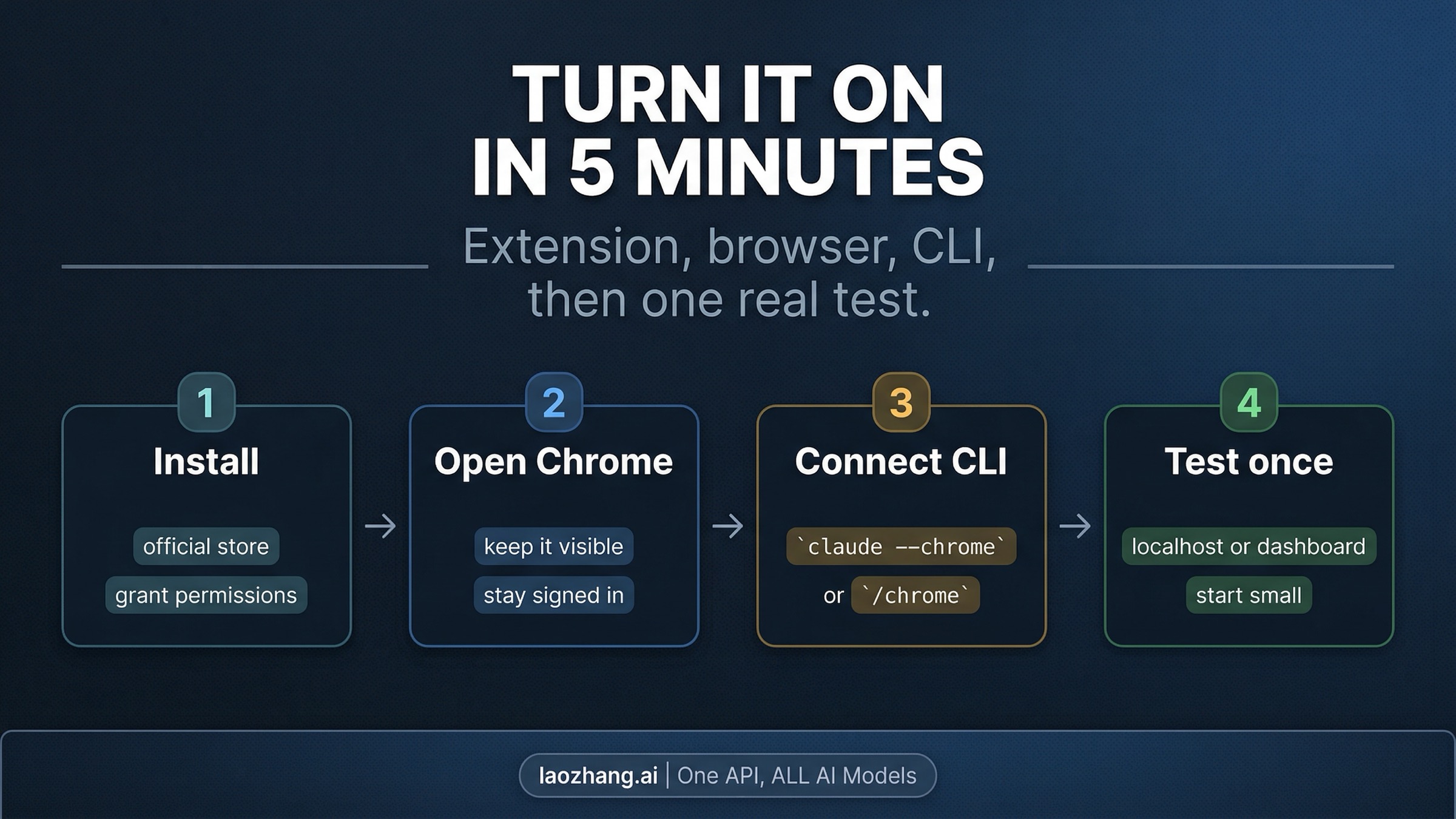
The official setup is simpler than the query wording makes it sound. You are not wiring together two unrelated products. You are enabling the official browser bridge and then connecting to it from Claude Code. Most failed first attempts come from one of five things: unsupported browser assumptions, outdated versions, the wrong billing path, missing permissions, or expecting Claude to work through a hidden browser window.
-
Install the official Claude in Chrome extension in the browser profile you actually use. Anthropic's getting-started guide says Claude in Chrome is available on paid Claude plans, and the Claude Code docs add an extra constraint for the CLI workflow: the browser integration currently requires a direct Anthropic subscription or Anthropic API key. If you are running Claude Code through a third-party provider path, Anthropic's own docs say the Chrome route is not supported there.
-
Confirm the browser and version floor before you try to connect. As of April 7, 2026, Anthropic's Claude Code docs list Google Chrome and Microsoft Edge for the integration, while the help-center setup guide still reads as Chrome-first. Anthropic also currently requires Claude Code
2.0.73+and the extension1.0.36+. In practice, that means Chrome is the cleanest first attempt. Treat Edge as a docs-backed secondary path rather than as proof that every Chromium browser will behave the same way. Anthropic's docs explicitly say Brave and Arc are not supported for this integration, and the route is also not supported in WSL. -
Keep the browser open and visible, then connect from Claude Code. The fastest start is one of these two paths:
claude --chromeOr, if you are already inside a Claude Code session:
/chromeAnthropic's docs say the integration shares your existing browser state, which is the whole point. It also means the browser cannot be hidden away as a purely headless automation target. If the page requires a login, 2FA prompt, or CAPTCHA, Claude pauses and waits for you to do the human part.
- Run one small verification task before you assume the workflow is ready for larger jobs. Start with a task that proves the route, not one that carries real risk. A good first test looks like this:
Open http://localhost:3000, click through the signup flow, and tell me where the first validation error appears.That kind of prompt verifies three things at once: Claude can see the browser, your browser state is usable, and the route is solving the actual problem you had in mind. If your browser path works on a small localhost or dashboard check, you can trust it more on the next step. If it fails there, fix the setup before you try a bigger task.
One practical nuance from Anthropic's help-center setup guide is that the extension's available model choices vary by plan. On the extension side, Pro is currently more limited than Max, Team, or Enterprise. That does not change the connection steps from Claude Code, but it is relevant if the route works and you are still confused by what model choices you can see in the browser surface.
Best jobs for Claude in Chrome from Claude Code
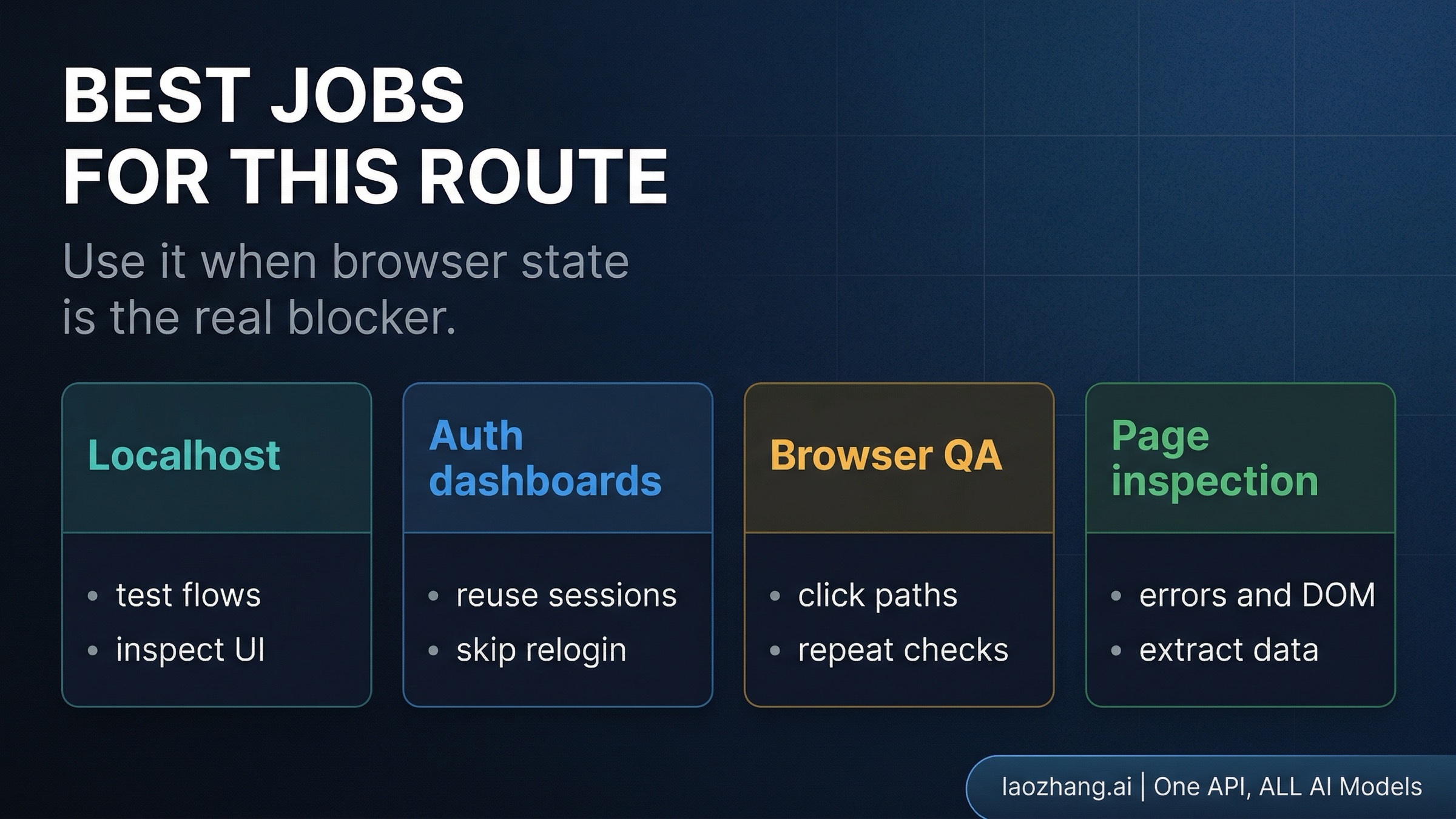
Use the browser path when the browser is the system of record. That usually means one of four job shapes.
Localhost testing is the cleanest fit for many developers. You are already running the app locally, the bug only shows up in the browser, and the fastest useful loop is "open the page, click through the flow, inspect what broke, then go back to the code." Without the browser bridge, Claude Code can still edit files and run tests, but it cannot directly see what your app is rendering. Claude in Chrome closes that gap.
Logged-in dashboards are the second obvious fit. This route becomes valuable when the pain point is not code execution but authenticated state. If the useful page lives behind your own login, the browser path can reuse the session you already have instead of forcing you to recreate the task through a less natural route. That is especially useful for admin panels, internal tools, and SaaS settings pages where the meaningful truth lives in the browser after sign-in.
Browser QA is the next category. Repetitive click paths, visual spot checks, and "did this change actually behave the way we expected?" are all much easier when Claude can work through the page you are already using. The important detail is that this still works best when the task is narrow and observable. If you need full end-to-end automation infrastructure, that becomes a different problem. But for fast build-test-verify cycles inside an active coding session, the browser route is often the shortest path.
Page inspection and extraction also fit well. Sometimes the job is not to modify the page at all, but to summarize a dashboard, find where an error appears, inspect the rendered DOM state, or pull structured information out of a visible interface. These tasks benefit from the same thing the testing tasks benefit from: the browser is already the live surface, so using it directly removes translation work.
What this route is not for is every task that vaguely touches the web. If a connector already exposes the system cleanly, use the connector. If a file or local build artifact already contains the answer, stay in the file path. If an API gives you a cleaner machine interface, it is usually better engineering to use the API than to automate the UI of a system that already exposes one. The browser path is strongest when it removes friction that lower-control paths cannot remove, not when it merely looks more exciting.
Permissions, safety, and when to stay hands-on
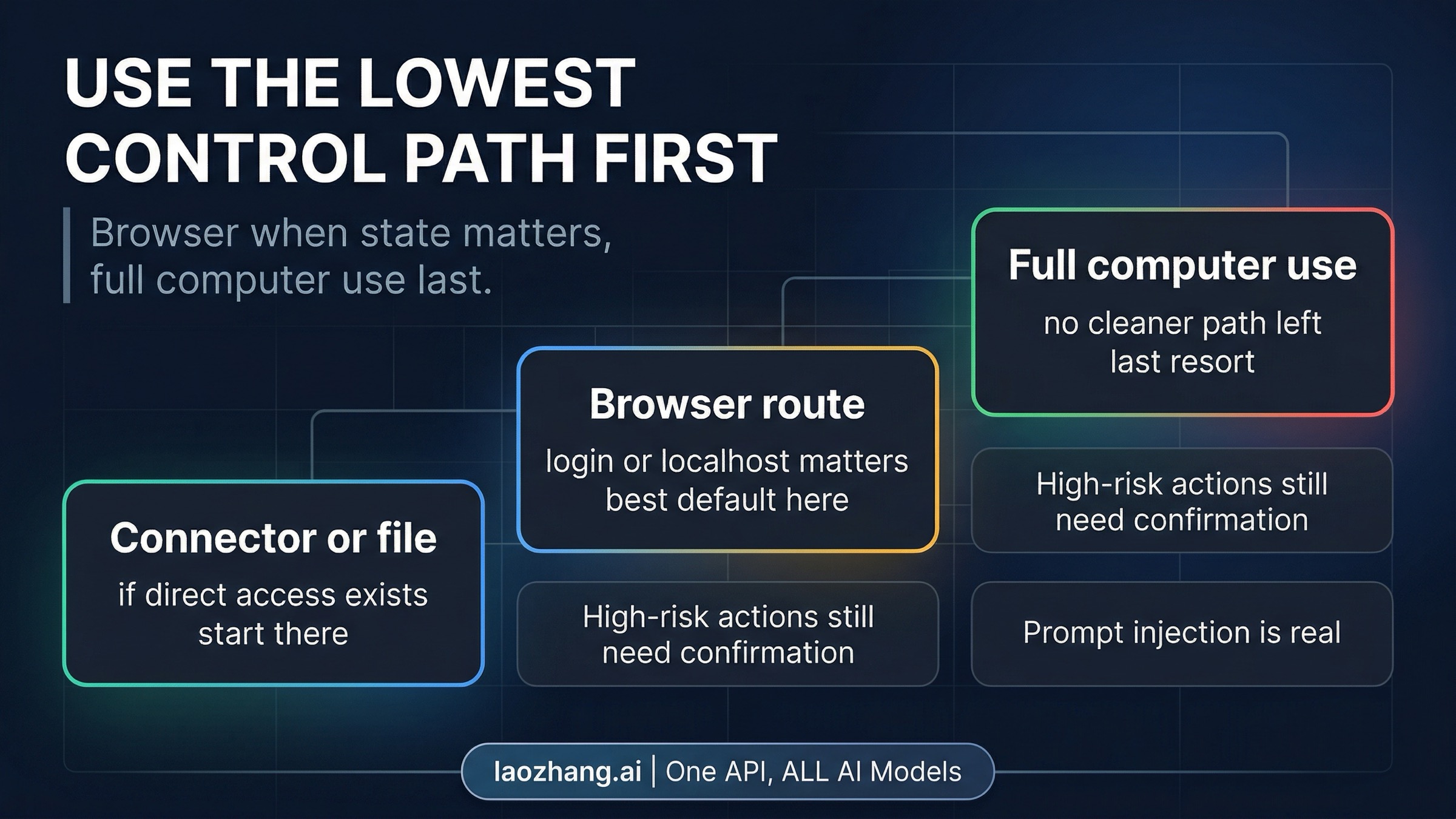
Before you trust the route on a sensitive site, understand how confirmation and prompt-injection risk work. Anthropic's permissions guide says Claude in Chrome can either ask before acting or act without asking, but some high-risk actions still require confirmation. That is a better mental model than the usual "agent mode" hype. You are not turning on a magic autonomy switch. You are choosing how much approval friction to remove on a browser task, while Anthropic keeps a harder boundary around actions with more obvious risk.
Anthropic's own setup and safety guidance also make the human boundary clear. Claude uses your real browser session, which is why it is useful, but that also means the route inherits the risks of the browser surface. If a site needs login, 2FA, or CAPTCHA, Claude stops and waits. That is not a bug. It is part of the intended control boundary. The route works best when human-only steps stay human, and when the browser work around those steps is still valuable enough to justify using the integration.
The biggest technical risk Anthropic highlights is prompt injection. A page can contain instructions that try to steer the model away from what you intended. That matters even more in a browser than it does in a plain repo workflow, because the browser can render arbitrary third-party content. Anthropic's safety article recommends extra care around sensitive sites and suggests using a separate browser profile if you want a cleaner boundary. That is sensible advice. If the page controls email, money, admin privileges, or some other meaningful authority, assume the blast radius is higher than the demo video makes it look.
The simplest safe-use rule is the one Anthropic's broader product framing points toward: use the lowest-control path that still solves the task. If a connector works, start there. If the answer lives in local files, stay in the repo. If browser state is the blocker, the browser path is a good middle layer. If you are drifting toward broad desktop or screen control for a task that could have stayed narrower, stop and rethink the route. A browser-integrated workflow is useful because it is narrower than broad computer control, not because it is a gateway to handing every risky action to Claude.
If it does not connect or pauses unexpectedly
Most setup problems are smaller than they first appear. The mistake is usually assuming the route itself is broken when the real issue is one missing prerequisite.
If /chrome never finds the browser, check the obvious contract mismatches first. Make sure the extension is installed in the same browser profile you actually have open, the browser is visible, Claude Code is on 2.0.73+, and the extension is on 1.0.36+ or later. If you are trying this from WSL, Brave, Arc, or a third-party Claude Code provider path, Anthropic's current docs already put you outside the supported path.
If the browser opens but Claude cannot do anything useful on the page, check permissions before you invent a deeper bug. Anthropic's help-center setup guide says the extension needs nativeMessaging, debugger, and host permissions on sites where you want Claude to act. If the site loads but the route feels blind or constrained, missing host permissions are a more likely explanation than "Claude in Chrome is flaky today."
If the session pauses during login, 2FA, or CAPTCHA, that pause is expected. Anthropic's docs say the browser workflow shares your existing session and pauses when a human-only step appears. Do the login step yourself, then let Claude continue. The correct lesson is not that the route failed. It is that this workflow is intentionally built around a mixed human-and-agent boundary.
If you are testing on Edge, qualify what success means. Anthropic's Claude Code docs currently list Microsoft Edge as supported for the integration, but the extension help pages still describe the route in Chrome-specific terms. That does not mean Edge never works. It means Chrome should be your default troubleshooting baseline, and Edge issues should be treated as a surface-specific question rather than proof that the extension is broadly supported on any Chromium browser.
If you cannot tell whether the blocker is setup or account eligibility, split the question cleanly. The extension-side product is documented for paid plans, while the Claude Code browser integration also requires a direct Anthropic billing path according to the current docs. If the extension appears installed but the CLI route still refuses to connect, check whether you are on the supported Anthropic account path before you waste time chasing browser flags.
When the route still does not make sense after those checks, it is usually a sign that you need the sibling page, not more debugging inside this one. For full CLI installation or update help, go back to the Claude Code install guide. For broader questions about whether browser control is even the right execution surface, move to the Claude Computer Use guide.
FAQ
Does Claude in Chrome replace full computer use?
No. In this workflow, the browser path is a narrower surface inside Claude Code. It is useful precisely because it is not the same thing as broad desktop control. Use it when browser state matters. If the job needs a connector, local files, or another cleaner interface, the browser path should not become the default answer.
Which plan and model do I need?
Anthropic's help-center setup guide says Claude in Chrome is available on paid plans, and it also notes that model choice varies by plan. Anthropic's Claude Code docs add a separate requirement for the CLI integration: a direct Anthropic subscription or Anthropic API key. So the shortest safe answer is: paid Anthropic access for the extension, direct Anthropic billing for the Claude Code browser integration, and plan-specific model choices on the browser side.
Does it work in Microsoft Edge?
Anthropic's Claude Code docs currently say yes for the integration, but Anthropic's extension help pages still document the setup in more Chrome-specific terms. Treat Chrome as the default supported path and Edge as a docs-backed but more qualified route. Do not assume that because Edge is listed there, other Chromium browsers such as Brave or Arc are also fine. Anthropic's current docs say they are not.
Why does Claude stop and wait during login or CAPTCHA?
Because the route is designed to reuse your real browser session without silently taking over human-only steps. Anthropic's docs say Claude pauses for login, 2FA, and CAPTCHA. Do that part yourself, then continue the session.
Should I use this on sensitive sites?
Only with caution. Anthropic's safety guidance says prompt injection is the biggest technical risk and recommends extra care around sensitive browsing. If the task touches money, admin access, or high-stakes approvals, keep the work more tightly supervised and prefer a lower-control path when one already exists.
Claude in Chrome is most useful when the browser is the missing piece between code and reality. That is a strong workflow, but it is a narrow one. Install the official extension, connect it from Claude Code, test one real browser task, and keep the route focused on logged-in state, localhost work, and browser verification. The moment the job stops needing the browser, you should be happy to step back down to a simpler path.