Claude Code "Git Is Required for Local Sessions" Error: 4 Causes
Windows builds of the Claude app before 1.49585.0 wanted Git for every local session, so update first. On current builds only Worktree sessions need Git.
On this page
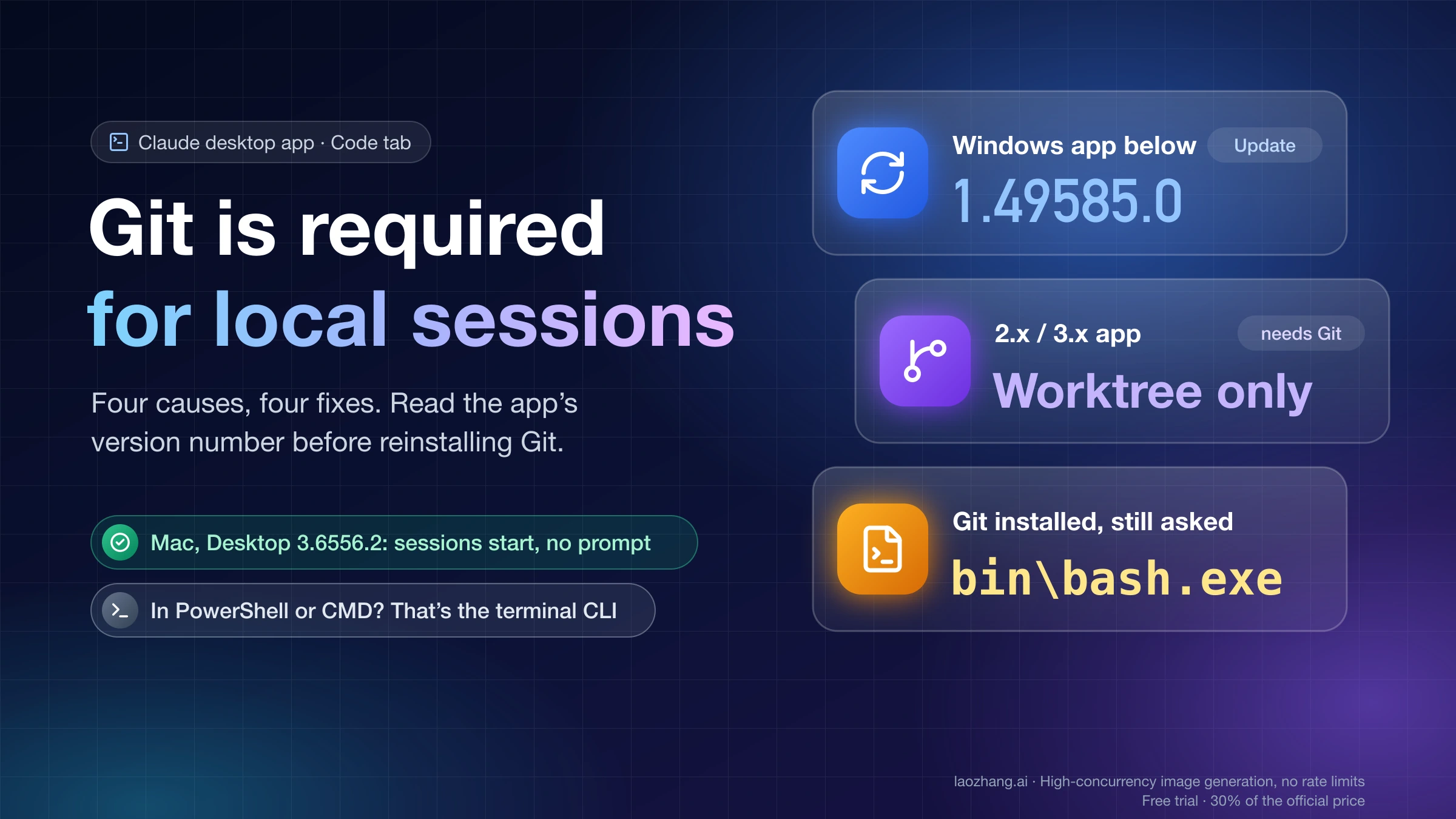
"Git is required for local sessions" in the Claude desktop app's Code tab does not always mean Git is missing. Open Help → About Claude on Windows or Claude → About Claude on a Mac and read the version number first. On Windows, Claude Desktop builds before 1.49585.0 asked for Git before starting any local session, and Anthropic's fix for people who don't use worktrees is simply to update the app with Check for Updates…. On current builds (any 2.x or 3.x version), only a session with Worktree turned on needs Git, so you can turn Worktree off, or install Git for Windows (on a Mac, run git --version in Terminal) and keep it on.
If Git is already installed and the dialog keeps coming back, the app is not finding or running it. On Windows, that usually means CLAUDE_CODE_GIT_BASH_PATH is misspelled, points to git.exe instead of bash.exe, or was set while Claude was still running in the system tray. On a Mac, it usually means an unaccepted Xcode license or a stray file named git earlier in your PATH. If the dialog survives an update plus one correct setup, stop reinstalling Git and use a cloud session or the terminal CLI until the app is fixed.
The only hands-on check behind this guide is one Mac on October 23, 2026: with macOS 26.1 and Claude Desktop 3.6556.2, local sessions start normally and the app no longer contains the old wording. No Windows machine was part of that check, so every Windows step below comes from Anthropic's documentation or from GitHub issue reports, and is labeled that way.
Which "Git is required" case you have
Four different situations produce a Git prompt, and three things tell them apart: the app's version number, whether Worktree is on, and whether git --version works in a terminal. Find your row, then go to the matching section.
| What you see | How to tell | What to do |
|---|---|---|
| Windows app blocks every new local session, even with Worktree off | Help → About Claude shows a 1.x version below 1.49585.0, such as 1.24012.9 | Update the app; you don't need Git unless you want Worktree |
| Current app asks for Git only when Worktree is on | Version is 1.49585.0 or later (2.x and 3.x included), and git --version fails or Git was never installed | Turn Worktree off, or install Git and keep it on |
| Git is installed and works in a terminal, but the app still asks | git --version prints a version; the dialog may mention CLAUDE_CODE_GIT_BASH_PATH, xcode-select, or "Git is installed but isn't working" | Fix detection: the Windows or Mac section below |
| The message appears in PowerShell or CMD, not in the app | You typed claude in a terminal; the text reads "requires git-bash" or "requires either Git for Windows (for bash) or PowerShell" | This is the terminal CLI, a different product surface; see the last section |
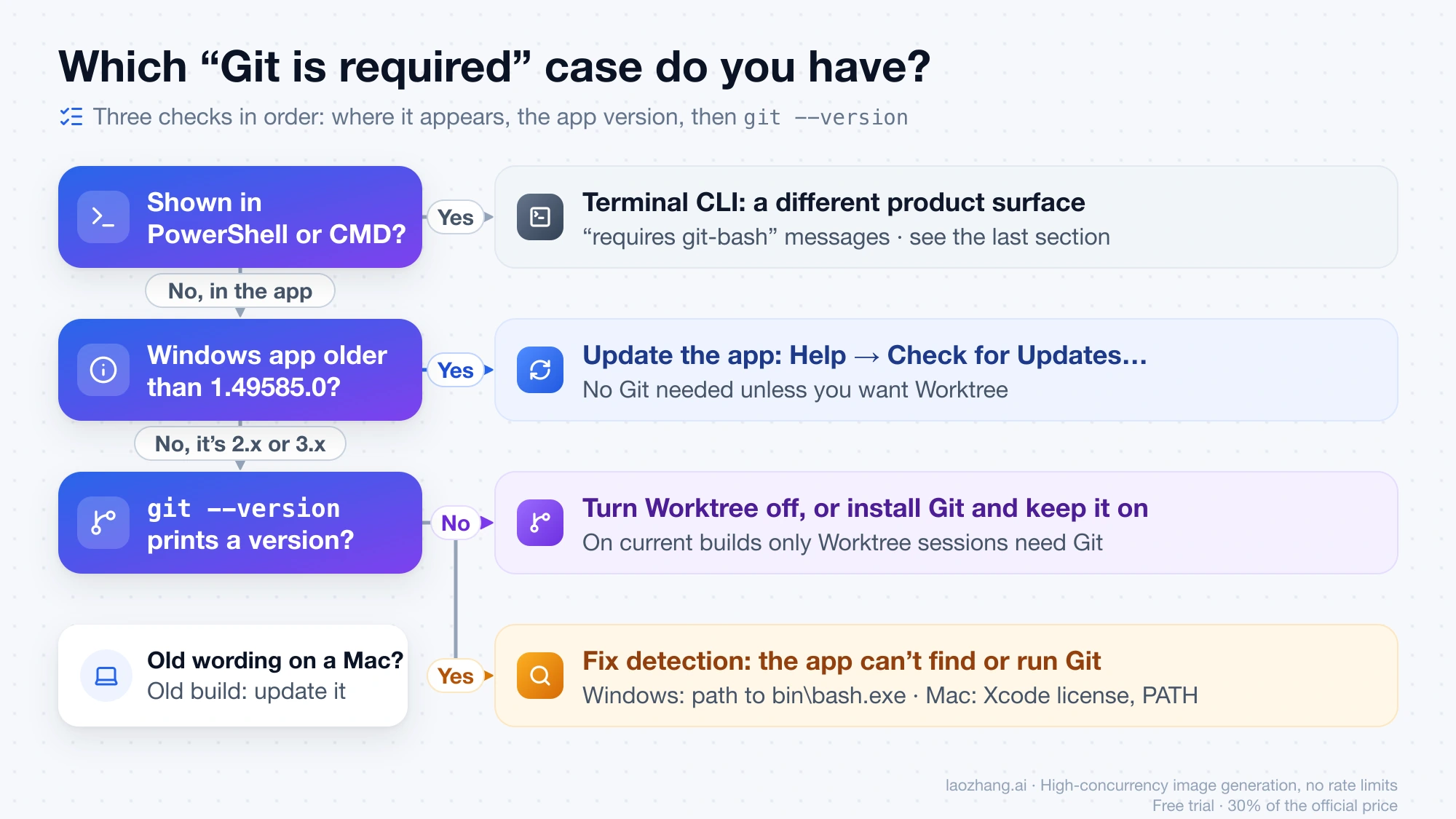
The wording also dates the build. In Claude Desktop 3.6556.2 for Mac, the sentence "Git is required for local sessions" does not appear anywhere in the installed app. The current Mac messages are "Git is required but was not found. Run xcode-select --install in Terminal…" and "Git is installed but isn't working", so a Mac that shows the old sentence is running an old build. Windows wording is known only from user quotes, so on Windows let the version number decide.
Why Claude asks for Git: only Worktree sessions need it now
Git is version-control software, and Claude Desktop uses it to give a session its own isolated copy of your project, called a worktree. According to Anthropic's Claude Desktop worktree documentation, "By default, Worktree is off and Claude works in the project folder itself," and only "sessions that run in their own worktree need Git." If you just want Claude to edit files in a folder, you don't need Worktree, and on a current build you don't need Git either.
To check the toggle, click the project folder control in the row under the prompt box and look at Worktree. In the earlier layout, it's a worktree checkbox beside the branch name, above the prompt box. A saved environment carries its own Worktree setting, so if you start sessions from one, edit the environment rather than the prompt box. Worktree only works in a folder that is already a Git repository.
A different message, "Git LFS is required by this repository but is not installed," means the repository itself stores large files with Git LFS. Install it from git-lfs.com, run git lfs install, and restart the app.
Check your Claude Desktop version and update past 1.49585.0
The version number decides whether updating alone clears the dialog, because Anthropic's Claude Desktop troubleshooting page says Windows versions before 1.49585.0 "asked for Git before starting any local session; if you see that prompt and aren't using worktrees, update the app."
- Open Claude → About Claude in the macOS menu bar, or Help → About Claude on Windows. Clicking the number copies it.
- Compare it with 1.49585.0. Any version that starts with 2 or 3 is newer. For a 1.x version, compare the second number: 1.24012.9 and 1.569.0 are older, because 24012 and 569 are both below 49585.
- Choose Claude → Check for Updates… on macOS or Help → Check for Updates… on Windows. If that menu item is missing, your organization has turned off auto-updates, and an administrator has to install the newer version.
- Start a new session with Worktree off. If it opens, you're done.
Anthropic hasn't published a release date for 1.49585.0. GitHub reports show Windows users already running it by September 9, 2026, so it probably shipped in early September 2026, and a Windows install that hasn't updated since August is likely to have the old check.
Git for Windows is installed, but the dialog won't go away
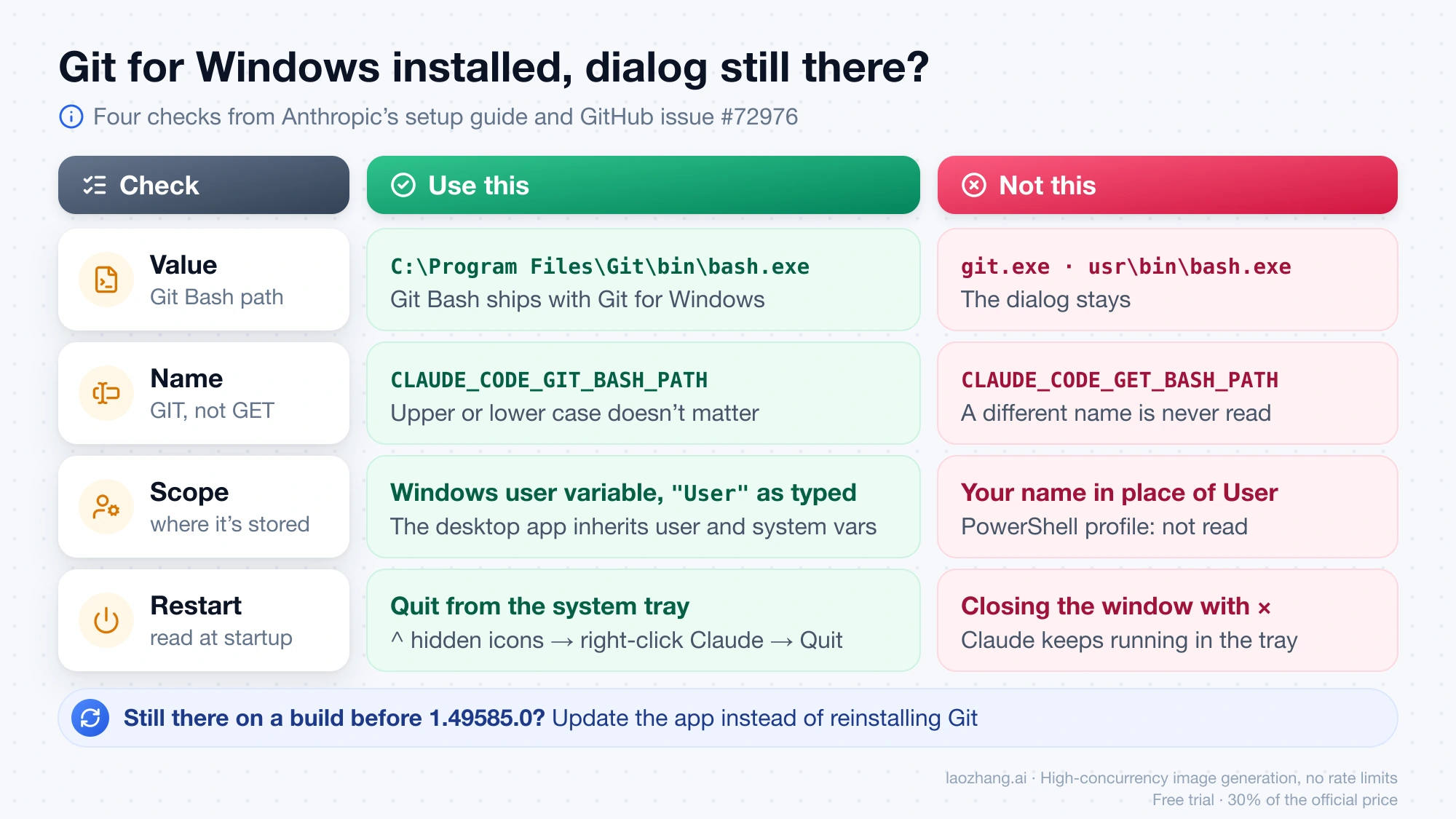
When Git for Windows is installed and Claude still asks for it, the app is not finding bash.exe. The old dialog tells you to "set the CLAUDE_CODE_GIT_BASH_PATH environment variable to your git executable," but Anthropic's Claude Code setup guide gives the value as the full path to Git Bash, C:\Program Files\Git\bin\bash.exe, not to git.exe. Git Bash comes with Git for Windows; it isn't a separate download. These steps come from that guide and from user reports in GitHub issue #72976 on Git detection in the Windows desktop app; no Windows test backs them.
-
Confirm the file exists. In PowerShell,
Test-Path "C:\Program Files\Git\bin\bash.exe"should returnTrue. If you installed Git somewhere else, such asD:\Gitor a portable copy, use that folder'sbin\bash.exeinstead. Git for Windows also contains ausr\bin\bash.exe, but don't point the variable there: one user with portable Git reported that the dialog stayed withusr\bin\bash.exeand cleared after switching tobin\bash.exe, with nothing else changed. -
Set the variable for your Windows user account. This is the command a user in that issue posted; type
"User"exactly as shown, not your name:[Environment]::SetEnvironmentVariable("CLAUDE_CODE_GIT_BASH_PATH", "C:\Program Files\Git\bin\bash.exe", "User") -
Check the spelling. The name is
CLAUDE_CODE_GIT_BASH_PATH, with GIT. Two YouTube walkthroughs spell itCLAUDE_CODE_GET_BASH_PATH, and a variable with a different name is simply never read. Upper or lower case doesn't matter on Windows; the E does. -
Quit Claude completely. Closing the window with × leaves Claude running in the system tray, and the app reads environment variables only when it starts. Open the ^ hidden-icons menu on the taskbar, right-click the Claude icon, and choose Quit. Restarting Windows does the same.
-
Reopen Claude and start a new session.
Windows environment variables or settings.json?
For the desktop app's Git check, set the Windows user or system variable. Anthropic's docs say the Windows app "inherits user and system environment variables but does not read PowerShell profiles," so a line in your PowerShell profile has no effect. The env block in ~/.claude/settings.json is the documented place for the terminal CLI, and it also reaches Desktop sessions, but Claude Code ignores it when the same variable already exists in the environment. The docs don't say whether the old pre-1.49585.0 check reads it at all, and on old builds some users reported that setting it in settings.json, alongside a system variable, still didn't clear the dialog. If you do use settings.json, JSON needs doubled backslashes:
{
  "env": {
    "CLAUDE_CODE_GIT_BASH_PATH": "C:\\Program Files\\Git\\bin\\bash.exe"
  }
}
When reinstalling Git won't help
On builds before 1.49585.0, some setups never cleared. Reporters between March and August 2026 had bash.exe in the right place, a system variable with no typos and full restarts, and in one case Windows on ARM with both ARM64 and x64 Git, yet the dialog stayed; Anthropic closed most of those reports as duplicates of one tracking issue. A gitBashPath key that circulates in those threads is not a documented setting, so don't rely on it. For those builds, the fix is the update in the previous section. If you're on a current version, the variable is correct, and the prompt still appears, look at the app log, which users report at %LOCALAPPDATA%\Claude\logs\main.log (Microsoft Store installs may keep it elsewhere), and file a GitHub issue with your version number while you work through one of the routes in the last section.
Mac: xcode-select says the tools are installed, but Claude still asks
On a Mac, the prompt tells you to run xcode-select --install, but when the Command Line Tools are already installed, that command only reports that and fixes nothing. In GitHub reports from April to August 2026, such as #44297 on the desktop app blocking sessions despite working Git, the real causes were an unaccepted Xcode license, something named git earlier in PATH that isn't Git, or an old app build. If Git is genuinely missing, the current app says "Git is required but was not found"; run xcode-select --install or install Git from git-scm.com, then retry. Otherwise, work through these checks in Terminal:
- Run
git --version. If it prints a version, Git works. If it says "You have not agreed to the Xcode license agreements," runsudo xcodebuild -licenseand agree. After a macOS upgrade, you may have to open Xcode and agree again. - Run
which -a gitto see whichgitfiles come first in your PATH. A stray entry such as~/bin/git, an empty file namedgit, or a folder namedgitinside a PATH directory producedspawn … EACCESerrors in the reports, so rename or remove it. A genuine Homebrew Git at/opt/homebrew/bin/gitcan fail too: Desktop 1.6259.1 skipped/usr/bin/git, preferred Homebrew's copy, followed its link to the/opt/homebrew/Cellar/gitfolder and tried to run that folder (GitHub issue #54754). If your log shows a Homebrew path withEACCES, update the app. - Run
grep 'error' ~/Library/Logs/Claude/main.logand look for lines withGit command failedorEACCES. They name the exact file or setting the app tripped on. - If the app says "Git is installed but isn't working" and mentions permission to read your Git configuration file, turn on Claude under System Settings → Privacy & Security → Full Disk Access.
- Check your version as described above. Desktop 1.32885.0 and earlier on macOS 26 rejected a Command Line Tools folder that has no
xcrun, even with working Git (GitHub issue #87762); updating removes that check. - Quit Claude with Claude → Quit Claude (closing the window isn't enough), reopen it, and start a new session.
What a working Mac showed on October 23, 2026
On October 23, 2026, a Mac running macOS 26.1 with Claude Desktop 3.6556.2 started local Code-tab sessions with no Git prompt, using Apple's Git from the Command Line Tools and no full Xcode. That Command Line Tools folder contains git but no xcrun, the exact layout that triggered the false prompt in Desktop 1.32885.0, so 3.6556.2 no longer trips on it. These are the outputs a healthy Mac gives for the checks in the previous section:
$ git --version
git version 2.50.1 (Apple Git-155)
$ which -a git
/usr/bin/git
$ xcode-select -p
/Library/Developer/CommandLineTools
The app's logs on that Mac, covering October 5 to 23, 2026, contain zero lines with "Git is required", and a search of the installed 3.6556.2 app finds no match for the old "Git is required for local sessions" sentence, only the current messages quoted in the first section. That result covers one Mac with Git installed and one app version. A Mac without Git and all Windows builds fall outside it, which is why the Windows sections rest on documentation and user reports.
Still blocked: cloud sessions, the terminal CLI, and the next error
A local session runs Claude Code on your own computer against your folder; a cloud session runs in Anthropic's environment instead. If you need to work today, a cloud session needs no local Git but does need a connected GitHub account and works on a GitHub copy of your project; Claude Code Web Interface: What Exists Now and Which Route to Use explains that route. The terminal CLI doesn't need Git for Windows at all and falls back to PowerShell, so its "requires git-bash" style message is a separate problem covered in How to Install Claude Code: Complete Setup Guide for Every Platform (2026).
If you're deciding whether to stay in the app or move to the terminal for good, Claude Code Desktop vs Terminal: Same Engine, Different Features compares the two. And if the session now starts but stops right away, Error: Claude Code Process Exited With Code 1? Diagnose the Branch Before Reinstalling picks up from there.
Sources8
External pages this guide links to, in the order they appear. Last updated Oct 23, 2026.
Sources8
External pages this guide links to, in the order they appear. Last updated Oct 23, 2026.
- 1.Anthropic's Claude Desktop worktree documentationcode.claude.com/docs/en/desktop
- 2.git-lfs.comgit-lfs.com
- 3.Anthropic's Claude Code setup guidecode.claude.com/docs/en/setup
- 4.#72976 on Git detection in the Windows desktop appgithub.com/anthropics/claude-code/issues/72976
- 5.#44297 on the desktop app blocking sessions despite working Gitgithub.com/anthropics/claude-code/issues/44297
- 6.git-scm.comgit-scm.com/downloads
- 7.GitHub issue #54754github.com/anthropics/claude-code/issues/54754
- 8.GitHub issue #87762github.com/anthropics/claude-code/issues/87762