Yes. As of May 7, 2026, Claude Code has official browser access through Claude Code on the web at claude.ai/code, but that does not mean every browser surface runs your code in the same place.
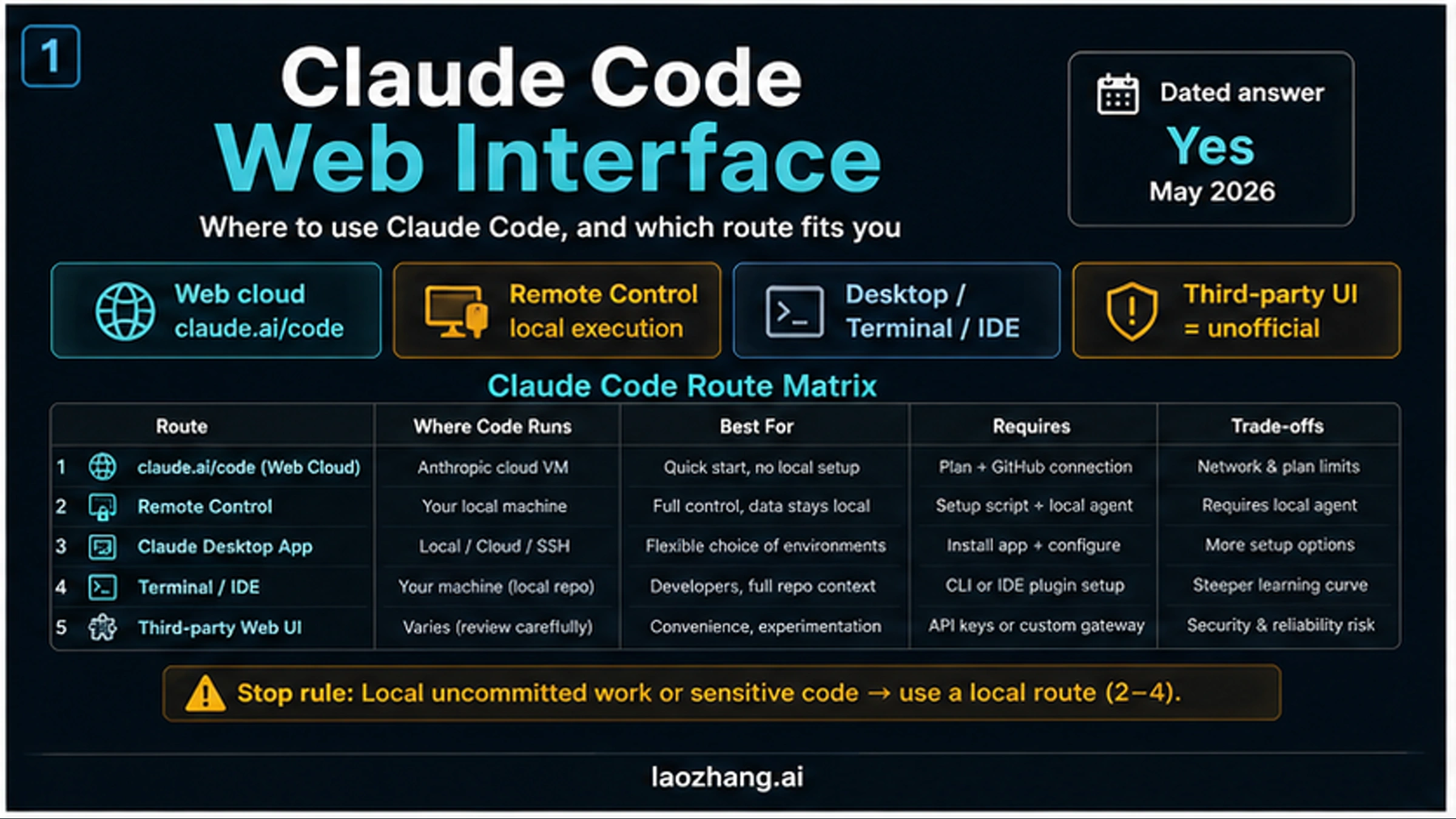
The first decision is execution location. Use official web for GitHub-backed cloud tasks in Anthropic-managed environments, Remote Control when you want browser or mobile control of a local session, Desktop when you want a graphical local/cloud/SSH workspace, and terminal or IDE when the job depends on active local state.
Stop before opening the web route if the task depends on uncommitted local files, local-only tools, secrets that should not leave your machine, or constant hands-on steering. In those cases, start from Remote Control, Desktop, terminal, or IDE instead, then use the official web setup only for work that fits a cloud GitHub flow.
Fast Answer: Choose By Where The Code Runs
The useful answer is not just "yes, there is a web interface." The useful answer is "which Claude Code surface should handle this repo right now?"
| Route | Where code runs | Best fit | First stop rule |
|---|---|---|---|
| Claude Code on the web | Anthropic-managed cloud environment | Async GitHub-backed tasks, backlog work, bounded repo changes | Do not use for uncommitted local-only state |
| Remote Control | Your local Claude Code session | Browser or mobile control while execution stays on your machine | Requires a local agent/session path |
| Claude Code Desktop | Local, cloud, or SSH workspace depending on session | Graphical Code tab, diff review, file editor, terminal, preview | More setup choices means more route decisions |
| Terminal or IDE | Your machine and active repo | Local tools, frequent steering, editor-driven work | Not the same as cloud web |
| Third-party Web UI | Varies by wrapper or provider | Experiments and custom gateways | Unofficial; review security, maintenance, and data handling |
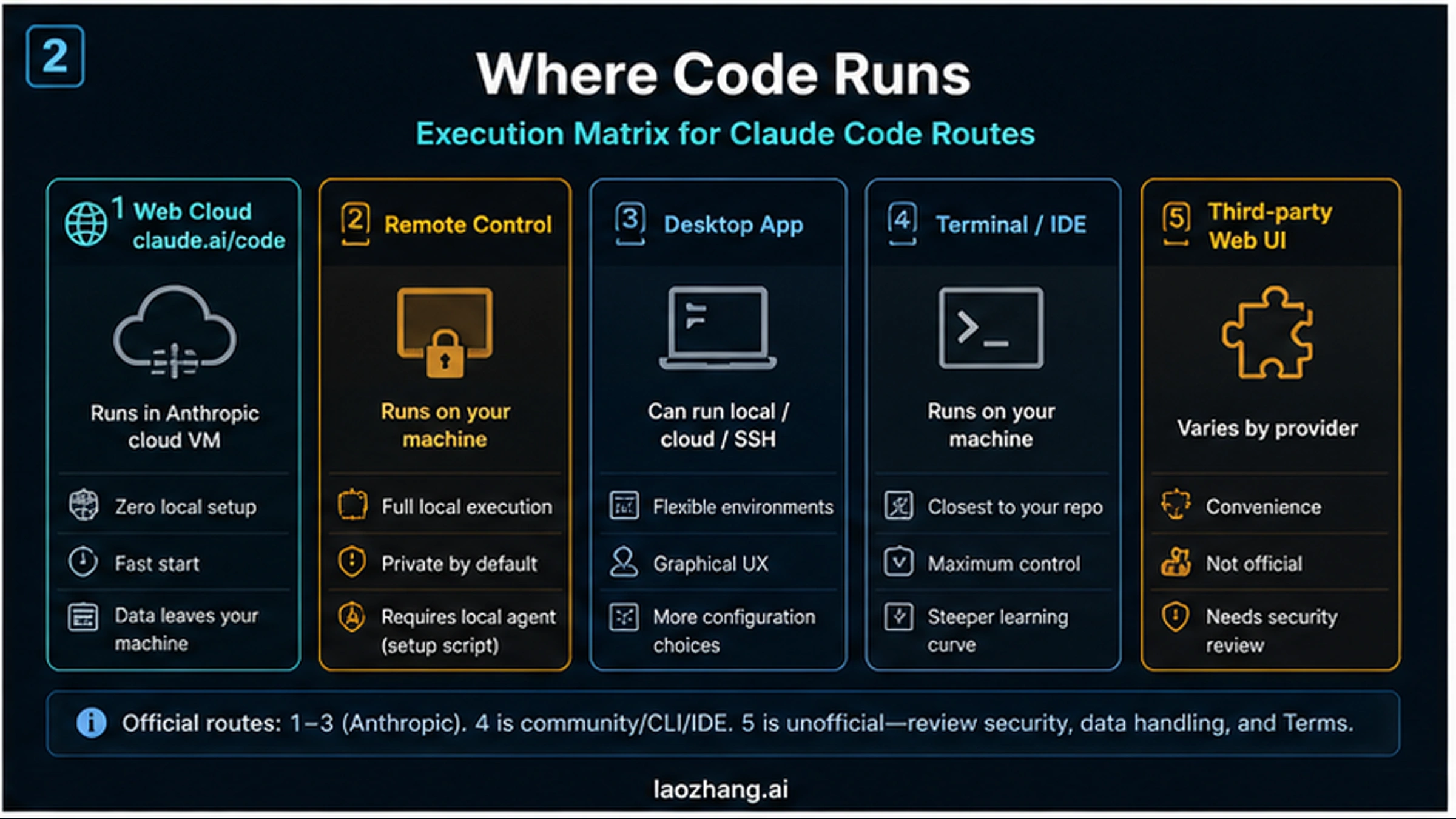
Use the official web route when the repo is in GitHub, the task can run asynchronously, and you are comfortable with code being worked on inside Anthropic-managed cloud infrastructure. Use Remote Control when the word "web" means "I want to steer my local session from a browser or phone." Use Desktop, terminal, or IDE when the work is tied to your local checkout, local tools, branch state, or constant back-and-forth.
The important correction is that "web interface" is not a single contract. The Claude Code on the web docs describe the cloud web route at claude.ai/code. The Remote Control docs describe browser or mobile control for a local session. The Desktop docs describe a graphical app route. The How Claude Code works docs place these surfaces next to terminal, IDE, Slack, and CI/CD routes rather than replacing them with one generic web UI.
What Claude Code On The Web Actually Does
Claude Code on the web is the official browser route for starting and monitoring Claude Code tasks from claude.ai/code. Anthropic's current documentation frames it as a cloud workflow: you connect GitHub, select a repository, configure the environment, run a task, then review the resulting branch or pull request. The work is not happening inside your local terminal just because you are using a browser.
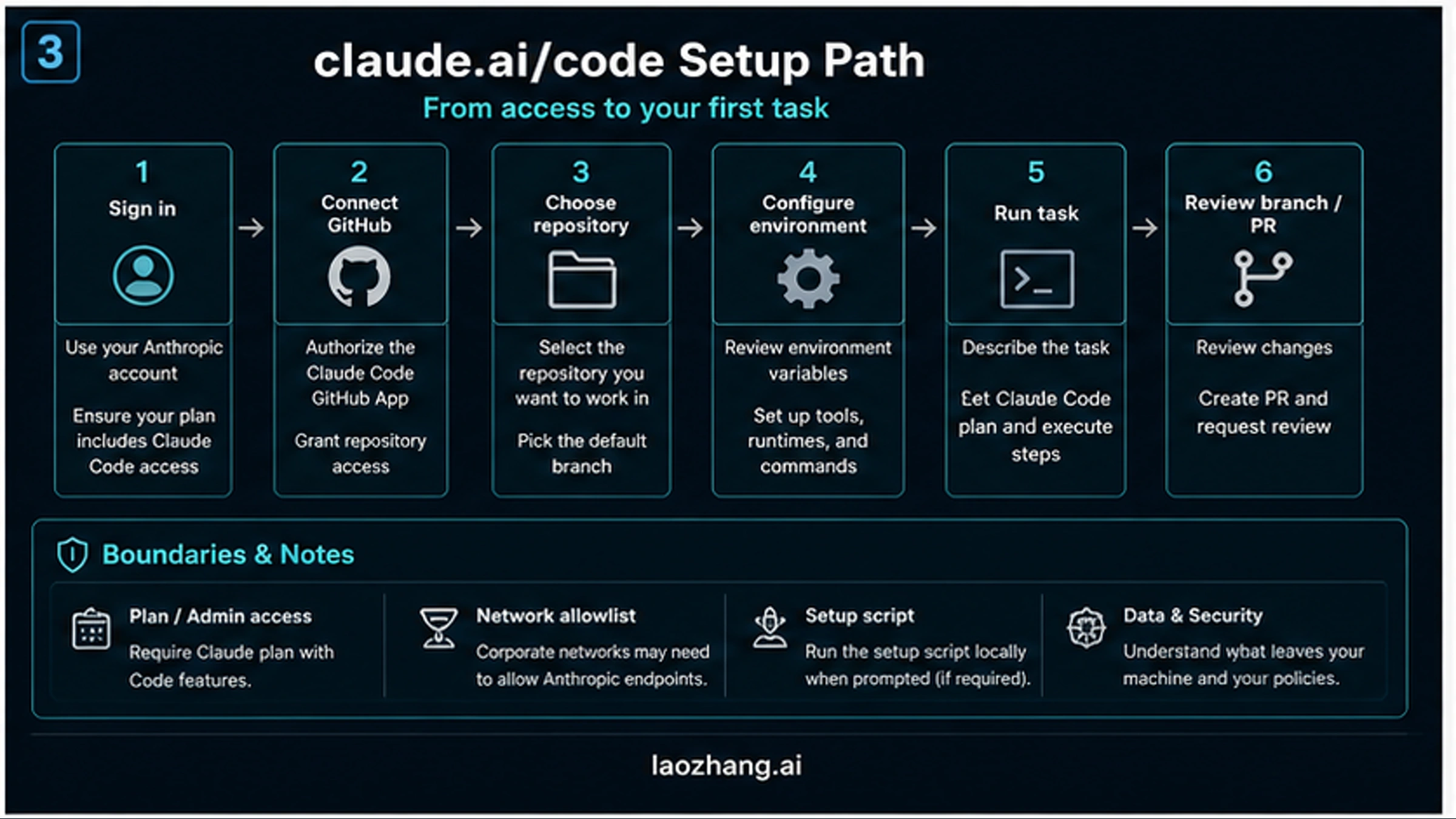
For a first web task, the practical sequence is:
- Sign in at
claude.ai/codewith an account that has Claude Code web access. - Connect GitHub and authorize the Claude Code GitHub app for the repository you want to use.
- Choose the repository and branch, then confirm the task scope before Claude starts.
- Configure environment variables, install steps, network access, and setup scripts when prompted.
- Let Claude run the task in the web session, then review the branch, diff, tests, and PR before merging.
That sequence is why official web is strongest for well-scoped cloud tasks: backlog items, GitHub issues, testable repo changes, dependency updates, documentation edits, and work you can review through a branch. It is weaker when the real context is your uncommitted local checkout, a private local service, a custom MCP setup, or a local credential that should not be copied into a cloud environment.
The feature state is volatile. Anthropic's web quickstart, support article, and launch blog post are the sources to recheck before publishing plan-specific claims. The route decision should not assume universal access, unlimited usage, non-GitHub support, or a stable preview label because those details can change faster than the core route decision.
When The Web Route Is The Wrong Route
Use a local route when the code that matters is not available to the cloud web environment. The clearest example is uncommitted work. If your local repo has changes that are not pushed, Claude Code on the web cannot reason about them unless you move that state into a branch or otherwise hand it off. Starting a cloud task in that situation is how teams end up with duplicate fixes, wrong diffs, or patches against stale code.
Secrets and local-only tools are the second stop rule. If the task needs a local database, private service, local MCP server, unshared .env file, internal VPN, or a one-off script that only exists on your machine, the web route may add friction or risk. You can sometimes recreate the environment in the cloud session, but that is an engineering decision, not a default assumption.
Frequent steering is the third stop rule. Claude Code on the web is useful when the job can run for a while and produce a branch you review. If you expect to inspect every diff, run local commands between steps, or guide the task every few minutes, terminal, IDE, Desktop, or Remote Control will usually feel cleaner.
For installation, CLI setup, and local authentication questions, use the Claude Code install guide. For browser testing inside a real Chrome session, the related route is Claude in Chrome with Claude Code, which solves a different problem from cloud web execution.
Remote Control, Desktop, Terminal, And IDE Are Different Answers
Remote Control is the browser answer for local execution. You still run Claude Code on your machine, but you can control that session from a browser or mobile surface under your account. That makes it useful when you want web convenience without moving execution away from local files, local tools, and local network context.
Desktop is the graphical app answer. The Claude Code Desktop docs describe a Code tab with local, cloud, and SSH session choices plus file editing, terminal, preview, diff, and PR review surfaces. That means Desktop should not be collapsed into either "web" or "terminal." It is a graphical workspace with its own route choices.
Terminal and IDE remain the most direct local development answers. Use them when you are already in the repo, when tests and scripts are local, when you need editor integration, or when you want the tightest review loop. If you are comparing Claude Code with editor-first tools, the Claude Code vs Cursor comparison is the better next page than a web-interface guide.
The naming discipline matters because bad naming leads to bad security decisions. "I used the web interface" can mean cloud execution, local Remote Control, a desktop tab, an IDE panel, or an unofficial wrapper. Before you give Claude a repo, name both the interface and the execution location.
Third-Party Web UI Wrappers Are Not Official Web
There are community and commercial projects that put a web UI around Claude Code or around a Claude-compatible coding workflow. They can be useful experiments, but they are not proof that Anthropic's official Claude Code web route works the same way. Treat "Claude Code Web UI" as a wrapper phrase unless the source is explicitly describing claude.ai/code or an Anthropic-documented route.
The review checklist for a wrapper is straightforward:
- Where does code execute: your machine, the wrapper provider, a cloud VM, or an unknown worker?
- Which credentials or API keys does it need, and where are they stored?
- Does it read whole repositories, local files, terminals, or browser state?
- How does it handle updates when Claude Code changes?
- Can you audit logs, diffs, network access, and generated branches?
- Does it have a clear security model for private repos and secrets?
If you cannot answer those questions, do not use a wrapper on sensitive work. A wrapper may be fine for demos, throwaway repos, or internal experiments, but it should not inherit trust from Anthropic's official docs.
If claude.ai/code Or Web Access Fails
Troubleshoot the route before you troubleshoot Claude Code itself. A web-access failure usually belongs to access, GitHub authorization, environment setup, network, repo targeting, or usage limits.
If claude.ai/code is unavailable, first check plan, billing, admin settings, and whether your organization has enabled the feature. Do not assume the public docs mean every account sees the same interface on the same day.
If repositories are missing, check the GitHub app path. The web route depends on repository authorization, and missing repo access often means the app was not installed, the wrong organization was selected, or the repository was not granted.
If the session starts but fails during setup, check the environment path before blaming Claude's model behavior. Setup scripts, package manager installs, network allowlists, proxy rules, and blocked domains are all ordinary causes of early failure.
If Claude edits the wrong branch or context, stop the session and confirm repo, branch, and task wording. For complex context that depends on local state, Remote Control or a local terminal session is often the cleaner recovery route.
If the session hits usage limits, separate product limits from route failure. Web tasks still consume account capacity, and heavy cloud work can run into the same broader usage planning problem covered in the Claude Code rate limit guide.
FAQ
Does Claude Code have an official web interface?
Yes. As of May 7, 2026, Anthropic documents Claude Code on the web at claude.ai/code. It is the official cloud web route, not a generic label for every browser-based Claude Code workflow.
Is Claude Code on the web the same as the terminal CLI?
No. The terminal CLI runs in your local shell and active repo context. Claude Code on the web runs tasks through a browser workflow tied to Anthropic-managed cloud environments and GitHub-backed repo access.
Is Remote Control the same thing as Claude Code on the web?
No. Remote Control gives you browser or mobile control over a local Claude Code session. The interface can be web-like, but execution stays on your machine.
Can Claude Code on the web see my uncommitted local files?
Do not assume that. If the task depends on uncommitted local files, local tools, local secrets, or a local-only service, use a local route or push the relevant branch before starting a cloud web task.
Should I use a third-party Claude Code Web UI?
Only after a security and data review. Third-party Web UI projects are wrappers, not the official Anthropic web route. They may be fine for experiments, but they should not be treated as equivalent to claude.ai/code.
Which route should I try first?
Use official web for well-scoped GitHub cloud tasks. Use Remote Control when you want browser convenience with local execution. Use Desktop when a graphical workspace helps. Use terminal or IDE when active local context and tight steering matter most.
The shortest accurate answer is yes, Claude Code has a web interface now. The more useful answer is that "web" is only the surface. Pick the route by execution location, repo state, security boundary, and review workflow before you let Claude touch the code.