Claude Code "Failed to Refresh OAuth Token": The 60-Second Lock
Claude Code's login isn't rejected: another process holds the refresh lock in ~/.claude. Retry in a minute; if nothing holds it, remove the empty lock folder.
On this page
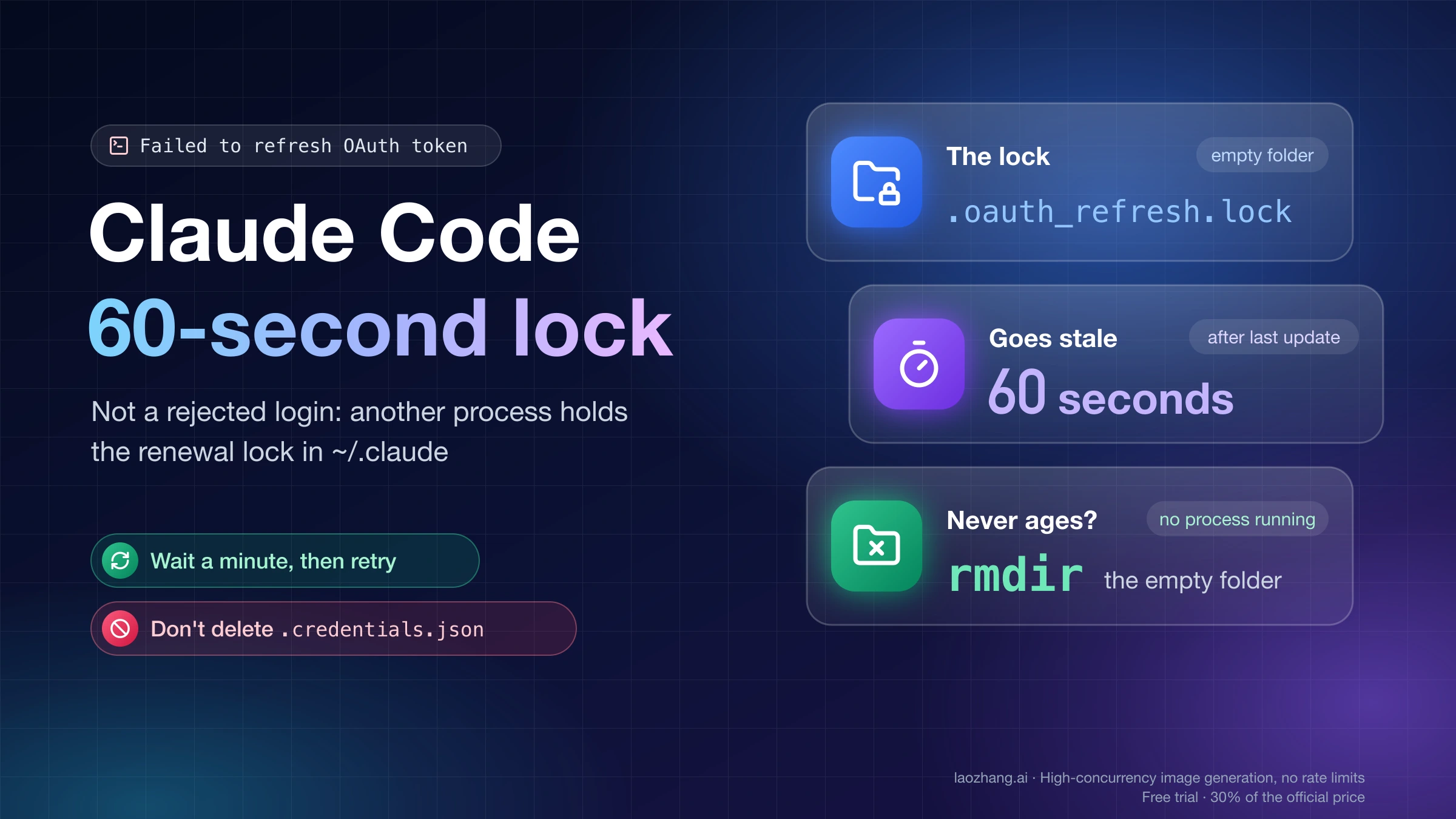
Failed to refresh OAuth token: another Claude Code process is refreshing it or exited mid-refresh doesn't mean Claude rejected your login. Your saved login had expired and needed renewing, but a lock on this computer, an empty folder at ~/.claude/.oauth_refresh.lock, said another Claude Code process was already renewing it, and that process either made no progress or exited without removing the lock. Claude Code stopped the request before sending it, according to the Claude Code error reference.
Wait a minute and run the command again. A lock that nobody updates goes stale 60 seconds after its last update, and the next run removes it and renews your login: in a test of Claude Code 2.1.316 on November 12, 2026, a lock left alone for 65 seconds was reclaimed automatically. If the message keeps coming back, close your other Claude Code windows and processes, because one of them is renewing at the same moment or keeps getting interrupted.
The exception is a lock that doesn't age. If no Claude Code process is running and the error still returns, look at that lock folder: when its timestamp is in the future, or on Windows, where users report the folder staying for minutes, remove the empty folder with rmdir, or run /login, which doesn't wait on the lock. Don't delete .credentials.json or the Keychain entry for this error, since that's what turns a blocked renewal into a real sign-out.
What "another Claude Code process is refreshing it" means
Every Claude Code process on one machine shares a single saved login, and Anthropic's troubleshooting page for login problems says parallel sessions coordinate its renewal so that only one process refreshes the token at a time. That coordination is the lock. When your session needs a fresh token, finds the lock taken and sees no progress, it gives up with one of two forms of the same error. An interactive session shows:
Could not refresh your login because another Claude Code process is refreshing it (or exited mid-refresh) · Try again in a minute; if it keeps happening, close other Claude Code windows or sign in again with /loginIn non-interactive mode (claude -p) and the Agent SDK, the same situation reads as below, and the SDK's structured error code is server_error:
Failed to refresh OAuth token: another Claude Code process is refreshing it or exited mid-refresh. This is usually transient; retry in a minute, and if it persists close other Claude Code processes or sign in againPhysically, "the lock" is three things. They were captured on November 12, 2026 while Claude Code 2.1.316 renewed a test login on a Mac, and all three disappeared when the renewal finished normally:
~/.claude/.oauth_refresh.lock, an empty directory that is the lock itself.~/.claude/.oauth_refresh.lock.owner, a small JSON file naming the holder: its process ID (pid), the process start time (procStart), the computer's name (pidSpace) and when the locks were created.~/.claude.lock, a second, older-style lock directory that sits next to the.claudefolder and is held at the same time.
If you set CLAUDE_CONFIG_DIR, everything moves with it: the lock becomes <your folder>/.oauth_refresh.lock and the second one <your folder>.lock. A few neighboring messages look similar but mean something else. Failed to authenticate: OAuth session expired and could not be refreshed means the renewal ran and was refused, which is covered in Claude (Temporarily) Unable to Authenticate: Outage or Local Fix?. If your message starts with Error during compaction:, it's this same lock hitting /compact; Claude Code Error Compacting Conversation: Fix by Exact Message lists the compaction errors by wording. And if it says the disk that holds the Claude Code config directory is full, free space on that disk first: the error reference notes that signing in again won't help while a new login can't be saved.
Why "retry in a minute": the lock goes stale after 60 seconds
The minute in the message is the lock's stale time. In Claude Code 2.1.316, the process holding the lock updates the folder's timestamp every 5 seconds, and any other process treats a lock whose timestamp is more than 60 seconds old as abandoned and removes it. A waiting process retries five times, 1 to 2 seconds apart, and if the timestamp hasn't moved in that time it stops with this error, which is why the message shows up about 8 seconds after you start a command. Those values come from the code shipped in 2.1.316, as of November 12, 2026, and versions 2.1.312 and 2.1.314 carry the same messages and lock settings.
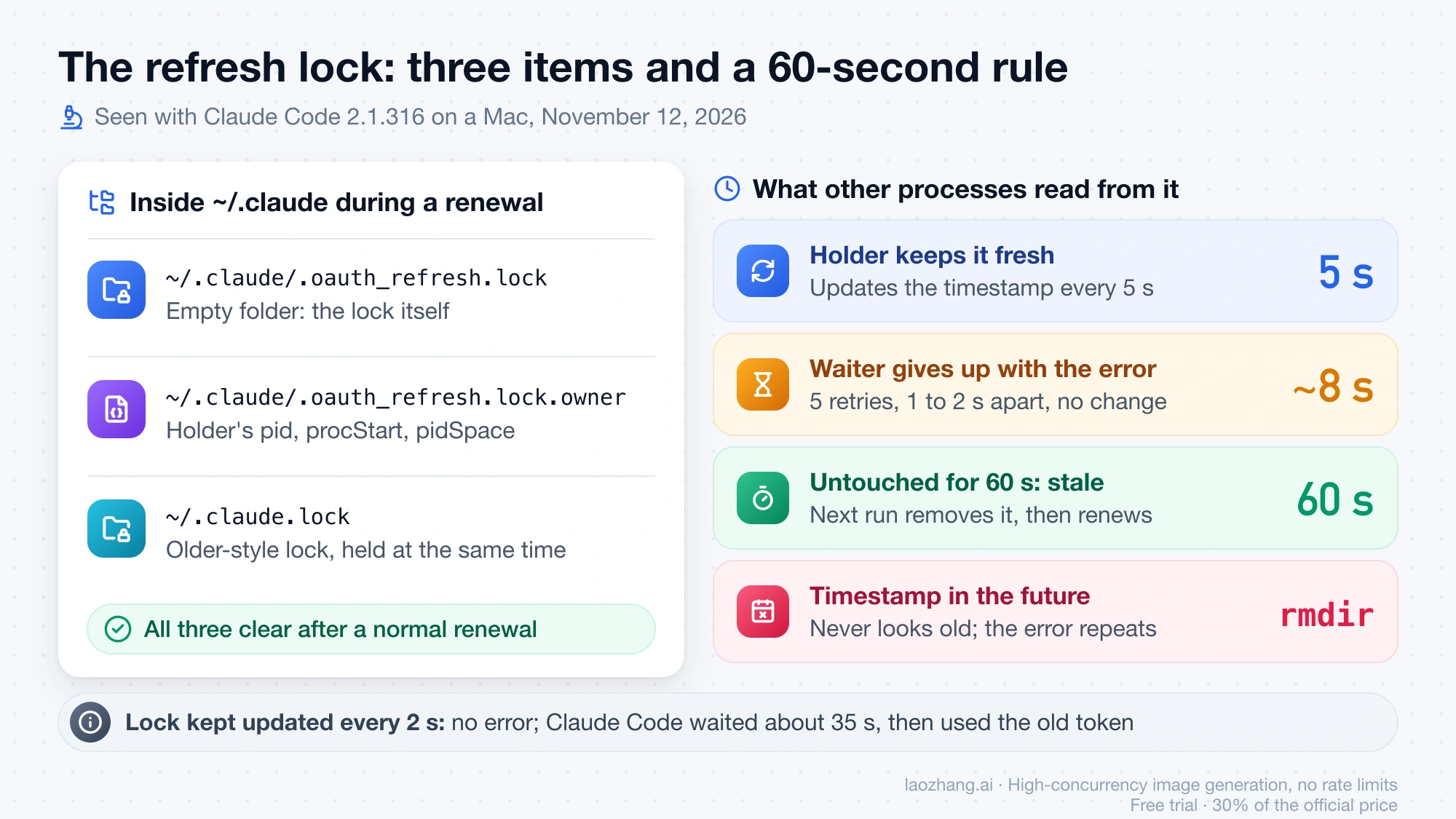
The timings were then reproduced on November 12, 2026 with Claude Code 2.1.316 on one Mac, running claude -p against fake credentials in a separate config folder set with CLAUDE_CONFIG_DIR, so the real login was never touched. An empty lock folder created just before the run, with nobody updating it, produced the -p error after 7.9 to 8.6 seconds with exit code 1, and an immediate rerun failed the same way. The same folder 65 seconds after it was created was reclaimed without any error, and a lock dated 5 minutes back was reclaimed at once. A lock dated 30 days in the future produced the error and produced it again 65 seconds later, because it never looks old; removing it with rmdir let the next run renew normally straight away. The older-style .lock folder on its own was enough to produce the error, in about 7.9 seconds.
One result changes how to read the message. When a helper kept updating the lock's timestamp every 2 seconds, imitating a live holder, Claude Code 2.1.316 did not print this error at all: it waited about 35 seconds and then went ahead with the old token. So on current versions, seeing the error usually means the lock wasn't being updated, because its holder exited, was killed or stalled. Claude Code 2.1.282 and later may recover sooner after a crashed holder, but in 2.1.316 that takeover needs an owner file proving the process is gone and a setting Anthropic controls remotely. Windows, two real logins racing, and a dead holder with an owner file were outside the test.
Which case you're in: VS Code, short commands, containers or Windows
What you were doing just before the error usually tells you whether waiting is enough. The patterns below come from user reports in the anthropics/claude-code GitHub repository, with the issue number for each.
| What you were doing | What you notice | Likely cause | First action |
|---|---|---|---|
| Opening several windows or sessions at once, often the first start of the day, such as VS Code restoring windows | Clears by itself within a minute; no lock folder is left afterwards | Two processes renewing the same expired login at once (#91708, #92330) | Wait and retry |
A short command just ran, such as claude auth status, claude doctor, claude agents --json or claude plugin validate, or a script killed Claude Code on a timeout | Every claude -p fails until you act; an empty .oauth_refresh.lock stays behind | The short command started a renewal and exited before it finished (#95822, #105729) | Update to 2.1.318 or later and remove the empty lock if it's older than a minute; if a script or gateway kills Claude Code on a timeout, stop killing it mid-run (2.1.282 fixed the minute-long wait after a killed holder, but the October 31 test in #105729 that left the lock behind states no version) |
| VS Code just started | ~/.claude.lock exists and its timestamp never changes | VS Code's config-cache process left the older-style lock behind (#102785) | Wait about a minute, then resend |
| Claude in Chrome was connected | Other sessions fail for up to 60 seconds, then work | claude --chrome-native-host held the lock in one report on 2.1.280; the reporter later found the same failure with the native host off (#105729) | Wait and retry |
| A container or VM just booted, or the system clock was corrected | The error with no other process running; the lock's timestamp is in the future | The clock stepped back during a renewal, so the lock never reaches 60 seconds old (#95739) | Remove the empty lock with rmdir |
| Running on Windows | The lock folder is still there minutes later, or logs show EPERM: operation not permitted, mkdir | Windows reports of the lock never being reclaimed and of creating it failing under contention (#95236, #91708) | Remove the empty lock folder; see the Windows section |
If Claude in Chrome is new to you, Claude in Chrome Extension: Install and Connect It to Claude Code explains what the native host is and how it connects.
Check which lock is held and whether its holder is alive
These checks only read the lock; nothing is changed. Run them on the machine or in the container where the error appeared, because the lock belongs to one config folder on one machine.
-
Look for the two lock folders and the owner file, with the time each was last updated and the current time. On macOS:
stat -f '%Sm  %N' -t '%Y-%m-%d %H:%M:%S' ~/.claude/.oauth_refresh.lock ~/.claude.lock
cat ~/.claude/.oauth_refresh.lock.owner
date '+%Y-%m-%d %H:%M:%S'
On Linux, replace the first line with
stat -c '%y %n' ~/.claude/.oauth_refresh.lock ~/.claude.lock. "No such file or directory" for both folders means no lock is held right now, so the next run should renew normally. -
Read the timestamp against the clock. Run the
statline again about 10 seconds later: a live holder updates the lock every 5 seconds, so a time that moves means some process still holds it. A time more than a minute old that doesn't move means the lock was left behind, and the next run should reclaim it, though Windows users report otherwise (see below). A time later than now is the clock case, which never clears by itself. -
If the owner file exists, check its
pid. The commandps -p <pid> -o pid=,lstart=,command=prints that process with its start time; if the start time matchesprocStartin the owner file, that process holds the lock, and if nothing prints, the holder is gone.pidSpacenames the computer that wrote the file, which matters when a home folder is shared with a container or another machine. -
List the Claude Code processes that are running, with
pgrep -fl claudeon macOS orpgrep -af claudeon Linux. The pattern also matches the Claude desktop app and anything else with "claude" in its command line, so look for theclaudecommand itself, the copy bundled with the VS Code extension, and--chrome-native-host. -
Note your version with
claude --versionand compare it with the version table below.
On Windows, users in GitHub issues #95236 and #108764 inspected the same folder from PowerShell; Get-ChildItem "$HOME\.claude" -Force -Filter ".oauth_refresh.lock*" | Select-Object Name, LastWriteTime lists the lock and its owner file with their times.
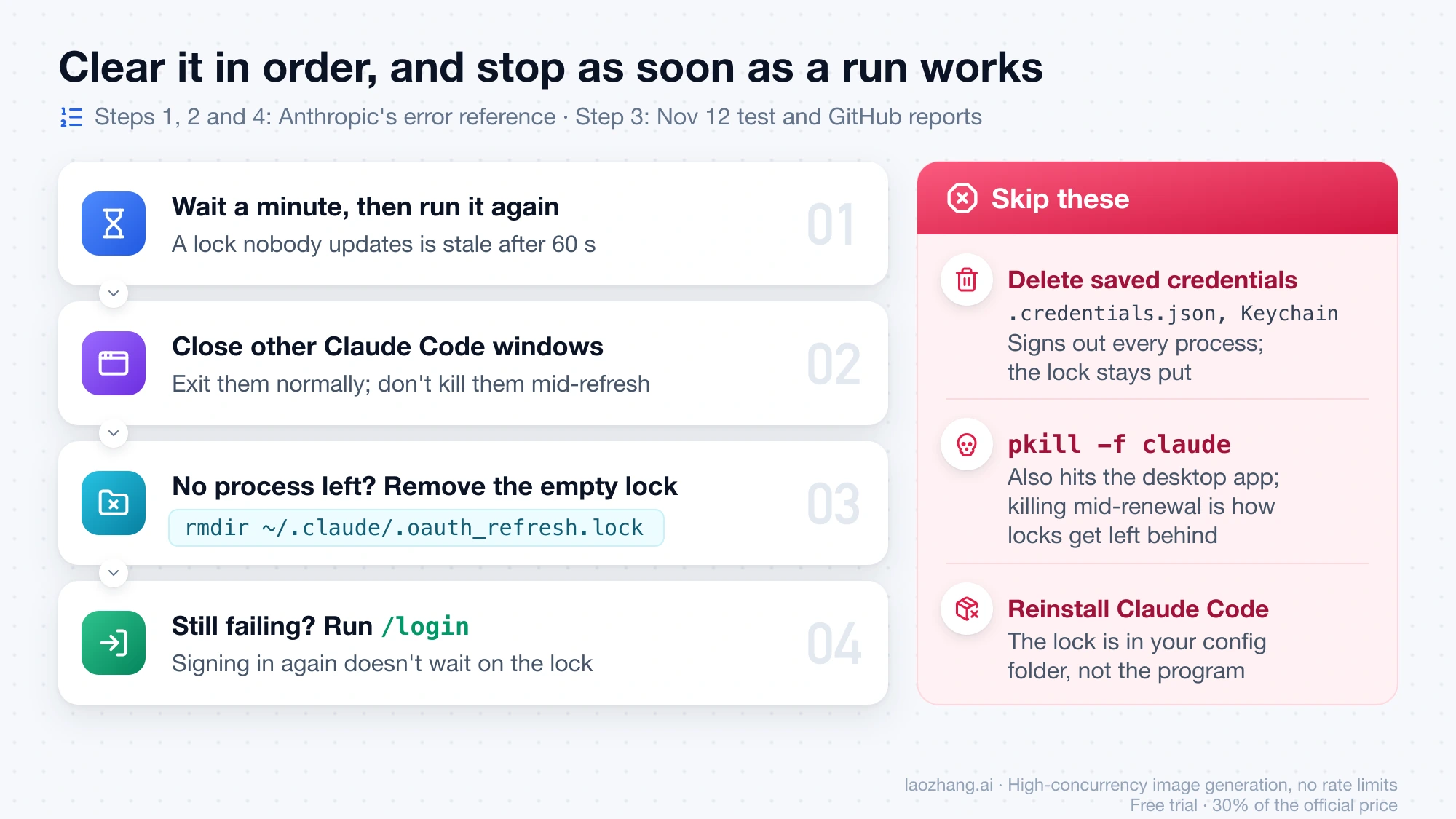
Clear it in this order: wait, close, rmdir, then /login
Go from the least disruptive step to the most, and stop as soon as a run succeeds. The first two steps and the last come from Anthropic's error reference; the rmdir step comes from the November 12 test and from GitHub reports.
-
Wait a minute, then run the same command again. If another process finishes the renewal first, your session uses the renewed login; if the holder is gone, the lock is stale after 60 seconds and gets reclaimed.
-
Close your other Claude Code windows and processes, then retry. End them normally, by exiting the session or closing the VS Code window, rather than killing them: the 2.1.282 changelog describes the error appearing "after that other process was closed or killed mid-refresh", and in a test posted on October 31, 2026 to #105729 (an issue filed on 2.1.280; the test gives no version), stopping a short command right after it created the lock left the lock behind in 8 of 8 runs.
-
If no Claude Code process is running and
.oauth_refresh.lockis still there, older than a minute and not moving, or dated in the future, remove only that empty folder:rmdir ~/.claude/.oauth_refresh.lockOn Windows, the reporter in #95236 used
Remove-Item "$HOME\.claude\.oauth_refresh.lock".rmdirrefuses a folder that has anything in it, which is the safety check you want. In the November 12 test, removing a future-dated lock let the next run renew at once, and the reporter in #95739 saw the same with the same stored login. If only~/.claude.lockis stuck, the reporter in #102785 found that waiting about a minute and resending worked. -
If it still returns with no other Claude Code process running, run
/loginin an interactive session. Signing in again doesn't wait on the refresh lock, according to the error reference.
Deleting .credentials.json (where Windows, Linux and containers keep the login) or the macOS Keychain item Claude Code-credentials is the step to skip. The error reference says this message doesn't mean the login was rejected, so throwing the saved login away fixes nothing and signs out every Claude Code process on the machine, while the lock folder stays where it was. Killing everything with pkill -f claude is also risky: it matches any process with "claude" in its command line, including the Claude desktop app, and killing a process in the middle of a renewal is how locks get left behind. Reinstalling Claude Code doesn't help either, because the lock lives in your config folder, not in the program.
On Windows, the lock folder may not clear by itself
Windows reports don't match the 60-second rule seen on macOS. In #95236, a user running batches of headless claude -p on Windows 11 with Claude Code 2.1.272 waited 180 seconds and got the same failure; deleting the empty .oauth_refresh.lock folder fixed it at once, and the next claude -p succeeded in 3.3 seconds. A commenter saw the same in a Linux Docker sandbox. The reporter hasn't seen it since upgrading but couldn't reproduce it on demand either, so no version is known to fix it, and why it differs from macOS is unexplained.
A second Windows report is a different failure. In #91708, a user on 2.1.282 and 2.1.283 logged EPERM: operation not permitted, mkdir 'C:\Users\<user>\.claude\.oauth_refresh.lock' 63 times when several sessions started together, followed by OAuth refresh token is no longer valid and a re-login every morning; another user confirmed it still happens. No changelog entry through 2.1.322 mentions it. Files named .oauth_refresh.lock.owner.tmp.* that pile up in %USERPROFILE%\.claude (811 in #108764, with no breakage noticed) aren't the lock.
Which Claude Code versions fixed the refresh lock, and what's still open
Anthropic has changed this lock's behavior in several releases since late August 2026, and as of November 12, 2026 the Claude Code changelog runs to 2.1.322. Release dates below are the GitHub release dates (UTC).
| Version | Released | What the changelog says it fixed |
|---|---|---|
| 2.1.248 | August 27, 2026 | A held lock no longer sends you to the login screen; "the request now fails with a retryable error instead" |
| 2.1.265 | September 8, 2026 | VS Code and SDK sessions needing a re-login when a session closed while refreshing |
| 2.1.277 | September 18, 2026 | Being logged out when an older build, such as an IDE extension's bundled CLI, runs alongside |
| 2.1.282 | September 24, 2026 | Requests failing "for up to a minute" with this error after the other process was closed or killed mid-refresh |
| 2.1.285 | September 29, 2026 | A rare failure when two sessions recover a crashed process's lock at the same time |
| 2.1.301 | October 15, 2026 | Timeouts and sign-outs after a short command such as claude auth status or claude plugin list exited mid-refresh |
| 2.1.314 | October 30, 2026 | Extra renewals when several sessions share an Anthropic profile login and the credentials lock is busy |
| 2.1.317 | November 3, 2026 | claude auth status exiting before a slow refresh was saved |
| 2.1.318 | November 4, 2026 | claude plugin commands exiting before a slow refresh was saved |
Several causes have no fix line through 2.1.322: Windows EPERM on creating the lock, a lock dated in the future after a clock change, --chrome-native-host, the VS Code config-cache process leaving ~/.claude.lock, and the .owner.tmp leftovers. Reports continue after the fixes, too; in #108871, two sessions on 2.1.319 still raced, though there the loser showed the "OAuth session expired" message rather than this one. As of November 12, 2026, Anthropic staff had replied once across the GitHub issues on this error: on #79688 on August 16, 2026, a collaborator wrote "this looks like a real bug" and asked for leftover lock files, and the issue was later closed automatically as stale.
Stop the lock error coming back with VS Code, scripts or servers
Repeats come from several processes renewing the same expired login at once, or from a process stopped halfway through a renewal. The workarounds below are user reports unless they cite Anthropic's docs.
With several VS Code windows, the first start after the login expires overnight is when processes collide. One user set "window.restoreWindows": "one" in VS Code (#90688); others run a single claude -p after the computer starts, before opening VS Code, so the login is already renewed (#79688, #102785). To confirm which login the extension is using, see Check Your Claude Code Account in VS Code: Status, Login, and API Route.
For scripts that launch many claude -p runs, start one run first after an idle period and hold the rest until it returns a real answer (#88583). Run 2.1.318 or later if your scripts call short commands such as claude auth status, and don't kill Claude Code on a short timeout. On older versions, one reporter in #95822 used claude -p /usage instead of claude auth status or claude doctor, and another removes an empty lock older than 60 seconds before each run. For automation that can't sign in interactively, Anthropic's error reference on expired logins points to ANTHROPIC_API_KEY or a long-lived token from claude setup-token; these don't use the saved-login refresh, so they shouldn't meet this lock, though that follows from the docs and the 2.1.316 code rather than a sentence Anthropic published.
On a server with many processes sharing one login, a user in #91708 replaced them with a single claude remote-control server started with --capacity N. In containers and VMs whose clock corrects itself after boot, check the lock's timestamp once the clock has settled, because a lock dated in the future never clears on its own (#95739). Anthropic's troubleshooting page also suggests checking the system clock if you're asked to log in often, and notes that before v2.1.211, waking a machine from sleep could make two sessions renew with the same token and sign every session out.
Sources15
External pages this guide links to, in the order they appear. Last updated Nov 12, 2026.
Sources15
External pages this guide links to, in the order they appear. Last updated Nov 12, 2026.
- 1.Claude Code error referencecode.claude.com/docs/en/errors
- 2.troubleshooting page for login problemscode.claude.com/docs/en/troubleshoot-install
- 3.#91708github.com/anthropics/claude-code/issues/91708
- 4.#92330github.com/anthropics/claude-code/issues/92330
- 5.#95822github.com/anthropics/claude-code/issues/95822
- 6.#105729github.com/anthropics/claude-code/issues/105729
- 7.#102785github.com/anthropics/claude-code/issues/102785
- 8.#95739github.com/anthropics/claude-code/issues/95739
- 9.#95236github.com/anthropics/claude-code/issues/95236
- 10.#108764github.com/anthropics/claude-code/issues/108764
- 11.Claude Code changeloggithub.com/anthropics/claude-code/blob/main/CHANGELOG.md
- 12.#108871github.com/anthropics/claude-code/issues/108871
- 13.#79688github.com/anthropics/claude-code/issues/79688
- 14.#90688github.com/anthropics/claude-code/issues/90688
- 15.#88583github.com/anthropics/claude-code/issues/88583