Claude Code Dynamic Workflows: When to Use Them, What `ultracode` Does, and How to Start Safely
A practical guide to Claude Code Dynamic Workflows: when the plan should become a script, what `ultracode` changes, which smaller surface to use instead, and how to start without hiding cost or permission risk.
On this page
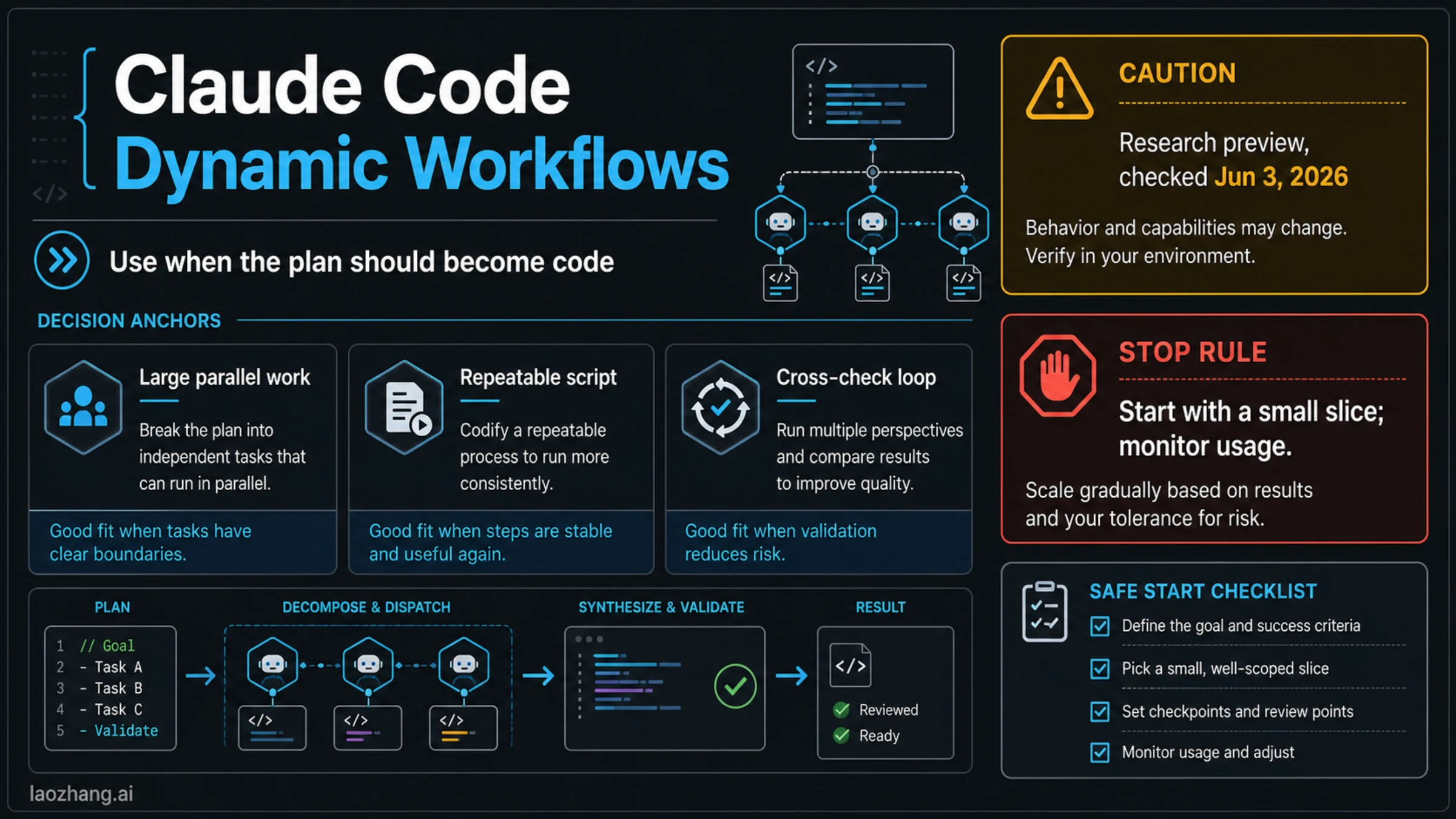
Claude Code dynamic workflows are JavaScript workflow scripts that Claude Code writes to coordinate many subagents in the background; use one only when the orchestration plan itself should become code. They fit large parallel work, repeatable branching, or cross-check loops that would be hard to keep reliable inside one chat. If a normal Claude Code turn, one subagent, a skill, a hook, or a routine can own the job, start there instead.
Checked on June 3, 2026, Anthropic documents dynamic workflows as a research-preview Claude Code feature for version 2.1.154 or later. The same docs describe workflow runs as counting toward plan usage and rate limits, with current caps of up to 16 concurrent agents and 1,000 total agents per run. That makes the first decision a control decision, not a hype decision.
| Job in front of you | Use Dynamic Workflows when... | Use a smaller surface when... | First safe move |
|---|---|---|---|
| Large repo audit or migration | independent slices can run in parallel and then be compared | one file, one package, or one reviewer can own the result | ask for one narrow slice and an explicit verification bar |
| Repeatable research or validation loop | the branching plan should be saved as a script | the method is reusable guidance for Claude to follow later | keep it as a skill until orchestration code matters |
| Tool-heavy implementation | subagents need separate read, write, and command contexts | a deterministic event rule is enough | prefer hooks for lifecycle rules |
| Scheduled or unattended work | the workflow is only part of a broader runtime | cadence, retries, and external state are the real owner | keep it in a routine or external job system |
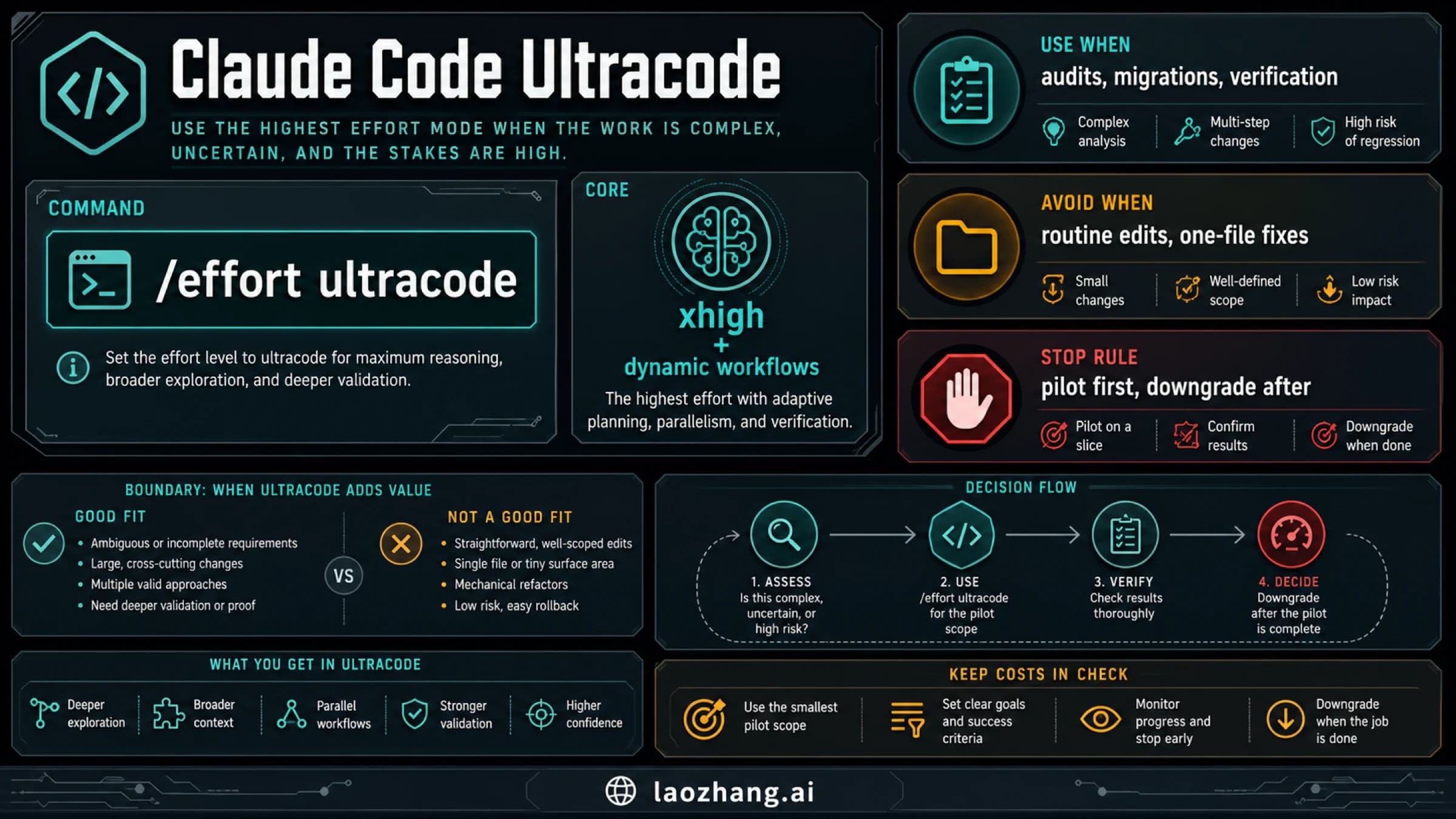
ultracode exploration | you want Claude to consider whether a workflow is justified | you already know a simple session can finish the job | keep the first run small and inspect /workflows |
Stop rule: do not run a whole-repo migration, broad research sweep, or high-permission workflow first. Ask Claude for a small slice, approve only the tools the slice needs, open /workflows to inspect the run, and stop, save, or resume based on evidence before scaling.
What changed when the plan becomes a script
The key change is where the plan lives. In a normal Claude Code conversation, Claude keeps the plan in the live chat and calls tools from that context. In a dynamic workflow, Claude writes a JavaScript orchestration script, then the workflow runtime executes that script in the background. The script can launch subagents, coordinate branches, collect intermediate outputs, and bring back a synthesized result.
That makes dynamic workflows useful for jobs where "do these ten things, compare them, and verify the winner" is the real work. A workflow can keep several clean contexts active at once instead of forcing one conversation to carry every branch, every tool result, and every self-check. It also gives the orchestration shape a reusable artifact: the script can be saved, reviewed, and rerun when that repeatability is worth it.
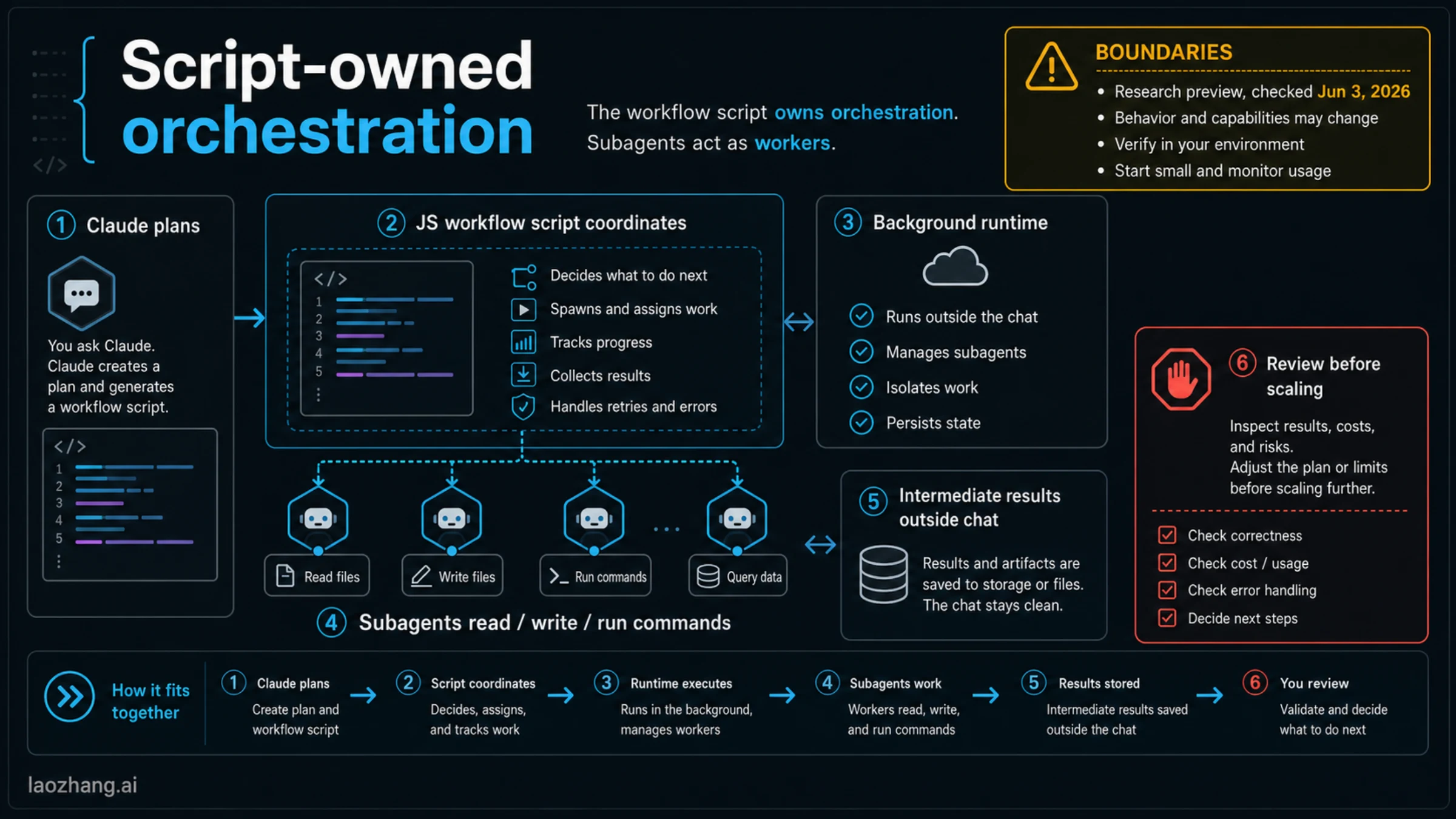
The cost is that you are now running a more powerful and less conversational surface. Anthropic's dynamic workflows docs describe the runtime as background execution: the session remains responsive, but the workflow does not pause for normal back-and-forth user input. Permission prompts can still interrupt the run, and subagents can read, write, or run commands according to the tools you allow. That is exactly why the first run should be scoped and observable.
The mental model is simple:
| Piece | Owns | What to watch |
|---|---|---|
| Claude Code session | the initial request, approval path, and review surface | whether the task really needs orchestration |
| Workflow script | the plan, branching, subagent calls, and synthesis path | whether the plan is inspectable and repeatable |
| Subagents | isolated work slices with their own context | file writes, command use, and duplicated effort |
/workflows | run inspection, token visibility, and run management | usage, stalled runs, and save/resume decisions |
If the script would be no more than "ask one agent to edit one file," it is not a workflow problem. If the script captures a repeatable harness for migration, audit, claim checking, or multi-variant implementation, it starts to justify the extra surface.
How dynamic workflows differ from the other Claude Code surfaces
Dynamic workflows do not replace subagents, skills, hooks, routines, or agent teams. They sit above some of those surfaces and beside others. The safest way to choose is to ask what should own the plan.
| Surface | Best owner | Use it when | Do not use Dynamic Workflows just because... |
|---|---|---|---|
| Normal Claude Code turn | one live conversation | the task is small enough for one context and direct review | the word "complex" appears in the prompt |
| Subagent | one specialized worker with separate context | you need one focused reviewer, implementer, or investigator | the job needs one clean perspective, not an orchestrated plan |
| Skill | reusable method or instruction pack | the method matters more than runtime branching | you want Claude to remember how to do something later |
| Hook | deterministic lifecycle rule | a command should fire before or after a known event | the behavior should be automatic and rule-like |
| Routine | unattended or scheduled runtime owner | time, trigger, retry, or external state owns the job | you need recurring cloud automation rather than a scripted run inside Claude Code |
| Agent team | managed parallel group | the product surface already owns multi-agent coordination | you need less script control and more hosted team behavior |
| Dynamic workflow | JavaScript orchestration script | the branching plan should become inspectable code | many agents sound impressive |
The sibling exits matter because each one removes unnecessary risk. If you only need repeatable guidance, write or reuse a skill. If you need a deterministic guardrail around tool use, use a hook. If the work should wake up tomorrow or respond to an external trigger, read the separate Claude Code routines guide. If your question is really whether to use Claude Code or another coding agent at all, the route owner belongs in Claude Code vs Codex.
This is also why "workflow" should not become the default answer for "large task." Large tasks can still be linear. They can still be owned by CI. They can still be better handled by one careful subagent. A dynamic workflow earns its place when the orchestration pattern itself needs to be visible and repeatable.
Where ultracode, /deep-research, and /workflows fit
The public feature has several entry points, and they are easy to mix together.
Anthropic's current docs list natural-language workflow requests as the most direct path: ask Claude Code to create or run a workflow when the task deserves one. They also describe /deep-research for research-heavy jobs and /workflows as the place to inspect and manage workflow runs. Saved workflows can live under project or user workflow directories, including .claude/workflows/ and ~/.claude/workflows/, which is why a useful workflow should eventually be treated like project automation, not a throwaway chat trick.
ultracode is different. The model configuration docs distinguish it from ordinary effort settings: it sends a very high effort setting and also lets Claude orchestrate dynamic workflows for substantive tasks. In practical terms, ultracode is a session behavior lever. It is not a saved workflow, not a fixed cost tier, and not a guarantee that every prompt should fan out into agents.
Use the entry points this way:
| Need | Start with | Why |
|---|---|---|
| One explicit orchestrated run | a direct request for a workflow | keeps the decision visible and reviewable |
| Research synthesis with many independent paths | /deep-research | matches the research workflow shape without inventing a coding task |
| Explore whether a hard task deserves orchestration | ultracode | lets Claude consider workflow orchestration for substantive work |
| Inspect, stop, save, or monitor an existing run | /workflows | keeps usage and run state visible |
| Reuse a proven orchestration pattern | saved workflow file | turns the plan into a reviewable artifact |
Before Claude Code v2.1.160, the literal trigger keyword behavior around "workflow" was narrower. If you are diagnosing behavior on older installations, version matters. For a publish-safe current article, the operating rule is simpler: upgrade first, then verify the feature in your local /config and /workflows surfaces before relying on a broad run.
A safe first dynamic workflow
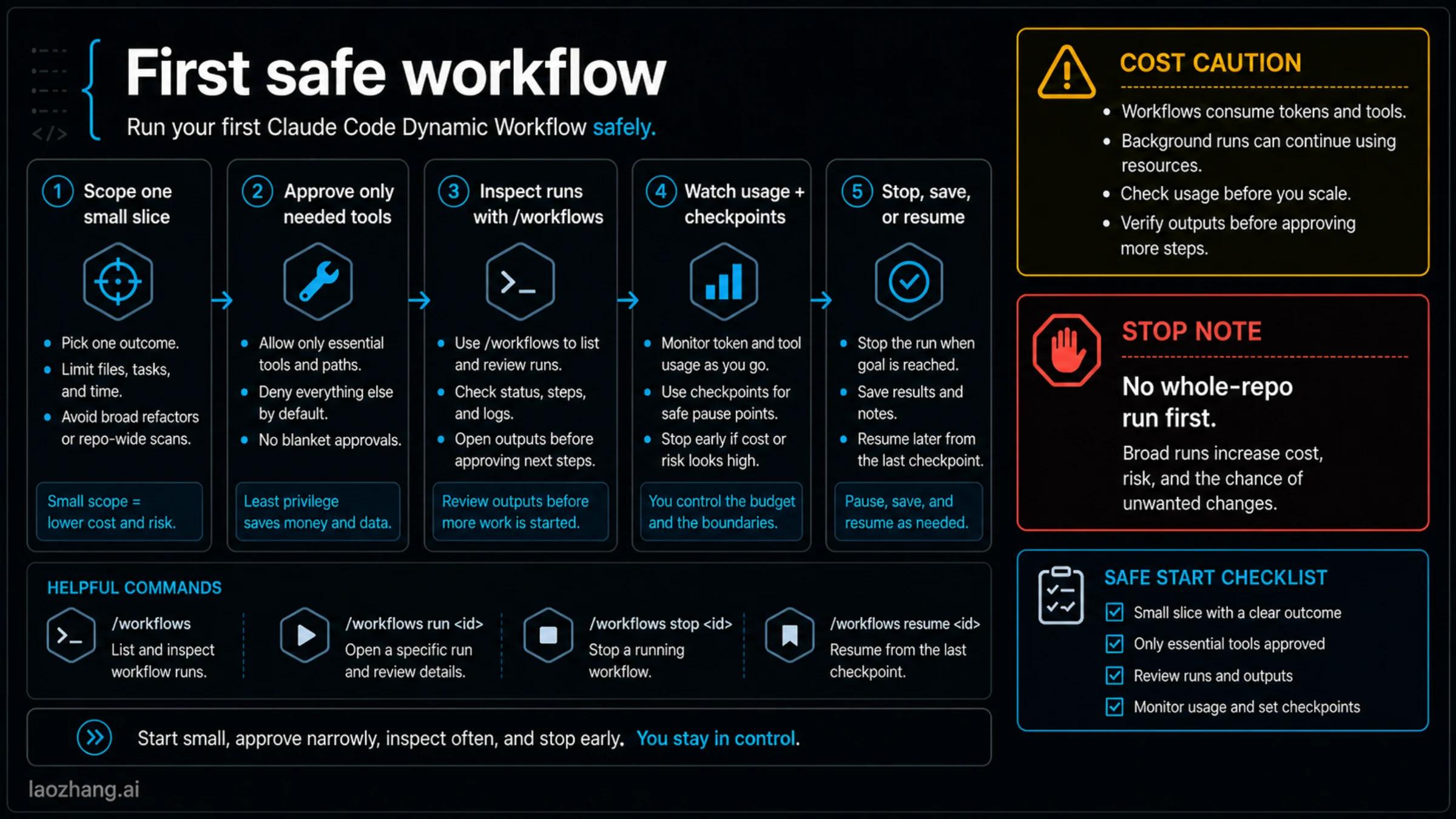
Start with a workflow only when the task meets all three tests:
- The work can be split into independent slices with clear inputs and outputs.
- The value comes from comparing or verifying those slices, not just doing more work at once.
- A repeatable orchestration script would be useful after this run.
If the task passes those tests, make the first workflow small enough to review in one sitting. A good first prompt is not "migrate the whole repo." It is closer to:
Use a dynamic workflow for one bounded slice only.
Target: the auth package and its tests.
Goal: find three migration risks, propose patches, and verify each with the existing test command.
Constraints: do not edit files outside this package, ask for permission before writes, and report token usage and unresolved risks before scaling.
That prompt does four useful things. It names the slice. It gives each subagent a useful boundary. It tells Claude what proof counts. It also makes scaling conditional instead of automatic. The output you want from the first run is not "a huge amount of agent activity." It is a decision: does this workflow shape produce better evidence than a normal Claude Code session?
During the run, keep /workflows open as the management surface. Watch whether the workflow is spending tokens on genuinely separate work or on redundant exploration. Watch whether permission prompts reveal broader access than the slice needs. Watch whether the synthesis cites what each subagent actually checked. If the run cannot show those things, stop and narrow the workflow before saving it.
After the run, save only the workflow that earned reuse. A one-off script that solved a one-off problem does not need to become project ceremony. A workflow that repeatedly audits claims, migrates a known pattern, validates several implementations, or checks release risk may deserve a project-level saved file. The difference is repeatability.
Cost, limits, permissions, and disable controls
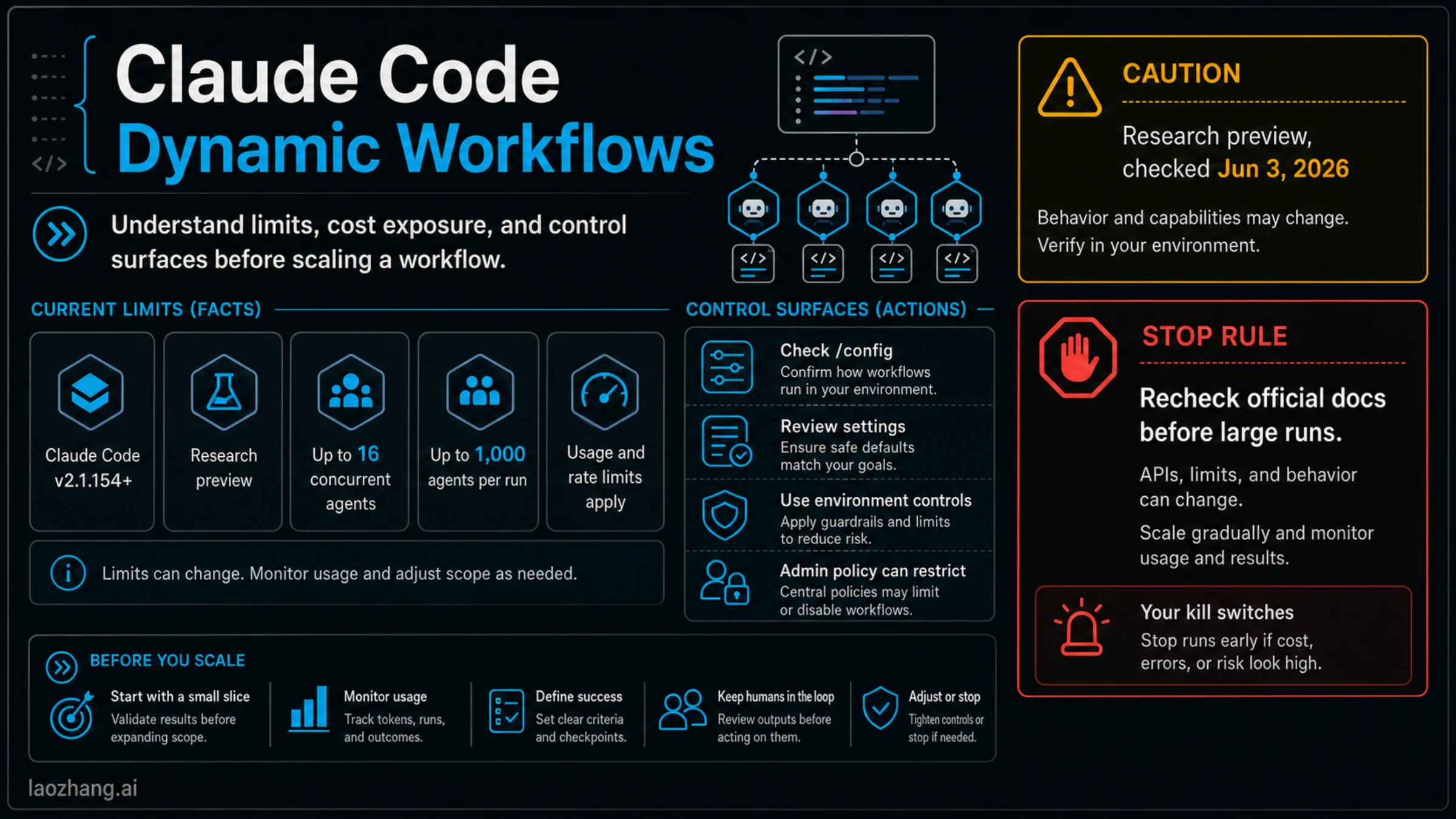
Dynamic workflows are not free parallelism. Anthropic's current docs say workflow runs count toward plan usage and rate limits, and they warn that workflows can use meaningfully more tokens than handling the same task in a single conversation. The /workflows surface shows token use for workflow runs, and the broader Claude Code costs docs are the right place to verify how usage is reported in your setup.
The current implementation limits, checked on June 3, 2026, are also part of the operating contract: up to 16 concurrent agents and 1,000 total agents per run. Treat those numbers as current-doc limits, not timeless design promises. They are high enough to make powerful harnesses possible, and high enough that a loose prompt can waste real usage quickly.
Permission control starts before the workflow launches. Subagents can perform reads, writes, and commands according to the tools and approval path you permit. A dynamic workflow that needs wide write access should earn that access with a small proof run first. For a first use, prefer a narrow target path, explicit allowed commands, and a review checkpoint before any broad write phase.
Disable controls are worth knowing before the first ambitious run. The docs currently describe several layers: Pro users can turn workflows on or off from /config; settings can use disableWorkflows; environments can set CLAUDE_CODE_DISABLE_WORKFLOWS=1; organizations can rely on managed settings or admin settings. The important article-level rule is not that every reader should memorize every switch. It is that a team should know which layer owns the stop control before a workflow becomes normal practice.
Use this preflight before scaling:
| Preflight question | Why it matters | Evidence to collect |
|---|---|---|
| What version is running? | workflows require current Claude Code support | claude --version or local app version check |
| Is the feature enabled? | availability and plan/provider behavior can change | /config and official docs checked on the same day |
| What is the smallest useful slice? | prevents a broad first run | target path, task boundary, verification bar |
| Which tools are allowed? | subagents can write and run commands | approval mode, allowlist, and denied surfaces |
| How will usage be watched? | workflows can spend more tokens | /workflows, /usage, and plan/rate-limit signals |
| Who can disable it? | teams need a kill switch | local setting, env control, managed setting, or admin policy |
If you cannot answer those six questions, you are not ready for a broad workflow. Use normal Claude Code, a single subagent, or a skill until the operating boundary is clear.
Examples that fit, and examples that do not
The best workflow candidates share one trait: they benefit from multiple clean contexts plus a final comparison.
A large migration can fit when several packages need the same change and each package has a separate test path. A workflow can assign slices, collect failures, compare patch shapes, and synthesize the repeatable rule. A security audit can fit when separate subagents inspect dependency risk, auth boundaries, data exposure, and test coverage, then one synthesis step reconciles the findings. A claim-verification job can fit when independent agents check docs, code, and runtime behavior before a final answer is allowed.
Those are not just "big tasks." They are tasks where independence and verification improve the answer. That is the real workflow signal.
Bad fits are more common. A single file refactor does not become a workflow because it is important. A deterministic pre-commit check should be a hook. A reusable prompt method should be a skill. A recurring daily repo sweep belongs closer to Claude Code routines. A choice between hosted Anthropic agent surfaces belongs closer to Claude managed agents. A basic "what does this error mean?" debugging session should stay in one conversation until the branches are real.
There is also a social anti-example: using dynamic workflows to hide uncertainty. If a team cannot say what each subagent should prove, a workflow may make the work look more rigorous while making the evidence harder to audit. Write the verification bar first, then decide whether many agents help.
What to save after a successful run
A useful saved workflow should read like project automation, not like a transcript. Keep the script and its documentation tight enough that a teammate can understand the owner, inputs, allowed tools, and proof bar.
For a project-level workflow, record:
| Item | Include |
|---|---|
| Owner | the repo area, team, or release job the workflow serves |
| Trigger intent | manual request, research run, migration slice, audit harness, or other route |
| Inputs | target paths, branch assumptions, test commands, docs to consult |
| Tool boundary | which reads, writes, and commands are expected |
| Stop rule | when to halt instead of continuing or broadening scope |
| Verification | exact tests, comparisons, or review evidence the synthesis must provide |
| Reuse rule | when the workflow is worth running again |
Do not save a workflow just because the first run succeeded. Save it when the orchestration script is easier to inspect, reuse, and improve than a normal Claude Code prompt. If the task is mostly "remember this method," a skill is still the cleaner artifact. If the task is mostly "run this every morning," a routine or external scheduler still owns the runtime.
FAQ
Are Claude Code Dynamic Workflows the same as subagents?
No. Subagents are workers with separate context. A dynamic workflow is the orchestration layer that can coordinate many subagents through a JavaScript workflow script. Use a single subagent when one focused worker is enough. Use a workflow when the plan, branching, and synthesis need to be scripted.
What does ultracode do?
ultracode is a Claude Code session setting, not a saved workflow. Current model configuration docs describe it as using a very high effort setting and letting Claude orchestrate dynamic workflows for substantive tasks. That means it can make workflow orchestration more likely for hard work, but it is not a promise that every prompt should become a workflow.
Is /deep-research a dynamic workflow?
It is one documented entry point for research-heavy workflow behavior. Use it when the job is research synthesis across many paths. For code migration, audit, or implementation work, ask explicitly for the workflow shape you want and keep the first run bounded.
Where do saved workflows live?
Current docs describe project and user workflow locations, including .claude/workflows/ and ~/.claude/workflows/. Treat saved workflows as reviewable automation artifacts. They should have a clear owner, allowed tools, stop rule, and verification bar.
Can I resume a workflow later?
The current docs say resume behavior is tied to the same Claude Code session; leaving while a workflow is running starts fresh next session. Use /workflows to inspect what is running, what can be saved, and what should be stopped before you leave.
Are Dynamic Workflows available on Pro, Team, Enterprise, API, Bedrock, Vertex, and Foundry?
Checked on June 3, 2026, the Claude Code docs describe availability on all paid plans and through Anthropic API, Amazon Bedrock, Google Cloud Vertex AI, and Microsoft Foundry. Treat that as a dated availability fact. Recheck the official docs in the same environment before making rollout, plan, or provider commitments.
How expensive are dynamic workflows?
There is no safe fixed price to publish. The current docs say workflows count toward plan usage and rate limits and can use meaningfully more tokens than a single conversation. The practical answer is to start with a small slice, monitor /workflows and /usage, and scale only if the evidence improves enough to justify the usage.
How do I disable dynamic workflows?
Current docs describe several control layers: /config, disableWorkflows, CLAUDE_CODE_DISABLE_WORKFLOWS=1, managed settings, and admin settings. Use the layer that matches your environment. For a team rollout, document who owns the control before workflows become a normal path.
Do dynamic workflows replace routines, hooks, or skills?
No. Workflows are for script-owned orchestration inside Claude Code. Routines own unattended or scheduled runtime. Hooks own deterministic event rules. Skills own reusable methods. If one of those surfaces owns the real job more cleanly, use it.
Sources3
External pages this guide links to, in the order they appear. Last updated Jun 3, 2026.
Sources3
External pages this guide links to, in the order they appear. Last updated Jun 3, 2026.