Claude Code Ultracode: What It Does, When to Use It, and How to Control Cost
Ultracode is not a new model. Use it when workflow orchestration is worth the cost, verify version and workflow support first, and downgrade after the hard task.
On this page
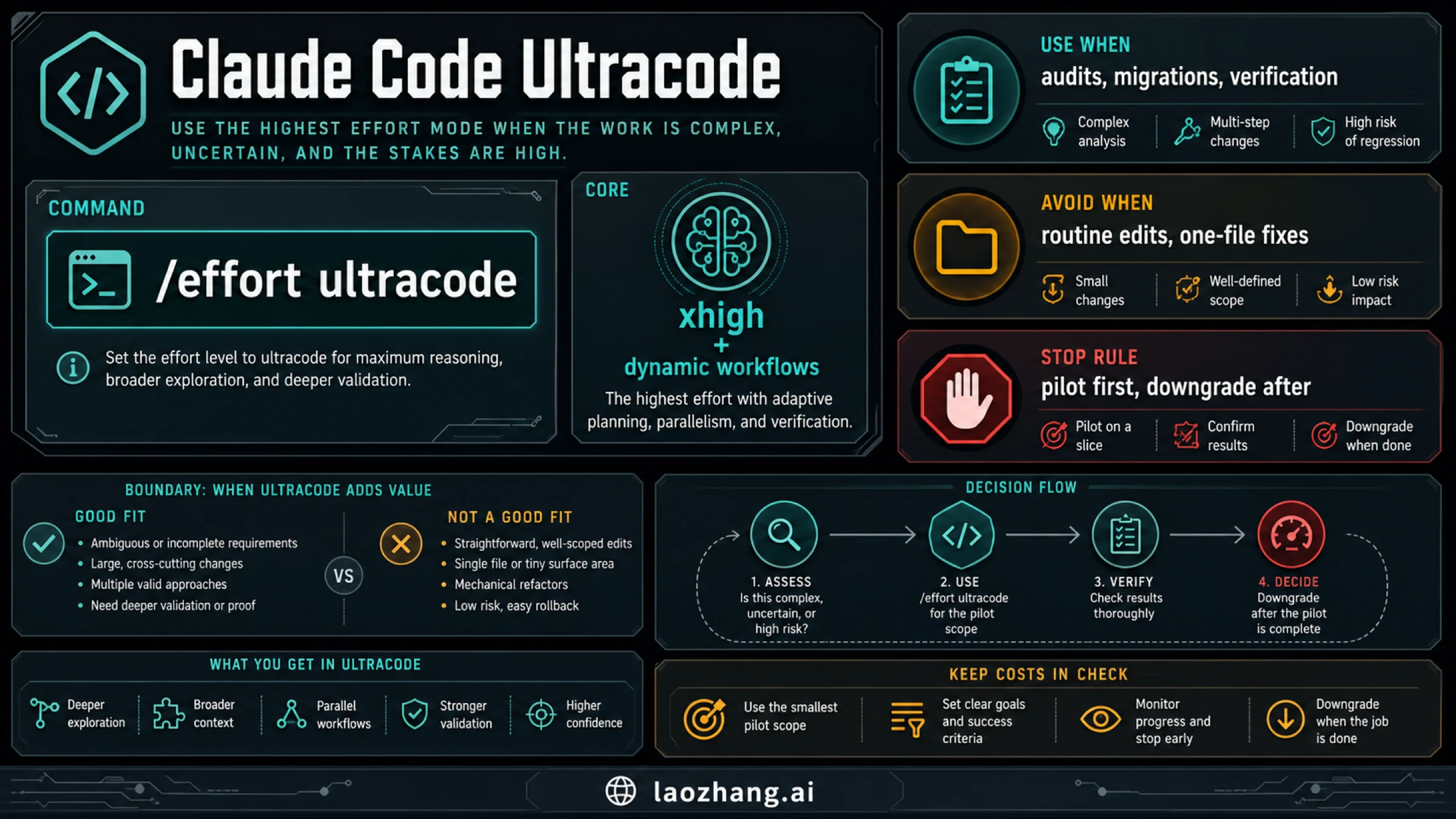
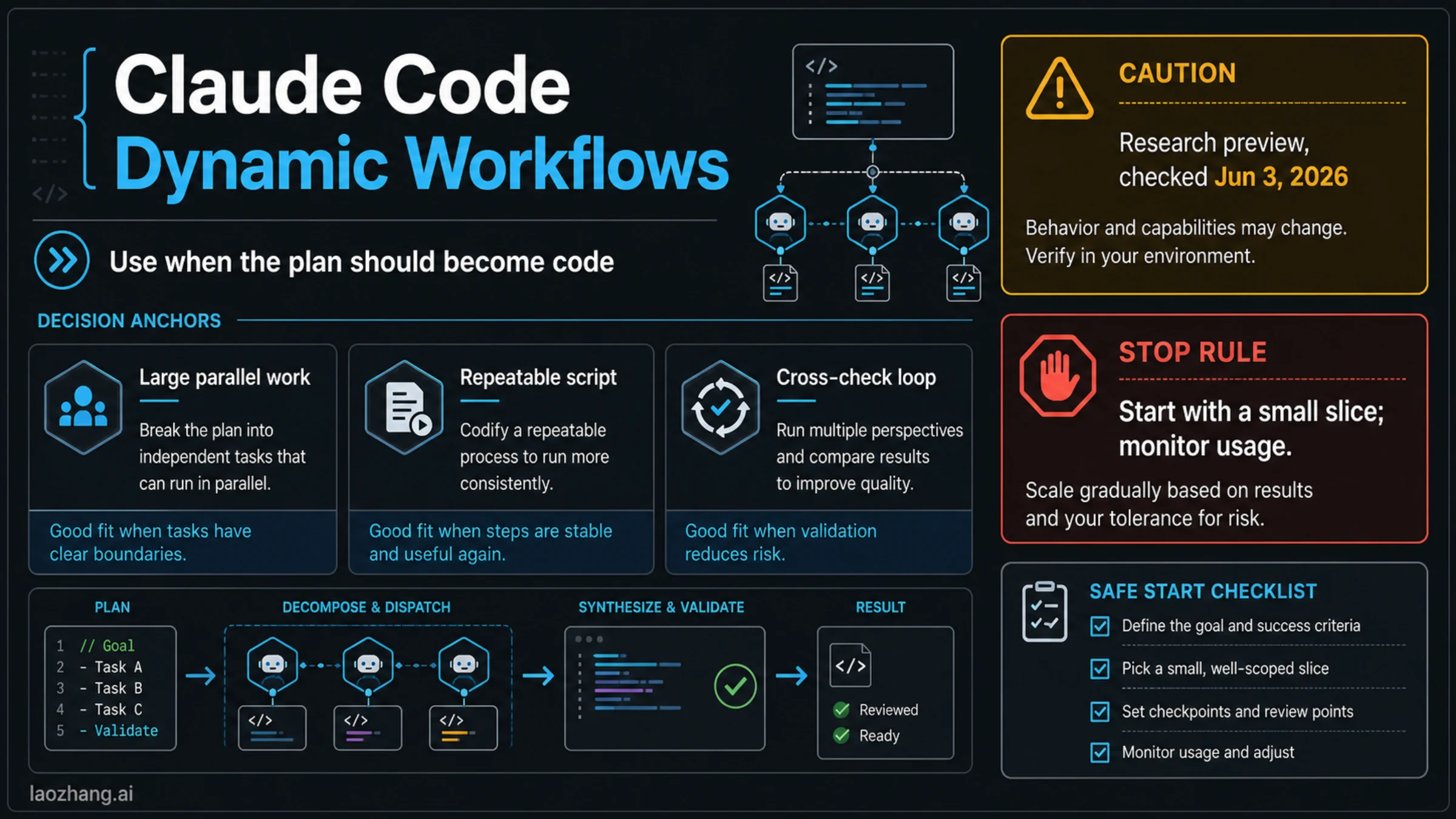
Claude Code Ultracode is not a new model. As of June 3, 2026, it is a session-only Claude Code setting that sends xhigh effort to the model and lets Claude automatically orchestrate dynamic workflows for substantive tasks.
The command is /effort ultracode. Use it when the work benefits from parallel exploration, migration planning, audit coverage, or adversarial verification. For a single hard task, you can ask Claude to create a workflow or include ultracode in the prompt instead of changing the whole session.
| If your task is... | Start here | Boundary |
|---|---|---|
| Hard multi-path audit, migration, or verification | /effort ultracode | Pilot first; review workflow plans before broad edits. |
| One complex task inside an otherwise normal session | Ask for a workflow or include ultracode in the task prompt | Keeps the rest of the session out of Ultracode. |
| Routine edits, one-file fixes, or well-defined refactors | high or xhigh | Orchestration is likely overhead. |
| Missing Ultracode option or behavior | Check claude --version, workflows, xhigh-capable model, plan/provider/admin, and restart | Do not use --effort, env effort, or effortLevel as Ultracode controls. |
Before you turn it on, apply the stop rule: run a small read-only or pilot slice first, watch the workflow, approve edits deliberately, stop repeated exploration, and downgrade to high or xhigh when the hard task is done.
Fast Answer
Ultracode is an operating mode for hard Claude Code work, not a quality button you leave on forever. It combines two things: the model receives xhigh effort, and Claude Code can create dynamic workflows when the task is large enough to benefit from orchestration.
Inside Claude Code, the short path is:
/effort ultracodeFor one task only, do not change the whole session. Ask directly:
Use an ultracode workflow for this task.
First create the workflow plan, keep edits scoped, and stop after verification.
The version check matters. Anthropic's Claude Code dynamic workflows docs require Claude Code v2.1.154 or later for dynamic workflows. During this June 3, 2026 run, npm view @anthropic-ai/claude-code version dist-tags --json returned latest and next at 2.1.161, while stable was 2.1.150. That means a normal-looking stable route can still be below the documented workflow minimum. Check your installed CLI instead of guessing from a package tag.
claude --version
npm view @anthropic-ai/claude-code version dist-tags --json
If you are deciding whether to use this mode for a team workflow, start with the task shape. Ultracode is useful for broad work where multiple lanes produce evidence: large audits, migration planning, competing hypotheses, or verification passes. It is wasteful for mechanical refactors, small edits, or work where one careful reasoning chain is safer.
What Ultracode Actually Changes
The key distinction is setting versus model. "Claude Code Ultracode" does not name a separate model. In Claude Code model-configuration docs, Ultracode is a setting that sends xhigh effort and additionally lets Claude Code orchestrate dynamic workflows for substantive tasks.
That second part is why the mode feels different. xhigh asks for deeper model effort. Ultracode also gives Claude Code a route to plan and run workflow lanes. A workflow can fan out, compare approaches, verify outputs, or continue until a bounded objective is done. That orchestration can be useful, but it is not free in attention or tokens.
Think of the mode as a workflow permission you grant for a specific class of work:
| What changes | Practical effect | Reader action |
|---|---|---|
xhigh effort | The model spends more effort on difficult reasoning. | Use when quality risk justifies it. |
| Dynamic workflow orchestration | Claude can split and coordinate substantive work. | Use when parallel lanes or verification are valuable. |
| Session scope | /effort ultracode affects the current session. | Downgrade after the hard task. |
| Workflow plans | Claude may propose or run multi-step work. | Review plans before broad edits. |
The safest wording is: Ultracode is for tasks where orchestration must earn its cost. If the task does not need split lanes, independent verification, or broad exploration, high or xhigh is usually cleaner.
How To Enable It
The session command is the most direct control:
/effort ultracodeOfficial model-configuration docs also describe a settings route with ultracode enabled, and an Agent SDK control-request route for SDK users. Those are specialized paths. For most readers, the interactive Claude Code command is the right place to start.
What does not work is just as important:
| Control | Use it for Ultracode? | Why |
|---|---|---|
/effort ultracode | Yes | This is the direct session setting. |
Prompt text with ultracode or an explicit workflow request | Yes, for one task | Good when you do not want the whole session in Ultracode. |
--settings '{"ultracode": true}' | Yes, when you need a settings route | Treat as a deliberate session configuration path. |
| Agent SDK control request | Yes, for SDK-controlled sessions | Use only if you are already building with the SDK. |
--effort | No | Official docs do not treat this as the Ultracode control. |
CLAUDE_CODE_EFFORT_LEVEL | No | Effort env control is not the Ultracode switch. |
effortLevel | No | Ultracode is not part of that model-effort field. |
If you only need a workflow once, keep the session on its normal mode and ask for a workflow in the prompt. That keeps the route local to the task and makes it easier to return to ordinary Claude Code work after the hard part.
Setup And Missing-Option Checklist
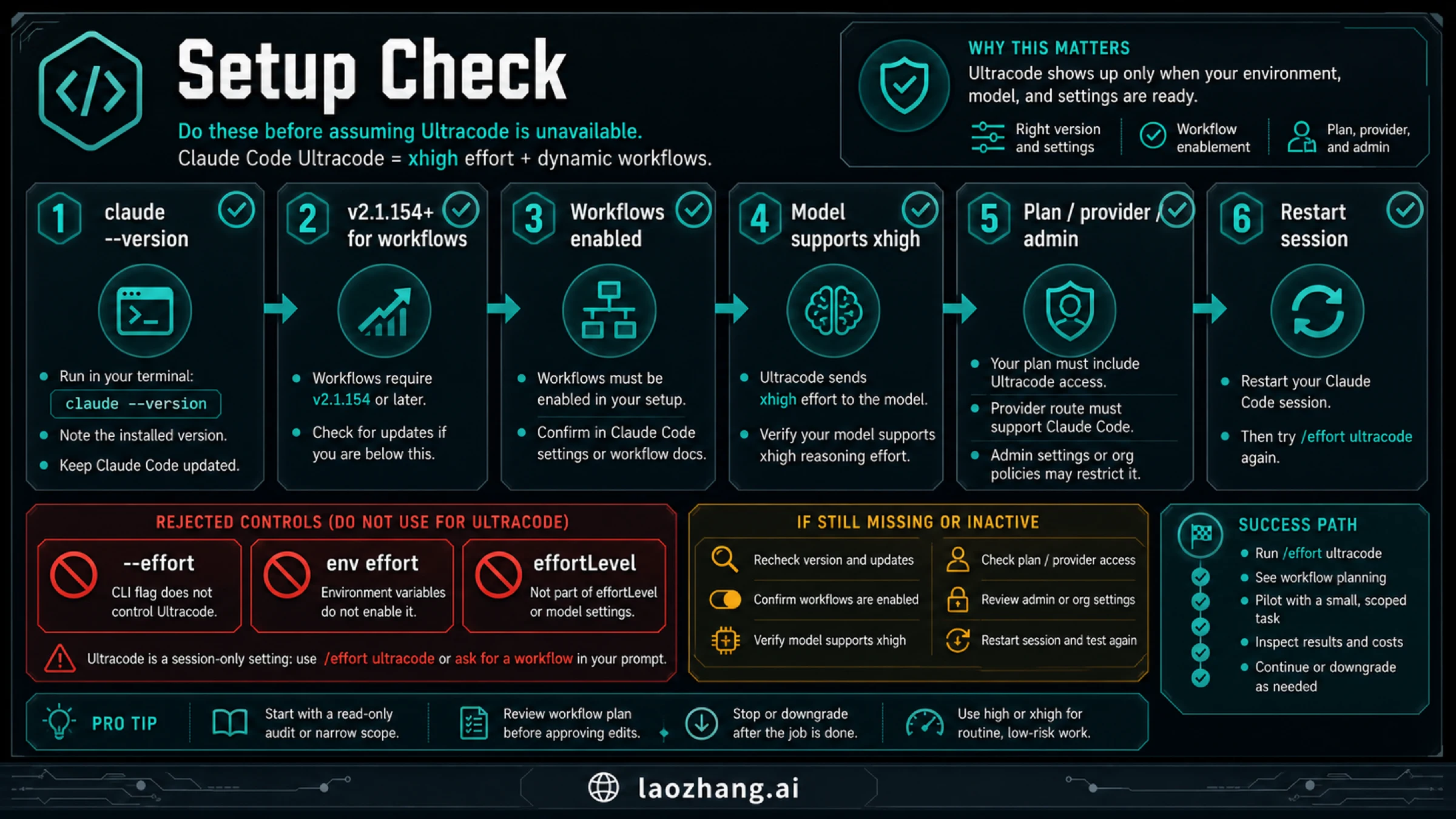
When Ultracode is missing, start with the boring checks. They solve more cases than account speculation.
- Run
claude --version. - Confirm the installed CLI is at or above the dynamic-workflows minimum in current docs.
- Confirm workflows are enabled in your Claude Code path. Pro users may need to check
/config; managed routes may also have admin controls. - Confirm the selected model route supports
xhigh. - Confirm your plan, provider, or enterprise/admin route allows the workflow feature.
- Restart the session after configuration changes.
Do not troubleshoot by adding unsupported knobs. If --effort, CLAUDE_CODE_EFFORT_LEVEL, or effortLevel appears to change something else, that still does not make it the Ultracode control path. Keep the troubleshooting branch tied to the official setting.
The package-tag mismatch from this run is the practical example. A reader on stable at 2.1.150 could be below the workflow threshold even though latest was already 2.1.161. That does not mean every installation will show the same tag state later. It means the article's rule should be: verify the installed CLI and current docs, not memory.
If the option appears but workflow behavior does not start, the task may be too small or too sequential. Ultracode does not need to create a workflow for every prompt. Try a bounded task that genuinely benefits from multiple lanes, such as "audit these three migration risks and verify the strongest finding."
Ultracode Vs Adjacent Controls
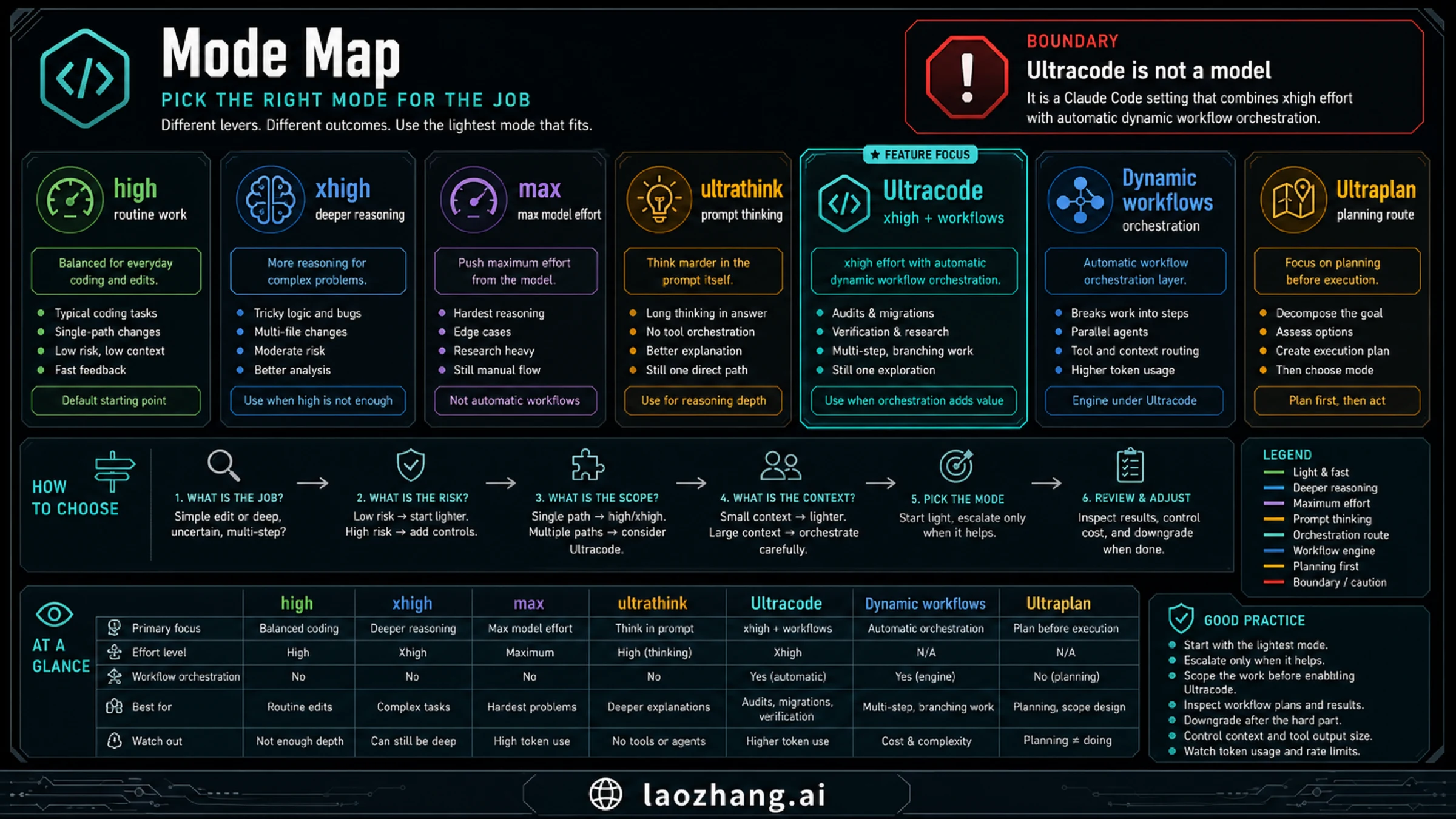
Most confusion comes from overlapping names. The useful way to compare them is by the control they change.
| Surface | What it controls | Use when | Avoid when |
|---|---|---|---|
high | Normal higher-effort Claude Code work. | You need quality without workflow orchestration. | The task needs broad split-lane verification. |
xhigh | Deeper model effort. | The problem is hard but still one reasoning lane. | You need automatic workflow planning. |
max | A maximum-effort/model path where supported. | You explicitly need that model-effort route. | You are really asking for workflows. |
ultrathink | Prompt language that asks for more thinking. | You want a one-off thinking cue. | You need session-level workflow behavior. |
| Ultracode | xhigh plus automatic workflow orchestration. | Audits, migrations, verification, and multi-path research. | Routine edits or low-risk single-file fixes. |
| Dynamic workflows | The orchestration runtime. | You want Claude to plan or run a workflow. | You only need an effort-level change. |
| Ultraplan | A planning route. | You want planning before implementation. | You need automatic execution/verification lanes. |
This table also helps with internal workflow design. If your problem is too many active tools or oversized context, the fix may be a smaller context surface, not Ultracode. The Claude Code MCP context overload guide is the better next step when tool output is the real bottleneck.
If the task needs repeatable methods or reusable operating rules, Claude Code best skills may help more than increasing effort. If the task needs external data or action surfaces, Claude Code best MCP servers gives a cleaner route than asking Ultracode to compensate for a weak setup.
Safe Prompt Recipes
Ultracode prompts should be scoped. You want Claude to plan workflow lanes, but you do not want a broad autonomous spree.
For a read-only audit:
Use an ultracode workflow for a read-only audit.
Map the risky areas first, split into independent verification lanes, and return findings with evidence.
Do not edit files. Stop if the task needs credentials, production data, or broad repo changes.
For a migration pilot:
Use Ultracode for a migration pilot, not the full migration.
Pick one representative module, create the workflow plan, and ask before editing shared files.
Return the migration rule, the test command, and what would block scaling.
For adversarial verification:
Create a workflow with two lanes: one implements the candidate fix, one tries to disprove it.
Keep changes scoped to the named files.
Report the commands run, strongest counterexample, and whether the fix should proceed.
For broad research:
Use a workflow to compare the viable routes.
Each lane should own one route, cite its evidence, and state the stop condition.
Synthesize only after the lanes report back.
Notice the pattern: task, boundary, workflow shape, allowed edits, evidence, and stop condition. Ultracode is strongest when the prompt makes ownership obvious.
Cost And Stop Rules
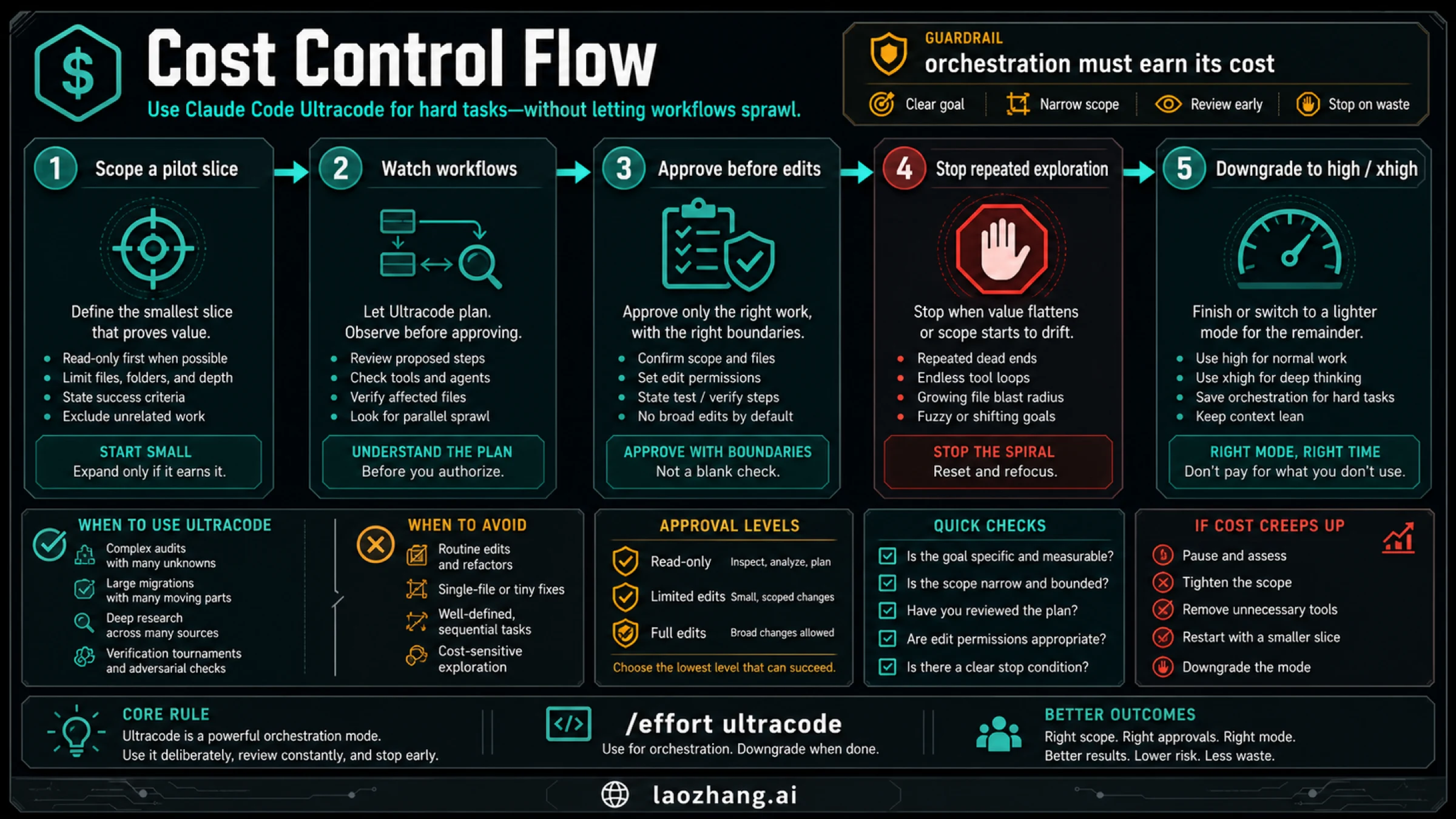
Dynamic workflows can use more tokens because they create more reasoning, more intermediate work, and more review surface. That does not make Ultracode bad. It means the workflow needs a budget rule.
Use this sequence:
- Start with the smallest representative slice.
- Ask Claude to show the workflow plan before broad edits.
- Watch active workflows and intervene when a lane drifts.
- Approve edits deliberately, especially around shared files.
- Stop repeated exploration if no new evidence appears.
- Downgrade to
highorxhighafter the hard task.
The stop rule is stricter than "tokens are expensive." It is about engineering control. If a workflow is producing more branches than decisions, stop it. If each lane returns similar claims without new proof, stop it. If the task has become implementation rather than exploration, collapse back to one session and finish carefully.
This also protects quota and billing interpretation. If you hit usage limits, do not treat it as proof that Ultracode is broken. Separate mode choice from account, subscription, API key, and quota route. The billing split in Claude Code API key vs subscription billing, the broader Claude Code pricing guide, and Claude Code usage limit issues are better follow-ups for account-level questions.
Troubleshooting
| Symptom | Likely cause | First check |
|---|---|---|
/effort ultracode is unavailable | CLI or workflow feature is behind the required boundary. | claude --version, current docs, and package tag state. |
| The setting works but no workflow appears | The task may be too small or sequential. | Ask for a workflow on a complex audit or verification task. |
--effort or env effort changes do not work | Those are not the Ultracode controls. | Use /effort ultracode or the documented settings path. |
| Workflows start but feel noisy | Task ownership is too broad. | Split by lane, allow read-only first, and add a stop condition. |
| Token usage rises quickly | Workflow orchestration is multiplying work. | Use a pilot slice and stop repeated exploration. |
| You are unsure which account pays | Mode choice and billing route are being mixed. | Check account/subscription/API route before interpreting costs. |
| Context becomes overloaded | The problem may be tool/result size, not effort. | Reduce MCP/tool output and active server scope. |
The best recovery is not another mode change. Save useful findings, stop or narrow the workflow, and choose the next single decision. If the problem is route visibility rather than Ultracode itself, Claude Code Agent View is the sibling page for managing visible local background sessions.
FAQ
Is Claude Code Ultracode a new model?
No. It is a Claude Code setting. The model receives xhigh effort, and Claude Code may orchestrate dynamic workflows for substantive tasks.
What is the command for Ultracode?
Use /effort ultracode inside Claude Code. For a one-task workflow, ask for an ultracode workflow in the prompt instead of changing the entire session.
What version do I need?
Official workflow docs require Claude Code v2.1.154 or later for dynamic workflows. During this June 3, 2026 check, npm latest was 2.1.161 and stable was 2.1.150, so verify your installed CLI with claude --version.
How is Ultracode different from xhigh?
xhigh is a model effort choice. Ultracode sends xhigh effort and also gives Claude Code the route to orchestrate dynamic workflows. Use xhigh when the task is hard but still one lane; use Ultracode when orchestration matters.
Does Ultracode cost more?
It can. The cost risk comes from deeper effort plus additional workflow lanes, intermediate reasoning, and review output. The safer rule is to run a pilot slice, inspect the workflow, and downgrade after the hard task.
Why is Ultracode missing?
Check CLI version, workflow enablement, model support for xhigh, plan or provider support, admin-managed settings, and stale session state. Do not use rejected controls such as --effort, env effort, or effortLevel as workarounds.
Should I leave Ultracode on?
Usually no. Leave it on only while the session is doing work that benefits from orchestration. After the audit, migration pilot, or verification pass, downgrade to high or xhigh.
Is Ultracode the same as dynamic workflows?
No. Dynamic workflows are the orchestration runtime. Ultracode is a setting that can trigger that runtime automatically while using xhigh effort.
Bottom Line
Claude Code Ultracode is useful when the hard part of the job is not just thinking longer, but coordinating useful lanes of work. It gives Claude Code a way to combine xhigh effort with dynamic workflows, which is powerful for audits, migrations, research, and verification.
Use it deliberately. Check the version and workflow route, turn it on with /effort ultracode only when orchestration earns the cost, start with a pilot slice, review workflow plans, and downgrade when the expensive part is done. For ordinary edits and single-path fixes, a smaller mode is usually the more professional choice.
Sources2
External pages this guide links to, in the order they appear. Last updated Jun 3, 2026.
Sources2
External pages this guide links to, in the order they appear. Last updated Jun 3, 2026.