How to Use GPT-5.6 in Kiro: Models, Credits, and a Safe Test
GPT-5.6 is a built-in premium model choice in Kiro, not an OpenAI API key setup. Confirm access, pick a tier and effort level, then measure accepted-task cost on your own repository.
On this page
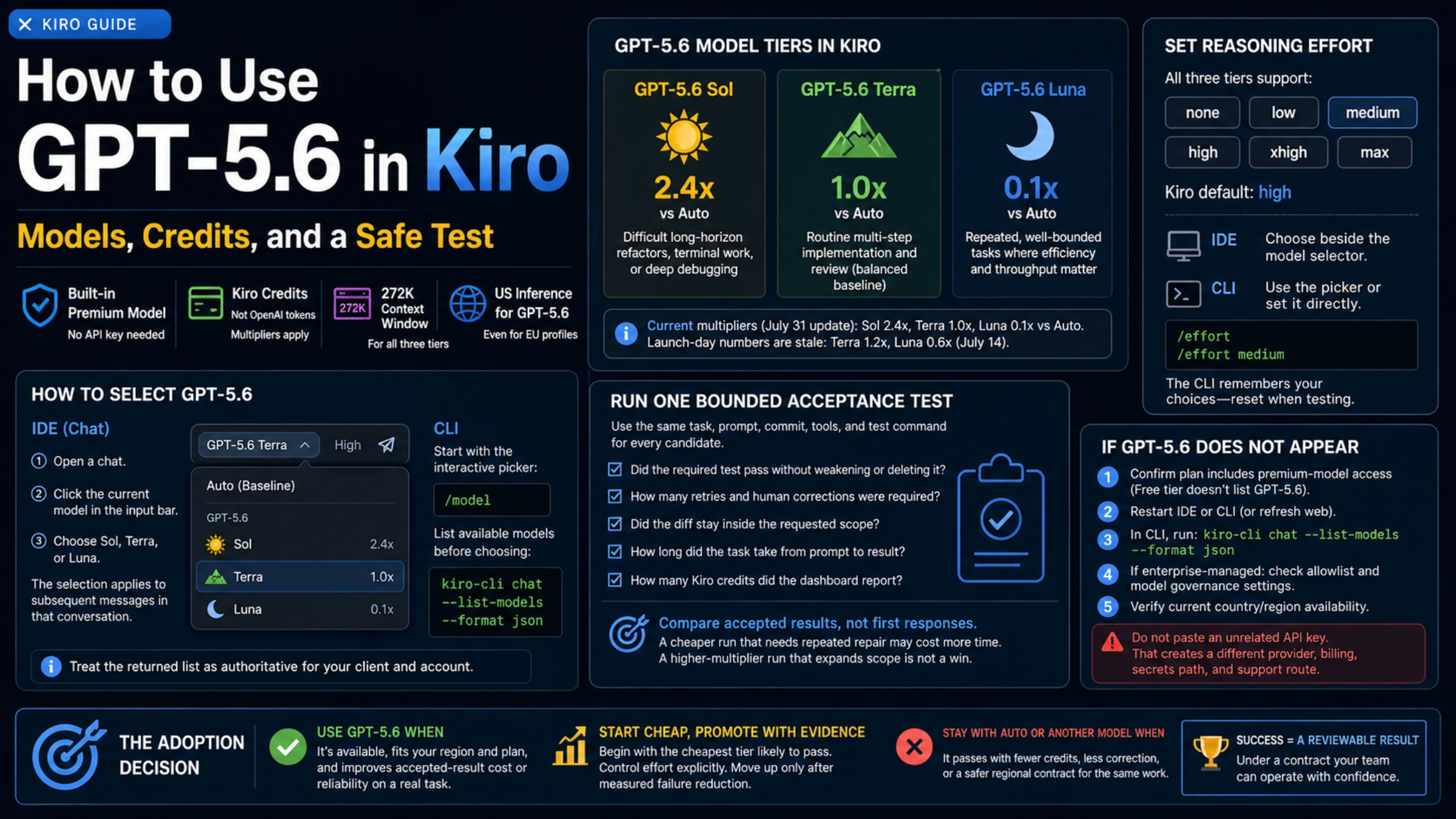
GPT-5.6 is available in Kiro as a built-in model family. In Kiro, you sign in to Kiro, use a paid plan that exposes premium models, and select Sol, Terra, or Luna from Kiro's model controls. You are not replacing Kiro's base URL or pasting an OpenAI Platform API key.
Kiro sets the access rules and billing terms for this integration. Kiro currently documents a 272K context window and credit multipliers relative to Auto. It also controls plan eligibility, model availability, inference routing, and the settings shown in its IDE and CLI.
Select a model in the IDE or CLI
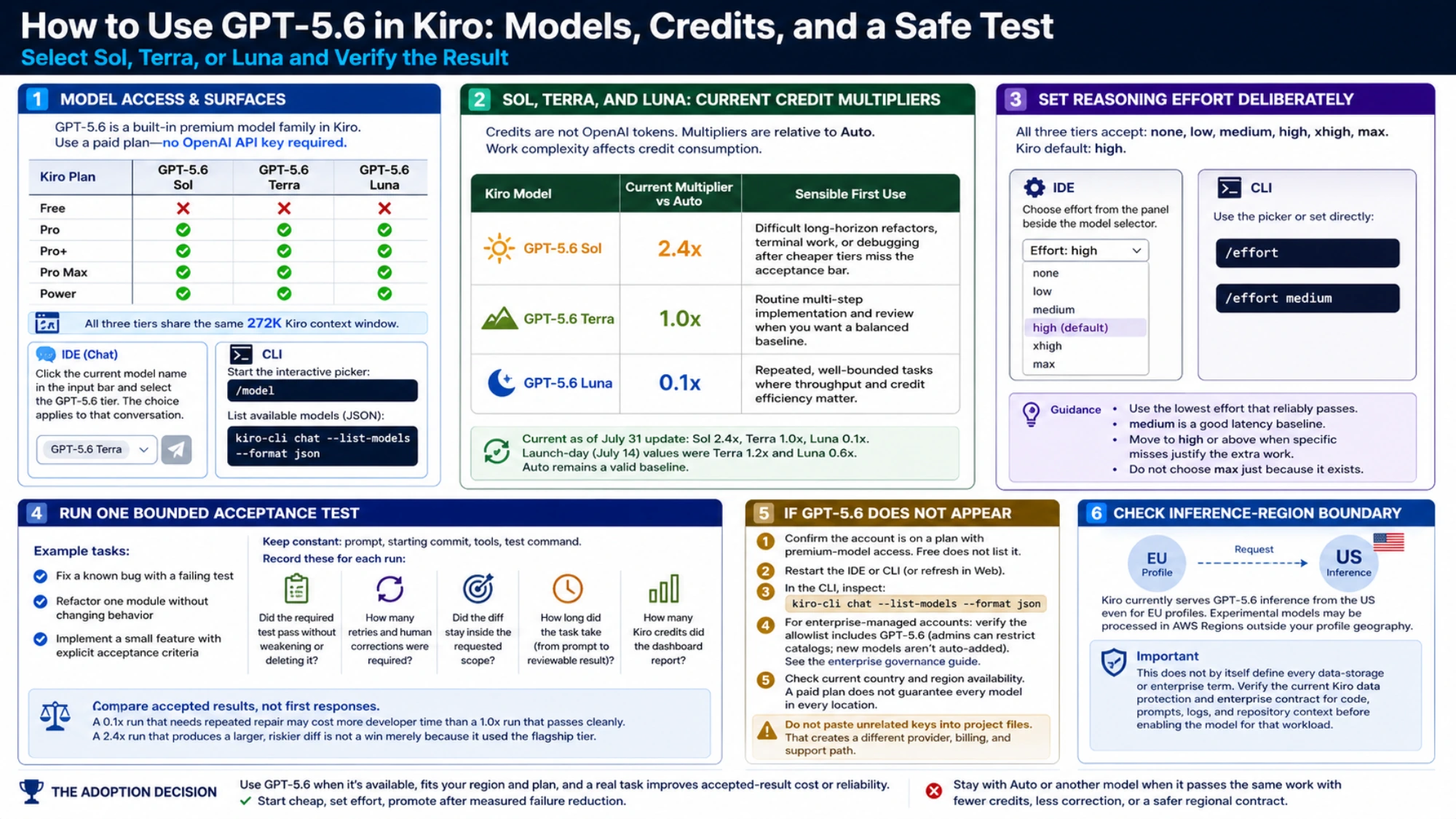
Kiro's current model table lists GPT-5.6 on Pro, Pro+, Pro Max, and Power, but not on Free. It shows the same 272K Kiro context window for all three tiers.
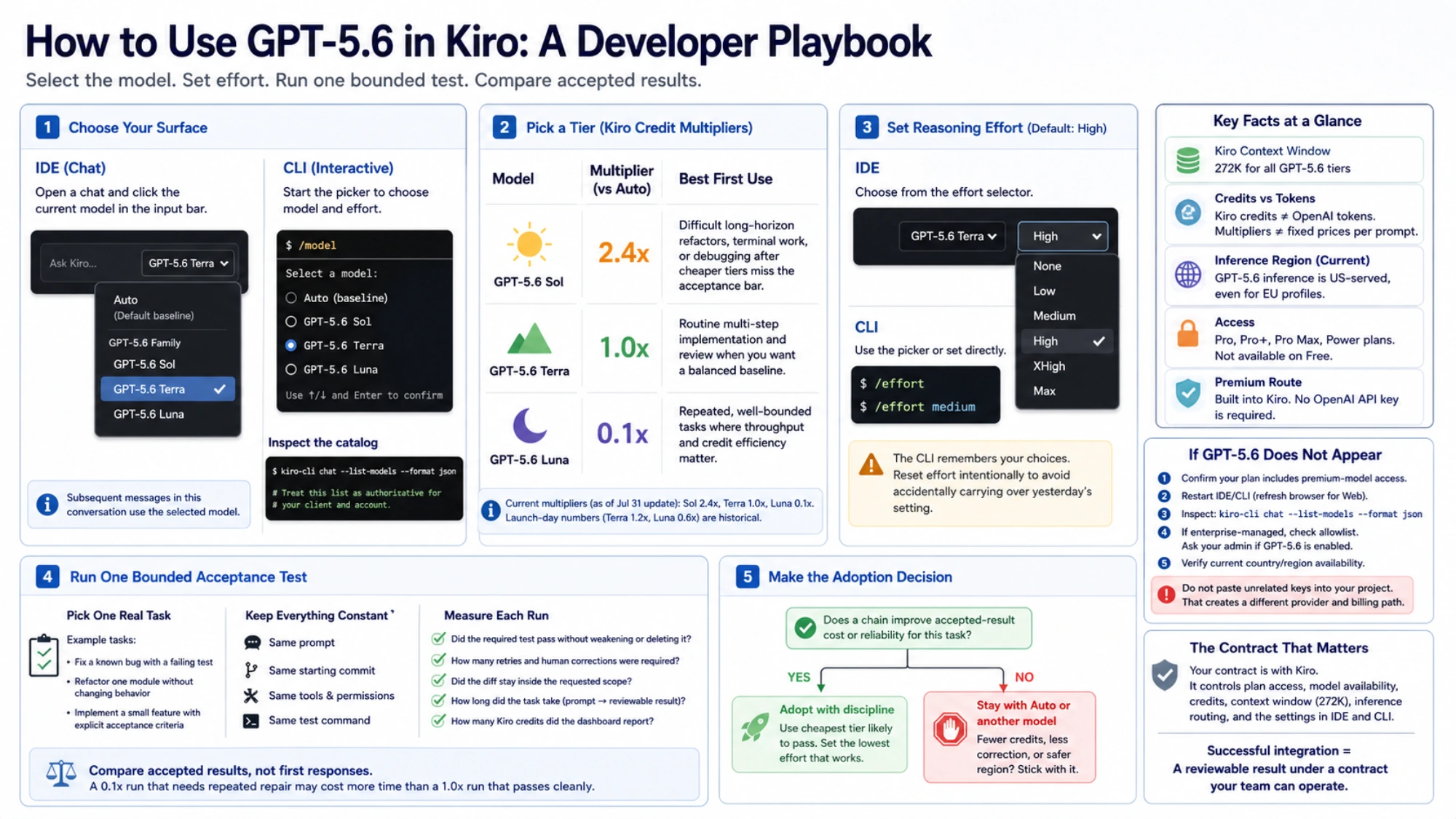
If you use the IDE, open a chat and click the current model name in the input bar. Select the GPT-5.6 tier you want; subsequent messages in that conversation use the selected model. In the CLI, start with the interactive picker:
/modelIf you want to inspect the catalog before choosing, Kiro's current CLI reference supports:
kiro-cli chat --list-models --format jsonTreat the returned list as authoritative for that client and account. A model mentioned in a launch post but absent from the live list is not usable in that session yet.
Sol, Terra, and Luna use Kiro credits differently
Kiro measures work in credits. A credit is not an OpenAI token, and the multiplier is not a fixed price per prompt. Complex work can consume more credits than a short lookup even on the same model.
| Kiro model | Current multiplier vs Auto | Sensible first use |
|---|---|---|
| GPT-5.6 Luna | 0.1x | Repeated, well-bounded tasks where throughput and credit efficiency matter |
| GPT-5.6 Terra | 1.0x | Routine multi-step implementation and review when you want a balanced baseline |
| GPT-5.6 Sol | 2.4x | Difficult long-horizon refactors, terminal work, or debugging after cheaper tiers fail your task requirements |
These are the current values in Kiro's July 31 multiplier update. The original July 14 launch post still shows Terra at 1.2x and Luna at 0.6x. Those launch-day numbers are historical, not the current rate card.
A practical default is to start with Terra for a nontrivial but ordinary development task. Start with Luna when the task is repetitive and easy to verify. Move to Sol only when the expected reduction in failures or human repair is worth the higher multiplier. Auto remains a valid baseline; a named model is not automatically a better deal.
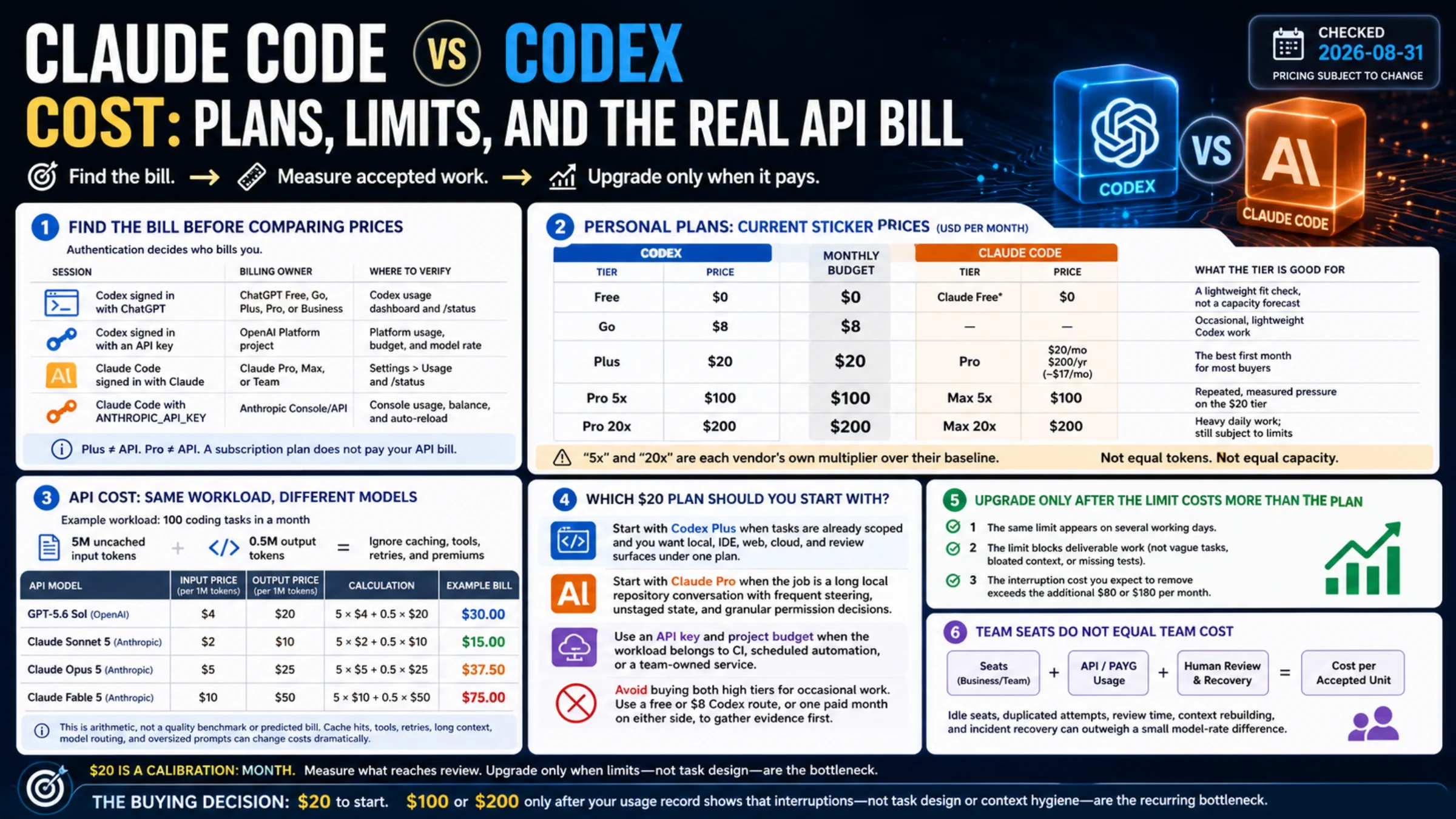
For direct API economics rather than Kiro credits, use the separate GPT-5.6 Sol, Terra, and Luna API comparison. OpenAI's API prices and Kiro's credits answer different billing questions.
Set reasoning effort deliberately
Kiro's reasoning-effort documentation says all three GPT-5.6 tiers accept none, low, medium, high, xhigh, and max. Kiro currently documents high as its built-in default.
In the IDE, choose the effort level from the panel beside the model selector. In the CLI, use the picker or set a value directly:
/effort
/effort medium
The CLI remembers model and effort choices. That is convenient, but it can also spoil a comparison: yesterday's max setting may still be active when you think you are testing a normal baseline.
Use the lowest effort that reliably passes your task. medium is a useful latency baseline for ordinary implementation. Move to high or above when you can name the missed edge cases or incomplete reasoning you expect the additional work to fix. Do not choose max simply because it is available.
Run one bounded acceptance test
Provider benchmarks show what a model can do under a published evaluation. They do not establish the cost or reliability of your repository, tool permissions, test suite, or definition of done.
Choose one real task that fits inside a review session: for example, fix a known bug with a failing test, refactor one module without changing behavior, or implement a small feature with explicit acceptance criteria. Keep the prompt, starting commit, tools, and test command the same for every candidate.
Record these values for each run:
- Did the required test pass without weakening or deleting it?
- How many retries and human corrections were required?
- Did the diff stay inside the requested scope?
- How long did the task take from prompt to reviewable result?
- How many Kiro credits did the account dashboard report?
Compare accepted results, not first responses. A 0.1x run that needs repeated repair may cost more developer time than a 1.0x run that passes cleanly. A 2.4x run that produces a larger, riskier diff is not a win merely because it used the flagship tier.
If GPT-5.6 does not appear
Check the failure from the outside in:
- Confirm that the account is on a plan with premium-model access. Kiro Free currently does not list GPT-5.6.
- Restart the IDE or CLI. Kiro's launch guidance explicitly recommends a restart; Web users can refresh the browser.
- In the CLI, inspect
kiro-cli chat --list-models --format jsonrather than guessing a model ID. - If the account is enterprise-managed, ask whether the model allowlist includes GPT-5.6. Kiro administrators can restrict the model catalog, and newly offered models are not added automatically when allowlist management is enabled. See the enterprise model-governance guide.
- Check current country and region availability. A paid plan does not guarantee every premium model in every location.
Do not work around a missing model by pasting an unrelated key into a project file. That creates a different provider, billing, secret-management, and support path.
Check where inference runs
Kiro's current inference-region table says GPT-5.6 requests are served from the US even when the Kiro profile is in Europe. It also warns that models marked experimental may be processed in commercial AWS Regions outside the profile geography.
That does not by itself describe every data-storage or enterprise term, but it is enough to stop an unsafe assumption: an EU Kiro profile does not currently mean EU inference for GPT-5.6. If code, prompts, logs, or repository context have a residency requirement, verify the current Kiro data-protection and enterprise contract before enabling the model for that workload.
The adoption decision
Use GPT-5.6 in Kiro when the live model selector exposes it, the region and plan fit your requirements, and a representative task improves accepted-result cost or reliability. Start with the cheapest tier likely to pass, control effort explicitly, and promote only after measured failure reduction.
Stay with Auto or another model when it passes the same work with fewer credits, less correction, or a region that meets your data requirements. Judge the setup by the work it completes and the billing, access, and data-handling terms your team needs.
Sources4
External pages this guide links to, in the order they appear. Last updated Aug 30, 2026.
Sources4
External pages this guide links to, in the order they appear. Last updated Aug 30, 2026.