Best Local Coding LLM for 16GB VRAM: Safe Picks, Qwen Tradeoffs, and Stop Rules
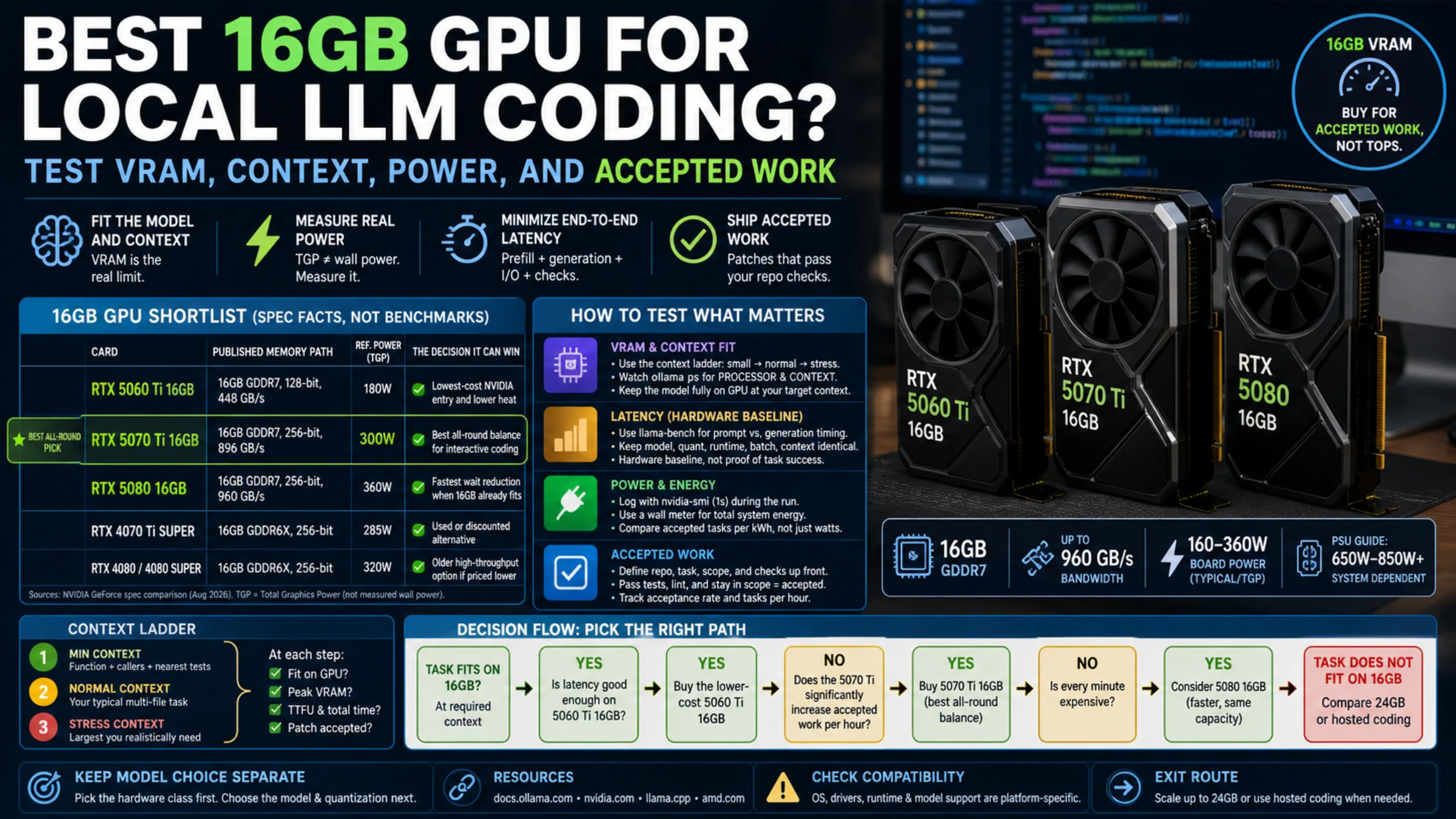
Use 16GB VRAM for local coding help by choosing the right route: safe fit, ambitious low-bit model, lightweight fallback, or stop.
On this page

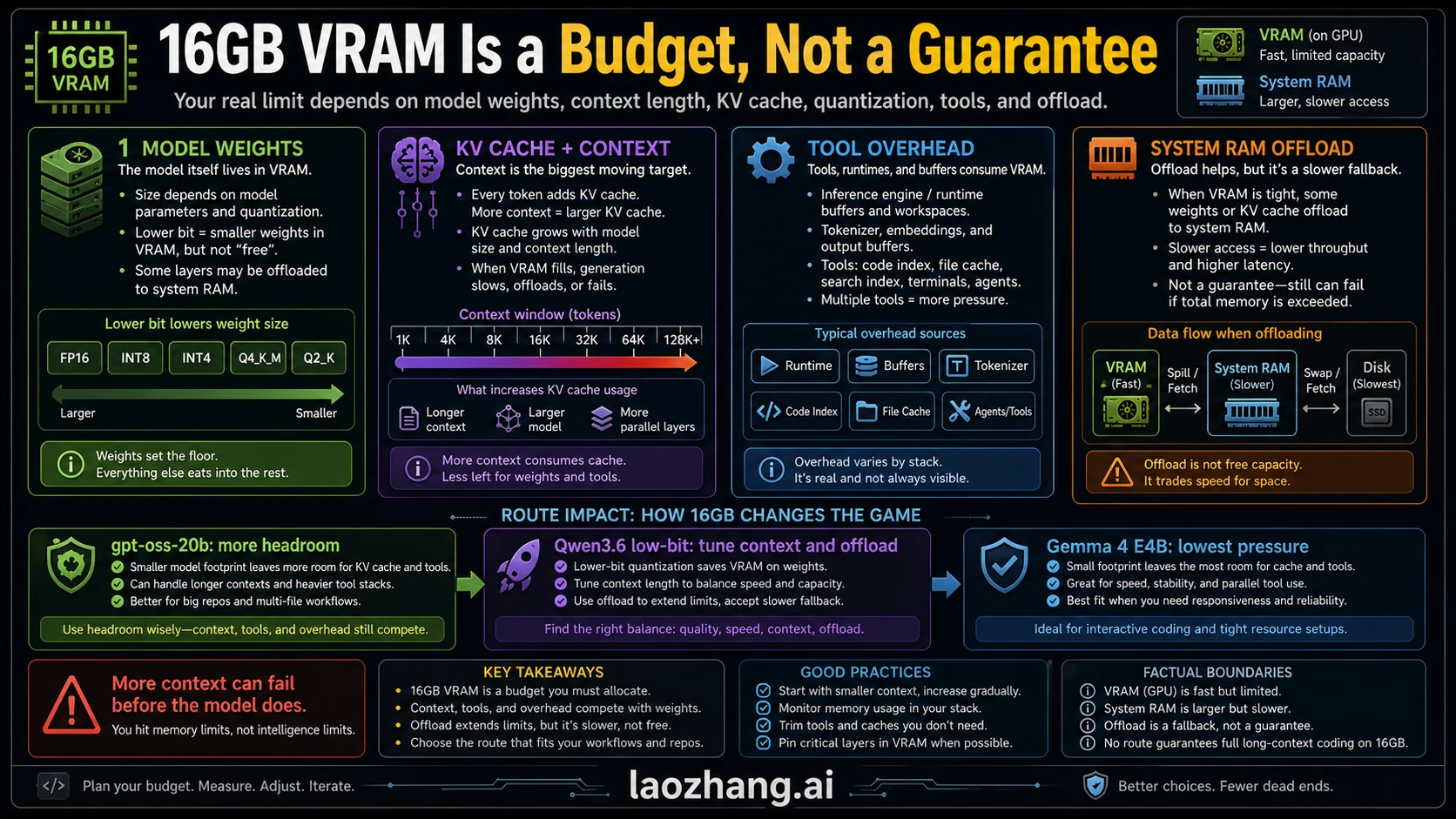
If you have a 16GB VRAM GPU and want local coding help, start with gpt-oss-20b as the safest daily-driver route, treat Qwen3.6 35B A3B as an ambitious low-bit or offload experiment, keep Gemma 4 E4B as the fit-first fallback, and stop when long repo context or patch loops exceed the machine. The mistake is naming the largest coding model that might load; coding runs also spend memory on model weights, KV cache, context, tool overhead, and the real repo slice you ask the model to hold.
Use this route board first:
- Start with gpt-oss-20b when you want the most defensible 16GB-class local route and a cleaner first install.
- Try Qwen3.6 35B A3B only when you are willing to manage low-bit quantization, context limits, offload, and slower or less predictable runtime behavior.
- Use Gemma 4 E4B when responsiveness, lower pressure, or a narrower coding task matters more than raw model size.
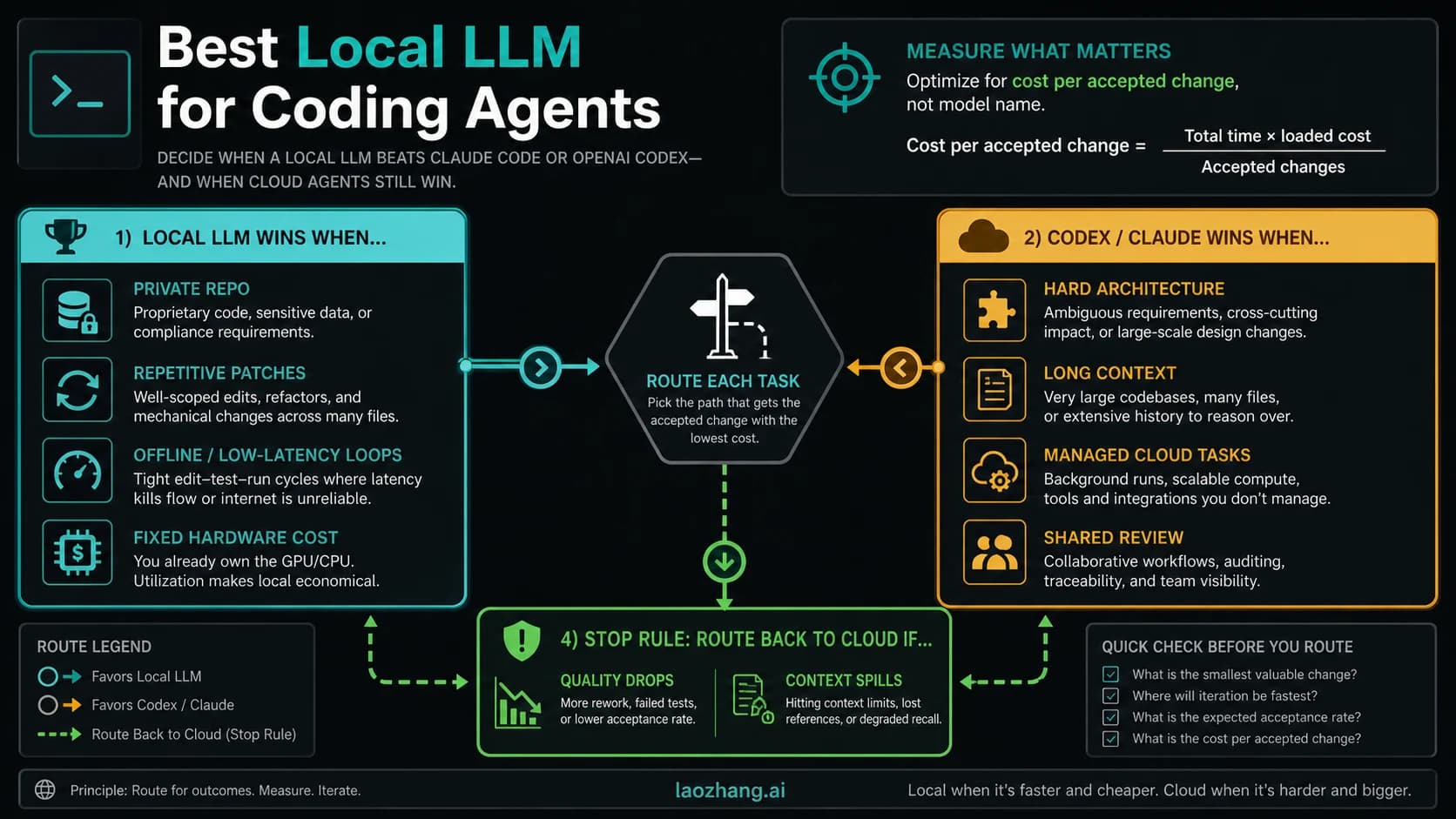
- Stop and move to more VRAM or hosted coding when the job depends on long project context, multi-file patch loops, heavy tool use, or reliable agentic coding.
Checked on 2026-07-03: official model or runtime claims are separated from package metadata and community reports, because model files, quantization builds, kernels, and benchmark anecdotes change quickly.
Quick Answer: Pick the Route First
The best local coding LLM for 16GB VRAM is not one universal model. It is a route decision.
| Route | First model to try | Why it fits the 16GB question | Main caveat | Best next action |
|---|---|---|---|---|
| Safe default | gpt-oss-20b | OpenAI and runtime surfaces place it in the 16GB memory class | Smaller than the aggressive Qwen route, so do not expect unlimited repo reasoning | Install it first and run the smoke test |
| Ambitious low-bit route | Qwen3.6-35B-A3B in a low-bit or offload setup | Strong current agentic-coding candidate with attractive capability claims | Common runtime pages are not a clean all-on-GPU 16GB guarantee | Try only after checking package size, quantization, context, and offload |
| Fit-first fallback | Gemma 4 E4B-it | Lower memory pressure and easier responsiveness for narrower coding help | Not proven here as the deepest repo-level coding agent | Use when speed and stability beat model size |
| Specialist fallback | Qwen2.5-Coder, Qwen3-Coder, or DeepSeek Coder variants that actually fit | Code-specialized families can be good for focused edits | Version, quantization, and runtime package decide feasibility | Verify the exact local package before ranking it |
| Stop rule | More VRAM, smaller local model, or hosted coding | Long context and tool loops can exceed a 16GB local comfort zone | Local-only pride can waste more time than it saves | Stop when OOM, slow edits, or context loss dominate |
If you only want one answer, use gpt-oss-20b first. If you want the strongest model that people are trying on 16GB cards, evaluate a low-bit Qwen3.6 route carefully. If you want the least fragile local coding helper, keep a smaller model ready.
Evidence Boundary: Official, Runtime, Community
The important split is evidence ownership.
OpenAI's gpt-oss local Ollama guide places the smaller gpt-oss-20b route in the 16GB VRAM or unified-memory class, with CPU offload possible but slower. The OpenAI gpt-oss-20b model card on Hugging Face describes a 21B-parameter model with 3.6B active parameters, MXFP4 quantization, and local runtimes such as Ollama, LM Studio, Transformers, and vLLM.
That is why gpt-oss-20b owns the safe-default row. It has the cleanest official 16GB-class memory evidence among the high-signal candidates reviewed here.
Qwen3.6 is different. The Qwen3.6-35B-A3B model card positions the model around agentic coding and repository-level reasoning. Runtime surfaces make the 16GB decision more complicated: the Ollama qwen3.6:35b-a3b page lists a 24GB standard package, while the LM Studio Qwen3.6 page lists a minimum system-memory requirement above 16GB. A lower-bit community build may still fit a particular 16GB setup, but that is no longer the same claim as a clean official 16GB default.
Gemma 4 E4B sits in the fit-first lane. The Gemma 4 E4B-it model card frames the family for text generation, coding, and reasoning across sizes that can run from laptops to servers. It should not be sold as the highest-capacity coding agent in this comparison. Its job is to give the 16GB reader a lower-pressure fallback when responsiveness matters.
Community threads, AI summaries, and benchmark posts are still useful. They show what people are trying. They should not own memory guarantees, speed claims, or "best model" rankings unless the exact model file, quantization, engine, context length, GPU, driver, and prompt shape are named.
What 16GB VRAM Actually Buys You
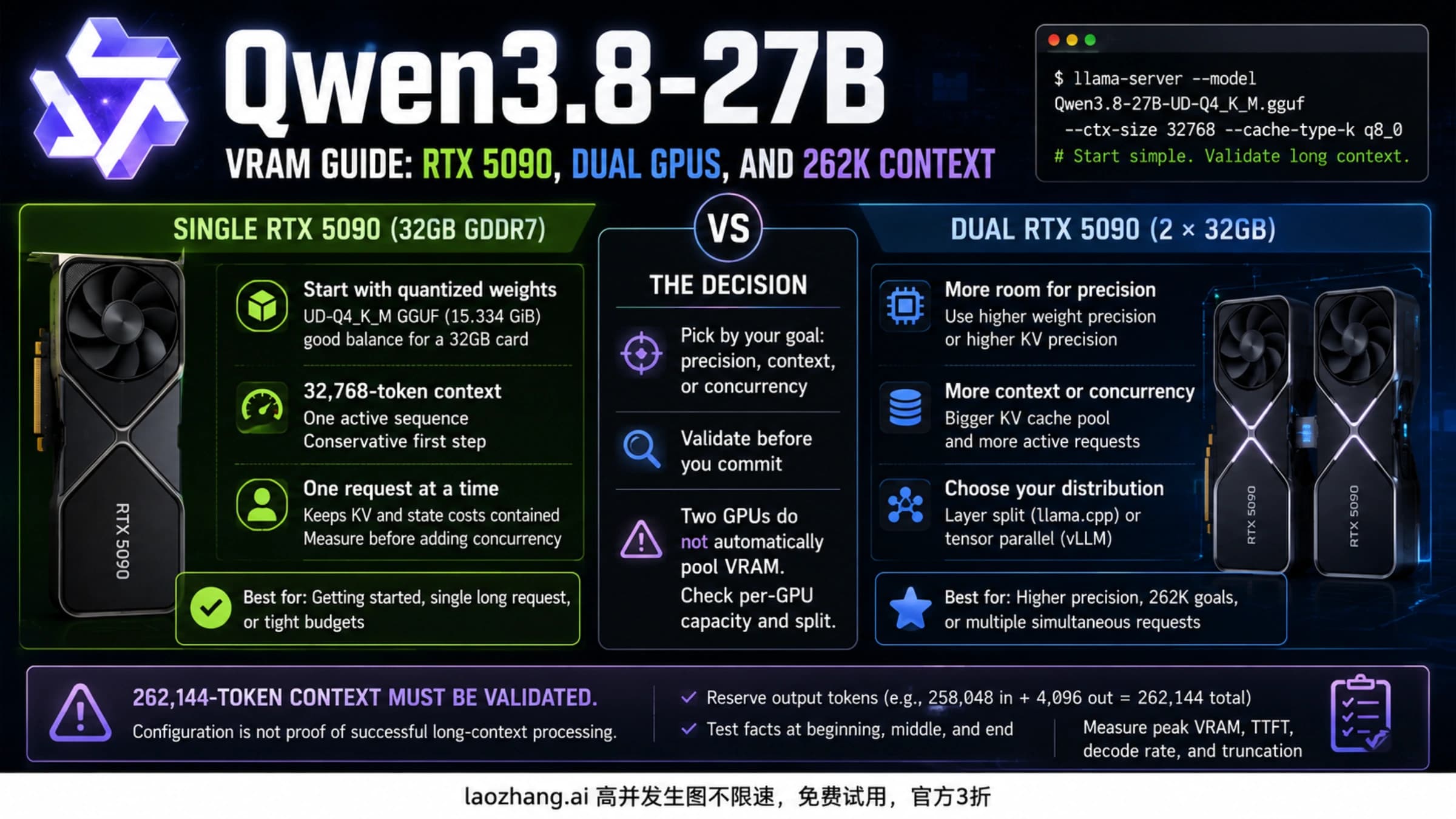
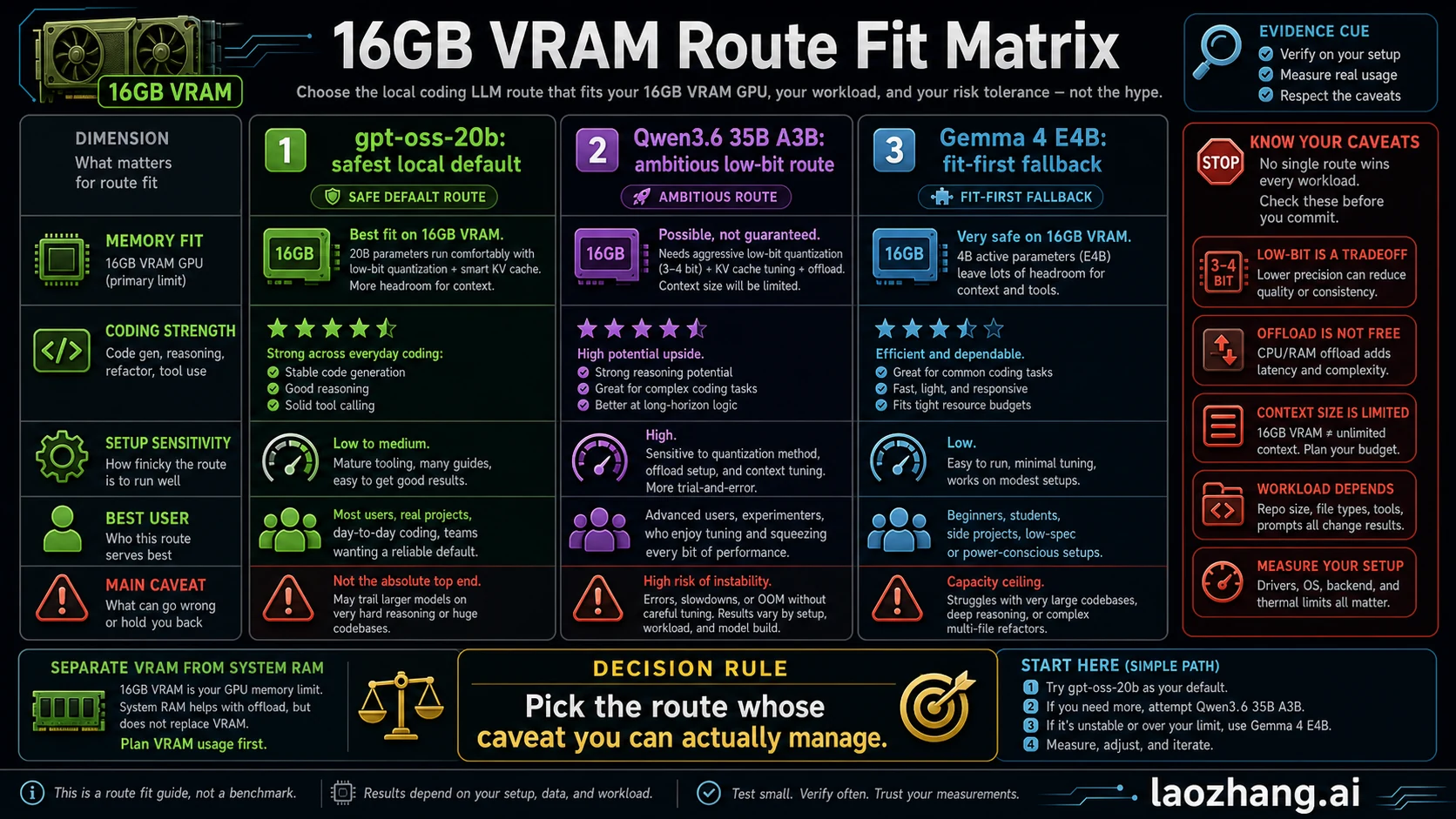
VRAM is dedicated GPU memory. It is not system RAM, and it is not disk space. On a discrete GPU, the model weights, runtime buffers, activations, and KV cache compete for that memory. A model that technically loads at a short prompt can still become unusable when you ask it to hold a repo map, inspect multiple files, plan a patch, call tools, and explain the change.
For local coding, four costs matter:
| Memory pressure | What it means for coding | Why 16GB feels smaller than expected |
|---|---|---|
| Model weights | The quantized model file that must be active enough for inference | Lower-bit quantization helps but can change speed, quality, and runtime support |
| KV cache | Memory used to remember prompt and generated context | Long context can consume the budget after the model loads |
| Tool overhead | Runtime, UI, server, tokenizer, image or vision path, and code tooling | Coding assistants often carry more overhead than a plain chat prompt |
| Offload | Moving some work to CPU or system RAM | It may avoid OOM, but it usually trades memory feasibility for latency |
This is the core reason the best 16GB route is conditional. If your job is "explain one function and suggest a patch," a smaller model can feel excellent. If your job is "understand a large monorepo, run multi-step tool calls, and keep several files in memory," the same hardware may feel cramped even with a clever quantization.
Route 1: Use gpt-oss-20b as the Safe Default
Use gpt-oss-20b first when you want the most defensible 16GB-class local coding route. Its advantage is not that it wins every coding benchmark. Its advantage is that the memory claim is cleaner, the runtime path is mainstream, and the first smoke test is less likely to turn into package archaeology.
Start here if:
- you have a 16GB NVIDIA card such as an RTX 4060 Ti 16GB or a laptop/workstation with a similar VRAM budget
- you want local privacy or low-latency coding help for focused tasks
- you would rather have a responsive daily helper than a larger model balanced on low-bit tradeoffs
- you need a baseline before evaluating Qwen3.6 or specialist coding models
A reasonable first install path is Ollama:
ollama pull gpt-oss:20b
ollama run gpt-oss:20b
Then ask it to do a real coding task, not a toy riddle. Use a repo slice, one function, one test file, or one bug report. A useful first prompt is:
You are helping with this repository slice.
Explain what this function does, identify one safe refactor,
show the patch, and name the test that should be updated.
The catch is capability ceiling. A smaller or more memory-friendly model may be the right first route while still losing to a larger low-bit Qwen build on some deeper reasoning tasks. Treat gpt-oss-20b as the baseline you can defend, not as a permanent winner.
Route 2: Try Qwen3.6 35B A3B Only as an Ambitious Route
Qwen3.6 35B A3B is attractive because it targets the kind of agentic coding and repository-level reasoning that local developers want. If your goal is maximum capability on a 16GB card, this is the route you will be tempted to tune.
The important word is "route." Do not write down "Qwen3.6 runs on 16GB" without the missing qualifiers:
- which quantization
- which runtime
- whether weights stay on GPU
- whether CPU or system RAM offload is used
- context length
- prompt shape
- GPU architecture and driver/runtime version
- whether the task is one-shot code chat or multi-step agentic coding
The standard runtime pages reviewed here do not make Qwen3.6 35B A3B a clean 16GB all-on-GPU default. That does not make the route bad. It makes the route advanced.
Use Qwen3.6 on 16GB when you are willing to trade convenience for capability. The first pass should be conservative: short context, a small repo slice, no huge tool loop, and a willingness to stop if the model spends more time paging memory than helping with code.
Before you commit, run:
ollama show qwen3.6:35b-a3bIf the package size, context needs, or offload plan already exceed your tolerance, do not force it. A model that barely loads can be worse for coding than a smaller model that answers quickly, keeps context, and edits correctly.
Route 3: Keep Gemma 4 E4B and Smaller Coders Ready
Gemma 4 E4B is the fit-first fallback. It belongs in this comparison because 16GB VRAM readers often need a model that stays responsive more than they need the biggest possible checkpoint.
Use this route when:
- the task is narrow, such as explaining a function, generating a small helper, or reviewing a short diff
- Qwen3.6 low-bit loads but feels too slow or too fragile
- you are on a laptop, small workstation, or shared machine where memory pressure matters
- the cost of waiting is higher than the benefit of a larger model
Also keep code-specialized families on the shortlist, but verify the exact package. DeepSeek Coder is a code model family with 1B to 33B versions and repo-level code training history. Qwen2.5-Coder includes multiple sizes, where smaller or mid-sized variants can be more realistic on 16GB than a 32B flagship. Qwen3-Coder-30B-A3B-Instruct is another current code-focused candidate, but its local 16GB fit still depends on the exact quantized file and runtime.
The practical rule is simple: a smaller model that edits correctly in 12 seconds can beat a larger model that needs two minutes, drops context, or fails halfway through a patch.
Runtime Path: Ollama, LM Studio, llama.cpp, or a Coding Wrapper
Runtime choice changes the answer. The same model name can behave differently depending on file format, quantization, GPU kernels, context settings, and offload behavior.
| Runtime path | Best use | First check | Stop rule |
|---|---|---|---|
| Ollama | Fastest command-line baseline for common local packages | ollama show package size and parameters | Stop if the available tag is above your memory comfort zone |
| LM Studio | GUI model browsing and local server testing | Model page memory requirement and selected quantization | Stop if the GUI needs system-memory/offload behavior you do not want |
| llama.cpp / GGUF | Fine-grained quantization and context control | Exact GGUF quant, GPU layers, and context length | Stop if manual tuning becomes the project |
| Coding wrapper or IDE plugin | Developer workflow integration | Which local endpoint, context packing, and file selection it uses | Stop if the wrapper hides too much memory pressure |
For Ollama, begin with the safe route:
ollama pull gpt-oss:20b
ollama run gpt-oss:20b
For LM Studio, search the exact model page and read the memory requirement before downloading. If the model page says the setup needs more system memory than your machine has, do not assume the GPU alone fixes it.
For llama.cpp or GGUF, write down the exact file and context:
llama-cli -m ./models/model.gguf -c 8192 -p "Explain this function and propose one safe refactor."That command is intentionally generic. The model file is the claim. A Q4_K_M, IQ2_M, Q5_K_M, or other quantization label changes the tradeoff, so the publishable recommendation must stay attached to the exact file you tested.
Smoke Test: Prove the Model Works on Your Code
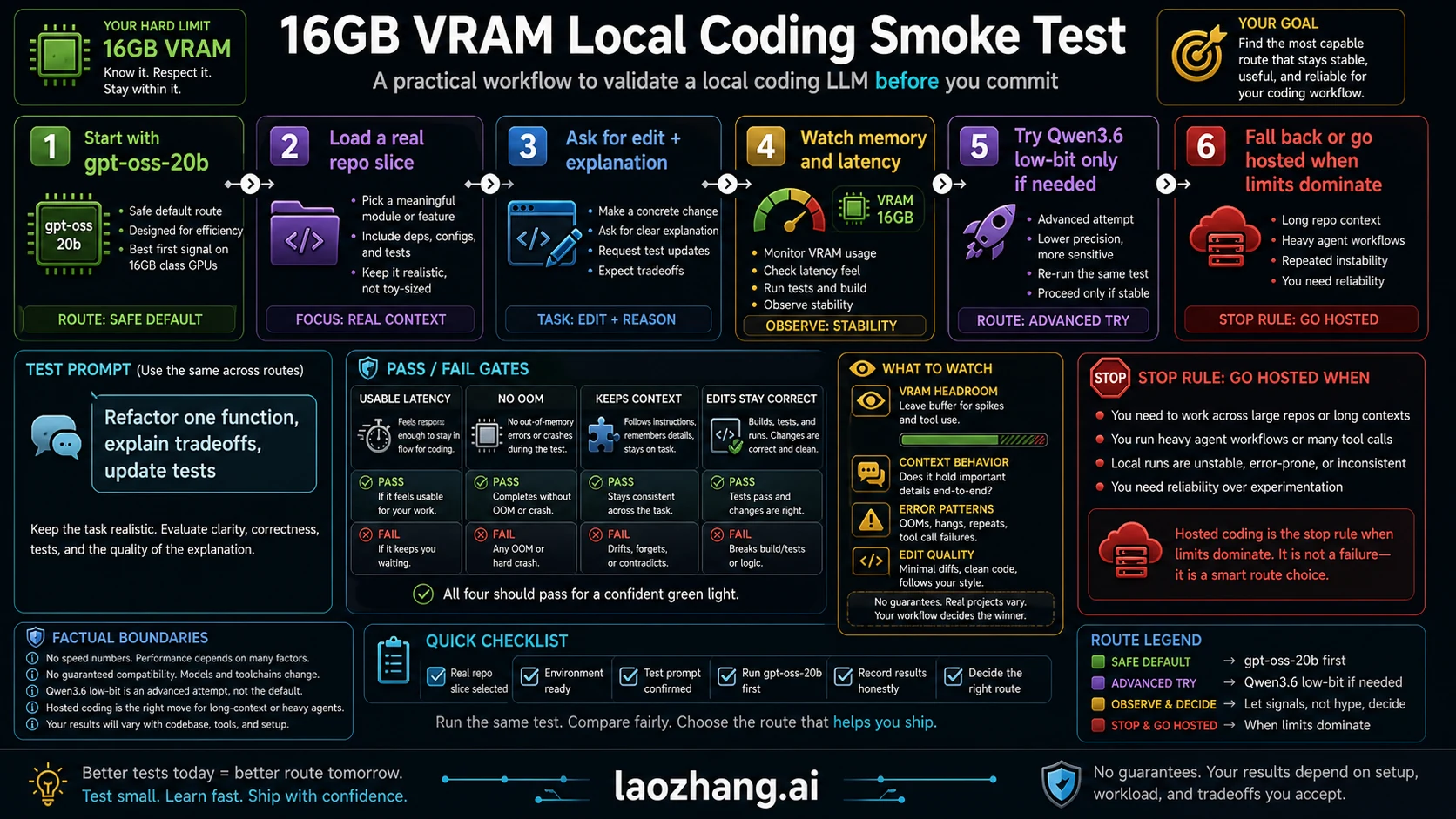
Do not make a local coding model your daily driver because it loads. Make it pass a small coding workflow.
Use this test:
- Start with
gpt-oss-20b. - Load one real repo slice: one file, one nearby test, and a short task description.
- Ask for an explanation, a patch, and the test that should change.
- Watch VRAM, system RAM, latency, and whether the model keeps the relevant context.
- Repeat with a slightly larger context window.
- Try the Qwen3.6 low-bit route only if the safe route fails on quality and your machine still has memory headroom.
- Keep the model only if it edits correctly, explains the tradeoff, and stays usable.
Use this prompt:
Given the files below, refactor one function without changing behavior.
Explain the tradeoff, show the patch, and name the test that should be updated.
If the context is insufficient, say exactly what file or symbol you need next.
Pass means four things:
- latency is tolerable enough that you would actually use it
- no OOM or runaway offload on the first real task
- the model keeps the function, requirement, and test context straight
- the patch is small, reviewable, and tied to the request
Fail does not mean the model is bad. It means the model, runtime, quantization, context, and machine are not a good route for that job.
Stop Rules: When 16GB Is the Wrong Constraint
Move away from the 16GB local route when the job needs more context than the machine can comfortably hold. The most common failure is not "the model is dumb." It is "the model cannot see enough of the project without becoming slow or unstable."
Use these stop rules:
| Symptom | Likely cause | Better route |
|---|---|---|
| Model loads but becomes unusably slow | Offload or low-bit tradeoff is too expensive | Smaller local model or more VRAM |
| Good answers on snippets, bad answers on repo tasks | Context packing is the bottleneck | Narrow the task or use a hosted coding agent |
| Frequent OOM after raising context | KV cache and prompt size exceed budget | Lower context or move to 24GB/32GB+ |
| Patch loops lose file state | Agentic workflow needs more memory and tool discipline | Hosted coding, API route, or larger local machine |
| Qwen3.6 tuning takes longer than the work | The experiment has become the project | Return to the safe default or fit-first fallback |
A 24GB card is the next comfort tier for larger local models, but it still is not unlimited. A 32GB or 48GB setup gives more room for context and heavier quantizations. Hosted coding becomes rational when the job is not "run local at all costs" but "get reliable multi-file edits without fighting memory."
If your next decision is about coding-agent usage and spend rather than local model memory, the adjacent Claude Code and Codex usage control guide is a better meter-first starting point.
FAQ
What is the best local coding LLM for 16GB VRAM?
For the safest first route, use gpt-oss-20b. For the most ambitious route, test a low-bit or offload setup around Qwen3.6 35B A3B. For the least fragile fallback, keep Gemma 4 E4B or a smaller specialist coding model ready.
Can Qwen3.6 35B A3B run on 16GB VRAM?
Possibly in a low-bit or offload route, but it should not be treated as a clean 16GB guarantee. The standard runtime pages reviewed here point to memory/package sizes above a simple 16GB all-on-GPU default, so the exact quantization, context length, runtime, system RAM, and offload behavior decide the result.
Is gpt-oss-20b good enough for coding?
It is the best first baseline for the 16GB question because the memory fit is cleaner. Whether it is good enough depends on the task. It is more defensible for focused edits, explanations, and short repo slices than for large agentic workflows that require long project context.
Is Gemma 4 E4B a coding model?
Gemma 4 E4B is positioned for text generation, coding, and reasoning, and it is useful as a fit-first local route. Treat it as a responsive fallback for narrower jobs, not as proof that a small model will beat larger specialist code models on repo-level tasks.
Should I use Ollama or LM Studio?
Use Ollama for a fast command-line baseline and LM Studio when you want a GUI, model browsing, and an easy local server path. In both cases, read the exact package size, memory requirement, and quantization before assuming the model fits 16GB VRAM.
Is 16GB VRAM enough for an RTX 4060 Ti or 5060 Ti?
It is enough for a useful local coding helper if you choose the route carefully. Start with a 16GB-class model, keep context modest, and run the smoke test. It is not enough to promise comfortable long-context repo agents across all models.
What if I only have 8GB VRAM?
Use a smaller local model, a more aggressive quantization, or a hosted route. Do not use the 16GB recommendations as if they were 8GB recommendations; KV cache and context pressure become tighter.
Is 24GB VRAM a better target?
Yes, if you want more local headroom for larger quantized models and longer context. It still does not remove the need to test package size, context, KV cache, and latency.
How much context should I use on 16GB?
Use the smallest context that solves the task. Start with one function, one nearby test, and a short instruction. Raise context only after the model passes latency, memory, and correctness checks.
When should I stop using local coding LLMs?
Stop when memory tuning becomes the main job, when patches require long multi-file context, or when offload makes the workflow too slow. At that point, a smaller local model, more VRAM, or hosted coding is the more honest route.