gpt-oss-120b is realistically an 80GB-class local model for a clean one-card run. Some runtimes can load it around a >=60GB floor, and the checkpoint is about 60.8 GiB, but those numbers do not remove runtime overhead, context memory, or the cost of CPU/unified-memory offload.
| Hardware route | What the memory number means | Use it when | Stop rule |
|---|---|---|---|
| 80GB GPU | Clean single-card target | You want the least-surprising local 120B run | Still budget for context and batch overhead |
| >=60GB VRAM or unified memory | Constrained runtime floor | You can test a specific runtime, context, and batch shape | Do not treat it as production headroom |
| 96GB+ or multi-GPU | Operational headroom | You need longer context, steadier throughput, or fewer OOM surprises | Verify sharding and cache behavior before deploy |
| 24GB consumer GPU with offload | Experiment route | The experiment itself is the goal | If load OOMs or tokens/sec is unusable, stop tuning |
gpt-oss-20b or hosted access | Fallback route | Local 120B hardware is below the floor | Use this before buying time on a doomed setup |
Why 60.8 GiB, >=60GB, and 80GB are different claims
The easiest way to read the GPT-OSS 120B memory requirement is to keep three layers separate.
The first layer is the model artifact. OpenAI's model card lists the gpt-oss-120b checkpoint at about 60.8 GiB in MXFP4 form, with 116.83B total parameters and 5.13B active parameters. That number helps explain why the model is unusually compact for a 120B-class open-weight release. It does not mean a 64GB card has a comfortable runtime budget.
The second layer is the runtime load floor. OpenAI's Cookbook examples for Transformers, vLLM, and Ollama describe large-model routes around >=60GB VRAM or >=60GB VRAM / unified memory, depending on the runtime. That is a floor for a specific stack, not a universal comfort tier.
The third layer is the clean operational target. OpenAI's launch post says gpt-oss-120B can run within 80GB of memory, and the OpenAI model docs frame it as fitting a single H100-class GPU. Hugging Face similarly describes the model as fitting on a single 80GB GPU such as H100 or MI300X. For a reader making a hardware decision, 80GB is the clean answer because it leaves less of the run balanced on implementation details.
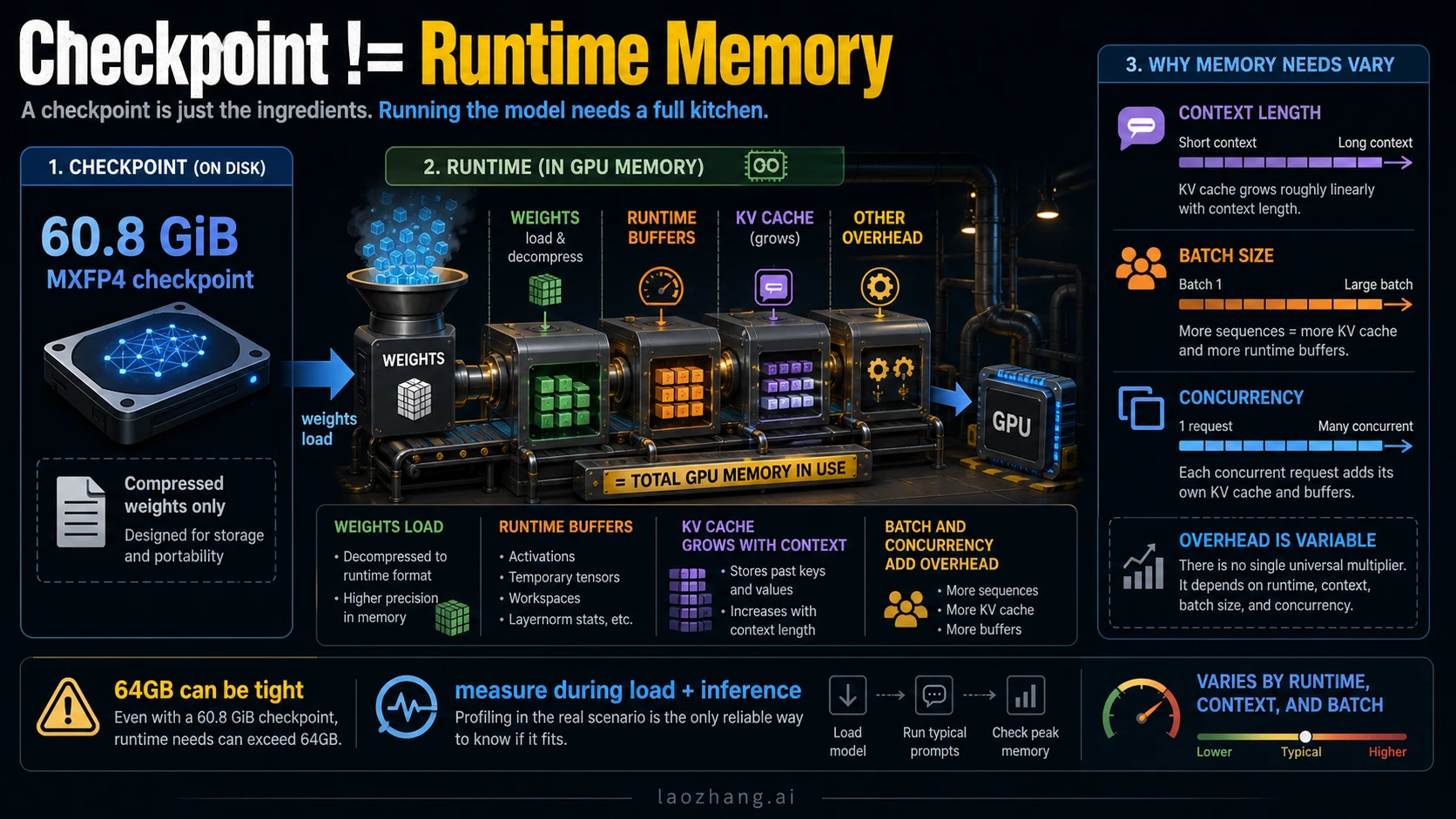
The numbers are not contradictions. They describe artifact size, runtime minimum, and safer deployment headroom. Treating them as one number is how people end up renting the wrong GPU or spending hours tuning an offload path that was never a good production route.
The official facts that should anchor your decision
Use first-party sources for the fixed facts and treat community hardware reports as experiments.
| Fact | Current evidence owner | Practical meaning |
|---|---|---|
gpt-oss-120B can run within 80GB memory | OpenAI launch post | 80GB is the clean single-accelerator target |
gpt-oss-20B targets 16GB memory | OpenAI launch post | 20B is the realistic lower-memory fallback |
| 60.8 GiB checkpoint | OpenAI model card | Artifact size is below the total runtime budget |
| >=60GB VRAM or unified memory routes | OpenAI Cookbook runtime guides | A constrained floor exists for supported runtimes |
| Single 80GB GPU framing | Hugging Face model card and MXFP4 docs | 80GB GPU is the safer local plan |
The evidence hierarchy matters. OpenAI's gpt-oss launch post, model card PDF, Transformers runtime guide, Ollama runtime guide, and vLLM runtime guide are the right owners for model facts and runtime floors. Hugging Face's openai/gpt-oss-120b model card and MXFP4 documentation help explain why the model can fit a smaller memory envelope than an uncompressed dense 120B model.
Forum posts, Reddit threads, Hacker News comments, and hardware blogs are still useful. They show what people are trying on consumer GPUs, Apple unified memory, and CPU offload. They should not become the requirement owner unless your goal is exactly that experiment.
Choose the run route before you tune
The runtime choice decides how close to the floor you can safely operate.
| Route | Memory posture | Best use | Main risk |
|---|---|---|---|
| Transformers on an 80GB GPU | Clean local route | Development, evaluation, and smaller production tests | Still needs context and batch budgeting |
| vLLM on 80GB or multi-GPU | Serving-oriented route | Higher-throughput inference and server experiments | KV cache and concurrency can move the real requirement |
| Ollama with >=60GB VRAM or unified memory | Lower-friction local route | Workstation or unified-memory testing | CPU offload can be much slower |
| 96GB+ workstation or multi-GPU | Headroom route | Long context, heavier prompts, fewer OOM surprises | Setup complexity and sharding behavior matter |
| 24GB consumer GPU plus offload | Experiment route | Learning, proof-of-load, curiosity | Speed and context can be unacceptable |
gpt-oss-20b | Small local fallback | 16GB-class machines or quick local tests | Different quality and capacity profile |
| Hosted/API route | No local memory burden | Product integration when local hardware is not the job | API limits, cost, and availability replace GPU limits |
If the goal is to learn how the model behaves, a constrained route can be worth trying. If the goal is to build a dependable service, start with the route that has headroom.
For hosted OpenAI work, the hardware question turns into account, key, quota, and usage-shaping questions. The adjacent operational pages on OpenAI API key setup and OpenAI API rate limits are more relevant once you stop running the model locally.
What VRAM, unified memory, RAM, and disk each mean
The phrase "RAM requirement" is often too loose for this model.
VRAM is dedicated GPU memory. When someone says an H100 80GB or MI300X-class card can run gpt-oss-120b, this is the memory they usually mean.
Unified memory is shared memory on systems where CPU and GPU use the same pool. It can make large-model loading possible without a discrete 80GB GPU, but it does not automatically make the run fast. Bandwidth, backend support, and offload behavior still matter.
System RAM helps when a runtime offloads weights or computation to CPU memory. It can keep a run from failing outright, but it usually trades memory feasibility for speed.
Disk space stores the checkpoint and related files. The 60.8 GiB checkpoint explains why you need plenty of local storage, but storage is not the same thing as active runtime memory.
KV cache and runtime buffers are the hidden reason minimum numbers feel tight. Longer context windows, more concurrent requests, bigger batches, and serving frameworks can all add memory pressure after the model loads.
Hardware tiers: what to do with your machine
An 80GB accelerator is the straightforward tier. If you have one H100 80GB, MI300X-class route, or a comparable 80GB setup supported by your stack, start there. You still need to check the runtime's exact requirements, but you are no longer relying on the narrowest floor.
A 60GB to 79GB setup is a test tier. It may load in some runtimes, especially with the right quantized checkpoint and careful context settings. It is not the same as saying the model has comfortable room for long prompts, high batch size, or production concurrency.
A 96GB+ workstation, multi-GPU server, or cloud instance is the headroom tier. It costs more and can be more complex, but it is the route that makes sense when failure cost is higher than hardware cost. If a run must support long context, repeated evaluations, or multiple users, the extra memory is not waste. It is margin.
A 16GB to 24GB consumer card is a fallback or experiment tier. It can be valuable for learning the stack, but the honest default is gpt-oss-20b or a hosted route. Treat a 120B offload success as a proof that something can run, not proof that it should own your workflow.
For a broader open-model local setup mindset, the Gemma 4 guide is a useful comparison point: small local models usually reward matching the model size to the machine instead of forcing the largest model through the narrowest path.
Stop rules for 4090, 3090, 5090, and other consumer GPUs
The common consumer question is whether a 24GB card can run GPT-OSS 120B. The honest answer is: not as a clean GPU-resident 120B route.
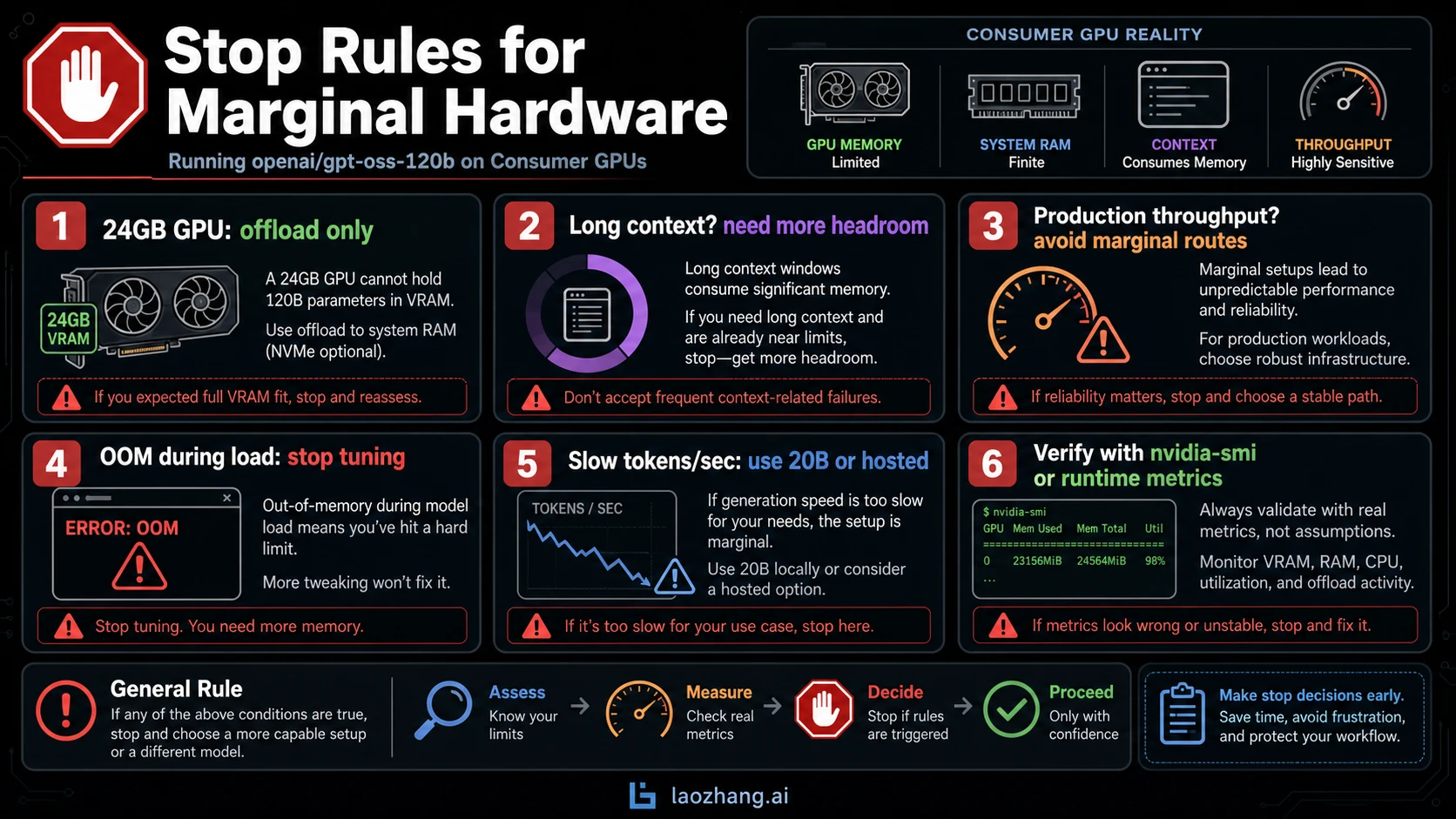
You can experiment with CPU offload, unified memory, smaller context, or runtime-specific tricks. But a consumer GPU with 24GB VRAM does not become an 80GB card because weights can spill elsewhere. The tradeoff shows up as slower loading, slower tokens per second, more fragile context limits, and more time spent debugging memory movement.
Use these stop rules:
- If the model cannot load without repeated OOM errors, stop tuning and change route.
- If it loads but token speed is too low for the job, use
gpt-oss-20b, a cloud GPU, or hosted access. - If you need long context, do not use a route that barely loads at short context.
- If you need production throughput, avoid any setup where offload is the main reason it fits.
- If the only reason to keep trying is curiosity, label the result as an experiment before sharing it.
That last rule is important. A successful offload screenshot is interesting. It is not the same thing as a hardware recommendation for someone else.
Context length and batch size are the real headroom test
GPT-OSS 120B supports a large context window on paper, but memory pressure grows with the way you use it. A short single-user prompt can fit where a long-context, multi-request, serving workload fails. This is why a route that passes one smoke test can still be wrong for your actual job.
Before calling a setup "enough", run the shape you really need:
- Load the model through the intended runtime.
- Run the context length you plan to support.
- Test the batch size or concurrency you expect.
- Watch GPU memory with
nvidia-smi, runtime logs, or the platform's metrics. - Keep the exact runtime, model file, driver, GPU, and context settings in the result.
If the setup survives only when every variable is minimized, the memory route is a demo route. That can be fine. It just should not be sold to a team as the deployment route.
When the fallback is the smarter decision
The lower-memory gpt-oss-20b exists for a reason. OpenAI positions it for 16GB-class memory, so it is the first honest local fallback when your hardware is below the 120B floor. You give up capacity, but you gain a setup that can actually run on the machine you have.
Hosted access is the other fallback when the job is product integration rather than local hardware ownership. It removes the GPU purchase decision, but it introduces API concerns: cost, rate limits, model availability, account state, and provider boundaries. Those are different problems, not free solutions.
The decision rule is simple:
| Your real goal | Better route |
|---|---|
| Learn how 120B behaves on your own hardware | Try the constrained or offload route, but label it as experiment |
| Build a reliable local workflow | Use 80GB+ hardware or multi-GPU headroom |
| Work on a 16GB to 24GB machine | Start with gpt-oss-20b |
| Ship a feature without owning GPUs | Use hosted/API access and manage API limits |
| Just compare answer quality | Rent the right GPU briefly before buying hardware |
FAQ
How much VRAM does GPT-OSS 120B need?
Use 80GB GPU memory as the clean local answer. Some runtime paths can operate around a >=60GB floor, but that is a constrained setup and should be tested with your context length, batch size, and runtime.
Is 60.8 GiB enough for a 64GB GPU?
Not automatically. The 60.8 GiB figure is the MXFP4 checkpoint size from OpenAI's model card. Runtime buffers, KV cache, context length, and framework overhead still need memory after the weights are loaded.
Can an RTX 4090 or RTX 3090 run GPT-OSS 120B?
Not as a clean GPU-resident run. A 24GB card can be used in offload experiments, but the result is usually a memory trick, not a production recommendation. If speed or context matters, use gpt-oss-20b, cloud GPU hardware, or hosted access.
Can a 5090 run it?
The answer depends on the actual VRAM capacity and runtime support. If the card is still far below the 60GB to 80GB range, it belongs in the offload-experiment tier, not the clean 120B tier.
How much system RAM do I need?
System RAM matters for CPU offload and unified-memory routes, but it does not replace dedicated VRAM one-for-one. The useful test is whether the intended runtime can load the model and still run your real context and throughput shape without becoming unusably slow.
How much disk space should I plan for?
Plan for the 60.8 GiB checkpoint plus tokenizer files, runtime cache, alternate formats, and working room. Disk space is easier to solve than runtime memory, but it still needs margin.
Should I use vLLM, Transformers, Ollama, or a local app?
Use the route that matches your goal. Transformers is a good controlled development path, vLLM is more serving-oriented, Ollama lowers local friction and can use unified-memory/offload paths, and local apps are useful only when they state which backend and memory path they are using.
When should I stop trying GPT-OSS 120B locally?
Stop when the model only works with tiny context, constant OOM tuning, or tokens-per-second that cannot serve your job. At that point the rational move is 20B, a larger GPU route, multi-GPU/cloud hardware, or hosted access.