Cancel a Seedance Subscription and Get a Refund: Who Billed You?
Cancel and ask for a refund where you were billed: Dreamina, Apple, Google Play, or an independent Seedance site. Dreamina US refunds need 14 days and zero use.
On this page
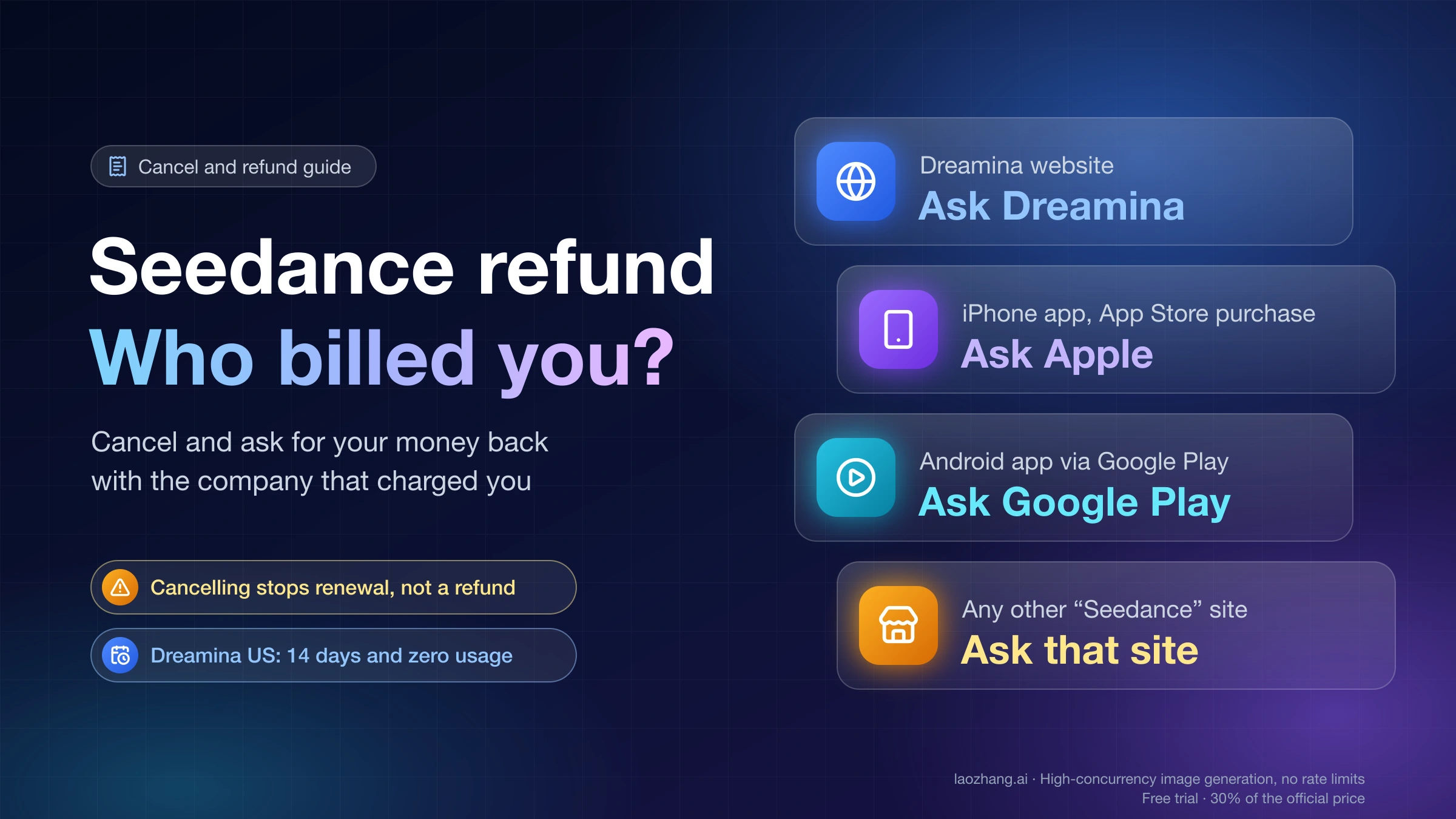
Seedance is ByteDance's video model. Many websites sell access to it under the Seedance name, and each of them has its own billing, cancel button, and refund policy. So the first step is not finding a "Seedance" refund form. It is working out which company actually took your money.
Once you know that, the order is the same everywhere:
- Find who billed you from the receipt email and the merchant name on your card or PayPal statement.
- Cancel the renewal with that company before the next billing date. Cancelling stops future charges. It does not refund anything by itself.
- Ask that company for a refund in writing, inside its window, with your order details.
- Escalate only if the seller refuses or ignores you: Apple or Google Play refund request, PayPal dispute, or card dispute, each with its own deadline.
The one exception is a charge you never authorized. In that case, contact your bank or card issuer right away instead of waiting on the seller. Nothing below is legal advice, and no route guarantees a refund.
Who charged you for Seedance: match the receipt to the right company
Search your inbox for the exact amount and date of the charge. The receipt's sender and the merchant name on your bank, card, or PayPal statement tell you who billed you. Don't guess from the website's logo: a page titled "Seedance 2.0" or "Seedance AI" can belong to any of a dozen operators.
| Where you paid | Who billed you | Where to cancel | Where to ask for a refund |
|---|---|---|---|
| Dreamina website (dreamina.capcut.com) | Dreamina. In the US, its terms name TikTok USDS Joint Venture LLC as the contracting party | Your Dreamina account | support@us.dreamina.com (US terms) |
| Dreamina app on iPhone or iPad | Apple, if the purchase went through the App Store | iPhone Settings, then your name, then Subscriptions | reportaproblem.apple.com |
| An Android app, billed through Google Play | Google Play | Google Play subscriptions page | Google Play order history |
| Any other site with "Seedance" in the name | That site's operator, usually through Stripe, PayPal, or another card processor | That site's account or billing page | The support email in that site's refund policy |
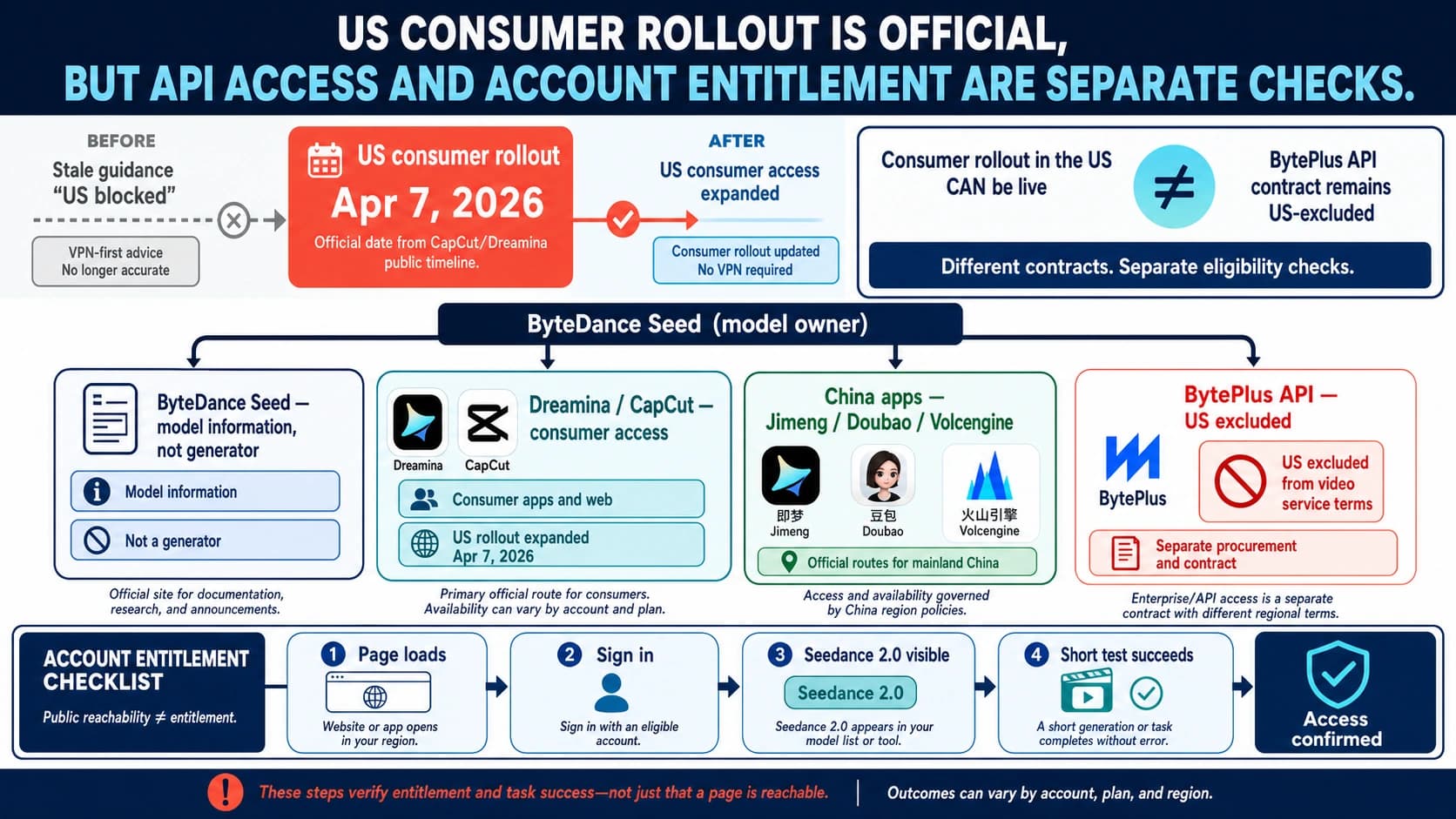
The official places for Seedance are ByteDance Seed's model page (seed.bytedance.com) and Dreamina, ByteDance's consumer app. CapCut is another official consumer surface. Everything else is a separate business, and the guide to using Seedance 2.0 online through the official website and US access routes explains how to tell them apart before you pay again.
Many of the independent sites say so themselves, as of October 18, 2026. The footer of www.seedance.ai calls it "an independent platform" that "is not affiliated with Bytedance." seedanceai.net and seedance2ai.video carry similar disclaimers, and seeddance.io (branded SeedVideo AI) says it is not the official Seedance site. seedance3ai.io names its operator as NexaEdge LLC of Sheridan, Wyoming. If the site you paid promotes "Seedance 3.0," that is a strong sign it is independent: ByteDance had announced no Seedance 3.0 as of October 18, 2026.
How to cancel a Dreamina subscription before it renews
Cancel through your Dreamina account before the current period ends. That is what Dreamina's US Terms of Service (last updated January 22, 2026) require. After you cancel, you keep Premium access until the end of the period you already paid for. You are still charged the full fee for that period unless the law says otherwise. On the last day, the account drops to the Free plan automatically.
Where exactly the cancel option sits in the web interface is not spelled out in Dreamina's public help. The Dreamina help page says only to cancel "through your Dreamina account," and the pricing page FAQ points to "your account and billing settings." One user on Facebook described the path as "click on your credits and then change the subscription plan." Treat that as one person's report, not a confirmed menu label.
A safe way to cancel that doesn't depend on the exact button:
- Sign in at dreamina.capcut.com with the account that was charged.
- Look for subscription, plan, or billing settings in your account and choose the option to cancel or stop auto-renewal.
- Screenshot the confirmation and the date your plan will end.
- If you can't find a cancel option, email support@us.dreamina.com before the renewal date. Say that you want to cancel auto-renewal, give your account email, and keep the reply.
Why the Dreamina charge was bigger than you expected
The cheap first month is usually the reason. As shown on the Dreamina pricing page on October 18, 2026, Basic costs $1.50 for the first month, then $15.00 per month, and "the subscription will automatically renew." The $1.50 price applies to credit card, debit card, or PayPal. Other payment methods pay $15 from the start.
| Dreamina plan (US, October 18, 2026) | First month | Each month after |
|---|---|---|
| Basic | $1.50 | $15.00 |
| Standard | $22 | $36 |
| Advanced | $95 | $159 |
| Ultra | $312 | $520 |
The same page offers 40% off yearly and quarterly plans, so a single charge can cover several months at once. No end date is shown for the first-month offer, and prices change often. Check the page you actually bought from.
Do you lose your Dreamina credits when you cancel?
Under the US terms, no, not right away: premium access continues until the paid period ends, and then the account moves to Free. A Reddit user reported the opposite experience, saying Dreamina froze paid credits after cancelling and deleted them when the subscription expired. The terms don't describe that. To be safe, use the credits you want and download your videos before you cancel, and screenshot your credit balance.
If you subscribed inside the iPhone app
The App Store listing for the Dreamina iOS app ("Dreamina AI: Image&Video Maker," seller BYTEDANCE PTE. LTD.) shows its subscriptions as in-app purchases, and Apple bills those. Cancel it from Apple, not from the Dreamina website. Apple's guide to cancelling a subscription from Apple gives the steps: open Settings, tap your name, tap Subscriptions, choose the subscription, and choose the option to end it. If there's no cancel option or you see a red expiration message, it's already canceled.
If an Android app billed you through Google Play, open Google Play's subscriptions page, select the subscription, and tap Cancel subscription. Google's help page notes that uninstalling an app does not cancel its subscription.
Dreamina refund policy in the US: 14 days and zero usage
Dreamina's US terms allow a no-reason full refund only when both conditions are true:
- You ask within 14 calendar days of the start of your subscription.
- You have had no usage of the Premium Services "in any form whatsoever" since you subscribed.
Read literally, a single generation on the paid plan can rule out this refund. Requests go to support@us.dreamina.com, and an approved refund goes back to the original payment method. The terms also say they do not limit any refund rights you have under applicable law.
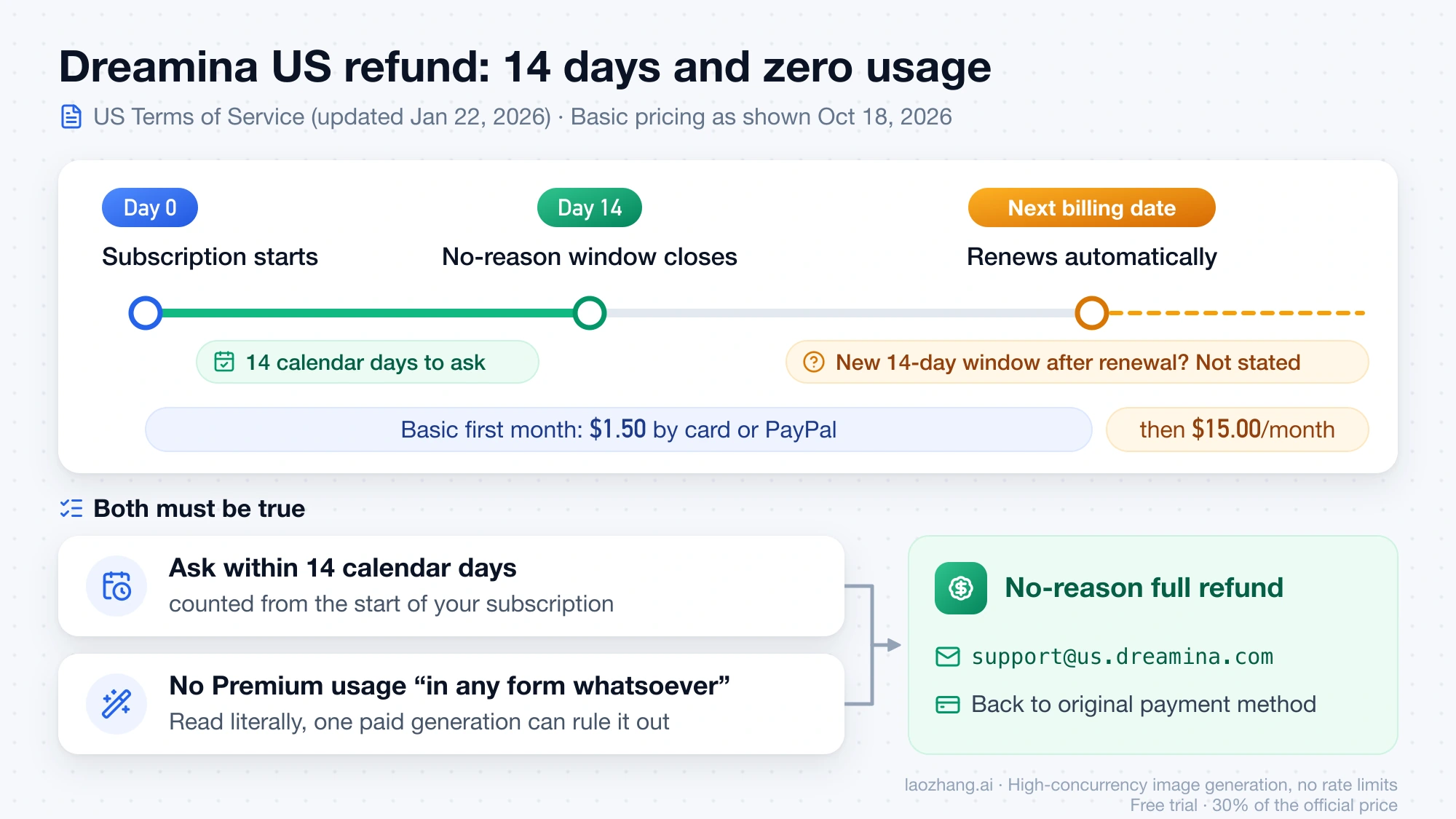
Some things the terms leave open. They don't say whether an automatic renewal starts a fresh 14-day window, so if a renewal hit you, ask anyway and ask quickly. Dreamina has separate terms for other regions, and the US rules above may not apply to you. Dreamina's help page tells you to check "the Terms of Service applicable to your region" for the support contact there.
Outside the 14-day, zero-usage case, you can still write to support. Explain what happened, such as a renewal you meant to cancel or a plan you bought by mistake, but expect the decision to be at Dreamina's discretion.
Is a failed generation a refund case?
Usually it's a support case first. A video that queues forever or errors out doesn't automatically mean the plan didn't work, and some sites return the credits instead of money. seeddance.io, for example, says credits returned after a failed generation are not a monetary refund. Work through what to do when a Seedance task errors, queues, or times out before deciding. If paid features never worked at all, say so in your refund request with the dates and any error messages.
Third-party Seedance site refund policies compared
Each independent site writes its own rules. They range from no refunds at all to 14 days for unused credits. The table summarizes each refund page as of October 18, 2026. The sites can change these terms at any time, so open the policy on the exact domain you paid and screenshot it with the date.
| Site (policy date) | Refund window | Usage limit | Fees and exceptions | Contact |
|---|---|---|---|---|
| seedance.ai refund policy (no date shown) | "Generally does not offer refunds" | Not applicable | Cancel at least 7 days before renewal. No pro-rated refunds | help@seedance.ai or "Subscription Management" in settings |
| seedanceai.net refund policy (Aug 2, 2025) | 7 days; renewals 7 days; credit packs 30 days | Up to 10% of subscription credits; renewal: none used; packs: under 50% | Proportional refund, about 5% fee | Email on its policy page |
| seedancev2.ai refund policy (Apr 13, 2026) | Non-refundable after purchase | Not applicable | Case-by-case only for duplicate charges, technical failure where access wasn't provisioned, confirmed fraud, or where law requires | support@seedancev2.ai |
| SeeMotion AI refund policy (no date shown) | 3 days; renewals 3 days | Up to 30 credits, not counting signup credits; renewal: none used | Processing fees deducted | Email on its policy page |
| seedance3ai.io refund policy (Feb 13, 2026) | 14 days, unused credits only | Used credits not refundable | Also billing errors, duplicate charges, outages over 24 hours. Promotional offers excluded | support@seedance3ai.io |
| seedance2.studio refund policy (May 25, 2025) | 3 days | Up to 50 credits | Fees deducted. Credit purchases non-refundable | Contact link on its policy page |
| ai-seedance.org refund policy (Feb 7, 2026) | 3 days | Up to 50 credits | 2–10% fee deducted | support@ai-seedance.org |
| seeddance.io refund policy (Aug 30, 2026) | 3 days | Zero credits used. Unlimited-mode videos count as use | Fees up to 4% plus US$1.50 | support@seeddance.io, subject "Refund Request" |
| seedance2ai.video refund policy (Jan 7, 2026) | 7 days from first purchase or first subscription charge | No material use of paid features | Renewals after 7 days not refundable | support@seedance2ai.video |
Three patterns matter more than any single row:
- Short windows count from the purchase date. Three days passes quickly. If you're inside a window, send the request today, even before you've gathered every detail.
- Using the plan usually ends eligibility. The limits are set in credits, so a few test videos can push you over.
- An accidental annual plan has its own rule on some sites. seedanceai.net, SeeMotion AI, and seedance2.studio say they will convert a mistaken annual plan to monthly, keep one month's fee plus processing fees, and refund the rest. Several sites show countdown timers or "spots left" banners next to their annual discounts. If one of those led to a yearly charge you didn't intend, ask for that conversion by name.
Refund request email you can copy
Send it from the email address on the account, and keep it short and factual. Never include your full card number, security code, or password. Dreamina's help page and seeddance.io both warn against this.
Subject: Refund Request – [order or receipt ID]

Hello,

I'm requesting a refund for the charge below and have cancelled
(or am asking you to cancel) auto-renewal on this account.

Account email: [email used to sign up]
Order / receipt / transaction ID: [ID from the receipt]
Charge date: [date]
Amount and currency: [amount]
Payment method: [card type and last 4 digits, or PayPal]

What happened: [for example: "The subscription renewed on (date)
after the discounted first month. I didn't use any credits in the
new period." / "I meant to buy the monthly plan and was charged
for a year."]

Under your refund policy ([quote the line, for example
"within 3 days and 50 credits or less"]), I'm asking for
[a full refund / conversion to a monthly plan and a refund
of the difference].

Please confirm by email that auto-renewal is off and tell me
the outcome of this request.

Thank you,
[name]
Keep a copy of what you sent, the time you sent it, the policy screenshot, and every reply. That record is what an Apple, PayPal, or card dispute will look at later.
If the seller refuses: Apple, Google Play, PayPal, and card dispute deadlines
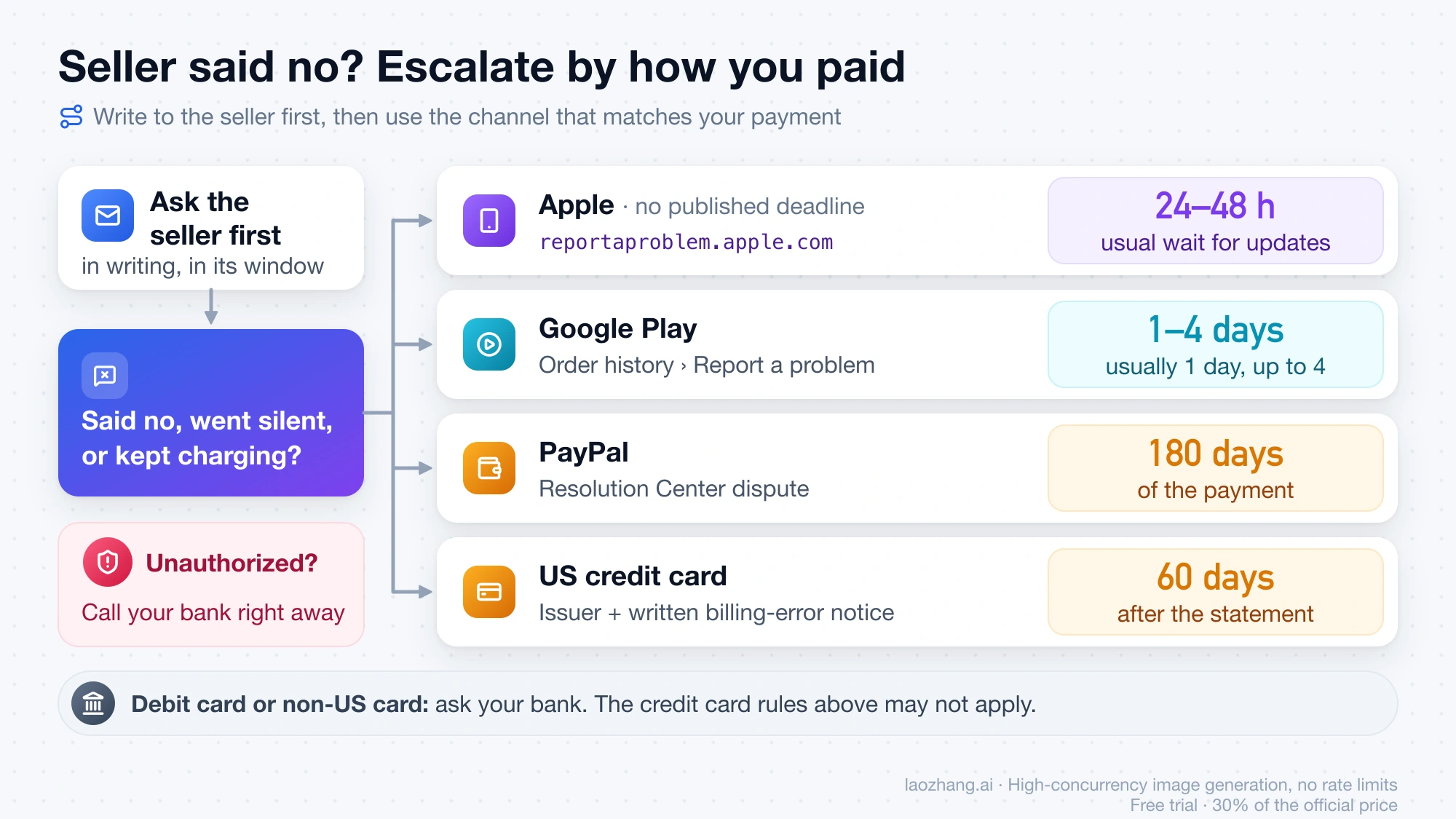
Escalate when the seller says no, stops answering, or keeps charging after you cancelled. Pick the channel that matches how you paid.
| How you paid | Where to escalate | Deadline and timing |
|---|---|---|
| Apple (App Store purchase) | reportaproblem.apple.com | Apple publishes no deadline. Updates usually take 24 to 48 hours |
| Google Play | Google Play order history, then Report a problem | Decision usually within one day, up to four days |
| PayPal | PayPal Resolution Center dispute | Within 180 days of the payment |
| US credit card | Your card issuer, then a written billing-error notice | Within 60 days after the charge appeared on your statement |
| Debit card or non-US card | Your bank | Ask your bank. The credit card rules above may not apply |
Apple. Sign in to Apple's Report a Problem site, choose "I'd like to," then "Request a refund." Pick a reason, choose the subscription, and submit. Apple's refund request guide says pending charges can't be refunded yet and that eligibility varies by country or region.
Google Play. On play.google.com, open your profile picture, then Payments & subscriptions, then Budget & order history. Find the order, choose Report a problem, say you'd like a refund, and submit. Google's Play refund guide says to contact the developer first once more than 48 hours have passed since the purchase.
PayPal. If you paid a Seedance-named site with PayPal, open a dispute in the Resolution Center. PayPal's buyer protection page says a dispute must be filed within 180 days of your purchase or payment. Whether a digital subscription qualifies for Purchase Protection depends on PayPal's own terms, so describe the cancelled renewal or the refused refund clearly.
US credit card. Call your card issuer first. Then send a written billing-error notice within 60 calendar days after the charge appeared on your statement, and keep copies. The issuer must acknowledge it within 30 days. The CFPB's guide to disputing a credit card charge covers the steps. It does not cover debit cards.
Before you file a card or PayPal dispute against an independent site, download any videos you want to keep. seedancev2.ai and seedance2ai.video both say an unresolved chargeback can lead to account restrictions. seedancev2.ai adds that restrictions may remain even after a dispute is decided in its favor. That's another reason to write to the seller first, unless the charge was never yours.
Seedance cancel and refund questions
Will I get a refund if I cancel my Seedance subscription?
Not automatically. Cancelling stops the next renewal. A refund is a separate request to whoever billed you, judged against that seller's window and usage limit. On Dreamina in the US, that means within 14 days and with no use of the paid plan at all.
How can I contact Dreamina customer support?
For US accounts, Dreamina's terms list support@us.dreamina.com for refunds and account requests. Accounts in other regions are covered by separate terms, and Dreamina's help page says to use the contact listed in the terms for your region.
Does deleting my Dreamina account cancel the subscription?
Dreamina's US terms don't say that it does. Cancel the subscription first and keep the confirmation. Delete the account afterward if you want to, through the "Manage account" page or by email. Deleted data can't be recovered.
What is the official Seedance website?
ByteDance publishes the Seedance model at seed.bytedance.com. Dreamina at dreamina.capcut.com is its official consumer app for making videos, and CapCut is another official surface. Sites such as seedance.ai, seedanceai.net, or seedance3ai.io are independent businesses with their own billing and refund rules.
Can I get money back for an annual plan I didn't mean to buy?
Ask the seller right away. On Dreamina, the 14-day, zero-usage rule still applies. seedanceai.net, SeeMotion AI, and seedance2.studio offer to convert an accidental annual plan to monthly and refund the difference minus one month and fees. If the seller refuses and the charge came through Apple, Google Play, PayPal, or a credit card, the escalation deadlines above apply.
Sources20
External pages this guide links to, in the order they appear. Last updated Oct 18, 2026.
Sources20
External pages this guide links to, in the order they appear. Last updated Oct 18, 2026.
- 1.www.seedance.aiseedance.ai
- 2.US Terms of Servicedreamina.capcut.com/clause/dreamina-terms-of-service
- 3.Dreamina help pagedreamina.capcut.com/help
- 4.Dreamina pricing pagedreamina.capcut.com/pricing/dreamina-price
- 5.guide to cancelling a subscription from Applesupport.apple.com/en-us/118428
- 6.Google Play's subscriptions pageplay.google.com/store/account/subscriptions
- 7.seedance.ai refund policyseedance.ai/refund-policy
- 8.seedanceai.net refund policyseedanceai.net/refund-policy
- 9.seedancev2.ai refund policyseedancev2.ai/refund-policy
- 10.SeeMotion AI refund policyseemotion.ai/refund-policy
- 11.seedance3ai.io refund policyseedance3ai.io/refund
- 12.seedance2.studio refund policyseedance2.studio/refund
- 13.ai-seedance.org refund policyai-seedance.org/refund-policy
- 14.seeddance.io refund policyseeddance.io/refund-policy
- 15.seedance2ai.video refund policyseedance2ai.video/refund-policy
- 16.Apple's Report a Problem sitereportaproblem.apple.com
- 17.refund request guidesupport.apple.com/en-us/118223
- 18.Play refund guidesupport.google.com/googleplay/answer/15574897
- 19.buyer protection pagepaypal.com/us/security/buyer-protection-resolution
- 20.guide to disputing a credit card chargeconsumerfinance.gov/ask-cfpb/how-do-i-dispute-a-charge-on-my-credit-card-bill-en-61