grok-imagine-image-quality Retired: Now 2.0 at Low, What to Set
xAI retired grok-imagine-image-quality on November 2, 2026. Old calls still work on grok-imagine-image-2.0 at low; set model and quality yourself.
On this page
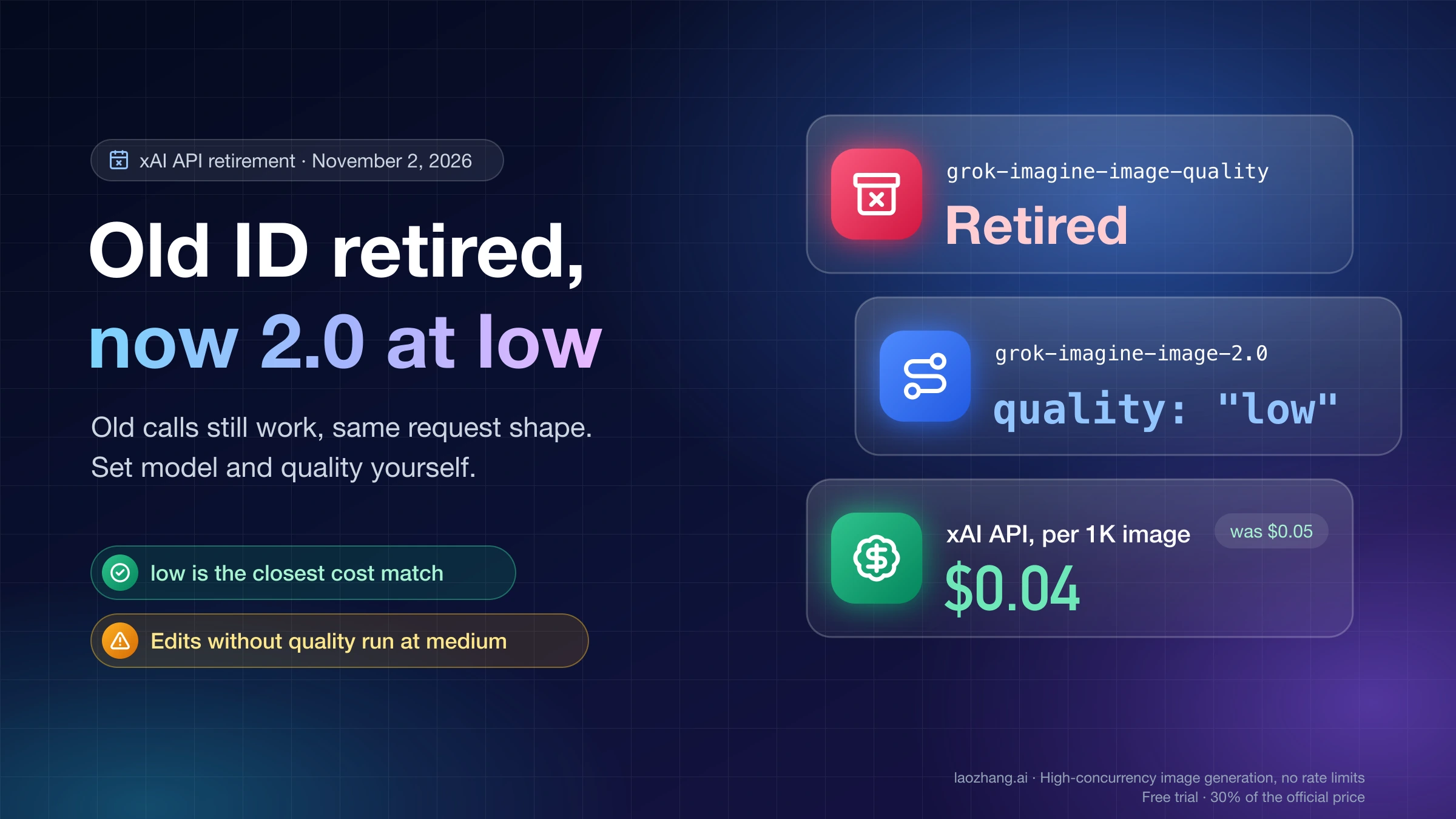
xAI retired the grok-imagine-image-quality model on November 2, 2026, but code that still sends that ID does not break. On the xAI API, the old slug keeps resolving: generation and edit requests to it are now served by grok-imagine-image-2.0 with quality set to low, the request and response shapes are unchanged, and you are billed at the 2.0 low rate, which at 1K is $0.04 per image instead of the old $0.05, according to xAI's grok-imagine-image-quality migration guide.
What you should do now is change the model field to grok-imagine-image-2.0 and pass quality yourself: low is the closest cost match to the old model, medium buys finer detail. Pinning it matters most for image edits, because 2.0 without a quality value edits at medium and bills at the medium rate, not the 1K low price. If you call the model through a gateway or a wrapper (a ComfyUI node, SillyTavern, a proxy), the gateway decides what runs and what you pay. On laozhang.ai, for example, the old ID was still callable at $0.045 per image as of November 3, 2026, while grok-imagine-image-2.0 costs a flat $0.055, so check which model ID your provider actually bills.
Disclosure: laozhang.ai is our own service. Its prices are platform pricing, not an independent comparison.
If you came here because of the Grok app's Quality Mode, that is a different thing from this API model ID, and nothing published says it changed on November 2; the section on the app explains the difference.
What a grok-imagine-image-quality request runs on now
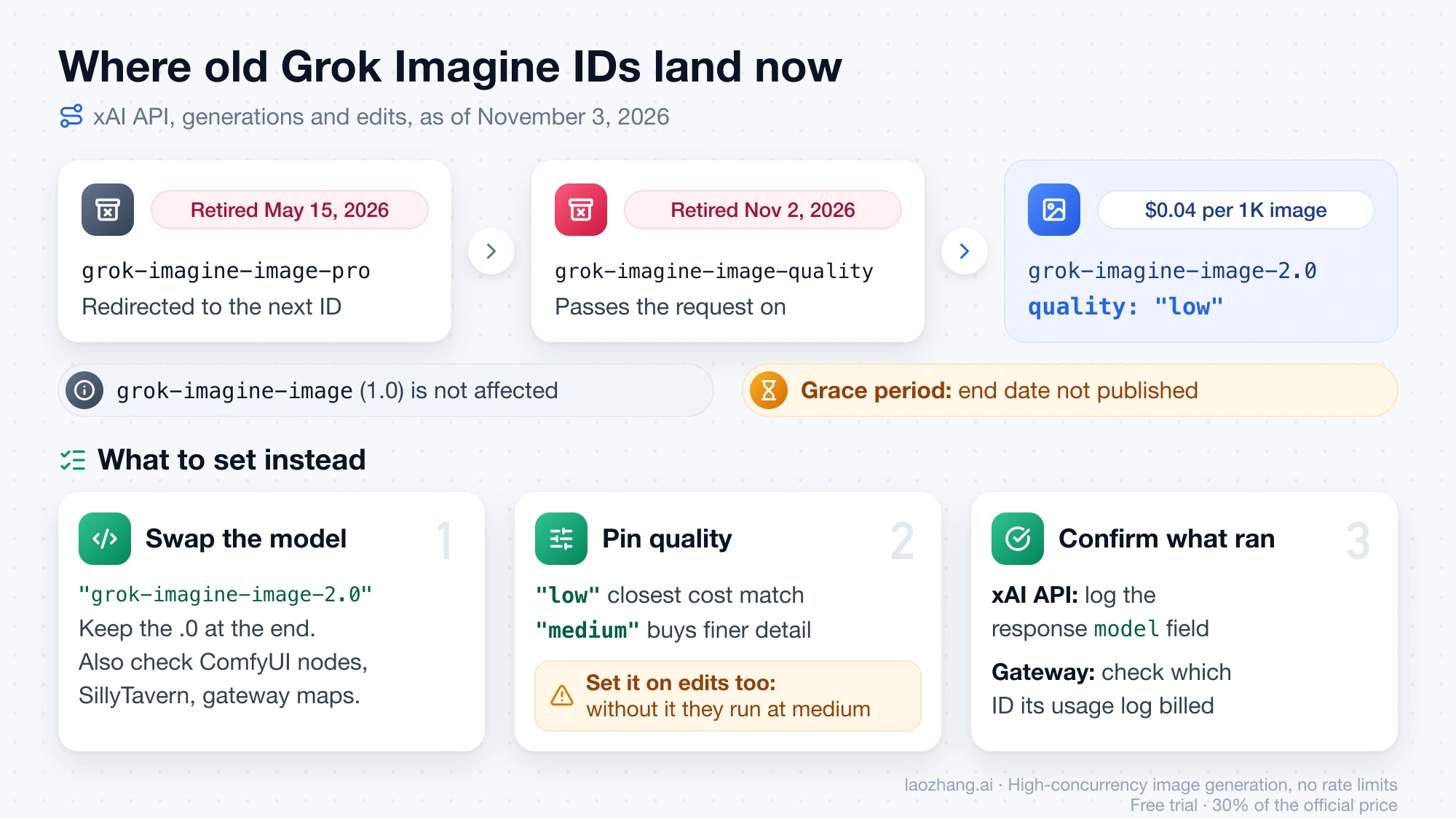
Since November 2, 2026, xAI answers every request to grok-imagine-image-quality on /v1/images/generations and /v1/images/edits with grok-imagine-image-2.0 at quality: "low". Every parameter the old model accepted is still accepted, so your existing prompt, n, aspect_ratio, resolution and response_format keep working without edits. xAI's migration guide says the model field in each response reports the model that actually served the request, which gives you a way to confirm the switch from your own logs.
The same chain catches an older ID. grok-imagine-image-pro was retired on May 15, 2026 and redirected to grok-imagine-image-quality; per xAI's May 15 retirement notice, it now follows that redirect on to 2.0 at low. The cheaper first-generation model, grok-imagine-image (1.0), is not affected on the xAI API.
What xAI has not published is how long the retired slug will keep resolving. Treat the redirect as a grace period, not a permanent alias, and move your code to the new ID while nothing is on fire.
What you pay after the switch: $0.04 is only 1K at low
The $0.04 figure on xAI's model page and in the plain-text version of its pricing page is the cheapest cell of a larger table: one 1K image at low. As of November 3, 2026, xAI's pricing page bills grok-imagine-image-2.0 per image by resolution and quality, plus $0.01 per input image on edits. Your real price depends on which of those cells your requests land in, and on whether you call xAI directly or through someone else's endpoint.
| What you send | xAI API direct | laozhang.ai (platform quote) |
|---|---|---|
| Old ID, 1K, before November 2 | $0.05 | $0.045 |
| Old ID, 1K, after November 2 | $0.04 (billed as 2.0 low) | $0.045 (old ID still listed) |
2.0, low, 1K | $0.04 | $0.055 |
2.0, low, 2K | $0.06 | $0.055 |
2.0, medium, 1K | $0.06 | $0.055 |
2.0, medium, 2K | $0.08 | $0.055 |
2.0 edit, no quality, 1K, one source image | $0.06 + $0.01 = $0.07 | $0.055 |
Disclosure: laozhang.ai is our own service. Its prices are platform pricing, not an independent comparison.
xAI's table also has a 1.5K tier ($0.05 at low, $0.07 at medium), although its image generation docs list only 1k and 2k as resolution values. The laozhang.ai prices come from its Grok Imagine image API documentation as of November 3, 2026: one price for every resolution and quality, for generations and edits alike, charged per successful image with no separate input-image fee.
So the direction of your bill depends on where you call from. At 10,000 successful 1K images a month on the xAI API, the old model cost 10,000 × $0.05 = $500 and 2.0 at low costs 10,000 × $0.04 = $400, a $100 saving. On laozhang.ai, the same volume moves from 10,000 × $0.045 = $450 on the old ID to 10,000 × $0.055 = $550 on 2.0, $100 more. Those figures are list-price arithmetic that leaves out retries and failed calls.
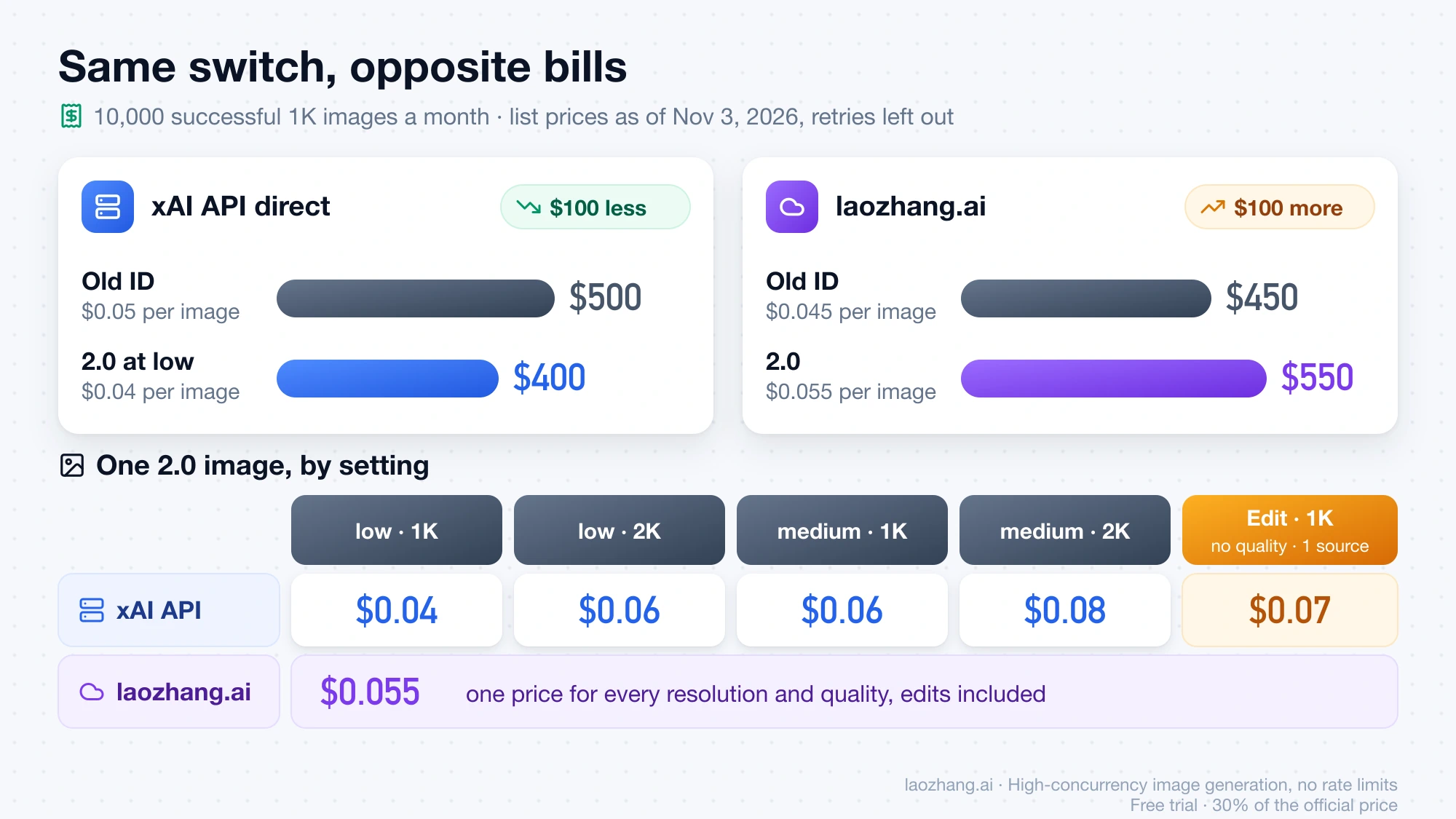
Your bill can still go up on the xAI API after you migrate, even though the redirect itself is cheaper, if your explicit 2.0 calls land in a dearer cell than the redirect does. Edit calls sent without quality are served at medium, so a 1K edit with one source image costs $0.07 rather than the redirect's 1K generation price, and choosing medium for detail costs $0.06 at 1K and $0.08 at 2K, more than the old model's $0.05 at 1K. xAI says the redirect is $0.01 cheaper than the old model at every resolution, but it has not published the old model's prices above 1K. If you are reconsidering xAI altogether, the AI Image Generation API Comparison 2026: Pricing, Quality, Value puts other vendors' image prices side by side, and Grok API Pricing: Model Rates, Billing Rules, and Monthly Costs covers Grok's text models.
What to set instead: grok-imagine-image-2.0 with an explicit quality
The fix xAI recommends is a one-line change to model plus a quality value you choose, so the redirect's low default stops deciding for you. Do it in this order, because the ID often lives in more places than the main code path:
- Search your code, environment variables, workflow files and tool settings for
grok-imagine-image-qualityandgrok-imagine-image-pro. ComfyUI nodes, SillyTavern image settings and gateway model maps often store the ID separately from your code. - Replace each one with
grok-imagine-image-2.0, including the.0at the end. - Add
quality:"low"for generations, the setting closest in cost to the old model and the one the redirect uses,"medium"where detail matters more than price. Set it on edit calls too, or they run atmedium. - If you use the OpenAI Python SDK, pass
quality(andresolution,aspect_ratio) insideextra_body; the JavaScript SDK acceptsqualityas a top-level field. - Confirm the change. On the xAI API, log the
modelfield of each response. On a gateway, check its usage log for which model ID was billed.
A minimal generation call against the xAI API looks like this:
curl -X POST https://api.x.ai/v1/images/generations \
  -H "Content-Type: application/json" \
  -H "Authorization: Bearer $XAI_API_KEY" \
  -d '{
    "model": "grok-imagine-image-2.0",
    "prompt": "A watercolor painting of a lighthouse at dawn",
    "quality": "low"
  }'
The same model and quality change applies to /v1/images/edits. Two options are new to you after the move: 2.0 accepts up to five source images for an edit on the xAI API (laozhang.ai's endpoint accepts one to three), and it adds the 21:9 and 5:2 aspect ratios. Do not send quality to grok-imagine-image (1.0); xAI's docs say the parameter is supported only on grok-imagine-image-2.0.
Disclosure: laozhang.ai is our own service. Its prices are platform pricing, not an independent comparison.
What a call to the old ID returned on November 3, 2026
A day after the retirement, the old ID still produced images through a third-party gateway, and adding 2.0-only parameters did not cause errors. On November 3, 2026, seven requests went to laozhang.ai's endpoint POST https://api.laozhang.ai/v1/images/generations from one paid account in the default group, all with the prompt "A watercolor painting of a lighthouse at dawn, no text", n: 1 and response_format: "url".
Disclosure: laozhang.ai is our own service. Its prices are platform pricing, not an independent comparison.
| Request | Status | Time | Image returned |
|---|---|---|---|
grok-imagine-image-quality, no quality (first call) | 200 | 15.4 s | 832×1248 JPEG, about 472 KB |
grok-imagine-image-quality, no quality (second call) | 200 | 17.3 s | 832×1248 JPEG, about 476 KB |
grok-imagine-image-quality + quality: "medium" | 200 | 16.7 s | 832×1248 JPEG, about 503 KB |
grok-imagine-image-quality + resolution: "2k" | 200 | 23.5 s | 1664×2496 PNG, 5.9 MB |
grok-imagine-image-2.0 + quality: "low" | 200 | 16.0 s | 832×1248 JPEG, about 474 KB |
grok-imagine-image-2.0 + quality: "medium" | 200 | 87.0 s | 1248×832 JPEG, about 430 KB |
grok-imagine-image-2.0, no quality | 200 | 14.6 s | 832×1248 JPEG, about 461 KB |
Every response body held only created, data[].url and a usage block reporting 1,000 tokens. There was no model field, so these calls cannot show whether the old ID was served by 2.0 at low; laozhang.ai's own documentation lists it as a separate model at its old price. xAI's statement about the model field was not tested, because no call went to the xAI API directly. The results come from one gateway, one account, one prompt and one day, with a single sample per setting; the 87-second medium call in particular is one data point, not a speed measurement. Billing was not read back per call.
Will images look worse on grok-imagine-image-2.0 at low?
xAI has not published a same-prompt comparison of the retired model against 2.0 at low, so whether redirected output looks worse is unknown as of November 3, 2026. xAI's position is that low is the closest cost match to the old model and ranks #2 on the Arena image-edit leaderboard and #3 on text-to-image; those ranks are xAI's own statement.
In the November 3 calls above, the images from the old ID and from 2.0 at low looked alike in style and composition when viewed side by side, but that was one prompt judged by eye, without a blind comparison. If your output looks softer after the switch and detail matters for that job, set quality: "medium" on those requests and budget $0.06 per 1K image on the xAI API.
Grok app Quality Mode is not the retired API model
The Grok app's Quality Mode and the grok-imagine-image-quality API model only share a word. On August 8, 2026, TestingCatalog reported, quoting xAI's @grok account, that Imagine Image 2.0 became Grok's Quality Mode on the web and in the iOS and Android apps. xAI's November 2 notice covers only the API slug, and nothing published says Quality Mode changed that day; that it was not retired is an inference from that silence, not an xAI statement. Questions about how many images the app lets you make and when that resets belong to Grok Free Limit: What xAI Publishes, How It Resets, What to Do.
Sources4
External pages this guide links to, in the order they appear. Last updated Nov 3, 2026.
Sources4
External pages this guide links to, in the order they appear. Last updated Nov 3, 2026.
- 1.xAI's grok-imagine-image-quality migration guidedocs.x.ai/developers/migration/imagine-image-quality-nov-2
- 2.xAI's May 15 retirement noticedocs.x.ai/developers/migration/may-15-retirement
- 3.xAI's pricing pagedocs.x.ai/developers/pricing
- 4.Imagine Image 2.0 became Grok's Quality Modetestingcatalog.com/xai-launches-imagine-image-2-0-in-grok-quality-mode