Best OpenClaw Skills to Install First (2026): Starter Packs by Workflow
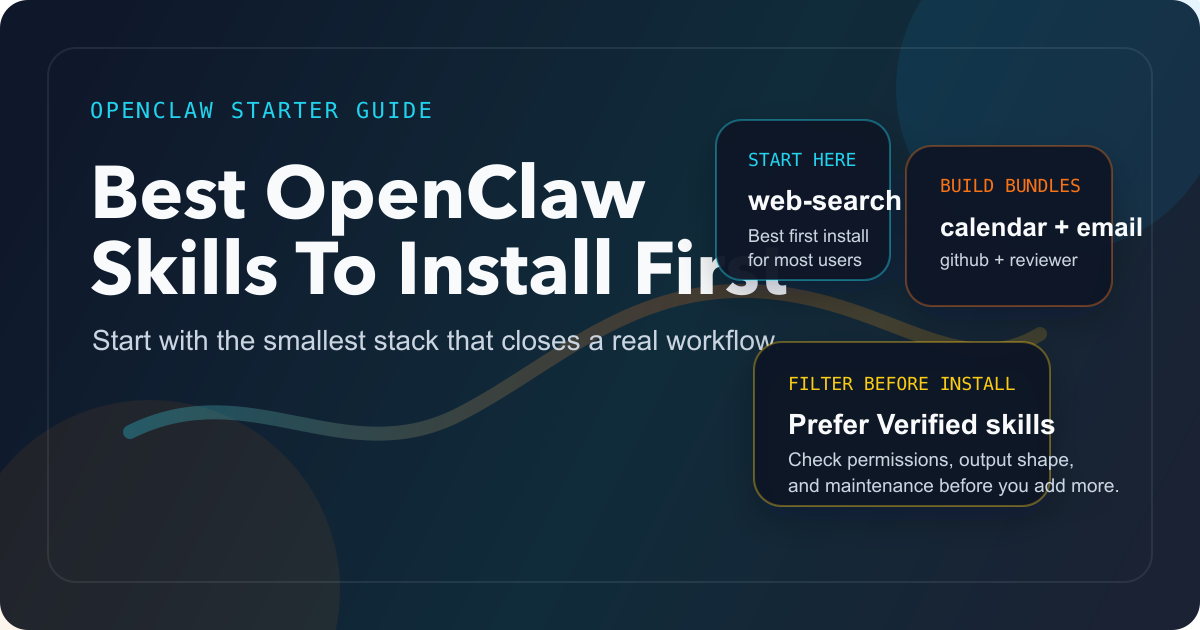
If you only install one OpenClaw skill, start with `web-search` for most workflows. But the better decision is usually a small workflow bundle: `calendar` + `email` for assistant tasks, `github` + `code-reviewer` for developer work, and `browser-automation` for scraping or operational flows. This guide explains what to install first, what to skip, and how to vet third-party skills without getting lost in the registry.
On this page
OpenClaw's skill ecosystem is large enough now that "just browse ClawHub and pick whatever looks cool" is bad advice. The official Popular Skills page says the platform has over 5,700 publicly available skills, while the official openclaw/skills archive repository shows the ecosystem is even larger once you count archived versions. That abundance is exactly why the beginner question has changed. The hard part is no longer finding skills. The hard part is choosing a small set that makes your agent genuinely more useful without making it fragile, unsafe, or annoying to maintain.
If you only install one skill, web-search is the best first OpenClaw skill for most people. It upgrades the agent across multiple jobs at once: current-information lookups, fact-checking, lightweight research, and reality checks before the model confidently invents something stale. That recommendation is not arbitrary. OpenClaw's own Popular Skills page highlights web-search as a top starter skill and describes it as the layer for real-time searches, fact-checking, and current-information questions. But that is only the default answer. If your actual goal is assistant automation, coding, or scraping, the better first decision is a workflow bundle rather than one isolated skill. For assistant workflows, start with calendar and email. For developer workflows, start with github and code-reviewer. For extraction-heavy workflows, start with browser-automation.
That is the core thesis of this article: the best OpenClaw skill is rarely the flashiest skill. It is the skill, or small skill set, that unlocks a real recurring workflow while keeping permissions, setup cost, and failure modes under control.
The Fast Answer: What Should You Install First?
Here is the short version I would give a new OpenClaw user on day one.
| Your situation | Best first install | Why |
|---|---|---|
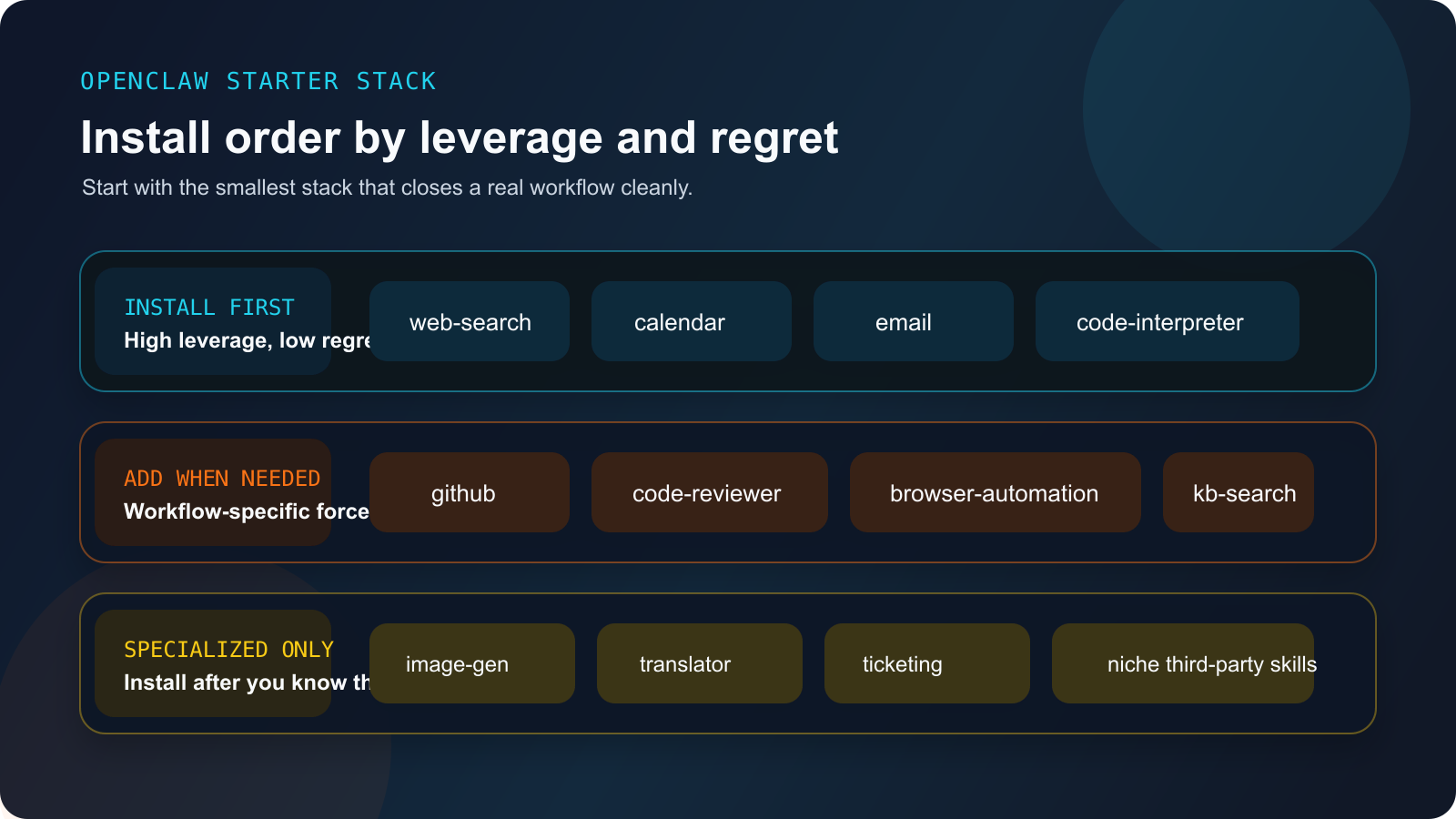
| You want one skill that improves almost everything | web-search | It adds live information, fact-checking, and research ability across many workflows |
| You want a personal assistant that actually handles your day | calendar + email | This pair turns OpenClaw from a chat novelty into something that can schedule, summarize, and draft |
| You mainly use OpenClaw for engineering work | github + code-reviewer | The official cookbook already treats these as a real code-review workflow, not random plugins |
| You need structured extraction from real websites | browser-automation | It solves a workflow that plain LLM reasoning cannot reliably solve on its own |
| You want a universally useful utility skill | code-interpreter | It gives the agent a deterministic execution layer for scripts, charts, calculations, and file output |
The official docs matter here because they prevent us from guessing. OpenClaw's own highlighted popular skills are not just "fun demos." They are generic tools with broad leverage: web-search, calculator, code-interpreter, calendar, email, and a few others. Then the Cookbook Overview shows how real workflows are composed from multiple skills. That combination is what turns the answer from a popularity contest into a decision framework.
The official docs also offer a quick-install route: a one-shot popular-skills command and openclaw bundle install starter-pack. That is a useful discovery shortcut, especially if you want the official broad starter set. But it is not automatically the best first-week setup. The job of a broad starter bundle is coverage. The job of a good first install is focus. In practice, most users learn faster from one small bundle they can evaluate clearly than from a wide pack that mixes essential skills with merely interesting ones.
So if you came here wanting one blunt answer, take this one: install web-search first unless your primary workflow clearly belongs to a more specific bundle.
Why Choosing OpenClaw Skills Got Harder in 2026
There are two opposite mistakes beginners make.
The first mistake is installing too little. They leave OpenClaw close to its base configuration, then conclude that it is not very helpful because it keeps answering from static model knowledge and cannot touch the services or workflows they actually care about.
The second mistake is worse: they install everything interesting in one weekend. That sounds ambitious, but in practice it creates a brittle agent with too many credentials, too many output formats, too much permission sprawl, and too many places where one third-party skill can quietly fail. The OpenClaw docs now explicitly treat malicious or vulnerable third-party skills as a supply-chain risk. The Security Overview is not vague about this: third-party skills are part of the threat model, and the platform leans on least privilege, isolated sandboxes, displayed permission manifests, and Verified badges to reduce that risk.
This changes what "best skill" should mean. Five months ago, a reasonable article might have been a giant "top 20" list sorted by coolness. That is no longer a strong answer. A better answer has to optimize for three things at once:
- leverage: does the skill make the agent meaningfully more useful?
- fit: does it match the reader's real workflow?
- trust: do permissions, documentation, maintenance, and output quality justify the install?
The official docs point the same way. The ClawHub Registry docs say Verified skills are reviewed for security, quality, documentation, and maintenance, and that they surface higher in search results. That is a useful filter, but it still does not tell a beginner which verified skill or skill bundle they should install first. This article tries to close that gap.
The Best OpenClaw Starter Bundles by Workflow
Once you stop treating the registry like an app store leaderboard, the right way to choose gets much clearer. You should start with the smallest bundle that completes a recurring job.
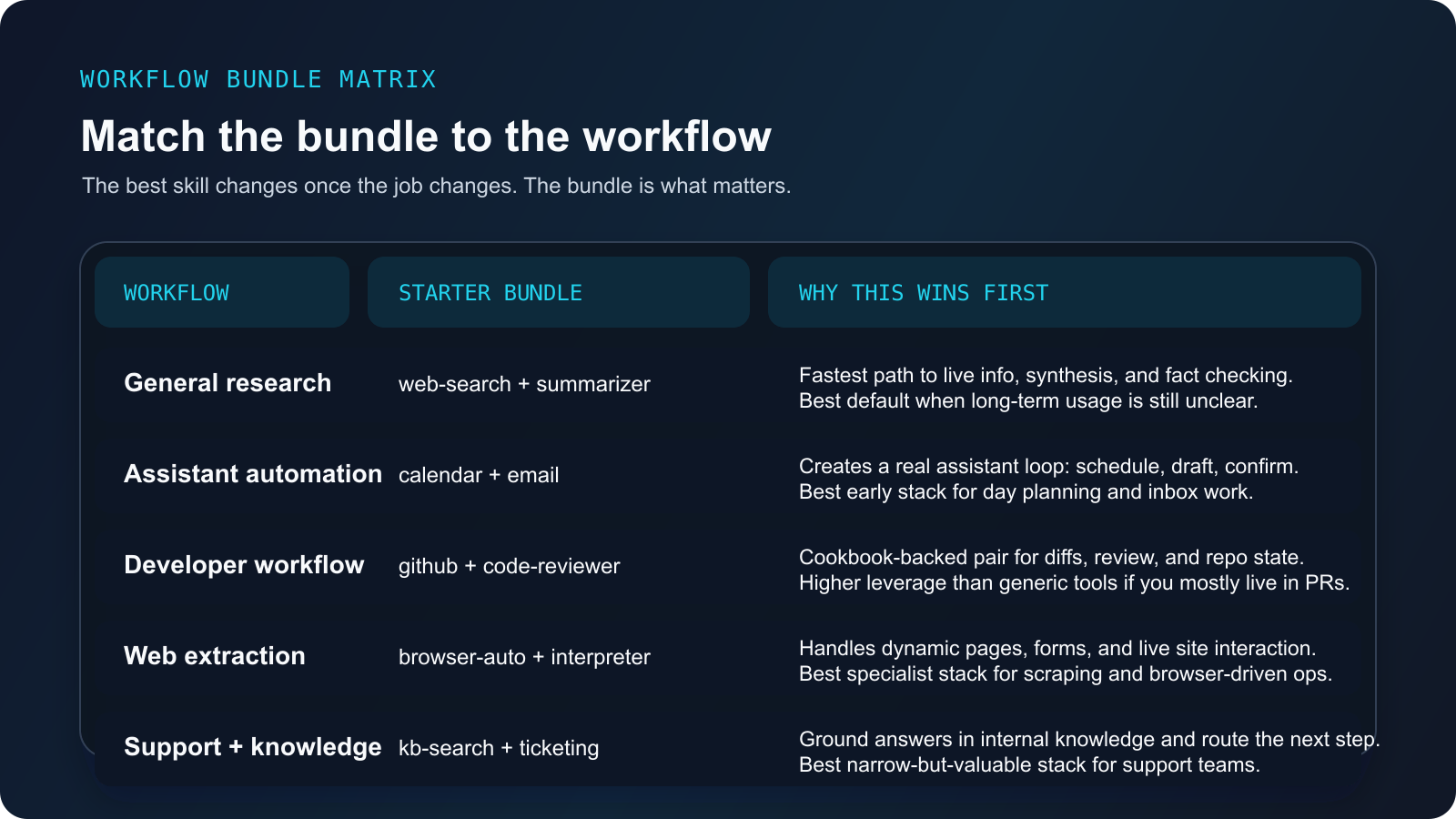
For general research and everyday usefulness, start with web-search and then consider summarizer. The official cookbook's Daily News Bot recipe uses exactly that pair. This is the cleanest example of a high-leverage bundle because the two skills complement each other naturally: one gathers current information, the other compresses it. Even outside a news bot, the pattern generalizes. You can use it for rapid competitor checks, lightweight fact validation, doc scanning, or even deciding whether the rest of your workflow should proceed.
Why this bundle ranks so highly is simple: it does not demand a complicated operational environment. You do not need to wire the agent into your mailbox, your calendar, your Git hosting, and a headless browser just to get value. For solo users still deciding whether OpenClaw fits their life, this is the safest place to start.
For assistant-style automation, calendar and email are the best first pair. The official docs highlight both as popular skills, and the cookbook uses them in its Meeting Scheduler and Email Assistant recipes. This matters because it means the docs already treat these two as working building blocks rather than isolated utilities. If your dream for OpenClaw is "be useful in my day," these are the skills that make the promise concrete. Calendar turns vague planning into scheduled state; email turns outputs into actual outbound action.
This pair also reveals an important principle: skills become more valuable when they close a loop. An isolated calendar integration is nice. An isolated email integration is nice. Together, they let OpenClaw check availability, propose times, send the proposal, draft follow-ups, and summarize what still needs action. That is a genuine assistant workflow, not a toy demo.
For developer workflows, install github and code-reviewer before almost anything else. The official code-review recipe pairs exactly those two skills. That is a better signal than raw popularity because it tells you these skills can cooperate in a meaningful system: fetch a pull request, analyze a diff, post review comments, and summarize the result. If your OpenClaw usage is mostly engineering-adjacent, this is far more valuable than a random grab bag of "developer tools."
There is a bigger lesson hiding here. Many users think in terms of single skills, but developer productivity often comes from composition. github alone gives access to repository state. code-reviewer alone is just an evaluator. The useful workflow appears when you connect the two and let one feed the other. That is why I would not tell a technical user that web-search is automatically the best first install. For many engineers, the GitHub bundle beats it on day-one leverage.
For website interaction, operations, and extraction work, browser-automation is the right early specialist skill. The OpenClaw cookbook's Web Scraping recipe treats browser automation as the core skill for real-world site interaction. This is valuable because browser work is one of the clearest examples of where pure model reasoning is not enough. Many operational tasks live behind forms, JavaScript-heavy pages, login walls, or dynamic interfaces. If your goal is price monitoring, structured extraction, admin-panel workflows, or repetitive web operations, browser automation unlocks a category of tasks that no amount of prompt cleverness can replace.
That said, browser-automation is not a universal first install. It has more moving parts, more fragility, and more room for website-specific failure than web-search or calendar does. The right mental model is not "this is better than search." It is "this becomes your best first skill when your job depends on interacting with live pages rather than just reading about them."
For support and internal knowledge workflows, kb-search and ticketing form the most important bundle. The official cookbook assigns those skills to the Customer Support Bot recipe. This is a strong pattern because it ties retrieval to action. kb-search without ticketing helps answer questions but does not complete the operational loop. ticketing without retrieval creates an agent that can manipulate support state without actually knowing enough. Together, they let OpenClaw look things up, ground the answer in internal knowledge, and route the outcome into the system that operators already use.
This may sound niche, but it is one of the highest-return patterns for teams. Plenty of organizations do not need OpenClaw to be a general-purpose super-agent. They need it to do one narrow but expensive job well. Support triage, answer suggestion, and ticket routing fit that description perfectly.
For a universal utility layer, keep code-interpreter close. The official Popular Skills page highlights it for good reason. It gives the agent a deterministic execution path for math, quick scripts, data transformations, and generated files. That matters because many flashy skills eventually fail in the last mile: they can talk about what should happen, but not actually produce the chart, transform the file, or run the logic. code-interpreter is not always the first skill I would install, but it is one of the most useful second-wave installs because it upgrades the agent's ability to finish work instead of merely describing it.
What Makes a Skill Worth Installing
The wrong way to choose a skill is to ask whether it sounds impressive. The right way is to ask whether it survives a short install filter.
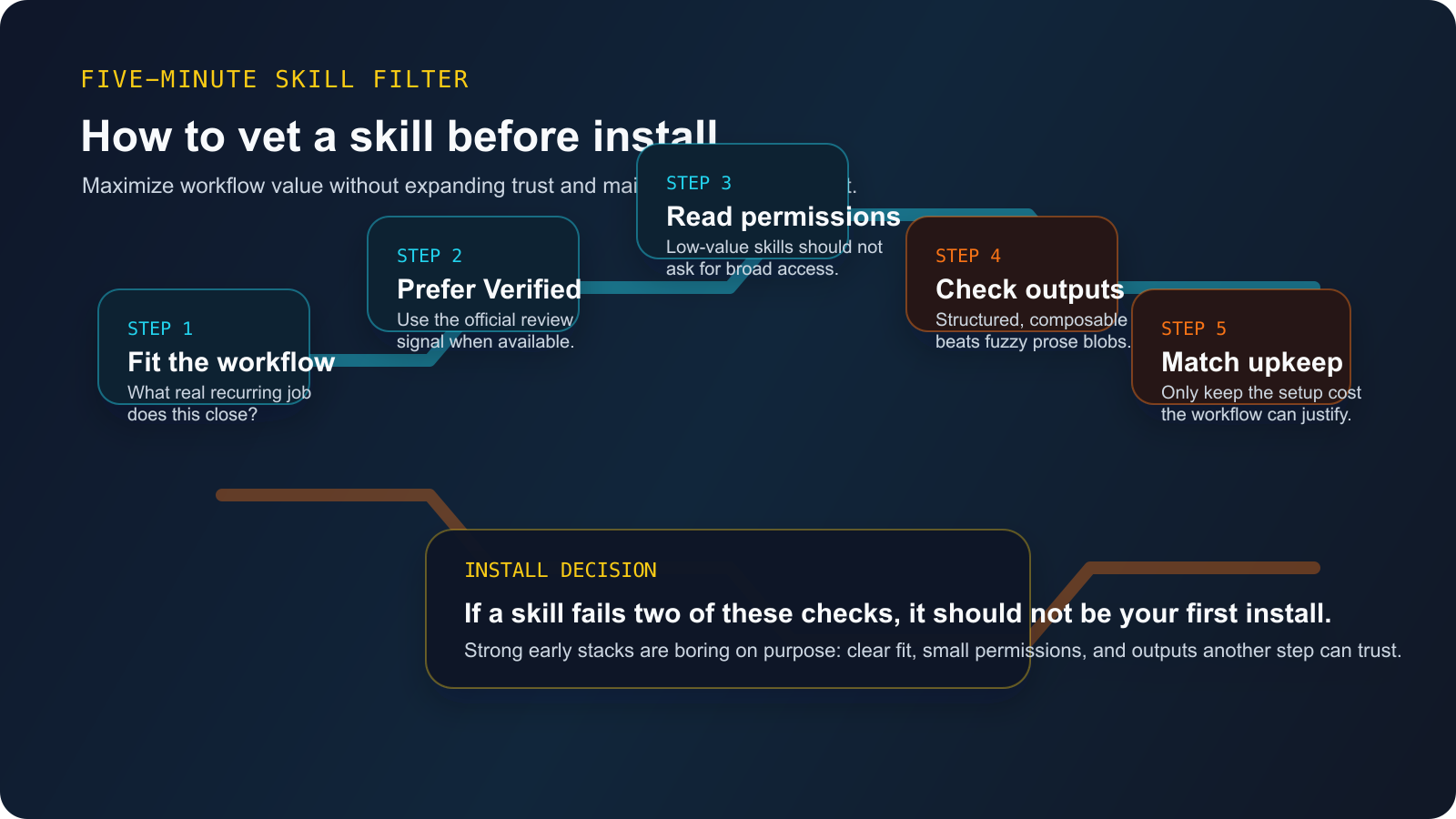
1. Start with workflow fit, not category fit. "Search" or "development" is too broad to be a good decision rule. Ask what recurring job you want to complete. If your real job is code review, github plus code-reviewer is a better answer than some generic "developer tools" collection. If your real job is calendar coordination, calendar plus email is stronger than a random communication skill.
2. Prefer Verified skills when they exist. The official ClawHub docs say Verified badges reflect review for security, quality, documentation, and maintenance. That does not make every non-verified skill bad, but it does make Verified status a strong default filter, especially for early installs. When the ecosystem is large and supply-chain risk is explicitly part of the platform threat model, letting the official review signal do some of the filtering work is rational.
3. Read the permission shape before you install. OpenClaw's security model is built on least privilege. That only helps you if you actually look at what a skill wants. A skill that only needs web access should not be quietly expanding into shell, file write, and broad outbound network privileges. The best early skills are often the ones with the smallest capability surface relative to the value they create.
4. Check the output contract. One of the more useful community insights in recent OpenClaw discussions is that boring, structured skills age better than flashy, fuzzy ones. If a skill's output is easy for another skill or workflow to consume, it compounds. If it returns vague natural-language blobs that downstream steps must guess how to parse, it creates fragility. This is one reason I like the cookbook-backed bundles: they are closer to workflow components than to novelty demos.
5. Make sure the maintenance burden matches the benefit. Some skills are technically impressive but operationally expensive. They require multiple credentials, external services, brittle selectors, or constant retries. That may still be worth it if the workflow value is huge. It is usually not worth it for a first install. Good starter skills should deliver value before they demand babysitting.
What You Should Not Install First
The highest-information-gain part of this topic is not the recommendation list. It is the skip list.
Do not start with over-permissioned third-party skills whose value proposition is vague. If the README sounds powerful but never gets concrete about what it does, what permissions it needs, and how it fails, that is already a red flag. OpenClaw's own security model assumes third-party skills can be risky. Your install choices should reflect that.
Do not start with specialist integrations you cannot evaluate yet. A niche finance bot, crypto executor, or infra operator might eventually be useful. But if you cannot inspect the permission surface, understand the external API dependencies, or judge the author's maintenance quality, it is not a good first-week install.
Do not confuse catalog popularity with workflow leverage. The official popular-skills page is helpful, but it is still a starter lens, not a complete answer. A popular translator or image-generation skill may be excellent. That still does not mean it is the best early install for a developer trying to automate repository work or a support team trying to close tickets faster.
Do not install twenty skills at once. This is the most common self-inflicted mistake. You lose the ability to tell which skill actually improved the agent, which one added failures, and which one silently expanded the security surface. Start with one bundle, use it long enough to notice where the next missing capability really is, then add the next skill intentionally.
The Starter Packs I Would Actually Use
If I were setting up OpenClaw from scratch for the most common workflows, I would not browse endlessly. I would install one of these bundles and stop there for a week. The official starter-pack is fine if you want the widest official baseline, but these narrower bundles are easier to evaluate, easier to trust, and easier to debug when something goes wrong.
General-purpose starter pack
openclaw skill install web-search summarizer code-interpreterUse this if you want research, current information, lightweight synthesis, and a deterministic utility layer before you wire OpenClaw into external systems.
Assistant starter pack
openclaw skill install calendar emailUse this if your goal is scheduling, inbox summarization, draft replies, reminders, and meeting coordination. If you still need help with the underlying OpenClaw setup, read our OpenClaw installation and deployment guide first.
Developer starter pack
openclaw skill install github code-reviewer web-search code-interpreterUse this if you want repository awareness, PR review, internet lookup, and quick execution. After that, pair it with a sensible model configuration using our OpenClaw best model selection guide.
Research and scraping starter pack
openclaw skill install web-search browser-automation code-interpreterUse this if your job depends on live pages, structured extraction, or repetitive web actions. For adjacent reading on browser-driven workflows, see our OpenClaw browser control guide.
Support and knowledge starter pack
openclaw skill install kb-search ticketing summarizerUse this if your job is grounded answer retrieval plus operational follow-through rather than broad general automation.
Frequently Asked Questions
What is the single best OpenClaw skill?
For most users, it is web-search. It improves accuracy, freshness, and research quality across many workflows. But for assistant automation, coding, and scraping, a small scenario-specific bundle beats a single generic skill.
How many skills should I install at the beginning?
Usually two to four is enough. The goal is to complete one real workflow cleanly, not to maximize your registry footprint.
Should I only install Verified skills?
For early installs, mostly yes. Verified status is not a guarantee of perfection, but it is the strongest official trust signal OpenClaw exposes. It is a very good default until you are comfortable evaluating third-party skills yourself.
Are the official popular skills automatically the best skills?
Not always. They are the best general-purpose starting set. The better answer for many users is a cookbook-backed bundle tied to a real workflow.
What if a skill needs API keys or provider credentials?
That is normal for integrations like calendar, email, translator, or image-gen. The question is not whether setup exists. The question is whether the value justifies the setup. If provider credentials are already a pain point, our OpenClaw API guide and OpenClaw API key error guide are the right next reads.
Sources and Method
This article is grounded primarily in current OpenClaw official materials rather than recycled listicles:
- OpenClaw Popular Skills
- ClawHub Registry
- OpenClaw Cookbook Overview
- OpenClaw Security Overview
- openclaw/skills archive repository
The secondary community signal was a recent r/clawdbot discussion about top skills, used only to validate the beginner-overwhelm and reliability concerns, not to establish volatile factual claims.