Gemini Omni 1.2 Flash API Gateway: 4 Routes, Cost by Clip Length
Vercel AI Gateway and OpenRouter carry Google's 3–15 s, up-to-4K model. A flat per-clip gateway costs less than per-second billing for 5–10 s clips to 1080p.
On this page
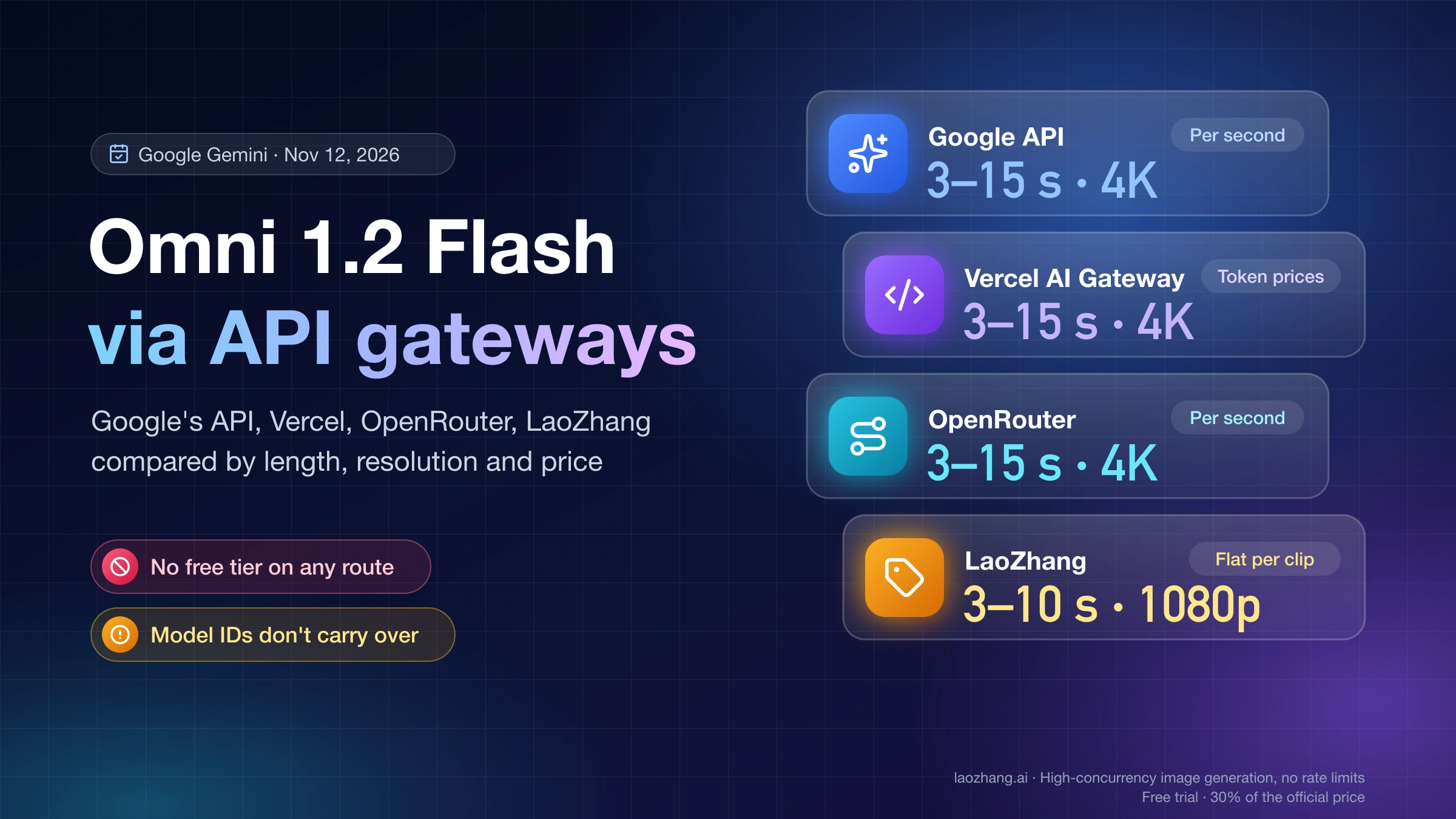
Yes, you can call Gemini Omni 1.2 Flash through an API gateway, but not as a chat-completions request. As of November 12, 2026, three gateways carry it: Vercel AI Gateway serves google/gemini-omni-1.2-flash through the AI SDK's generateText, OpenRouter serves the same ID through its own asynchronous Video Generation API at /api/v1/videos at Google's per-second prices, and LaoZhang serves gemini-omni-1.2-flash on an OpenAI-style POST /v1/videos endpoint at a flat price per clip. Google exposes the model only through its Interactions API, so every gateway defines its own request shape, and a model ID that works on one gateway fails on another.
Choose by clip length and features. If you need clips of 11–15 seconds, 4K, extension, editing of an existing video, reference video or first-and-last-frame control, use Google's own paid API or a pass-through gateway: OpenRouter documents all of these, and Vercel AI Gateway documents 15-second clips, 4K, extension and editing. If your clips are 3–10 seconds at 1080p or below and start from text or images, the flat per-clip price ($0.10, $0.30 or $0.45 for 360p, 720p or 1080p) is lower than Google's per-second rate from 5 seconds up, while 3- and 4-second clips cost less per second.
The per-clip gateway is the one with test results below: six clips generated on November 12, 2026, with one key in one six-minute window, plus seven requests it rejected. What follows about Vercel and OpenRouter comes from their own documentation and model pages. None of the four ways is free: Google lists the free tier for this model as "Not available."
Which gateways carry Gemini Omni 1.2 Flash, and how each one is called
Each way of calling Gemini Omni 1.2 Flash has its own interface, model ID and price model, and only Google's API and the two pass-through gateways cover the model's full 3–15 second, up-to-4K range. Google's own request goes to the Interactions API (POST https://generativelanguage.googleapis.com/v1beta/interactions), not to GenerateContent or Chat Completions, so no gateway can forward it as a plain OpenAI chat call. Vercel wraps it in the AI SDK, while OpenRouter and LaoZhang each put it behind their own asynchronous video endpoint.
| Google Gemini API | Vercel AI Gateway | OpenRouter | LaoZhang | |
|---|---|---|---|---|
| How you call it | Interactions API, edits chained with previous_interaction_id | AI SDK generateText or streamText; the video comes back as a file | POST /api/v1/videos, poll the job, download | POST /v1/videos (OpenAI-style), poll the task, download |
| Model ID | gemini-omni-1.2-flash | google/gemini-omni-1.2-flash | google/gemini-omni-1.2-flash | gemini-omni-1.2-flash |
| What you need | A Google project on the paid tier | A Vercel key, no Google account | An OpenRouter key | A LaoZhang token, no Google account |
| Clip length | 3–15 s | 3–15 s | 3–15 s | 3–10 s |
| Resolution | 360p, 720p, 1080p, 4K | 360p, 720p, 1080p, 4K | 360p, 720p, 1080p, 4K | 360p, 720p, 1080p |
| Inputs and edits | Up to 6 reference images, first and last frame, reference video, extension to 30 s, conversational editing | Edits of 3–15 s source clips with up to 6 reference images, extension to 30 s, follow-ups via previousInteractionId | First and last frame, video references, editing an uploaded video, extension and edits via previous_job_id | Text, one starting image, up to 6 images in total |
| Price model | Per second of output, by resolution | Token prices listed; no per-second video price on its model list | Google's per-second prices | Flat per clip, by resolution only |
Only the LaoZhang column was exercised directly. The Google column follows the Gemini API pricing page and Gemini Omni documentation, the Vercel column follows Vercel's November 5, 2026 changelog for Gemini Omni 1.2 Flash on AI Gateway and its public model list, and the OpenRouter column follows the OpenRouter model page for Gemini Omni 1.2 Flash and its video model list, all as of November 12, 2026. OpenRouter's page adds that for this model, "video generation is only supported through the Video Generation API," so swapping the base URL in a chat client will not return a clip.
Model IDs do not carry over between gateways either. On November 12, 2026, sending the OpenRouter- and Vercel-style ID google/gemini-omni-1.2-flash to LaoZhang's /v1/videos returned HTTP 503 with Current group default has no available channels for model google/gemini-omni-1.2-flash, while the bare gemini-omni-1.2-flash worked in the same session. Moving between gateways means changing the endpoint, the request body and the model string.
One number on gateway model pages misleads people comparing prices. Vercel's model list and OpenRouter's model page show $1.50 input and $9 output per 1M tokens, but $9 is Google's text-output rate. Video output is billed at $12 per 1M tokens, so a "$9 versus $12" gap is not a discount on video.
Which route is cheaper for your clip length: the 4.32-second break-even
At Google's published rates, a flat per-clip price and a per-second price are equal at 4.32 seconds in all three resolutions they share, so per-second billing costs less for 3- and 4-second clips and the flat price costs less from 5 seconds up to its 10-second limit. Google's pricing page bills video output at $12 per 1M tokens and counts 1,931 tokens per second at 360p, 5,792 at 720p, 8,688 at 1080p and 17,376 at 4K. Multiplying gives $0.0232, $0.0695, $0.1043 and $0.2085 per second, and OpenRouter's video model list shows the same figures for this model (for example $0.069504 at 720p). Dividing the flat price by the per-second price gives the break-even: $0.30 / $0.0695 = 4.32 seconds at 720p, and the same 4.32 at 360p and 1080p.
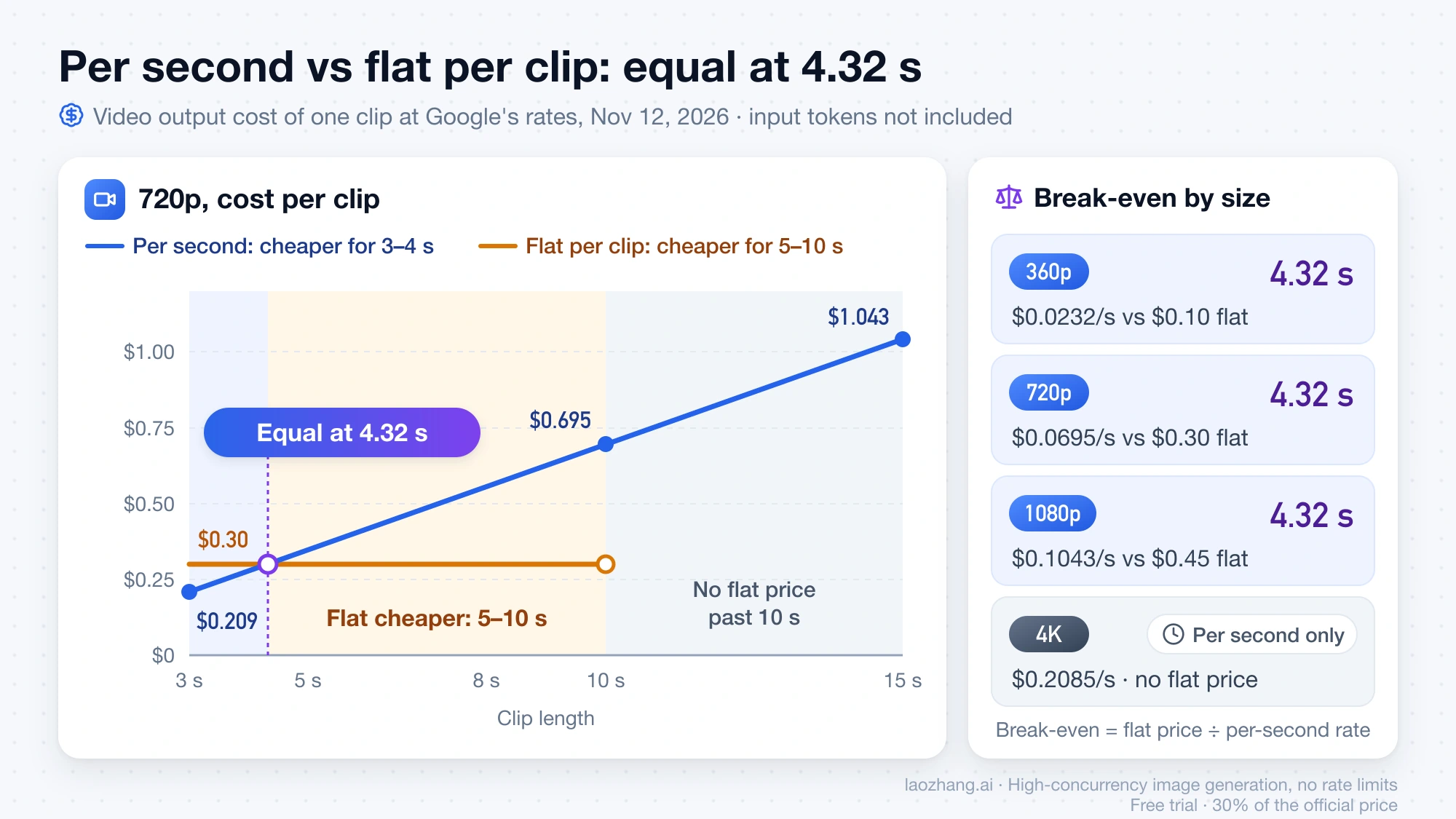
| Clip length | 360p: per-second / flat | 720p: per-second / flat | 1080p: per-second / flat | 4K: per-second only |
|---|---|---|---|---|
| 3 s | $0.070 / $0.10 | $0.209 / $0.30 | $0.313 / $0.45 | $0.626 |
| 4 s | $0.093 / $0.10 | $0.278 / $0.30 | $0.417 / $0.45 | $0.834 |
| 5 s | $0.116 / $0.10 | $0.348 / $0.30 | $0.521 / $0.45 | $1.043 |
| 8 s | $0.185 / $0.10 | $0.556 / $0.30 | $0.834 / $0.45 | $1.668 |
| 10 s | $0.232 / $0.10 | $0.695 / $0.30 | $1.043 / $0.45 | $2.085 |
| 15 s | $0.348 / not offered | $1.043 / not offered | $1.564 / not offered | $3.128 |
The gap grows with volume. A hundred 10-second clips at 720p cost $69.50 at the per-second rate and $30 at the flat price, so the flat price is 43% of the per-second cost at that length. A hundred 3-second clips at 720p reverse the result: $20.85 per second against $30 flat, or 144%. These figures cover video output only. Google also bills input tokens at $1.50 per 1M, which the flat price does not add, and Vercel's model list gives no per-second video price, so Vercel is not in the table. All prices are as of November 12, 2026.
Need 11–15 s, 4K or editing? Google's API or a pass-through gateway
If a clip needs more than 10 seconds, 4K, extension, editing, a reference video or a last frame, skip the per-clip gateway and choose between Google's API, OpenRouter and Vercel AI Gateway. Google's API has the full set: 3–15 seconds in 1-second steps, 360p to 4K, 16:9 or 9:16, up to six reference images, first-and-last-frame interpolation for 3–10 second clips, reference videos (one for 11–15 second clips, up to three for 3–10 seconds), extension of 3–10 seconds per turn up to 30 seconds in total, and conversational editing of a generated or uploaded clip. OpenRouter's page for this model lists 3–15 second clips, up to 4K, 16:9 or 9:16, first and last frames, subject and video references, editing or extending an uploaded video, and follow-ups via previous_job_id, but it does not repeat Google's numeric caps, so the image, reference-video and extension limits above are Google's figures. Vercel's changelog documents 3–15 second clips, 4K, editing with reference images and extension, but does not mention reference video or a last frame. Beyond features, the choice depends on the account you have and the code you already run.
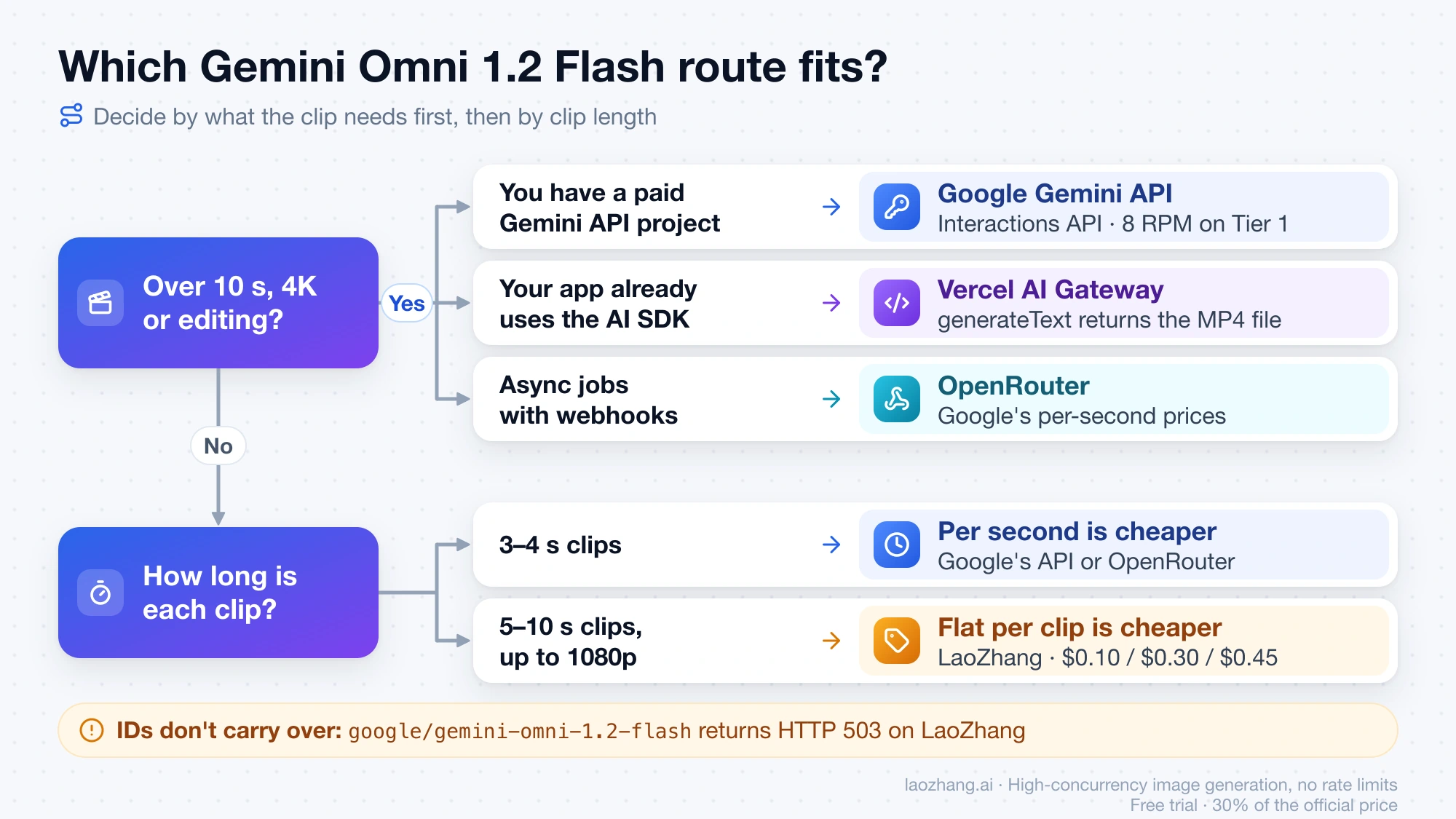
Google's own API makes sense when you already have, or can open, a paid Gemini API project. It is also the only option with published limits for your own project: as of November 6, 2026, Google's Gemini API rate limits page allows this model 8 requests per minute and 40 per day on Tier 1, rising to 40 per minute and 2,000 per day on Tier 3. Gateways do not publish how their own limits relate to those numbers. The key setup and a first Interactions API request are covered in Gemini Omni 1.2 Flash API: Model ID, Cost per Clip, 1.1 Routing.
Vercel AI Gateway fits if your app already uses the AI SDK and you want one Vercel key with no Google account. Its example calls generateText and gets the MP4 back in files with no task ID or polling, and with streamText the video still arrives as one completed file, so a long 4K clip has to finish within a single request; set your server's timeout with that in mind. Vercel's model page for Gemini Omni 1.2 Flash lists token prices but no per-second video price, so compare your first clip's charge in Vercel's usage view against the per-second table above before you scale up.
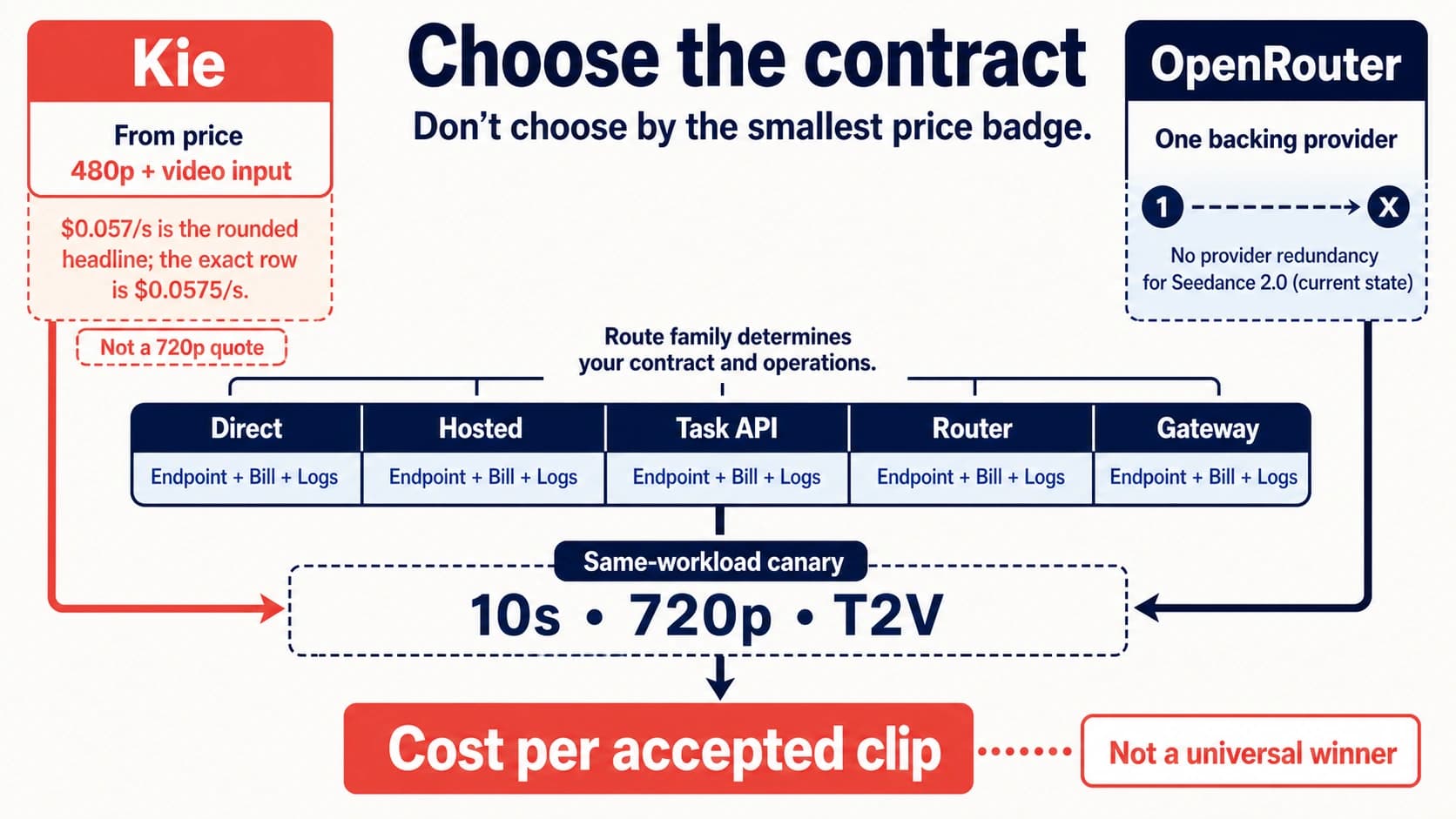
OpenRouter fits if you want Google's per-second prices behind an asynchronous job API with webhooks. The trade-off is that it forwards every request to a single provider, Google AI Studio. Around 03:35 UTC on November 12, 2026, OpenRouter's own model page showed an end-to-end latency P50 of 41.51 seconds and an uptime of 44.18%, which it defines as the share of the past three days that at least one provider was responding. That is a rolling figure taken one week after launch, it changes daily, and it describes OpenRouter's path to Google AI Studio rather than Google's API in general.
Send a first Gemini Omni request through a gateway: create, poll, download
A gateway video call has four steps: get a key, create a task, poll until it finishes, then download and check the file. The commands below are for LaoZhang's /v1/videos endpoint, the one that was run on November 12, 2026; the LaoZhang API documentation describes the same flow. OpenRouter's and Vercel's documented versions follow after the Python script.
Disclosure: laozhang.ai is our own service. Its prices are platform pricing, not an independent comparison.
- Create a token on the LaoZhang token page in the
defaultgroup, with the billing mode set to usage-first or pay-per-request. A token set to usage-only billing cannot call this model. No Google account or Gemini API key is involved. Keep the token in an environment variable.
export LAOZHANG_API_KEY="your-token"- Create the task.
secondsis a whole number from 3 to 10 sent as a string (default"10"),resolutionis360p,720p(default) or1080p, andaspect_ratiois16:9(default) or9:16. LaoZhang's docs say a line in quotes in the prompt is spoken by the character.
curl -s -X POST "https://api.laozhang.ai/v1/videos" \
  -H "Authorization: Bearer $LAOZHANG_API_KEY" \
  -H "Content-Type: application/json" \
  -d '{
    "model": "gemini-omni-1.2-flash",
    "prompt": "A street violinist plays under a lamp on a wet cobblestone street after rain, the camera slowly pushes in. She stops, smiles at the camera and says: \"This one is for you.\" Rain drips and violin in the background.",
    "resolution": "720p",
    "seconds": "10"
  }' | tee create.json

export VIDEO_ID=$(jq -r '.id' create.json)
The response is a task with "status": "queued" and an id. In the test runs this call took 5.5–5.8 seconds to return, so give the HTTP client a timeout of at least several seconds. To start from an image, add "image" with a public URL or a data:image/jpeg;base64,… data URL; for a multipart upload the field name is input_reference. Extra images go in reference_images, up to six images in total.
- Poll every 5–10 seconds until
statusiscompletedorfailed. The status moves fromqueuedtoin_progress(with aprogressvalue) tocompleted. LaoZhang's docs say to keep polling for up to 15 minutes without resubmitting, because a second submission is a new task and is charged again; a task still unfinished after 30 minutes is failed and refunded.
curl -s "https://api.laozhang.ai/v1/videos/$VIDEO_ID" \
-H "Authorization: Bearer $LAOZHANG_API_KEY" | jq '{status, progress, video_url, error}'- Download the MP4 from
video_url, which needs no auth header and is kept for 7 days, or callGET /v1/videos/{id}/contentwith your key. Then check that you got the length and size you asked for.
curl -L -o omni.mp4 "$(curl -s "https://api.laozhang.ai/v1/videos/$VIDEO_ID" \
  -H "Authorization: Bearer $LAOZHANG_API_KEY" | jq -r '.video_url')"

ffprobe -v error -show_entries stream=codec_name,width,height,r_frame_rate:format=duration \
  -of compact omni.mp4
The same flow in Python, with the 15-minute polling limit built in:
import os
import time
import requests

BASE = "https://api.laozhang.ai"
HEADERS = {"Authorization": f"Bearer {os.environ['LAOZHANG_API_KEY']}"}

r = requests.post(f"{BASE}/v1/videos", headers=HEADERS, timeout=60, json={
    "model": "gemini-omni-1.2-flash",
    "prompt": "A paper lantern rises over a night market, vertical shot, "
              "crowd murmur and distant music.",
    "resolution": "1080p",
    "seconds": "5",
    "aspect_ratio": "9:16",
})
r.raise_for_status()  # 400 = rejected at submit, nothing charged
task_id = r.json()["id"]

deadline = time.time() + 15 * 60
while True:
    video = requests.get(f"{BASE}/v1/videos/{task_id}", headers=HEADERS, timeout=60).json()
    if video["status"] in ("completed", "failed") or time.time() > deadline:
        break
    time.sleep(5)

if video["status"] == "completed":
    with open("omni.mp4", "wb") as f:
        f.write(requests.get(video["video_url"], timeout=300).content)
else:
    # failed: read the message; still running: poll the same id later, don't resubmit
    print(video["status"], video.get("error"))
The same task on OpenRouter and Vercel AI Gateway
OpenRouter's video generation guide uses the same create-poll-download pattern with different names. You POST /api/v1/videos with model, prompt, duration (an integer), resolution and aspect_ratio, and get back a job with status: pending and a polling_url. You poll GET /api/v1/videos/{jobId} about every 30 seconds until completed (or failed, cancelled, expired), then download from unsigned_urls, which needs your key in the Authorization header. First and last frames go in frame_images, each with a frame_type of first_frame or last_frame.
curl -s -X POST "https://openrouter.ai/api/v1/videos" \
  -H "Authorization: Bearer $OPENROUTER_API_KEY" \
  -H "Content-Type: application/json" \
  -d '{"model": "google/gemini-omni-1.2-flash", "prompt": "A red ball rolls across a white table.", "duration": 3, "resolution": "360p"}'

# when the job is completed:
curl "https://openrouter.ai/api/v1/videos/$JOB_ID/content?index=0" \
  -H "Authorization: Bearer $OPENROUTER_API_KEY" --output video.mp4
Vercel's changelog example has no job at all. The AI SDK call waits for the clip and returns it among the result's files:
import { writeFile } from 'node:fs/promises';
import { generateText } from 'ai';

const { files } = await generateText({
  model: 'google/gemini-omni-1.2-flash',
  prompt: 'A red ball rolls across a white table.',
  providerOptions: {
    google: {
      responseModalities: ['text', 'video'],
      responseFormat: [{ type: 'video', resolution: '360p', duration: '3s' }],
    },
  },
});

const video = files.find(file => file.mediaType === 'video/mp4');
if (!video) throw new Error('No MP4 video returned');
await writeFile('video.mp4', video.uint8Array);
Six test clips through the gateway: wait times and the files returned
All six clips sent to LaoZhang's /v1/videos between 03:42 and 03:48 UTC on November 12, 2026 completed, each in about half a minute to just over a minute, and each file matched the requested size and length. Every clip came back as an MP4 with H.264 video at 24 fps and an AAC stereo 48 kHz audio track, measured with ffprobe. The wait below runs from submit to completed, with polling every 5 seconds and the submit call included.
| Request | Wait to completed | File returned | List price |
|---|---|---|---|
| 360p, 3 s, 16:9, text only (three runs) | 30.8 s, 30.9 s, 30.7 s | 640×360, 3.03 s, 1.29 MB each | $0.10 each |
| 360p, 5 s, 16:9, from a starting image | 37.2 s | 640×360, 5.03 s, 1.62 MB | $0.10 |
| 720p, 10 s, 16:9, text only | 67.2 s | 1280×720, 10.03 s, 4.99 MB (about 3.98 Mbit/s) | $0.30 |
| 1080p, 5 s, 9:16, text only | 61.1 s | 1080×1920, 5.03 s, 5.01 MB (about 7.95 Mbit/s) | $0.45 |
The six clips cost $1.15 at list price (4 × $0.10 + $0.30 + $0.45). The account's usage counter moved by exactly the list price for the 360p, 1080p and image-to-video tasks; the other readings were blurred by another session using the same key at the time. The 3- and 5-second clips cost the same as a 10-second clip at that resolution would have.
The audio track is not silent: mean volume ranged from −23 to −33 dB. Whether the quoted lines were spoken word for word was not transcribed, so treat lip-sync as untested. The starting-image clip used a 640-pixel-wide frame cut from the 720p clip, sent as a base64 data URL in image.
Six clips from one key in one six-minute window are a sample, not a success rate. LaoZhang's docs give similar expectations: 30–60 seconds for short 360p clips, about a minute for 720p at 10 seconds, and 1.5–2 minutes for 1080p at 10 seconds. OpenRouter's 41.51-second P50 is a different measurement on a different path, so the two numbers should not be read as a speed ranking.
Requests the per-clip gateway rejects, with the exact error messages
Seven requests that stepped outside the per-clip limits were each rejected at submit within about a second with HTTP 400 and type: invalid_request_error, and no charge appeared for any of them. These are LaoZhang's own validation messages from November 12, 2026, not Google's. The last column shows which ones are features you lose and which are limits Google's API has too.
| Field sent | Message returned | On Google's own API |
|---|---|---|
"seconds": "15" | seconds must be a whole number from 3 to 10. | Supported, 3–15 s |
"seconds": "2" | seconds must be a whole number from 3 to 10. | Also not allowed, 3 s minimum |
"resolution": "4k" | resolution must be one of 360p, 720p, 1080p (2K and 4K are not available). | 4K supported |
"aspect_ratio": "1:1" | aspect_ratio must be one of 16:9, 9:16. | Also not offered, 16:9 or 9:16 only |
video_url (a reference video) | video_url is not supported by gemini-omni-1.2-flash; send a prompt and up to 6 images. | Reference video supported |
last_frame | last_frame is not supported by gemini-omni-1.2-flash; send a prompt and up to 6 images. | First-and-last-frame supported, 3–10 s |
Seven images in reference_images | Send at most 6 images in total (input_reference plus reference_images). | Also capped at 6 reference images |
LaoZhang's docs also list no field for extension or multi-turn editing, so those two Google features are missing from this gateway without an error message to look up. If you hit any of the "supported" rows, the fix is a different gateway, not a different request.
Is a gateway clip still Google's output? C2PA credentials and SynthID
Yes, the files that came back through the gateway still carry Google's provenance data. On November 12, 2026, c2patool reported a valid C2PA manifest (validation_state: Valid) issued by Google LLC in all six downloaded files, written by the "Google C2PA Core Generator Library," with the actions "Created by Google Generative AI." and "Added imperceptible SynthID watermark" and the source type trainedAlgorithmicMedia. That matches Google's statement that all Omni output carries an invisible SynthID watermark and C2PA content credentials. It shows the clips came from Google's generator and that the gateway did not strip the credentials, but on its own it does not prove which Omni version made a clip. Any platform or tool that reads C2PA data will identify these clips as AI-generated, the same as clips from Google's own API.
Blocked prompts and retries: when a failed task costs money
A blocked prompt on the per-clip gateway is accepted first and fails later, and the charge comes back. On November 12, 2026, a prompt naming a real celebrity got HTTP 200 and a task ID, then ended as failed 11.6 seconds later with error.code: video_generation_failed and the message The prompt or images were blocked: the model can't create videos of real people's names or likenesses. This request is not charged. Remove the person's name or photo and retry. The account's usage counter rose by $0.10 at submit and was back at its previous value about 30 seconds later. LaoZhang's docs say the same applies to every failed task, including sexual content and copyrighted characters, while requests rejected at submit are never charged. The cost of a retry depends on what you resubmit: a corrected prompt is a new task at the full clip price, and resubmitting a task that is merely slow is charged a second time while the first one may still complete.
Gemini Omni 1.2 Flash gateway: other questions
Is there a free Gemini Omni 1.2 Flash API?
No. As of November 12, 2026, Google's pricing page lists the free tier for gemini-omni-1.2-flash as "Not available," and the gateways resell paid access. Vercel's free credits of $5 every 30 days are the closest thing, but Vercel's model page does not say whether they apply to this model. If you only need clips in Google's apps rather than an API, the daily limits are in Google Veo Limit Per Day: 5 Clips in Flow, No Count in Gemini.
What happens to gemini-omni-1.1-flash requests on December 3?
From December 3, 2026, Google routes every request to gemini-omni-1.1-flash to gemini-omni-1.2-flash and bills it at 1.2 rates, according to the Gemini API pricing page. What that means for an existing integration is covered in Gemini Omni 1.2 Flash API: Model ID, Cost per Clip, 1.1 Routing.
How do I get a continuous clip longer than 15 seconds?
Gemini Omni 1.2 Flash generates at most 15 seconds per request and reaches 30 seconds only through extension on Google's API and the pass-through gateways. For 20–60 second continuous clips, LaoZhang's docs point to Muse on the same /v1/videos endpoint and token; see Muse Video API: No Meta Endpoint Yet, How to Call It in Python.
Sources7
External pages this guide links to, in the order they appear. Last updated Nov 12, 2026.
Sources7
External pages this guide links to, in the order they appear. Last updated Nov 12, 2026.
- 1.Gemini API pricing pageai.google.dev/gemini-api/docs/pricing
- 2.Gemini Omni documentationai.google.dev/gemini-api/docs/omni
- 3.Vercel's November 5, 2026 changelog for Gemini Omni 1.2 Flash on AI Gatewayvercel.com/changelog/gemini-omni-1-2-flash-now-available-on-ai-gateway
- 4.OpenRouter model page for Gemini Omni 1.2 Flashopenrouter.ai/google/gemini-omni-1.2-flash
- 5.Gemini API rate limits pageai.google.dev/gemini-api/docs/rate-limits
- 6.model page for Gemini Omni 1.2 Flashvercel.com/ai-gateway/models/gemini-omni-1.2-flash
- 7.video generation guideopenrouter.ai/docs/guides/overview/multimodal/video-generation