FLUX.2 Flex vs Pro: Which Model Is Worth Using?
Start with FLUX.2 Pro for lower generation costs. Test Flex when text or fine details need more control. Compare current BFL pricing, editing costs, and the acceptance rate that would justify paying more.
On this page

Start with FLUX.2 Pro if you need a practical default for production. Test FLUX.2 Flex when exact text, small details, or adjustable inference settings are central to the job. That recommendation follows their available controls and current pricing; it does not mean either model wins every visual comparison. Black Forest Labs positions Pro for production throughput and Flex for typography and fine detail, but those are vendor descriptions, not a guarantee that your next image will pass review. BFL model guide
The deciding question is whether Flex produces enough additional usable images to justify its higher cost. A slightly more attractive result may be worth the premium for a campaign hero image. It may be irrelevant for a catalog background that Pro already gets right.
The prices below are BFL's direct API list prices in US dollars, checked September 6, 2026. They do not describe a third-party provider's bill or a Playground credit package.
What you gain by choosing Flex
Both models generate and edit images. The meaningful difference is how much control you have over generation, rather than whether one can accept a reference image.
| Decision | FLUX.2 Pro | FLUX.2 Flex |
|---|---|---|
| First model to try for a repeatable production job | Lower-cost starting point | Candidate when additional control addresses a recurring defect |
| User-adjustable inference steps | Not exposed in the current fixed Pro API schema | steps: 1–50; default 50 |
| User-adjustable guidance | Not exposed in the current fixed Pro API schema | guidance: 1.5–10; default 5 |
| Reference-image editing | Supported | Supported |
| Text and fine details | Judge against your deliverable | BFL specifically positions Flex for these tasks; verify the actual output |
The parameter limits come from the current Pro API reference and Flex API reference. The absence of a public control is not a claim about how Pro works internally.
Inference steps control the number of generation steps; guidance controls how strongly the model follows the prompt. BFL describes higher Flex guidance as stronger adherence with reduced realism. Turning every setting up therefore does not establish the best result. A clean product photo and a poster with tightly specified lettering can require different compromises. Flex parameter documentation
For example, a designer making an ad with the exact headline “WEEKEND EDITION” should reject missing or substituted letters even if the overall composition is excellent. A developer replacing backgrounds for product listings may instead reject changes to a zipper, logo, or silhouette. Flex is worth testing when its controls help solve that specific failure. Neither model's name proves that it will.
These settings adjust inference. They do not give you downloadable Flex weights, fine-tuning access, or a public LoRA training workflow. BFL's downloadable models are separate choices within the wider FLUX family.
The price gap grows with resolution and reference images
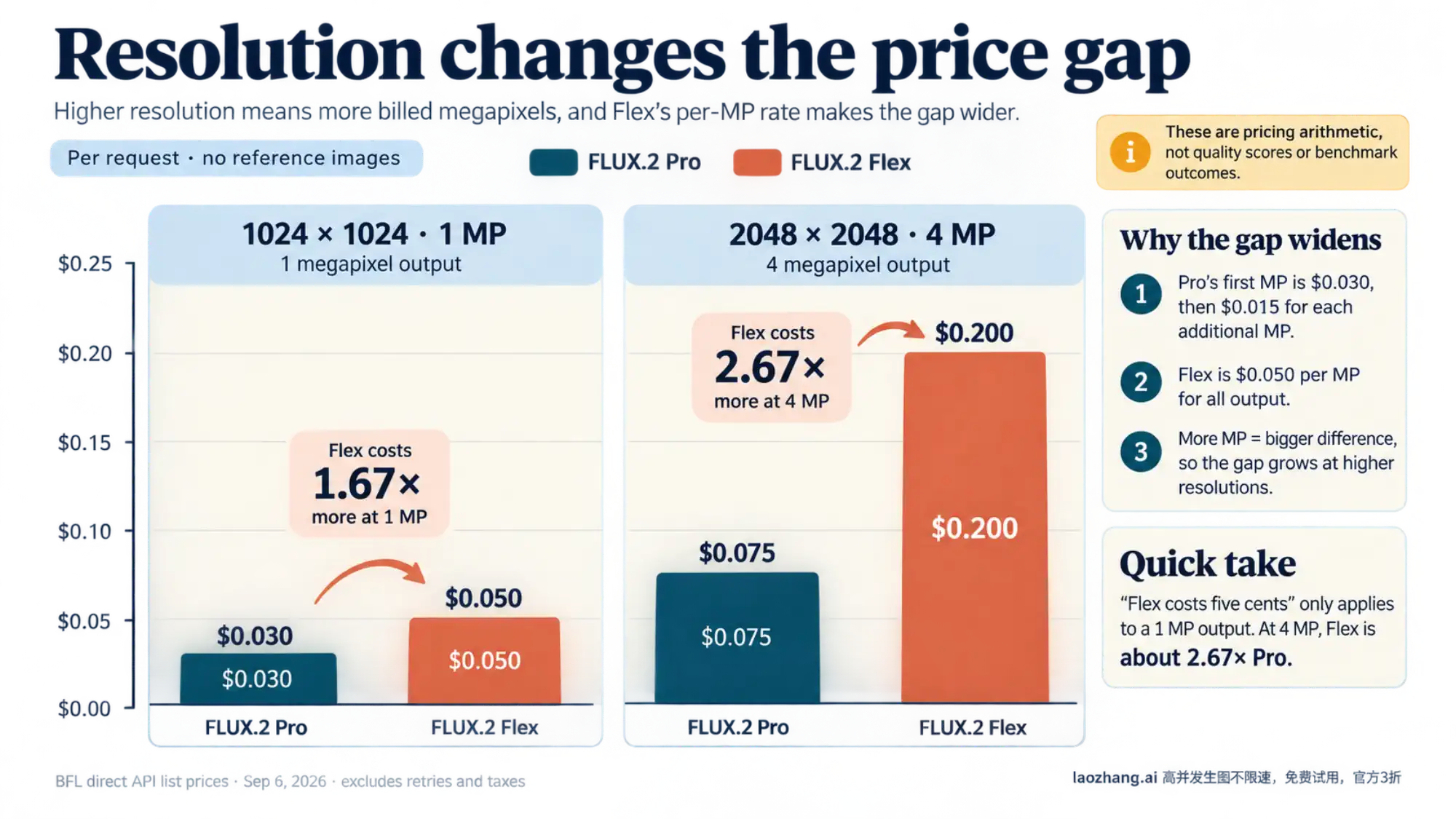
BFL currently charges Pro $0.03 for the first output megapixel, then $0.015 for each additional output megapixel and $0.015 per billed reference-image megapixel. Flex is $0.05 per billed megapixel for both output and references. These are the detailed rates on the current FLUX.2 pricing page.
This matters because “Flex costs five cents” describes only a one-megapixel output with no reference images. It is not a general image-editing price.
| Example request | Billed output | Billed references | Pro | Flex |
|---|---|---|---|---|
| Generate a 1024 × 1024 image | 1 MP | 0 MP | $0.030 | $0.050 |
| Generate a 2048 × 2048 image | 4 MP | 0 MP | $0.075 | $0.200 |
| Edit using one 2048 × 2048 reference, output 1024 × 1024 | 1 MP | 4 MP | $0.090 | $0.250 |
| Use three 1024 × 1024 references, output 2048 × 2048 | 4 MP | 3 MP | $0.120 | $0.350 |
These are arithmetic examples using BFL's listed rates, excluding retries and taxes. The first two also match the pricing calculator's displayed estimates; an estimate is not a settled charge.
For 1,000 text-to-image requests, that is $30 versus $50 at 1024 × 1024, or $75 versus $200 at 2048 × 2048. At the higher resolution, Flex costs about 2.67 times as much as Pro, rather than the roughly 1.67 times implied by comparing only their starting prices.
Count megapixels the way BFL bills them
On this pricing page, one megapixel means 1024 × 1024 pixels, and BFL rounds up the output and each reference image separately. Do not divide a combined pixel total by one million and round once at the end. BFL caps output at 4 MP; “4 MP” also does not mean a 4K display resolution. Pricing rules and calculator
Reference handling changes with the number of inputs. A single reference up to 4 MP is processed at its original resolution; above that, BFL says it is downsampled and billed at 4 MP. With multiple references, each image above 1 MP is downscaled to 1 MP and billed accordingly. Adding references can therefore change both the bill and the image detail available to the model. The three-reference example above intentionally uses 1 MP files so there is no ambiguity about downscaling.
If O is the rounded output MP and I is the total billed reference MP, the current formulas are:
Pro:  $0.03 + $0.015 × (O − 1) + $0.015 × I
Flex: $0.05 × (O + I)

O ranges from 1 to 4.
Older BFL material can produce conflicting quotes: the editing guide still lists $0.06 for Flex, while a help overview describes editing at $0.10/MP. For a new budget, use the detailed live pricing table and calculator with your actual inputs, and recheck before committing to a large batch. Fewer inference steps are not listed as a Flex price discount. Current pricing, editing guide
Use acceptance rate to decide whether Flex pays for itself
Compare cost per usable image, not just cost per request:
Cost per usable image = total generation spend / accepted imagesFor a batch of otherwise identical requests, the same calculation is request cost divided by acceptance rate. Define “accepted” before the test: correct text, preserved product identity, suitable composition, and whatever else the delivery actually requires. Count every paid attempt, including unsuccessful variations.
At 1 MP with no references, Flex costs $0.05 versus Pro's $0.03. To beat Pro on generation spend alone, Flex's acceptance rate must be more than 1.67 times Pro's. If Pro passes 50% of images, Flex would need to pass more than 83.3%. These percentages are a hypothetical break-even calculation, not measured model performance.
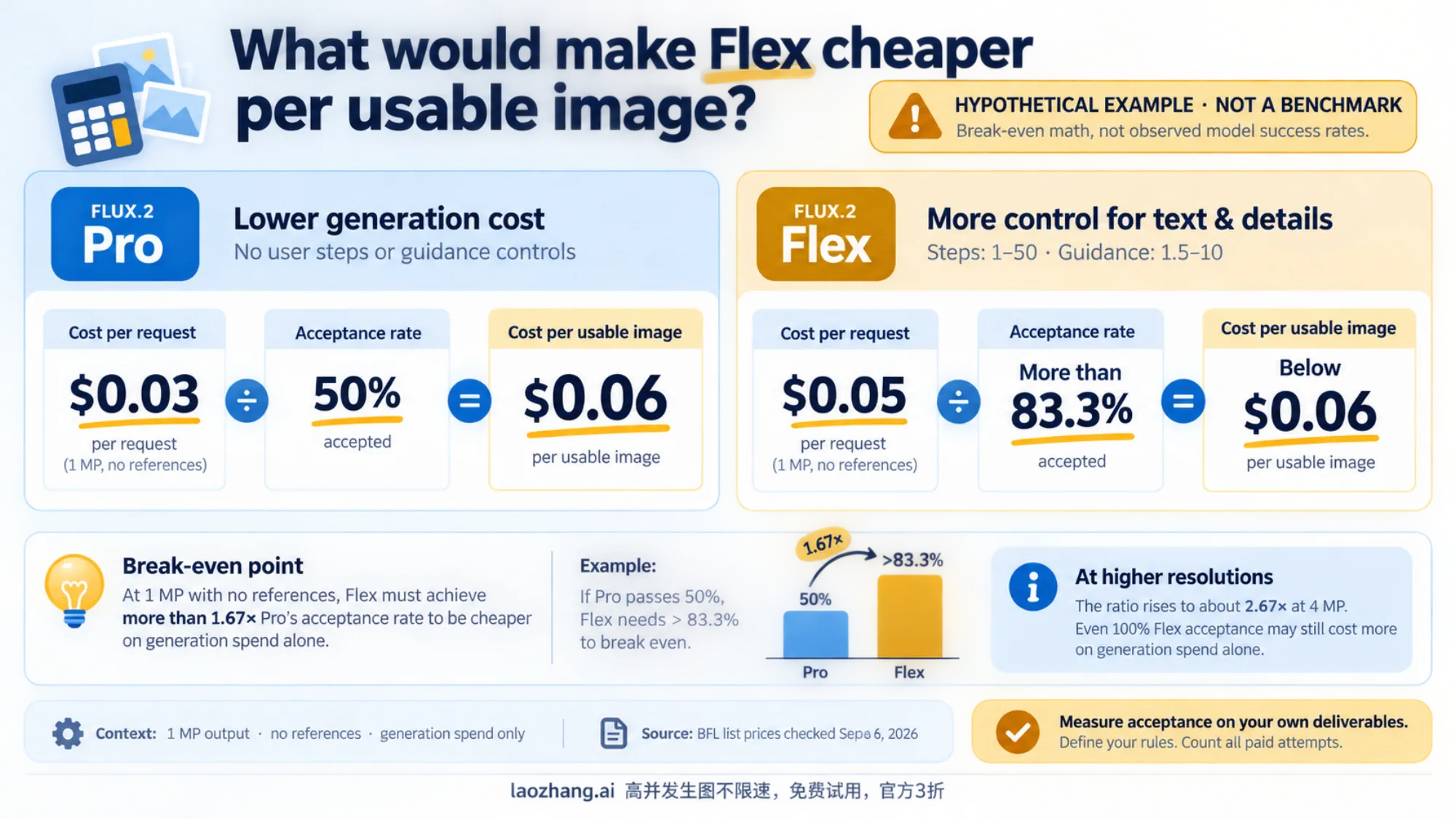
At 4 MP with no references, the ratio rises to about 2.67. If Pro already passes 50%, even a 100% Flex acceptance rate would not make Flex cheaper on generation spend alone. Flex could still be the better purchase if it reduces expensive manual correction or delivers a result Pro cannot reliably produce. Track retouching time separately so that benefit is visible instead of assuming it.
This also suggests a practical mixed workflow: use Pro for tasks it already passes, then evaluate Flex on the failure categories that matter. Include the cost of the initial Pro attempts when budgeting that workflow; sending an image to a second model does not erase the first bill.
Check the endpoint before copying a comparison
Use the exact model identifier in your test notes. The fixed Pro endpoint is /v1/flux-2-pro; some BFL guides use /v1/flux-2-pro-preview, which is a separate endpoint. The Flex endpoint is /v1/flux-2-flex. Results labeled only “Pro” do not tell you which one was used. Pro API schema, BFL generation guide
Request fields also differ. Flex exposes prompt_upsampling, which defaults to true; Pro exposes disable_pup. Do not copy one request body to the other and assume that omitted or renamed settings behave identically. Record the settings you actually submit, including prompt enhancement, seed, dimensions, and reference files. Flex API schema
There is an unresolved documentation mismatch for reference counts. BFL's editing guide advertises up to eight references for Pro through the API and ten in Playground, and up to ten for Flex through either interface. Yet the current Flex API schema lists only input_image through input_image_8. If you need nine or ten references, verify support for your chosen interface before building around it; the guide alone is not a reason to invent input_image_9 and input_image_10 fields. Editing limits, current Flex request fields
Run a comparison that matches the work you will ship
A useful test shows whether the added control improves your actual deliverables. Begin with actual deliverables: a text-heavy promotion, a product edit, and any other recurring task that would change your choice. Select enough variations to reveal repeated failures rather than relying on a single lucky image.
- Write the acceptance rules first. For a promotional graphic, spell out the exact copy, punctuation, and placement. For a product edit, identify features that must remain unchanged. Judge text and fine details at the intended delivery size.
- Keep the materials and budget comparable. Use the same source files, requested dimensions, and task description. Record the exact endpoint and all settings. A shared seed is useful bookkeeping, but it does not establish identical noise or a one-to-one comparison across different models.
- Establish a baseline, then tune Flex deliberately. Start with the documented Flex defaults of 50 steps and guidance 5. As an experimental choice, you could compare 30 steps with 50 while keeping guidance fixed, then change guidance for a failure that needs stronger adherence. Changing every control at once makes the cause harder to understand.
- Save completed images and operational measurements. Record total elapsed time until a usable file is retrieved, generation spend, pass/fail reason, and correction time. An accepted API request or task ID is not an image. BFL returns an
idandpolling_url; wait forReady, handle failures and a timeout, and download the result before its signed URL expires after 10 minutes. Result lifecycle, result API - Choose by task category. Compare acceptance rate and cost per accepted image for each type of work. If Flex only improves lettering, that finding supports using it for lettering-heavy jobs; it does not establish a winner for every photo edit.
Use the BFL model page to choose the API or Playground entry point, then price the real input dimensions in the FLUX.2 calculator. Pro is the sensible starting point when it meets your acceptance rules. Flex earns its place when adjustable inference solves a concrete quality problem and the resulting improvement is worth the full cost of obtaining the image.
Sources8
External pages this guide links to, in the order they appear. Last updated Sep 6, 2026.
Sources8
External pages this guide links to, in the order they appear. Last updated Sep 6, 2026.
- 1.BFL model guidehelp.bfl.ai/articles/6122710168-which-flux-2-model-should-i-choose
- 2.Pro API referencedocs.bfl.ai/api-reference/models/generate-or-edit-an-image-with-flux2-[pro]
- 3.Flex API referencedocs.bfl.ai/api-reference/models/generate-or-edit-an-image-with-flux2-[flex]
- 4.FLUX familybfl.ai/models/flux-2
- 5.FLUX.2 pricing pagebfl.ai/pricing
- 6.editing guidedocs.bfl.ai/flux_2/flux2_image_editing
- 7.BFL generation guidedocs.bfl.ai/flux_2/flux2_text_to_image
- 8.result APIdocs.bfl.ai/api-reference/utility/get-result