DeepSeek Edit Limit Reached: Counted per Message, Not per Day
Edit limit reached in DeepSeek means one message used up its versions, usually 6, not a daily quota. Waiting won't reopen it; branch from the message above.
On this page
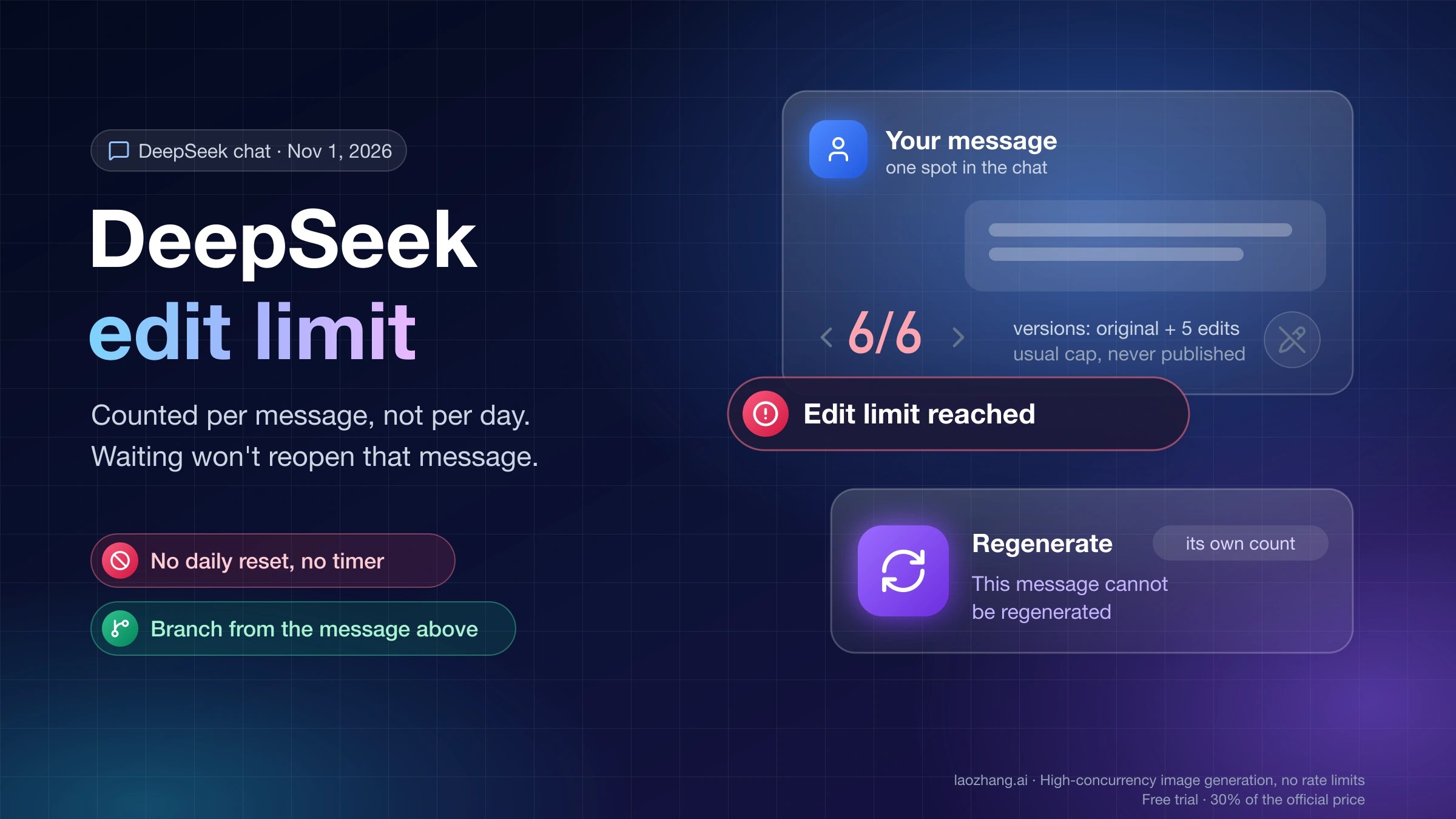
"Edit limit reached" and "Regeneration limit reached" in DeepSeek chat mean that one message has run out of versions, not that your account hit a daily quota. DeepSeek counts the versions stored at a single spot in the conversation: your original prompt plus each edit, or each answer regenerated under the same prompt. Once that count reaches the cap for your mode, the pencil turns grey, the regenerate button's tooltip changes to "This message cannot be regenerated", and nothing is sent. Users have reported about 6 versions for edits since the cap appeared on May 29, 2026; DeepSeek has never published the number.
Because the count belongs to that one message, waiting won't unlock it, and other messages keep counts of their own. To keep your chat or story going, send the correction as a new message, or edit the message one step above and resend your text there, which starts a fresh branch with fresh counts. If a scene needs dozens of rewrites, the DeepSeek API has no edit or regenerate cap and charges per token instead.
The exception is a different warning telling you that you're editing or regenerating too frequently and to try again later. That one is a time-based throttle, so stopping for a while does help. "Message limit reached" and "Length limit" warnings are about the size of the chat, and they need a new chat.
How many edits does DeepSeek allow? Usually 6 versions per message
DeepSeek doesn't publish the number, but its web-app code and user reports both point to 6 versions of a message for edits, with fewer regenerations in Expert mode. The cap is a per-model setting sent by DeepSeek's server, so it can differ between Instant and Expert and change without an app update.
The public scripts that chat.deepseek.com loaded on November 1, 2026 (web build main.d1d163b7e4, downloaded without signing in) contain both toasts word for word and the check behind them. The check counts the versions already stored at that message position, subtracts one for the original, and disables the button once the result reaches the server's edit_quota or regenerate_quota for your model. When the server sends no number, the code falls back to 5, so the original plus 5 edits makes 6 versions and the counter under the message reads 6/6. The live values only reach signed-in accounts, and the settings endpoint answers SETTINGS_NOT_FOUND without one, so the cap on your account may not be the fallback.
User reports line up with that default. A report by Zimu AI on May 30, 2026, reprinted by Huxiu, put edits at usually 6 and regenerations at 3–6 in a normal chat and about 3 in Expert mode. GitHub issue #1445 on DeepSeek-V3 asks DeepSeek to remove "the 6 edition and generation limits". An Android screenshot posted in GitHub issue #1372, "New edit limit is ruining role-playing games", shows Instant mode with the counter at 7/7 and the grey text "Edit limit reached. Message not sent." That is the same rule seen from the app: six versions went through, and the seventh was refused without a reply.
When does the DeepSeek edit limit reset? Not on a timer
The edit and regeneration caps aren't counted per day or per chat, and the web app's check has no timer: it only looks at how many versions that one message already has. Versions you've created aren't deleted, so in the web app the same message stays blocked an hour or a day later. Whether DeepSeek's server ever clears old counts can't be seen from the app code, and DeepSeek hasn't said.
Every other position keeps its own count. A new message at the bottom and every message in a new chat start from zero, which is why the options further down work. An earlier prompt in the same chat has a separate count too, but it may already hold versions, and each branch you start from it uses one more. The two counts for one turn are also separate: using up the regenerations on an answer doesn't touch the edits left on the prompt above it.
The common advice to "wait 15–30 minutes" traces back to a Xiaohongshu account that Zimu AI described as semi-official. In late May it blamed compute pressure after a surge of app traffic and warned that rapid repeated clicks could be flagged as abnormal; DeepSeek hasn't confirmed any of it. Since the count check has nothing that expires with time, that advice most likely describes the separate "too frequently" warning rather than the per-message cap. That reading is an inference from the code, not a statement from DeepSeek.
Edit limit, "too frequently" or length limit: which message is it?
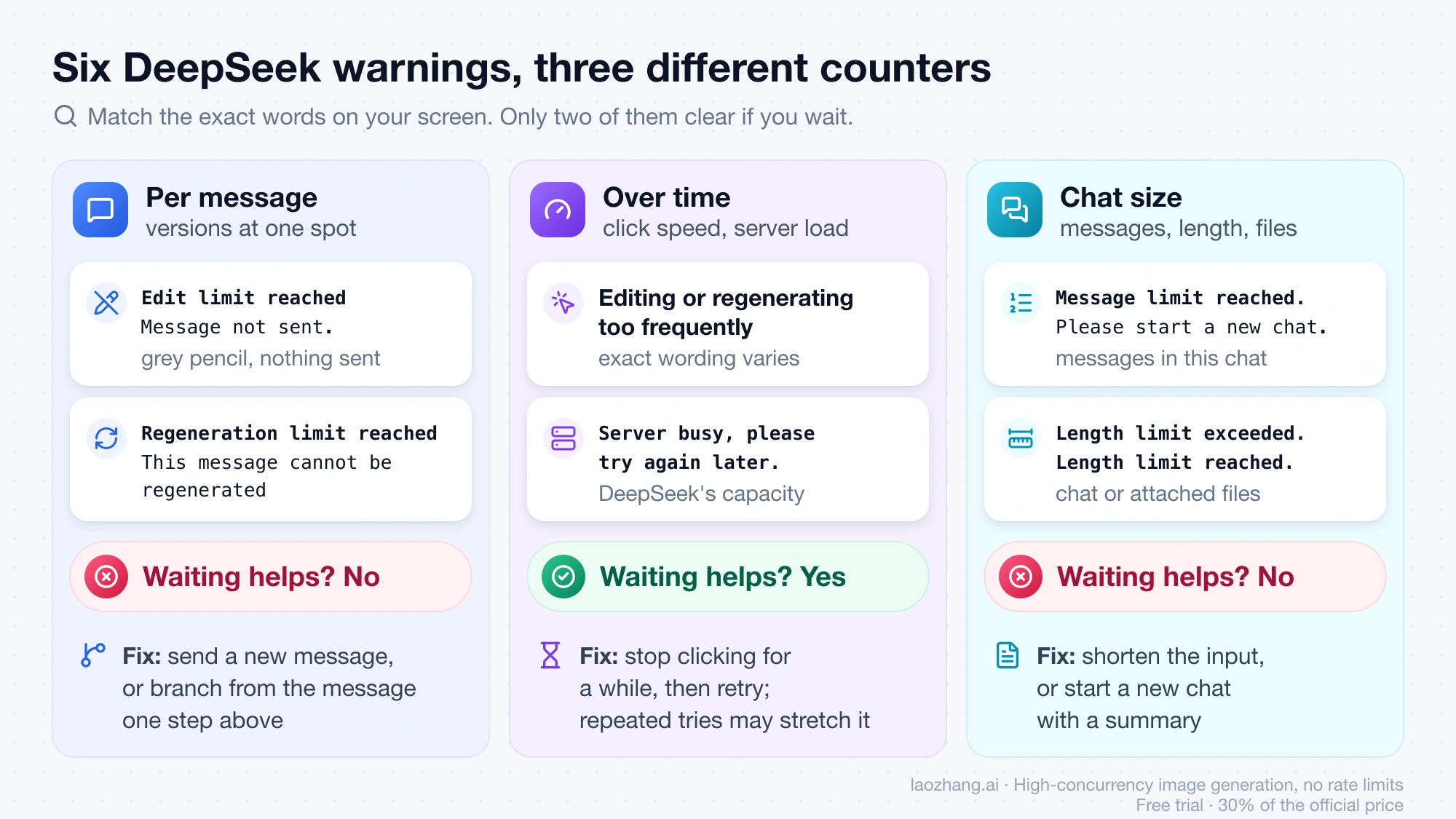
Six warnings look alike in DeepSeek chat, and only two of them go away if you wait. Match the exact words on your screen to a row, because the fix for a per-message cap and the fix for a full chat are different.
| What you see | What is counted | Does waiting help? | What to do |
|---|---|---|---|
| "Edit limit reached" when you click the grey pencil; in the app, "Edit limit reached. Message not sent." | Versions of this one prompt | No, the web check has no timer | Send the change as a new message, or branch from the message above |
| "Regeneration limit reached", or the tooltip "This message cannot be regenerated" | Answers generated under this one prompt | No | Edit the prompt instead (a separate count), or branch from above |
| A warning that you're editing or regenerating too frequently, try again later | How fast you've been clicking, over a time window | Yes | Stop clicking for a while; repeated tries may stretch it |
| "Message limit reached. Please start a new chat." | Number of messages in this chat | No | Start a new chat with a summary |
| "Length limit exceeded. Your message will be sent to a new chat." or "Length limit reached. Try shortening or start a new chat." | Size of the chat or of attached files | No | Shorten the input or start a new chat |
| "Server busy, please try again later." | DeepSeek's capacity, for everyone | Yes | Retry later |
Wording for the edit, regeneration, message-count and length rows comes from the same November 1, 2026 web build; the "too frequently" warning isn't in that web code, so it comes from DeepSeek's server or app, and its exact wording varies between reports. One trap: "This message cannot be regenerated" also appears on answers that were stopped by the content filter or by an over-long context. If you never regenerated that answer, the cause is the content or the chat length, not the cap.
How to keep a DeepSeek chat or story going after the limit
The safest option depends on which count ran out and whether the turns below the blocked message matter to you. All but the last one work inside the normal chat.
| Your situation | What to do | What you keep | What it costs you |
|---|---|---|---|
| "Regeneration limit reached" on an answer | Edit the prompt above it, even with a small change, to get a new answer branch | Everything above the prompt | One of that prompt's edits |
| "Edit limit reached" on your latest prompt | Send the correction as a new message ("Rewrite your last reply so that…") | The whole chat | The unwanted reply stays in the context the model reads |
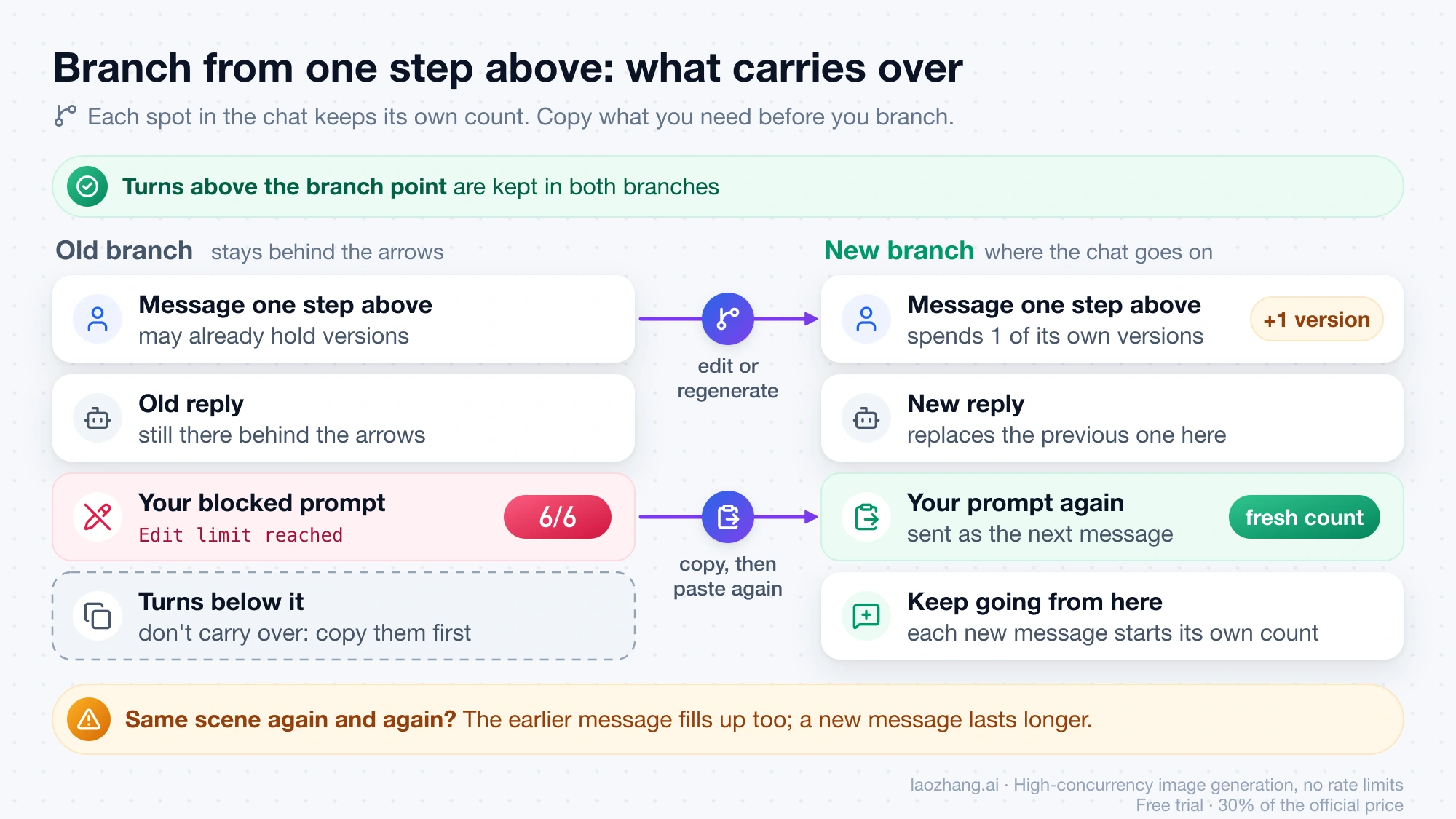
| Both counts used up and you need that turn redone | Copy your prompt, edit or regenerate the message one step above, then paste your prompt again | Everything above that earlier message | The previous reply is replaced, and that earlier spot has its own cap |
| The chat hit "Message limit reached" or a length warning | Paste a summary of the story so far into a new chat (ask DeepSeek for one while the old chat still accepts messages) | Characters, plot and rules in summary form | Exact wording of earlier turns |
| A scene needs dozens of rewrites | Move the chat to the DeepSeek API in a client such as Janitor AI or SillyTavern | Whatever history you paste in | Per-token cost and some setup |
Branching from one step above is a workaround shared on r/DeepSeek, and it works because each position keeps its own count. Before you use it, copy anything you want from the blocked branch: the old versions stay behind the arrows under that message, but nothing written below them carries over to the new branch. If you keep rewriting the same scene, the earlier message fills up too, so sending a new message lasts longer in long role-plays.
DeepSeek API: no edit cap, each regeneration billed per token
DeepSeek's chat app has no paid tier that raises the caps; the paid product is the DeepSeek API, which bills per token and has no edit or regenerate button at all. Each API request sends the whole chat history, so "editing" means changing your own copy of the history and resending it, and "regenerating" means sending the same history again. No per-message cap applies, which is what GitHub commenters mean when they say the API has no edit limit.
The cost of one regeneration is the history you resend plus the reply. With deepseek-flash at off-peak list prices as of November 1, 2026 (DeepSeek API pricing page), a 30,000-token history counted as a cache hit and an 800-token reply cost 30,000 × $0.003/1M + 800 × $0.60/1M = $0.00009 + $0.00048 = $0.00057. A cache miss bills the history at $0.15 per million instead.
| Model, history (off-peak) | One regeneration, cache hit | One regeneration, cache miss | 100 regenerations, hit / miss |
|---|---|---|---|
| deepseek-flash, 30,000 tokens | $0.00057 | $0.00498 | $0.057 / $0.498 |
| deepseek-flash, 100,000 tokens | $0.00078 | $0.01548 | $0.078 / $1.548 |
| deepseek-v4-pro, 30,000 tokens | $0.00224 | $0.02138 | $0.224 / $2.138 |
These are calculations from the list prices, not a measured bill. Cache hits aren't guaranteed, so treat the miss column as the upper case. Peak hours double every figure, and thinking tokens count as extra output. For the full price list and the weekday peak window, see DeepSeek API Peak Hours: Current Prices and When to Wait.
You need an API key, a balance topped up on the DeepSeek platform, and a client, because the API isn't the chat website. For role-play, How to Set Up DeepSeek on Janitor AI: Proxy URL, Model Name, Key covers the proxy URL, model name and key. The limit that does apply on the API is concurrency: deepseek-flash allows 2,500 requests at once and deepseek-v4-pro 500, and going over returns HTTP 429. DeepSeek doesn't publish which API model sits behind the app's Instant and Expert modes, so answers may read differently from the chat app.
Will DeepSeek remove the edit and regeneration limit?
There's no sign of it as of November 1, 2026. DeepSeek made no announcement when the caps appeared on May 29, 2026, and it has not commented since: issues such as #1373 on the DeepSeek-V3 GitHub repository got no staff reply, and #1373 and #1375 were closed automatically as stale. The semi-official Xiaohongshu account said the limits would probably be lifted once new Huawei Ascend supernode cards came online in the second half of 2026. That window is here, yet the web build from November 1 still contains the check, and users were still reporting the caps in September and October.
The mobile app's version 2.1.1, released on May 21, drew reviews about the caps and is sometimes named as their start, but users first hit them on May 29. The likeliest explanation is that DeepSeek's server switched the caps on later, which fits the cap value coming from server settings rather than from the app.
Sources5
External pages this guide links to, in the order they appear. Last updated Nov 1, 2026.
Sources5
External pages this guide links to, in the order they appear. Last updated Nov 1, 2026.
- 1.reprinted by Huxiuhuxiu.com/article/4862909.html
- 2.GitHub issue #1445 on DeepSeek-V3github.com/deepseek-ai/DeepSeek-V3/issues/1445
- 3.GitHub issue #1372, "New edit limit is ruining role-playing games"github.com/deepseek-ai/DeepSeek-V3/issues/1372
- 4.DeepSeek API pricing pageapi-docs.deepseek.com/quick_start/pricing
- 5.#1373 on the DeepSeek-V3 GitHub repositorygithub.com/deepseek-ai/DeepSeek-V3/issues/1373