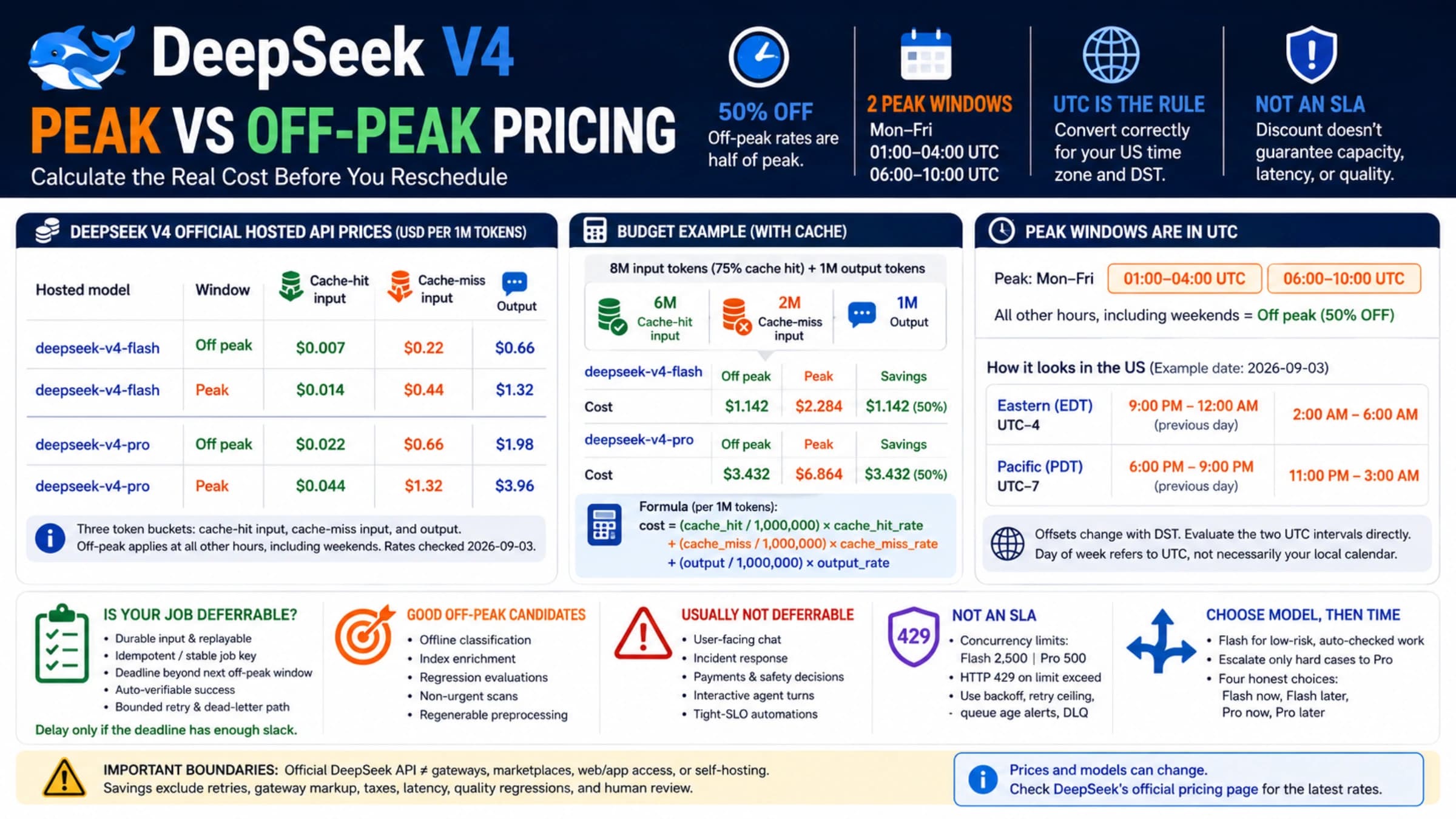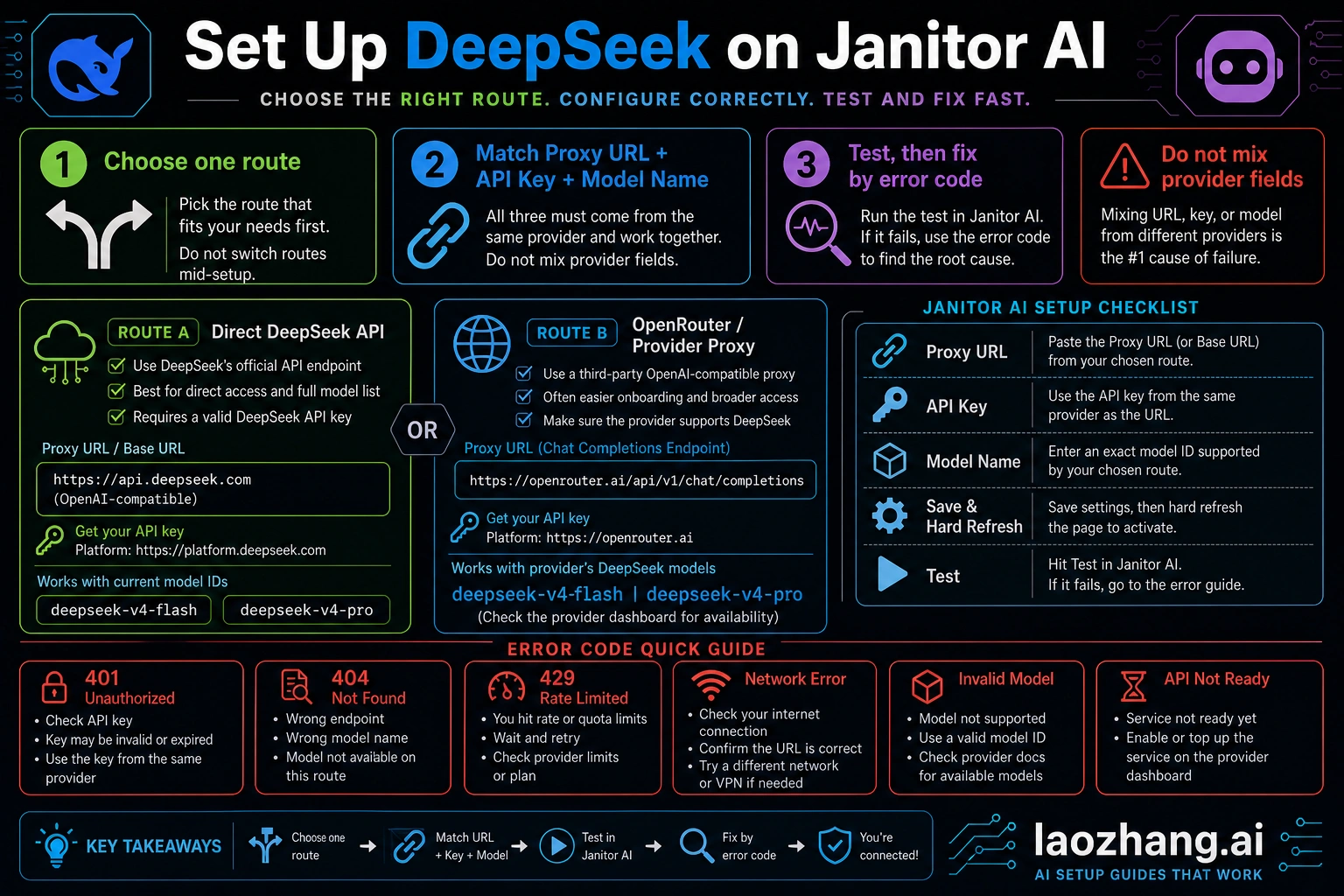
To set up DeepSeek on Janitor AI, create a proxy/API configuration where the proxy URL, API key, and model name all belong to the same route. Use the direct DeepSeek API route when you want DeepSeek's own endpoint and key; use OpenRouter or another provider proxy when you want that provider's model catalog and chat-completions endpoint. As of May 9, 2026, DeepSeek's current direct model IDs to verify are deepseek-v4-flash and deepseek-v4-pro, while older names such as deepseek-chat or deepseek-reasoner can still appear in outdated Janitor tutorials.
The fastest safe path is route first, fields second, test third. If the first test fails, do not change prompts or switch random models; read the error layer: 401 usually points to the key or provider, 404 to the endpoint or model, 429 to quota or provider limits, and network errors to URL, browser, VPN, or cache issues.
Quick setup matrix
Pick one row and keep every field in that row. Most failed Janitor AI DeepSeek setups happen when the proxy URL comes from one provider, the API key comes from another provider, and the model name was copied from an old post.
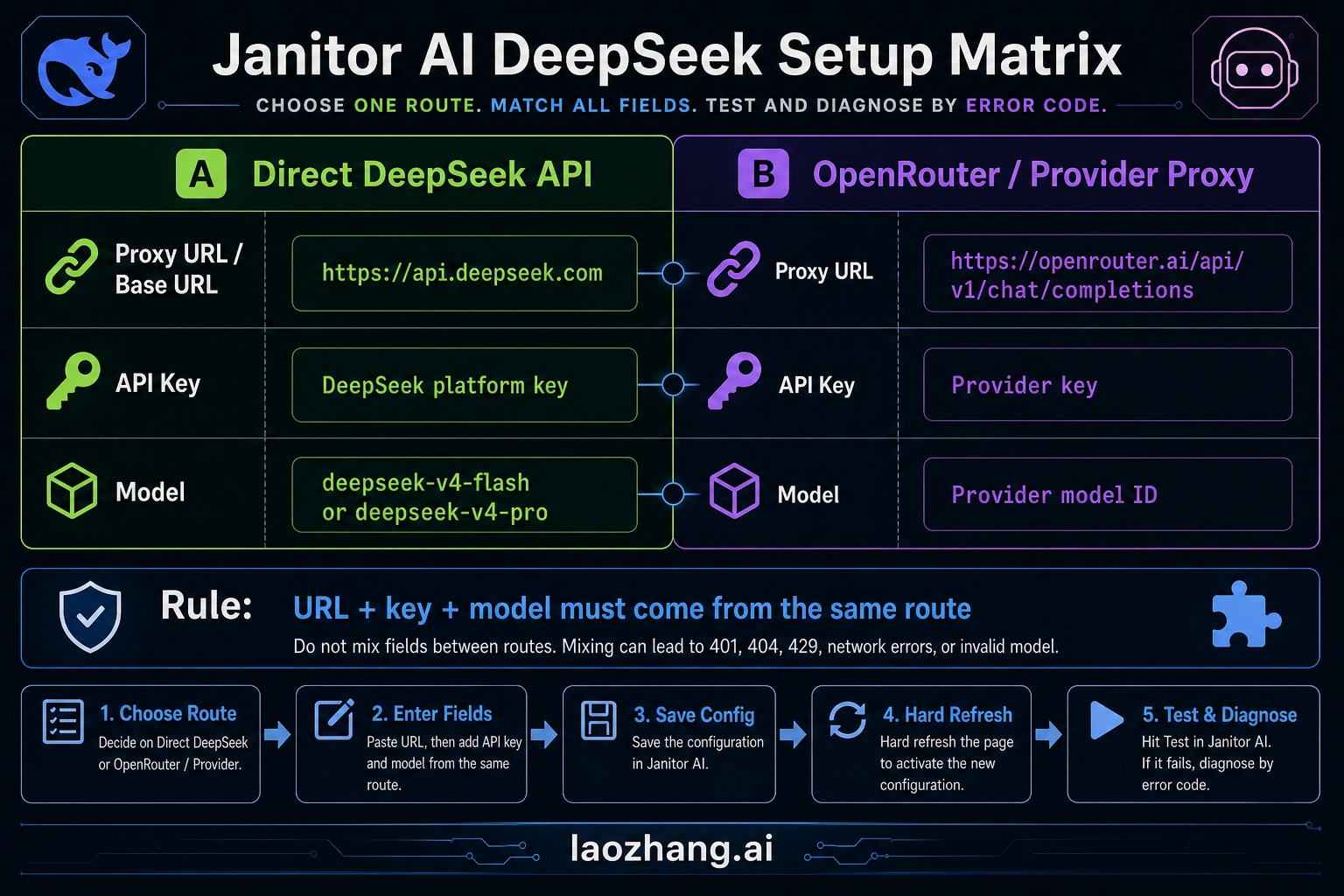
| Route | Proxy URL field | API key source | Model name field | Use it when |
|---|---|---|---|---|
| Direct DeepSeek API | DeepSeek's OpenAI-compatible base URL is https://api.deepseek.com. If Janitor asks for a full chat-completions proxy URL, test the DeepSeek chat-completions path for the current UI. | DeepSeek Platform API key | Current DeepSeek model ID, such as deepseek-v4-flash or deepseek-v4-pro, after checking the live model list | You want DeepSeek's own hosted API route and billing/account boundary |
| OpenRouter or another provider proxy | Provider endpoint, for OpenRouter: https://openrouter.ai/api/v1/chat/completions | Provider API key from that provider account | Provider model ID exactly as shown in that provider dashboard | You want the provider's model catalog, routing, credits, or account controls |
| Old Reddit or video tutorial values | Treat as examples only | Do not reuse blindly | Old aliases such as deepseek-chat or deepseek-reasoner may be stale | You are debugging why an old setup stopped working |
If Janitor AI exposes separate fields for base URL and model, paste the base URL only where it asks for the base URL. If it exposes one proxy URL field that expects a full OpenAI-compatible request endpoint, use the chat-completions endpoint form required by that UI or provider. The important rule is not the slash count; it is that URL, key, and model all describe the same API route.
Choose direct DeepSeek or a provider proxy first
Use the direct DeepSeek route when your goal is to connect Janitor AI to DeepSeek's own API account. The route boundary is simple: DeepSeek account, DeepSeek API key, DeepSeek endpoint, DeepSeek model ID, and DeepSeek billing or balance rules. This is the cleaner route when you want fewer middle layers and can create or fund a DeepSeek Platform account.
Use OpenRouter or a similar provider route when you prefer a provider dashboard, one key for many models, or a model ID that only exists in that provider's catalog. In that case, Janitor AI is not talking to DeepSeek directly. It is sending a chat-completions request to the provider, and the provider decides which DeepSeek route or pool serves the request. That means the model name must match the provider's visible model slug, not the model name you saw on DeepSeek's official docs.
Do not mix the two routes. A DeepSeek key with an OpenRouter endpoint should fail. An OpenRouter key with the DeepSeek endpoint should fail. A provider-only model slug in the direct DeepSeek endpoint should fail. Those failures are useful, because they tell you the setup is inconsistent before you spend time tuning roleplay settings.
Set it up in Janitor AI
Janitor's official proxy help flow is the right UI pattern: open a chat, go to API or Proxy settings, add a configuration, fill model name, proxy URL, and API key, then save settings and refresh before testing. The official Janitor help page is useful for that workflow, but its older DeepSeek model examples should not be treated as current model truth.
Use this order:
- Open Janitor AI and enter the chat where you want to test DeepSeek.
- Open API Settings, Proxy Settings, or the current Janitor settings area for custom API configurations.
- Choose Add Configuration or the equivalent control for a custom proxy.
- Select the OpenAI-compatible or custom proxy mode if Janitor asks for a route type.
- Paste the proxy URL for your chosen route.
- Paste the API key from the same route.
- Paste the model name from the same route.
- Save settings.
- Hard-refresh the page or reload the chat before testing.
- Send one short test message before changing temperature, persona, jailbreak text, memory, or token settings.
The first test should be boring on purpose. Use a short prompt such as "Reply with one sentence that says the API is connected." If the short test fails, the setup problem is not your character card or prompt style. It is one of the configuration layers.
Model name: current IDs, provider slugs, and old aliases
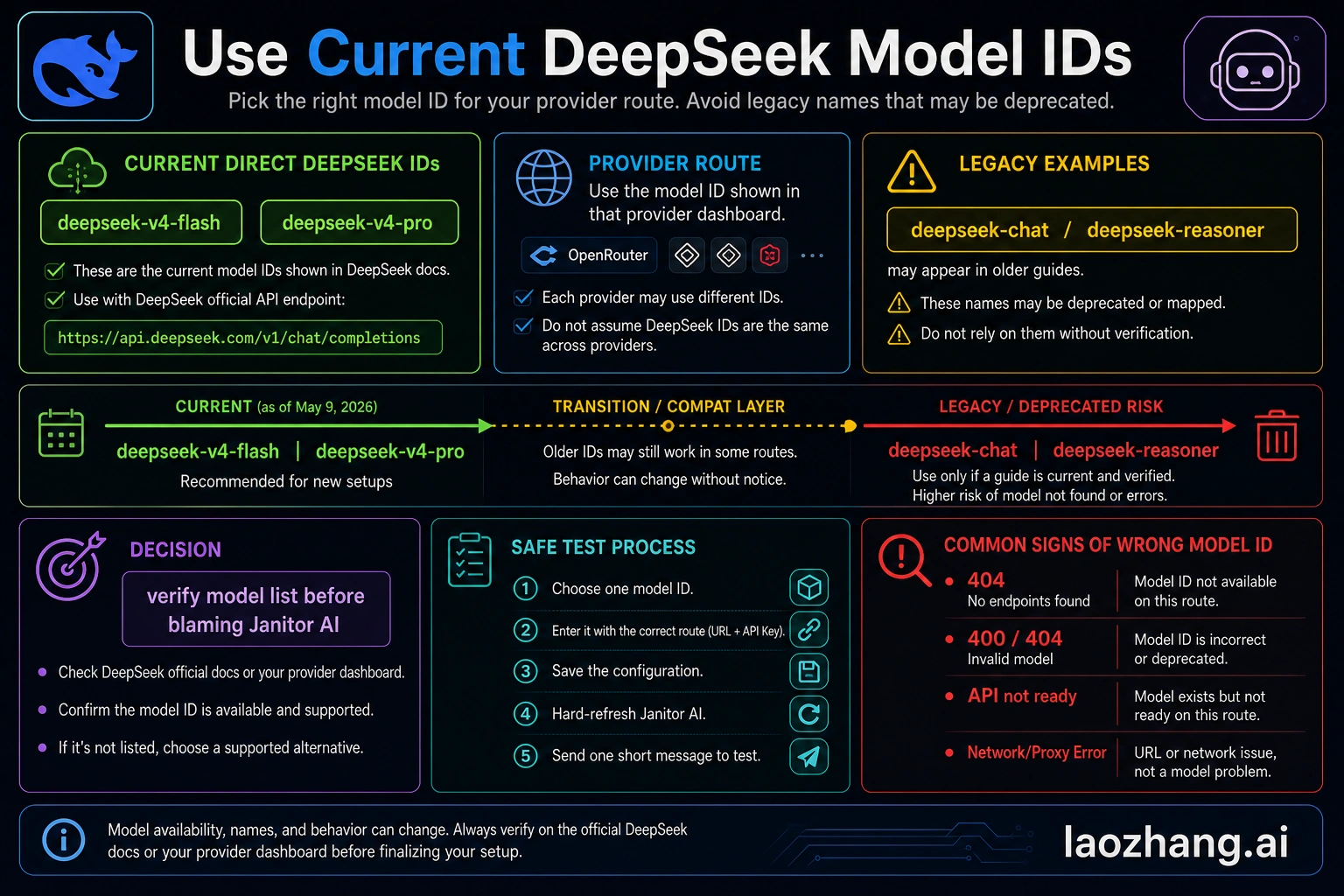
As of May 9, 2026, DeepSeek's direct model-list evidence points to deepseek-v4-flash and deepseek-v4-pro as the current direct DeepSeek model IDs to verify. Older names such as deepseek-chat and deepseek-reasoner still appear in community tutorials and even some older help examples. They should be treated as compatibility or stale-alias clues, not as the first model names to paste into a new Janitor AI setup.
For direct DeepSeek, check the live DeepSeek model list or dashboard before you paste the model. For OpenRouter, check the OpenRouter model page or dashboard and paste the exact provider model slug. For another proxy provider, use that provider's catalog. If the provider adds a namespace, version suffix, or free-route suffix, Janitor AI needs that exact string.
This distinction prevents a common 404 loop. A model can be real on DeepSeek and still be unknown to OpenRouter under that exact name. A model can be visible in OpenRouter and still be unknown to the direct DeepSeek endpoint. Model names are not universal labels; they belong to the endpoint that receives the request.
Troubleshooting the first failed test
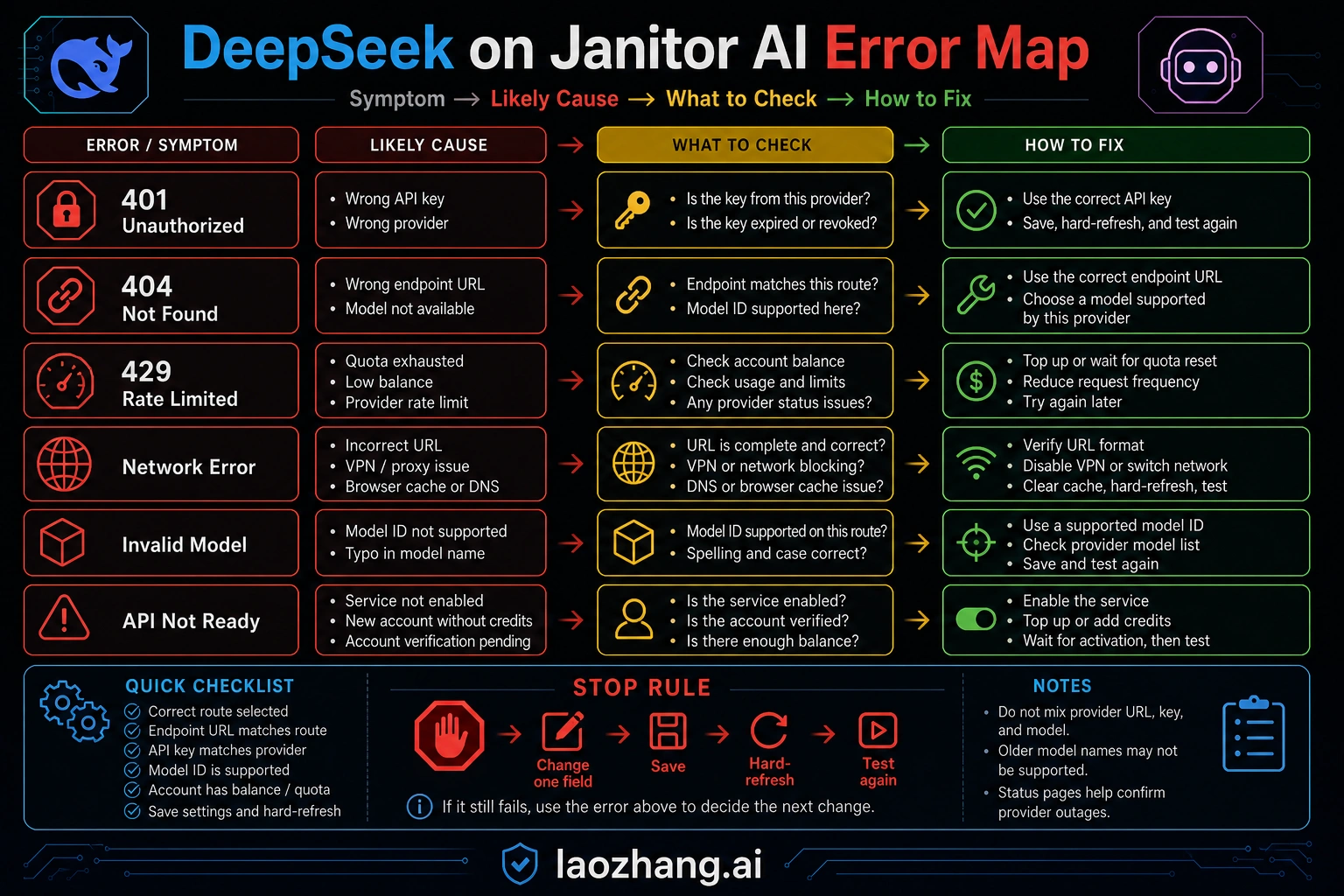
Fix only one layer at a time. If you change the proxy URL, API key, model name, temperature, and prompt on the same retry, the next error cannot tell you what changed.
| First symptom | Most likely layer | What to check first | Stop rule |
|---|---|---|---|
| 401, unauthorized, invalid key, missing bearer token | API key or provider mismatch | Confirm the key came from the same route as the endpoint. Regenerate the key if it was copied with spaces or truncated. | Do not change model settings until a known-good key is accepted. |
| 403, forbidden, account not allowed | Account permission, region, plan, or provider policy | Check provider account status, billing, allowlist, or whether the model requires a paid account. | Do not assume Janitor is blocking the model until the provider account can call it. |
| 404, not found, invalid endpoint | Proxy URL or model path | Compare whether Janitor expects a base URL or a full chat-completions URL; then verify the model belongs to that endpoint. | Do not keep swapping old model aliases after the endpoint shape fails. |
| Invalid model, model not available, model does not exist | Model name | Copy the exact current model ID from the active provider page. | If the same ID is not visible in that provider account, it is not a Janitor prompt issue. |
| 429, quota, rate limit, insufficient credits | Balance, quota, or provider limits | Check balance, credits, rate limits, and whether a "free" route is temporarily exhausted. | Back off and verify account state before retry loops. |
| Network error, failed to fetch, CORS-like browser error | URL, browser session, VPN, extension, or provider availability | Reload Janitor, disable interfering extensions, check VPN/proxy, and test the provider status or endpoint separately. | Do not rotate API keys if the browser cannot reach the endpoint at all. |
| API not ready, empty response, stuck generating | Provider queue, model cold start, timeout, or Janitor session state | Save settings, refresh the chat, lower max tokens, and run a short test. | If a short test works, then tune generation settings separately. |
When you can test outside Janitor AI, send one minimal request to the same provider route with the same key and model. If the provider route fails outside Janitor, fix the provider account first. If it works outside Janitor but fails inside Janitor, the likely issue is the proxy URL shape, Janitor mode selection, browser cache, or how the model name was entered.
Tune roleplay settings after the connection works
The DeepSeek connection test only proves transport. Roleplay quality depends on generation settings, context size, character card structure, memory length, and how Janitor packages messages for the selected proxy. Tune those after the API can answer a short message.
Start conservative:
| Setting area | Safe starting behavior | Why it helps |
|---|---|---|
| Temperature | Use a moderate value first, then raise it for more variety | High randomness can hide whether the model or prompt is failing |
| Max tokens | Start lower for the first test, then raise for long scenes | Long outputs cost more and time out more easily |
| Context or memory | Keep the first test small | Oversized context can cause slow, expensive, or rejected requests |
| Rerolls | Fix one configuration field before repeated rerolls | Rerolls burn quota without isolating the broken layer |
| System or jailbreak text | Add after transport is stable | Prompt complexity should not be part of the connection test |
If DeepSeek answers but the style feels wrong, then adjust character instructions, example dialogue, temperature, repetition settings, and context length. If DeepSeek does not answer at all, return to the field matrix and error table.
Free DeepSeek routes are not a setup guarantee
Community setup notes often mention free DeepSeek routes. Treat those claims as temporary unless the provider page you are using confirms the model, quota, and rate limit at the time you set it up. A free model row can disappear, pause, require credits, or hit a shared quota without changing Janitor AI itself.
The safer rule is simple: free route means "test with current provider limits," not "unlimited roleplay." For Janitor AI, that matters because roleplay chats can produce long context and repeated generations. Even a cheap or promotional route can fail with 429, slow responses, or empty generations if the account has no available quota.
Do not publish your private API key into a character card, public prompt, screenshot, or shared preset. If a tutorial asks you to paste a key into a place that other people can see, stop. The API key belongs only in Janitor's private configuration field or in the provider dashboard.
FAQ
What proxy URL should I use for DeepSeek on Janitor AI?
Use the URL that matches your chosen route. For direct DeepSeek, DeepSeek's OpenAI-compatible base URL is https://api.deepseek.com, with chat completions under the provider's chat-completions path. If Janitor asks for a full proxy URL instead of a base URL, use the full endpoint shape required by the current Janitor field. For OpenRouter, use https://openrouter.ai/api/v1/chat/completions.
Which DeepSeek model name should I put in Janitor AI?
For direct DeepSeek, verify the current model ID on DeepSeek's model list before entering it. As of May 9, 2026, the current direct IDs to verify are deepseek-v4-flash and deepseek-v4-pro. For OpenRouter or another provider, use that provider's exact DeepSeek model slug, not a copied DeepSeek official ID unless the provider shows the same value.
Can I use deepseek-chat or deepseek-reasoner?
Only treat them as old-setup clues. They appear in older Janitor and community tutorials, but they are not the safest names for a new setup. New configurations should start from the current model list for the route you actually use.
Is OpenRouter required for Janitor AI DeepSeek setup?
No. OpenRouter is one provider-proxy route, not the only route. Use it when you want OpenRouter's account, endpoint, and model catalog. Use direct DeepSeek when you want DeepSeek's own endpoint and API key.
Why does Janitor AI say invalid model?
The model name probably does not exist on the endpoint you selected. Copy the model ID from the same provider that owns your proxy URL and API key. If the provider dashboard does not show that model for your account, Janitor AI cannot make it available by prompt tuning.
Why do I get 401 after pasting my DeepSeek API key?
A 401 usually means the key is missing, malformed, expired, or belongs to a different provider than the endpoint. Check for extra spaces, confirm the key source, and make sure a DeepSeek key is only used with the DeepSeek endpoint while a provider key is only used with that provider endpoint.
Why do I get 429 or quota errors?
429 points to quota, credits, dynamic rate limits, or provider-side throttling. Check the provider balance and limits. Do not treat "free" DeepSeek comments as a guarantee that your route has available capacity today.
Where should I learn more about current DeepSeek API models?
For the broader DeepSeek API route and current model boundary, see our DeepSeek V4 API guide. For this Janitor AI setup, the deciding detail remains the same-route rule: endpoint, key, and model must all come from the route you selected.