DeepSeek V4.1 vs Kimi K3.1: Flash vs Pro and a 9–28× Cost Gap
DeepSeek V4.1 exists only as Flash and Kimi K3.1 only as Pro: budget vs flagship. At list prices K3.1 Pro costs 9–28× as much per agent or document job.
On this page
Three checks sit behind this comparison, all run on October 24, 2026: a read of OpenRouter's public model and endpoint API, a recomputation of list-price costs for four example workloads, and a read of LaoZhang's API model list. No same-prompt test of the two models was run, so every quality statement below comes from Artificial Analysis or from the two vendors.
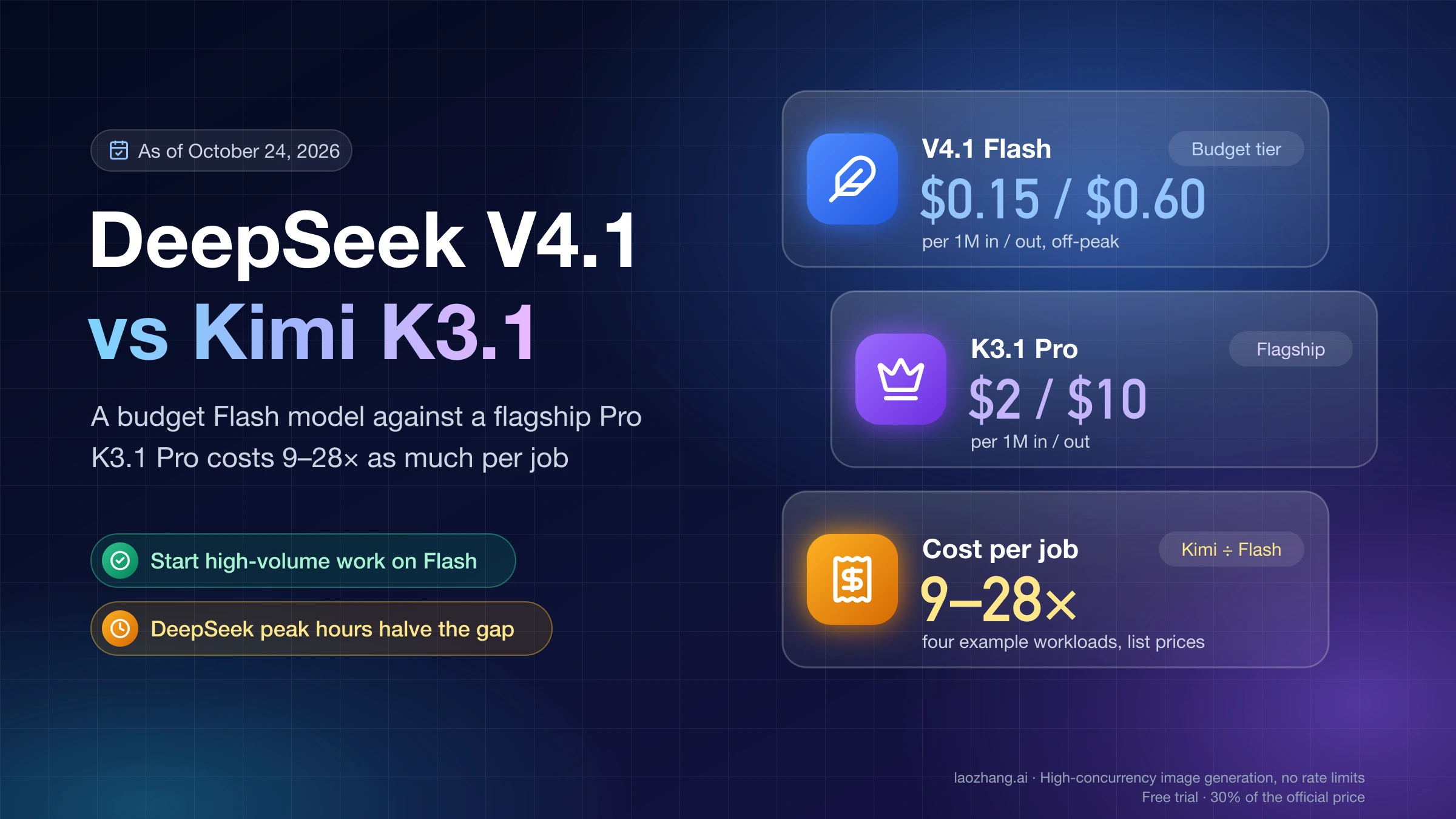
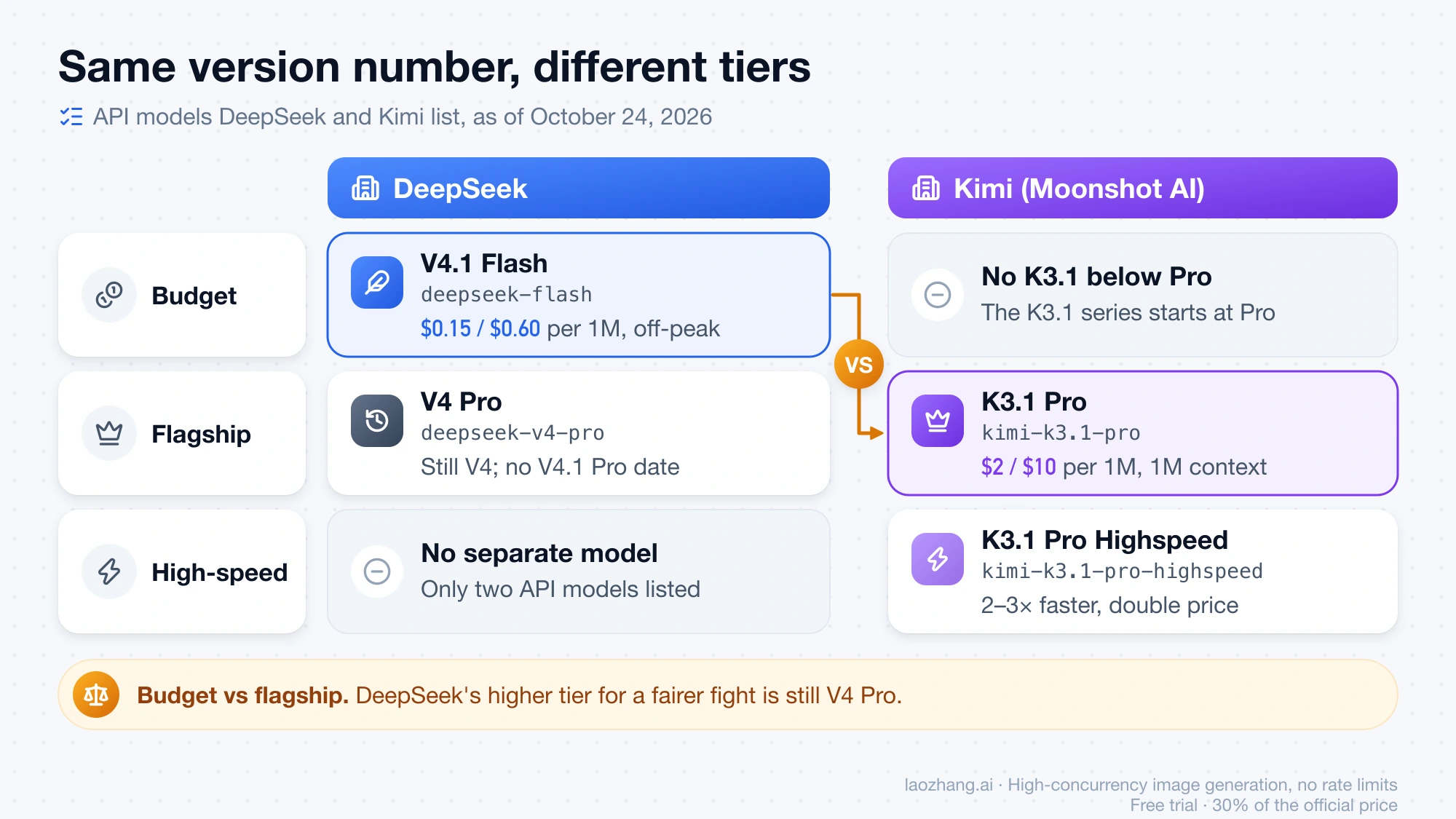
The two names don't describe the same tier. As of October 24, 2026, "DeepSeek V4.1" exists only as DeepSeek V4.1 Flash, which you call as deepseek-flash, and "Kimi K3.1" exists only as Kimi K3.1 Pro (kimi-k3.1-pro), the flagship Moonshot AI released on October 23. That makes this DeepSeek's budget model against Kimi's top model, and the bill reflects it: at list prices, an agent session or a long-document job costs roughly 9 to 28 times as much on K3.1 Pro. Start with deepseek-flash for high-volume agent loops and document Q&A, and move a workload to kimi-k3.1-pro only when it keeps failing on Flash and a failure costs you more than the extra spend. On the Artificial Analysis Intelligence Index, K3.1 Pro scores 55 and V4.1 Flash 45.
Two things move that gap. DeepSeek doubles its prices during weekday peak hours, which roughly halves the ratio, and Kimi charges every time it writes your prompt prefix to its cache, so a large document that keeps falling out of Kimi's cache widens it. If you want DeepSeek's higher tier for a fairer fight, that is still V4 Pro (deepseek-v4-pro); DeepSeek has not released a V4.1 Pro.
DeepSeek V4.1 is only Flash, and Kimi K3.1 is only Pro
DeepSeek's pricing page lists exactly two API models as of October 24, 2026. deepseek-flash is served by DeepSeek-V4.1-Flash-1017, the October 17 update of the V4.1 Flash model DeepSeek released on September 10 and described as the smallest model in its new architecture family: a 552B-parameter mixture-of-experts model with 8B active parameters for input and 16B for output, per the V4.1 Flash release note. deepseek-v4-pro, DeepSeek's higher tier, is still DeepSeek-V4-Pro-0813 from the previous generation, at higher prices. That same release note says V4 Pro traffic would be rerouted to V4.1 Flash "until V4.1-Pro launches", but the later DeepSeek changelog reversed that and the pricing page still bills V4 Pro at Pro rates. V4.1 Pro has no announced date.
If your code still sends deepseek-v4-flash or deepseek-v4-flash-vision-exp, those names are accepted, but the old models are retired and the requests are answered by V4.1-Flash-1017 at the Flash price. DeepSeek asks you to switch to deepseek-flash, and its changelog calls the alias temporary without giving an end date.
On Kimi's side, the K3.1 Pro quickstart calls it "the first model in our new K3.1 series", a post-trained version of Kimi K3 with a 1M-token context window and text, image and video input. There is no K3.1 model below Pro. What changed from K3 is mostly price and post-training: K3.1 Pro lists at $2 input and $10 output per million tokens, a third below K3's $3 and $15, according to Kimi's API pricing page. Kimi K3.1 Pro Highspeed, which Kimi says runs 2–3× faster, is a separate model id, kimi-k3.1-pro-highspeed, at double the price; it is not a speed setting on the standard model.
Kimi K3.1 Pro vs V4.1 Flash cost per workload: 9–28× at list price
K3.1 Pro's per-token prices are 13 to 67 times DeepSeek's off-peak rates, depending on the token type, and half that during DeepSeek's peak window. The table shows the list prices both vendors published as of October 24, 2026, in USD per million tokens.
| Per 1M tokens | Kimi K3.1 Pro | V4.1 Flash, off-peak | V4.1 Flash, peak | Kimi ÷ Flash (off-peak / peak) |
|---|---|---|---|---|
| Input, cache miss | $2.00 | $0.15 | $0.30 | 13.3× / 6.7× |
| Input, cache hit | $0.20 | $0.003 | $0.006 | 66.7× / 33.3× |
| Cache write, 5-minute / 1-hour TTL | $2.00 / $4.00 | no separate fee | no separate fee | — |
| Output | $10.00 | $0.60 | $1.20 | 16.7× / 8.3× |
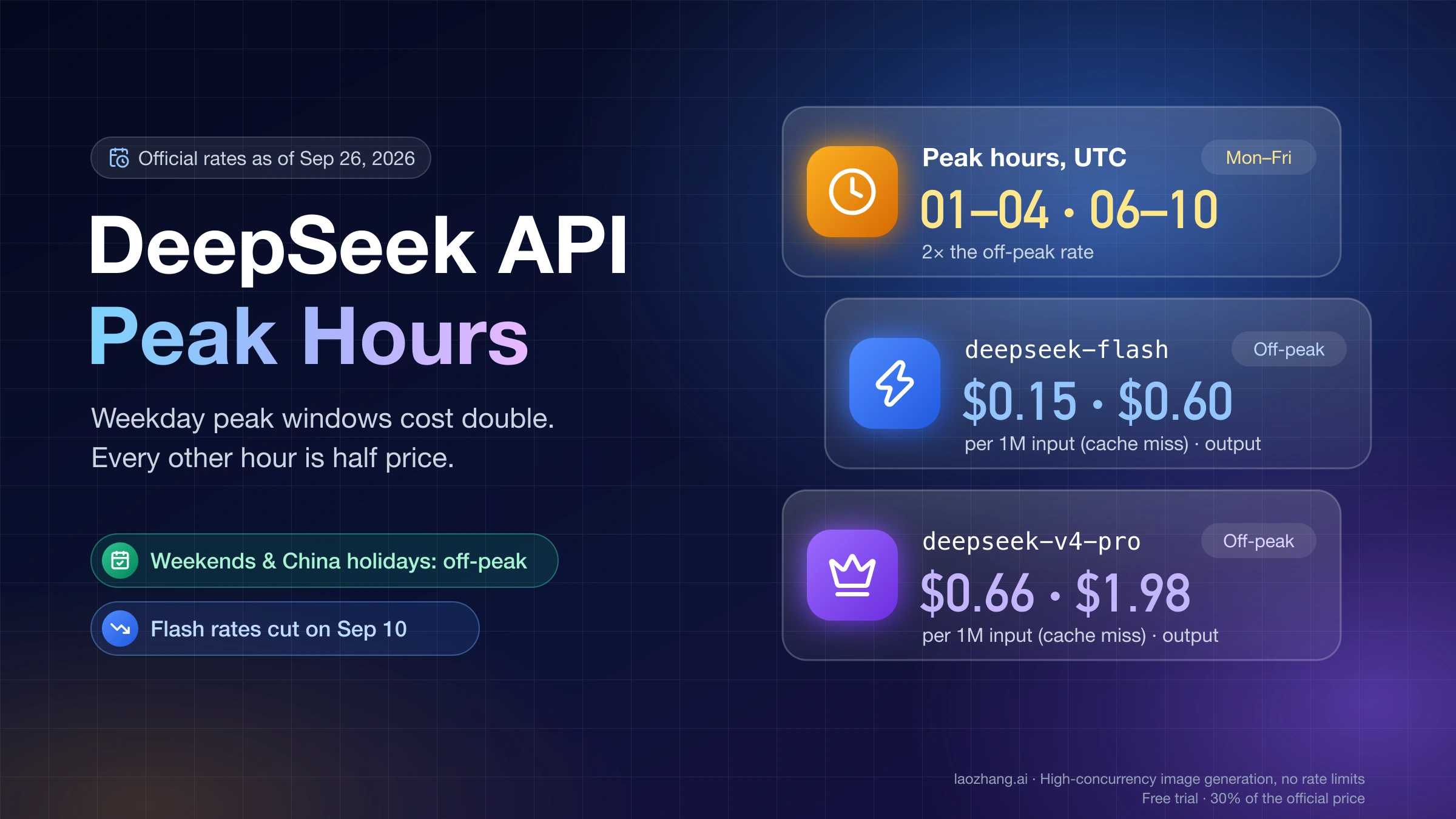
DeepSeek's peak window is 01:00–04:00 and 06:00–10:00 UTC, Monday through Friday, excluding Chinese public holidays; every other hour is billed at the off-peak half price. DeepSeek API Peak Hours: Current Prices and When to Wait covers how to schedule batch work around it. DeepSeek has no cache-write fee: the first request with a new prefix is simply billed as a cache miss. Kimi caches repeated prefixes automatically with a 5-minute default TTL, charges a write each time the prefix enters the cache, and offers a 1-hour TTL at twice the write price through prompt_cache_options.ttl.
Per-token prices don't tell you what a job costs, so the next table applies those prices to four example workloads. The token counts are illustrations chosen to show how caching behaves, not measured traffic, and output counts include thinking tokens, because both models think by default. The calculation was run on October 24, 2026.
| Example workload (assumed tokens) | Kimi K3.1 Pro | V4.1 Flash, off-peak | V4.1 Flash, peak | Kimi ÷ Flash (off-peak / peak) |
|---|---|---|---|---|
| A. Coding-agent session: 60K cached repo prefix, 40 turns, 4K new input and 3K output per turn | $2.108 | $0.112 | $0.224 | 18.8× / 9.4× |
| B. 400K-token document, 10 questions within 5 minutes, 300 input and 1,500 output each | $1.676 | $0.080 | $0.161 | 20.9× / 10.4× |
| C. Same document, 10 questions over a working day, Kimi on the 1-hour TTL with 2 cache rewrites, DeepSeek given the same 2 re-misses | $5.516 | $0.198 | $0.396 | 27.9× / 13.9× |
| D. Single cold request: 8K input, 2K output, no cache | $0.036 | $0.0024 | $0.0048 | 15.0× / 7.5× |
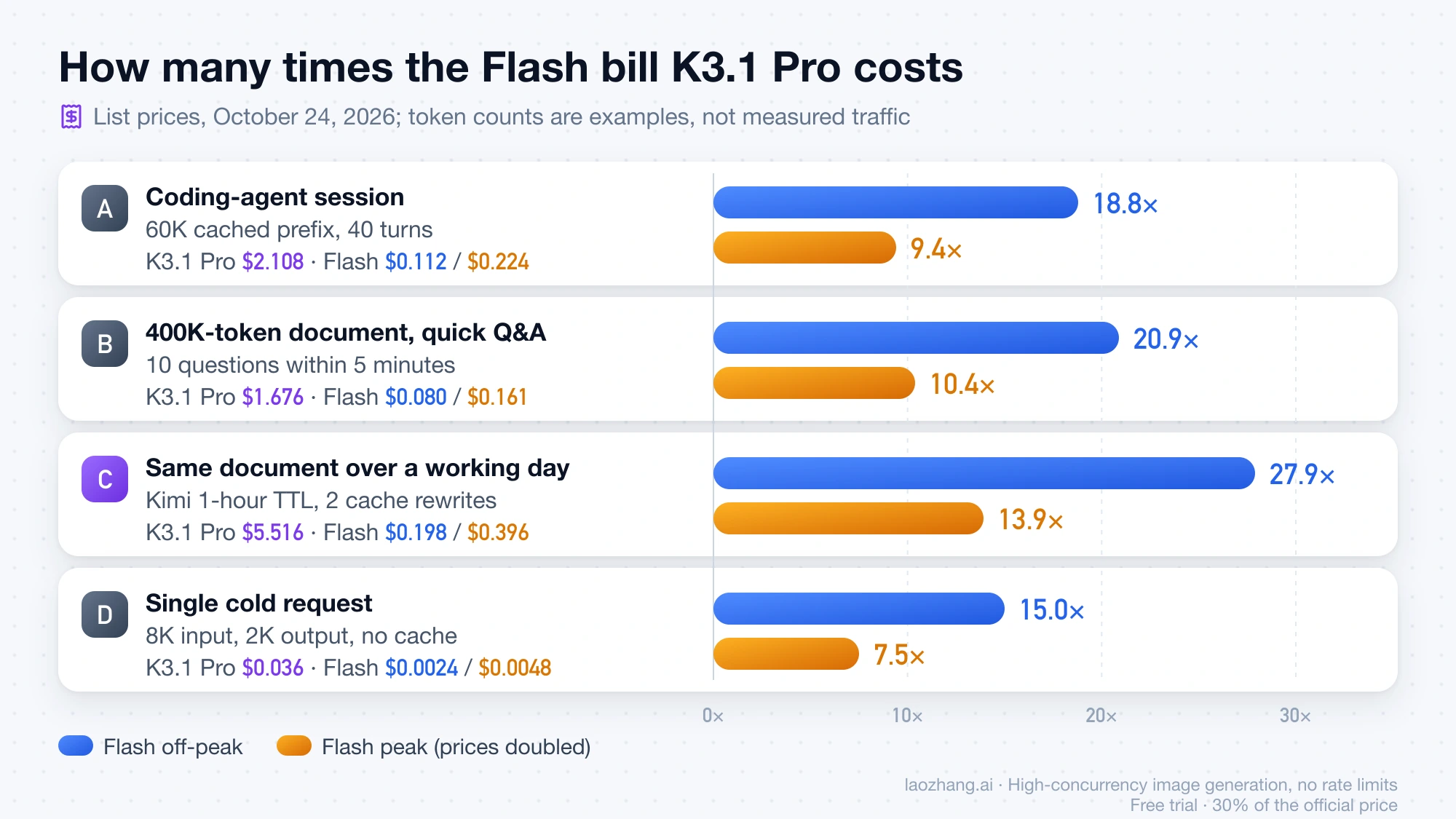
To check workload A on K3.1 Pro: one 60K-token cache write at $2.00 ($0.120), 39 cache hits on that prefix at $0.20 ($0.468), 160K new input tokens at $2.00 ($0.320), and 120K output tokens at $10.00 ($1.200) add up to $2.108. The same session on V4.1 Flash off-peak is one 60K cache miss at $0.15 ($0.009), 39 hits at $0.003 ($0.007), new input at $0.15 ($0.024) and output at $0.60 ($0.072), or $0.112. Output is more than half of both bills, so the output-price ratio and how long each model thinks matter more than anything else. A real agent loop also grows its prefix every turn, which this simplified version ignores.
Workload C is where Kimi's cache rules bite. Writing a 400K-token document to the 1-hour cache costs $1.60, so three writes account for $4.80 of the $5.52. Staying on the default 5-minute TTL would be worse when questions arrive more than five minutes apart: every call would rewrite the document at $0.80, about $8.16 for the day. If your gaps are longer than five minutes, set the 1-hour TTL, as Kimi's quickstart recommends. On DeepSeek, an expired prefix just costs one more cache miss, $0.06 for the same document off-peak.
Independent runs point the same way even when thinking length is real rather than assumed. Artificial Analysis reported $2.11 per Intelligence Index task for K3.1 Pro against $0.26 for V4.1 Flash 1017 at max effort as of October 24, 2026, about 8 times as much, even though Flash produced 210M output tokens on the index to K3.1 Pro's 150M. Artificial Analysis lists Flash at $0.30 input and $1.20 output, which is DeepSeek's peak rate, so that ratio is close to the peak-hour column above.
Is Kimi K3.1 Pro better than DeepSeek V4.1 Flash on quality?
On the one independent comparison that runs both models the same way, yes. As of October 24, 2026, Artificial Analysis gives Kimi K3.1 Pro 55 on its Intelligence Index, fourth of 215 models, and DeepSeek V4.1 Flash 1017 (max) 45, second among 121 open-weights models. The same pages put Flash at 198.4 output tokens per second against 80.7 for K3.1 Pro, so Flash generates output more than twice as fast. The index is a composite, the two ranks come from different pools, and scores can still move in the days after a launch.
The vendors' own benchmark tables don't settle it. DeepSeek reports 42.3 on Terminal-Bench 4.0 for V4.1-Flash-1017, run with the Claude Code harness, while Kimi's Chinese launch page reports 65.7% for K3.1 Pro without naming a harness, and the English page still showed an unfilled "[xx.x%]" placeholder for that score on October 24. Numbers measured under different setups are not a head-to-head. Kimi's most concrete claim compares K3.1 Pro with its own predecessor: on a deliberately hard set of conversations where users had flagged factual errors, the claim-level hallucination rate fell from 23.35% for K3 to 6.85% for K3.1 Pro. Kimi labels that a stress test, not a daily error rate.
Public same-prompt reports so far involve K3, not K3.1 Pro. One X post from mid-October described a single game-building prompt at the highest reasoning setting: Kimi K3 took about 2.5 hours and $35 and produced the more complete game, while V4.1-1017 took about 1.5 hours and $0.80 but couldn't get the game's creative mode working. That is one sample on the previous Kimi model, but it matches the pattern above: a stronger result at a price measured in multiples, not percentages.
Switching between deepseek-flash and kimi-k3.1-pro: what changes in code
Both APIs accept the OpenAI SDK, so the switch is a base URL, a model id and a handful of parameter rules, and those rules are where requests break. The table compares DeepSeek's thinking-mode guide and pricing page with Kimi's K3.1 Pro quickstart, as of October 24, 2026.
| What to check | DeepSeek V4.1 Flash (deepseek-flash) | Kimi K3.1 Pro (kimi-k3.1-pro) |
|---|---|---|
| Base URL | https://api.deepseek.com, plus an Anthropic-format endpoint at https://api.deepseek.com/anthropic | https://api.moonshot.ai/v1 |
| Thinking | On by default; turn off with {"thinking": {"type": "disabled"}} | Always on; cannot be turned off |
reasoning_effort | low, high, max; default high. Other values are mapped (medium and xhigh become high) | low, high, max; default max |
| Sampling parameters | In thinking mode, temperature and the penalties are ignored without an error | temperature=1.0, top_p=0.95, n=1 and zero penalties are fixed; omit them |
| Multi-turn and tool calls | With tools, pass every earlier reasoning_content back, or the API returns 400 | Return the complete assistant message unchanged |
| Output limit | Up to 384K tokens | max_completion_tokens defaults to 131,072, settable up to 1,048,576 |
| Context window | 1M tokens | 1M tokens, flat price at any length |
| Image input | Vision supported | No public image URLs; send base64 or ms://<file-id> with content as an array; video also accepted |
| Structured output | JSON output mode | json_schema with strict: true |
| Continuing from a prefix | Chat prefix completion (beta); FIM in non-thinking mode only | Partial mode (partial: true on a trailing assistant message) |
| Caching | Automatic, no write fee, no TTL setting | Automatic, write fee per TTL, 5m default or 1h |
| Access and limits | Concurrency limit of 2,500 per account | Unlocks only after a top-up of at least $1; cumulative top-up sets the rate-limit tier |
Moving a DeepSeek workload to Kimi, the three changes that matter most are deleting any temperature or top_p you set, choosing reasoning_effort explicitly instead of inheriting max, and making sure image inputs are uploaded or base64-encoded. Inheriting max is the easy one to miss, because it lengthens thinking and output is the largest line on the bill. Moving the other way, the trap is history: if your Kimi code already appends the full message object, DeepSeek's reasoning_content rule is satisfied, but code that keeps only content will get a 400 from DeepSeek as soon as tools are involved.
A pattern that works on both is to append the whole returned message to that model's own history:
from openai import OpenAI

deepseek = OpenAI(base_url="https://api.deepseek.com", api_key=DEEPSEEK_API_KEY)
kimi = OpenAI(base_url="https://api.moonshot.ai/v1", api_key=MOONSHOT_API_KEY)

def call(client, model, messages, tools, **kwargs):
    resp = client.chat.completions.create(
        model=model, messages=messages, tools=tools, **kwargs
    )
    messages.append(resp.choices[0].message)  # full message, not just .content
    return resp

# Kimi K3.1 Pro: no temperature/top_p; set effort explicitly (default is "max")
call(kimi, "kimi-k3.1-pro", kimi_messages, tools, reasoning_effort="high")

# DeepSeek V4.1 Flash: thinking on at "high" by default; the same append keeps reasoning_content
call(deepseek, "deepseek-flash", deepseek_messages, tools)
Web search differs too. Kimi says its official web search tool is being updated and is not recommended for production for now. DeepSeek's Search and Fetch APIs cost $0.75 per 1,000 successful requests each, and the calls its server-side tools make inside DeepSeek Harness, Claude Code and Codex, free until now, start being billed at 16:00 UTC on October 31, 2026, per DeepSeek's October 17 update note.
Open weights and providers: 29 for V4.1 Flash, one for K3.1 Pro
V4.1 Flash is open weights today and K3.1 Pro is not yet. DeepSeek published the V4.1-Flash-1017 weights on Hugging Face, and Artificial Analysis lists the license as MIT. Kimi says the full K3.1 Pro weights "will be released by Nov 4", and until then Artificial Analysis lists it as a proprietary model.
That shows up in who serves them. As of October 24, 2026, OpenRouter's public API listed one supplier for moonshotai/kimi-k3.1-pro: Moonshot AI itself, with two endpoints, the standard model and Highspeed, at the same prices Kimi lists directly. The same API listed 34 endpoints from 29 providers for deepseek/deepseek-v4.1-flash-1017, including DeepSeek's own at its official prices with the peak-hour surcharge. Third-party Flash endpoints differ in quantization (fp4, fp8, mxfp4 or unstated) and in maximum completion length, from 131,072 to 943,718 tokens, so a cheaper listing is not automatically the same model you'd get from DeepSeek. The K3.1 Pro endpoint's supported parameters also omit temperature, top_p, seed and logprobs, consistent with Kimi's fixed sampling. Expect more K3.1 Pro providers once the weights are out.
If you route through laozhang.ai, its /v1/models list as of October 24, 2026 included kimi-k3 and deepseek-v4-flash but not kimi-k3.1-pro or deepseek-flash.
Disclosure: laozhang.ai is our own service. Its prices are platform pricing, not an independent comparison.
Plan with Kimi, execute with DeepSeek: when the split pays
Splitting one job across both models makes sense when a few decisions carry most of the risk and many steps are routine. Send the planning step, and a final review if you want one, to kimi-k3.1-pro, and keep the long tool-calling loop on deepseek-flash. The Kimi calls still dominate the bill: two planning calls that each read workload A's 60K-token prefix uncached and write 3K tokens cost about $0.32 (64K × $2 plus 3K × $10 per million, twice), nearly three times the whole 40-turn Flash session off-peak. That is worth paying only if those calls are what makes the job succeed.
The handoff needs care. Each vendor caches separately, so a shared repo prefix is paid for on both sides, and each model expects its own reasoning format in the history. Pass the plan to the executor as ordinary text in a user or system message instead of replaying Kimi's assistant turns to DeepSeek, and keep each model's own history intact within its own loop. If the executor's failures come from bad plans, the split helps; if they come from execution mistakes, a stronger planner won't fix them.
How to test K3.1 Pro against V4.1 Flash on your own tasks
Neither the vendor tables nor the index above tell you how either model handles your repo or your documents, so run a small trial before you change a default. Budget for it on Kimi first: K3.1 Pro won't answer until the account has a top-up of at least $1.
- Pick 20–50 real tasks from your workload, including a few that Flash already fails, and write the pass rule before you read any answer, such as tests passing or extracted fields matching a checked record.
- Pin the model ids and efforts:
deepseek-flashathighandmax, andkimi-k3.1-proatlowandhighas well as its defaultmax, so you are not comparing a default against a tuned setting. - Send identical messages and tools to both, with the history rules from the switching table, and record the input, cached-input and output token counts each API returns.
- Note the time of every DeepSeek call, or run the trial outside the peak window, so you know which DeepSeek price applies.
- Compute cost per accepted task: total spend divided by the number of tasks that passed.
Read the result against the cost ratio from the workload table. Kimi wins on cost per accepted task only when Flash's pass rate is lower by more than that ratio: at workload A's off-peak 18.8×, if K3.1 Pro passes 95% of tasks, Flash would have to pass fewer than about 5%. When the pass-rate gap is smaller than the cost ratio, the case for K3.1 Pro rests on what a failure costs you in review time, repair work or a broken release, and that is the number to put next to the bill.
DeepSeek V4.1 vs Kimi K3.1: other questions
Can I run Claude Code on DeepSeek V4.1 Flash?
Yes. DeepSeek offers an Anthropic-format endpoint at https://api.deepseek.com/anthropic for both deepseek-flash and deepseek-v4-pro, as of October 24, 2026. Setup through DeepSeek directly or through OpenRouter is covered in Claude Code with OpenRouter and DeepSeek: Setup, Routes, and First-Error Fixes. Server-side Search and Fetch calls from Claude Code become billable on October 31, 2026.
I use Kimi K2. Do I have to move to K3.1 Pro?
Not right away, but plan for it. Kimi's pricing page says K2 series models close to newly registered users on October 31, 2026, while existing users keep access, and Kimi plans to retire all K2 models by the end of December 2026. K3.1 Pro is the current K3-series model; before moving K2 code over, check it against K3.1 Pro's always-on thinking and fixed sampling parameters in the switching table above.
Sources10
External pages this guide links to, in the order they appear. Last updated Oct 24, 2026.
Sources10
External pages this guide links to, in the order they appear. Last updated Oct 24, 2026.
- 1.Artificial Analysis Intelligence Indexartificialanalysis.ai/models/kimi-k3-1-pro
- 2.pricing pageapi-docs.deepseek.com/quick_start/pricing
- 3.V4.1 Flash release noteapi-docs.deepseek.com/news/news260910
- 4.DeepSeek changelogapi-docs.deepseek.com/updates
- 5.K3.1 Pro quickstartplatform.kimi.ai/docs/guide/kimi-k3-1-pro-quickstart
- 6.Kimi's API pricing pageplatform.kimi.ai/docs/pricing/chat
- 7.V4.1 Flash 1017 at max effortartificialanalysis.ai/models/deepseek-v4-1-flash-1017
- 8.thinking-mode guideapi-docs.deepseek.com/guides/thinking_mode
- 9.DeepSeek's October 17 update noteapi-docs.deepseek.com/news/news261017
- 10.Hugging Facehuggingface.co/deepseek-ai/DeepSeek-V4.1-Flash-1017