Migrate OpenAI Assistants API to Responses API: A Production Cutover Guide
The Assistants API has shut down. Restore configuration and available history from your own records, run custom functions through a complete Responses loop, and switch traffic with a recovery path that works today.
On this page
The OpenAI Assistants API is no longer available. It shut down on August 26, 2026, so an application still using Assistants, Threads, or Runs needs a working Responses implementation now. The current migration guide explicitly says the old call for listing Thread messages no longer works. Recover history from messages your application already stored; a thread_ ID by itself is not a transcript.
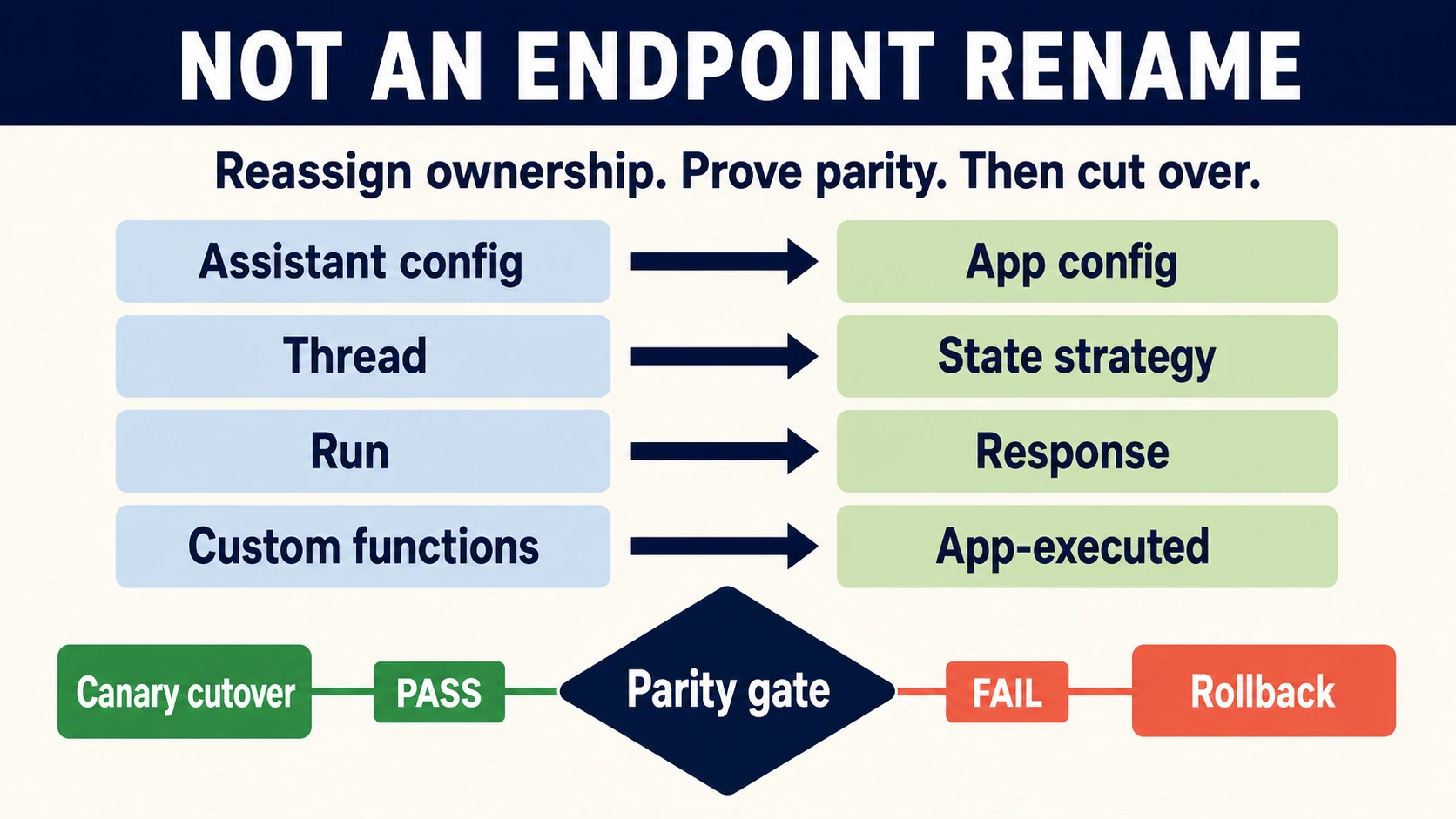
The practical migration is to restore instructions and tools into versioned application configuration, select one conversation-state strategy, replace Run orchestration with Responses and an application function loop, and verify retrieval and user-visible completion before routing traffic. If the new runtime fails, recovery must use an already-working Responses release, a deterministic safe mode, a queue, or human handling. Switching back to Assistants cannot restore service.
This guide covers the official OpenAI API. Azure, automation platforms, and third-party compatible endpoints have their own availability and request contracts. The examples below are documentation-aligned implementations with offline checks, not live SDK/API tests or proof of production parity.
Recover configuration and decide which old chats can resume
Start with records you control: source code, configuration snapshots, application databases, retained transcripts, authorized file originals, and previously saved task results. Stop any worker that keeps retrying the retired API, but keep its queued business requests and execution records so a replacement worker can decide what remains safe to process.
Recreate each Assistant's instructions, model selection, custom function definitions, retrieval scope, and output schema as an application configuration version. Distinguish recovered settings from newly chosen defaults. If the original instructions were never saved, write a new supported configuration and evaluate it as new behavior; do not call it an exact restoration.
Do not make a reusable Prompt object the permanent destination. The Assistants guide still contains that historical mapping, but reusable Prompt objects and v1/prompts are scheduled to shut down on November 30, 2026. OpenAI's Prompt migration guide directs developers to move prompt content into application code. Keep model, instructions, tool schemas, and output settings together so one release can be reviewed and restored coherently.
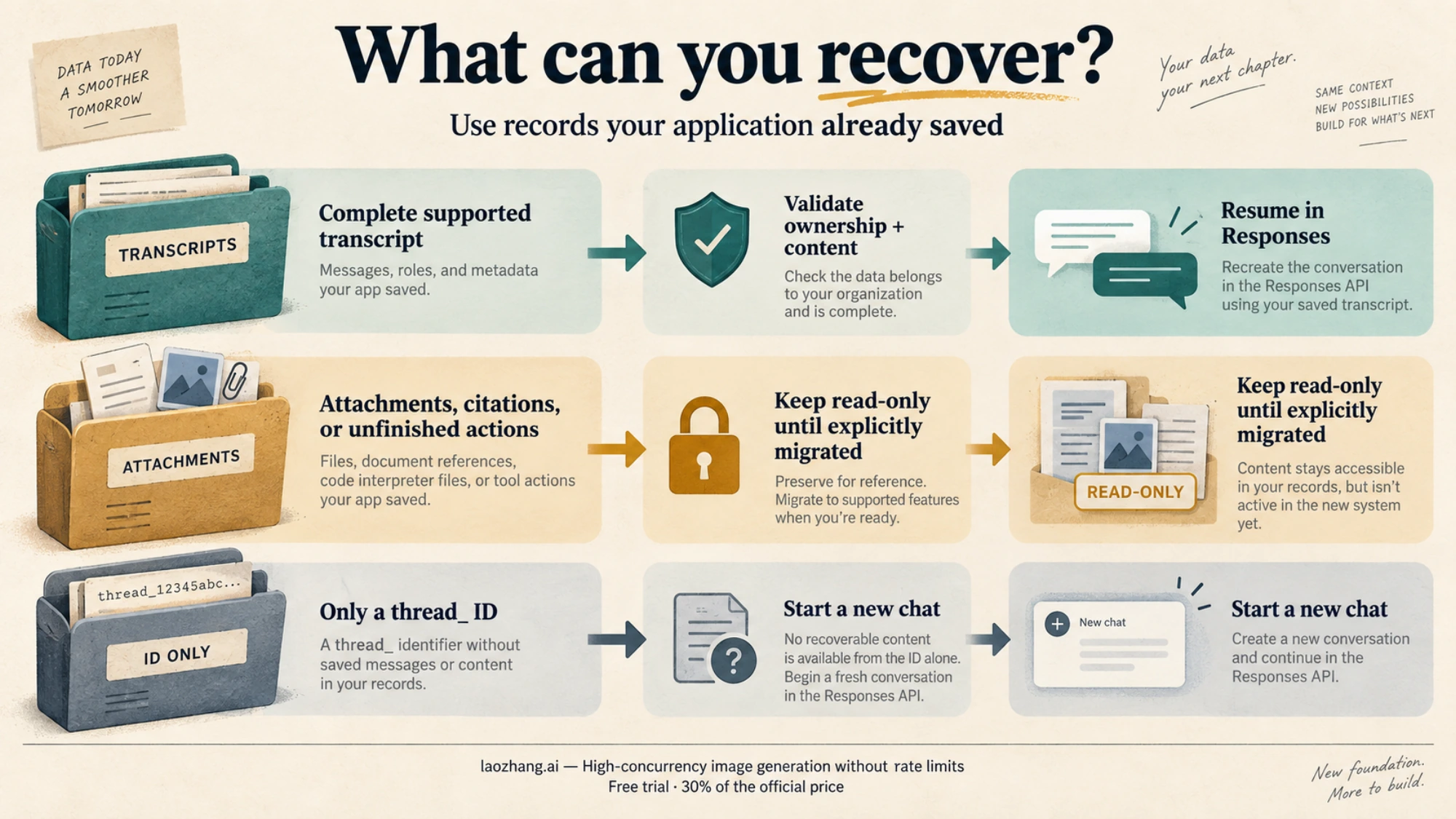
For conversation recovery, use three explicit outcomes:
| What your application retained | Safe migration outcome |
|---|---|
| An ordered transcript containing supported content, with verified ownership and no unresolved tool action | Convert it, inspect the result, and allow a new Responses turn |
| A transcript with attachments, citations, incomplete content, or unresolved business actions | Keep it readable; resume only after those parts have an explicit supported migration |
| Only an Assistant, Thread, or Run ID | Start a new chat; explain that the earlier transcript is unavailable |
Keep an application record linking the old Thread ID, the owning tenant/user, the archive location, migration status, configuration version, and the new session identifier. Authenticate access through your application before loading that record. A provider object ID does not establish who may read it.
Convert a stored text-only transcript without silently losing content
The following standalone converter reads a local application-owned archive, not the retired API. Its envelope is deliberately small: thread_id, an ascending messages array of saved Assistants-style message objects, and pending_tool_actions: false. Each message must have an ID, numeric created_at, role, and content. The pending-action flag must come from saved application execution records; do not mark an unknown action resolved to make conversion pass.
Save this as convert_archive.py. Run python convert_archive.py saved-thread.json > response-input.json on a verified archive. An error leaves the original archive intact and stops conversion. This implementation rejects non-text content, attachments, citations, non-completed messages, and unsupported fields instead of quietly discarding them.
import json
import sys


def convert_archive(archive):
    if not isinstance(archive, dict):
        raise ValueError("archive must be an object")
    if set(archive) != {"thread_id", "messages", "pending_tool_actions"}:
        raise ValueError("unsupported archive fields")
    if not isinstance(archive["thread_id"], str) or not archive["thread_id"]:
        raise ValueError("missing legacy identifier")
    if archive["pending_tool_actions"] is not False:
        raise ValueError("resolve or archive pending tool actions first")
    messages = archive["messages"]
    if not isinstance(messages, list) or not messages:
        raise ValueError("no stored transcript")
    items, seen, previous_time = [], set(), float("-inf")
    allowed = {"id", "object", "created_at", "thread_id", "role", "content",
               "attachments", "metadata", "assistant_id", "run_id", "status",
               "completed_at", "incomplete_at", "incomplete_details"}
    for message in messages:
        if not isinstance(message, dict) or set(message) - allowed:
            raise ValueError("unsupported message fields")
        message_id = message.get("id")
        if not isinstance(message_id, str) or not message_id or message_id in seen:
            raise ValueError("missing or duplicate message ID")
        seen.add(message_id)
        timestamp = message.get("created_at")
        if type(timestamp) not in (int, float) or timestamp < previous_time:
            raise ValueError("archive must be chronological")
        previous_time = timestamp
        if message.get("thread_id", archive["thread_id"]) != archive["thread_id"]:
            raise ValueError("mixed threads")
        if message.get("status", "completed") != "completed":
            raise ValueError("incomplete message")
        if (message.get("attachments") or message.get("metadata")
                or message.get("incomplete_details") or message.get("incomplete_at")):
            raise ValueError("additional content needs an explicit migration")
        role = message.get("role")
        content = message.get("content")
        if role not in ("user", "assistant") or not isinstance(content, list) or not content:
            raise ValueError("unsupported role or empty content")
        converted = []
        for part in content:
            if not isinstance(part, dict) or set(part) != {"type", "text"}:
                raise ValueError("unsupported content block")
            text = part["text"]
            if (part["type"] != "text" or not isinstance(text, dict)
                    or set(text) - {"value", "annotations"}
                    or text.get("annotations")
                    or not isinstance(text.get("value"), str)):
                raise ValueError("non-text content or annotations need separate handling")
            converted.append({
                "type": "input_text" if role == "user" else "output_text",
                "text": text["value"],
            })
        items.append({"role": role, "content": converted})
    return items


if __name__ == "__main__":
    with open(sys.argv[1], encoding="utf-8") as source:
        archive = json.load(source)
    json.dump(convert_archive(archive), sys.stdout, ensure_ascii=False, indent=2)
The old IDs and timestamps remain in the original archive and application mapping; they are not new Responses identifiers. File or image content needs its own authorized, supported conversion. A legacy assistant message cannot manufacture missing reasoning Items or reconstruct hidden thoughts. When a chat's meaning depends on missing material, preserve it for reading and start a fresh supported session.
Choose one state strategy before sending the first Response
All three options in the conversation-state guide can support a migration, but they place different responsibilities on your application.
| Strategy | Use it when | What to preserve |
|---|---|---|
| Application-managed input Items | You need explicit history custody, pruning, or a stateless request path | Ordered user input plus complete replayable output Items, including opaque reasoning and assistant phase |
previous_response_id | You want a bounded continuation of an available stored Response | Response lineage, applicable instructions, configuration version, and a limit on history growth |
| A Conversation object | You want provider-managed state across sessions, devices, or jobs | A durable tenant/session mapping, access control, deletion policy, and configuration version |
For the text-only archive above, use response-input.json as initial manual input, or pass those converted Items to client.conversations.create(items=items) once you have verified the archive and accepted Conversation retention. Store the returned Conversation ID in your application mapping. New chats start with an empty transcript or a new Conversation; they do not need a legacy ID.
In a Conversation request, send conversation=conversation_id and only the new input. The API prepends stored Items and adds the current input and output after completion. Do not also set previous_response_id, and do not replay the entire same history alongside the Conversation. The Responses create reference treats these mechanisms as alternatives. With previous_response_id, top-level instructions from the preceding Response are not carried forward; resend the applicable configuration.
Manual state requires more than saving response.output_text. Keep complete replayable output Items, preserving reasoning data and message phase. Python examples append response.output; current JavaScript examples use toResponseInputItems from openai/lib/responses/ResponseInputItems. OpenAI's reasoning guidance says to keep Items between the last user message and the function output intact. Treat encrypted reasoning as opaque data.
Serialize turns for each session, or use an application sequence/version check, so two workers cannot both extend the same history and overwrite each other's result. Limit history by the product's needs and the model's context window. Earlier input tokens in a previous_response_id chain are still billed as input; a smaller HTTP payload does not remove that cost. Summaries and compaction need task-specific evaluation before replacing durable facts or unfinished work.
Replace Run orchestration with a complete function loop
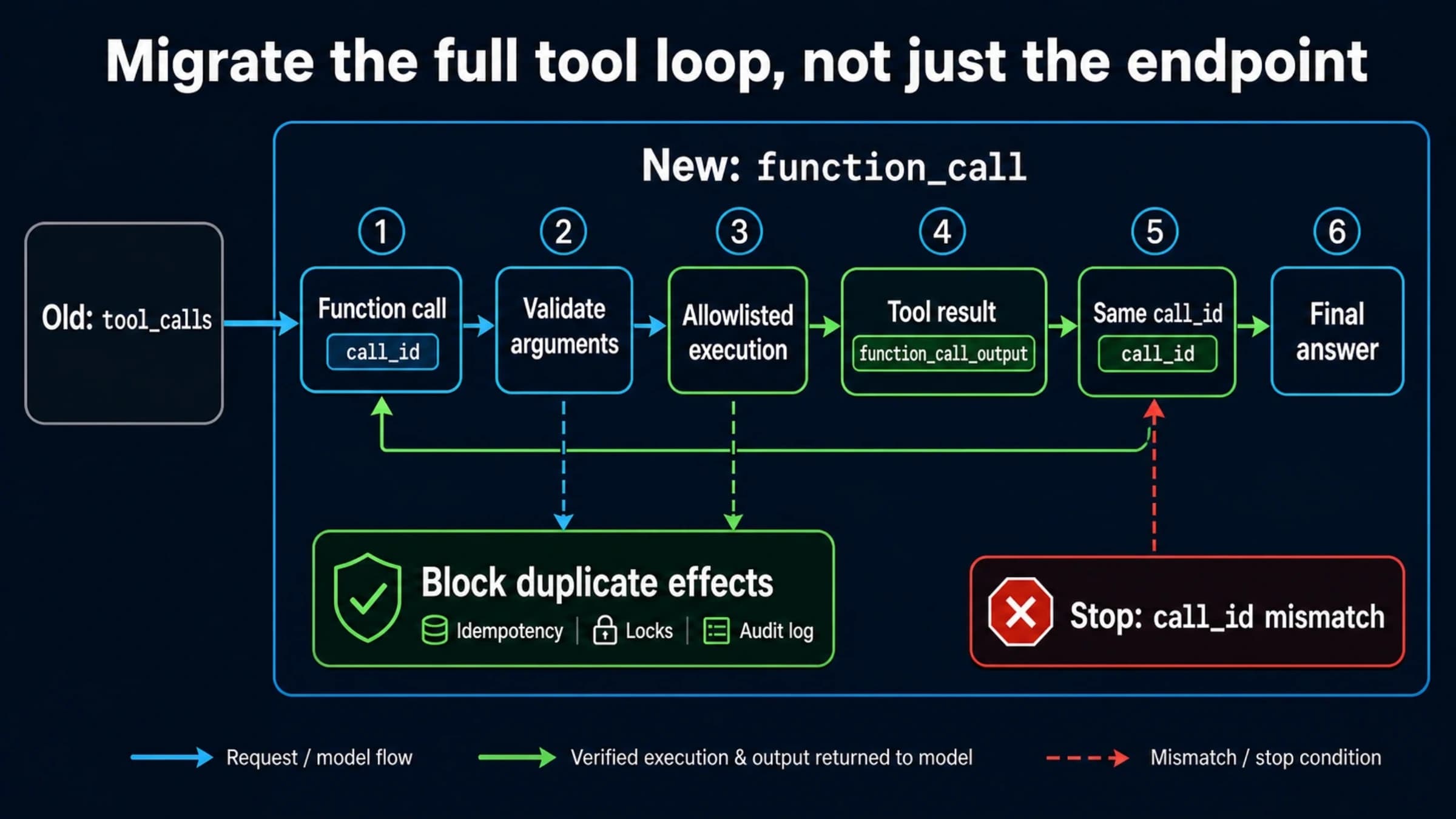
A custom function is executed by your application. Responses emits a function_call with a name, JSON arguments, and a call_id; your application validates and authorizes it, executes the operation, and submits a function_call_output with the same call_id. The next Response may ask for another function. One follow-up request is therefore not a complete general-purpose loop. See the official function-calling contract.
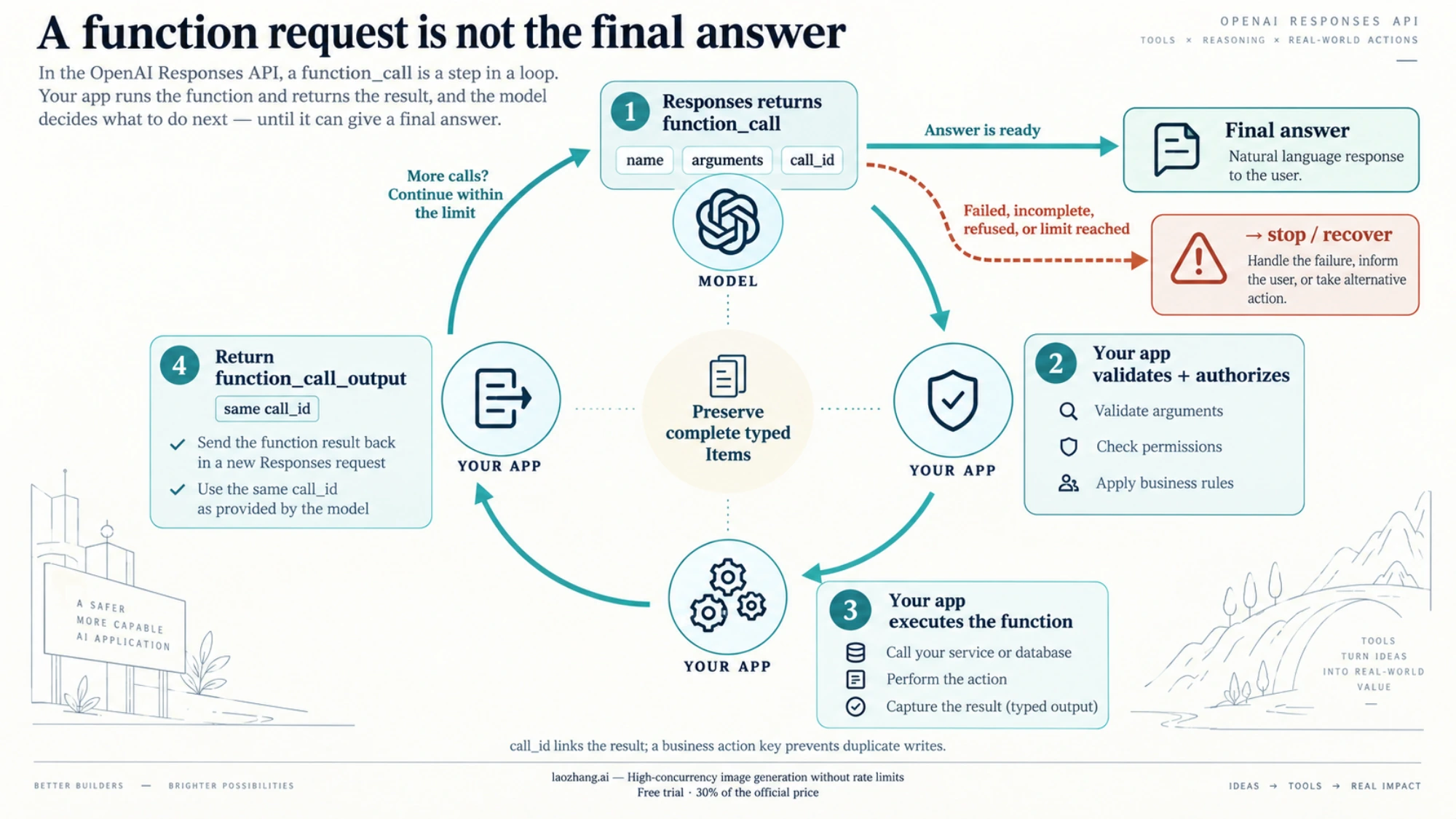
This example uses manual history and a harmless local incident lookup. It accepts the converter's output or starts a new session, preserves complete output Items, handles multiple calls, and stops after six model requests. The fixture's tenant check illustrates an authorization boundary; replace it with your authenticated application lookup rather than trusting a tenant name supplied by the model.
Save it as incident_chat.py. In your own authorized staging environment with the OpenAI Python SDK and API access already configured, run python incident_chat.py YOUR_SUPPORTED_MODEL response-input.json. Omit the second argument for a new chat. The model is an explicit argument because model access and tool support must match your project. These instructions describe what the reader runs; this article's checks did not import the SDK or send requests.
import json
import sys
from openai import OpenAI

INSTRUCTIONS = (
    "Answer incident questions using get_incident. Do not invent current status. "
    "If the incident is unavailable, say so. Give a final user-facing answer."
)
TOOLS = [{
    "type": "function",
    "name": "get_incident",
    "description": "Read the status of an incident accessible to this user.",
    "strict": True,
    "parameters": {
        "type": "object",
        "properties": {"incident_id": {"type": "string"}},
        "required": ["incident_id"],
        "additionalProperties": False,
    },
}]
FIXTURE = {
    "INC-17": {"tenant": "north", "status": "monitoring", "summary": "Queue recovered"},
    "INC-23": {"tenant": "south", "status": "investigating", "summary": "Delayed jobs"},
}


def execute_call(call, tenant):
    if call.name != "get_incident":
        raise ValueError("unexpected function")
    args = json.loads(call.arguments)
    if (not isinstance(args, dict) or set(args) != {"incident_id"}
            or not isinstance(args["incident_id"], str)):
        raise ValueError("invalid function arguments")
    record = FIXTURE.get(args["incident_id"])
    if record is None or record["tenant"] != tenant:
        return {"available": False}
    return {"available": True, "status": record["status"], "summary": record["summary"]}


def answer(client, model, history, question, tenant):
    items = list(history) + [{"role": "user", "content": question}]
    seen_calls = set()
    for round_number in range(6):
        response = client.responses.create(
            model=model,
            instructions=INSTRUCTIONS,
            tools=TOOLS,
            input=items,
            store=False,
            include=["reasoning.encrypted_content"],
        )
        if response.status != "completed":
            raise RuntimeError(f"response did not complete: {response.status}")
        items.extend(response.output)
        calls = [item for item in response.output if item.type == "function_call"]
        if not calls:
            final_text = []
            for item in response.output:
                if item.type != "message" or getattr(item, "phase", None) not in (None, "final_answer"):
                    continue
                for part in item.content:
                    if part.type == "refusal":
                        raise RuntimeError("model refused; use the application's refusal path")
                    if part.type == "output_text":
                        final_text.append(part.text)
            if not final_text or not any(text.strip() for text in final_text):
                raise RuntimeError("completed response has no final answer")
            return "\n".join(final_text), items
        if round_number == 5:
            raise RuntimeError("request limit reached before tool continuation")
        outputs = []
        for call in calls:
            if not isinstance(call.call_id, str) or not call.call_id or call.call_id in seen_calls:
                raise RuntimeError("missing or repeated call_id")
            seen_calls.add(call.call_id)
            result = execute_call(call, tenant)
            outputs.append({
                "type": "function_call_output",
                "call_id": call.call_id,
                "output": json.dumps(result),
            })
        items.extend(outputs)
    raise RuntimeError("no final answer")


if __name__ == "__main__":
    history = []
    if len(sys.argv) > 2:
        with open(sys.argv[2], encoding="utf-8") as source:
            history = json.load(source)
        if not isinstance(history, list):
            raise ValueError("input history must be an array")
    final, updated_items = answer(
        OpenAI(), sys.argv[1], history,
        "What is the current status of INC-17?", "north",
    )
    print(final)
In a real service, persist updated_items using your application's supported Item serialization, and journal request IDs, accepted calls, results, and failures as work progresses. The demonstration prints the answer but does not supply a production database, timeout policy, or queue. Its synthetic checks cover conversion and orchestration branches; they cannot establish SDK compatibility, model behavior, retrieval quality, or latency.
Explicit strict: true is intentional. Each object in a strict function schema needs additionalProperties: false, and every property must be required; optional values can be nullable. Omitting strict is not a validation guarantee: Responses attempts normalization and can fall back to best-effort strict: false if the schema cannot be made compatible. parallel_tool_calls: false limits calls to zero or one, rather than forcing a call. These rules and exceptions are documented under strict mode and parallel calls.
For a production tool failure, decide whether the error can safely be returned as a structured result for the model to explain, or requires stopping and escalating. Never manufacture a successful output after a timeout. Apply authorization and business validation even with a strict schema.
For a mutating function, add a durable action record keyed by the business operation, such as tenant + order + requested transition. call_id correlates a tool output with a model request; it does not prevent a retry from refunding an order twice. A transport failure after committing a write requires reconciliation against that record before retrying. The read-only fixture above deliberately avoids that problem.
Reattach File Search to verified files and access rules
Hosted file_search is executed by OpenAI. You do not submit its result through the custom function loop. Specify the intended vector_store_ids in the Responses request; an old Assistant or Thread association does not establish the new request's document scope. The File Search guide requires files to be available and shows how to expose results and citations.
Use this request fragment with a client and model selected for your authorized staging project, and a vector store you have verified belongs to the intended application:
response = client.responses.create(
    model=model,
    input="Which policy defines the incident escalation threshold?",
    tools=[{"type": "file_search", "vector_store_ids": [verified_store_id]}],
    include=["file_search_call.results"],
    store=False,
)
Search results are omitted by default; include=["file_search_call.results"] makes them inspectable. Check the retrieved passages and output message annotations, not just the answer text. Confirm file processing has reached completed, citations point to the expected documents, and an empty result does not produce an invented policy.
Test the application behaviors that can fail independently: a known answer, an absent answer, a stale or conflicting document, and a request from a user who must not access the source. Apply trusted application-selected stores and, when suitable, metadata filters whose attributes you control. A model-written query or tenant filter is not an access-control policy.
If the original store or files are unavailable, rebuild from authorized file originals and wait for indexing to finish before accepting retrieval traffic. If you retained only file IDs, do not imply those IDs recreate the content. Keep document-dependent tasks paused or route them to a supported manual process until their sources are available.
Port completion, streaming, and long-running jobs together
Replace the old Run state machine with a product state machine that distinguishes waiting, generation, tool execution, final answer, refusal, failure, cancellation, and an incomplete response. A successful HTTP request or a terminal provider status alone does not mean the user's task succeeded.
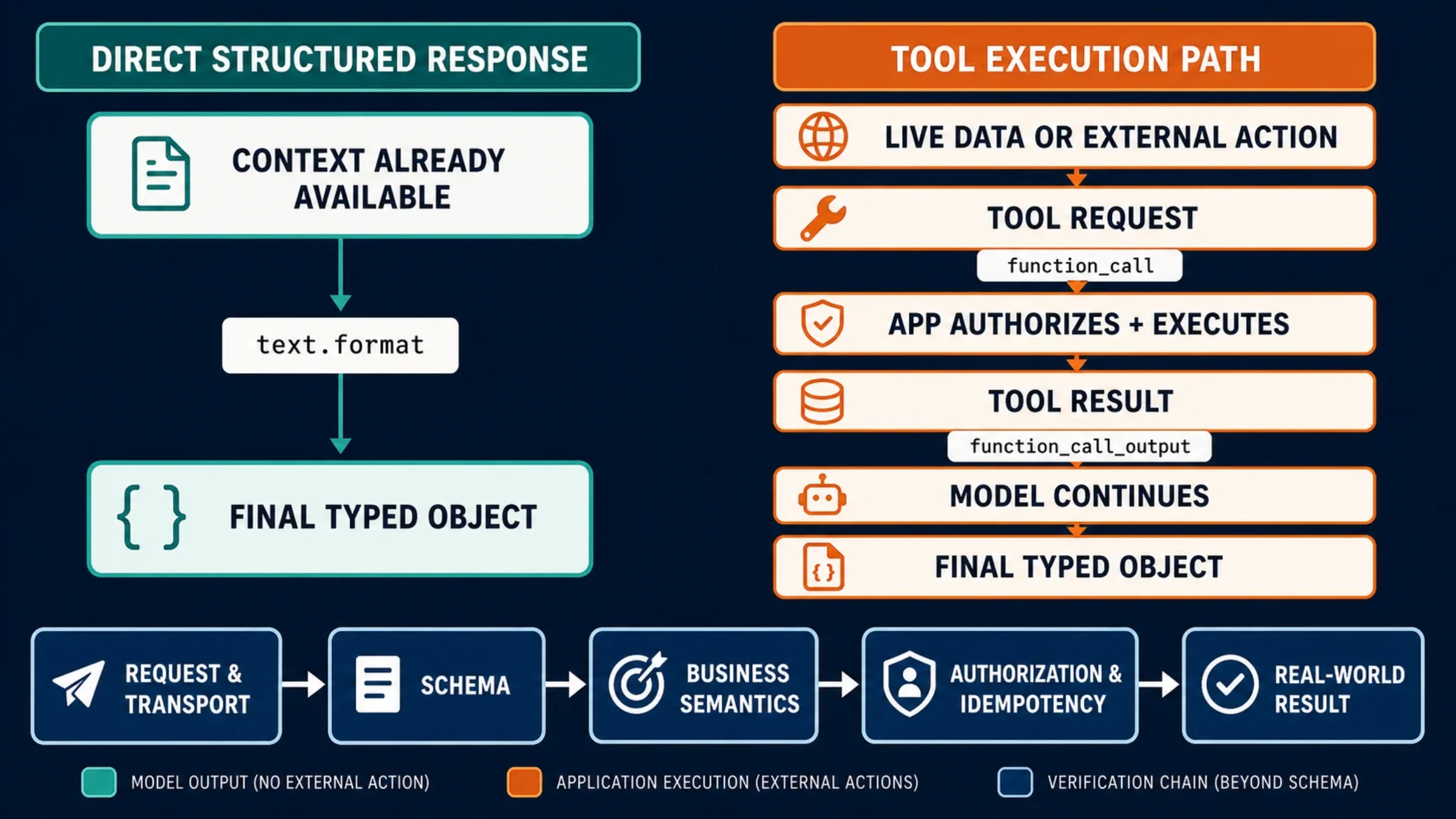
For a streaming UI, consume typed Responses events. response.output_text.delta updates visible text; function-argument deltas update a pending call, and their done event completes the arguments. Do not execute partial JSON. Preserve output Items and wait for the appropriate terminal result before displaying a completed task. Handle the error event, disconnects, and incomplete/failed responses explicitly. The Responses migration guide also moves Structured Outputs from response_format to text.format; update both the request and the downstream schema validator.
Use background: true for work that should continue asynchronously. Poll responses.retrieve while status is queued or in_progress, then inspect the terminal outcome. Use responses.cancel for an in-flight background response. To resume a background stream, create it with stream: true initially and retain its sequence_number cursor for starting_after. These behaviors are documented in Background mode, which currently notes higher time to first token than synchronous generation.
Canceling generation or closing a foreground connection does not reverse a business write already committed by your application. Make that distinction visible in job status: “generation canceled” and “refund reversed” are different outcomes. The retry button should resume or reconcile the recorded job, rather than blindly repeat its side effects.
Set retention deliberately, including background storage
store: false controls Response object storage; it is not a promise that no customer data is retained anywhere. Default abuse-monitoring logs may contain customer content and are retained for up to 30 days, with documented exceptions. Stored Responses normally have a 30-day application-state period, while Conversations and their Items have no 30-day TTL and are retained until deleted. Conversations are not ZDR eligible. Files, vector stores, and other tools have separate storage rules. Use the current data controls alongside your actual organization and project agreement.
There is an important background-mode distinction in the current background documentation: ZDR projects run background requests with store=false, but Response data is temporarily stored on disk for roughly 10 minutes to support execution and polling. If your policy prohibits that temporary storage, choose a permitted foreground flow rather than treating the ZDR label as sufficient.
For Modified Abuse Monitoring, including enhanced MAM, foreground requests follow standard retention when store is omitted or true. Background responses are retained beyond the temporary polling period only when store=true is explicitly supplied; omitted or false background storage is deleted after roughly 10 minutes. Check your project's actual eligibility and model-specific exceptions before choosing a mode. Your own history database, task logs, and backups also need access and deletion policies.
Switch traffic with a recovery path that works after shutdown
Validate the new implementation against saved successful tasks and known failures, or compare it with an already-working Responses release. Historical Assistants outputs can be a reference, but you cannot run fresh legacy shadow traffic now. Do not execute mutating tools twice just to compare two versions; use fixtures, recorded tool results, or a controlled read-only path.
The useful acceptance criteria follow the application, rather than an endpoint response code:
| Area | Evidence before expansion | Action if it fails |
|---|---|---|
| Restored behavior and history | Required facts and escalation rules survive; supported chats resume without invented content | Stop that session's migration or begin a new chat with a clear explanation |
| Session isolation | Authenticated users receive only their own history and document scope | Block affected traffic and investigate access mappings |
| Custom functions | Arguments, authorization, call_id, result submission, additional rounds, and retry safety work | Disable the affected operation; reconcile any committed write |
| Retrieval | Expected sources and citations appear; unavailable and unauthorized sources are handled safely | Pause document-dependent tasks or restore a verified index |
| UI and jobs | Final, incomplete, failed, refused, disconnected, and canceled states have usable behavior | Route jobs to a known working implementation or supported queue |
| Operations and data | Successful-task cost, error rate, latency, context growth, storage, and deletion meet your own limits | Hold the rollout and restore a verified compatible release or safe mode |
Start with internal users and a small low-risk cohort. Keep cohorts on a consistent configuration and state version. Increase traffic after enough representative completed tasks to assess the application; no universal percentage schedule proves safety. Observe successful-task cost including model usage, tools, and storage rather than assuming the endpoint change lowers the bill.
A recovery switch must select both runtime and configuration. If the previous working Responses release cannot read the new state shape, keep an explicit conversion or safe read-only path; changing a code flag alone is not reversible. Preserve accepted jobs and action records, suppress unsafe retries, and tell users when a request is queued or needs human handling.
The migration is ready for normal traffic when supported sessions can resume, new sessions work, tools and retrieval satisfy their authorization and result contracts, failures have useful outcomes, and recovery no longer depends on the retired API. If your application also changes SDK URL settings or uses another provider, verify that separate route with the OpenAI base URL configuration guide.
Frequently asked questions
Can I still export old Threads using their IDs?
The retired Thread message-list call no longer works, according to the current Assistants migration guide. Use application-held transcripts or previously saved exports. An ID-only record is insufficient to recover missing content; keep it as a reference and start a new supported session rather than fabricating history.
Do I need to create a Prompt before using Responses?
No. Put instructions, model selection, tools, and output schemas in your application configuration. Reusable Prompt objects and v1/prompts have a separate November 30, 2026 shutdown, so OpenAI's Prompt migration guidance recommends moving their content into code.
Should I use Conversations or previous_response_id?
Use a Conversation for durable provider-managed state across sessions or jobs; use previous_response_id for a bounded continuation of available Response state. Do not combine them. Use manual Items when your application must own replay and pruning. These choices have different retention obligations, and preceding instructions are not automatically carried forward by previous_response_id. See the Responses request reference and state guide.
Why did the model request a function but never answer the user?
Your application must execute the function, return a function_call_output with its matching call_id, and continue until a final answer or a defined failure. Another function request may follow the first result. Cap the loop and distinguish tool execution from user-facing completion; receiving a call does not itself perform the business operation. The function-calling guide defines that exchange.
Can I roll back to Assistants if Responses fails?
No. Assistants is already unavailable. Recovery must select a verified Responses release and compatible state/configuration, or a supported safe mode such as queuing the request or manual handling. Preserve records of business actions before retrying so recovery does not duplicate side effects.
Sources10
External pages this guide links to, in the order they appear. Last updated Oct 6, 2026.
Sources10
External pages this guide links to, in the order they appear. Last updated Oct 6, 2026.
- 1.current migration guidedevelopers.openai.com/api/docs/assistants/migration
- 2.Prompt migration guidedevelopers.openai.com/api/docs/guides/prompting/migrate-from-prompt-object
- 3.conversation-state guidedevelopers.openai.com/api/docs/guides/conversation-state
- 4.Responses create referencedevelopers.openai.com/api/reference/resources/responses/methods/create
- 5.reasoning guidancedevelopers.openai.com/api/docs/guides/reasoning
- 6.official function-calling contractdevelopers.openai.com/api/docs/guides/function-calling
- 7.File Search guidedevelopers.openai.com/api/docs/guides/tools-file-search
- 8.Responses migration guidedevelopers.openai.com/api/docs/guides/migrate-to-responses
- 9.Background modedevelopers.openai.com/api/docs/guides/background
- 10.current data controlsdevelopers.openai.com/api/docs/guides/your-data