Claude Code Agent View: Latest Claude Code Agent Updates, `claude agents`, and When to Use It
Agent View is the current Claude Code local-session dashboard to understand first; use it for independent background sessions, with version, quota, and worktree limits checked before you scale it.
On this page
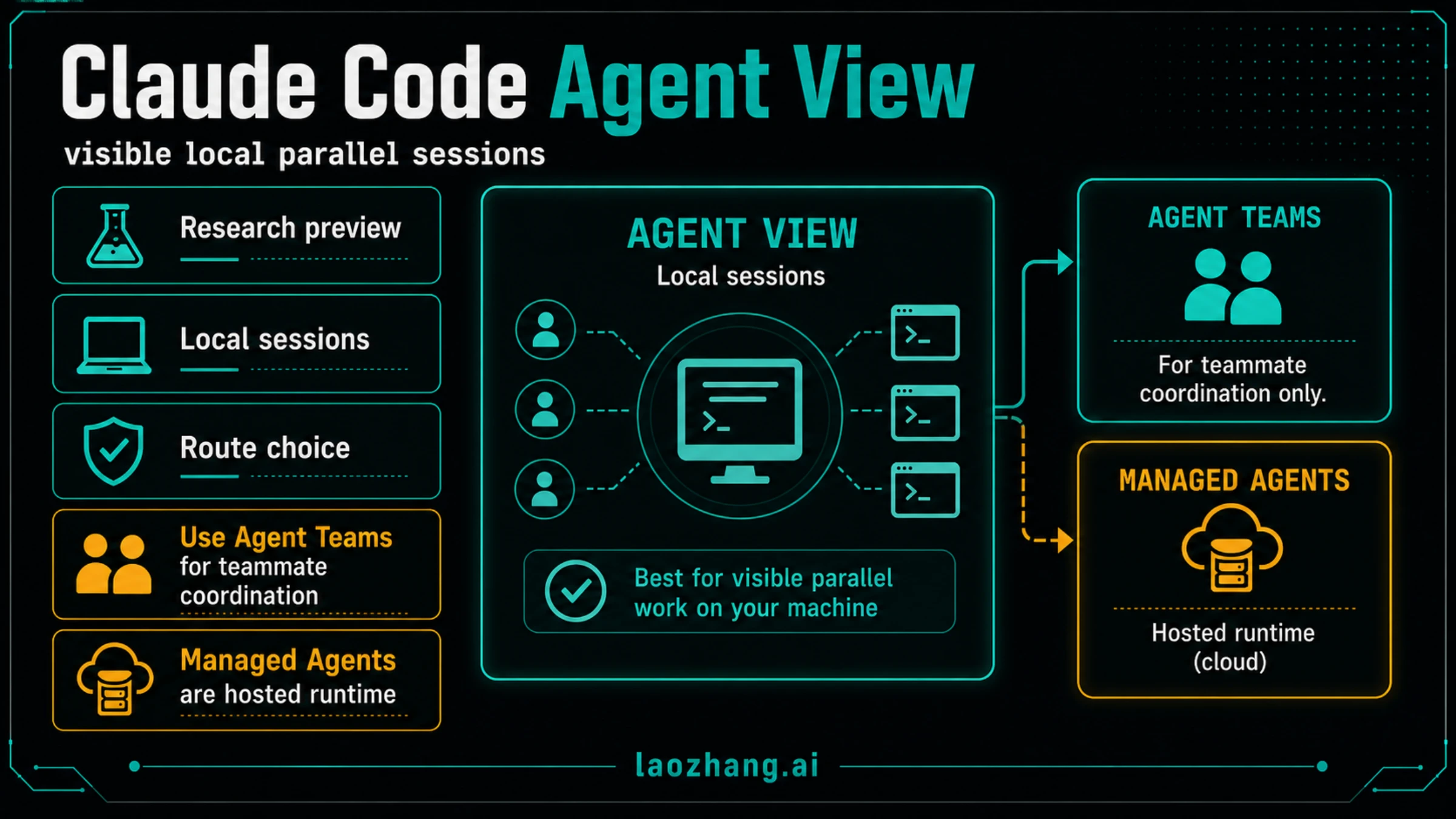
As of May 19, 2026, Claude Code Agent View is the current Claude Code route to understand first: a research-preview dashboard opened with claude agents for managing independent local background sessions.
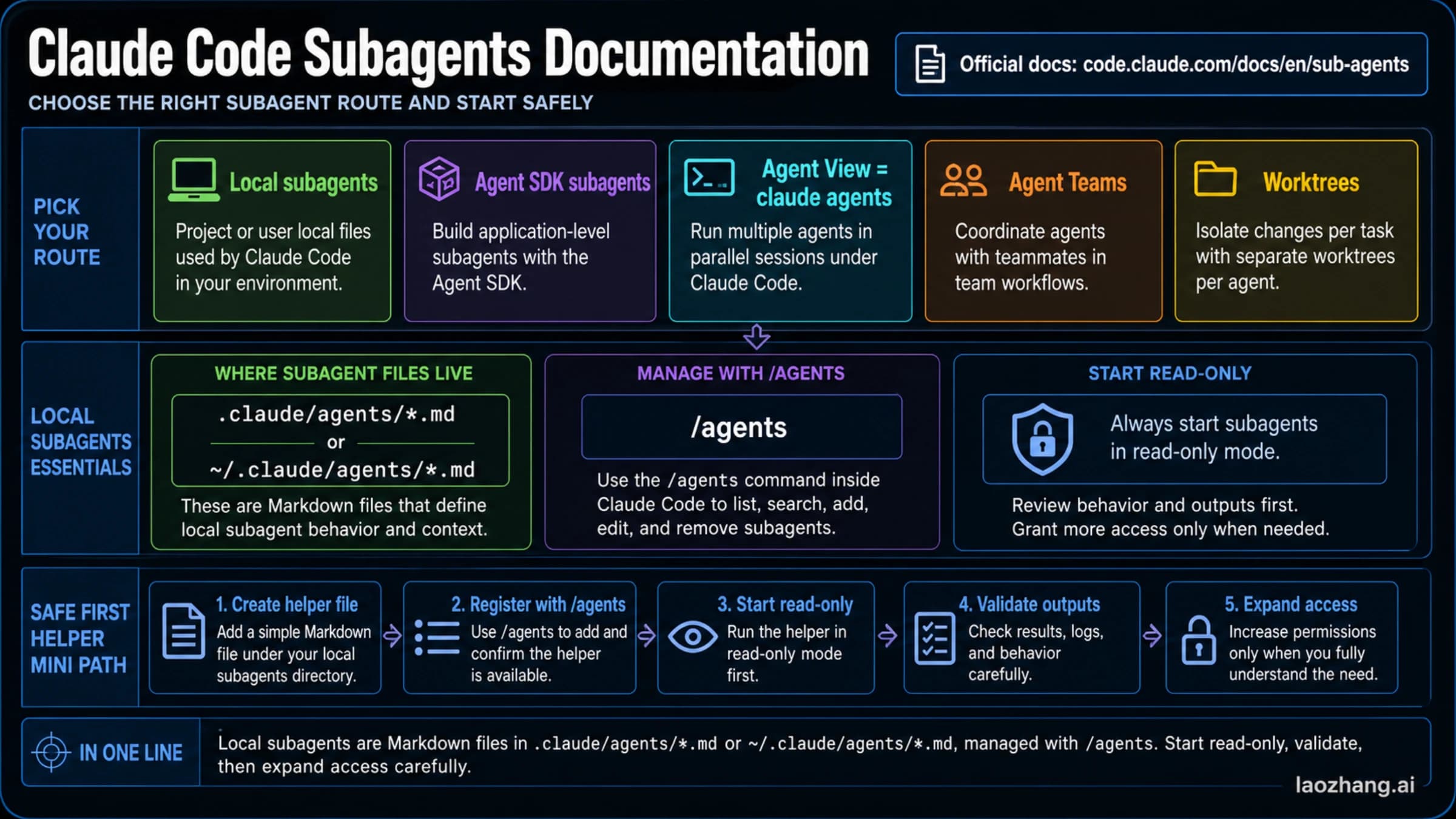
That does not make every "Claude Code agent" question the same route. Use Agent View when you want visible parallel local sessions. Use Agent Teams only when you are deliberately trying Anthropic's experimental teammate-coordination path. Use subagents for focused helpers inside one Claude Code session, Managed Agents for hosted Anthropic platform execution, and the Agent SDK or Messages API when you are building your own product agent runtime.
| If you mean... | Start here | Current boundary |
|---|---|---|
| "I want several Claude Code tasks visible at once" | claude agents | Agent View is a research preview for local background sessions. |
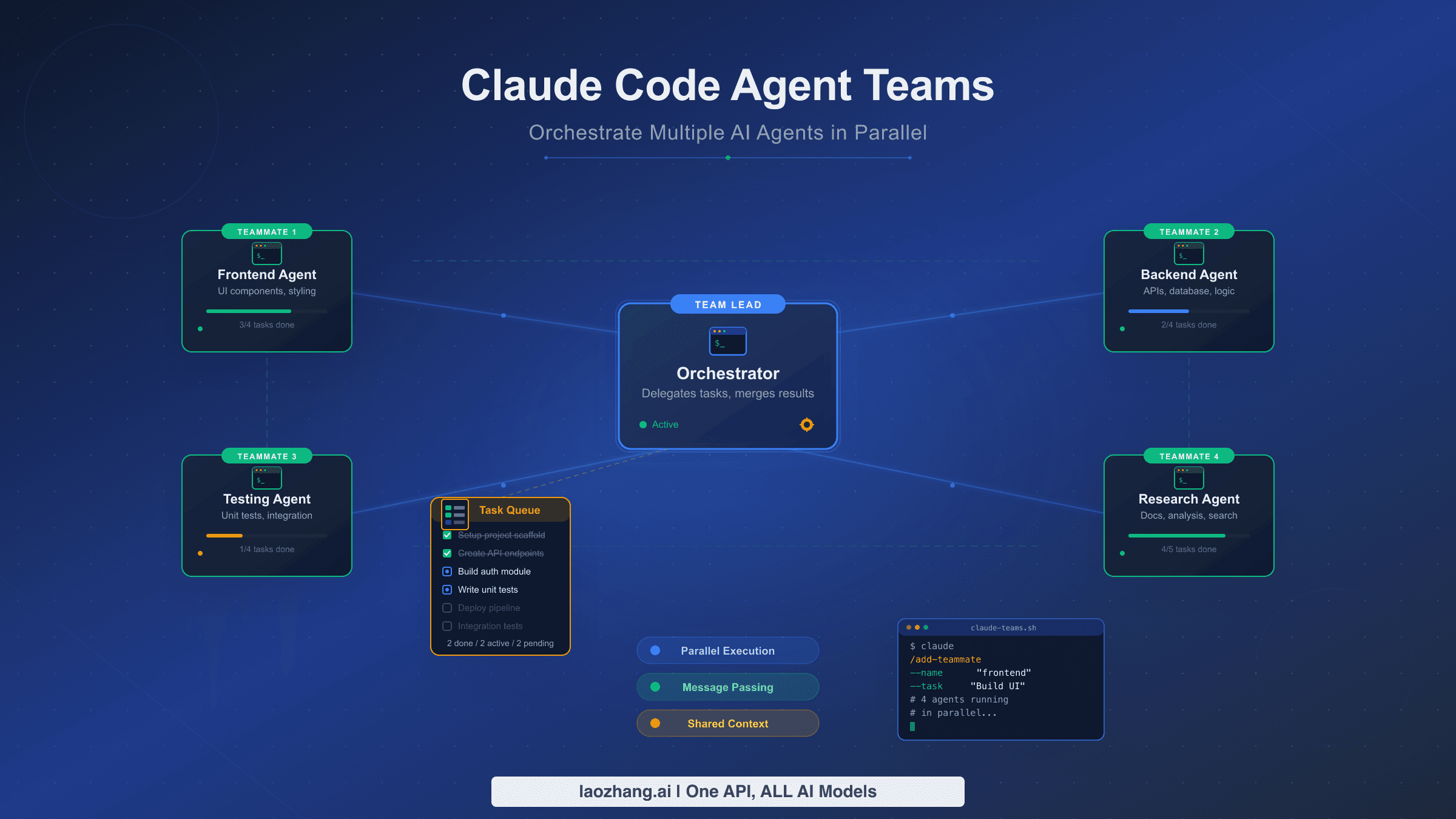
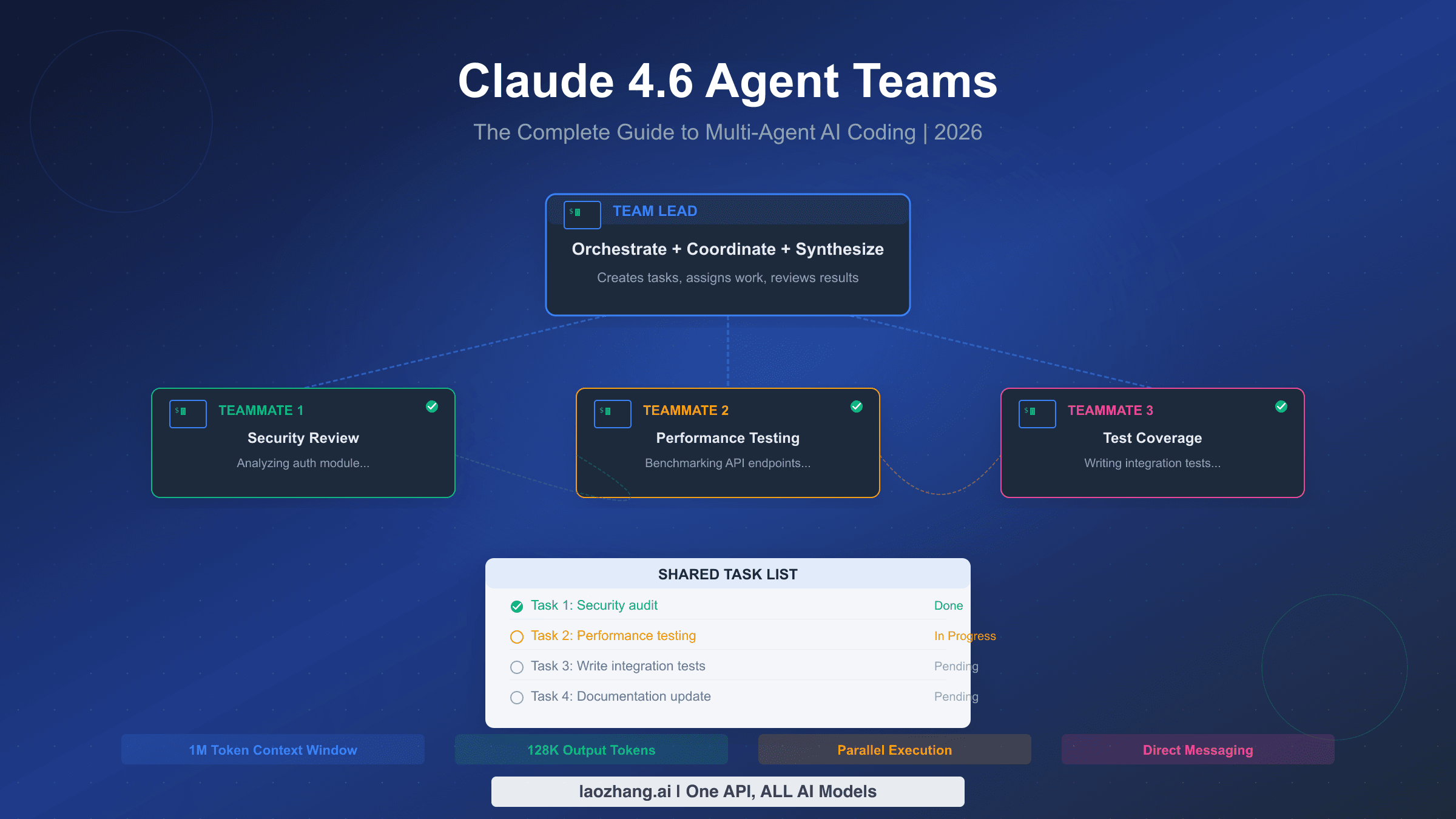
| "I want Claude Code teammates to coordinate work" | Agent Teams docs | Experimental and disabled by default. |
| "I want a focused helper inside one session" | Claude Code subagents | Better for scoped review, testing, or research inside a single workflow. |
| "I want hosted agent execution through Anthropic" | Managed Agents | Separate platform/API route, not a local Claude Code dashboard. |
| "I want to build an agent product" | Agent SDK or Messages API | Application runtime choice, not a Claude Code UI feature. |
Before scaling up, run the short stop rule: if the work touches the same files, has unclear ownership, depends on scarce quota, or needs one careful reasoning chain, stay in a single Claude Code session until the boundary is clearer.
Fast Answer
Agent View is a local Claude Code dashboard for background sessions. The practical path is short: update Claude Code, verify your version, open the dashboard, start only independent work, and review each session before cleanup.
npm install -g @anthropic-ai/claude-code@latest
claude --version
claude agents
The date matters. Anthropic's Claude Code changelog added Agent View as a research preview in v2.1.139 on May 11, 2026, and the npm registry showed @anthropic-ai/claude-code latest at 2.1.143 during this May 19, 2026 run. The registry also showed a newer next tag, but that is not the default route to recommend for ordinary readers. Use the documented command path and current docs first.
The most useful mental model is not "more agents equals better work." It is "more visible local sessions when the work can be split safely." Each background session is still a Claude Code conversation with its own context, tool use, permissions, and quota impact. Agent View gives you a screen to monitor those sessions; it does not remove the need to assign clean boundaries.
If you came here because older material talks about Agent Teams, keep the split explicit. Claude Code Agent Teams is the sibling path for experimental teammate coordination. Agent View is the easier first answer when you only need to see and manage several local Claude Code sessions.
What Changed With Agent View
The current update is that Claude Code now has an official dashboard-shaped route for local background sessions. Instead of treating every parallel task as a terminal juggling exercise, Agent View gives you one place to see running sessions, sessions that need input, and completed work.
That matters because the earlier Claude Code agent conversation was easy to misread. Agent Teams made "multiple Claude Code agents" sound like a team architecture problem. Subagents made it sound like delegation inside one parent session. Managed Agents made it sound like Anthropic-hosted runtime. Agent View is different: it is about visible local background sessions that you can open, inspect, and return to.
The official boundary is also important. Agent View is a research preview, not a settled forever contract. Anthropic documents v2.1.139 or later as the required Claude Code version, and the changelog entries after that release include fixes around background sessions, Agent View, and related command behavior. Do not freeze the interface as if every label or behavior is final; build a verification habit instead.
Use this three-part freshness check before changing your workflow:
claude --versionconfirms you are at or beyond the documented Agent View boundary.claude agentsconfirms the command opens the dashboard in your environment.- The current Claude Code docs and changelog confirm whether preview labels, session behavior, or shutdown semantics have changed after May 19, 2026.
That check is intentionally boring. It prevents the expensive mistake of designing a team workflow around a screenshot, a video demo, or a package tag that is not the normal default.
Route Board: Agent View Is Not Agent Teams
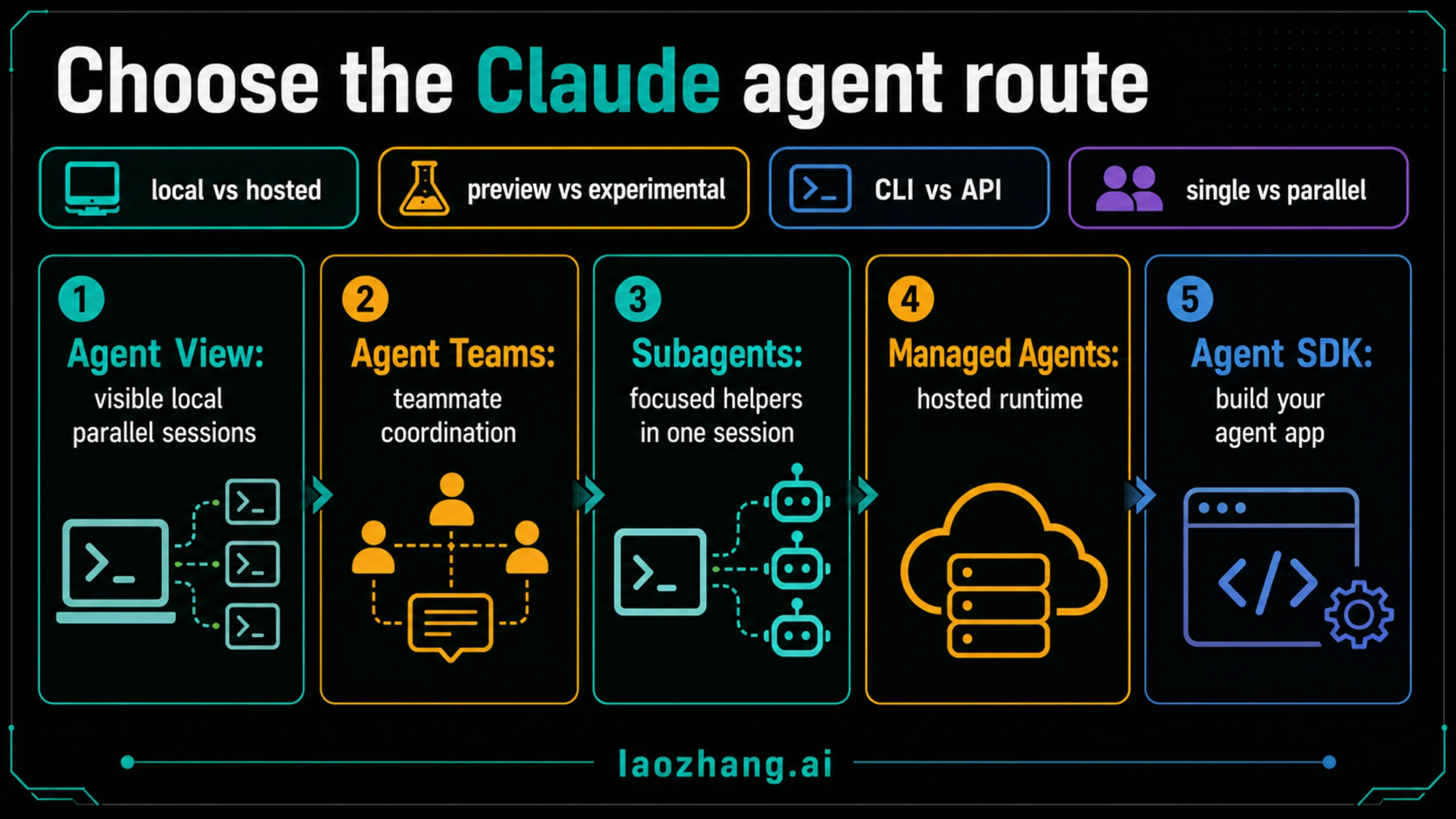
The route decision should happen before setup. These surfaces use overlapping words, but they do not solve the same job.
| Route | Use it when | Do not use it when | Status boundary |
|---|---|---|---|
| Agent View | You want to manage independent local Claude Code background sessions from one dashboard. | The work is one tight edit or needs agents to coordinate as teammates. | Research preview; verify version and docs. |
| Agent Teams | You want Claude Code teammates to coordinate, communicate, and share a team task model. | You only need several visible sessions or a simple focused helper. | Experimental and disabled by default with CLAUDE_CODE_EXPERIMENTAL_AGENT_TEAMS. |
| Subagents | You want a focused helper inside one Claude Code session for review, testing, research, or search. | Sibling workers need persistent peer-to-peer coordination. | Part of the single-session delegation pattern. |
| Managed Agents | You want Anthropic to host a longer-running agent runtime through the platform/API. | You are managing local repo work in Claude Code. | Hosted runtime route; see Claude Managed Agents. |
| Agent SDK or Messages API | You are building your own application agent runtime. | You want a ready Claude Code dashboard. | Product architecture route, not a Claude Code UI. |
The same distinction also protects cost and attention. Agent View can make parallel local work easier to monitor, but it can also multiply unfinished branches if you spawn sessions without ownership. Agent Teams can be powerful when coordination is the point, but it has heavier setup and coordination overhead. Subagents are often enough when the work is scoped and parent-managed.
For most developers, the route order should be:
- Stay in one Claude Code session for tightly coupled work.
- Use subagents for bounded helper tasks inside that session.
- Use Agent View when independent local work deserves separate visible sessions.
- Use Agent Teams only when teammate coordination is the actual experiment.
- Use Managed Agents, Agent SDK, or Messages API only when you are choosing an application runtime.
That order is less exciting than a feature tour, but it is safer. The wrong route does not just waste time. It can create duplicate edits, unreviewed worktrees, quota surprises, and confusing ownership.
Safe First Run
Use Agent View first on a small task split, not on your most fragile repo migration. The first goal is to learn the operating rhythm: open, split, watch, attach, review, and clean up.
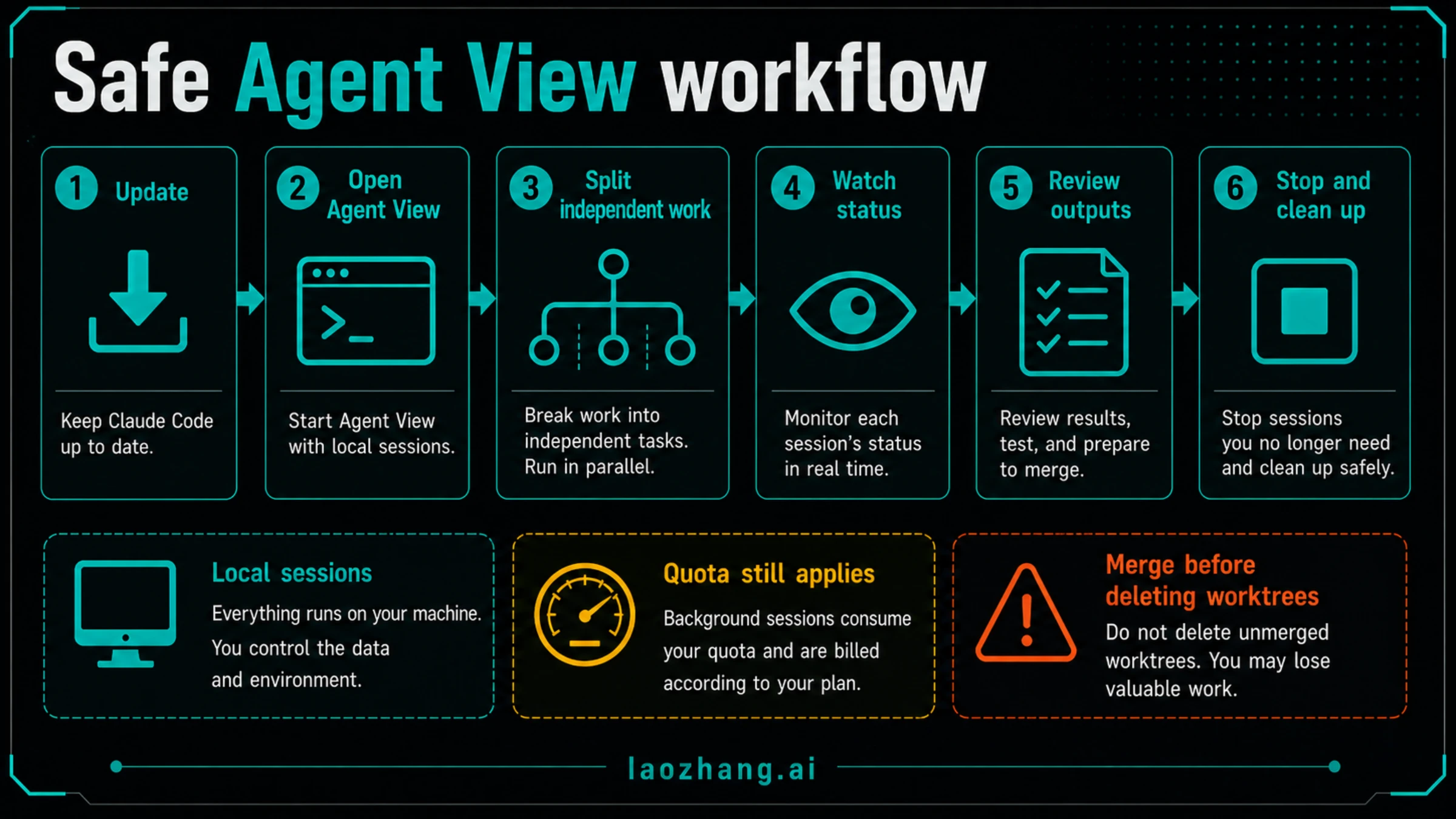
A conservative first run looks like this:
- Update Claude Code with the normal
latestpackage route. - Confirm the installed version with
claude --version. - Open Agent View with
claude agents. - Start two independent background sessions, not five.
- Give each session a task that owns a different question or file area.
- Watch for
needs inputstates instead of letting sessions drift. - Attach to each completed session and review the evidence, commands, and file changes.
- Stop or clean up only after you know where the work lives.
Good starter tasks are investigative, independent, and easy to compare. For example:
- One session maps where authentication state is read while another maps where it is written.
- One session reviews a pull request for test gaps while another checks migration risk.
- One session reproduces a flaky test while another scans recent changes around the failing path.
- One session explores docs and the other audits local implementation assumptions.
Bad starter tasks are tightly coupled or ambiguous. Do not ask three background sessions to edit the same component, redesign a shared API contract, and update tests before anyone has agreed on ownership. Agent View can help you see the parallel work, but it cannot make unclear boundaries safe.
The prompt shape matters. A useful Agent View session brief includes the task, ownership boundary, allowed files or read-only status, expected output, and stop condition.
Investigate why checkout retry tests are flaky.
Read-only unless you find a one-line test isolation fix.
Focus on test files and retry helper code only.
Return the failing command, strongest hypothesis, and safest next action.
Stop if the fix touches shared payment runtime code.
That is more useful than "debug checkout." A background session should know what it owns and when to stop.
When Agent View Is Worth Using
Agent View is worth using when parallelism reduces waiting without creating merge confusion. The best cases have independent lanes and a clear review point.
Use it for parallel investigation. If a bug has three plausible causes, separate sessions can test those hypotheses faster than one session moving sequentially. The review point is simple: compare evidence and choose the strongest branch before editing shared code.
Use it for independent review lanes. One session can read for security risk, another for performance risk, and another for missing tests. That works because each lane can produce findings without editing the same files. If the findings conflict, you still make the final decision in one place.
Use it for background documentation or migration prep. One session can map current commands, another can inventory config files, and another can check docs drift. This is a good fit because the output is a set of findings, not simultaneous code mutation.
Use it for long-running but bounded local checks. If one branch needs to run a slow test suite while another reads logs or reproduces a small failure, visible background sessions are useful. Agent View is not only about spawning more code writers. It is also about not losing track of work that is waiting, blocked, or ready for review.
The threshold is not "could I split this?" Almost anything can be split badly. The threshold is "can I assign non-overlapping ownership and review outputs before merging?" If the answer is yes, Agent View is worth trying.
Stop Rules Before You Parallelize
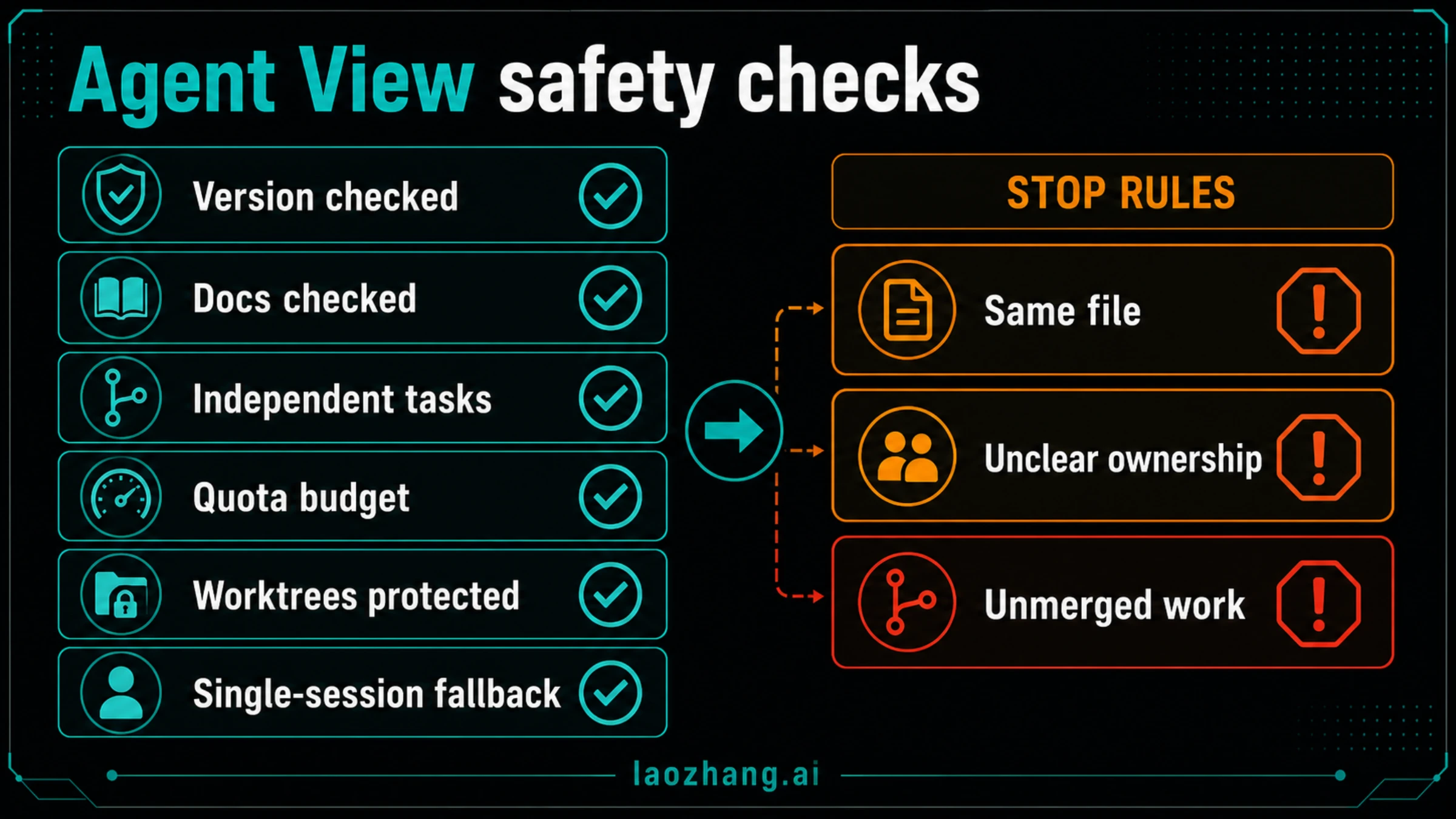
Do not use Agent View to make unclear work feel organized. Use it after you have a clean boundary.
Stop and stay single-session when:
- The edit touches the same files from multiple angles.
- The task depends on one continuous reasoning chain.
- You cannot describe ownership without using vague words like "help with everything."
- The repo has uncommitted user changes you have not understood.
- Quota is tight and each extra session would create more review work than value.
- You need to preserve a delicate local worktree or migration state.
- The expected output is one final judgment, not several comparable findings.
This is especially important in dirty worktrees. Claude Code sessions can help, but they cannot protect you from merging unrelated edits, deleting a local branch, or accepting two incompatible changes. Before starting multiple sessions, know what is already modified, what each session may touch, and how you will review diffs.
If you are learning Claude Code workflow design more broadly, Claude Code best skills and Claude Code best MCP servers are better follow-ups than adding more background sessions. Better local context often beats more parallelism.
Troubleshooting Agent View
If claude agents does not open what you expect, start with version and channel before redesigning the workflow.
| Symptom | Likely branch | Next action |
|---|---|---|
claude agents is unavailable or behaves differently | Installed Claude Code is behind the Agent View boundary or docs changed after May 19, 2026. | Run claude --version, update via @latest, and re-check current Claude Code docs. |
| Agent View opens but there are no sessions | You have not started background work or existing work is not in a visible state. | Start one small independent session and confirm it appears before scaling. |
| Sessions keep asking for input | Prompts are under-specified or permissions need attention. | Attach, answer the blocking question, and make the task boundary narrower. |
| Many sessions finish but nothing is mergeable | The work was split by enthusiasm, not ownership. | Review findings, choose one branch, and collapse back to one session for implementation. |
| Quota or plan limits become the bottleneck | Parallel sessions multiply model usage and review overhead. | Reduce active sessions and read Claude daily limit before retrying. |
| The question is about billing, API keys, or subscriptions | You may be on the wrong route entirely. | Separate Claude Code account access from API runtime; see Claude Code API key vs subscription billing. |
The safest recovery path is simple: stop adding sessions, attach to the running ones, save or summarize useful findings, and finish the next edit in one normal Claude Code session. Agent View should improve observability. If it is increasing ambiguity, reduce concurrency.
One more boundary is worth repeating. Agent View is local Claude Code session management. It is not Managed Agents, not a hosted platform runtime, and not a promise that background work continues independently of your local machine constraints. Treat shutdown, local state, permissions, and worktree cleanup as real operational risks.
FAQ
Is Claude Code Agent View available now?
Yes, but the current public contract is research preview. Anthropic documents Agent View as available through claude agents with Claude Code v2.1.139 or later. Verify your installed version and current docs before using it as a core workflow dependency.
What is the minimum version?
The documented Agent View boundary is Claude Code v2.1.139 or later. As of May 19, 2026, the npm latest tag for @anthropic-ai/claude-code was 2.1.143. Use claude --version instead of guessing from package memory.
Should I install the next tag?
Not as the normal recommendation. The registry showed a newer next tag on May 19, 2026, but preview or pre-release package tags should not become the default reader path without a current official reason. Start with @latest and the docs.
Is Agent View the same as Agent Teams?
No. Agent View is a dashboard for local background sessions. Agent Teams is an experimental teammate-coordination route that is disabled by default and uses the CLAUDE_CODE_EXPERIMENTAL_AGENT_TEAMS flag. Use Agent View first when visibility is the job; use Agent Teams only when teammate coordination is the job.
Are subagents still useful?
Yes. Subagents are often the better route for focused helper work inside one Claude Code session. If the helper can complete a bounded task and report back, a subagent may be simpler than opening separate visible sessions.
Does Agent View run work in the cloud?
No. Treat Agent View as a local Claude Code session-management surface. If your need is hosted Anthropic runtime for product workflows, read the Claude Managed Agents route instead.
Does Agent View avoid quota usage?
No. Background sessions still use Claude Code and model capacity. Parallel work can consume quota faster because more sessions are active and more output must be reviewed. Use fewer sessions until the value is clear.
What is the best first task to try?
Pick two independent investigation lanes with read-only or low-risk output. For example, ask one session to map failing tests and another to inspect recent changes around the same feature. Compare evidence before editing shared files.
Bottom Line
Claude Code Agent View is the current local-session answer to understand first when you want visible parallel Claude Code work. Its value is not that it makes every task multi-agent. Its value is that it gives independent background sessions a clearer operating surface.
Use it with discipline: verify the version, open claude agents, split only independent work, watch for blocked sessions, and review outputs before cleanup. Keep Agent Teams, subagents, Managed Agents, and SDK/API work in their own lanes. When the task is tight, sequential, quota-sensitive, or unclear, one careful Claude Code session is still the better engineering choice.