Claude Code Memory Guide (2026): CLAUDE.md vs Auto Memory vs Plugins
Claude Code memory is not one giant permanent brain. The built-in system uses CLAUDE.md for explicit rules and auto memory for learned patterns, while plugins are optional escalation routes when you need cross-tool or cross-machine continuity. This guide explains what loads at startup, how to inspect memory with /memory and /context, and how to fix the most common forgetting problems.
On this page
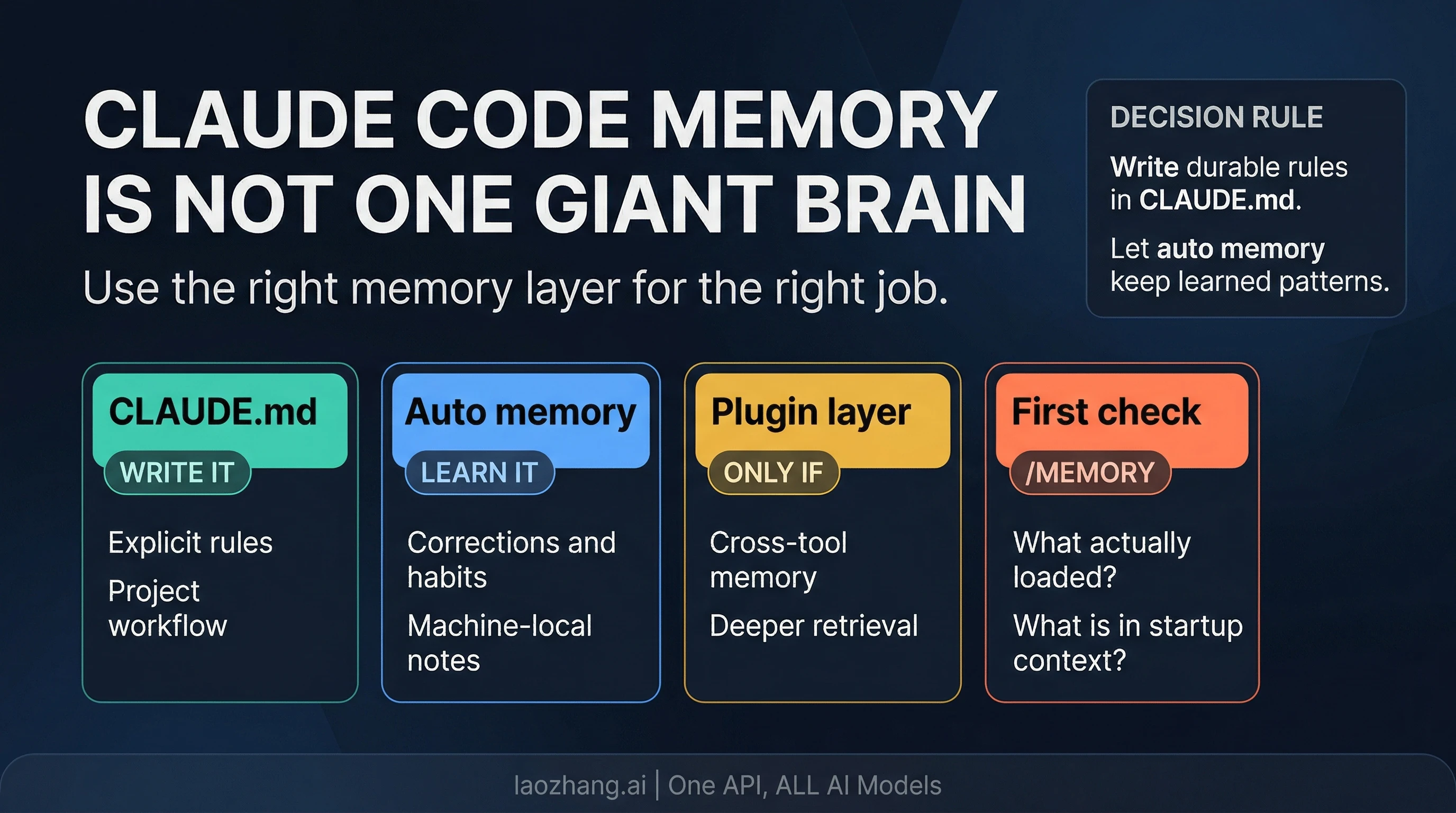
Claude Code does remember your project between sessions, but not through one giant permanent memory. Anthropic's current documentation, checked on April 8, 2026, makes the split explicit: the built-in system uses CLAUDE.md for instructions you write and auto memory for patterns Claude learns over time.
That distinction matters because most confusion around "Claude Code memory" comes from putting three different jobs into one bucket. Some information should be written down as durable instructions. Some should be learned from repeated corrections. Some should not live in the built-in system at all if what you really need is cross-tool or cross-machine retrieval. Once you separate those jobs, Claude Code memory stops feeling mysterious and starts feeling configurable.
The practical route is straightforward. If a rule would be costly to lose, write it into the right CLAUDE.md. If Claude can learn it from repeated feedback, let auto memory carry that pattern. If you need continuity beyond one machine, one repository context, or one built-in memory folder, that is when an external layer becomes relevant. Before you assume memory is broken, run /memory to see what loaded and /context to see how much of the session budget is already in play.
What Claude Code Should Remember, and What It Should Not
The most useful question is not "Does Claude Code have memory?" It is "What should remember what?" Claude Code's built-in memory works well when you give each layer a clear job.
CLAUDE.md is the explicit instruction layer. This is where durable workflow rules belong: how your repository is organized, how tests should be run, what coding standards matter, which directories are sensitive, and what the team expects Claude to do before proposing changes. If you would be annoyed to rediscover the rule in every session, it belongs here. Anthropic's docs are careful on one important point, though: CLAUDE.md is loaded as context, not enforced as hard policy. If the instructions are vague, contradictory, or bloated, Claude can still drift. The value of CLAUDE.md is not that it is magical. The value is that it is explicit, stable, and present at the start of each session.
Auto memory is the learned-pattern layer. It is designed for behavior Claude can pick up from repetition: "prefer this testing command", "this project uses this internal abbreviation", "we usually structure review notes like this", or "this folder contains generated assets that should not be edited casually." Anthropic's current docs describe auto memory as enabled by default on recent Claude Code versions, with memory files stored under ~/.claude/projects/<project>/memory/. That makes it practical, but it also defines the boundary: this is machine-local operational memory, not a universal cloud memory that follows you everywhere.
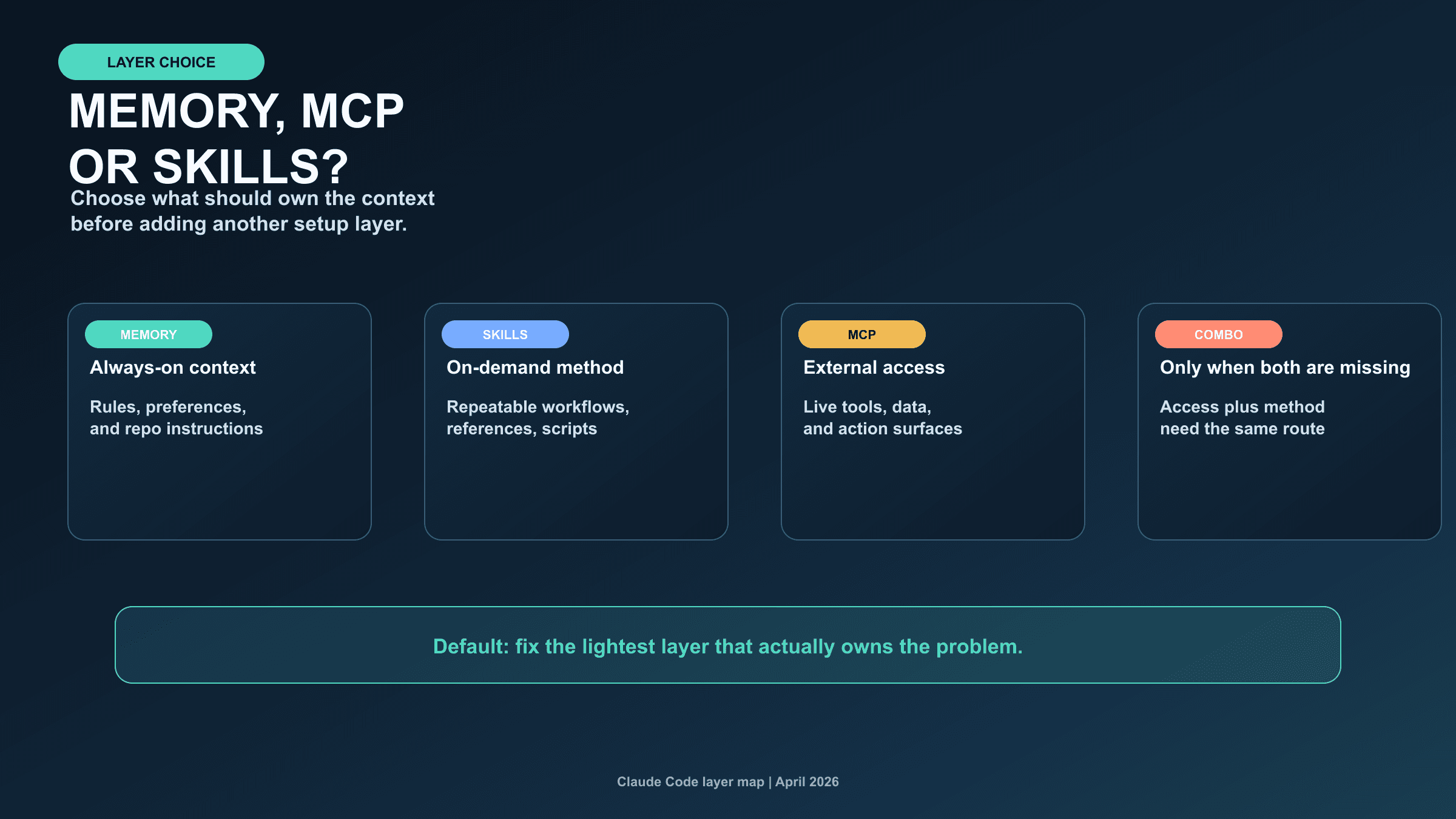
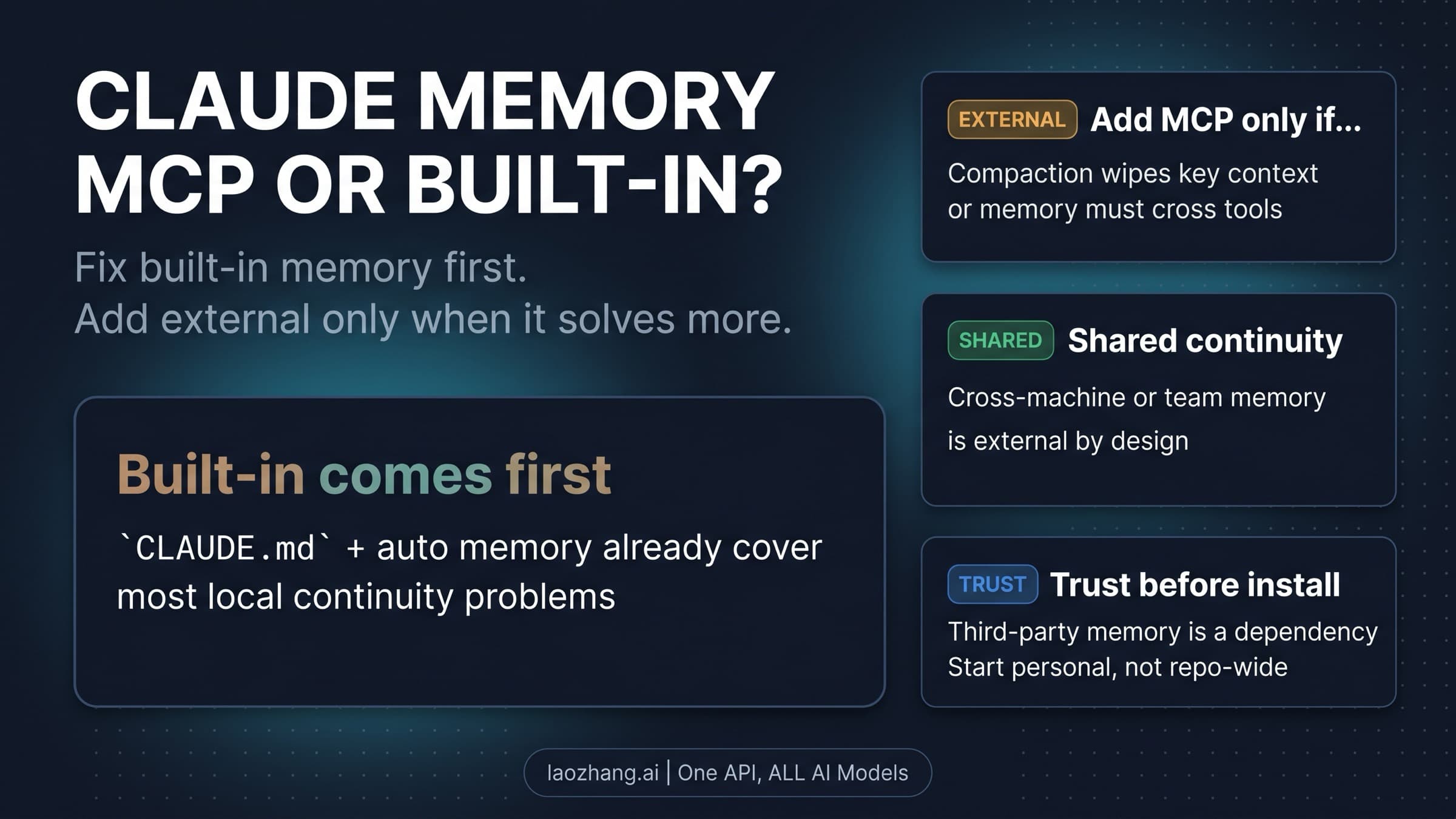
Plugins and external memory layers are a different category again. Anthropic's plugin marketplace now includes memory-extension tools, which is one reason search results often blur built-in Claude Code memory with broader second-brain or retrieval products. That blur is exactly what causes people to overcomplicate the setup. If your actual problem is "Claude should remember the repo rules and my repeated corrections between sessions on this machine," the built-in system is the right place to start. If the real problem is "I need memory shared across tools, machines, or richer retrieval surfaces," a plugin may help. But that is an escalation route, not the default contract of Claude Code itself.
The fastest mental model is this:
| Memory surface | Best for | Wrong expectation |
|---|---|---|
CLAUDE.md | explicit durable instructions | treating it like a hidden policy engine that forces compliance |
| auto memory | habits, corrections, and learned patterns | assuming it is universal, cloud-synced, or always loaded in full |
| plugin / external layer | cross-tool, cross-machine, or richer retrieval workflows | using it before you understand the built-in boundaries |
If you want one rule to keep in your head, use this one: if you would be upset to lose it, write it; if Claude can learn it from repetition, let it learn; if the built-in boundaries are the actual blocker, then escalate.
How Startup Loading Actually Works
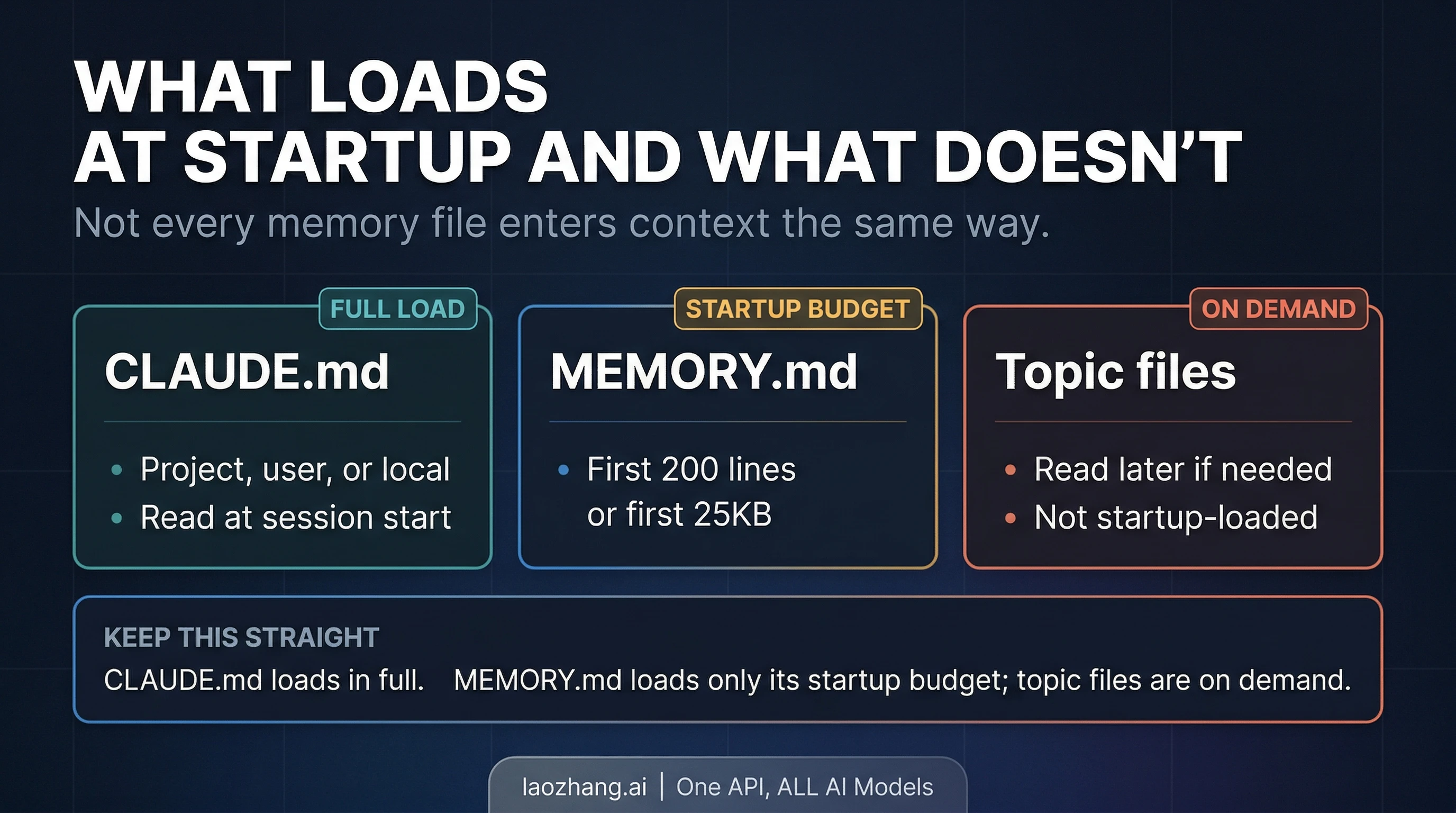
The next piece people miss is that not all memory enters the session the same way. Claude Code does not just "have memory" in one undifferentiated blob. Startup loading is selective, and that is why something can exist on disk without being equally visible in the current session.
Anthropic's current memory docs say CLAUDE.md files are loaded at the start of every conversation. That is why CLAUDE.md is the correct place for rules that must be in view from the first turn. If the rule matters before Claude takes any action, you do not want to hope it shows up later through inference or retrieval. You want it in the startup context.
Auto memory is more nuanced. The built-in memory folder uses a MEMORY.md index plus optional topic files. The official contract is that Claude loads only the first 200 lines of MEMORY.md, or the first 25KB, at startup. Topic files are not startup-loaded wholesale; they are read on demand when the current task makes them relevant. That is a useful design, because it stops the startup context from becoming a giant junk drawer, but it also means a file existing in the memory folder is not the same thing as that file being in the current turn.
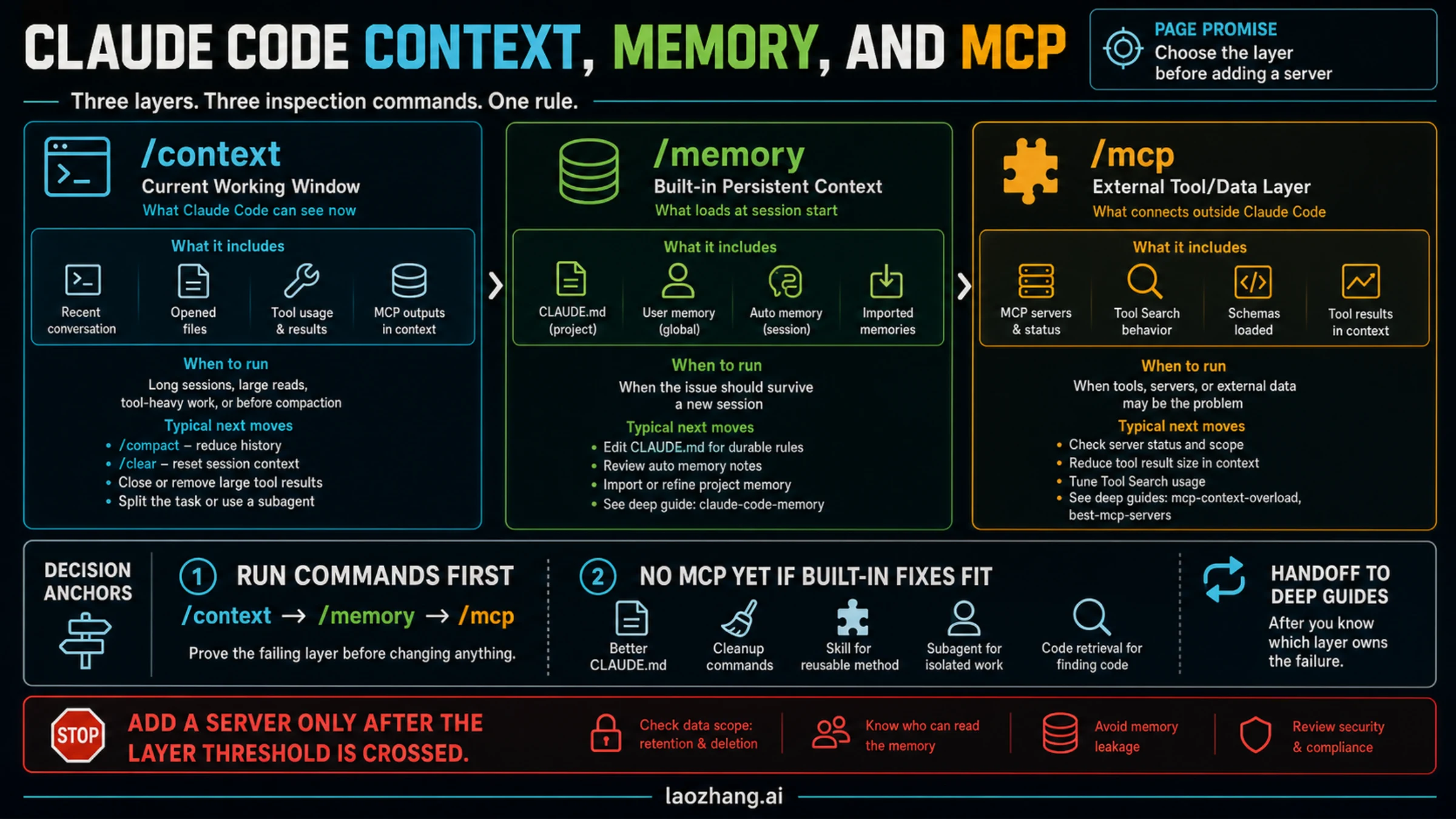
This is where /memory and /context stop being optional nice-to-know commands and become real debugging tools. /memory shows which CLAUDE.md, CLAUDE.local.md, and rules files are loaded in the current session, and it gives you a direct route into the memory folder. /context shows the live context breakdown. If Claude appears to be forgetting something, those two commands are the fastest way to check whether the problem is actually missing load, too much stale context, or a mistaken assumption about what startup includes.
The machine-local boundary matters just as much as the startup boundary. Anthropic's docs are explicit that auto memory is stored locally, under your home directory. That is useful because it keeps the system fast and inspectable, but it also means you should not talk yourself into cloud-style persistence that the product has not promised. If you switch machines, work in a remote environment, or assume a fresh environment will inherit local auto memory automatically, you are likely to be disappointed.
There is also one subtle docs detail worth handling carefully. Anthropic's current memory docs are very clear about the storage path, but less perfectly clear in the way they describe worktree scope versus same-repo storage behavior. The safe operational answer is not to make a grand claim about worktree isolation. It is to verify what Claude actually loaded in the working tree you care about, using /memory, before you trust your assumption.
How to Structure CLAUDE.md Without Turning It Into a Junk Drawer
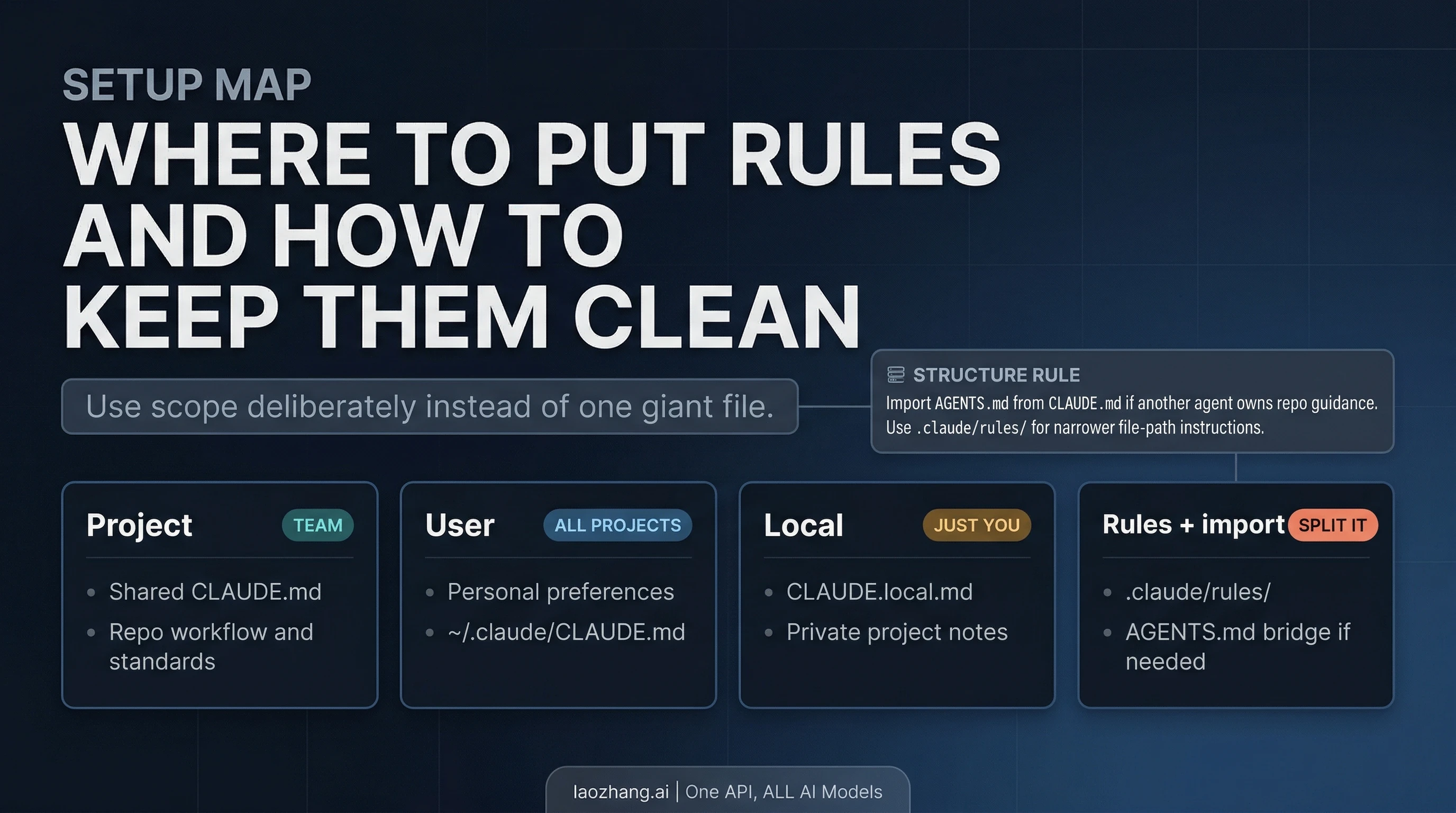
The best CLAUDE.md setups are not the biggest ones. They are the cleanest ones. Anthropic's docs support multiple instruction scopes, and once you understand them, most "memory problems" become file-organization problems instead.
At the project level, CLAUDE.md should hold what the repository needs Claude to know every time: test commands, branching habits, safety boundaries, code-style expectations, generated folders, release rules, or architectural constraints that matter across the whole repo. This is the team-facing layer. It should not be an encyclopedia. Anthropic's own guidance recommends keeping CLAUDE.md relatively short, roughly under 200 lines, because overgrown instruction files are harder for Claude to follow and more expensive to carry around.
At the user level, ~/.claude/CLAUDE.md is where personal preferences make sense. This is where you put cross-project habits that belong to you rather than the repository: whether you prefer terse commit messages, when Claude should ask before destructive actions, or what kind of explanation style you want during refactors. These are not repo policies. They are your defaults.
At the local layer, CLAUDE.local.md is useful for private project notes that should not be committed for the team. This can be the right place for machine-specific setup reminders, temporary constraints, or private preferences that matter for your workflow but do not belong in version control. The mistake is treating it as a second giant CLAUDE.md. The value of the local layer is precision, not sprawl.
Anthropic's newer guidance also points people toward narrower rules surfaces rather than one monolithic instruction file. If a rule only matters for a path, directory, or narrow workflow, splitting it into .claude/rules/ keeps the instruction layer cleaner and more legible. That is better than stuffing every edge case into a single file and hoping Claude will infer which parts matter.
One more detail is easy to miss if your repo already uses another agent system: AGENTS.md is not read directly by Claude Code. Anthropic's current recommendation is to import AGENTS.md from CLAUDE.md when another system already owns repository guidance. That is the bridge. Do not assume Claude Code will discover AGENTS.md on its own just because other tools do.
If you are still getting Claude Code itself working before you worry about memory structure, use our Claude Code install guide first. Memory configuration is much easier once the base CLI install, authentication, and project workflow are stable.
How Auto Memory Works in Practice
Auto memory is easy to over-romanticize because the name makes it sound like a seamless long-term memory layer. In practice, it is more grounded than that, and that is a good thing. It stores learned patterns in inspectable markdown files, and the current docs give you enough control to treat it like a practical layer rather than a mystical one.
The first useful fact is that auto memory is not hidden. Anthropic documents the default storage path, the MEMORY.md index, and the on-demand topic files. That means you can inspect what Claude has learned instead of guessing. It also means memory quality depends on maintenance. If the memory folder fills up with stale, conflicting, or overly broad notes, the problem is not that Claude has no memory. The problem is that the memory surface has become messy.
The second useful fact is that auto memory is bounded. Anthropic's current contract says only the first part of MEMORY.md startup-loads, while topic files are pulled in only when relevant. That makes the system cheaper and more targeted, but it also means you should not bury a critical instruction three files deep and expect it to behave like the main repo contract. If it must always be present, move it to the right CLAUDE.md.
The third useful fact is that the control surface is built into Claude Code. Anthropic's docs say you can inspect memory through /memory, turn auto memory off in settings with autoMemoryEnabled: false, or disable it with CLAUDE_CODE_DISABLE_AUTO_MEMORY=1. Those controls matter because they let you isolate problems. If Claude keeps learning an annoying pattern, inspect the memory folder. If you want to compare a session with and without auto memory, disable it intentionally instead of arguing from feel.
The temptation is to ask whether auto memory is "smart enough." A better question is whether the information you are asking it to remember is actually the right kind of information. Auto memory is strong at repeated habits and learned preferences. It is weak when you ask it to be a policy engine, a team-wide knowledge base, a cross-machine store, and a universal retrieval system all at once.
Why Claude Forgot After /compact or Between Sessions
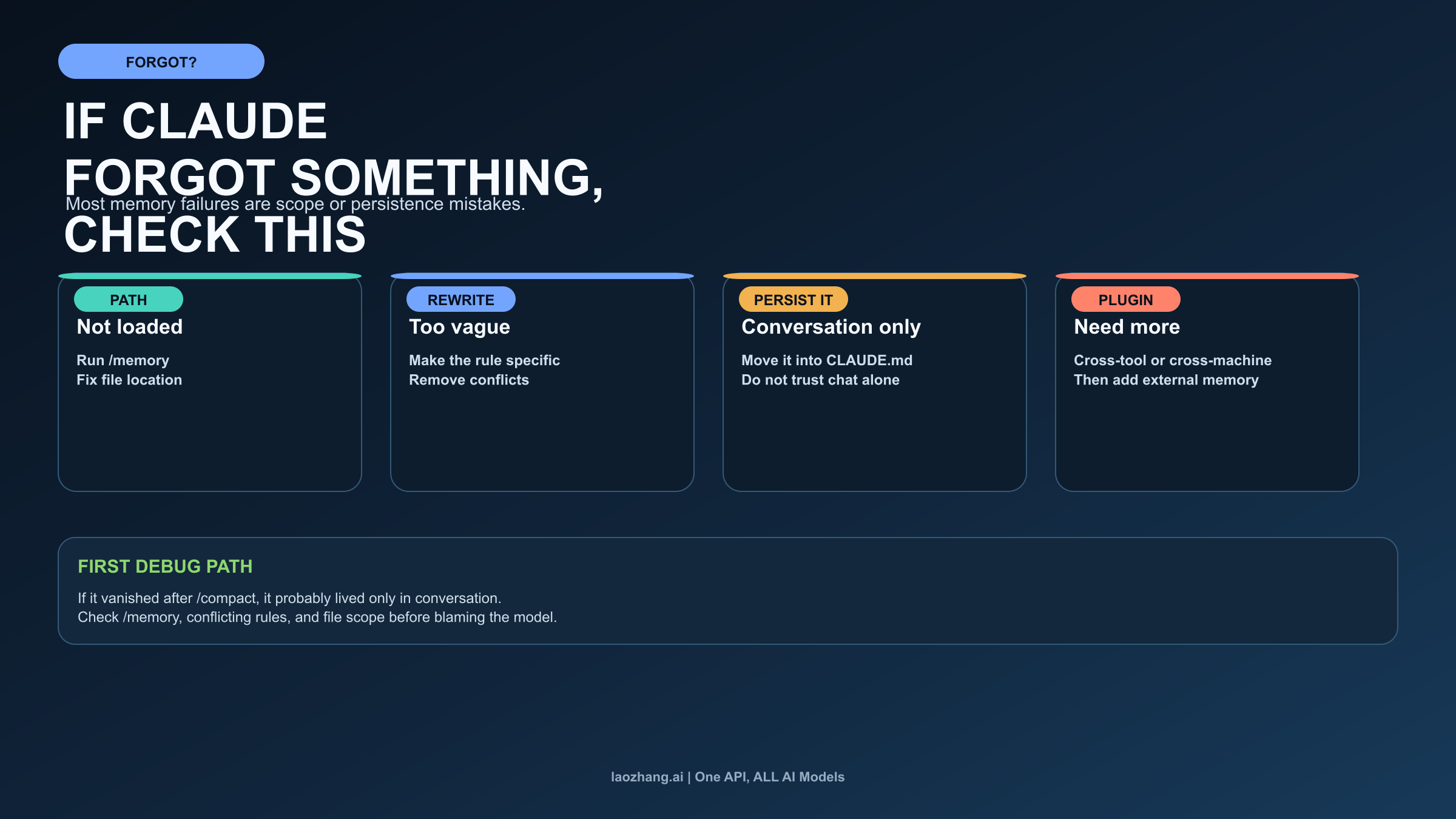
Most Claude Code memory failures are not proof that memory does not exist. They are proof that the wrong layer is carrying the job, the right file never loaded, or the instruction only lived in conversation.
The first branch is not loaded. If Claude ignored a rule, start with /memory. Was the right CLAUDE.md actually in the session? Was the file placed in the correct scope? Did you assume a topic file was startup-loaded when Anthropic's docs say it is on-demand? Many "Claude forgot" stories end here: the file existed, but the session did not actually load what the user assumed it loaded.
The second branch is too vague or conflicting. Anthropic's own docs explicitly warn that CLAUDE.md is context, not hard enforcement. If the rule says something soft like "prefer clean code" or if several instructions point in different directions, Claude may not behave consistently. The fix is not more faith in memory. The fix is sharper wording, fewer conflicts, and smaller, cleaner scopes.
The third branch is conversation-only memory. Anthropic's troubleshooting guidance says that after /compact, Claude re-reads CLAUDE.md from disk. If a rule disappeared after compaction, the likely explanation is that the instruction lived only in conversation and never became durable memory. This is the cleanest diagnostic in the whole system. If losing the context hurts, write it down. Conversation is not a reliable place to store policies you need next week.
The fourth branch is real boundary pressure. Sometimes the built-in system is not enough. If your workflow needs continuity across multiple tools, multiple machines, or a richer retrieval layer than the current built-in memory surfaces provide, that is a legitimate reason to consider a plugin or external memory layer. But you should arrive at that conclusion after you have ruled out load, scope, and persistence mistakes, not before.
When debugging memory problems, the safest order is:
- Run
/memoryand confirm what actually loaded. - Check whether the instruction belongs in
CLAUDE.mdrather than auto memory or conversation. - Rewrite vague or conflicting rules before adding more files.
- Use
/contextwhen the session itself feels bloated or inconsistent. - Only after that ask whether the built-in machine-local boundary is the real blocker.
This is also where long sessions and context pressure can distort the experience. If the issue is not memory correctness but session cost or context bloat, our Claude Code token usage guide is the better next read. A memory problem and a usage problem can feel similar from the keyboard even when the fix is different.
When a Plugin Helps, and When It Is Overkill
Anthropic's current marketplace signal makes one thing clear: the ecosystem sees memory as a real extension surface. That does not mean the official built-in system is incomplete by default. It means the product boundary is real enough that third parties can build on top of it.
A plugin helps when your memory problem is bigger than one local Claude Code environment. If you need continuity across several tools, a shared long-term store across machines, retrieval over a broader knowledge base, or team-level memory beyond the local built-in surfaces, an external layer can make sense. At that point you are not just configuring Claude Code memory. You are designing a wider workflow memory system.
A plugin is overkill when the real issue is still built-in setup. If you have not yet separated explicit rules from learned habits, if you do not know what startup loads, if you have not inspected /memory, or if you are expecting conversation alone to behave like durable policy, adding a plugin usually hides the confusion rather than fixing it.
The safest posture is conservative. Start with the built-in system because it is official, inspectable, and already good enough for a large share of normal project continuity. Escalate only when you can name the exact boundary you hit: cross-machine continuity, cross-tool retrieval, or broader memory orchestration than the local folder model provides.
Frequently Asked Questions
Does Claude Code remember across sessions?
Yes, but through layered built-in memory rather than one permanent universal store. CLAUDE.md carries written instructions, and auto memory carries learned patterns. The current session still starts fresh and reloads those surfaces into context.
What should go in CLAUDE.md?
Put durable instructions there: repository workflow, coding standards, safety boundaries, important commands, and guidance you do not want to rediscover by conversation alone. If losing it would hurt, write it down.
Where is MEMORY.md stored?
Anthropic's current docs place built-in auto memory under ~/.claude/projects/<project>/memory/. The folder uses a MEMORY.md index plus optional topic files. The storage is machine-local.
Why did Claude forget after /compact?
The official troubleshooting rule is simple: if something disappeared after compaction, it likely lived only in conversation rather than in CLAUDE.md. /compact re-reads the durable instruction layer from disk.
Do I need a memory plugin?
Not by default. Start with the built-in system first. Reach for a plugin only when you need continuity or retrieval beyond the built-in local memory model.
Claude Code memory works best when you stop asking it to be one giant brain. Use CLAUDE.md for what must stay explicit, let auto memory carry repeated patterns, inspect the live session with /memory and /context, and only escalate to a plugin when the built-in boundaries are the actual problem. That is a much more reliable setup than hoping a vague idea of "persistent memory" will sort itself out.