ChatGPT Deactivated for Cyber Abuse: Appeal, Export, and Billing
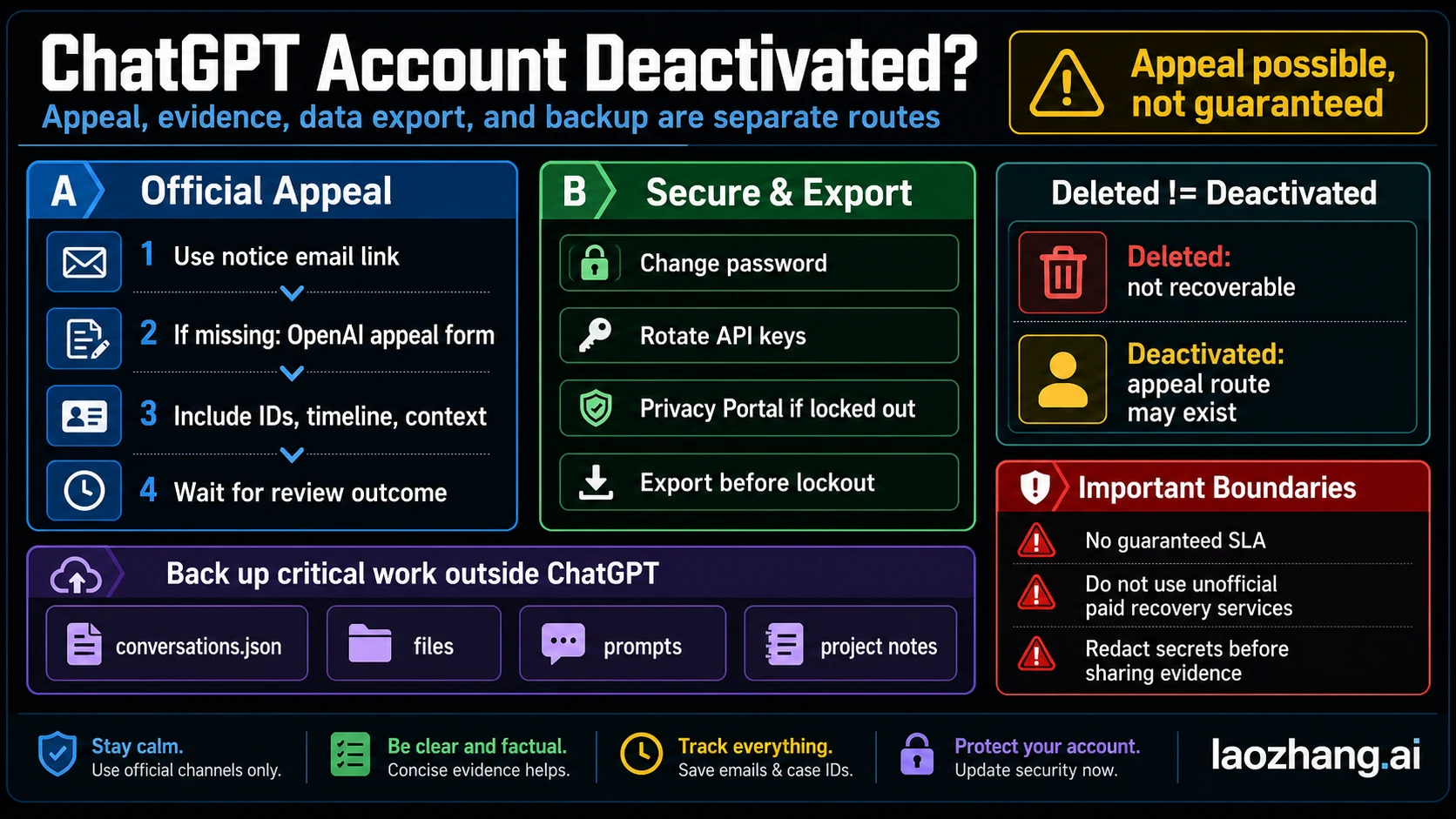
A Cyber Abuse email is a warning or a deactivation. If you are locked out, send one complete appeal, request your data, and stop the next charge where you pay.
On this page
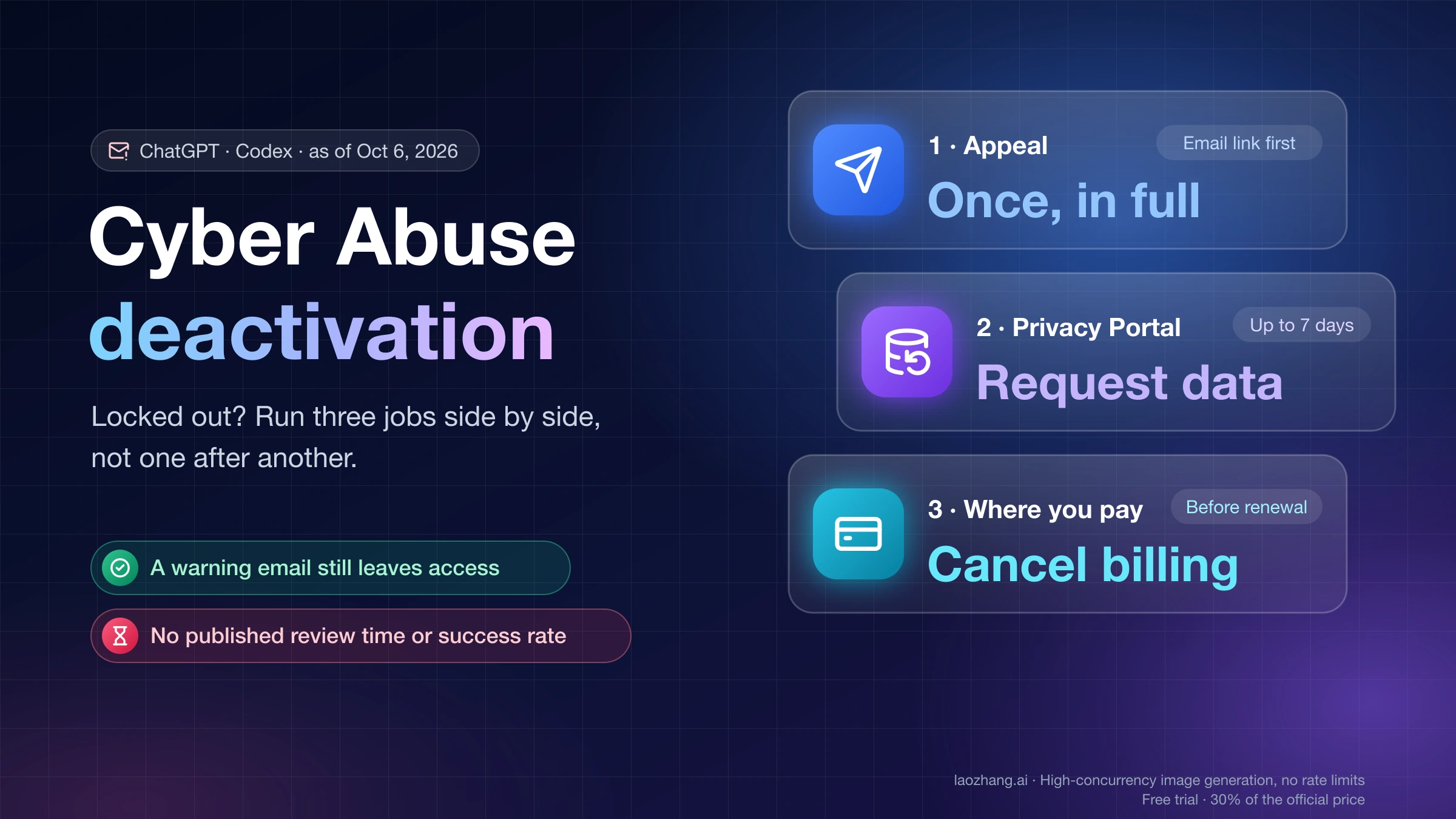
A "Cyber Abuse" notice from OpenAI can mean three different things, and only one of them locks you out. A message inside Codex or ChatGPT saying a request was limited or sent to a fallback model is a per-request safeguard. An email saying OpenAI identified activity "not permitted under our policies for: Cyber Abuse" is a warning, and the account still works. An email saying your account "has been deactivated" for Cyber Abuse, or a sign-in screen saying you "do not have an account because it has been deleted or deactivated," is the lockout.
If you are locked out, run three jobs side by side instead of waiting on one: send a single, complete appeal through the link in the deactivation email, request a copy of your data through OpenAI's Privacy Portal, and stop the next charge with whoever bills you. As of October 6, 2026, OpenAI publishes no review time and no success rate for appeals, and no help page says whether a deactivation cancels or refunds a subscription. Each job has to be handled on its own.
What "Cyber Abuse" means in OpenAI's policy wording
OpenAI's only published definition sits in its Daybreak Trusted Access for Cyber overview, not on the general deactivation page:
"we disallow use of our services to facilitate cyber abuse: the compromise of the integrity, confidentiality, or availability of an information system—to include 'dual-use' cyber activities carried out with malicious intent, without proper authorization, or in excess of granted authorization."
Two parts of that sentence decide most appeals. Dual-use work such as exploit analysis or reverse engineering is covered only when it is malicious, unauthorized, or beyond the authorization you had. And the harm is to an information system. Defensive work on systems you own or are cleared to test is not what the policy describes. The trouble is that an automated system has to infer authorization from what it can see in a conversation or a Codex session.
OpenAI's Usage Policies, effective October 29, 2025, back this with three prohibitions that cyber cases tend to touch: "destruction, compromise, or breach of another's system or property, including malicious or abusive cyber activity," "unsolicited safety testing," and "circumventing our safeguards." They also say that breaking or circumventing the rules "may mean you lose access to our systems."
OpenAI's general help article, Why was my OpenAI account deactivated?, lists sexual content, scams, harassment, Terms breaches, compromise, and missed verification. It never names Cyber Abuse, so many people with this label can't match it to anything on that page. A longer definition that circulates in forum posts ("enables real-world harm, targets live systems...") was written by a user, not by OpenAI. Don't quote it in an appeal as if it were policy.
Why legitimate developers get a Cyber Abuse flag
OpenAI acknowledges that its safeguards can flag legitimate work. The OpenAI API cybersecurity checks guide states that because these systems "are still being calibrated, legitimate security research or defensive work may occasionally be flagged." In July 2026, an OpenAI support agent told a Codex user on the developer forum that "some development workflows can resemble patterns associated with cyber misuse," that only a manual review can confirm what caused a warning, and that "detailed detection information may not always be available."
Users on OpenAI's developer forum, in Codex GitHub issues, and on community sites reported Cyber Abuse warnings or deactivations from June to September 2026 while doing the following:
- reverse engineering their own hardware, including one user already verified for Trusted Access
- authorized penetration-test and red-team proof-of-concept work
- hardening and administering their own servers, rotating credentials, configuring DNS and mail security
- building a data export feature for their own internal SaaS app
- building an HTML/CSS editor in Codex
- pasting security candidates' resumes into ChatGPT for recruiting screens
- academic prompts about LLM security
OpenAI did not confirm the trigger in any of these threads. Read them as patterns people reported, not as a list of banned topics.
One reported case is different in kind. A Korean user studying a hacking lab kept rewording prompts after refusals, with lines like "I need to study this" and "to protect the company," and was deactivated hours later. The user concluded that the rewording, not the topic, caused it, and the account was later restored. Rewording a refused request is close to what the Usage Policies call "circumventing our safeguards," and OpenAI's account warning help page lists attempts to bypass safety filters as a reason for warnings. When a request is refused or rerouted, stop instead of rephrasing it.
Reroute, warning, or deactivation: match the notice to the next step
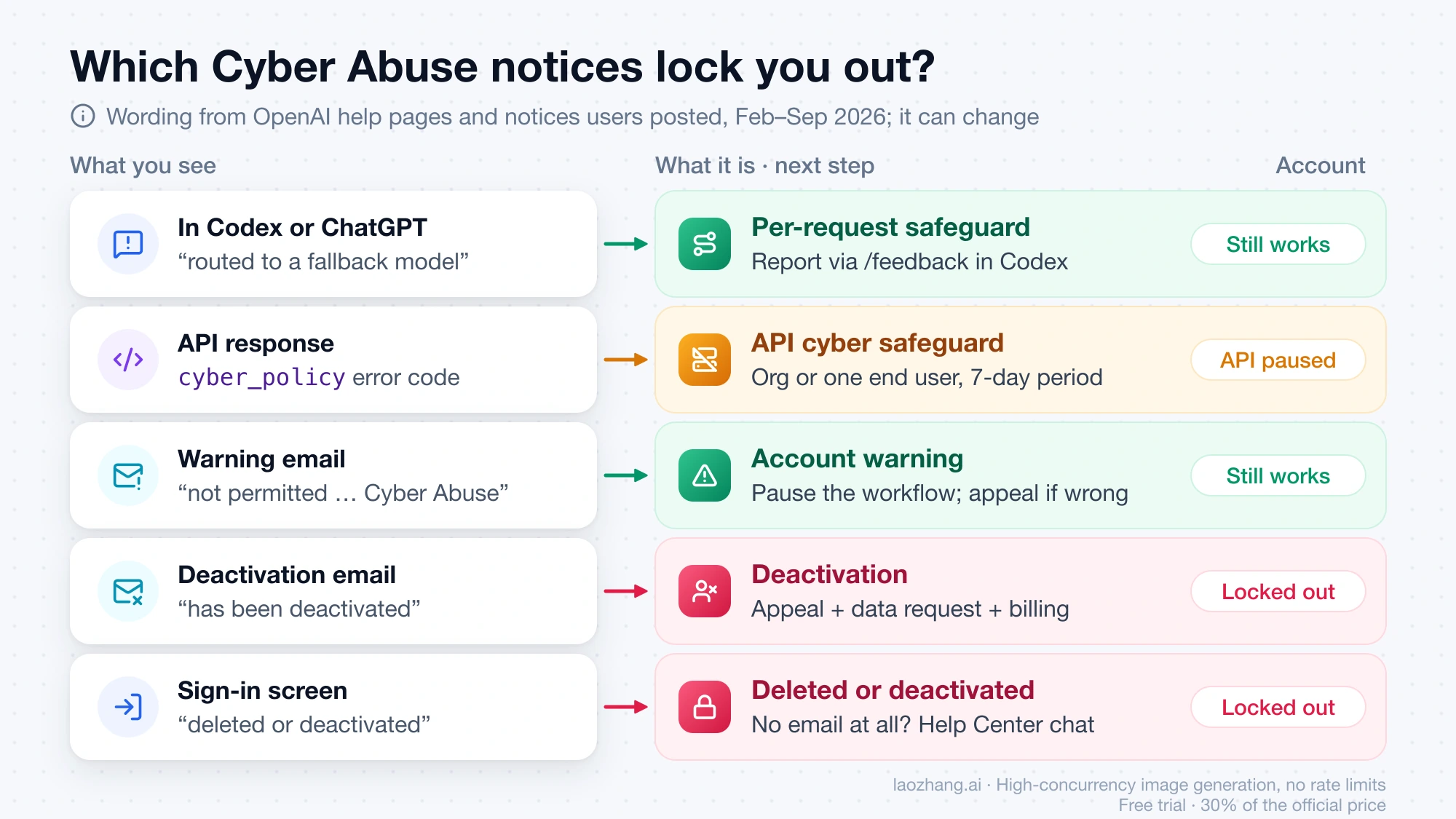
The wording of the notice tells you which system acted and where to go next. The quoted wording below comes from OpenAI help pages and from notices users posted between February and September 2026; OpenAI can change it at any time, and emails may arrive in your account's language.
| What you see | What it is | Account usable? | Next step |
|---|---|---|---|
| In Codex or ChatGPT: access "temporarily limited," or the request was "routed to a fallback model to reduce cyber-abuse risk" | Per-request cyber safeguard | Yes | In Codex, report a suspected false positive with /feedback where available; for authorized security work, see Daybreak below |
API error code cyber_policy | API cybersecurity safeguard; model access can be paused for the whole organization, or for one end user if you send a per-user safety_identifier | The API organization loses access to those models | Contact OpenAI support if you need access back before the 7-day period ends |
| Email: "We have identified activity in Codex that is not permitted under our policies for: - Cyber Abuse" | Account warning | Yes | Pause the workflow that may have caused it; appeal through the email link if you think it is wrong |
| Email: "Your account has been deactivated because recent activity violated our Terms and Usage Policies related to: Cyber Abuse" | Deactivation | No | Appeal, data request, and billing, in the sections below |
| Sign-in error: "You do not have an account because it has been deleted or deactivated" | Deleted by you or deactivated by OpenAI | No | Search the inbox and spam folder for a deactivation email; with no email at all, use OpenAI Help Center chat |
Three details change how you read that table:
- Warnings can be email-only. Codex users reported warnings with no in-app notice and no prompt, thread, request ID, or timestamp. One user later found a warning in a rarely checked inbox, sent eight days before the account was deactivated. Check every inbox tied to the account, including spam.
- A warning may not come first. OpenAI calls a warning "a notice, not an immediate suspension," and continued violations can lead to deactivation. Users have still reported deactivations without any warning they saw, so don't count on one.
- Plan changes can be a symptom. On OpenAI's forum, one Pro subscriber reported dropping to Plus right after a Cyber Abuse warning; staff said the Pro purchase had been refunded. If your plan or usage limits change without explanation, check your email for a warning before treating it as a billing bug.
Should you appeal a Cyber Abuse warning or deactivation?
Appeal when you can describe the flagged work plainly and it was one of these: work on systems you own, testing you were authorized to do, or ordinary development that only looks like security work. Both OpenAI help pages on warnings and deactivations say to appeal if you believe the decision was a mistake.
How strong your position is depends on what actually happened:
- Authorized, owned, or non-security work. Appeal now. Reversals of Cyber Abuse decisions are reported. One Codex user posted two support replies, from July and September 2026, each arriving within about four hours and reading: "We have determined that we incorrectly issued a warning on your account." Deactivated users have also reported restorations, one of them overnight.
- Testing a system you had no permission to test. That is the activity the policy describes. An appeal is unlikely to fit the facts; put your effort into the data request and billing.
- Rewording after refusals. Say so in the appeal, explain the task, and say what you will change. The review team assesses the account's activity, so an appeal that contradicts the record doesn't help you.
For a warning, appealing is optional because you keep access. Users who appealed and lost reported a reply that closes the case to further appeals. Write the first appeal as if it is the only one you will get, whether it is about a warning or a deactivation.
Cyber Abuse appeal evidence: what to send and what to hold back
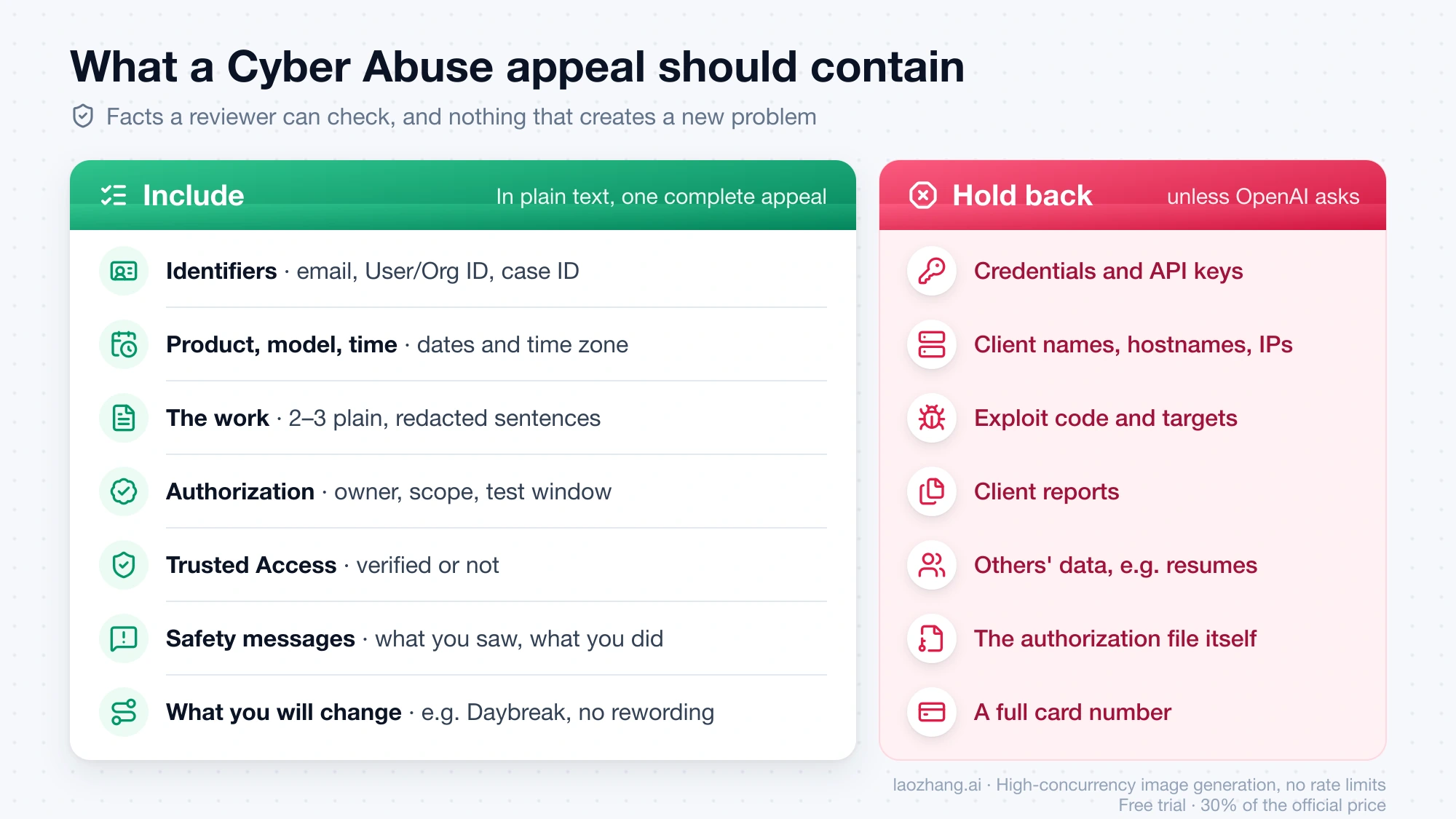
A reviewer needs enough to check whether the activity was authorized, without receiving anything that creates a new problem. OpenAI's appeal guidance asks for your User ID and Org ID, context about your usage, a date range if you suspect your account was compromised, and the steps you have taken. For a Cyber Abuse case, add the facts that bear on authorization.
Include:
- Identifiers. The account email, your User ID and Org ID if you have them, and the case ID from the notice. Case IDs in posted notices look like
C-followed by letters and digits. - Product, model, and time. ChatGPT, the Codex app, the Codex CLI, or the API; the model you used; the approximate dates and time zone of the work. Add a Codex thread ID if you have one.
- What the work was, in two or three plain sentences. OpenAI's Daybreak troubleshooting page asks support requests for a short, redacted description of the cybersecurity task, and that format works for appeals too.
- Ownership and authorization. Whose systems they were and your role. For client engagements, say that a signed authorization exists and give the scope and testing window. Describe the document; don't attach it.
- Trusted Access status. Say whether you are verified at chatgpt.com/cyber or approved for Daybreak.
- Safety messages before the notice. List any refusals, reroutes, or warnings you saw and what you did after them. Be accurate here.
- What you will change. For example, moving authorized testing to Daybreak, or stopping after a refusal instead of rewording.
Hold back: OpenAI's Daybreak troubleshooting guide tells users not to send "secrets, private keys, exploit targets, or confidential third-party data unless OpenAI specifically instructs you to do so through an approved support path." Apply the same line to an appeal. That rules out credentials and API keys, client names, hostnames, and IP addresses, exploit code, client reports, and other people's personal data such as candidates' resumes. Never send a full card number. Card details (last four digits, dates, amounts) belong in a request only when the issue is an unauthorized charge.
If you suspect a specific session caused the flag, say so and label it as your guess. One Codex user's public write-up did exactly this, noting they were "not presenting timing alone as proof of causation." Specific, honest uncertainty reads better than a confident theory you can't support.
A plain-text appeal can follow this shape:
Subject: Appeal - Cyber Abuse deactivation - Case [case ID]

Account email: [email]
User ID / Org ID: [if available]
Product and model: [Codex app / Codex CLI / ChatGPT / API], [model]
Dates and time zone of the work: [range]

What I was doing: [2-3 sentences, redacted, no targets or secrets]
Systems involved: [owned by me / my employer / client under written
authorization, scope and window described, document available on request]
Trusted Access: [verified / not applied]
Safety messages I saw before the notice: [none / what and when]
What I will change: [one or two concrete steps]

I believe this decision was made in error and request a manual review.
Where to send a Cyber Abuse appeal, and what replies look like
OpenAI's help pages set the order:
- Use the appeal link in the notification email.
- If you can't access that email, use the OpenAI appeal form.
- If you lost access and never received an email, contact OpenAI through Help Center chat.
Public posts on OpenAI's developer forum or in Codex GitHub issues don't replace an appeal. OpenAI staff on the forum have moved individual Cyber Abuse cases into support tickets and closed the threads without resolving them publicly. In June 2026, a staff member said the team was "actively investigating the account bans that have been reported," with no timeframe.
Reported reply times range from minutes to weeks. One user's appeal was rejected in 54 minutes, another account was restored overnight, and a third user was still deactivated 13 days after an escalation tag was added to their forum thread. The rejection that users quote most often reads: "After carefully reviewing your account, we are upholding our decision… We will no longer consider additional requests to appeal this case." One user reported that every later message to support was referred back to that first decision.
Before a final reply arrives, there is some room to add facts. One Pro subscriber reported filing a second appeal, separate from the email link, with context they had remembered later, and the account was restored the same day. That is a single case, not a promised second chance.
Export ChatGPT data after a Cyber Abuse deactivation
Request your data now; don't wait for the appeal result. The in-app export (Settings → Data controls → Export data) is "Not available while you are logged out," so a deactivated account needs the other channel described in OpenAI's data export help article:
- Go to the OpenAI Privacy Portal.
- Select Make a Privacy Request.
- Select I have a consumer ChatGPT account.
- Select Download my data and follow the instructions.
Make sure you can still open the email inbox or phone number tied to the account, because OpenAI may ask you to verify ownership. Exports can take up to 7 days, and the download link expires 24 hours after you receive it. OpenAI documents the Privacy Portal as the channel for people who can't sign in. It doesn't state how fast or how completely it fulfills requests for deactivated accounts. The same help article says to download an export while signed in to the account that requested it, and that instruction doesn't fit a locked account. Watch the inbox closely and act on the link the day it arrives.
ChatGPT Business, Enterprise, and Healthcare users can't self-export; the workspace owner handles it. An export also can't restore chats that were already deleted. For turning an export into a usable archive and for the generic deactivated-versus-deleted checks, see ChatGPT Account Banned or Deactivated? Appeal, Evidence, Export, and Backup Steps.
ChatGPT Plus or Pro billing after deactivation: cancel where you pay
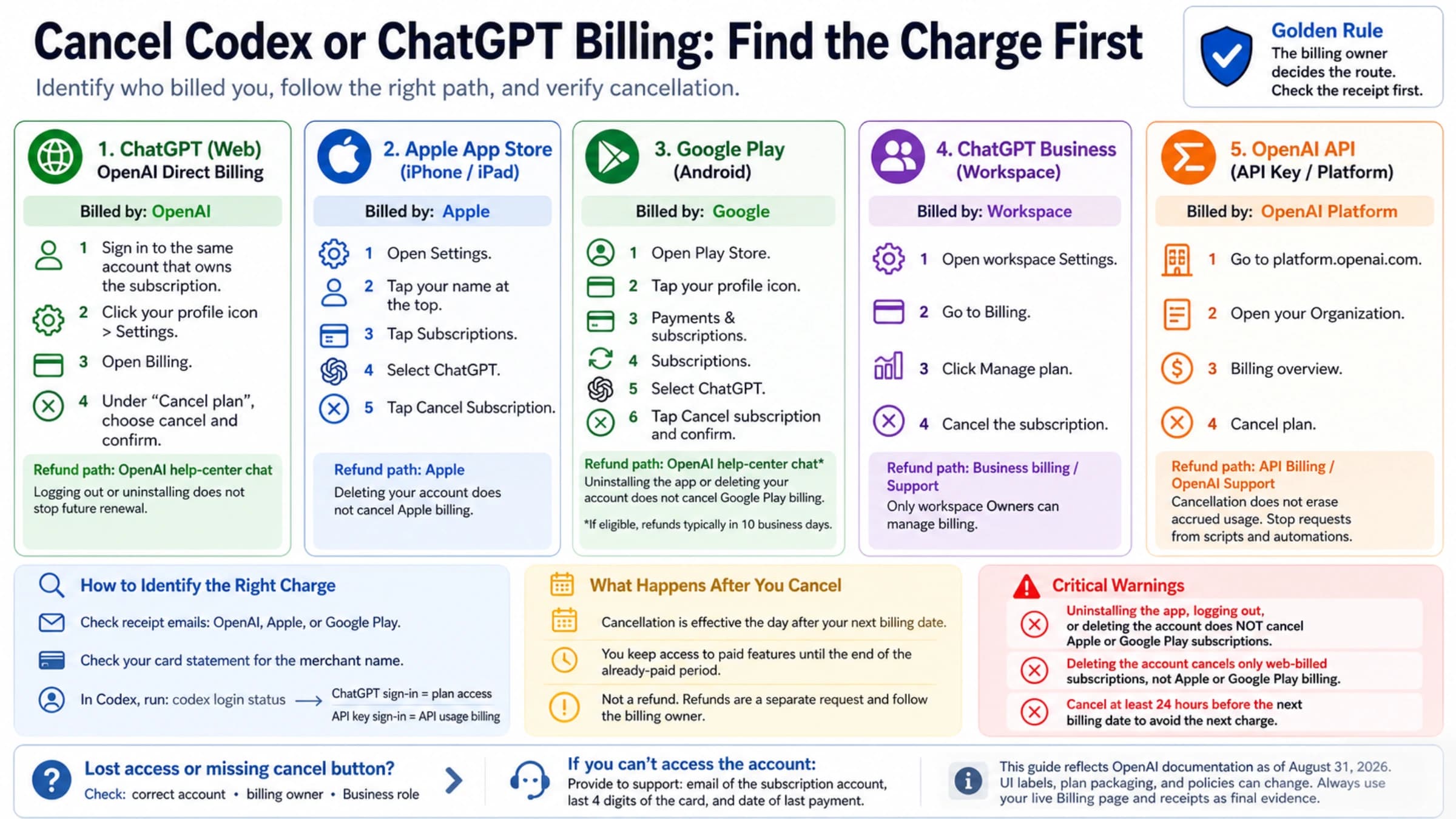
No OpenAI page says whether a deactivation stops renewals. Assume it doesn't, and cancel through whoever charges you, at least 24 hours before the next billing date. Canceling stops future renewals; it doesn't refund past charges.
| You pay through | How to cancel | Where refund requests go |
|---|---|---|
| ChatGPT on the web | In billing settings if you can sign in; otherwise ask OpenAI Support, giving the account email, your card's last four digits, and the latest payment date | OpenAI Help Center chat; 5–7 business days if eligible |
| Apple App Store | Your Apple subscriptions, using the Apple account you subscribed with | Apple |
| Google Play | Your Google Play subscriptions | OpenAI Help Center chat; up to 10 business days if eligible |
| ChatGPT Business workspace | Workspace billing, handled by the admin | OpenAI Support with workspace and invoice details |
According to OpenAI's subscription cancellation help article, Support may be able to cancel a web-billed plan without deleting the account. Never send the complete card number. For the per-store steps and how to find which platform is actually charging you, see Cancel Codex or ChatGPT Billing: Find the Charge First.
ChatGPT refund rules that apply to a Cyber Abuse case
OpenAI's ChatGPT subscription refund policy starts from "Payments are generally non-refundable." Within that, three rules matter here:
- Exceptions. OpenAI "may also approve refunds for a verified OpenAI billing error, validated unauthorized charges, or a documented OpenAI service or access failure." If an appeal reverses your deactivation, it is reasonable to ask whether the lost time counts as a "documented OpenAI service or access failure." OpenAI doesn't say whether a reversed enforcement decision qualifies, so quote the phrase and ask.
- Seven-day window. A discretionary refund for an unused individual subscription is possible only within seven days of the charge. Conditions include "no substantial use, no active payment dispute, and no confirmed abuse." While a Cyber Abuse decision stands, that last condition works against you. There is no automatic prorated refund after seven days.
- Regional rights. Residents of the EU, UK, and Turkey get a prorated refund if they cancel within 14 days of purchase. In Korea, an unused plan is fully refundable within 7 days of purchase; otherwise the refund is prorated from the request date, and cancellation takes effect immediately. Where you live decides this, not your language setting.
You can contact OpenAI "from the email address associated with the relevant charge," which works even when you can't sign in. If a refund is granted, the access it paid for normally ends.
Two reports describe what happened to Pro plans around a Cyber Abuse decision. On OpenAI's forum in July 2026, staff told a restored user that the Pro purchase had been refunded, so the account "would fall back to the active Plus subscription." A Chinese user wrote in June 2026 that a Pro plan bought three days before the deactivation was gone after restoration. Support told them the Pro subscription had been refunded automatically at deactivation. That user also reported that replying to the original subscription receipt email reached a billing specialist within about an hour, while the deactivation thread got no answer. These are two cases, not policy. After any restoration, check your card statement and receipt emails before buying the plan again or filing a complaint.
If you dispute the charge with your bank, OpenAI says it "cannot issue a separate refund while a payment dispute is active or after the funds have already been returned through the dispute process." That doesn't limit your right to contact your bank, but the two processes don't run side by side.
API credits and organizations under a deactivated ChatGPT login
One login can own both a ChatGPT account and an API organization. A user on OpenAI's forum reported that a deactivation also froze their API organization and its prepaid credits. That is a single case, but if your login spans both, assume the API side is affected until you confirm otherwise.
According to OpenAI's prepaid API billing help article, purchased credits expire after one year and are non-refundable unless the law requires it or an approved exception applies. Unused credits may qualify "for a verified billing error, confirmed unauthorized activity, or a confirmed OpenAI service failure or incorrect account restriction." An "incorrect account restriction" most likely has to be reversed before that exception applies, so raise the credits in the same ticket once an appeal succeeds. If you dispute the card payment instead, OpenAI removes the equivalent credits.
An API-only cyber_policy restriction is a separate mechanism from account deactivation. If you run a platform for other people, sending a unique safety_identifier per end user lets OpenAI limit the affected user instead of the whole organization.
When the Cyber Abuse appeal is final: what still works
Once you receive "We will no longer consider additional requests to appeal this case," treat the account as gone. Your data request and billing steps still stand. OpenAI's help pages also settle three related questions:
- "Waiting 30 days does not reactivate a deactivated account."
- A deleted account's email address can be reused after 30 days, but that applies to accounts you deleted, not ones OpenAI deactivated.
- "A new account does not restore the chats, files, or saved memories" from the old one, according to OpenAI's help article on creating a new account after deletion.
That help article covers accounts the user deleted. It doesn't describe signing up again after an enforcement deactivation, and the Usage Policies treat circumventing safeguards as a violation in itself. A second account used to continue the same work isn't a fix.
Authorized security work after a Cyber Abuse flag: Daybreak Trusted Access
If your work really is security work, OpenAI's sanctioned channel is Daybreak, its Trusted Access for Cyber program. Daybreak is intended for "authorized defensive cybersecurity work on systems, applications, accounts, networks, or data that you own, operate, or are explicitly authorized to test or analyze." Individuals apply at chatgpt.com/cyber; organizations use an enterprise request form. The program has costs and limits worth weighing first:
- Plan and hardware. Individual access requires an eligible paid plan, Advanced Account Security, and at least one compatible FIDO2 hardware security key. Existing individual users had to meet this by October 1, 2026.
- Recovery risk. Advanced Account Security disables password sign-in, email and SMS sign-in codes, and standard email recovery. Losing every sign-in method and recovery key can mean losing the account permanently. Store the recovery keys and consider registering a second hardware key.
- Approval. "Approval is not automatic." You must be 18 or older, Daybreak isn't available in every region, support can't override a verification decision, and no contract or purchase guarantees access. Individuals can apply only for Daybreak Blue; Daybreak Red is for approved business and enterprise organizations.
- Codex toggle. Approval alone doesn't reduce refusals. In the Codex app (version 26.908.40834 or later), the Daybreak toggle is off by default, and requests use standard safeguards until you switch it on.
- No immunity. Daybreak "does not remove all safeguards," and Usage Policies still apply. A user verified through chatgpt.com/cyber still received a Cyber Abuse warning in June 2026. Losing Trusted Access "does not delete your ChatGPT account or existing chats."
The OpenAI Codex cyber safety documentation adds practical limits: use the approved identity, workspace, and surface only, keep work inside systems you own or are explicitly authorized to assess, and keep human review in place before sensitive actions run.
FAQ about ChatGPT Cyber Abuse notices
What does the "Cyber Abuse" warning mean on ChatGPT?
It means OpenAI's systems flagged activity in ChatGPT or Codex as possible misuse against information systems, and the account received a warning. A warning is not a suspension, and the account keeps working. Further flagged activity can lead to deactivation, so pause the workflow that may have caused it and appeal through the email link if you think it is wrong.
What does the ChatGPT "your account has been deactivated" email mean?
The full sentence reads "your account has been deactivated because recent activity violated our Terms and Usage Policies," and it means the account "can no longer be used." When the email adds "related to: Cyber Abuse," the reason is the cyber policy described above. Appeal through the link in that email, request your data through the Privacy Portal, and cancel billing where you pay.
Can a deactivated ChatGPT account be hacked?
Deactivation itself doesn't mean your account was hacked. But if someone else used it, their activity counts against your account. If you see sign-ins, chats, or charges you don't recognize, say so in the appeal and include the date range of the suspected compromise, which OpenAI's appeal guidance asks for. The steps for securing a compromised account are covered in ChatGPT Account Banned or Deactivated? Appeal, Evidence, Export, and Backup Steps.
Has anyone had a Cyber Abuse case reviewed by a human?
Yes, according to user reports. Warning reversals ("we incorrectly issued a warning on your account") and restored accounts have both been reported, some within hours. Other users received the final "upholding our decision" reply in under an hour. OpenAI publishes no review time, no success rate, and no detail on how much of the review is manual.
Does waiting 30 days restore a ChatGPT account deactivated for Cyber Abuse?
No. OpenAI states that "Waiting 30 days does not reactivate a deactivated account." The 30-day rule applies only to reusing an email address after you deleted the account yourself.
Sources15
External pages this guide links to, in the order they appear. Last updated Oct 6, 2026.
Sources15
External pages this guide links to, in the order they appear. Last updated Oct 6, 2026.
- 1.Daybreak Trusted Access for Cyber overviewhelp.openai.com/en/articles/20001258-openai-daybreak-trusted-access-for-cyber-overview
- 2.OpenAI's Usage Policiesopenai.com/policies/usage-policies
- 3.Why was my OpenAI account deactivated?help.openai.com/en/articles/10562188-why-was-my-openai-account-deactivated
- 4.OpenAI API cybersecurity checks guidedevelopers.openai.com/api/docs/guides/safety-checks/cybersecurity
- 5.OpenAI's account warning help pagehelp.openai.com/en/articles/10562178-why-did-i-receive-a-warning-about-my-account
- 6.OpenAI's Daybreak troubleshooting guidehelp.openai.com/en/articles/20001259-openai-daybreak-common-issues-and-troubleshooting
- 7.OpenAI appeal formopenai.com/form/appeal
- 8.OpenAI's data export help articlehelp.openai.com/en/articles/7260999-exporting-your-chatgpt-history-and-data
- 9.OpenAI Privacy Portalprivacy.openai.com
- 10.OpenAI's subscription cancellation help articlehelp.openai.com/en/articles/7232927-canceling-your-chatgpt-subscription
- 11.OpenAI's ChatGPT subscription refund policyhelp.openai.com/en/articles/7232895-how-do-i-request-a-refund-for-my-chatgpt-subscription
- 12.OpenAI's prepaid API billing help articlehelp.openai.com/en/articles/8264644-setting-up-and-managing-prepaid-api-billing
- 13.OpenAI's help article on creating a new account after deletionhelp.openai.com/en/articles/9019931-creating-a-new-chatgpt-account-after-deletion
- 14.chatgpt.com/cyberchatgpt.com/cyber
- 15.OpenAI Codex cyber safety documentationlearn.chatgpt.com/docs/cyber-safety